
Foreword
Your Responsibility
Any misuse of the information provided on this page or elsewhere on this site is the sole responsibility of the user. Please always act ethically and obtain signed authorization before testing any system or network that is not your own.
Good Notetaking
Your notes are going to be one of the defining factors of your success in ethical hacking. You can't remember everything, so you will need to rely heavily on your notes. The quality of your notes will directly impact your ability to recall the information you need.
How to Take Bad Notes
❌ Writing down everything you hear, read, or watch
- You're spending more time transcribing than actually learning
❌ Including too many screenshots and pictures
- Pictures are not searchable on the page
- You're polluting your field manual with too much information
🤔 And you likely do this because
- You are learning something for the first time
- Everything is new and exciting and every little detail seems significant
You don't want to struggle to find the information you need when reading your own notes.
How to Take Good Notes
Notes with a Purpose
✅ Your notes are your pocket guide, your field manual, not a novel or textbook
✅ The information should be available at a moment's notice
✅ The information should be searchable and easy to find
Questions to Ask Yourself
Am I just blindly transcribing?
- Will this information be valuable to me months from now?
Am I making more work for myself?
- If the information is documented elsewhere
- Capture the essential information and link back to the original source
- Don't rewrite it
Has the instructor said to write this down?
- Then write it down, obviously
Has this information come up multiple times?
- It's probably important if it's mentioned multiple times
Is this likely to come up in an exam?
- Oftentimes, exams will test on information such as trivia, factoids
Is this information going to be useful?
- Many of my notes written months and years ago continue to be useful to me even now
High Impact Note Formats
Diagramming
Dealing with a Complex Topic?
- Make a diagram of it: https://draw.io — 100% free
- Here's an example of a diagram I've made using
draw.io
Commands and Code Blocks
Need to capture commands, code snippets, or entire scripts?
Use code blocks with syntax highlighting
```
Write-Host -ForegroundColor Green "Hello, World!"
```
Example of a simple code fence in Markdown
Write-Host -ForegroundColor Green "Hello, World!"Simple code fence results in plain text without syntax highlighting
```powershell
Write-Host -ForegroundColor Green "Hello, World!"
```
Example of a code fence with a target programming language in Markdown
Write-Host -ForegroundColor Green "Hello, World!"Code fence with target language results in code with syntax highlighting
Collapsible Content
Need to Add Long Passages for Important Context?
Use a collapsible toggle so that it doesn't occupy too much space on the page.
Show / Hide
Lorem ipsum dolor sit amet consectetur adipiscing elit. Quisque faucibus ex sapien vitae pellentesque sem placerat. In id cursus mi pretium tellus duis convallis. Tempus leo eu aenean sed diam urna tempor. Pulvinar vivamus fringilla lacus nec metus bibendum egestas. Iaculis massa nisl malesuada lacinia integer nunc posuere. Ut hendrerit semper vel class aptent taciti sociosqu. Ad litora torquent per conubia nostra inceptos himenaeos.
Drawing Attention
Something You Really Want to Remember Later?
Use "callouts" on the page to draw your attention or point something out.
Note-Taking Products
Local Notes + Sync
These are products where you take notes in an application and the notes will either be synced by the product or require syncing by the user.
- Obsidian + GitHub or other sync solution
- Trillium + Sync Server
- Joplin + Dropbox
- Microsoft Word + OneDrive
- Etc...
Web-Based Platforms
These are products where everything is entirely web-based. You log into a web application with your web browser and all of your notes are stored by the web application.
- Notion
- GitBook
- Microsoft OneNote
- Google Docs
- SimpleNote
- BookStack (Self-Hosted)
- Wiki.js (Self-Hosted)
- Etc...
Notes Versus Write-Ups
Notes
As stressed before, your notes are:
- Your field manual, your pocket guide
- Highly searchable, concise summaries and snippets
Write-Ups
- Write-ups are where you document in greater detail the things you're learning and doing (screenshots recommended)
- Have a template that you can clone and fill out and have a scratchpad to store random details while you work
- If you transfer information from your writeups to your notes, ensure you keep the information concise and searchable
Prerequisites to Ethical Hacking
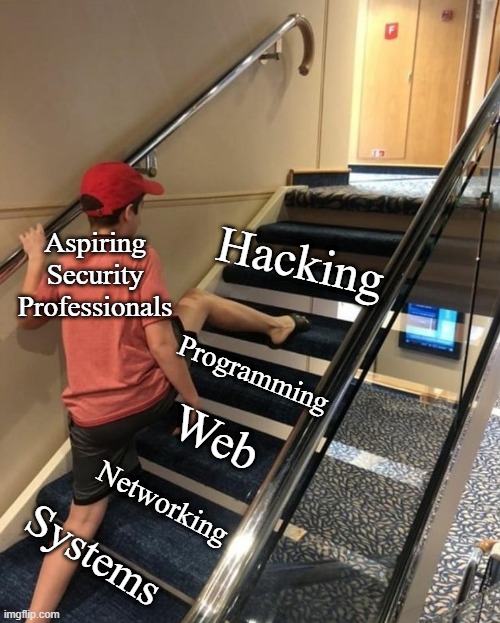
Realistic Expectations
In the age of the dopamine reward loop, the modern human brain has been wired to seek gratification and reward that is instant, low-effort, and high-return.
- No one is gatekeeping, I promise
- You can't help that you don't know something and you can't make yourself instantly know it
- You're NOT going to learn ethical hacking in a day, a month, or maybe even a year
- The field is too broad, covers too many topics, and requires continuous learning
- Your skill will be a direct reflection of time + effort + repetition
Four Core Skill Areas
It is a matter of my opinion that in order to be a proficient ethical hacker, you should build up four core skill areas:
- Operating Systems
- Computer Networking
- Web Technologies
- Computer Programming
Why in this Order? 🤔
Operating Systems
- You should know operating systems — command line and GUI — since these make up the backbone of all the other items on the list
- Some variety of operating system runs user desktops, servers, networking equipment, IoT, and much more
Computer Networking
- Once you know the operating system, you know the commands and settings to configure them
- You are now ready to stitch multiple systems together to form a computer network
Web Technologies
- Now that you've formed a network of computer systems, you probably want to share information between them
- Some of the most common ways we share information is via web servers on an intranet, internet, or the world wide web
Programming
- You've formed a very solid set of foundational skills
- Computer programming helps you automate and write custom solutions for the skill areas learned above
Learning Resources
 0xBEN
0xBEN
The learning path suggests free resources in each of the four skill areas
Will ${cert_name} Help Me?
Certification Pros and Cons
Cons:
- Expenses for study materials and vouchers
- Time-consuming
- Fees for renewal (and sometimes membership dues)
Pros:
- May improve prospects when hunting for jobs
- Offer the student an
A-to-Zroadmap of topics to study
The Most Important Question
Considering the time and costs involved with getting certifications, this should really be your sole motivation for pursuing them.
Search job boards for the target certification and assess what kind of demand there is for it by employers. If the demand is high, then it may be a wise investment of your time and money.
Learning to Hack
Curiosity: The Most Important Attribute
You need to have the mentality of:
What if ________ ?What would happen if I ________ ?I wonder what caused ________ to happen.I don't know what ________ is. Let me research it.
To the curious, nothing is inconsequential. Hackers want to understand how things work, how things are controlled, and how those control systems can be manipulated in unintended ways.
Breaking an Application
If you know the technology, you can begin to think in terms of inputs and outputs.
- What kinds of inputs is the application accepting?
- What format?
- Is the application passing our inputs to potentially unsafe functions?
- Is the application accepting file uploads?
- Could this lead to code execution?
- Does the application attempt to filter or sanitize inputs?
- Can they be bypassed?
- Does the application produce outputs?
- What is the format?
- Does the output reveal any information about the underlying system?
- How does the application handle errors?
- Is any error output returned to the user?
- Does the output reveal any information about the underlying system?
- Is any error output returned to the user?
Learn to Love Research
Your FIRST INSTINCT – when you encounter something you don't know – should be to do some research on:
- Your favorite LLM
- GitHub
- Stack Overflow
- etc.
There's a good chance someone on the Internet has already asked about it or written about it.
Google Dorks
Some Example Search Operators
"keyword"all results must contain this word"some words"return all results with this exact phrase-keywordresults must not contain this word-"some words"results must not contain this phrasesite:somesite.comreturn results only from a specific sitesite:*.somesite.comreturn results from any subdomain of a sitefiletype:pdfreturn results containing PDF filesbefore:YYYY-MM-DDreturn results before a specific dateafter:YYYY-MM-DDreturn results after a specific dateafter:YYYY-MM-DD before:YYYY-MM-DDreturns results in a date rangecache:somesite.comcheck for cached version of a siteinurl:keywordresults must contain this word in their URLintitle:keywordresults must contain this word in their titlesite:somesite.com file:xlsx inurl:expenseyou can compound operators
 Matteo Duò
More examples of Google search operators
Google Hacking Database

Google Dorks used by the community to find vulnerabilities or misconfigurations
Embracing the Road Ahead
At the risk of oversimplifying, three things will make you a better hacker:
- Experience
- Time
- Repeated application of learned concepts
This is true for any hobby or profession, really. As you build incremental experience, you naturally become better at it. It just takes time.
Try different things to see what interests you:
- Programming
- Computer networking
- Bug bounty
- Active Directory
- Binary exploitation and reverse engineering
- Etc.
Nothing is really time wasted if you're continuously learning and adding skills to your repertoire.
Where to Practice Safely
Knowledge without practice is useless. Practice without knowledge is dangerous.
– Confucius
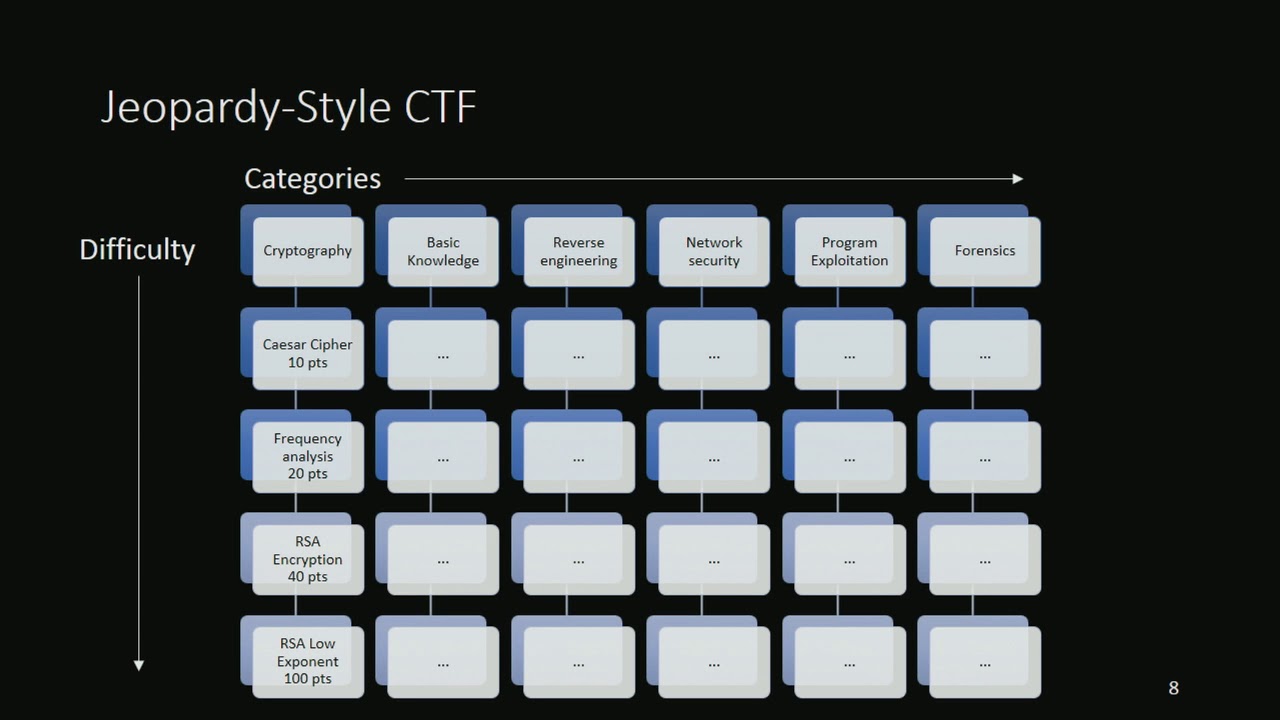
CTF Varieties
- Binary Exploitation / Pwn
- Boot2Root
- Cryptography
- Forensics
- Hardware
- Mobile
- OSINT (Open Source Intelligence)
- PCAP Analysis
- Reverse Engineering
- Steganography
- Web Exploitation
- Etc.
Hosted Services
Pros and Cons
Pros
- The lab and environment are already set up for you
- Just bring your Kali VM, connect to the VPN, and get to work
- Some services also offer a pre-made attack box for convenience
Cons
- Most will require a fee to use extended features
- If you use the provided attack box, you're going to miss out on valuable experience setting up and maintaining your own VM
Some Lab Providers
Home Lab
How to Start Your Home Lab
 0xBEN
0xBEN
- One of the single greatest way to develop core IT skills
- You build it, you break it, you research it, you fix it
- It's all yours and incredibly empowering
VMware Workstation and VirtualBox Security Labs
0xBEN 0xBEN
0xBEN
- These guides are great for beginners and you'll get plenty of hands on experience with a wide array of topics
- Systems and network administration
- Internal penetration testing
- External penetration testing
- SIEM
Proxmox Security Lab
0xBEN
Note: You aren't required to use a laptop, just what this project focused on
- The Proxmox guide is going to require separate server hardware
- Proxmox allows for much more robust designs and solutions
- Following along with this project, you'll learn:
- Systems and network administration, including
802.1qVLANs - Internal penetration testing
- External penetration testing
- SIEM
- Systems and network administration, including
- I have even documented getting GOAD setup in this environment
Developing an Attack Methodology
Boot2Root Methodology
Boot2Root is my personal favorite, since it represents the opportunity to practice full system compromise. My favorite platforms to practice against Boot2Root targets are:
Boot2Root Process
The process is typically the same no matter which platform you're practicing on:
- Boot up the target
- Get the target's IP address
- Run a
nmapscan - Begin your assessment
nmap scan and trying to figure out what to pick at first.sudo nmap -Pn -p- -T4 -sC -sV -oN nmap_scan.txt 10.10.10.25Example nmap scan of all 65,535 ports on IP address 10.10.10.25
I Ran Nmap, Now What?
1) File Servers
Why they're good starters:
- File servers in this context:
- FTP
- SMB
- HTTP (with directory listing)
- Can sometimes allow anonymous authentication
- HTTP may have directory listing enabled, allowing you to inspect directories and files right in your web browser
- Are great places to enumerate more information for later
- Usernames, emails, passwords, etc may be saved in files
2) Web Servers
Why they're good starters:
- Easy to assess, just open your web browser
- Web apps may reveal additional information on web pages
- Use tools like
gobuster,feroxbuster,wfuzz, orffufto brute-force additional virtual hosts, directories, and pages, which may lead to further information disclosure
3) Everything Else
As you're bound to find out as you experiment more with CTFs, you will get stuck. Assuming you've done a thorough job in steps 1 & 2 above, you should begin researching other ports and services and consider pivoting.
If you're seeing other ports you're not familiar with, you'll need to be ready to do lots of research on ways to assess them.
A More Detailed Boot2Root Methodology
When you're ready:
- Pick an easy target on one of the platforms listed above
- Boot it up and follow along with the process
It's OK if your first attempt is not successful. Just keep working at it and you will get better.
 0xBEN
0xBEN
Is It OK to Use Walkthroughs?
Unequivocally, yes!
If you've been stuck for 30 minutes and you're not getting anywhere, just read enough to get unstuck and put it away until you need it again.
Don't let your pride get in the way. You can't help that you don't know something. Add the knowledge to your notes and make an effort to remember it for next time.
 ippsec
Don't take my word for it. See here as well.
Ethical Hacker Roadmap
1) Core Skills Checklist
This is not an exhaustive list of everything you need to know, but it should be a good basis of building and determining your proficiency.
Systems
- You'll need to know a variety of operating systems
- Windows
- Windows XP
- Windows7
- Windows 10
- Windows Server
- Linux (Debian and RedHat derivatives)
- BSD
- Possibly more
- Windows
- Be comfortable in the terminal
- Bash
- PowerShell (and CMD)
- Know how to list the users and groups on an operating system
- Know the file system hierarchy on various operating systems
- Know how to get the current operating system version and kernel
- Be familiar with the Windows Registry
- Know how to list installed hotfixes on Windows
- Know how to check and modify permissions and ACLs
- Know how to check, create, and modify scheduled tasks
- Know how to list running process and services
- Have a basic understanding of how Active Directory functions
- Know how to work with AD in the shell and GUI
- Know the difference between a local and network user
- Know the difference between a local and network group
- Know the difference between NTLM and Kerberos authentication
- Know how to check various AD policies and configurations
- Know how to query DNS records
- Know how to query LDAP
Networking
- You don't need to be a subnetting wizard
- Given an IP address and network mask: know how to figure out your IP address space
- Know how to query and configure network interfaces on the command line
- Know how to read a routing table on the host
- Know what ARP is and how to read an ARP table
- Know how to list listening ports on a host
- Know how to pivot to internal networks when your target has mutliple interfaces or routes
- Proxying
- Tunneling
- Know how to forward individual ports
- Be familiar with the OSI model
- Understand the fundamentals of TCP/IP networking
Web
- Know the most common HTTP request methods
- Know the most common HTTP response codes
- Know some basic HTTP headers and how they work
- Know the basic functionality of a web server
- Know how to make HTTP requests from the command line
- Know how to use Burp or some other web proxy
- Know how DNS works to resolve hostnames to IPs
- Know how DNS hostnames correlate to virtual hosts on a web server
- Know how to modify your
hostsfile on your attack box - Know how to modify your DNS settings on your attack box
- Be familiar with SQL and NoSQL databases
- Have basic proficiency in SQL
- Understand SQL injections
Programming
- You don't need to be a full-time engineer or a computer science wizard
- Have some basic proficiency in AT LEAST one of these object-oriented languages:
- PowerShell
- Python
- Have a basic understanding of primitive data types in programming
- Know how to use flow control logic (conditions)
- Know how to use loops
- Know how to read, create, and edit scripts and exploits
- Know how to compile public exploits
- 32-bit
- 64-bit
- Know how to read and understand error messages when your scripts fail
- Google the error messages when you can't figure it out
2) Pentesting Methodology
Applying it to Boot2Root CTFs
- It is important to follow proven methodologies when conducting a penetration test, even when doing CTFs
- The Penetration Testing Execution Standard (PTES) and Penetration Testing Framework (PTF) detail the core steps of a penetration test
In other words, while pwning an application with XXE on a vulnerable box may not directly resemble real life, it can help you think outside the box when you encounter a real app in the wild that processes XML.
1. Client Visit and Scoping
- For a CTF, think platform rules of engagement
- Have an understanding of what you may and may not do
- Be very clear on what your target is
- Never engage out of scope without permission
2. Intelligence Gathering
- Passive
- Finding information about a target in an indirect way
- No interaction with target systems
- Active
- Finding infomration about a target directly
- Query DNS servers
- Visiting target web sites, FTP servers, mail servers, etc
- Finding infomration about a target directly
3. Threat Modeling
- Asses the target type and determine some common weaknesses
- For example, most web applications could use a database, which could lead to SQLi
4. Vulnerability Analysis
- Directly related to the quality of your intel
- Based on your interactions with the target systems
- Check version numbers, inputs, etc
- What do your findings reveal?
5. Exploitation
- Use great care and rely on your intel
- Is there an exploit for the target service?
- Version-specific?
- Architecture-specific (32-bit/64-bit)?
- An incorrect exploit could crash the service
6. Post Exploitation
- Congrats, you got a shell!
- Get a lay of the land
- Privilege escalation, further penetration
- Repeat the enumeration process (steps 2 through 5)
7. Reporting
- For a CTF, this could be a blog write-up
- You'll want to clearly define how you exploited targets
- Describe the vulnerability
- Describe the exploit used and how it works
- Describe any changes you made to an exploit
- Describe how to prevent exploitation
3) Individual Challenges
Develop Your Attack Methodology
Get to Know the Platforms
HackTheBox
TryHackMe
Learn the Tools and Tactics
HackTheBox
- Network Enumeration with Nmap
- Footprinting
- Vulnerability Assessment
- Information Gathering - Web Edition
- Attacking Common Applications
- Attacking Common Services
- Linux Privilege Escalation
- Windows Privilege Escalation
TryHackMe
- How to Research
- Hacker Methodology
- Nmap
- Walking an Application
- Vulnversity
- Basic Pentesting
- Intro to Offensive Security
- Vulnerabilities 101
- Post-Exploitation
- Windows Post-Exploitation
- TryHackMe Jr. Pentester Path (paid)
Work on Beginner-Friendly Boot2Root
Things to Remember
- It is OK to look at write-ups and learn from your failures
- Work your way up from least effort to most effort
- Nothing wrong with looking for easy wins and low-hanging fruit
- Look at everything and leave no stone unturned
- Take good notes!
- Question everything, let your curiosity go wild
HackTheBox
TryHackMe
Learn Web App Pentesting In-Depth
Web Resources
Explore Other Platforms
Target Variety
- Get lots of practice against a wide variety of operating systems
- Windows
- Server 2008, 2012, 2016, etc
- XP, 7, 10, 11
- Linux (Debian and Red Hat derivatives)
- BSD
- Windows
Hosted Environments
- Again, if the goal is variety, practice your skills against targets on multiple platforms:
- HackTheBox
- TryHackMe
- OffSec Proving Grounds
- Etc.
- Different box creators will introduce different styles, which helps you not get too comfortable with one way of doing things
- These platforms offer Linux and Windows targets
- See below for Active Directory recommendations
Home Lab
- My Home Lab Guides will show you how to host vulnerable home lab targets in a secure way
- Vulnhub is simply massive, with tons of targets
- Unfortunately, you won't find any Windows targets here
- But, it's still an excellent place to perfect your methodology
- HackMyVM
- This is a newer site that allows the community to share vulnerable targets
- They do have vulnerable Windows targets
- Vulnhub was acquired by OffSec and hasn't seen any recent VM releases, so do check out HackMyVM for more current targets
- Vulnhub is simply massive, with tons of targets
4) Active Directory Methodology
Active Directory presents a bit more of a challenge from what you saw with individual boxes in step 3. Generally speaking, Active Directory typically involves network penetration testing:
- Initial foothold
- Privilege escalation
- Credential mining
- Pivoting
- Etc.
Active Directory is just an extension of Windows fundamentals
- Get comfortable with the Active Directory exploit chain
- You'll need your Windows methodologies
- And, you'll need to understand the core function of Active Directory
Active Directory Fundamentals
HackTheBox Academy Resources
TryHackMe Resources
Attacking Active Directory
Basic Pivoting Practice
Fantastic Comprehensive Module
- TryHackMe - Compromising Active Directory
- Contains paid content, but highly worth it
- Probably overkill, but will really cement the AD exploit chain
- See my write-ups on these rooms:
Practice Active Directory Networks
- HackTheBox
- HackTheBox - Dante Pro Lab - Best for beginners
- HackTheBox - Zephyr Pro Lab - Heavy Active Directory focus
- TryHackMe
- Home Lab
- Proxmox Lab
- Building the Active Directory Lab
- Hack Your Active Directory Lab (Internal Pentest)
- Set up a Pivoting Lab (External Pentest)
- VMware Workstation Pro
- Building the Active Directory Lab
- Hack Your Active Directory Lab (Internal Pentest)
- Set up a Pivoting Lab (External Pentest)
- VirtualBox Lab
- Building the Active Directory Lab
- Hack Your Active Directory Lab (Internal Pentest)
- Set up a Pivoting Lab (External Pentest)
- Proxmox Lab
Cheat Sheets
5) Real-World Targets
At some point, you're going to want to move beyond CTFs and vulnerable boxes and test your skills against real-life and hardened targets on:
- Vulnerability Disclosure Programs (VDP)
- Bug Bounty Platforms
CTFs and environments dedicated to the safe practice of ethical hacking are much better suited to this audience.
Once you've become comfortable with the skillset, workflow, and the tools involved with the trade, you should consider graduating up to VDP and / or bug bounty programs.

Finding Your Niche
The learning path on this page covers a wide variety of topics in the computer security field. You should try a little bit of everything in order to find what interests you the most. That may end up being:
- Web App
- Hardware (IoT / Drone / Automotive / ICS)
- Pwn (Binary Exploitation)
- Active Directory
- OS (Kernel / Driver / Firmware)
- Etc.
You can't remain a generalist forever, simply for the fact that:
- The computer security industry is constantly evolving
- It's impossible to master all of the niches
What you should do instead is:
- Find one niche that's very interesting to you
- Spend 70% — 80% of your focus becoming proficient there
- Spend the remainder of your time outside of this niche to keep things interesting
Impostor Syndrome
When it comes to any profession — not just computer security — it's perfectly normal to experience feelings of inadequacy, especially when comparing yourself to someone very skilled.
- The only comparison to make is your current self versus your past self
- Do I sometimes feel inadequate when comparing myself with others? Yes!
- Have I made progress more quickly than I thought I would? Also, yes!
- There is a lot to learn in this field and there will always be new things to learn
- Be kind to yourself and remember to give yourself time to relax too
- Constantly grinding and learning will lead to burnout
- You have a finite attention span, give yourself time to do non-study things
Seeking Help from the Community
Asking Good Questions
When seeking help from the community, there is a reasonable expectation that you are going to ask questions that reflect:
Effort
- Is the answer easily found with a quick Google search?
- Show that you at least tried some things
- What did you try? What was the result?
Clarity of the Problem
- Bad question: Anyone around for a Python question?
- Better question: I'm working on a Python script to scan TCP ports. When I run the script, I get this error message. Here's a screenshot of the output for additional clarity.
- Why This Works: It's clear what you're working on, what the problem is, and anyone potentially interested in helping out has a general idea of how much time they're going to need to invest in helping you out.
- See also: https://dontasktoask.com/
Respect for Others' Time
- Posting your question in one forum / channel and then posting again in another forum / channel five minutes later is bad etiquette
- Be patient, people may or may not be immediately available to assist you
- When someone helps you with your question, they are volunteering their time to help you
If you ask a question that does not reflect these principles, or ask lazy questions, most people are going to correct you, or possibly refuse to answer at all.
Mentorship
Bring the Right Mindset
- Mentorship is voluntary, no one owes this to you
- If you are fortunate enough to receive mentorship:
- Understand that your mentors have lives — work, family, personal interests
- Don't take your mentor's time for granted
Mentorship Styles
Mentorship styles differ from person to person, mainly as a reflection of the mentor's personality.
- Active: More involved in the day-to-day activities of the mentee and approaching the mentee proactively
- Passive: Available when the mentee has questions, but may engage first if they find something that the mentee could benefit from
Finding the Right Mentor
Also, in my experience, mentors come and go. I've mentored people for days, weeks, and months at a time. Then, when they've gotten to a certain point that I'm no longer needed, I don't hear from them any longer. And, that's fine. That's the way it should be. I'm still around if they want to ask questions.
Where You Can Find Your Peers
I would encourage you to seek out a mentor or a community of your peers. It is an immense help to have others to learn from and learn with. It's not a zero-sum game, we all give and take to and from each other.
- Discord
- HackTheBox Discord server
- TryHackMe Discord server
- Local Meetups
- Mastodon
- Etc
More Pages to Check Out
 0xBEN
0xBEN
 0xBEN
0xBEN





 r0adrunn3r
 HTB Academy




Ethical Hacking Roadmap