
Previous Step
 0xBEN
0xBEN
Quick Recap
In the previous model, we started building out our GitOps pipelines by introducing best practices with Packer template development. We also committed the pipeline configuration.
- Briefly talked about what Packer is and why professionals use it
- Introduced the development strategy
- Local iterative refinement
- Start with a blank slate
- Build out the core directories and files
packer init,packer fmt,packer validate, andpacker build- Monitor the build process, fix issues
- Re-run
packer validateandpacker build - Monitor the build process, fix issues, repeat
- Re-run
- Prepare the
.gitlab-ci.ymlpipeline - Prepare
.gitignoreandgit add, thengit commitandgit push - Let the pipeline push the final build using
packer build --force
- Local iterative refinement
- Briefly talked about adding new templates moving forward
Terraform Overview
In the previous module, we established that IT teams use HashiCorp Packer to define system templates using code. And, that code is tracked in version control such as GitLab. Because the code is fully declarative and auditable, there's no guesswork when a system is built.
If Packer is used to define the template, then the next logical step is a means of deploying the template.
The most important thing, however, is reinforcing the infrastructure-as-code. IT teams define the infrastructure using code and track it in version control. The code is static and auditable, acting as a policy of sorts, to dictate how resources should conform to certain standards.
Pipeline Diagram
Click here to view this diagram in a new tab
Development Strategy
The development strategy for Terraform will be very similar to the way we did things with Packer.
Remote Development Box
I will also be developing remotely as done in the previous module:
- Remote development box
- Connect using SSH
git clonetheinfrastructure/terraformrepository- Open the directory
- Start a new Git branch for the work
Local Iterative Refinement
- Add the directory hierarchy
- Add files and source code
- Pull the docker image from GitLab Container Registry
- Start an ephemeral container and map the directory as a volume
- Run
infisical loginwith the previously defined machine ID - Run
infisical exportto load Terraform environment variables - Export some
TF_HTTP_environment variables to configure the GitLab HTTP backend for remote state - Run
terraform init- We will use GitLab's Terraform API to store the state remotely
- Run
terraform fmtto parse and normalize files - Run
terraform validate- Observe any warnings and / or errors
- Fix any issues
- Re-run
terraform validate - Repeat
- Run
terraform plan- Observe any warnings and / or errors
- Fix any issues
- Re-run
terraform plan - Repeat
- Run
terraform applyand monitor the deployment - Run
terraform destroyand monitor the tear down
Using GitLab Terraform State API
As mentioned above, in the local development environment, we'll be using some TF_HTTP_ environment variables to tell Terraform about the HTTP backend — GitLab, in this case.
Part of this will be using our GitLab username and GitLab personal access token to facilitate API access to GitLab's Terraform state API. We'll read and write Terraform state to the remote state backend for one-off development, which will allow us to terraform plan against the Proxmox VE API.
.gitignore file before running git add. This will ensure we do not commit sensitive files to GitLab.Generate a Personal Access Token

- Token name:
tf-dev-state-mgmt - Description: Used for local Terraform development to leverage GitLab Terraform API for state management
- Expiration: 1 year from now
- Scopes:
read_repositoryapi
When finished, click the Generate token button.

Add to Infisical Secrets



Secret 1
- Key:
TF_HTTP_PASSWORD— one example of a TF_HTTP_ environment variable - Value:
glpat-...[REDACTED]...— paste in your token from before - Comment: GitLab personal access token for Terraform state management in local development
- Click Create Secret
Secret 2
- Key:
TF_HTTP_USERNAME— another TF_HTTP_ environment variable - Value:
0xBEN— not your email - Click Create Secret
infisical export --format=dotenv-export, we will be able to leverage TF_HTTP_PASSWORD and TF_HTTP_USERNAME as environment variables within the Docker container on the devbox.Development Environment
Remote Development Box
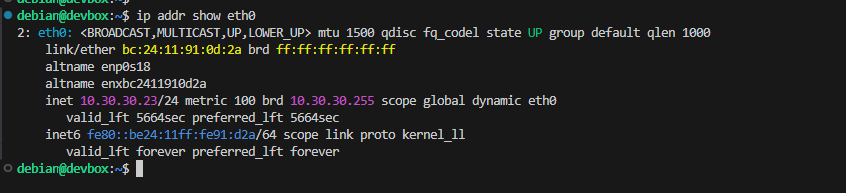
In the exact same fashion as the Packer module, I'll be leveraging Visual Studio Code with a remote SSH connection to my developer box. I'm going to refer you back to that module for setting up the initial connection.



Clone the Terraform Repository
In the Packer module, I also set up Git authentication using SSH keys. I'll refer you back to that module for setting that up, but you can also reference my notes here.
cd ~/Code/IaC_Projectgit clone git@gitlab-ce.lab.home.internal:infrastructure/terraform.git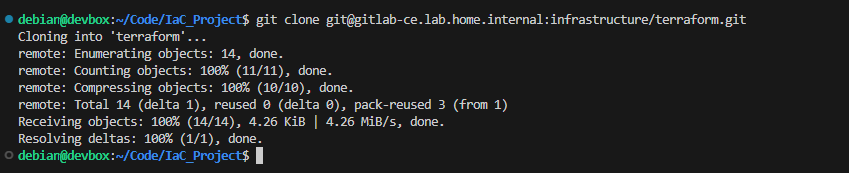
cd terraformChange directory into the repository

git checkout -b initial-development-workStart a new feature branch for the upcoming development
Repository Structure
terraform
|---- .gitignore                                                       # List of directories and/or files to keep out of remote repository
|---- .gitlab-ci.yml                                                   # GitLab pipeline configuration
'---- proxmox/
      |---- deploy/
      |      |---- providers.tf                                        # Shared plugins for all Proxmox deployments
      |      '---- linux/
      |             |---- variables.tf                                 # Shared variables for Linux deployments, define expected inputs
      |             '---- debian/
      |                    '---- debian-13/
      |                           |---- backend.tf
      |                           |---- debian-13-vm.auto.tfvars       # Populates variables defined in variables.tf (Infisical will populate others)
      |                           '---- debian-13-vm-main.tf              # The actual infrastructure-as-code for the deployment
      |
      |---- files/
      |      '---- .gitkeep
      |
      '---- scripts/
'---- .gitkeepterraform plan or terraform apply inside a build directory, any file ending in .tf or .auto.tfvars will be automatically processed.Create the Core Structure
touch .gitignoretouch .gitlab-ci.ymlmkdir -p proxmox/deploy/linux/debian/debian-13/mkdir proxmox/{files,scripts}touch proxmox/deploy/providers.tftouch proxmox/deploy/linux/variables.tftouch proxmox/deploy/linux/debian/debian-13/backend.tf
touch proxmox/deploy/linux/debian/debian-13/debian-13-vm.auto.tfvars
touch proxmox/deploy/linux/debian/debian-13/debian-13-vm-main.tfDebian 13 VM
Defining Expected Inputs
Like Packer, we are going to symbolically link a shared variables file into the working directory. Recall that Terraform will automatically process any .tf or .auto.tfvars files it finds in the working directory,
You can name variables.tf anything you'd like, but I'm going to keep it generic, since it's a shared variables file. This file serves the purpose of:
- Telling Terraform what variables names to expect
- Telling Terraform what kinds of input the variables should accept — e.g.
string,number, etc - Defining any
defaultvalues that should be assigned to those variables in the event none are supplied
cd ~/Code/IaC_Project/terraform/proxmox/deploy/linux/debian/debian-13-vm/ln -s ../../variables.tf .Symbolically link the shared Linux variables in the working directory
variables.tf file in the linux/ directory or under debian-13-vm/ directory and the changes should track accordingly.variables.tf (SHOW/HIDE)
# ----- Infisical Variables: Begin ----- #

/*
Infisical will inject authentication variables into environment
    - PROXMOX_VE_API_TOKEN : terraform/bpg provider automatically discovers this environment variables
        - Unprotected GitLab runner won't have access to Infisical
        - So, we'll set them as empty environment variables in the pipeline configuration
*/

variable "ssh_public_key" {
  # Injected by Infisical as "TF_VAR_ssh_public_key"
  type        = string
  description = "Terraform adds this SSH key for the user defined in TF_VAR_ssh_username"
  default     = ""
}
variable "ssh_username" {
  # Injected by Infisical as "TF_VAR_ssh_username"
  type        = string
  description = "Terraform adds this SSH user, and will login with private key matching TF_VAR_ssh_public_key"
  default     = ""
}

# ----- Infisical Variables: End ----- #

/* Local Variables: Begin
.-----------------------------------------------.
| Locally Sourced Variables: *.auto.pkrvars.hcl |
|     We can commit these to Git, cause         |
|     there are no protected variables          |
'-----------------------------------------------'
*/

# Proxmox Environment
variable "proxmox_node_domain" {
  type    = string
  default = ".lab.home.internal"
}

# Source Template
variable "template_source_node" {
  type        = string
  description = "The name of the Proxmox VE node that holds the source template"
  default     = "pve"
}
variable "template_vm_id" {
  type        = number
  description = "The numerical ID of the VM template in Proxmox VE from which to clone"
  default     = null
}

# New VM General
variable "target_deploy_node" {
  type        = string
  description = "The Proxmox VE node to deploy the new VM on"
  default     = "pve"
}
variable "target_disk_storage_pool" {
  # Defaults to "local-lvm", which would match a default Proxmox VE installation
  # Doing it this way because I do not have shared storage (e.g. ceph, NFS)
  type        = string
  description = "The name of the VM disk storage pool on the target PVE node"
  default     = "local-lvm"
}
variable "vm_id" {
  type        = number
  description = "The numerical ID of the new VM in Proxmox VE. When 'null' Proxmox VE auto-assigns next available."
  default     = null
}
variable "vm_name" {
  type        = string
  description = "The name to give to the new VM"
}
variable "vm_description" {
  type        = string
  description = "Describe the general purpose of the VM"
  default     = "Linux VM deployed by Terraform. Use Ansible to configure."
}
variable "vm_tags" {
  type        = list(string)
  description = "Comma-separated strings in list notation"
  default     = ["terraform-deployed", "cloud-init"]
}
variable "resource_pool" {
  type        = string
  description = "The resource pool in Proxmox VE logical grouping of units"
  default     = ""
}
variable "is_full_clone" {
  type        = bool
  description = "Set 'true' for full clone, 'false' for linked clone"
}
variable "start_at_boot" {
  type        = bool
  description = "Set to 'true' to boot the VM when Proxmox starts up."
  default     = true
}

# New VM Hardware
# Guest Agent
variable "guest_agent_enabled" {
  type        = bool
  description = "Set to true or false, indicating if the QEMU guest agent has been installed and activated on the VM"
  default     = false
}
variable "prefer_ipv4" {
  type        = bool
  description = "Set to true if you want to prefer waiting for IPv4 address allocation"
  default     = false
}
variable "prefer_ipv6" {
  type        = bool
  description = "Set to true if you want to prefer waiting for IPv6 address allocation"
  default     = false
}
# CPU
variable "cpu_type" {
  type        = string
  description = "Defaults to the value when creating VMs in the UI."
  default     = "x86-64-v2-AES"
}
variable "cpu_cores" {
  type    = number
  default = 2
}
variable "cpu_sockets" {
  type    = number
  default = 1
}
# Memory
variable "memory_min" {
  type    = number
  default = 2048
}
variable "memory_max" {
  type    = number
  default = 2048
}
# Disk
variable "storage_controller" {
  type        = string
  description = "Matches the default used with builds in Packer"
  default     = "virtio-scsi-pci"
}
variable "disk_interface" {
  type    = string
  default = "scsi"
}
variable "disk_size_gb" {
  type        = number
  description = "cloud-init will automatically grow the disk to match if larger than Packer template"
  default     = 40
}
variable "disk_file_format" {
  type        = string
  description = "ZFS: 'raw' ; local-lvm: 'qcow2'"
  default     = "qcow2"
}
# Networking
variable "switch_name" {
  type        = string
  description = "The virtual switch in Proxmox VE"
  default     = "vmbr0"
}
variable "nic_driver" {
  type    = string
  default = "virtio"
}
variable "vlan_tag" {
  type    = number
  default = null
}
# Cloud-Init
variable "cloud_init_domain" {
  type        = string
  description = "The domain to use when populating the VM's cloud-init settings"
  default     = null
}
variable "clout_init_dns_servers" {
  type        = list(any)
  description = "The DNS server to use when populating the VM's cloud-init settings"
  default     = null
}
Setting the Inputs
Recall that Packer will automatically process any .auto.tfvars files it finds in the working directory. If discovered, it will use these key=value pairs to automatically assign values to any variables defined in configuration files — such as variables.tf for example.
debian-13-vm.auto.tfvars (SHOW/HIDE)
# Proxmox Environment
proxmox_node_domain = "lab.home.internal"

# Source Template
template_source_node = "proxmox" # proxmox is the hostname in my network
template_vm_id       = 10001

# New VM General
target_deploy_node       = "proxmox-hx90" # proxmox is the hostname in my network
target_disk_storage_pool = "Guest_Disks"
vm_id                    = 5000 # 5000 -- 5999 for Terraform deploys
vm_name                  = "debian-13-tf"
vm_description           = "Debian 13 VM deployed and managed by Terraform"
vm_tags                  = ["terraform-deployed", "cloud-init", "ansible-target"]
resource_pool            = "terraform-managed" # The resource pool as created in initial user / group script
is_full_clone            = true
start_at_boot            = true

# New VM Hardware
# Guest Agent
guest_agent_enabled = true
prefer_ipv4         = true
prefer_ipv6         = false
# CPU
cpu_type    = "x86-64-v2-AES"
cpu_cores   = 4
cpu_sockets = 1
memory_max  = 4096
memory_min  = 4096
# Disk
storage_controller = "virtio-scsi-pci"
disk_interface     = "scsi"
disk_size_gb       = 64
disk_file_format   = "raw"
# Networking
switch_name = "vmbr0"
nic_driver  = "virtio"
vlan_tag    = 302 # You can delete this variable if not using VLANs
# Cloud-Init
cloud_init_domain      = "lab.home.internal" # Set according to the new VM's VLAN
clout_init_dns_servers = ["10.0.32.1"]
Infrastructure-as-Code
This is the declarative file that will define precisely how the VM should be built in Proxmox VE. That is the whole intent of infrastructure-as-code — state exactly what you want and avoid human error.
/pool/packer-templates resource pool. We gave svc_terraform read-only access to this pool, so that when cloning off Debian 13 template VM, we will able to see the template in the resource pool. Terraform creates the clone in its own resource pool: /pool/terraform-managed.Per the documentation, Terraform will automatically take steps to determine if the clone source is part of a pool, so
/pool/packer-templates should be automatically discovered.debian-13-vm-main.tf (SHOW/HIDE)
data "proxmox_vm" "debian_13_vm_template" {
  /*
  - https://registry.terraform.io/providers/bpg/proxmox/latest/docs/data-sources/vm
  - Perform a lookup of the Packer template on the target PVE node
  - Store the data about the VM in memory, so we can reference information about it
  - See down in the "tags" property and "clone {}" section on how we're using the properties
      - ".id"
      - ".node_name"
      - ".tags"
    as reference points for cloning
  */
  node_name = var.template_source_node
  id        = var.template_vm_id
}

resource "proxmox_virtual_environment_vm" "debian_13_vm_clone" {
  # https://registry.terraform.io/providers/bpg/proxmox/latest/docs/resources/virtual_environment_vm
  # New VM General
  # vm_id       = var.vm_id # Environment uses random_vm_ids, uncomment if you want to set a static ID
  name        = var.vm_name
  description = var.vm_description
  node_name   = var.target_deploy_node
  on_boot     = var.start_at_boot
  # Uses the concat() function to use the tags from the packer template AND our local variable
  tags = concat(
    tolist(data.proxmox_vm.debian_13_vm_template.tags),
    tolist(var.vm_tags)
  )
  pool_id = var.resource_pool

  agent {
    enabled = var.guest_agent_enabled
    wait_for_ip {
      ipv4 = var.prefer_ipv4
      ipv6 = var.prefer_ipv6
    }
  }

  # Hardware Overrides (Overrides what was set in Packer if needed)
  cpu {
    sockets = var.cpu_sockets
    cores   = var.cpu_cores
    type    = var.cpu_type
  }

  memory {
    dedicated = var.memory_max
    floating  = var.memory_min
  }

  disk {
    datastore_id = var.target_disk_storage_pool
    file_format  = var.disk_file_format
    interface    = "${var.disk_interface}0" # e.g. scsi0
    size         = var.disk_size_gb
  }

  network_device {
    bridge   = var.switch_name
    model    = var.nic_driver
    vlan_id  = var.vlan_tag
    firewall = false
  }

  # Cloud-Init Configuration (Matches 'cloud_init = true' in Packer)
  # This injects the hostname, SSH keys, and static IP into the cloned VM
  initialization {
    datastore_id = var.target_disk_storage_pool
    ip_config {
      ipv4 {
        address = "dhcp"
      }
    }
    dns {
      domain  = var.cloud_init_domain
      servers = var.clout_init_dns_servers
    }
    user_account {
      username = var.ssh_username
      keys     = [var.ssh_public_key]
    }
  }

  # This clone block is used when cloning between two distinct nodes
  # Comment this "clone {}"" block out if clone will be on the same node as the source
  clone {
    # Uses the ".id" property from the template data source to indicate the VM ID to clone from
    # Uses the ".node_name" property from the template data source to indicate which node to clone from
    # "datastore_id" is the storage pool on the target PVE node
    vm_id        = data.proxmox_vm.debian_13_vm_template.id
    node_name    = data.proxmox_vm.debian_13_vm_template.node_name
    datastore_id = var.target_disk_storage_pool
    full         = var.is_full_clone
  }

  /* Uncomment this "clone {}" block if clone will be on the same node as the source
  # This clone block is used when the cloned VM will be on the same node as the source
  clone {
    # Omits "node_name" because source and target nodes are the same
    vm_id = data.proxmox_vm.debian_13_vm_template.id
    full  = var.is_full_clone
  }
  */
}

# Make an API call with the API token to reboot the VM when the name changes
# This ensures the hostname is always right in Dynamic DNS
resource "null_resource" "vm_reboot" {
  triggers = {
    vm_name = proxmox_virtual_environment_vm.debian_13_vm_clone.name
  }

  provisioner "local-exec" {
    command     = <<-EOT
      curl -X POST \
        https://${var.template_source_node}.${var.proxmox_node_domain}:8006/api2/json/nodes/${var.target_deploy_node}/qemu/${proxmox_virtual_environment_vm.debian_13_vm_clone.vm_id}/status/reboot \
        -H "Authorization: PVEAPIToken=$PROXMOX_VE_API_TOKEN" \
        --insecure \
        --silent \
        --fail
    EOT
    interpreter = ["bash", "-c"]
  }
}

# Will use this in the GitLab CI/CD pipeline to dynamically retrieve the VM FQDN
output "vm_fqdn" {
  description = "The fully qualified domain name of the provisioned VM"
  value       = "${proxmox_virtual_environment_vm.debian_13_vm_clone.name}.${proxmox_virtual_environment_vm.debian_13_vm_clone.initialization[0].dns[0].domain}"
}
Defining the Providers
Like we did with the variables.tf file, we'll symbolically link the providers.tf file in the working directory. This way, we only need to update the providers file in a single location.
ln -s ../../../providers.tf .terraform {
# Current version in Docker: 1.14.7
required_version = ">= 1.14.7"
required_providers {
proxmox = {
source = "bpg/proxmox"
version = "~> 0.102.0"
}
}
}
provider "proxmox" {
# The Proxmox VE node you want Terraform to talk to
# No authentication details needed in this block
# - "PROXMOX_VE_API_TOKEN" will be imported from Infisical
# terraform/bpg provider will automatically discover this in environment variables
# https://registry.terraform.io/providers/bpg/proxmox/latest/docs#argument-reference
endpoint = "https://${var.template_source_node}.${var.proxmox_node_domain}:8006/"
insecure = false # Set to true if you're not using trusted PKI
random_vm_ids = true
random_vm_id_start = 5000 # 5000-5999, I've decided to set aside
random_vm_id_end = 5999 # this range for Terraform deployments
}providers.tf
Defining the State Backend
terraform {
  # Intentionally empty
  # Environment variables will used to finish the configuration
  backend "http" {}
}
Terraform Plan Testing
Firewall Rules
Firewalls required for testing:
If you're operating on a flat network where all of your hosts are in the same subnet, this will most likely not apply to you, unless you're using host-based firewalls — e.g. iptables.
- Allow DevBox to reach PVE API
- Source: DevBox
Source Port: any - Destination: Proxmox Node(s)
Destination Port: 8006
- Source: DevBox
- Allow DevBox to Pull from Container Registry
- Source: Developer Box
Source Port: any - Destination: GitLab CE Server
Destination Port: 5050
- Source: Developer Box
Segment Dev and Prod
In the Packer module, we already took steps to segment development and production by creating separation in Proxmox VE and Infisical. We will expand on that here for Terraform testing.
svc_terraform user in Proxmox VE has write access to the terraform-managed resource pool, but we don't want to touch that resource pool during development or testing. Instead, we'll create a
terraform-testing resource pool, add another Proxmox VE group, service account, and API token, and restrict write access to /pool/terraform-testing.Proxmox VE Testing Resources
Add a DevBox Token to Proxmox VE
terraform-test.sh#!/bin/bash
REALM="pve"
GROUP="TerraformTesting"
USERNAME="svc_devbox_terraform@${REALM}"
TOKEN_NAME="tf-testing-token"
TF_TEST_POOL="terraform-testing"
TF_TEST_POOL_PATH="/pool/${TF_TEST_POOL}"
PACKER_POOL_PATH="/pool/packer-templates"
ISO_STORAGE_POOL="local" # change according to your environment
DISK_STORAGE_POOL="local-lvm" # Change accordingly
# Create the resource pool
pveum pool add $TF_TEST_POOL --comment "Resource pool for unprotected GitLab runner to provision test resources"
# Create the group
pveum group add $GROUP --comment "Group for any service accounts needing to test terrafrom plans"
# Create the service account
pveum user add $USERNAME --comment "Service account for devbox testing"
# Add the user to the group
pveum user modify $USERNAME --groups $GROUP
# ---- GROUP PERMISSIONS ----
# Full CRUD on its own pool
pveum aclmod $TF_TEST_POOL_PATH --group $GROUP --role PVEVMAdmin
pveum aclmod $TF_TEST_POOL_PATH --group $GROUP --role PVEPoolAdmin
# Terraform needs to read the node state and find available VM IDs, but cannot modify anything outside its pool.
pveum aclmod /nodes --group $GROUP --role PVEAuditor
# Read-only on global storage configurations
pveum aclmod /storage --group $GROUP --role PVEAuditor
# Full permissions on required storage pools
pveum aclmod /storage/$ISO_STORAGE_POOL --group $GROUP --role PVEDatastoreAdmin
pveum aclmod /storage/$DISK_STORAGE_POOL --group $GROUP --role PVEDatastoreAdmin
# Network Permissions: Ability to attach the network interface
pveum aclmod /sdn/zones/localnetwork --group $GROUP --role PVESDNUser
# Allow the testing group to read templates in the Packer pool
pveum aclmod $PACKER_POOL_PATH --group $GROUP --role PVEPoolUser
pveum aclmod $PACKER_POOL_PATH --group $GROUP --role PVETemplateUser
# Create an API token for the user
# No privilege separation, since inheriting off the group's permissions
pveum user token add $USERNAME $TOKEN_NAME --privsep 0
Save the Token in Infisical Dev Environment
We'll be pulling the terraform Docker image from our container registry to do some testing a bit later. In anticipation of this, we'll go ahead and add this token to the dev environment in Infisical, so that when we infisical export, we can pull the svc_devbox_terraform@pve!tf-testing-token variable accordingly.



- Key:
PROXMOX_VE_API_TOKEN - Value:
svc_devbox@pve!tf-testing-token=926xxxxx-xxxx-xxxx-xxxx-xxxxxxxxxx08f - Comment: PVE API token for use with local development, write access to /pool/terraform-testing
Cloud-Init Test Variables
In the variables.tf file, we defined some variables that will be sourced when we call infisical export. However, those currently only live in the prod environment, and we want to pull from dev, in order to use our svc_devbox API key.
ssh-keygen -t ed25519 -N "" -C "Test user for development testing" -f "$HOME/test-user-key"Running this command will output in the current user's home directory:
test-user-key— private keytest-user-key.pub— public key

Secret 1
cat "$HOME/test-user-key"- Key:
TERRAFORM_SSH_PRIVATE_KEY - Value:
--—BEGIN OPENSSH PRIVATE KEY--—...— paste the entire key here - Comment: SSH private key for terraform testing in development
- Enable Multiline Encoding: ✅
Secret 2
cat "$HOME/test-user-key.pub"- Key:
TF_VAR_ssh_public_key— matches variable name invariables.tf - Value:
ssh-ed25519 AAAAC3Nz...[snip]... - Comment: SSH public key for terraform testing in development
Secret 3
- Key:
TF_VAR_ssh_username - Value:
ansible - Comment: SSH user for terraform testing in development
Install Docker on DevBox (Debian)
 Docker Inc
sudo usermod -a -G docker $(whoami)Add yourself to the docker group, then logout and log back in
Pull the Terraform Image from GitLab
Docker Credential Helper


We followed along with this documentation in the Packer module, but linking here again
docker login gitlab-ce.lab.home.internal:5050When prompted, enter the GPG key passphrase to decrypt the credential
Pull the Terraform Image
docker pull gitlab-ce.lab.home.internal:5050/infrastructure/runner-images/terraform:latestTesting the Terraform Container
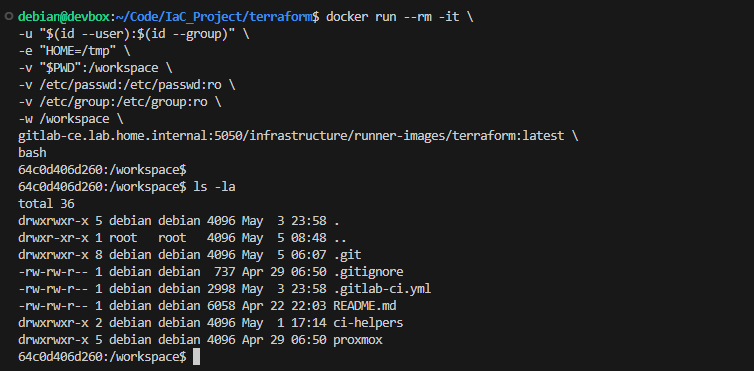
Now is an excellent opportunity to test out pulling terraform from our Container Registry and making sure the containerized environment can apply Terraform plans without a hitch. It also has the infisical CLI installed, so we should be ready to go.
cd ~/Code/IaC_Project/terraform/proxmoxdocker run --rm -it \
-u "$(id --user):$(id --group)" \
-e "HOME=/tmp" \
-v "$PWD":/workspace \
-v /etc/passwd:/etc/passwd:ro \
-v /etc/group:/etc/group:ro \
-w /workspace \
gitlab-ce.lab.home.internal:5050/infrastructure/runner-images/terraform:latest \
bash- Mount
/etc/passwdand/etc/groupfrom the host to the container to force the container to acknowledge our UID / GID- These files are already read-only on the host anyway
- We want to launch the container with our UID and GID using the to ensure that any files created from within the container do not cause ownership issues inside the repository.
Infisical Access
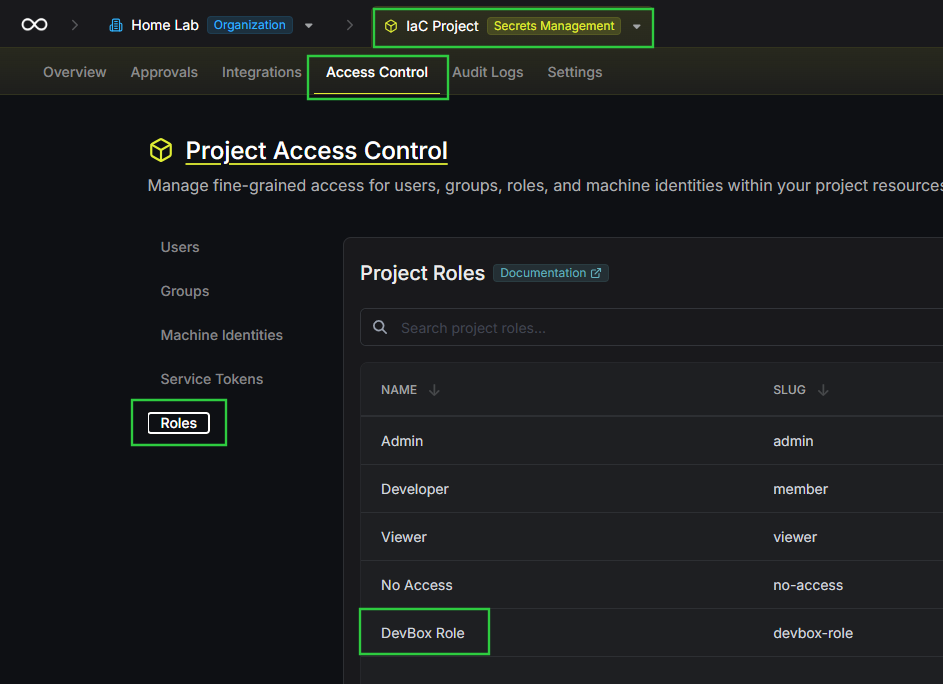
In the Packer Module, we already took the following steps to facilitate Infisical access from devbox:
- Created a custom
DevBox Rolerole inside theIaC Projectproject - Added a Machine Identity to
IaC Projectproject - Gave the
DevBox Rolerole to the machine identity - Created a Universal Auth token and saved it in a password vault
We just need to adjust the role slightly to allow the DevBox to authenticate and pull dev.

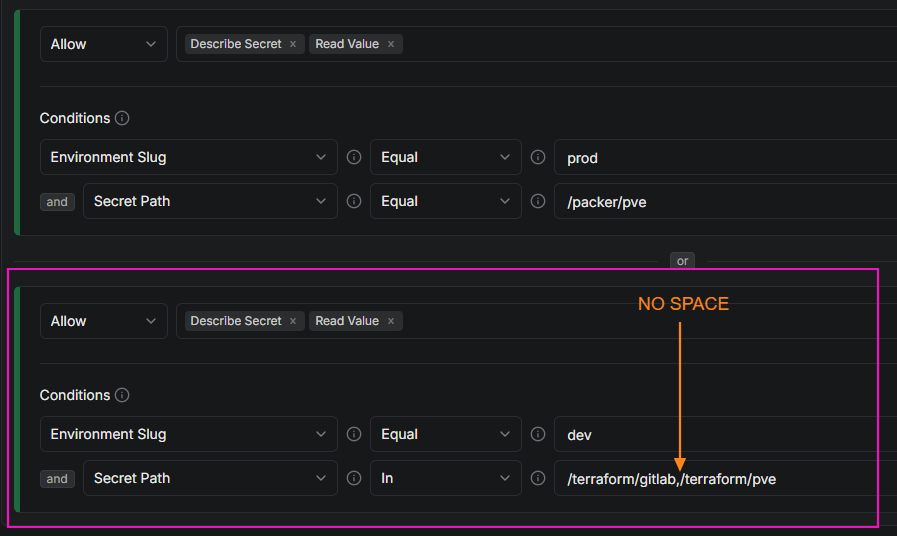
read -e -s -p 'Enter your machine ID (input hidden): ' machine_id
export MACHINE_ID="$machine_id"
read -e -s -p 'Enter your machine secret (input hidden): ' machine_secret
export MACHINE_SECRET="$machine_secret"
read -e -p 'Enter your Infisical project ID (input shown): ' infisical_project_id
export INFISICAL_PROJECT_ID="$infisical_project_id"
INFISICAL_ACCESS_TOKEN=$(infisical login \
--domain="https://secrets.lab.home.internal" \
--method="universal-auth" \
--client-id="${MACHINE_ID}" \
--client-secret="${MACHINE_SECRET}" \
--silent \
--plain)Fetch an access token
eval $(infisical export \
--domain="https://secrets.lab.home.internal" \
--token="${INFISICAL_ACCESS_TOKEN}" \
--projectId="${INFISICAL_PROJECT_ID}" \
--env=dev \
--path="/terraform/gitlab" \
--format=dotenv-export \
--silent)
Fetch "/terraform/gitlab" secrets from "dev"
eval $(infisical export \
--domain="https://secrets.lab.home.internal" \
--token="${INFISICAL_ACCESS_TOKEN}" \
--projectId="${INFISICAL_PROJECT_ID}" \
--env=dev \
--path="/terraform/pve" \
--format=dotenv-export \
--silent)
Fetch "/terraform/pve" secrets from "dev"

PROXMOX_VE_API_TOKEN— The Proxmox VE API token we created previously to allow write access to/pool/terraform-testingTF_HTTP_PASSWORD— An environment variable ready byterraformfor the HTTP backendTF_HTTP_USERNAME— An environment variable ready byterraformfor the HTTP backendTF_VAR_ssh_public_key— An environment variable that matchesvariables.tfTF_VAR_ssh_username— An environment variable that matchesvariables.tf
Initialize the Terraform Environment
 HashiCorp
Reference the environment variables you can use to initialize the HTTP backend

cd /workspace/deploy/linux/debian/debian-13-vm/Running inside the container
GITLAB_URL='https://gitlab-ce.lab.home.internal'
PROJECT_ID='9'
STATE_BASE_URL="${GITLAB_URL}/api/v4/projects/${PROJECT_ID}/terraform/state"
export TF_STATE_NAME="debian-13-vm-dev"
export TF_HTTP_ADDRESS="${STATE_BASE_URL}/${TF_STATE_NAME}"
export TF_HTTP_LOCK_ADDRESS="${STATE_BASE_URL}/${TF_STATE_NAME}/lock"
export TF_HTTP_UNLOCK_ADDRESS="${STATE_BASE_URL}/${TF_STATE_NAME}/lock"
export TF_HTTP_LOCK_METHOD="POST"
export TF_HTTP_UNLOCK_METHOD="DELETE"
export TF_HTTP_RETRY_WAIT_MIN="5"
Exporting "TF_HTTP_" variables to configure the HTTP backend as per "backend.tf"
TF_HTTP_USERNAME and TF_HTTP_PASSWORD environment variables come from infisical export from the dev environment.debian-13-vm-dev... It's up to you on the naming convention you want to use, but in my environment, I'll be using the VM Name plus the the suffixes: -dev and -prod.- The
-devsuffix is what I'll use for local testing in development environments such as DevBox.- I'll also be pulling from Infisical
devenvironment and using the PVE resource pool,/pool/terraform-testingforterraform planactions.
- I'll also be pulling from Infisical
- The
-prodsuffix will be used in the.gitlab-ci.ymlfile for production jobs once the plan has been fully vetted.
terraform init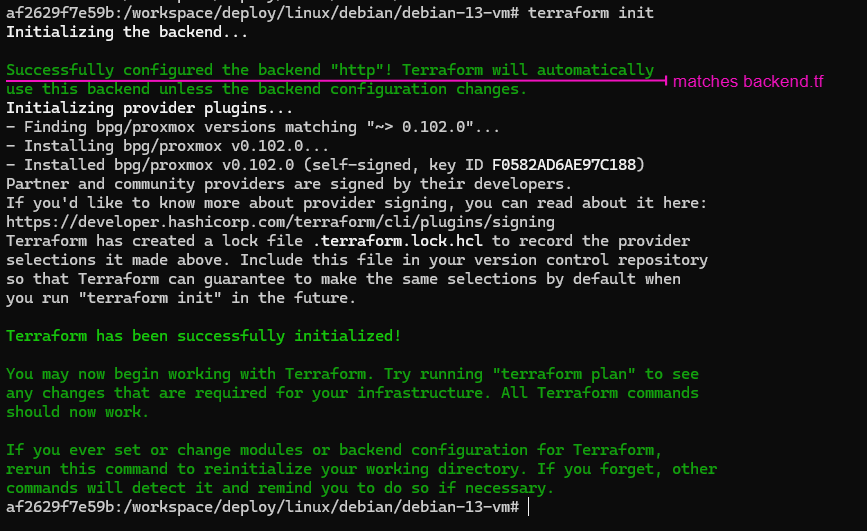
Format and Validate File Syntax
cd /workspace/deploy/linux/debian/debian-13-vm/terraform fmt .terraform validate .
Test the Terraform Plan
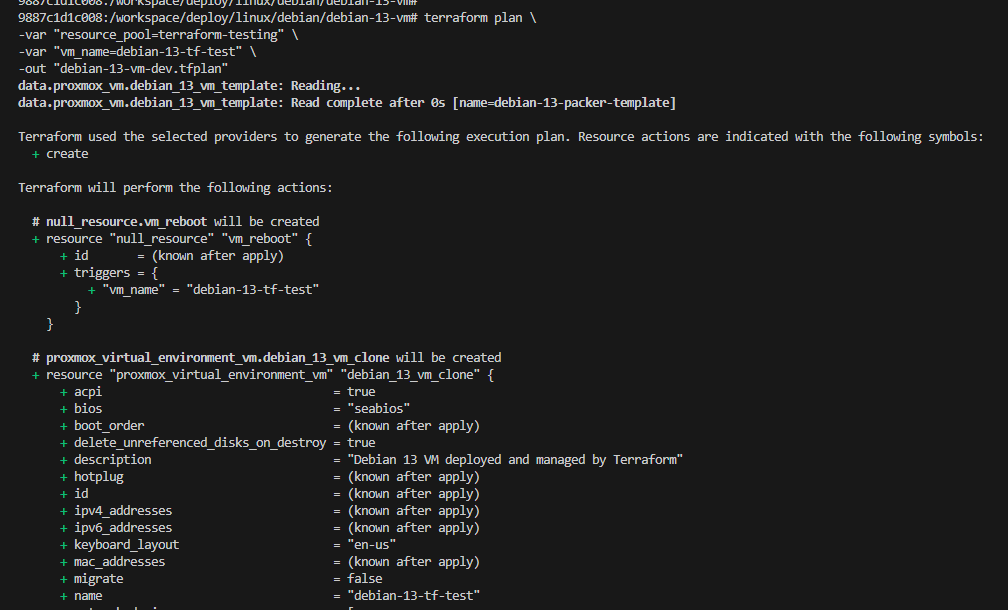
terraform plan, some things to take note on. The debian-13-vm-main.tf file references a resource_pool variable, which we will override with -var resource_pool=terraform-testing, as the Proxmox API token does not have write access to terraform-managed defined in the .auto.tfvars file.terraform plan \
-var "resource_pool=terraform-testing" \
-var "vm_name=debian-13-tf-test" \
-out "debian-13-vm-dev.tfplan"Override "resource_pool" from ".auto.tfvars" to target custom test pool
terraform apply debian-13-vm-dev.tfplan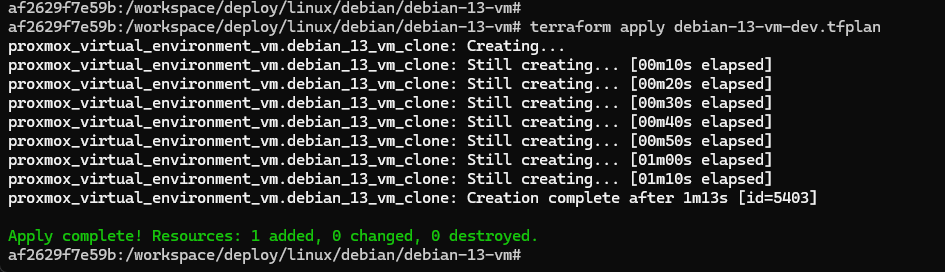

proxmox_virtual_environment_vm resource has been saved in the debian-13-vm-dev state file in the infrastructure/terraform repository's HTTP state backend.So, if you want to managed this particular deployment, you always have to reference the
debian-13-vm-dev state file from GitLab.If we inspect the .terraform/terraform.tfstate file in the working directory, you'll note the configuration keys are set null.
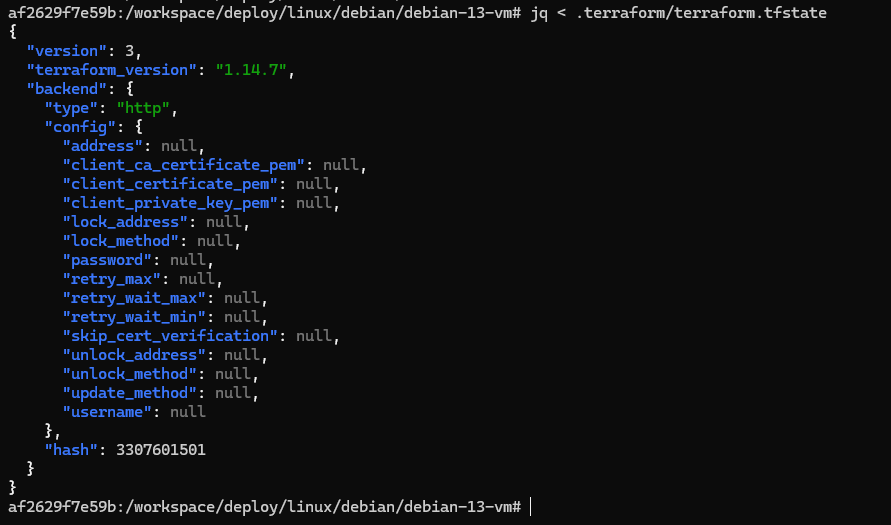
These keys are null because of the TF_HTTP_ environment variables we configured in the previous section.

Test SSH Login to VM
Recall that in the environment we've set up thus far, we have:
- DHCP on the target VLAN
- DHCP Dynamic DNS on the target VLAN
- Cloned a VM off the target Packer template into the
/pool/terraform-testingpool - The VM was provisioned with
cloud-init- VM Name:
debian-13-tf-test - Domain:
lab.home.internal - User:
ansible
- VM Name:
- The VM is set to IPv4 DHCP
- VLAN 302 should have allocated an address in
10.0.32.0/24subnet - All said, we should be able to resolve
debian-13-managed.lab.home.internalto some IP at10.0.32.x/24
- VLAN 302 should have allocated an address in
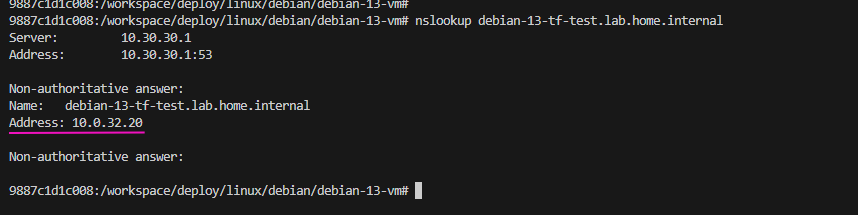
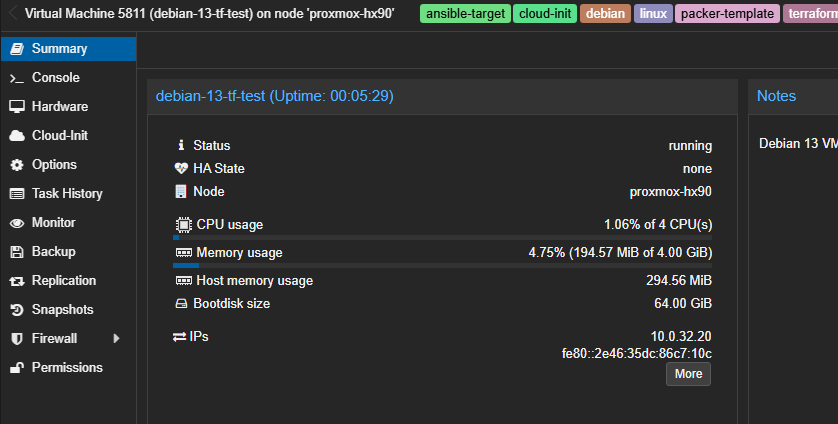
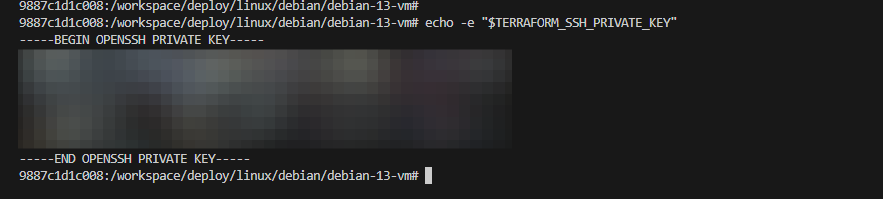
eval $(ssh-agent)echo -e "$TERRAFORM_SSH_PRIVATE_KEY" | ssh-add -ssh -o "UserKnownHostsFile=/dev/null" ansible@debian-13-tf-test.lab.home.internalTest the private key we created to pair with the SSH public key injected by Infisical "dev"
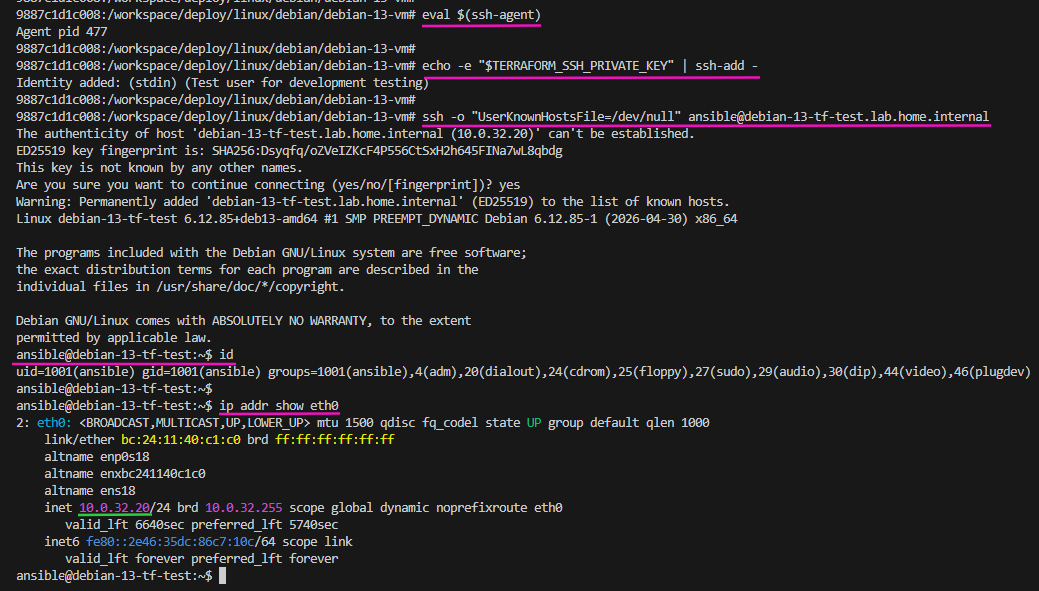
exitExit SSH back to the terraform container's shell
Destroy the VM after Testing
cd /workspace/deploy/linux/debian/debian-13-vm/terraform plan -destroy -out "debian-13-vm-dev.tfplan"terraform apply debian-13-vm-dev.tfplan
terraform plan -destroy, it checks the debian-13-vm-dev file in GitLab and compares the state of the VM to what we need to do in order to destroy the resource(s). And, it reaches the
debian-13-vm-dev state file in GitLab because of the TF_HTTP_ backend environment variables we created.Taking Inventory of the Repo
Identify Sensitive Directories and Files
Before we run any
git operations, we want to take full inventory of the current repository state and ensure we properly configure the .gitignore file. You must add directories and files to
.gitignore BEFORE running git push. As you don't want sensitive informaion in your repository.~/Code/IaC_Project/terraformtree -a -I .git/List all files but ignore the ".git/" directory
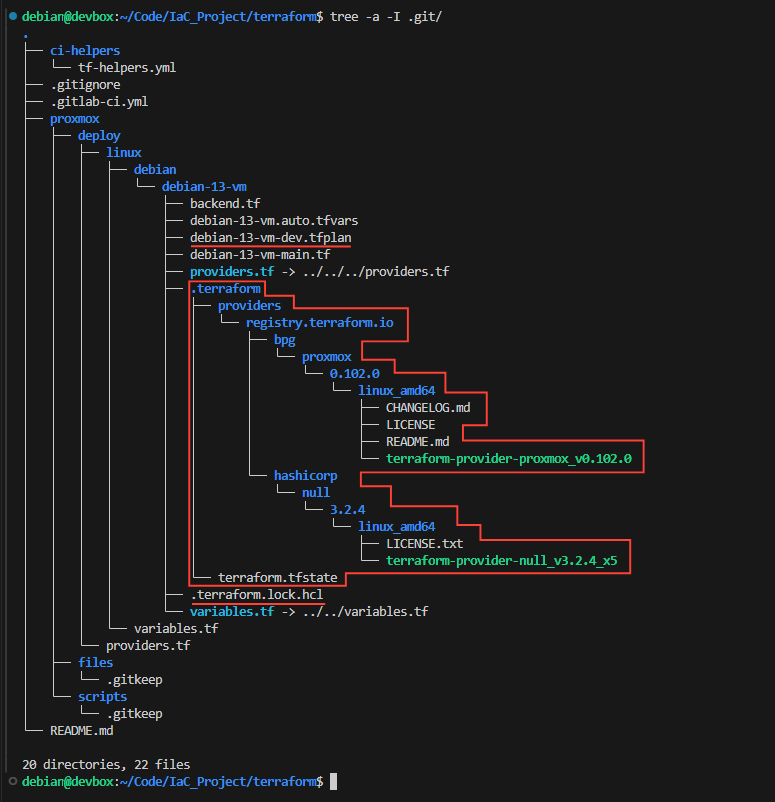
git commitFill in .gitignore
# Not adding the following files
# ------------------------------
# [+] *.auto.tfvars
#  |--- "infisical export" or GitLab CI/CD will add sensitive variables
#  |--- using "TF_VAR_var_name" format to match variable names in "variables.tf"
#  '--- No sensitive variables hard-coded in ".auto.tfvars"
# [+] providers.tf
#  |--- "infisical export" or GitLab CI/CD will add "PROXMOX_VE_API_TOKEN"
#  |--- to environment variables, which is automatically picked up by
#  '--- terraform/bpg for PVE API authentication

# Ignore all Terraform plan files in any directory
**/*.tfplan

# Ignore all Terraform working directories in any directory
**/.terraform/

# Ignore all Terraform dependency lock files in any directory
**/.terraform.lock.hcl
Unprotected Runner Variables
Like we did with the Packer pipeline, we'll be splitting up the jobs in the CI pipeline.
terraform plan— run on the unprotected runnerterraform apply— run on the protected runner
However... our unprotected runner will read the state file and plan any changes. This will require giving access to
/pool/terraform-managed because the production resources live in /pool/terraform-managed. There can only be one state file and one source of truth.To address this, we'll create another API token for the unprotected runner and store it in Infisical.
This isn't really a problem — unless the box is compromised and exposes the API key — because the unprotected runner may only run
terraform plan.The protected runner runs
terraform apply, but only after manual review after the merge request.Proxmox VE API Access
Add Runner Token to Proxmox VE
#!/bin/bash

REALM="pve"
GROUP="Terraform"
USERNAME="svc_gitlab_unprotected_runner@${REALM}"
TOKEN_NAME="terraform-token"

# Create the service account
pveum user add $USERNAME --comment "Service account for unprotected GitLab runner terraform jobs"

# Add the user to the group
pveum user modify $USERNAME --groups $GROUP

# Create an API token for the user
# No privilege separation, since inheriting off the group's permissions
pveum user token add $USERNAME $TOKEN_NAME --privsep 0
Adds a new user for the unprotected runner and adds to the "Terraform" group
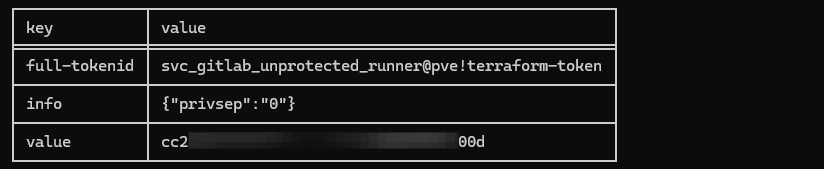
Add the Secret to Infisical
Again, since we do not want to give the unprotected runner access to Infisical OIDC auth, we're going to:
- Add the secret to the Infisical
stagingenvironment - Then, in a moment:
- Create a custom role to scope access to just that environment and path
- Create a machine ID and assign the role
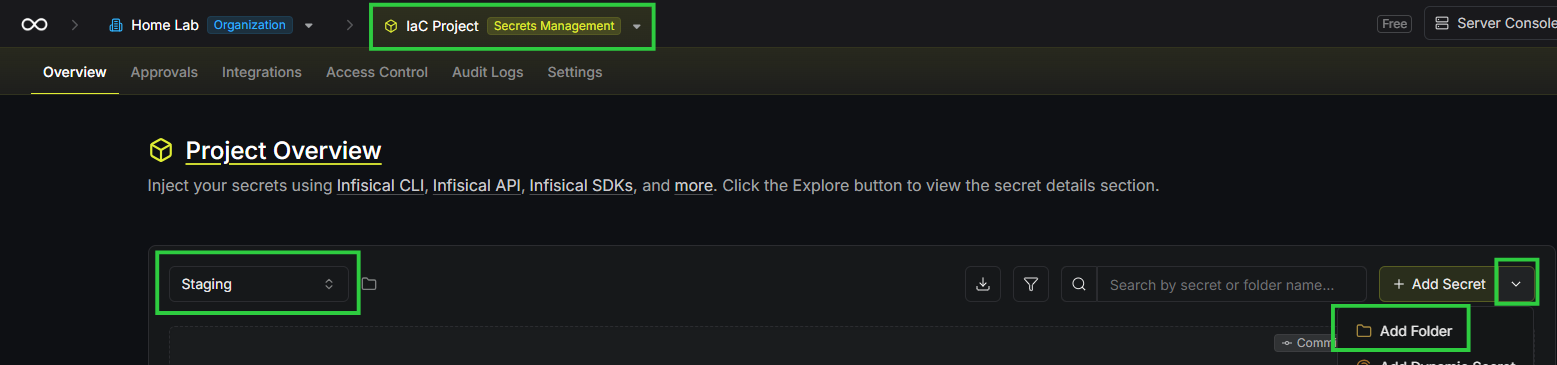
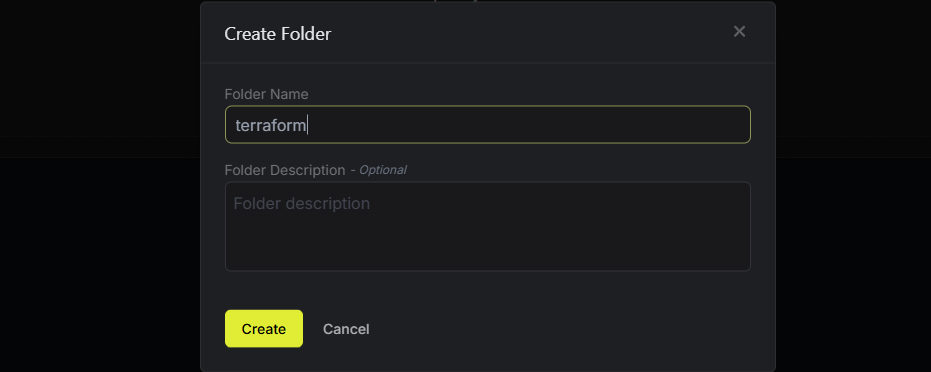

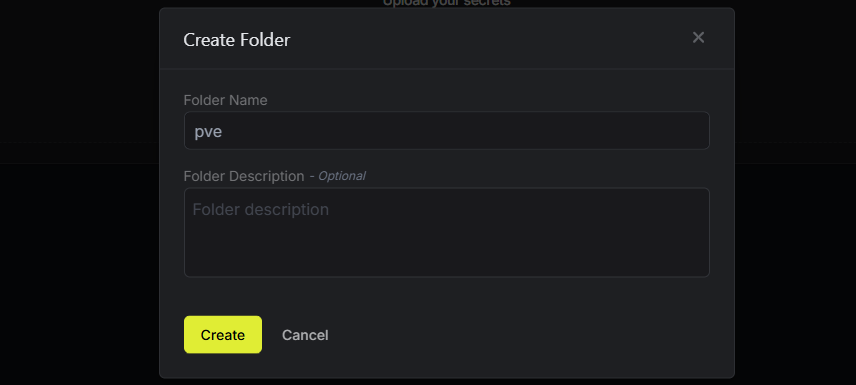
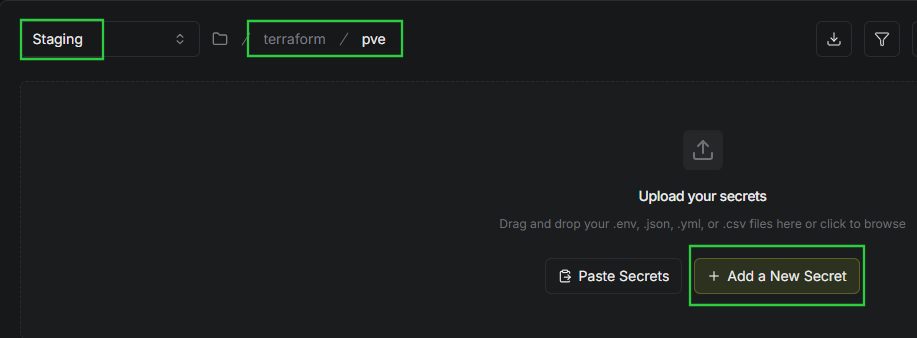
Secret 1
- Key:
PROXMOX_VE_API_TOKEN - Value:
svc_gitlab_unprotected_runner@pve!tf-readonly-token=cc2xxxxx-xxxx-xxxx-xxxx-xxxxxxxxx00d - Comment: API token for terraform plan jobs on unprotected GitLab runner
Managing the PVE Token
If you ever need to rotate this token, bear in mind that Proxmox VE does not have a built-in token rotation feature. Instead, you will have to do the following:
- Log into Proxmox VE
- Open Datacenter > API Tokens
- Select
svc_gitlab_unprotected_runnerand remove the token - Add a new token for
svc_gitlab_unprotected_runner- Uncheck privilege separation (inheriting group privileges)
- Set the Token ID to match the GitLab variable:
tf-readonly-token - Set a comment to describe the intent of the token
- Copy the resulting token value
- Update
PROXMOX_VE_API_TOKENinstaging -> /terraform/pve
- Update
Infisical Access to Required Secrets
Unprotected Runner Custom Role
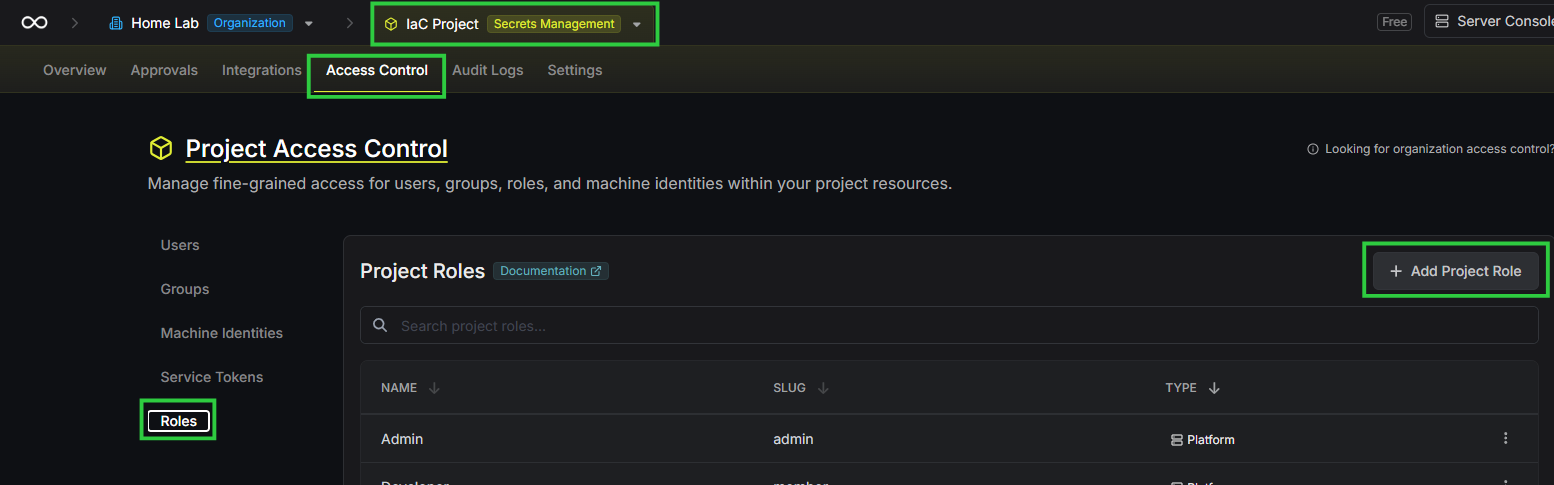
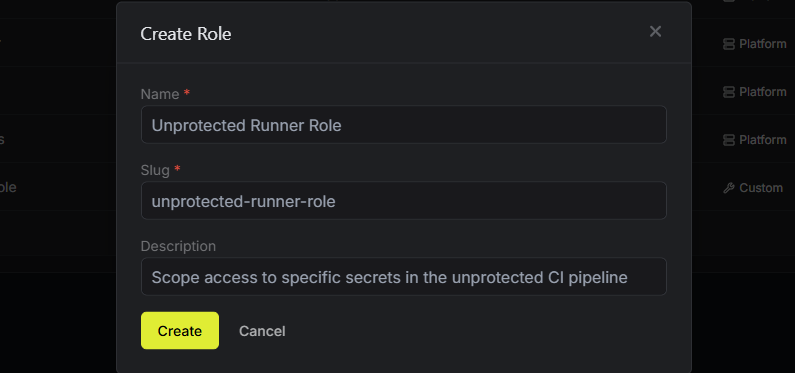
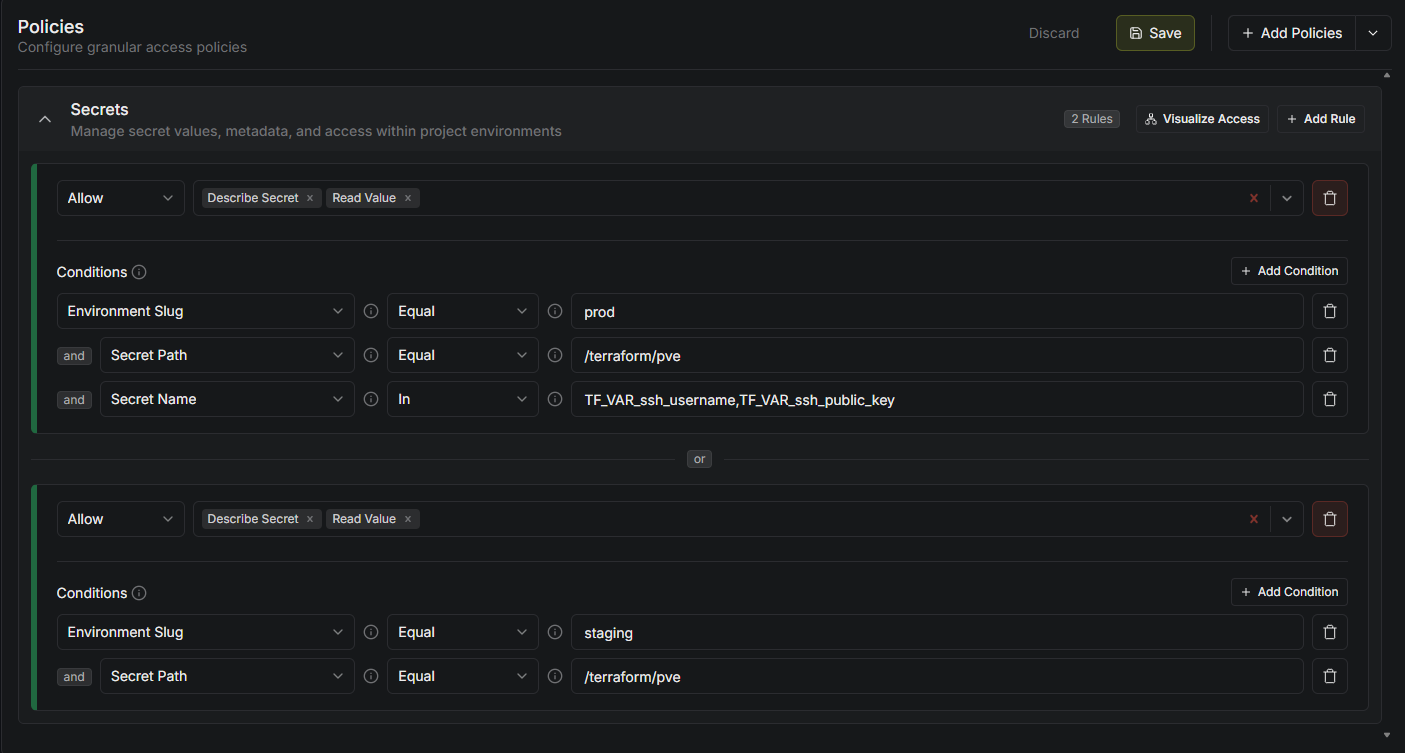
Rule 1
- May read only specific secret names in
prodenvironment, inside the/terraform/pvepath. - This is necessary to
terrafrom planwith the correct inputs forvariables.tf
Rule 2
- May read all secrets in
stagingenvironment, inside the/terrafrom/pvepath - This is necessary to
terrform planwith the PVE API key
Unprotected Runner Machine Identity
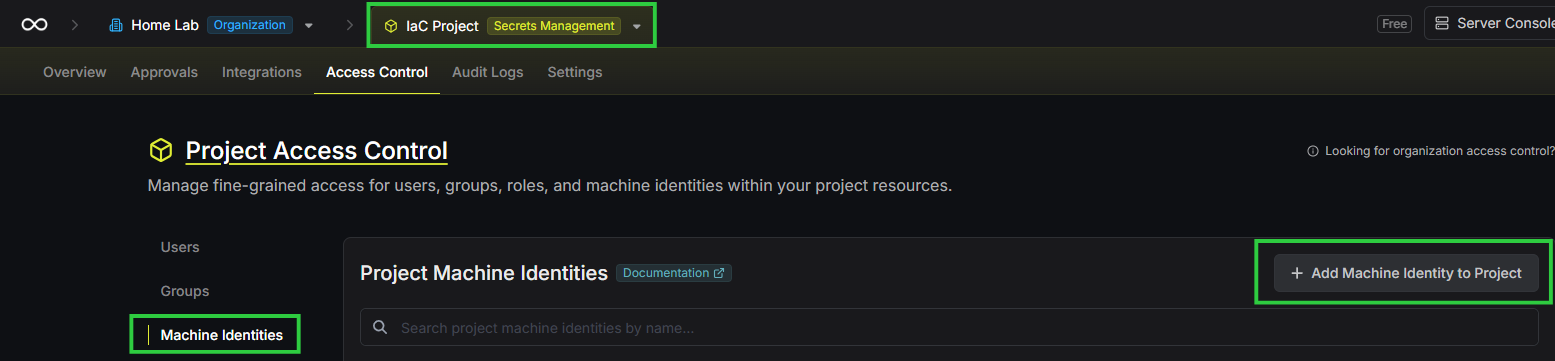
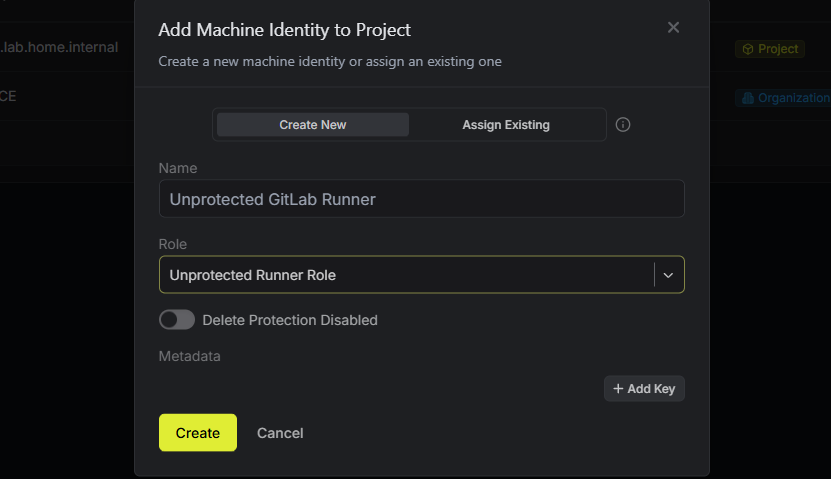
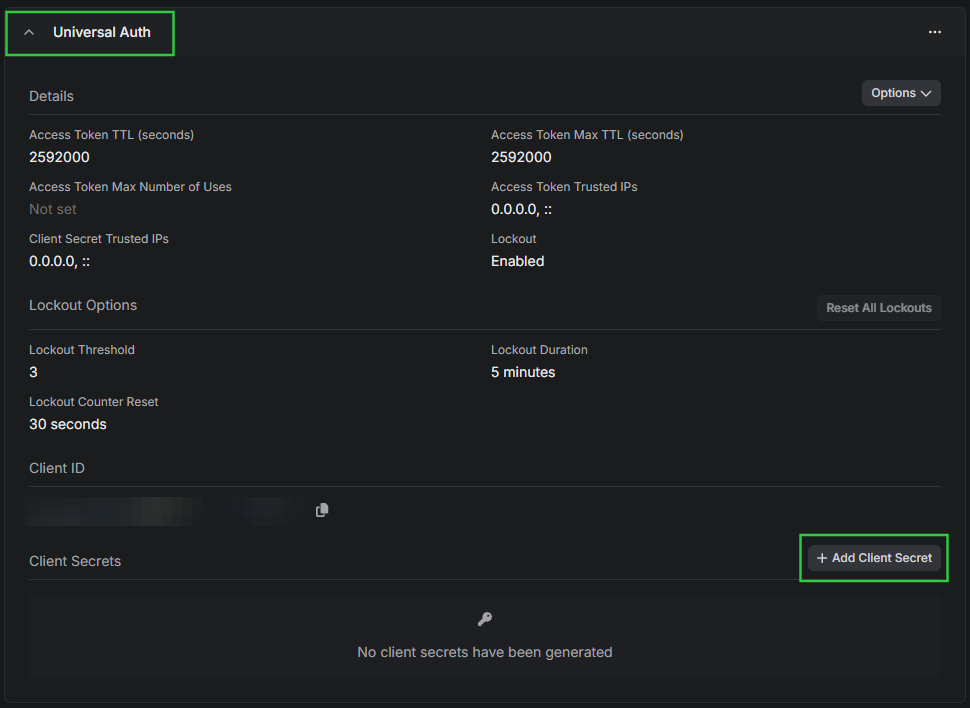
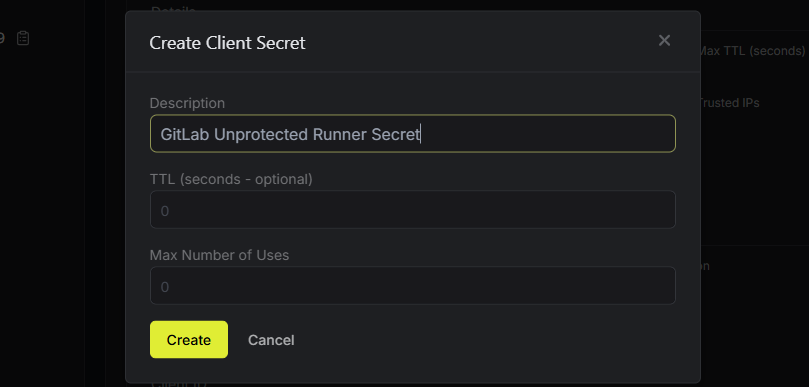
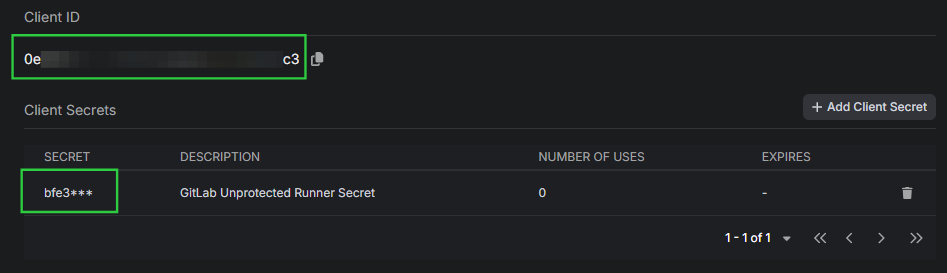
CI/CD Variables for Infisical Auth
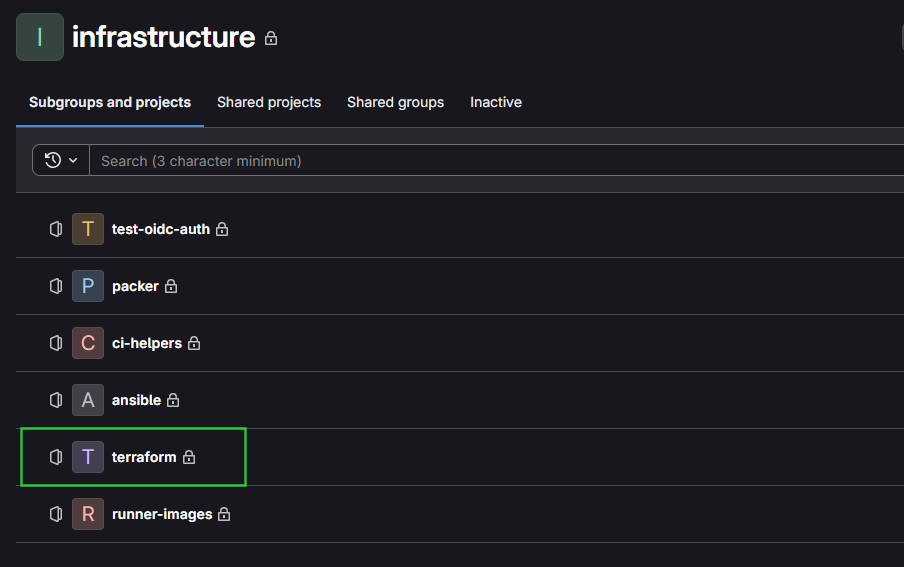
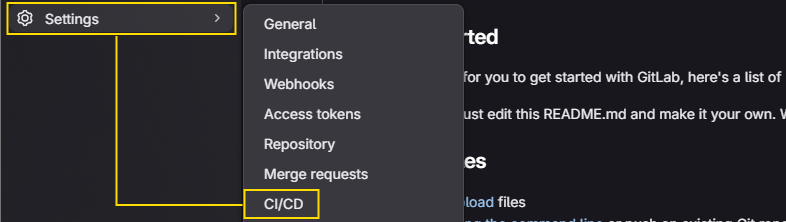


Secret 1
- Type: Variables
- Environments: All
- Visibility: Masked
- Flags:
- 🔳 Protect variable (unchecked) — required for unprotected runner access
- 🔳 Expand variable reference (unchecked)
- Description: Unprotected Runner client ID for universal auth
- Key:
UR_INFISICAL_MACHINE_ID - Value:
0exxxxxx-xxxx-xxxx-xxxx-xxxxxxxxxc3
Secret 2
- Type: Variables
- Environments: All
- Visibility: Masked
- Flags:
- 🔳 Protect variable (unchecked) — required for unprotected runner access
- 🔳 Expand variable reference (unchecked)
- Description: Unprotected Runner client secret for universal auth
- Key:
UR_INFISICAL_CLIENT_SECRET - Value: Paste in your secret from just before
Secret 3
- Type: Variables
- Environments: All
- Visibility: Masked
- Flags:
- 🔳 Protect variable (unchecked) — required for unprotected runner access
- 🔳 Expand variable reference (unchecked)
- Description: Infrastructure-as-Code project ID from Infisical
- Key:
UR_INFISICAL_PROJECT_ID - Value: Paste in your project ID as noted just before
Pipeline Configuration
ci-helpers/
tf-helpers.yml
tf-helpers.yml (SHOW/HIDE)
# Hidden job for re-usable 'terraform init' command
# TF_ROOT and TF_STATE_NAME passed in from calling jobs
# convert_report alias formats the JSON document for GitLab Terraform widget
# https://docs.gitlab.com/user/infrastructure/iac/mr_integration/
.tf-init:
  image: $TERRAFORM_IMAGE
  before_script:
    - export TF_HTTP_ADDRESS="${STATE_BASE_URL}/${TF_STATE_NAME}"
    - export TF_HTTP_LOCK_ADDRESS="${TF_HTTP_ADDRESS}/lock"
    - export TF_HTTP_UNLOCK_ADDRESS="${TF_HTTP_ADDRESS}/lock"
    - cd "${TF_ROOT}" && terraform init
    - shopt -s expand_aliases # Allow bash shell to expand aliases
    - alias convert_report="jq -r '([.resource_changes[]?.change.actions?]|flatten)|{\"create\":(map(select(.==\"create\"))|length),\"update\":(map(select(.==\"update\"))|length),\"delete\":(map(select(.==\"delete\"))|length)}'"

.tf-validate:
  extends: .tf-init # Pull docker image, cd working directory, terraform init
  stage: lint
  tags: [lint] # Triggers unprotected runner
  script:
    - terraform fmt -check -recursive
    - terraform validate . # Backend configured by .tf-init
  rules:
    # Triggers job when merge request created
    # But only if code changed inside the working directory
    # Automatically runs
    - if: $CI_PIPELINE_SOURCE == "merge_request_event"
      changes:
        - "${TF_ROOT}/**/*"
    # Triggers job any time code is commited to default branch
    # But only if code changed inside the working directory
    # Automatically runs
    - if: $CI_COMMIT_BRANCH == $CI_DEFAULT_BRANCH
      changes:
        - "${TF_ROOT}/**/*"
    # Job automatically runs on manual web trigger
    # Automatically runs
    - if: $CI_PIPELINE_SOURCE == "web"

.tf-plan:
  interruptible: true
  extends: .tf-init # Pull docker image, cd working directory, terraform init
  stage: plan
  tags: [validate] # Triggers unprotected runner
  variables:
    TF_STATE_NAME: "${RESOURCE_NAME}-prod"
  script:
    # Script block uses CI/CD masked variables for Infisical universal auth
    - |
      set -e
      INFISICAL_ACCESS_TOKEN=$(infisical login \
        --domain="https://secrets.lab.home.internal" \
        --method="universal-auth" \
        --client-id="${UR_INFISICAL_MACHINE_ID}" \
        --client-secret="${UR_INFISICAL_CLIENT_SECRET}" \
        --silent \
        --plain)

      echo "Importing the following secrets from prod"
      echo "  TF_VAR_ssh_public_key"
      echo "  TF_VAR_ssh_username"
      eval $(infisical export \
        --domain="https://secrets.lab.home.internal" \
        --token="${INFISICAL_ACCESS_TOKEN}" \
        --projectId="${UR_INFISICAL_PROJECT_ID}" \
        --env=prod \
        --path="/terraform/pve" \
        --format=dotenv-export \
        --silent)

      echo "Importing the read-only PVE API key from staging"
      eval $(infisical export \
        --domain="https://secrets.lab.home.internal" \
        --token="${INFISICAL_ACCESS_TOKEN}" \
        --projectId="${UR_INFISICAL_PROJECT_ID}" \
        --env=staging \
        --path="/terraform/pve" \
        --format=dotenv-export \
        --silent)
    - terraform plan -out "${CI_PROJECT_DIR}/${TF_STATE_NAME}.tfplan"
    - terraform show -json "${CI_PROJECT_DIR}/${TF_STATE_NAME}.tfplan" | convert_report > "${CI_PROJECT_DIR}/plan.json"
  rules:
    # Triggers job when merge request created
    # But only if code changed inside the working directory
    # Automatically runs
    - if: $CI_PIPELINE_SOURCE == "merge_request_event"
      changes:
        - "${TF_ROOT}/**/*"
    # Triggers job any time code is commited to default branch
    # But only if code changed inside the working directory
    # Automatically runs
    - if: $CI_COMMIT_BRANCH == $CI_DEFAULT_BRANCH
      changes:
        - "${TF_ROOT}/**/*"
    # Job automatically runs on manual web trigger
    # Automatically runs
    - if: $CI_PIPELINE_SOURCE == "web"
  artifacts:
    name: "${TF_STATE_NAME}-plan"
    paths:
      - "${TF_STATE_NAME}.tfplan" # Make the plan file available for the next job
      - "plan.json" # Make the 'plan.json' artifact available for GitLab Terraform widget
    reports:
      terraform: "plan.json" # Output report artifact to show in GitLab UI
    expire_in: 7 days

.tf-apply:
  extends:
    - .infisical-auth
    - .tf-init
  before_script:
    - !reference [.infisical-auth, before_script]
    - !reference [.tf-init, before_script]
  tags: [terraform] # Triggers the protected runner
  stage: apply
  variables:
    TF_STATE_NAME: "${RESOURCE_NAME}-prod"
    INFISICAL_SECRET_PATH: "/terraform/pve" # Pull prod secrets using Infisial OIDC
  script:
    - terraform apply "${CI_PROJECT_DIR}/${TF_STATE_NAME}.tfplan"
    - terraform output -raw vm_fqdn > "${CI_PROJECT_DIR}/${RESOURCE_NAME}-hostnames.txt" # Output a list of hostnames for SSH test login
  rules:
    # Triggers job any time code is commited to default branch
    # But only if code changed inside the working directory
    # User must trigger the job
    - if: $CI_COMMIT_BRANCH == $CI_DEFAULT_BRANCH
      changes:
        - "${TF_ROOT}/**/*"
      when: manual
    # Job automatically runs on manual web trigger
    # User must trigger the job
    - if: $CI_PIPELINE_SOURCE == "web"
      when: manual
  artifacts:
    name: "${TF_STATE_NAME}-hosts"
    paths:
      - "${RESOURCE_NAME}-hostnames.txt" # Make the list of hostnames available to the next job
    expire_in: 1 day

.test-ssh:
  extends:
    - .infisical-auth
    - .tf-init
  before_script:
    - !reference [.infisical-auth, before_script]
    - !reference [.tf-init, before_script]
  tags: [terraform] # Triggers the protected runner
  stage: verify
  variables:
    TF_STATE_NAME: "${RESOURCE_NAME}-prod"
    INFISICAL_SECRET_PATH: "/terraform/pve" # Pull prod secrets using Infisial OIDC
  script:
    - |
      echo "========================================================"
      echo " Phase 1: Environment Setup"
      echo "========================================================"
      eval $(ssh-agent -s)

      # Strip potential carriage returns before loading the key
      echo -e "$TERRAFORM_SSH_PRIVATE_KEY" | ssh-add -

      # Abstract SSH options to remove visual clutter in the loop
      SSH_OPTS="-o UserKnownHostsFile=/dev/null -o StrictHostKeyChecking=no -o BatchMode=yes -o ConnectTimeout=5"
      SSH_USER="${TF_VAR_ssh_username}"

      export TESTING_FAILED=0

      echo ""
      echo "========================================================"
      echo " Phase 2: Connection Verification"
      echo "========================================================"

      for TARGET_HOST in $(cat "${CI_PROJECT_DIR}/${RESOURCE_NAME}-hostnames.txt"); do
        echo "-> Commencing verification for: ${TARGET_HOST}"
        HOST_UP=0

        for attempt in {1..30}; do

          # Step A: Wait for DNS resolution and Network routing (Port 22)
          if nc -w 5 -vz "$TARGET_HOST" 22 2>/dev/null; then

            # Step B: Wait for Cloud-Init and SSH Daemon to accept keys
            if ssh $SSH_OPTS ${SSH_USER}@${TARGET_HOST} 'echo "Ping"' > /dev/null 2>&1; then
               echo "   [OK] SSH authentication successful on attempt ${attempt}!"
               HOST_UP=1
               break
            else
               echo "   [WAIT] Port 22 is open, but auth rejected (Attempt ${attempt}/30). Retrying in 30s..."
            fi

          else
             echo "   [WAIT] Waiting for DNS / Network routing (Attempt ${attempt}/30). Retrying in 30s..."
          fi

          sleep 30
        done

        # If the loop exhausts all 30 attempts without breaking
        if [ $HOST_UP -eq 0 ]; then
           echo "-> [ERROR] Failed to verify ${TARGET_HOST} after 15 minutes."
           export TESTING_FAILED=1
        fi

      done

      echo ""
      echo "========================================================"
      echo " Phase 3: Rollback Evaluation"
      echo "========================================================"

      if [ $TESTING_FAILED -eq 1 ] ; then
        echo "-> [FATAL] Verification failed. Initiating automated rollback..."
        terraform plan -destroy -out "${TF_STATE_NAME}.tfplan"
        terraform apply "${TF_STATE_NAME}.tfplan"
        exit 1
      fi

      echo "-> [SUCCESS] All hosts verified. Deployment complete!"
  rules:
    # Triggers job any time code is commited to default branch
    # But only if code changed inside the working directory
    # Chained after apply, so no manual trigger
    - if: $CI_COMMIT_BRANCH == $CI_DEFAULT_BRANCH
      changes:
        - "${TF_ROOT}/**/*"
    # Job automatically runs on manual web trigger
    # Automatically runs
    # Chained after apply, so no manual trigger
    - if: $CI_PIPELINE_SOURCE == "web"

.tf-show-state:
  extends:
    - .infisical-auth
    - .tf-init
  before_script:
    - !reference [.infisical-auth, before_script]
    - !reference [.tf-init, before_script]
  tags: [terraform] # Triggers the protected runner
  stage: check
  variables:
    TF_STATE_NAME: "${RESOURCE_NAME}-prod"
    INFISICAL_SECRET_PATH: "/terraform/pve" # Pull prod secrets using Infisial OIDC
  script:
    - |
      set -e
      echo "Checking production state of resource(s) in: ${TF_ROOT}"
      echo "Outputting terraform state in HCL format"
      echo "Empty output means resource does not exist (destroyed or never created)."
      terraform show
  rules:
    # Triggers job any time code is commited to default branch
    # But only if code changed inside the working directory
    # User must manually trigger
    # But "allow_failure: true" allows the pipeline to show success
    # Because, the user may not WANT to run this job
    - if: $CI_COMMIT_BRANCH == $CI_DEFAULT_BRANCH
      changes:
        - "${TF_ROOT}/**/*"
      when: manual
      allow_failure: true
    # Job automatically runs on manual web trigger
    # User must trigger the job
    - if: $CI_PIPELINE_SOURCE == "web"
      when: manual

.tf-destroy:
  extends:
    - .infisical-auth
    - .tf-init
  before_script:
    - !reference [.infisical-auth, before_script]
    - !reference [.tf-init, before_script]
  tags: [terraform] # Triggers the protected runner
  stage: destroy
  variables:
    TF_STATE_NAME: "${RESOURCE_NAME}-prod"
    INFISICAL_SECRET_PATH: "/terraform/pve" # Pull prod secrets using Infisial OIDC
  script:
    - terraform plan -destroy -out "${TF_STATE_NAME}.tfplan"
    - terraform apply "${TF_STATE_NAME}.tfplan"
  rules:
    # Triggers job any time code is commited to default branch
    # But only if code changed inside the working directory
    # User must manually trigger
    # But "allow_failure: true" allows the pipeline to show success
    # Because, the user may not WANT to run this job
    - if: $CI_COMMIT_BRANCH == $CI_DEFAULT_BRANCH
      changes:
        - "${TF_ROOT}/**/*"
      when: manual
      allow_failure: true
    # Job automatically runs on manual web trigger
    # User must trigger the job
    - if: $CI_PIPELINE_SOURCE == "web"
      when: manual
.gitlab-ci.yml
.gitlab-ci.yml (SHOW/HIDE)
# Source in the Infisical authentication helper
include:
  - local: /ci-helpers/tf-helpers.yml
  - project: 'infrastructure/ci-helpers'
    ref: main
    file: '/infisical.gitlab-ci.yml'
  - template: Security/Secret-Detection.gitlab-ci.yml
  - template: Security/SAST.gitlab-ci.yml

# Trigger pipeline in the web and on merge rquests to main (or other default)
workflow:
  rules:
    - if: $CI_PIPELINE_SOURCE == "web"
    - if: $CI_PIPELINE_SOURCE == "merge_request_event"
    - if: $CI_COMMIT_BRANCH == $CI_DEFAULT_BRANCH

# Stages to break up pipeline jobs
stages:
  - lint
  - plan
  - apply
  - verify
  - check
  - destroy

# ----- SECRETS SCANNING START ----- #

sast:
  stage: lint

secret_detection:
  stage: lint

# ----- SECRETS SCANNING END ----- #

# Global pipeline variables
# Authentication to container registry to pull Dockerized terraform
variables:
  DOCKER_AUTH_CONFIG: >
    {
      "auths": {
        "$CI_REGISTRY": {
          "username": "$CI_REGISTRY_USER",
          "password": "$CI_JOB_TOKEN"
        }
      }
    }
  TERRAFORM_IMAGE: "$CI_REGISTRY/infrastructure/runner-images/terraform:${TERRAFORM_VERSION}" # References version variable from group CI/CD settings
  TF_HTTP_USERNAME: "gitlab-ci-token" # GitLab CI pre-defined username
  TF_HTTP_PASSWORD: "${CI_JOB_TOKEN}" # Injected into the runner environment dynamically
  TF_HTTP_LOCK_METHOD: "POST"
  TF_HTTP_UNLOCK_METHOD: "DELETE"
  TF_HTTP_RETRY_WAIT_MIN: "5"
  STATE_BASE_URL: "${CI_SERVER_URL}/api/v4/projects/${CI_PROJECT_ID}/terraform/state"

# ---- Debian 13 VM ----

# Runs when merge request opened and files in TF_ROOT changed
debian-13-vm-validate:
  extends: .tf-validate
  variables:
    RESOURCE_NAME: "debian-13-vm" # Variable used by multiple hidden jobs
    TF_ROOT: "proxmox/deploy/linux/debian/debian-13-vm" # Variable used by multiple hidden jobs

# Runs when merge request opened and files in TF_ROOT changed
debian-13-vm-plan:
  extends: .tf-plan
  needs: [debian-13-vm-validate]
  variables:
    RESOURCE_NAME: "debian-13-vm"
    TF_ROOT: "proxmox/deploy/linux/debian/debian-13-vm"

# First job to run on merge to default branch
# Also runs on manual web trigger
debian-13-vm-apply:
  extends: .tf-apply
  variables:
    RESOURCE_NAME: "debian-13-vm"
    TF_ROOT: "proxmox/deploy/linux/debian/debian-13-vm"
  needs:
    - job: debian-13-vm-plan
      optional: true

# Second job to run on merge to default branch
# Also runs on manual web trigger
debian-13-vm-ssh-test:
  extends: .test-ssh
  variables:
    RESOURCE_NAME: "debian-13-vm"
    TF_ROOT: "proxmox/deploy/linux/debian/debian-13-vm"
  needs: [debian-13-vm-apply]

# Runs on manual web trigger
debian-13-vm-show-state:
  extends: .tf-show-state
  variables:
    RESOURCE_NAME: "debian-13-vm"
    TF_ROOT: "proxmox/deploy/linux/debian/debian-13-vm"

# Runs on manual web trigger
debian-13-vm-destroy:
  extends: .tf-destroy
  variables:
    RESOURCE_NAME: "debian-13-vm"
    TF_ROOT: "proxmox/deploy/linux/debian/debian-13-vm"
Merge Request
Quick Review
We're ready to commit the code to the repository, but first, a quick review of what we've done.
On the DevBox
- We've defined all of the source code
- We've pulled the
terraformDocker image from the container registry- Tested
infisical exportfromdev- Added
TF_VAR_ssh_usernameandTF_VAR_ssh_public_keytodev - For use with
cloud-initinitialization on the test VM
- Added
- Made sure we can:
- Authenticate to the GitLab Terraform API
- Write state files to the
http {}backend - Authenticate to the Proxmox VE API using a separate token with write to
/pool/terraform-testing
- We have verified all phases of the
terraformlifecycle:terraform planterraform apply- SSH login using test key to the target VM
terrafrom plan -destroyterrafrom apply
- Tested
- Populated the
.gitignorefile
Prepared the Unprotected Runner
- Created a separate PVE API token and stored as a CI/CD variable
Firewall Rules
Firewalls required for production:
If you're operating on a flat network where all of your hosts are in the same subnet, this will most likely not apply to you, unless you're using host-based firewalls — e.g. iptables.
- Allow Protected Runner to reach PVE API
- Source: Protected Runner
Source Port: any - Destination: Proxmox Node(s)
Destination Port: 8006
- Source: Protected Runner
- Allow Unprotected Runner to reach PVE API
- Source: Unprotected Runner
Source Port: any - Destination: Proxmox Node(s)
Destination Port: 8006
- Source: Unprotected Runner
- Allow Protected Runner to Pull from Container Registry
- Source: Protected Runner
Source Port: any - Destination: GitLab CE Server
Destination Port: 5050
- Source: Protected Runner
- Allow Unprotected Runner to Pull from Container Registry
- Source: Unprotected Runner
Source Port: any - Destination: GitLab CE Server
Destination Port: 5050
- Source: Unprotected Runner
- Allow Protected Runner to Target VM
- Source: Protected Runner
Source Port: any - Destination: Target VM VLAN — easiest solution
Destination Port: 22
- Source: Protected Runner
Commit the Code
cd ~/Code/IaC_Project/terraformgit add .git commit -m "First commit of all source code."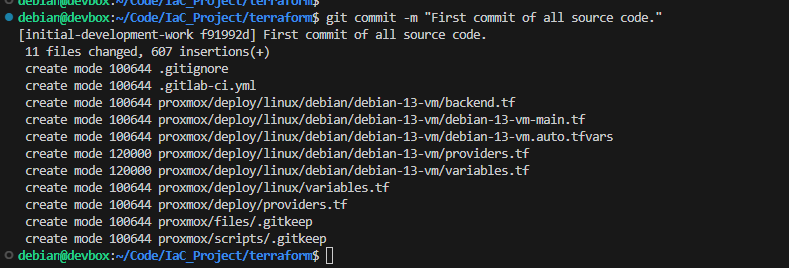
git push -u origin initial-development-workCreate Merge Request


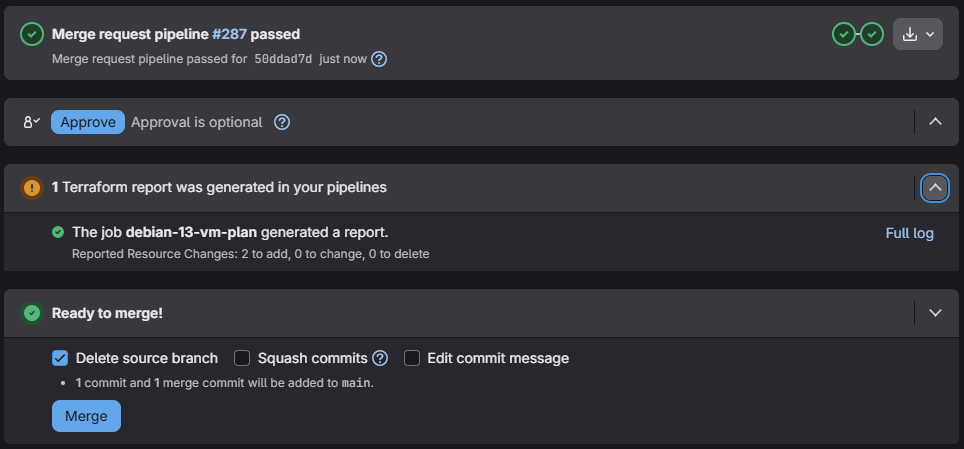
The Terraform merge request widget shows an overview of planned changes:
- 2 to add — means we're adding the following according to
debian-13-vm-main.tfresource "proxmox_virtual_environment_vm" "debian_13_vm_clone"resource "null_resource" "vm_reboot"
terraform plan.
Merge into Main
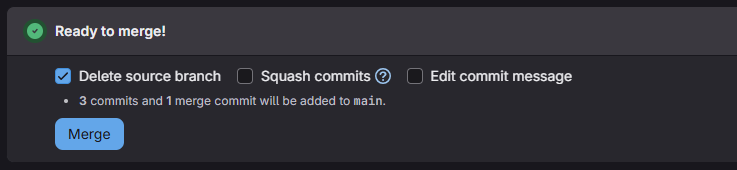



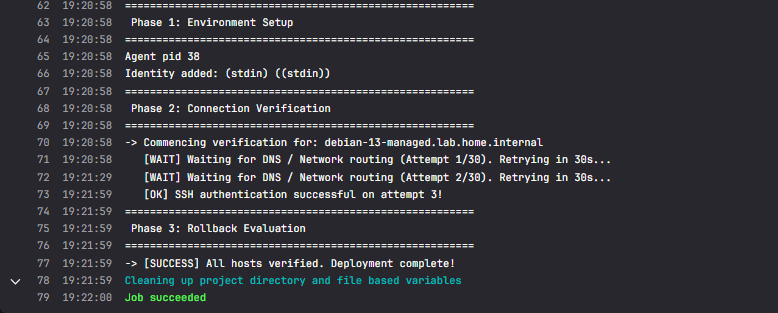
git switch maingit pull --prunegit branch -d initial-development-workState Drift
Moving forward, resist the urge to manually modify the VM in the Proxmox VE GUI.
If you must modify the VM, you should resist the urge to modify the VM by hand in the web GUI. This is because you will cause state drift.
By changing the settings manually, you will have introduced changes that deviate from the last known state currently stored in the GitLab HTTP backend. The next time Terraform runs terraform plan, the settings in the state file will no longer match the actual resource.
Your process for changing the VM should be:
git switch maingit pull --rebasegit checkout -b update-vm-start-at-boot— example- Change your settings in
.auto.tfvarsor Infisical secrets git add .git commit -m "Enables VM start at boot"— examplegit push -u origin update-vm-start-at-boot -o merge_request.createupdate-vm-start-at-bootis an example descriptive branch, modify accordingly
- Review pipeline results and merge to main
git switch main && git pull --prune && git branch -d update-vm-start-at-bootupdate-vm-start-at-bootis an example descriptive branch, modify accordingly
Pipeline Sanity Check
Code Change
We can make a very small cosmetic change to something in debian-13-vm.auto.tfvars — say the vm_name variable. Then, we can add changes, commit, and merge.
cd ~/Code/IaC_Project/terraformgit checkout -b test-pipeline-logicStart a new branch to add the changes
Edit the debian-13-vm.auto.tfvars file and change the vm_name variable to something different — completely change it or tack on something to the end.
git add . && git commit -m "Changes VM name for testing."git push -u origin test-pipeline-logic -o merge_request.createPush your changes and automatically open a merge request
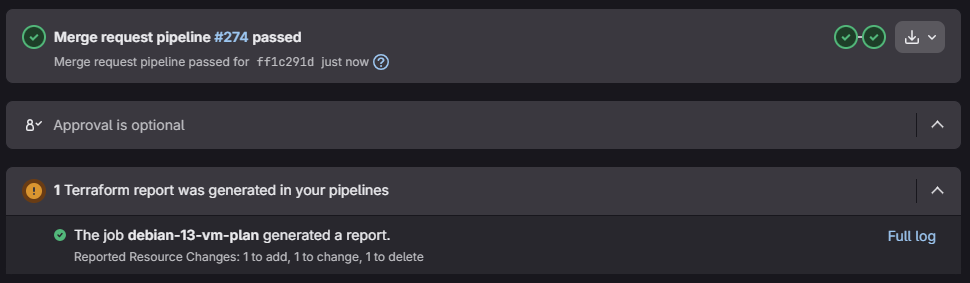
- 1 to add — because the reboot provisioner is being added for the new name
- 1 to change — changes the
debian_13_vm_cloneresource with the new name - 1 to delete — removes the old reboot provisioner with the old name

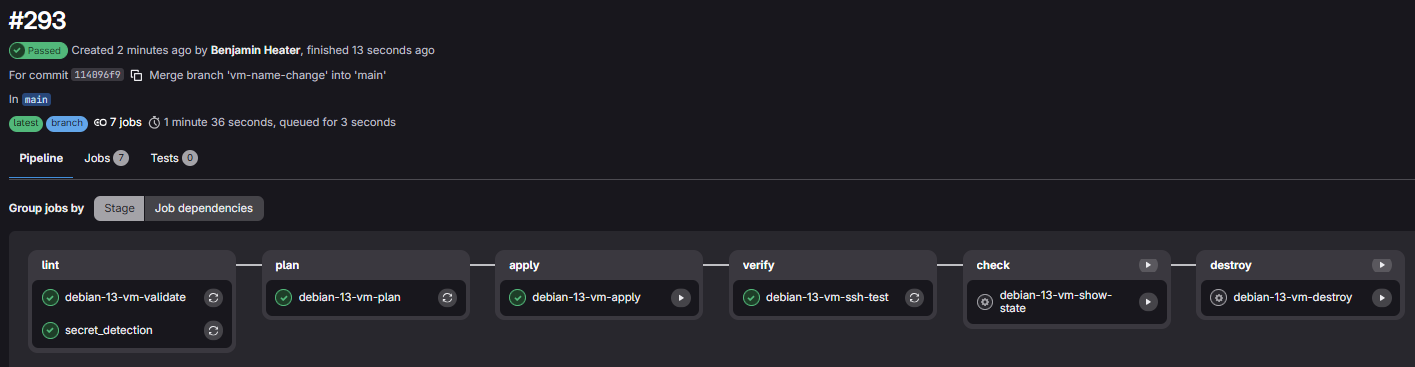
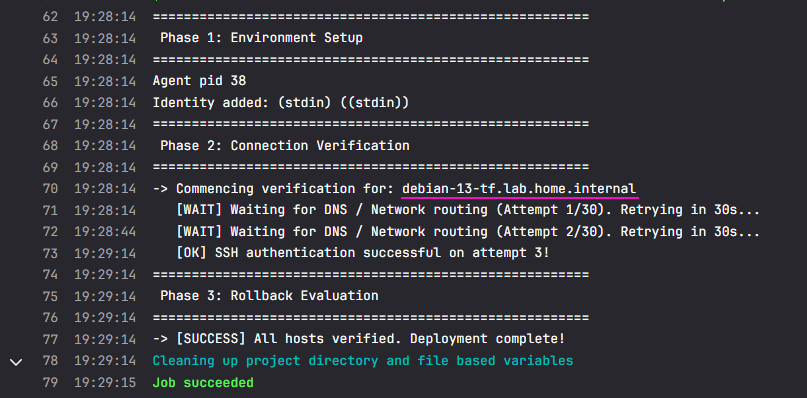
vm_reboot provisioner kicked in due to the name change, rebooted the VM, and the new hostname was updated by DHCP dynamic DNS.cd ~/Code/IaC_Project/terraformgit switch main && git pull --prunegit branch -d test-pipeline-logicClean up the feature branch after merge into main
Manual Pipeline Trigger
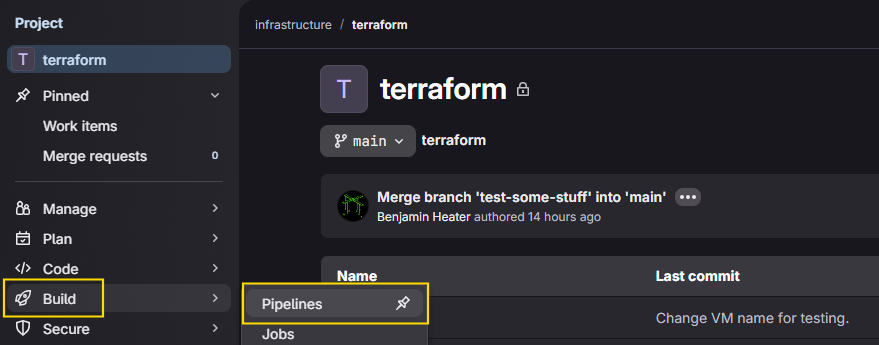

if: $CI_PIPELINE_SOURCE == "web" condition in the pipeline.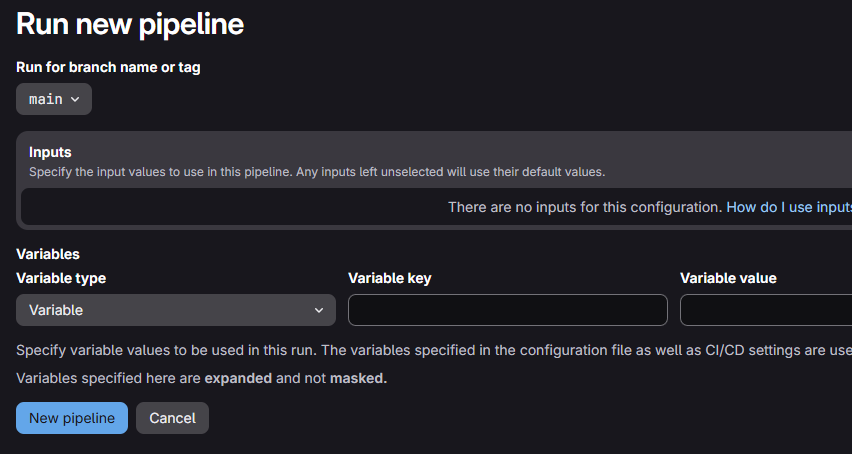


Pipeline Expansion
Moving forward, you're certainly going to want to add more Packer templates and deploy them with Terraform. Looking at the repository structure above, you'd add your new deployments under proxmox/deployments/linux/. Or, if you end up building Windows templates, put them under proxmox/deployments/windows/.
From there, you'd go through your initial phases of local iterative testing and move to add them to your pipeline.
Then, you'd add your pipeline jobs to the .gitlab-ci.yml file.
Example Pipeline Additions (SHOW/HIDE)
# # ---- Debian 13 VM ----
# ...
# ...
# ...

# ---- Ubuntu 24.04 VM ----

# Runs when merge request opened and files in TF_ROOT changed
ubuntu-2404-vm-validate:
  extends: .tf-validate
  variables:
    RESOURCE_NAME: "ubuntu-2404-vm"
    TF_ROOT: "proxmox/deploy/linux/ubuntu/ubuntu-2404-vm"

# Runs when merge request opened and files in TF_ROOT changed
ubuntu-2404-vm-plan:
  extends: .tf-plan
  needs: [ubuntu-2404-vm-validate]
  variables:
    RESOURCE_NAME: "ubuntu-2404-vm"
    TF_ROOT: "proxmox/deploy/linux/ubuntu/ubuntu-2404-vm"

# First job to run on merge to default branch
# Also runs on manual web trigger
ubuntu-2404-vm-apply:
  extends: .tf-apply
  variables:
    RESOURCE_NAME: "ubuntu-2404-vm"
    TF_ROOT: "proxmox/deploy/linux/ubuntu/ubuntu-2404-vm"
  needs:
    - job: ubuntu-2404-vm-plan
      optional: true

# Second job to run on merge to default branch
# Also runs on manual web trigger
ubuntu-2404-vm-ssh-test:
  extends: .test-ssh
  variables:
    RESOURCE_NAME: "ubuntu-2404-vm"
    TF_ROOT: "proxmox/deploy/linux/ubuntu/ubuntu-2404-vm"
  needs: [debian-13-vm-apply]

# Runs on manual web trigger
ubuntu-2404-vm-show-state:
  extends: .tf-show-state
  variables:
    RESOURCE_NAME: "ubuntu-2404-vm"
    TF_ROOT: "proxmox/deploy/linux/ubuntu/ubuntu-2404-vm"

# Runs on manual web trigger
ubuntu-2404-vm-destroy:
  extends: .tf-destroy
  variables:
    RESOURCE_NAME: "ubuntu-2404-vm"
    TF_ROOT: "proxmox/deploy/linux/ubuntu/ubuntu-2404-vm"
Or, you could move it into
ci-helpers/ubuntu-pipeline and source it in via an include: -local reference.Closing the Terraform Module
Quick Review
Lessons Learned
- We established the model of local iterative refinement
- We don't want to test and troubleshoot in the pipeline, as it's too time consuming
- We do want to test and troubleshoot locally in our development environment while we debug issues until a successful deployment
- We realized the need to test Terraform plans in the development environment and created separate resources in Proxmox VE and Infisical to facilitate this
- In the development environment, we run
terraform planwith extra variable flags, such as-var resource_pool=terraform-testingto override those in the.auto.tfvarsfile
- In the development environment, we run
- We identified directories and files we want to keep out of GitLab, and added them to the
.gitignorefile - The unprotected runner reads the state file and plans changes against resources in
/pool/terraform-managed- So, we added a PVE API token and added to the
Terraformgroup and stored it in Infisical - As mentioned before, no way around this, since the runner needs to
terraform planchanges against the state file which points to/pool/terraform-managed - Only a problem if the box is compromised, since the
Terraformgroup has write access to the resource pool- But still not worst case scenario, since the
Terraformgroup may only modify/pool/terraform-managedand nothing else - Also, being on the unprotected runner — inside a restricted VLAN — reduces the blast radius
- But still not worst case scenario, since the
- So, we added a PVE API token and added to the
Moving Forward
- Our pipeline for
debian-13-vmshould now be stable enough that we can:- Start a new feature branch
- Make changes to the Terraform plan or variables
git add .,git commit, andgit pushand let the pipeline handle theterraform planandterraform applyactions
- For new Terraform plans...
- You'll create your source code and repeat the local iterative refinement until you have a successful plan
- Use your
terraformcontainer from the GitLab Container Registry - Log into Infisical with universal auth and
infisical exportyour secrets fromdev - Set your environment variables for
TF_HTTP_state management terraform fmt .andterraform validate .- Create your test plan with
-var resource=terraform-testing - And,
terraform applyand monitor - Finally,
terrform plan -destroyandterraform applyto clean up
- Use your
- Then, after testing, you'll update
.gitlab-ci.ymlwith any new jobs required to deploy your plan git add,git commit, andgit pushyour new template and pipeline
- You'll create your source code and repeat the local iterative refinement until you have a successful plan
- Updating your README.md
- At some point, you should update your
README.mdfile - In this file, you should outline the steps you (or other developers) should take when carrying out local development and testing and commits to production
- At some point, you should update your
Helpful Links

Terraform bpg provider for Proxmox

proxmox_virtual_environment_vm arguments
 hashicorp
Examples of infrastructure-as-code using Terraform (sadly, none for Proxmox)
Next Step
 0xBEN
0xBEN