
Purpose
Since we haven't yet built out our Infrastructure-as-Code CI/CD pipelines, we'll want to create some initial templates for use when building out our infrastructure for the lab. Some key benefits to this are:
- Install the operating system once, saving time
- Bake in our internal PKI Root CA certificate
- Save with an ideal configuration state and set of packages
10000+ as your range for templates.Proxmox VE Imports Storage
You are going to need to identify the storage backend where you want to save your templates. Your environment and my environment are likely going to be configured differently. Below, I show a couple of template storage options.
Proxmox Default: local

My Environment: ZFS Dataset
Since my storage backend is ZFS, I created a directory called, Templates and pointed it at my ZFS mountpoint — effectively, /rackdrives/Templates. It acts as a subdirectory under the ZFS pool.


VM Template
Custom Cloud-Init Storage
This lab is going to make use of Proxmox VE snippets and the custom Cloud-Init flag --cicustom.
This flag allows us to point to a storage pool and file name and feed the custom snippet into the Cloud-Init process.
My Environment: NFS Share
I'm going to be using a NFS share for this process, since the NFS share will be cluster-wide.
[Datacenter]---Adds NFS Storage
 |             synology-nas.nas.home.internal:/volume1/PVE_Code_Snippets
 |             /mnt/pve/PVE_Code_Snippets
 |
 |----Node 1----.                                              .--------------------------------------.
 |----Node 2----|                                              | Synology NAS                         |
 |              |----[/mnt/pve/PVE_Code_Snippets/snippets/]----|  Shared Folder                       |
 |----Node 3----|                                              | /volume1/PVE_Code_Snippets/snippets/ |
 '----Node 4----'                                              '--------------------------------------'
Save any cloud-init configs in "/mnt/PVE_Code_Snippets/snippets/", shared among all nodes
No NFS Share?
If you don't have network storage, then you can modify the local storage pool to accept data type of Snippets.


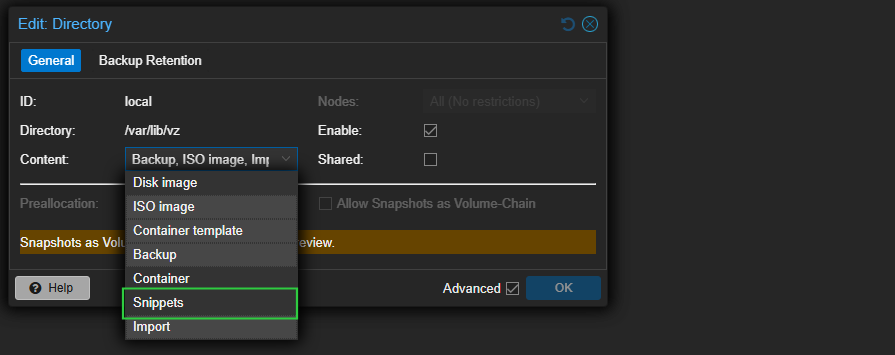
If using
local, then be advised that when you create a snippet -- such as script.sh -- you will have to copy script.sh to /var/lib/vz/snippets/ on every PVE node.Debian Official Cloud Image
Import the Disk Image


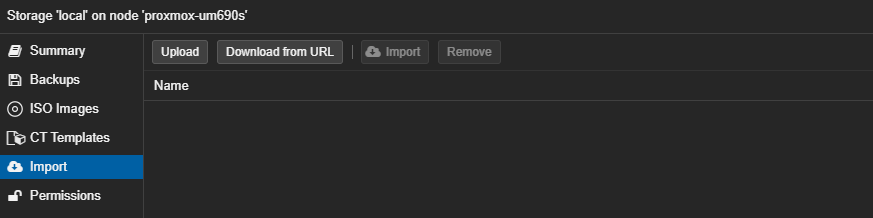



Workaround for DHCP Race Condition
When the machine is first booted, cloud-init networking configuration added by Proxmox VE cloud-init drive does not include a mechanism for the host to send its hostname during the DHCP discover process. Therefore, we'll inject a Systemd unit into the template to restart the networking stack once the hostname is set.
apt install -y libguestfs-toolsvirt-customize -a /var/lib/vz/import/debian-13-generic-amd64.qcow2 \
--write /etc/systemd/system/dhcp-hostname-sync.service:'[Unit]
Description=Restart DHCP discover after hostname set
After=cloud-init.service
Before=cloud-config.service
[Service]
Type=oneshot
ExecStart=/bin/sh -c '"'"'for i in $(ip -o route show | sed -n "s/.* dev \([^ ]*\).*/\1/p" | sort -u); do networkctl reconfigure "$i"; done'"'"'
RemainAfterExit=yes
[Install]
WantedBy=cloud-config.service
' \
--run-command 'systemctl enable dhcp-hostname-sync.service' \
--run-command "truncate -s 0 /etc/machine-id /var/lib/dbus/machine-id"Prepare the VM Template
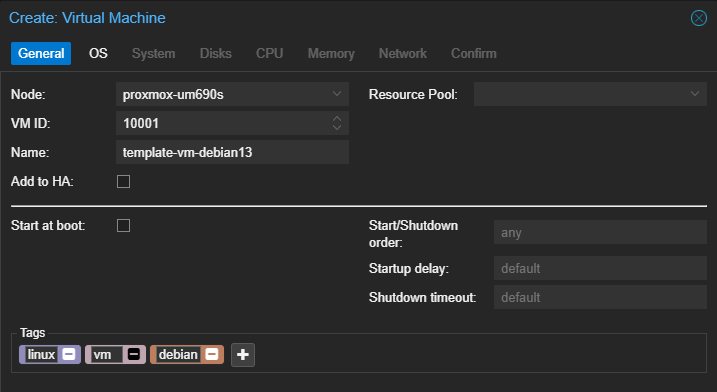
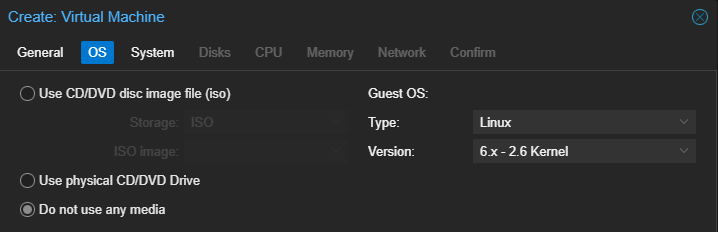
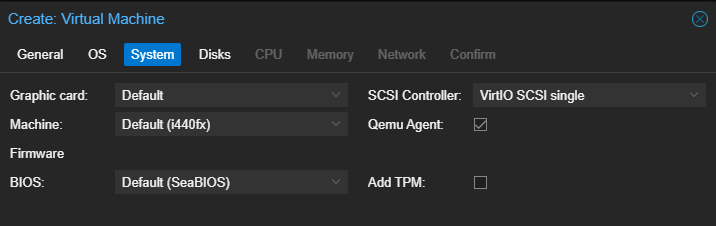
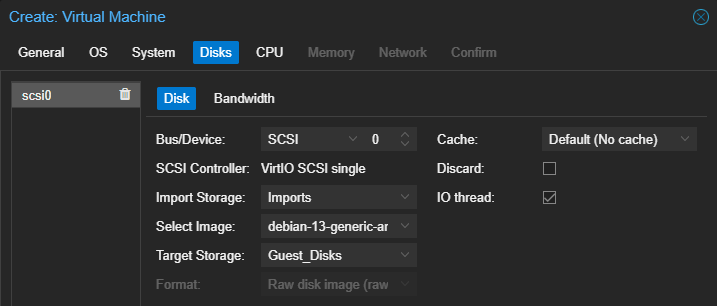
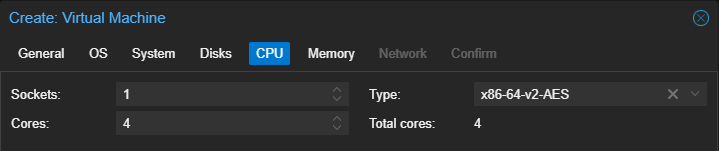

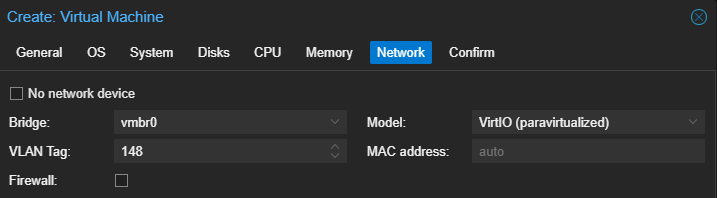
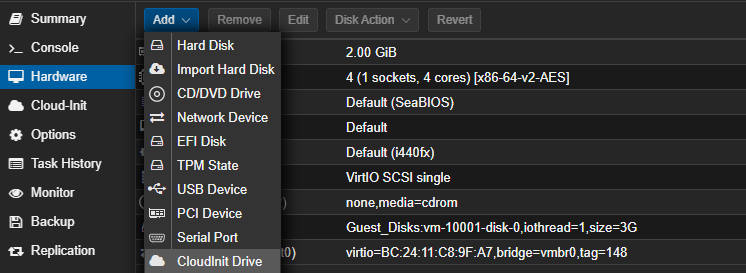

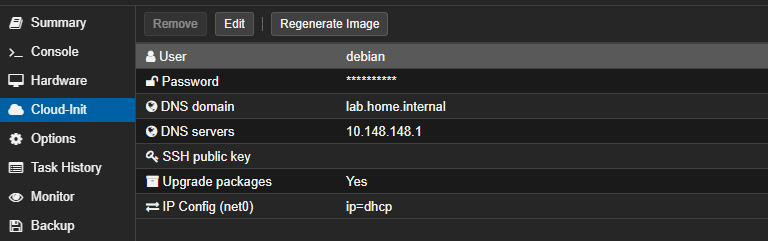
- User:
debian - Password: Optional
- DNS domain and servers: Set according to VLAN DHCP
- SSH public key: Preferred login method
- IP config: Set according to your environment
Add the Custom Cloud-Init
The key objectives of this vendor config will be to ensure a minimal, base configuration for the environment:
- Run
apt updateandapt upgrade - Install a minimal set of required packages
- Ensure the language and encoding are set to
en_US.UTF8 - Ensure our internal PKI Root CA certificate has been stored, with connect timeout of 3 seconds in the event of connection issues
NFS Snippet
nano /mnt/pve/PVE_Code_Snippets/snippets/deb_vendor-data.yamlLocal Snippet
nano /var/lib/vz/snippets/deb_vendor-data.yamlCopy this file to EVERY Proxmox VE node
If you have a Proxmox VE cluster with local storage only -- and no NFS share for your snippets --
deb_vendor-data.yaml must exist under /var/lib/vz/ on EVERY node.#cloud-config
locale: en_US.UTF-8
packages:
- qemu-guest-agent
- locales
- sudo
- curl
- gnupg
- lsb-release
- ca-certificates
- apt-transport-https
runcmd:
- curl -fsSk https://sub-ca.pki.home.internal/roots.pem -o /usr/local/share/ca-certificates/internal-intermediate.crt --connect-timeout 3
- update-ca-certificates
- systemctl enable --now qemu-guest-agentNFS Snippet
qm set 10001 --cicustom 'vendor=PVE_Code_Snippets:snippets/deb_vendor-data.yaml'Local Snippet
qm set 10001 --cicustom 'vendor=local:snippets/deb_vendor-data.yaml'Convert the VM to Template
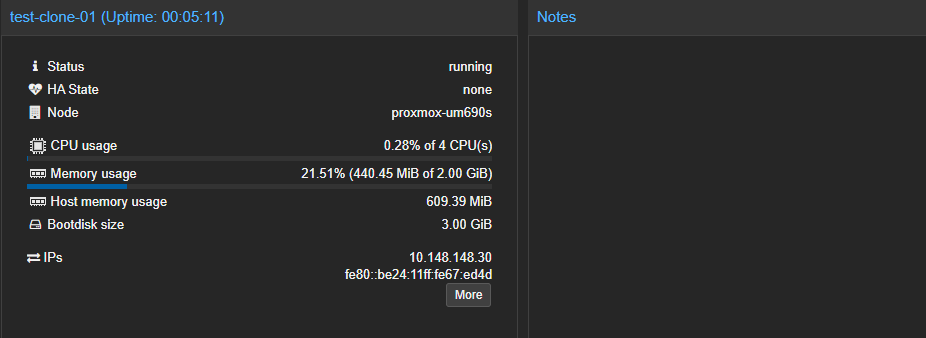
Right-click the VM in your Proxmox VE node and choose Convert to template.
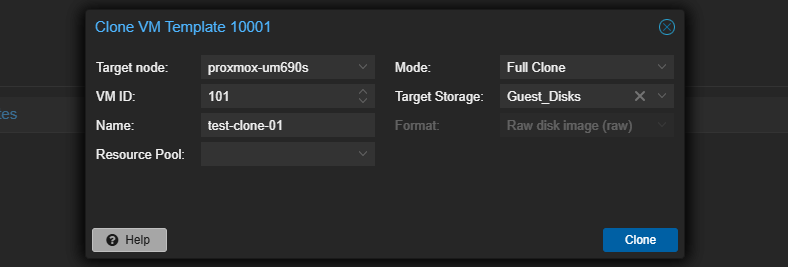

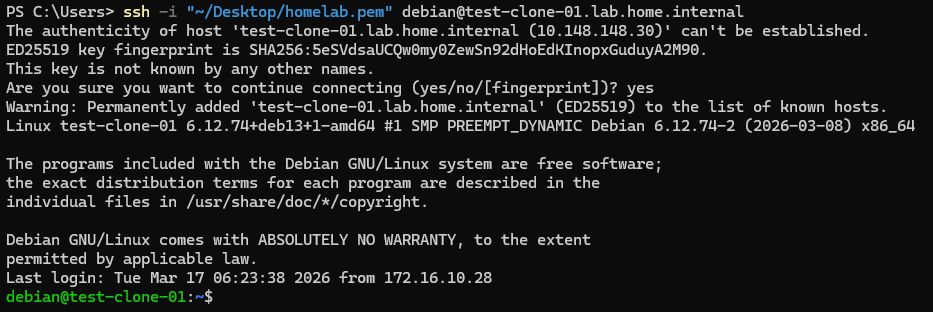
LXC Template
Hook Script Storage
My Environment: NFS Share
I'm going to be using a NFS share for this process, since the NFS share will be cluster-wide.
[Datacenter]---Adds NFS Storage
 |             synology-nas.nas.home.internal:/volume1/PVE_Code_Snippets
 |             /mnt/pve/PVE_Code_Snippets
 |
 |----Node 1----.                                              .--------------------------------------.
 |----Node 2----|                                              | Synology NAS                         |
 |              |----[/mnt/pve/PVE_Code_Snippets/snippets/]----|  Shared Folder                       |
 |----Node 3----|                                              | /volume1/PVE_Code_Snippets/snippets/ |
 '----Node 4----'                                              '--------------------------------------'
Save any hook scripts in "/mnt/PVE_Code_Snippets/snippets/", shared among all nodes
No NFS Share?
If you don't have network storage, then you can modify the local storage pool to accept data type of Snippets.
If using
local, then be advised that when you create a snippet -- such as script.sh -- you will have to copy script.sh to /var/lib/vz/snippets/ on every PVE node.Add Hook Script to Storage
The key objectives of this script will be to ensure a minimal, base configuration for the environment:
- Run
apt updateandapt upgrade - Install a minimal set of required packages
- Ensure the language and encoding are set to
en_US.UTF8 - Ensure our internal PKI Root CA certificate has been stored, with graceful fail for connection issues (e.g. PKI server not yet implemented)
NFS Snippet
nano /mnt/pve/PVE_Code_Snippets/snippets/deb_config.shLocal Snippet
nano /var/lib/vz/snippets/deb_config.shIf you have a Proxmox VE cluster with local storage only -- and no NFS share for your snippets --
deb_config.sh must exist under /var/lib/vz/ on EVERY node.deb_config.sh (Show/Hide)
#! /usr/bin/env bash

set -euo pipefail

CTID="${1}"
PHASE="${2}"

# Check for these packages and install if missing
REQUIRED_PACKAGES=(
    locales
    sudo
    curl
    gnupg
    lsb-release
    ca-certificates
    apt-transport-https
)

# Preferred local and encoding
LOCALE_NAME="en_US.UTF-8"
LOCALE_CHARSET="UTF-8"
LOCALE_ENTRY="${LOCALE_NAME} ${LOCALE_CHARSET}"

# Adjust as needed for your internal PKI
REQUIRED_CA_CN="Home Lab Root CA"
CA_FETCH_URL="https://sub-ca.pki.home.internal/roots.pem"
CA_DEST_PATH="/usr/local/share/ca-certificates/internal-intermediate.crt"
# Search these directories to see if Root CA installed
CA_TRUST_DIRS=(
    /etc/ssl/certs
    /usr/local/share/ca-certificates
    /usr/share/ca-certificates
)

# Sentinel file to track successful run of script
# Since this script is long-running, we don't want to run at every boot
SENTINEL_FILE="/etc/lxc-provisioned"

# Logger functions
log()  { echo "[hook][CT ${CTID}][${PHASE}] $*"; }
info() { log "INFO  $*"; }
warn() { log "WARN  $*"; }
fail() { log "ERROR $*"; exit 1; }

# Wrapper around pct exec
ct_exec() {
    pct exec "${CTID}" -- "$@"
}

# Upgrade packages on LXC
apt_update_upgrade() {
    info "Running apt update && apt upgrade -y ..."
    ct_exec env DEBIAN_FRONTEND=noninteractive apt-get update -qq
    ct_exec env DEBIAN_FRONTEND=noninteractive apt-get upgrade -y -qq
    info "System packages are up to date."
}


# Check for required packages from array above
ensure_packages() {
    info "Checking required packages ..."

    local missing=()

    for pkg in "${REQUIRED_PACKAGES[@]}"; do
        if ct_exec dpkg-query -W -f='${db:Status-Abbrev}' "${pkg}" 2>/dev/null \
                | grep -q "^ii"; then
            info "  [OK]      ${pkg}"
        else
            warn "  [MISSING] ${pkg} -- will install"
            missing+=("${pkg}")
        fi
    done

    if [[ ${#missing[@]} -eq 0 ]]; then
        info "All required packages are already installed."
        return
    fi

    info "Installing missing packages: ${missing[*]} ..."
    ct_exec env DEBIAN_FRONTEND=noninteractive \
        apt-get install -y -qq "${missing[@]}" \
        || fail "apt-get install failed for: ${missing[*]}"

    local still_missing=()
    for pkg in "${missing[@]}"; do
        if ct_exec dpkg-query -W -f='${db:Status-Abbrev}' "${pkg}" 2>/dev/null \
                | grep -q "^ii"; then
            info "  [INSTALLED] ${pkg}"
        else
            still_missing+=("${pkg}")
        fi
    done

    if [[ ${#still_missing[@]} -gt 0 ]]; then
        fail "Package(s) could not be installed: ${still_missing[*]}"
    fi

    info "All required packages are now installed."
}

# Set system locale and encoding
# Adjust as needed using variable above
ensure_locale() {
    info "Checking locale (${LOCALE_ENTRY}) ..."

    # Check if the locale is already generated
    if ct_exec locale -a 2>/dev/null | grep -qi "^${LOCALE_NAME//./\\.}$"; then
        info "Locale ${LOCALE_NAME} is already generated."
    else
        info "Locale ${LOCALE_NAME} not found -- configuring ..."

        # Ensure the entry is present and uncommented in /etc/locale.gen
        local locale_gen="/etc/locale.gen"

        # Remove any existing (commented or uncommented) entry for this locale
        # then append the correct uncommented entry
        ct_exec bash -c "
            sed -i '/^#\?\s*${LOCALE_ENTRY}/d' ${locale_gen}
            echo '${LOCALE_ENTRY}' >> ${locale_gen}
        " || fail "Failed to update ${locale_gen}"

        # Generate the locale
        ct_exec locale-gen \
            || fail "locale-gen failed"

        info "Locale ${LOCALE_NAME} generated."
    fi

    # Check if LANG is already set correctly system-wide
    local current_lang
    current_lang=$(ct_exec bash -c "
        grep -oP '(?<=^LANG=).+' /etc/default/locale 2>/dev/null || true
    ")

    if [[ "${current_lang}" == "${LOCALE_NAME}" ]]; then
        info "System locale already set to ${LOCALE_NAME}."
    else
        info "Setting system locale to ${LOCALE_NAME} ..."
        ct_exec update-locale "LANG=${LOCALE_NAME}" \
            || fail "update-locale failed"
        info "System locale set to ${LOCALE_NAME}."
    fi
}

# Checks for Root CA certificate from Step CA
# Update variable at top of script to adjust for your environment
ensure_ca_certificate() {
    info "Checking for CA certificate with CN '${REQUIRED_CA_CN}' ..."

    # Collapse the entire search into a single pct exec to eliminate per-cert
    # round-trip overhead. Inside the container, xargs -P fans out openssl
    # calls across multiple workers simultaneously.
    #
    # Output format on match: FOUND:<cert_path>:<subject_line>
    # Output on no match:     (empty)
    local scan_result
    scan_result=$(ct_exec bash -s -- "${REQUIRED_CA_CN}" "${CA_TRUST_DIRS[@]}" <<'SCAN'
        TARGET_CN="${1}"; shift
        SEARCH_DIRS=("$@")

        # Exported so the xargs subshell can call it
        _check_cert() {
            local cert="${1}"
            local target_cn="${2}"
            local subject
            subject=$(openssl x509 -noout -subject -in "${cert}" 2>/dev/null) || return
            if echo "${subject}" | grep -qi "CN\s*=\s*${target_cn}"; then
                printf 'FOUND:%s:%s\n' "${cert}" "${subject}"
            fi
        }
        export -f _check_cert

        find "${SEARCH_DIRS[@]}" \
            \( -name "*.crt" -o -name "*.pem" \) \
            -type f 2>/dev/null \
        | xargs -P "$(nproc)" -I{} \
            bash -c '_check_cert "$@"' _ {} "${TARGET_CN}" \
        | head -1
SCAN
    ) || true

    if [[ "${scan_result}" == FOUND:* ]]; then
        # Strip the leading "FOUND:" tag and split on first colon after the path
        local cert subject
        cert="${scan_result#FOUND:}"
        subject="${cert#*:}"
        cert="${cert%%:*}"
        info "  [FOUND] ${cert}"
        info "          Subject: ${subject}"
        info "CA certificate '${REQUIRED_CA_CN}' is already trusted."
        return
    fi

    warn "CA certificate '${REQUIRED_CA_CN}' not found -- fetching from ${CA_FETCH_URL} ..."

    ct_exec mkdir -p "$(dirname "${CA_DEST_PATH}")"

    # -k used because the system may not yet trust the internal CA
    curl_exit_code=0
    ct_exec curl -fsSk "${CA_FETCH_URL}" -o "${CA_DEST_PATH}" --connect-timeout 3 \
      || curl_exit_code=$?

    case $curl_exit_code in
        0)
             info "Certificate saved to ${CA_DEST_PATH} -- running update-ca-certificates ..."
             ct_exec update-ca-certificates \
                || fail "update-ca-certificates failed"

             info "CA certificate '${REQUIRED_CA_CN}' is now trusted."
             ;;

        6|7|28)
            warn "  Unable to retrieve Root CA certificate due to network error."
            warn "  Error code: ${curl_exit_code}"
            warn "  List of exit codes: https://everything.curl.dev/cmdline/exitcode.html"
            ;;

        *) fail "Failed to download CA certificate from ${CA_FETCH_URL}" ;;
    esac
}

# Use the post-start phase to configure the LXC
# Uses 'pct exec' to run commands inside the container after boot
case "${PHASE}" in
    post-start)
        # Invoke helper functions from above
        if ct_exec test -f "${SENTINEL_FILE}" 2>/dev/null; then
            local_ts=$(ct_exec cat "${SENTINEL_FILE}" 2>/dev/null || true)
            info "Already provisioned on ${local_ts} -- skipping."
            exit 0
        fi

        info "First boot detected -- running provisioning ..."
        apt_update_upgrade
        ensure_packages
        ensure_locale
        ensure_ca_certificate

        # Write the sentinel file with an ISO-8601 timestamp so it is easy to
        # audit when a container was first provisioned.
        local_ts=$(date -u +"%Y-%m-%dT%H:%M:%SZ")
        ct_exec bash -c "echo '${local_ts}' > '${SENTINEL_FILE}'" \
            || warn "Could not write sentinel file -- provisioning will re-run on next boot."

        info "Provisioning complete. Sentinel written at ${SENTINEL_FILE} (${local_ts})."
        ;;
    pre-start | pre-stop | post-stop | mount)
        info "Phase '${PHASE}' -- nothing to do; skipping."
        ;;
    *)
        warn "Unknown phase '${PHASE}' -- skipping."
        ;;
esac

exit 0
pct exec $CT_ID -- rm /etc/lxc-provisioned.NFS Snippet
chmod u+x /mnt/pve/PVE_Code_Snippets/snippets/deb_config.shLocal Snippet
chmod u+x /var/lib/vz/snippets/deb_config.shStage the Template
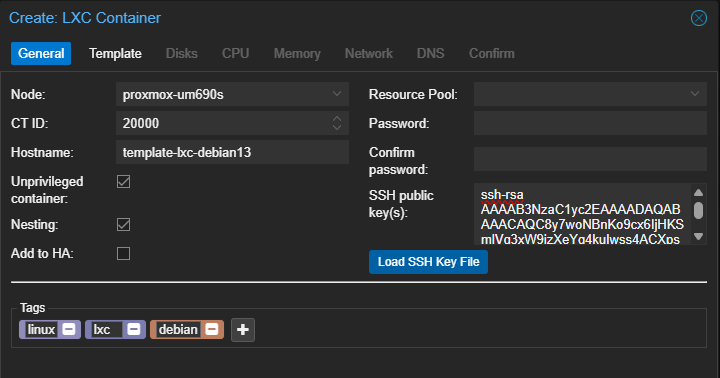
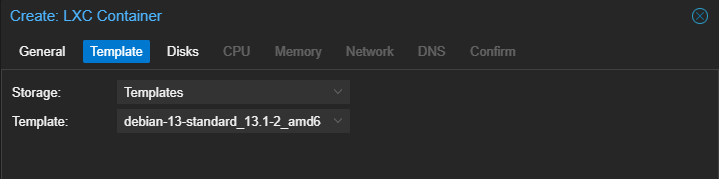
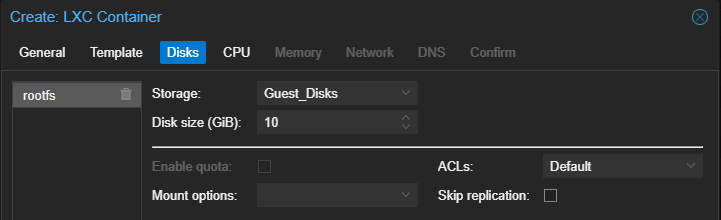
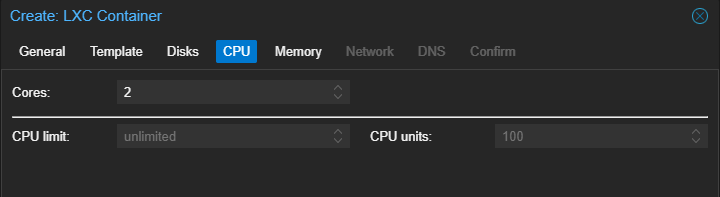
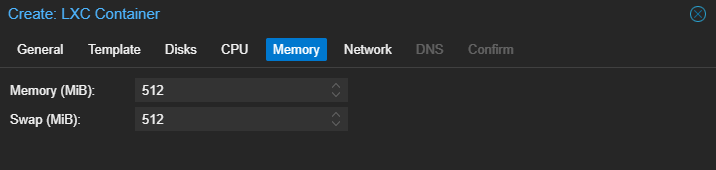
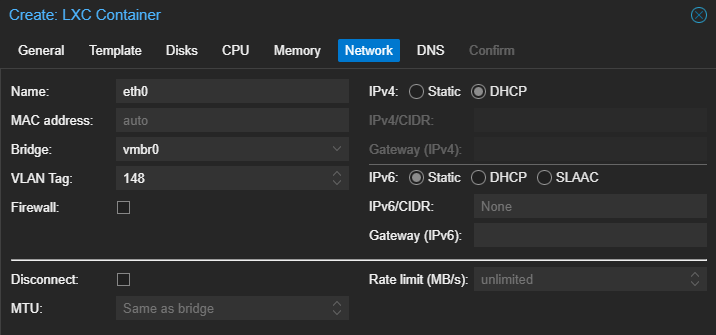
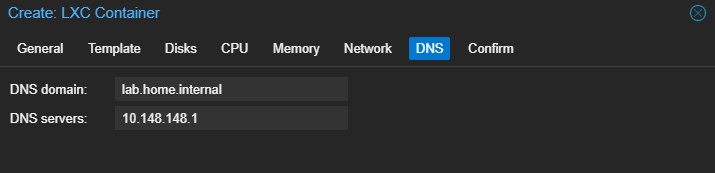
NFS Snippet
pct set 20000 --hookscript PVE_Code_Snippets:snippets/deb_config.shAdd the hook script to the LXC
Local Snippet
pct set 20000 --hookscript local:snippets/deb_config.shAdd the hook script to the LXC
Create and Test Template
- Right-click on the LXC under your Proxmox VE node
- Click Convert to template
- Observe that the icon changes, confirming it is now template
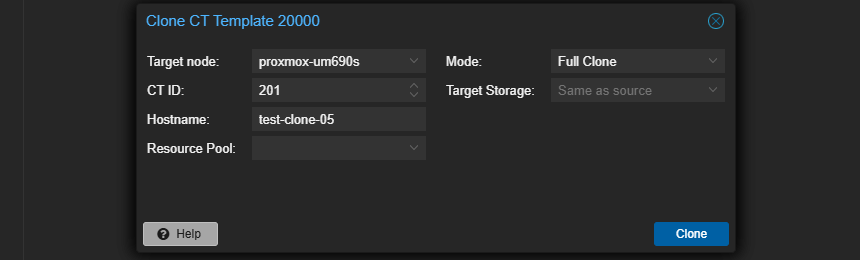
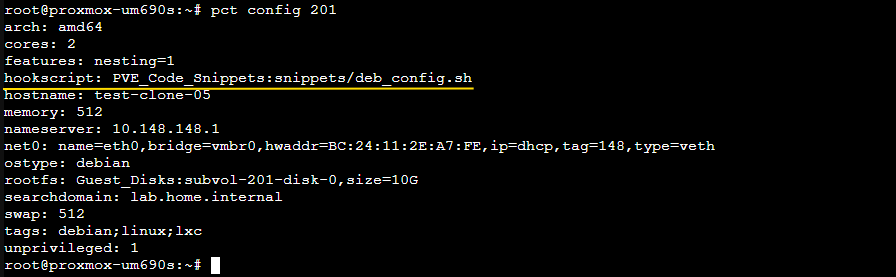
deb_config.sh as often as needed to ensure your hosts receive your desired end-state configuration.pct start 201Start the LXC in the GUI / shell and watch the output
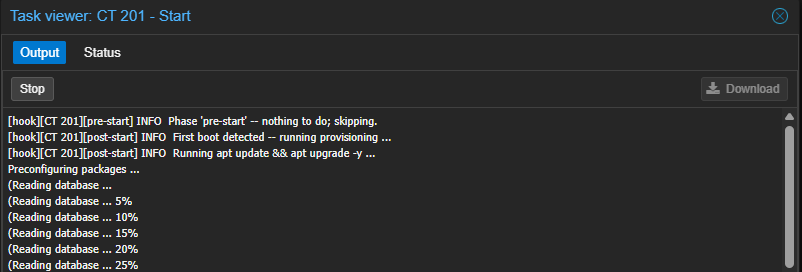
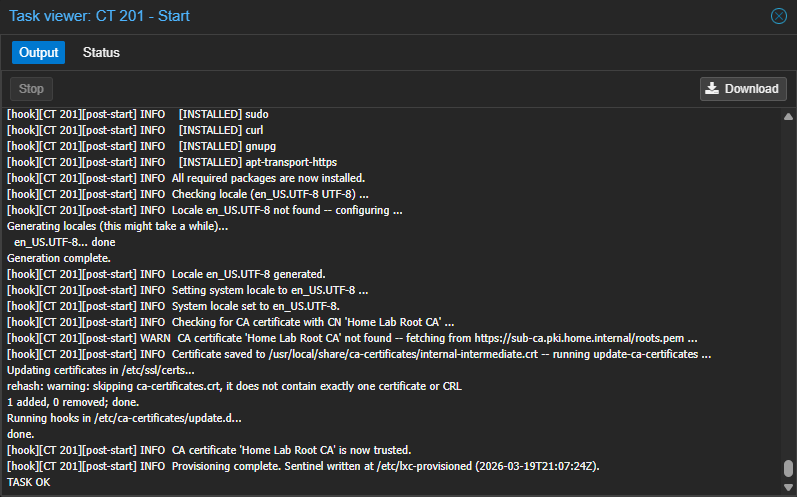
pct enter 201Open a shell on the container to check for end-state config
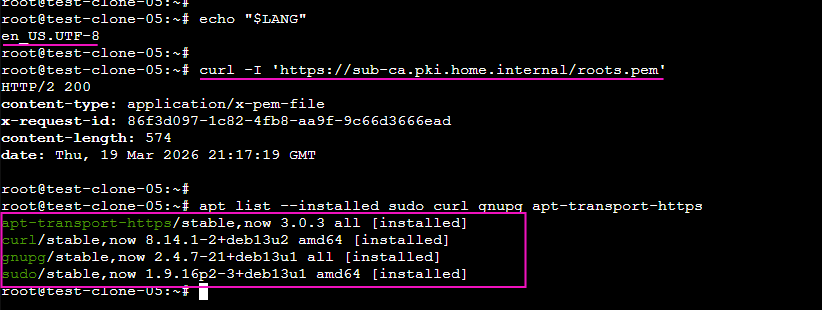
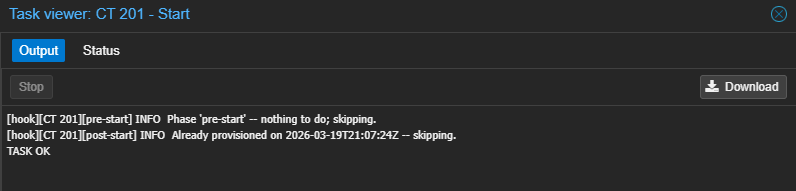
/etc/lxc-provisioned file.Next Step
 0xBEN
0xBEN